Posts Tagged ‘Computers’
 When simple turns to exhausting
 July 27th, 2013 |
  Author:
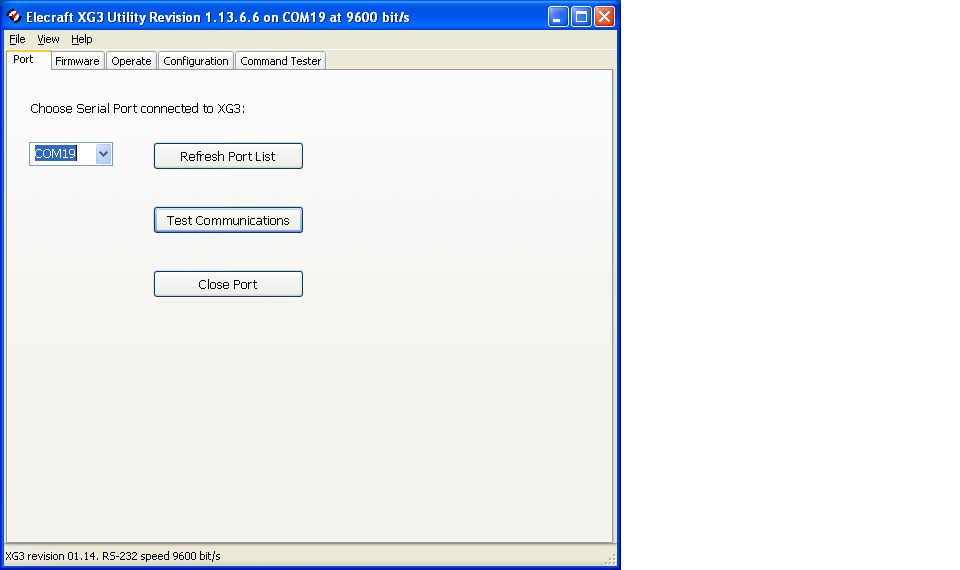 |
| So far so good but Murphy shows up! |
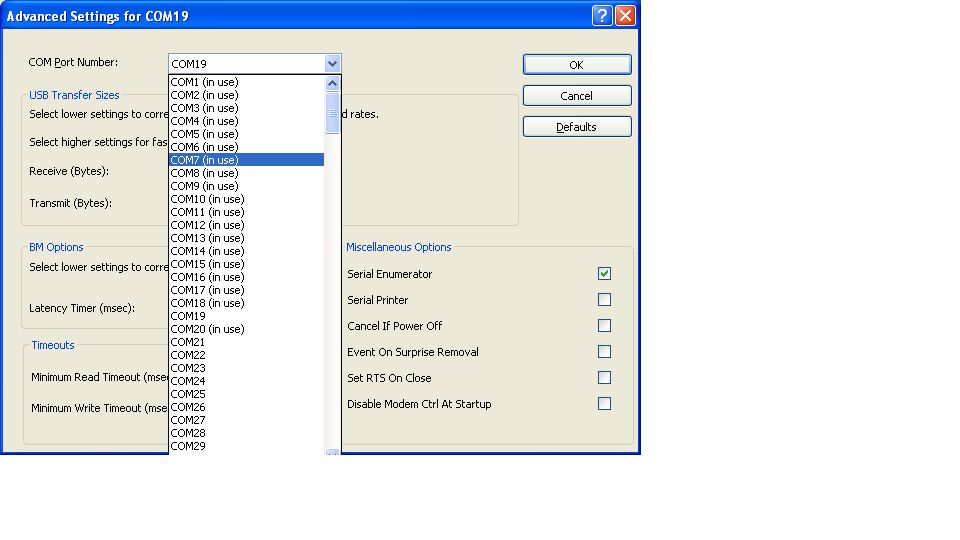 |
| Not able to use available com ports |
Visitors Book gone!
They say that to err is human, to really foul things up you need a computer. And I have been fouling a lot of things up recently. The latest thing that I fouled up is the G4ILO’s Shack visitors book.
On the site I also have a contact log. This runs from a backup of my KComm (MixW format) log file. KComm automatically backs up my log to the web server, in order to create an off-site backup of my log. As a bonus, I have a PHP script that reads this backup file and displays the contents in a human-readable format.
What I stupidly did, when re-configuring KComm after my computer troubles a couple of weeks ago, was put the guest book file name log.dat for the backup file name, instead of what it should have been: g4ilo.log. So when KComm uploaded my contact log backup it overwrote the guest book data file instead. I only discovered this after wondering why the contact log on the site wasn’t updating.
I looked back in the site backups maintained by the hosting service but they only go back a couple of weeks. I must have made the error before then. All I have managed to salvage is the most recent 3 entries. I’m rather upset about that, because the guest book contained comments made over many years from the early days of the site, which I had painstakingly preserved over various versions of guest book script.
At least I didn’t lose my contact log going back to 2001. That would have been a disaster!
Ham radio and software……….
1. It's no good as it's not supported.
2. Since it's free it must be very simple and buggy
3. I am sure it's not updated.
As for the software for a price I have heard and read......
1.It's way over priced.
2.Why pay when free software is out there?
3. Someone is just trying to make a buck.
I have both free and software I had to paid for and am very happy with both products. My software is not the be all and end all but it's what works for me. There is some fantastic software out there that can make you grow in your ham radio journey. I hope to just excite you to look to see what is out there.
Here is what I use and as most ham I know they love free stuff and here is the free software I use.
1. DXlabs for my every day radio adventures I am sold on DX Labs! This software has rig control, logging, world map view of DX, QRZ (and many more) look up feature and much more. With this software and with the click of a mouse able to use many features of my K3. At a glance I am able see on a world map DX spots, I am told if I worked this country before....on what band.....and what mode. There is a huge amount this free software can do. As for updates it seems that it's almost daily this software is improving. Oh and as a side note updates are a breeze to instal and no need to jump through hoops to get the latest and greatest upgrade. If you are not sure about a feature or if the software does not seem to be doing what it should, support is fast and readily available on the internet.
2. If you are into contesting (like me) then once again the free stuff comes to the rescue. N1MM seems to be one of the staples for contesting. Again it has rig control features, CW and SSB features, VFO A and B control, spotting networks this is just to name a few things this amazing software can do.
There are regular updates and bugs are very few and far between. Again if you have troubles the support is there and it's fast.
Ok lets talk crazy now.....paying for ham software
1. When contesting I said I use N1MM but I also use a rig control program by N4PY and it's not free but WOW does it enhance my contesting. (now this software is not only for contesting I just chose to use it this way) This program allows me to adjust most of my Elecraft K3 controls with the mouse or keyboard. I can used my K1EL keyer, this program allowed me to use my Flexcontrol knob.
2. Another program I dished out some coin for and never looked back is MRP40 cw decoding program. Now I know what your thinking "there are lots of free CW decoding programs out there" This is true I have tried them and they are good BUT MRP40 is GREAT. In contesting when the speeds get to what I call "crazy speeds" this program has no trouble at all decoding them.
Lets say you want to have multiple programs work together without a hitch.........
3. Then LP Bridge or VSP manager come to the rescue. These are free programs and will allow your computer to set up virtual ports thus having multiple programs working at the same time and talking to each other. These programs work like a dream and as far as my needs go no bugs at all.
4. If you are into the digi modes like I was and in the near future hope to be there is a free program called Quickmix. This program will remember all the audio settings you use for each digi mode, so for example when operating PSK and you want to now switch to WSJT-X which has new audio settings for you PC. You no longer have to remember them Quickmix can in the blink of an eye adjust the sound card to the new settings for the selected digi mode!!
Chromium plated

I never did find out what was causing Google Chrome to crash so much on my computer. However, after several months of using Chrome I found Firefox rather slow and clunky. So I had a look round to see if there were any other browsers. It turned out that there were more alternatives than I ever imagined.
The first alternative browser I found was one called Avant. This is a powerful browser with a lot of configurability, developed by a Chinese programmer. It boasts the ability to render web pages using your choice of the Internet Explorer, Firefox or Chrome rendering engines, which is probably handy if you’re a website developer. I set it to use Chrome and it displayed the pages that had give me trouble with nary a murmur. But I found the user interface rather heavy after the minimalist approach of Google Chrome. So I kept it on my hard drive but carried on looking.
The next candidate I stumbled across was SRWare Iron. It almost counts as two browsers in one, as it installed two shortcuts on my desktop, one named SRWare Iron and one named Chromium, both pointing to the same executable. This turns out to be a browser built from the same open source code as Google’s Chrome by a German company. Germans seem to be a bit sensitive about privacy, so the main difference with this SRWare browser is that it does not send information about your browsing habits back to Google. What, you didn’t know Google Chrome did that? Neither did I until I discovered this program, though I thought I opted out of this during Chrome’s installation.
Apparently you can opt out of all the Google tracking if you choose the appropriate settings in Chrome, but most users won’t do this. So Iron / Chromium could be said to be a better version of Chrome than Google’s, certainly from the privacy point of view. Chrome extensions like AdBlock Plus work as with the real thing. Chromium even supports the ability to log in to your Google account to save and restore your bookmarks and other settings, which was very handy. Try it, you’ll never notice the difference.
I’m happy with Chromium / Iron as my default web browser now. So far, it hasn’t crashed on me. But I also discovered another Chrome clone. It’s called Comodo Dragon and it’s made by the Comodo security company. Dragon is also built from the Chrome open source code and omits the Google tracking code, but it has some extra security features added by Comodo. So it looks like an even better option if you are really privacy-conscious.
Life without Chrome
I’ve not been doing much radio the last couple of weeks. I haven’t been able to raise much enthusiasm. No doubt for those of you with jobs, being able to play radio all day would be a blissful situation. But it’s not much fun being in this small, sweaty shack in this hot, sunny weather. I’d really like to be able to get out and about in the beautiful Lakeland countryside, further than I can reach on my own two feet. And my hopes of doing that took a bit of a blow yesterday.
I did continue trying to get Google Chrome to run on my shack computer. For a short time I thought I had succeeded. I spotted that Microsoft .Net 3.5 was installed twice. I uninstalled both copies and Chrome appeared to be stable after that. Then I spotted Windows Update installing Net 3.5 again, and before I could stop it Chrome immediately crashed. I tried removing Net 3.5 again after disabling automatic updates, but this time it didn’t help. I could crash Chrome every single time I opened this post from PD0AC’s blog. Usually Chrome would just vanish from the screen, but other times I got blue-screen or black-screen error messages and once Windows XP spontaneously rebooted. So I have given up.
Time and trouble
I’m still reconstructing my PC system after the disk got trashed. I didn’t lose any important files nor my ham radio stuff. But many of the configuration settings that Microsoft helpfully squirrels away in hidden locations like the registry or somewhere off Documents and Settings were not backed up. Mea culpa. Unfortunately I never came across a full backup system that I liked (I purchased Acronis but it was full of bugs that they want you to pay for an upgrade to sort out.
I keep on discovering things that need to be restored. I was getting some gobbledygook decodes from WSJT-X and then remembered that I needed to install Meinberg NTP. But the installation failed: the service wouldn’t start, reporting the error that “NTP failed to respond in a timely manner.” There is a note on the Meinberg website that the service might fail unless you install some Visual Studio restributable package, so I installed it but still no luck. I’ve run Meinberg NTP for years and have recommended it to everyone and it’s so annoying that I can’t install it.
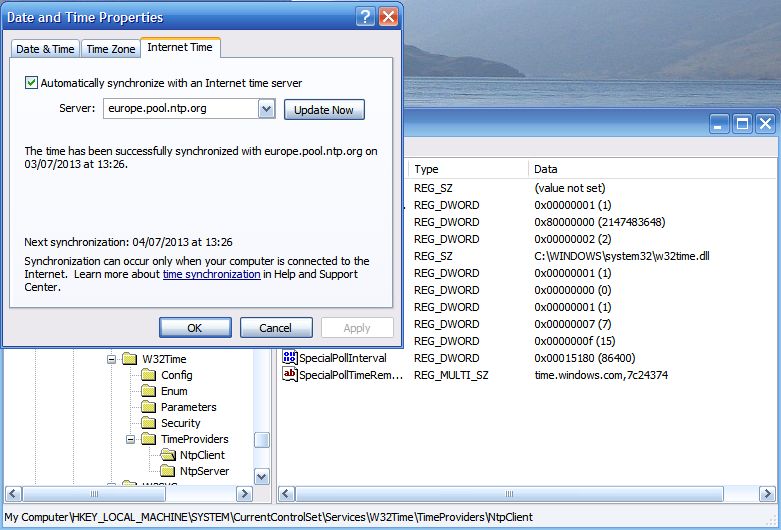 |
| Hacking the registry to up the frequency of Windows Time updates. |
Nothing for it but to rely on good old Windows Time Service. I found the registry hack that lets you increase the frequency of updates. I also changed the time server to europe.pool.ntp.org which responded much more quickly that time.windows.com. Hopefully that will do the trick. I hunted for an old version of Meinberg from before 2009 which I must have installed when I first set the PC up, but no luck.
Disaster!
I have just trashed my shack PC. Not intentionally, you understand. I was trying to resolve a problem and the result was that the system has restored itself to the state it was in when it was new back in 2006 or whenever it was.
I have been using a backup program called Magicure. I’ve probably mentioned it in this blog before. It’s kind of a System Restore on steroids. It has saved my bacon countless times and I have come to depend upon it. But it started giving an error message when it tried to do a backup. No new backups were being made. So I had to do something about it.
I emailed Magicure support for help but didn’t receive a reply. I saw that there was a newer version of the software so I decided to download and install that in the hope that this would get it working again.. But the installer complained that there was another version present and asked me to remove it first. So I started to uninstall Magicure. That was a mistake.
The uninstaller said that it was going to roll back to before Magicure was first installed. If I was a bit sharper-witted I might have smelt a rat at this point. But I thought “no, surely it isn’t going to do that.” I just want to remove Magicure. So I clicked OK and within a few seconds I was looking at a Windows XP login screen with only Administrator as the available login. This looked ominous. No user “Julian”. It looked as if it had rolled back the entire system to the state it was in when new, when I first installed Magicure.
I have no idea what the Administrator password was. But if I knew it I would be no better off because the computer won’t respond to the mouse or keyboard. So I can’t get in to the system to assess the extent of the damage. I don’t seem to have a Windows XP disc to reinstall from scratch, either.
What an utter disaster. I have no idea what to do at this point.













