Author Archive
Push power on and………NOTHING!!!
Last Sunday Julie and I were on our way out the door and I wanted to check some directions before we left. I went off to the computer to look something up and as I turned the PC on a POPPING sound was heard…..then nothing! My six year old PC failed to start, absolutely nothing was happening. There was no time to look into it now we were heading out the door. Early that evening when at home I tried the power button on the PC again (maybe somehow the computer god's looked after things for me) it was the same….nothing. The tower has to come out from it's cubby in the roll top desk and opened for further investigation. I first made up a diagram of where all the USB cables, monitor cables, audio
cables and serial cables went so all could be placed back in the same place. I suspected the power supply was the problem and hoping I could find a reset button on the unit once the side panels were taken off the tower. I was not so lucky there was no reset button but there sure was a noticeable burning smell and it was coming from the power supply. It was easy to remove the power supply from the PC but not without labelling what cables went where on the mother board. Doing similar things in the past I have said to my self "no need to write it down it's simple and straight forward" boy has that lie got me into some troubles in the past! With the power supply out and not yet opened I did notice the
power supply fan was missing some blades. Once the supply was opened up I quickly found the faulted
transistor. With the broken fan and faulted transistor it was time for a new power supply.
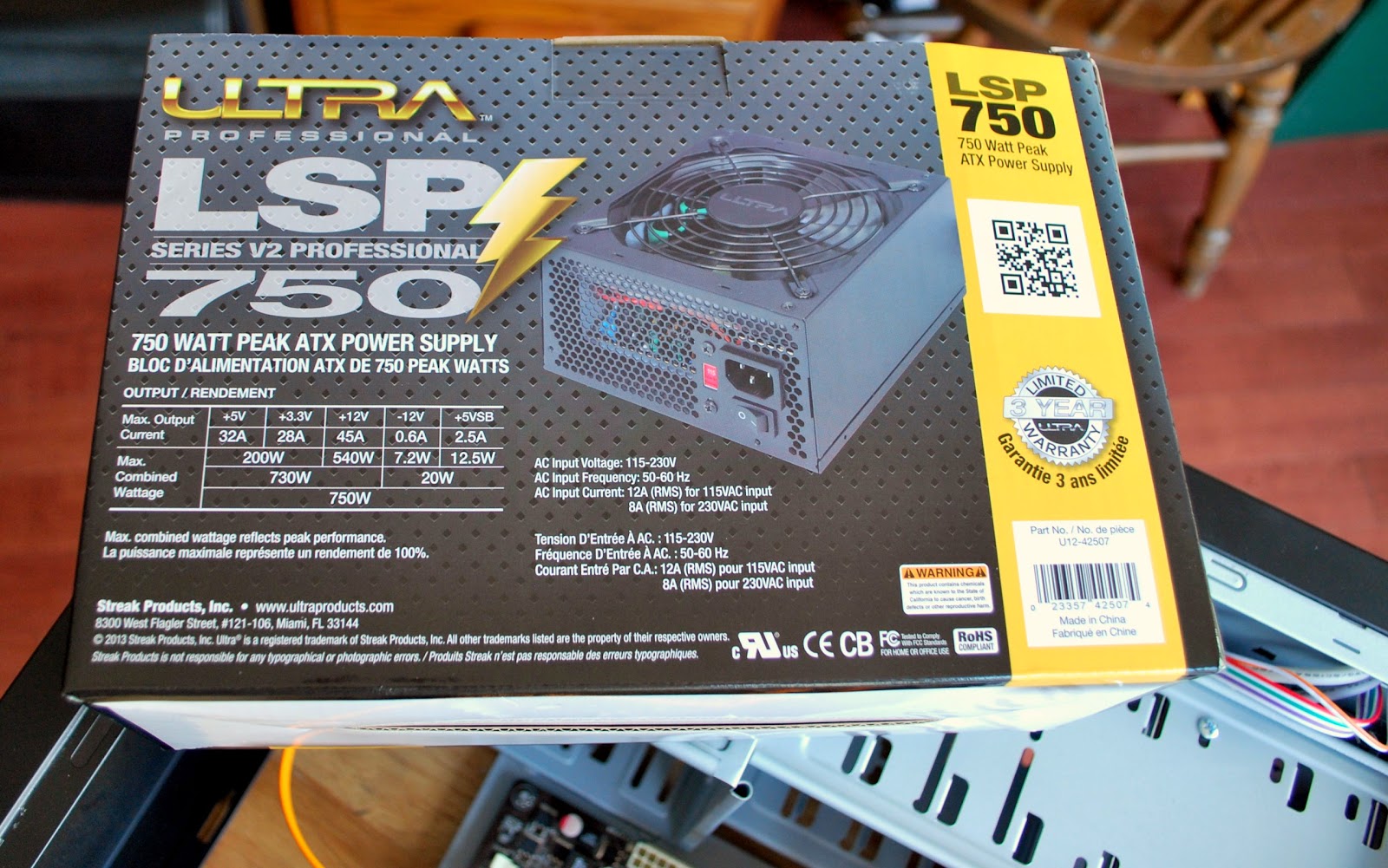
The old supply was a 500 watts supply the new one is 750 and can be used with a new PC when I decide to build one. The new supply fit perfectly into the tower and there sure were lots more cables on this supply! I ended up using only 5 of the some 20 cables so the rest were tucked away in an open bay for future use. With all the cables plugged into the mother board, hard drives and CD drive and the spare cables were as I said tucked away. Before putting the side panels back on it was time to plug in the new supply and power up the PC. I then pushed the power button and NOTHING!!!! Ok I said lets try that again…..NOTHING!!! First thing that came to mind was, did the faulted power supply take something else with it?? It was time to take a breath and think of my next step, time to recheck all the mother board connections. After all I did take time to clean the dust off the board while the side panels were off
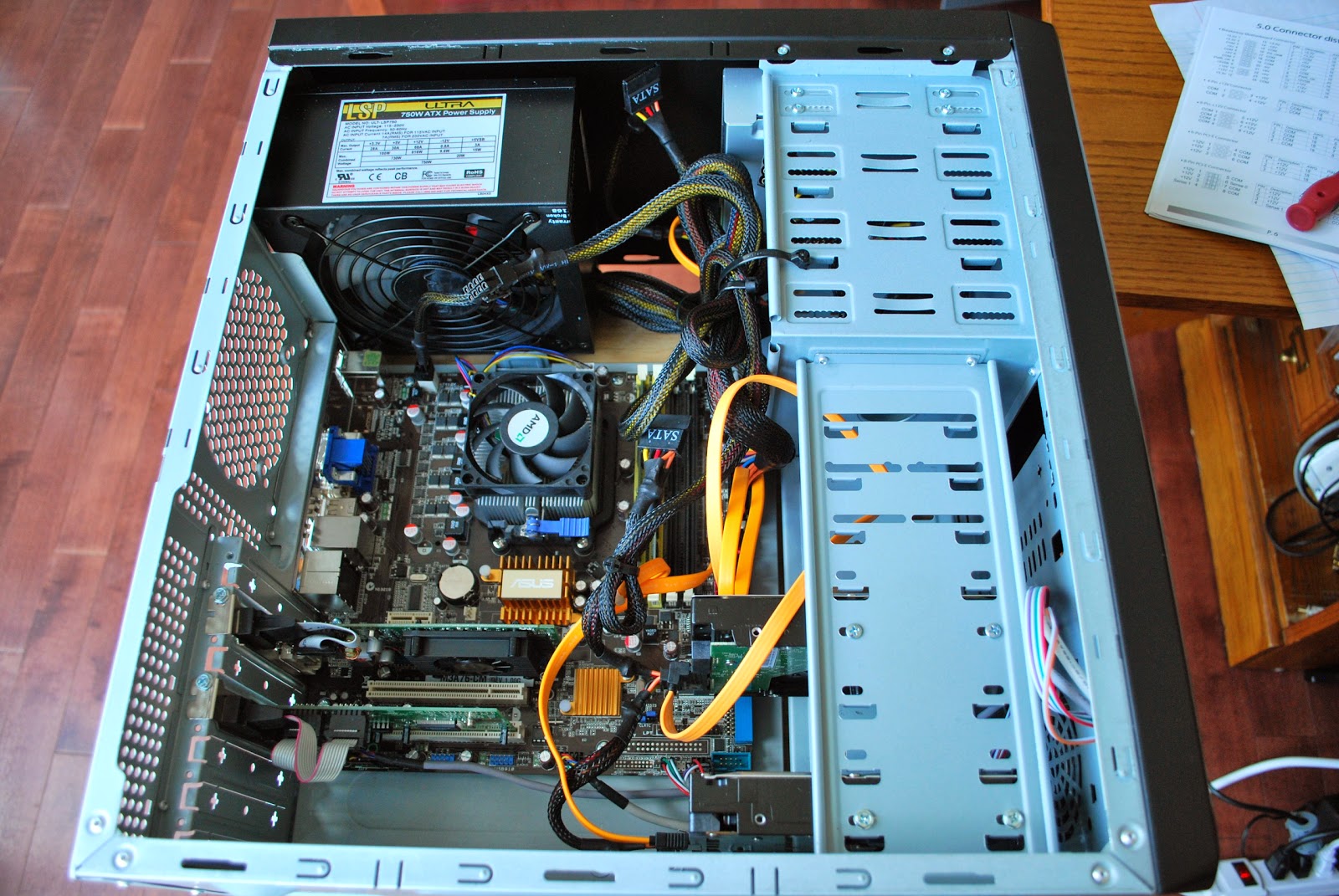
maybe I loosened or disconnected something in my cleaning frenzy. All seemed good on the motherboard it was time to recheck the power supply again. It could be possible that even thought the supply is new it is defective? I checked that there was AC making it to the supply, that the proper connecters were used on the mother board and that I did not forget any connections. It was then I noticed on one connector did not seem to be seating right. This was a connector that had an "option" of adding 4 extra connections. It was a 20 pin connector but some mother boards were 24 pins as mine was a 24 pin. The connector had the 24 pin setup ready to go as it was snapped into place so I just plugged it into the board….very straight forward I thought……NOT…….there was also clear tape holding the extra 4 pin connector in place and this tape stopped the connector from seating firmly on the main board and thus the PC not starting! With the tape removed and 24 pin connector firmly seated the PC came to life! I am happy to say that all has been working well and the PC seems to run cooler and not as noisy ass the old power supply. I did notice some software hiccups once I was up and running.
Some of the USB ports changed their ports on me. My K3 now wants to be com 3 and not com 4 anymore. This had me change around some radio software. Also when the PC booted a bios page came up (never a good sign) asking me some questions about the type of start up I wanted??? This only happened once and all is good now but really not sure what that was all about I only replaced a power supply?? Oh and finally Oliver was in on the action too, he was fine with no PC and a new cubby.
| Faulted part |
power supply fan was missing some blades. Once the supply was opened up I quickly found the faulted
| Cables everywhere |
The old supply was a 500 watts supply the new one is 750 and can be used with a new PC when I decide to build one. The new supply fit perfectly into the tower and there sure were lots more cables on this supply! I ended up using only 5 of the some 20 cables so the rest were tucked away in an open bay for future use. With all the cables plugged into the mother board, hard drives and CD drive and the spare cables were as I said tucked away. Before putting the side panels back on it was time to plug in the new supply and power up the PC. I then pushed the power button and NOTHING!!!! Ok I said lets try that again…..NOTHING!!! First thing that came to mind was, did the faulted power supply take something else with it?? It was time to take a breath and think of my next step, time to recheck all the mother board connections. After all I did take time to clean the dust off the board while the side panels were off
| Ready to power up |
| The problem found |
| If you look hard Oliver can be found |
There is a good idea out there…….
| Trying to find my way around |
| That's better |
A good day on 17m
We had another cold snap hit us here with a wind chill in around -20C it was time for some indoor radio activities. For some reason I settled in on 17m not a band that I frequent all that often, not sure why but never seem to stay long on this band. When looking at the P3 band scope the band did not look very active but as I slowly scanned across the band I came across some stations calling CQ. The first station was ZB2FK on Gibralter. There was not much of a pileup at the time when I made contact and I did receive a 559 from him and with 5 watts from an MFJ 1788 loop antenna I was very pleased with that contact. I then came across IW1DFU calling CQ again on 17m and I gave him a call he did come back to me but I had to repeat my call but again he gave me a pleasing 559 report. I then came across KH2L in Guam and he was in and out with the noise floor but I was very happy the loop was even picking him up! It was time to put the filtering of the K3 to use. I dropped the filter to 250 hz and added the Audio Peak filtering feature and that
was all it took to bring him off the noise floor and into plan old CW. There really was no pileup to speak of but some where in line before me and I wanted to wait my turn. The propagation was such that his signal was up around S5 and then just at the noise floor. This is the exciting type of DX I like to try to work, it's a challenge and it could be hit or miss. It is very unusual for me to even hear signals from this part of the world but today at times he is S5. When given the opportunity I dropped my call and hoped for the best. Have you ever had this happen.......I for sure thought he was coming back to me and it happen to be the one time he was in the noise floor but maybe I was not at his end but at a possible S5. So I came back to him..........but it was not to be it was if the static was playing head games with me and coding VE3WDMmmmmm. To make a long
story short one of his contacts had spotted him on a cluster and then all hell broke loose!! My time was up as a HUGE pile started. I'm not saying QRP stations have not busted pileups but time was moving on and dinner was soon going to be on the table. KH2L maybe next time, I am not at all disappointed as these types of events help sharpen your skills and really allows you to become familiar with your radio.
| Add caption |
story short one of his contacts had spotted him on a cluster and then all hell broke loose!! My time was up as a HUGE pile started. I'm not saying QRP stations have not busted pileups but time was moving on and dinner was soon going to be on the table. KH2L maybe next time, I am not at all disappointed as these types of events help sharpen your skills and really allows you to become familiar with your radio.
Ham radio “ZERO” doing everything but radio “TEN”

Good afternoon fellow bloggers between work, getting over a nasty flue bug and running around doing none ham stuff it sure has been a long time since my last post. I have been able to get on the internet and check out the blog posting of fellow bloggers.......BUT as for on air time is has just gotten away from me. I have had some opportunities to get on the rig and for some reason all hell with my PC would break loose. I like to run a PC to both operate my K3 and to log contacts. Since we have moved and I have setup the PC at our new location hoping all would be well. It seems all the USB ports were not matching what the software was setup even though all was setup the same……PLUS my VSP manager program which provides me with virtual com ports it just for some reason went A.W.L from my PC! There has been more screw ups but the most recent and I hope the last was a request for a video card up date. I said yes and as it was loading it told me that most if not all of the updates would not apply to my PC. Well that would be a waste of hard drive space I chose to not install the up date. I was then to restart the PC....sounds simple....WELL....the PC started in safe mode and to make a long story short I had to reload the the drivers for the video card, setup the two monitor option (which reminded me of how much a pain in the ass it was) finally setup the resolution as well.
So things are up and running and on Friday I was able to make a fast contact with LY10NATO. This as you guessed it is a special activity call pertaining to NATO. The contact was made with 5 watts and my MFJ 1788 antenna. The weather here is still a winter wonderland with 15cm of snow on Wednesday, then it was temps of plus 9C on Friday and now this evening a cold weather alert has been issued! Anytime this winter wants to exit…… all the better.
Final repairs on MFJ loop
| Time to repair the control box. |
| Ready to remove switch |
| A great tool to have |
Doing the MFJ loop happy dance!!
For some time now I have been trouble shooting my MFJ 1788 loop off and on. I have had a problem with getting 20m to tune. The best I could do was an SWR in and around 12 to 1 and really that is not good at all. Even with that SWR the K3 tuner was able to drop it too a flat match but odd things were still happening....for example
1. Tuning the loop for max noise (as low SWR was not happening) did happen but as soon as the rig was tuned in any way the noise dropped to nil.
2. Once max noise was achieved and I transmitted the max noise was gone again.
3. There was no spots on the Reverse Beacon Network while giving the tuned match a go.
4. When transmitting power levels were all over the place from 1 watt to 5 watts.
I had posted my 20m tuning problem on 2 loop user groups and had some great advice but nothing seemed to even come close to solving the problem. I then emailed MFJ who very promptly emailed me back and advised me to change the shape of a 12 gauge copper loop that was located inside the loop. Easier said than done this involved removing half the plastic cover on the loop and changing the shape of this loop then
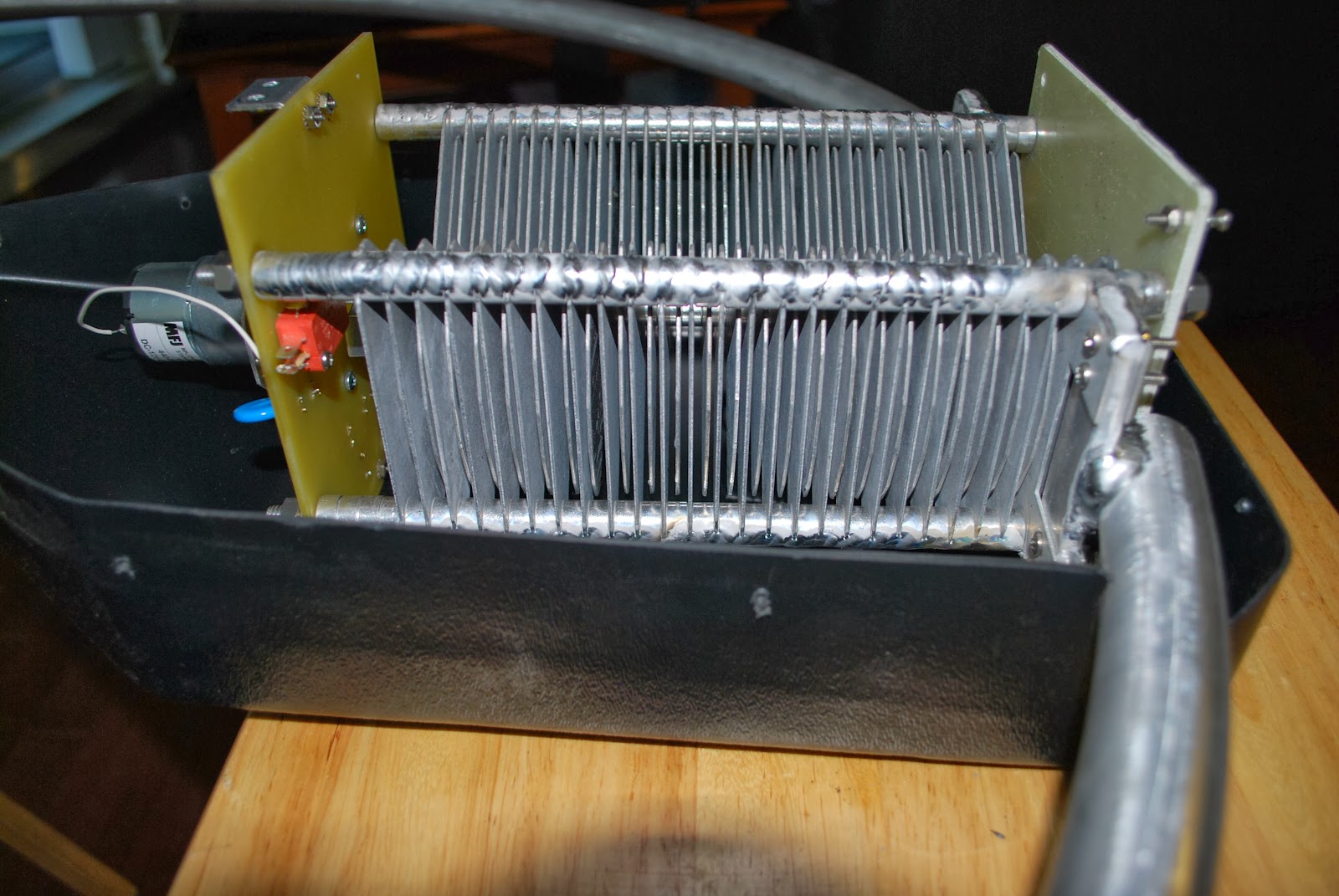
checking the SWR. The hard part was trying to figure out where the sweet spot for 20m was on the loop was. The loop would read an SWR of 12 to 1 no matter what adjustment I gave the loop. I ended up tuning the loop for the highest noise level I could hear. I figured this was as close as I could get to the sweet spot for 20m. Adjusting this small loop did not really change anything and I was getting frustrated! The best thing I find when this happens is to put the project aside and do some thinking. I did just that over the past few weeks I enjoyed the bands the loop would tune and thought about my next move. The loop consists of a rotating capacitor that tunes the loop via a motor. I had been reading on the loop reflector sites and a reoccurring conversation was how quality control at MFJ was very low. For some reason I wanted to check the spacing of the capacitor plates on the loop antenna . It turned out the plates had a warp to them and at the low end spacing was good but in and around
20m's some of the plates were very close and maybe touching each other. After some time of tweaking the plate spacing I was able to have equal spacing for the full rotation of the capacitor. The SWR on 20m is now down to 1.4 to 1 and that was the problem as I put the loop back together I kept an eye on the SWR to see if it changed at all. The piece of equipment that really helped me out with this process was the MFJ 259B analyzer. This unit made tracking my SWR very easy, bottom line is the antenna is now working great and now it's time to get on the air and see how 20m is preforming from the condo.
1. Tuning the loop for max noise (as low SWR was not happening) did happen but as soon as the rig was tuned in any way the noise dropped to nil.
2. Once max noise was achieved and I transmitted the max noise was gone again.
3. There was no spots on the Reverse Beacon Network while giving the tuned match a go.
4. When transmitting power levels were all over the place from 1 watt to 5 watts.
I had posted my 20m tuning problem on 2 loop user groups and had some great advice but nothing seemed to even come close to solving the problem. I then emailed MFJ who very promptly emailed me back and advised me to change the shape of a 12 gauge copper loop that was located inside the loop. Easier said than done this involved removing half the plastic cover on the loop and changing the shape of this loop then
| Adjusting the loop |
| Some plates to close |
Day 3 of ARRL CW contest time to drop the power!
| Pumping out 1/2 a watt |
| Hard at work |
1 contact made at 3 watts
4 contacts were made at 2 watts
7 contacts were made at 1 watt
6 contacts were made at .5 of a watt
1 contact made at .1 of a watt
1 contact made at 5 watts ( this being the only contact not netting me 1000 miles per watt)
Some of the miles per watt numbers
II9P at .5 of a watts netted me 18,470 miles per watt
K5RT at .1 of a watt netted me 11,808 miles per watt
CN2AA at .5 of a watt netted me 7682 miles per watt
F8CIL at .5 of a watt netted me 7662 miles per watt
F5NBX at .5 of a watt netted me 7608 miles per watt
CS2C at .5 of a watt and netted me 7216 miles per watt
This contest I was just a point giver and not in the contest to submit a score. I wanted to test out the MFJ 1788 antenna to see how my location and antenna performed. Some things that still have to be done, I have to get the contesting software and radio control software up and running. Have the SWR problem on 10m and 20m figured out with the MFJ 1788 loop, for some reason the best SWR I can get is around 9! On a positive side this contest proved to me that the antenna will get out even with QRP or QRPp power!!