Author Archive
 Fraternity?
 October 24th, 2010 |
  Author:
 Over the last few days a North American ham has been operating a beacon at the top end of the 30m band on the frequency that has been used for many years for HF APRS. At times this has made HF APRS operation impossible. After some difficulty, due to the fact that the beacon operator’s contact information was incorrect, someone managed to get in touch with him to point out the problems he was causing and ask politely if he would move the beacon. This is part of the reply that was received, copied verbatim from an APRS mailing list:
“Last week I moved the beacon when some other hams we’re bitching at me about ‘their’ all important!!! ham activity…… PSK, RTTY what ever!!! .
I move AGAIN then another cry baby bunch CRIES about ‘THEIR’ ALL IMPORTANT activities like weak signal CW QRRS CW whatever!
We have to SHARE the frequencies I will think about the QSY ….. if I get Bitching from so other ham ‘group’ like the DX cluster folks who are ‘DXing’ fish in a BARREL for some ALL IMPORTANT ‘certificate’ What am I to do??? I am an experimenter /builder when do I get to use a frequency????????
WHY is ‘APRS’ more important than MY activity? I look in the regs and I see NOTHING about one ham activity has priority over another!”
I have left out the individual’s details as I don’t want to start a personal attack that could be counterproductive by leading him to entrench his position. But whatever happened to good manners, politeness and consideration for one’s fellow amateur? When, as a young teenager, I first began listening on the amateur bands, I used to be impressed by the politeness and courtesy of the conversations I heard. No longer is amateur radio a gentleman’s hobby.
This OM is quite correct that we have to share the frequencies. It is a common courtesy that if a frequency is in use then you don’t use it, even if you have a net that has been meeting on that frequency every day since Marconi invented the spark transmitter.
But in the digital parts of the bands which can be used for more than conversations between two or more people, checking whether a frequency is in use may involve more than just sending “QRL?” or listening for a couple of minutes. Activities like APRS, packet radio, Winlink and so on are effectively nets that operate 24/7. If you don’t hear anything for a while that may just be because propagation isn’t sending anything your way at the moment.
This is how Chris, G4HYG prepared to select the frequency to use for APRS over PSK. He recently wrote: “Before I released the HF version of APRS Messenger I spent some time checking various frequencies on the 30m band. I found that the section from the 300 bd APRS frequency to the band edge appeared to be clear. I then started a period of monitoring the band from 10.1494 to 10.150 on a receiver with a digital mode program running with a very slow waterfall to catch anything I heard. This ran for a month from mid January to mid February.” It’s a pity the developer of the ROS digital mode that has caused so much disruption to other established activities could not have been as thorough and considerate in selecting operational frequencies.
To those who will trot out the response that activities like APRS have no more right to use a particular frequency than anything else I would say first of all that some types of activity need a specific frequency where other users can find it. It isn’t a matter of one activity being more important than another. If you had to hunt to find what frequency everyone is using today, some types of worldwide net operation would not be possible. In any case, a frequency that was clear in, say, North America might well be occupied in Europe. Allowing legitimate activities sole use of an established frequency by gentleman’s agreement is the only option. There is still plenty of room for other activities including ad-hoc beacons.
In activities like APRS, many dozens of stations all use the same frequency, making this a very efficient use of bandwidth. If users are driven off these frequencies or prevented from using these modes the result would be even less space left for other activities.
What people who object to this argument really mean is “I don’t have any interest in that mode and I don’t give a fig about those who do.” Is ham radio a fraternity? Yes, we are like a family of brothers who are forever breaking each other’s toys and beating the shit out of one another.

Cross Country Wireless SDR update
Cross Country Wireless has just announced an updated version 2 of its low cost SDR Receiver. The new version has an RF preamplifier using a power MOSFET after the RF bandpass filter which is claimed to improve sensitivity – which was a criticism of the earlier version – and reduce local oscillator output at the antenna port.
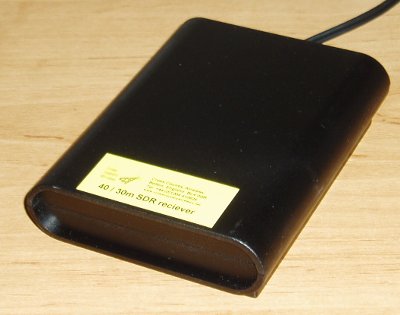 The designer Chris, G4HYG, claims that the receiver will now display a CW carrier at a level of -135 dBm on the waterfall of SDR-Radio using a 48 kHz sound card. The level of the local oscillator at the antenna port is now specified as -65 dBm, though a more typical measurement is -70 dBm. This should make it an ideal choice as a panadapter for radios such as the Elecraft K3. In fact, Chris recently stated that most orders for the receiver have been for use as panadapters, in conjunction with a sound card and suitable software such as PowerSDR-IF.
The cost of the standard SDR is £49.95. For panadapter use you will need a custom crystal for your radio’s IF which increases the price to £59.95. The SDR has two (switched) local oscillators so the other one could be specified to cover 40m or 30m for use as a conventional receiver. It’s also available as a built and tested board for assembly into your own case (at a significant saving.) If you built a USB sound device into the same box then it would be rather neat.

Bête noire
In the digitalradio Yahoo group a few people have been experimenting with APRS on HF using the robust ALE400 mode. I am interested in trying more robust modes for APRS and wish that someone would work out how to interface the new Winmor TNC to an APRS client. But as nobody has, I thought I would try to give this a go. Unfortunately this meant getting to grips with MultiPSK, a program that is something of a personal bête noire as whenever I have been tempted to try I have never been able to figure out how to use it. Today turned out to be no different.
I downloaded the latest version of the program, started it, and was presented with an unexpected screen for a digital modes program. After a few seconds of puzzlement I realized that this was the configuration screen. Normally with software you get the main screen and select configuration from a menu but MultiPSK is not as other software. Oh no. The author threw away the book when he wrote this program, the book in question being “Microsoft User Interface Guidelines.”
I managed among the bewildering array of buttons and options to find one to set the sound card, another to set the KISS TNC port that I would need and one that I presumed would set the serial port for PTT. As I couldn’t find an OK button I tried closing the window and MultiPSK itself closed. Completely. I tried again and realized that you have to click a large button marked RX/TX Window to get to the main operational screen. Bizarre!
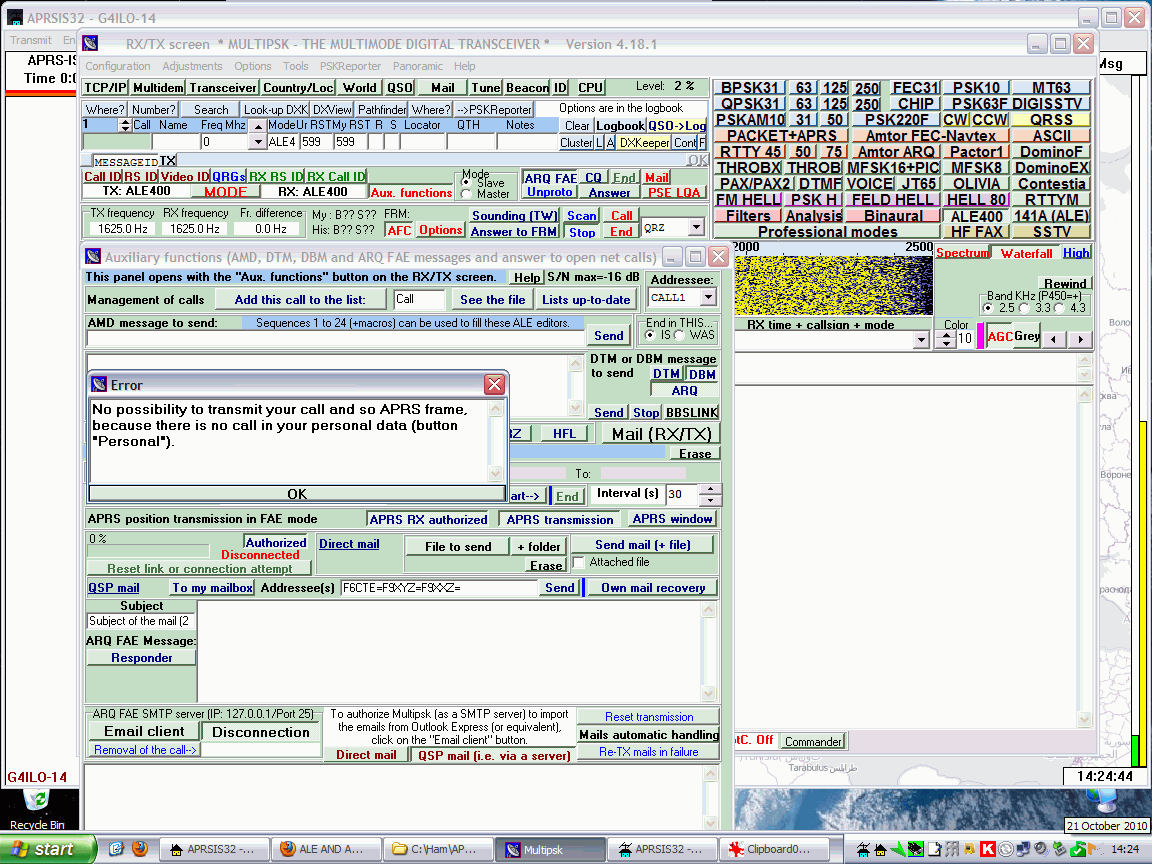
The main screen contains another mind-boggling array of buttons and controls, but I did see a waterfall with noise scrolling down the screen, which looked encouraging. At least I’d managed to select the sound card correctly. After staring open-mouthed at the screen for fully two minutes I managed to spot a button marked ALE400, so I clicked it. I was now in ALE400 mode. At least, I think I was, though I don’t know how I was supposed to tell for sure.
One of the Yahoo group postings had mentioned that you needed to click a button marked “Aux. functions”. After some more searching I found this button it and clicked it and up popped another bewildering dialog box crammed with buttons. Hilariously, at the top is the caption “This panel opens with the Aux. functions button in the TX/RX screen.” Yes, I really laughed out loud when I saw that. If I didn’t know that how would I ever find it?
I spotted that some buttons on this new dialog were to do with APRS. I clicked one and a dialog popped up saying something about there being no map folder. So apart from being a digital modes program MultiPSK is trying to be an APRS client as well? The phrase “jack of all trades, master of none” sprang briefly to mind before I dismissed it as being uncharitable.
I clicked another button marked “APRS Transmit” and a strange notepad-style window appeared with the caption Error which said “No possibility to transmit your call and so APRS frame because there is no call in your personal data (button ‘Personal’).” The English wasn’t great but I could understand what it was trying to tell me. I closed the error dialog but although I could see several places that looked as if they were meant to have a call entered in them I couldn’t see anywhere marked “Personal.”
I did discover a documentation file to do with setting up APRS using ALE400. Unfortunately it is a .doc file and I don’t have Microsoft Word. I did try opening it in Wordpad which is what I normally use but it displayed several errors about graphics filters and opened the file without the all-important images. Google’s HTML view of the document couldn’t display the images either. Hello, anyone heard of PDF files?
Now I do feel a little bit guilty criticizing the work of a fellow amateur programmer. I’m sure the author of MultiPSK, Patrick F6CTE, is far more talented than I ever was in being able to implement all of these sound card digital modes. But when it comes to user interface design I’m sorry but MultiPSK sucks.
This has to be the worst user interface of any program I have ever encountered, by a long way – and at one time in my life I used to review software for a living. Its worst sin is that it uses buttons instead of menus and apparently has no context-sensitivity (or more specifically mode-sensitivity) so that you are presented with all of the available options all at once, which is not only confusing but wastes a lot of screen space. It is testimony to the delight that so many practitioners of our hobby take in doing things the hard way that so many people are willing to use this program to operate digital modes when there are so many better-designed alternatives.
Once again MultiPSK has been deleted from my hard drive without transmitting so much as a digit. If APRS over ALE400 is only achievable by those able to master MultiPSK then I’m afraid it will go nowhere.

Spotted in Spain
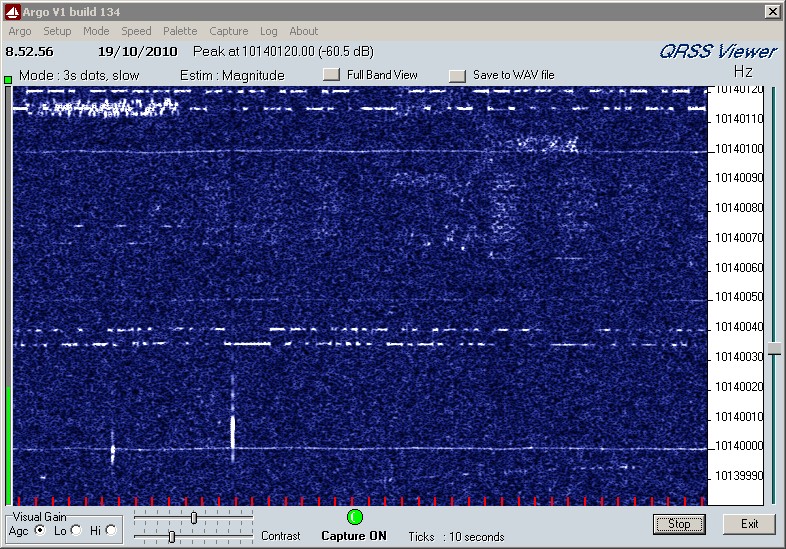
My 30m 50mW QRSS signal has now been received in Spain by the grabber of EA1FAQ. (It’s the one at 10140.030 kHz.)
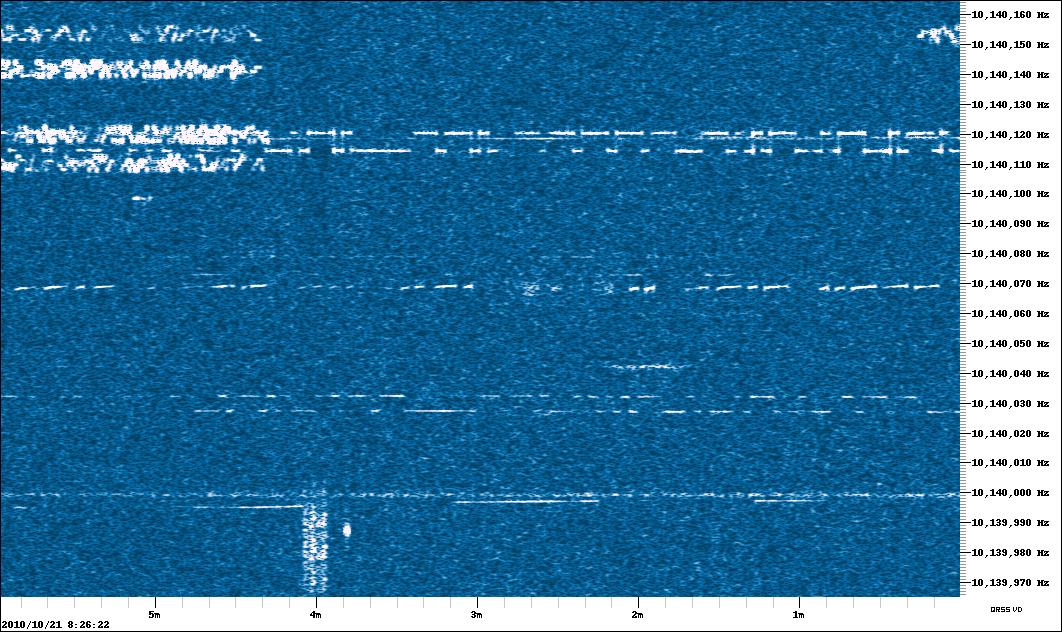
That’s a distance of 1458km or 906 miles.
[Off-topic note: When will Blogger fix its frigging “Add Images” uploader so it works in Firefox? I had to use the ghastly IE to insert the picture.]

Memory fix
Six months ago I bought an old Kenwood TH-205 on eBay for spares or repair. I got it working, managed to find a new replacement NiCad battery pack for it and built a drop-in charger for it for a total cost of well under £20. The backup battery had died so the memories didn’t work and the radio wouldn’t even remember the frequency it was last used on, but I was pleased just to have got it working and I was afraid the replacement would be an expensive part the cost of which couldn’t be justified.

Today I decided to have a look and see if the backup battery could be replaced. I wasn’t sure where the backup battery was, but I guessed it might be hidden under a foam pad in the centre of the circuit board. I had a peek and was pleased to find that it was a CR2032 3V lithium button cell. However it wasn’t your regular CR2032 cell that you can buy in stores, but one with solder tags spot welded to each side.
I looked on eBay, but although this turned up zillions of sellers of the regular cells at prices from five for a pound, no-one had the version with solder tags. I looked to see if I could fit a cell holder into the radio but the PCB mount one I had was quite a bit thicker than the cell itself and there was insufficient space for it.
I tried a Google search and Digikey had a CR2032 with solder tags for £1.17 a time, but there was a £12 shipping charge which made it uneconomic. The cost of the repair needed to be proportionate to what I paid for the radio.
So I decided to try taping wires to a regular CR2032 cell. I doubt that I could solder to it, and that probably isn’t a good idea anyway. I had a CR2032 which came in a kit I purchased recently but haven’t started to build yet. It was new and sealed in its packing so I thought I would use that. It was a good job I decided to check the voltage after taping the wires to it, in order to verify they were making good contact, because it was as dead as a dodo! Even the one I took out of the radio showed more signs of life, as it acts as a capacitor and charges up a little bit when the battery power is turned on.
So it’s back to eBay to order a couple of replacement cells, one for the Kenwood and one for the kit I haven’t yet built.

Isn’t QRP amazing?
The Royal Society for the Protection of Birds, a British wildlife conservation charity, has a slogan “aren’t birds brilliant!” I think QRPers should start promoting low power operation using the slogan “Isn’t QRP amazing!” Because whenever I try using low power the results simply amaze me.
Until starting on my QRSS adventure I had never tried very low power, sometimes called QRPP. I was inspired by Paul PC4T who yesterday wrote about using WSPR on 20m using 50 milliwatts. At the moment I am QRSSing with 50mW on 30m using my magnetic loop, but that still leaves my multiband dipole antenna for some QRPP WSPR experiments.
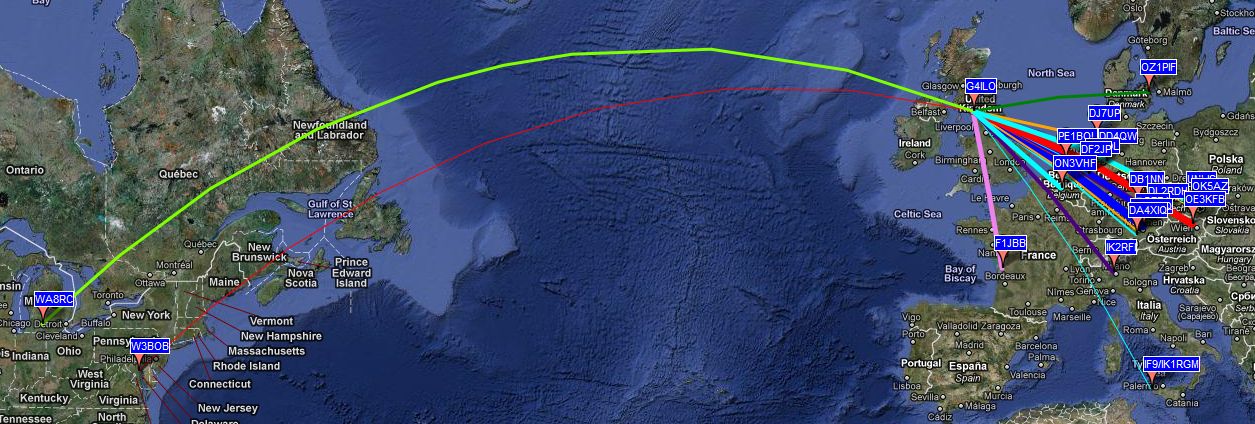
I connected my QRP power meter to my K3, turned the power control to the lowest setting (0.1W) and sent a Tune signal from the WSPR software. The meter read about 65mW. I thought that I would be lucky to get any reception reports at all at that power level so I was amazed to be spotted by around 20 different stations in the space of a couple of hours, including two from the USA. One, WA8RC, was at a distance of more than 5,800km! To be heard, consistently, over that kind of distance across the Atlantic Ocean using less than 100mW to a dipole zig-zagged into a tiny attic is simply incredible.
I think we all use too much power, myself included. We do it because it makes copy easier or because it increases the chance of someone hearing us calling CQ. Even WSPR users mostly use 5W or more, despite the fact that the “WS” in the name of the mode means “weak signal.” Because of our macho desire to have a bigger signal than the other guy we never discover just how far a little power will really go. And that’s a discovery that’s far more enthralling than receiving yet another 599 report, surely.
Isn’t QRP amazing?

QRSS success
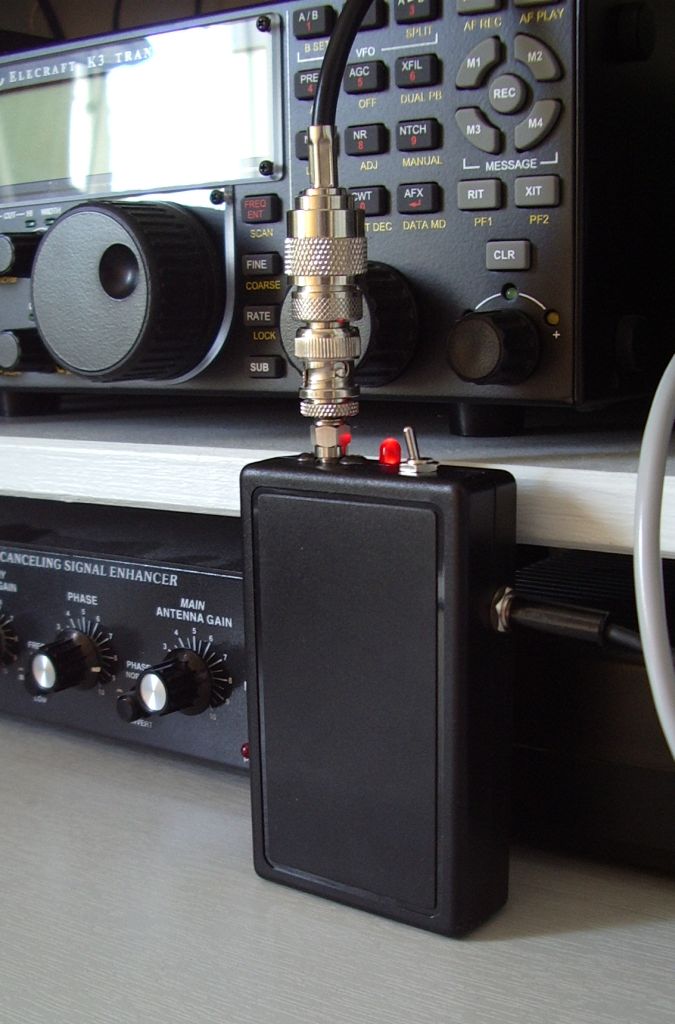
My 30m QRSS beacon transmitter is working very well. It has been on the air for more than a day now and has been received in Italy, Belgium, Holland and the UK. This is a 50 milliwatt signal being radiated by a magnetic loop antenna in the attic! Isn’t QRP amazing?
On Sunday I assembled the QRSS beacon into a nice case. This is not my favourite constructional task – give me toroids to wind any day! – but I do like the projects I build to look reasonable. The case I used was one I bought for the abortive 2m FM Fredbox project. I even used the SMA chassis socket I bought for that project as the case wasn’t really suitable for a BNC socket and I didn’t have any of the RCA phono chassis sockets I often use for QRP projects in my junk box.
This case has a compartment for a PP3 9V battery. I had toyed with the idea of using a PP3 battery and building in a regulator to reduce the voltage to the required 5V but space was tight and I was concerned that the heat given off by the regulator would affect frequency stability. Also with a current consumption of 70mA at 50mW output a rechargeable PP3 battery with a capacity of 280mAH would last for less than 4 hours between charges.
I observed that it is possible to squeeze 4 x AAA cells into the same space. Rechargeable NiMH AAA cells have a capacity of 1100mAH. Four of them will provide a voltage of 4.8 – 5.2V which will give 15 hours of operation and require no regulation at all. So that is what I will use.
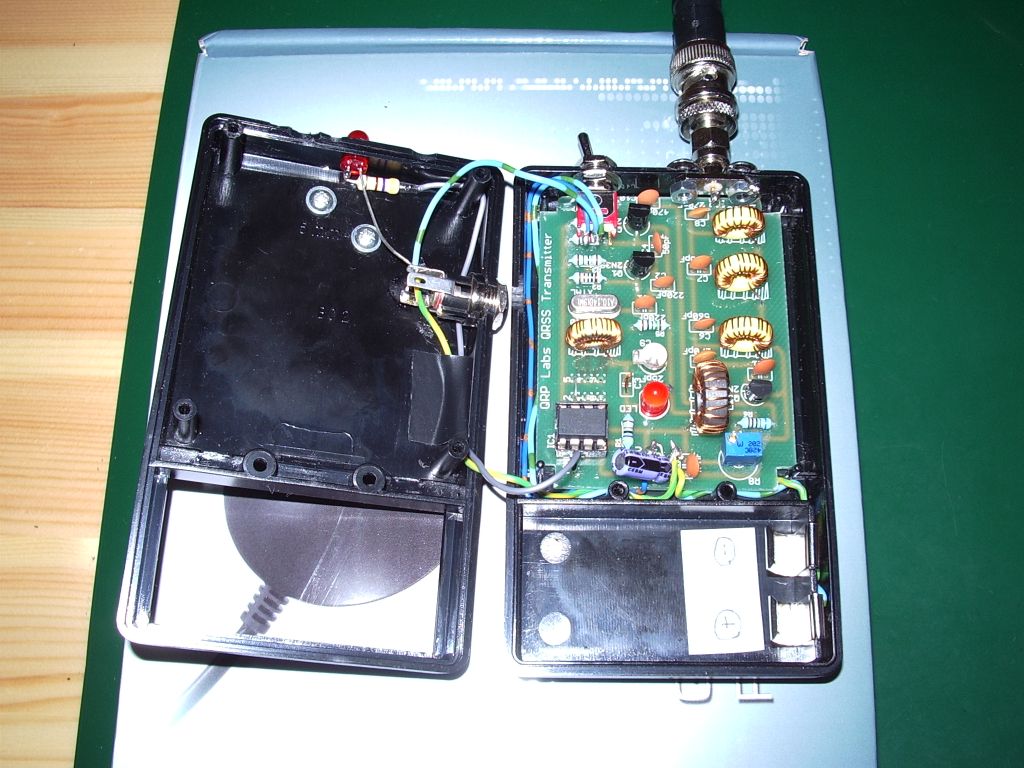
Fitting the project into the box took a bit of time because it was a tight fit in the case. I had to be very careful positioning the antenna socket, switch and external power / charger socket to ensure they didn’t foul any of the components. One of the frustrating things about boxing-up projects is that you can never find a case of exactly the size you want.
As I didn’t have a suitable battery pack I started off powering the transmitter from the computer. I took a redundant USB cable, cut the end off, determined the +5V and GND leads and soldered a DC power connector to them. That got the rig on the air, where it was almost immediately spotted by PA0TAB. The stability of the transmitter is excellent. There is a slight drift down in frequency by 10Hz or so during the first few minutes of operation. After that it appears to be pretty steady. There does not seem to be any need to encase the crystal oscillator in insulating material or use an oven as some QRSS builders have done.
Later on I dug out a charger for a mobile phone which has a USB socket on it and I switched the power over to that so I could keep the QRSS transmitter on overnight after I had shut down the computer. Nobody spotted me overnight, but I will leave it on for a few days to see whether I can be received further afield than Italy. To be received on the other side of the Atlantic would be a great thrill!
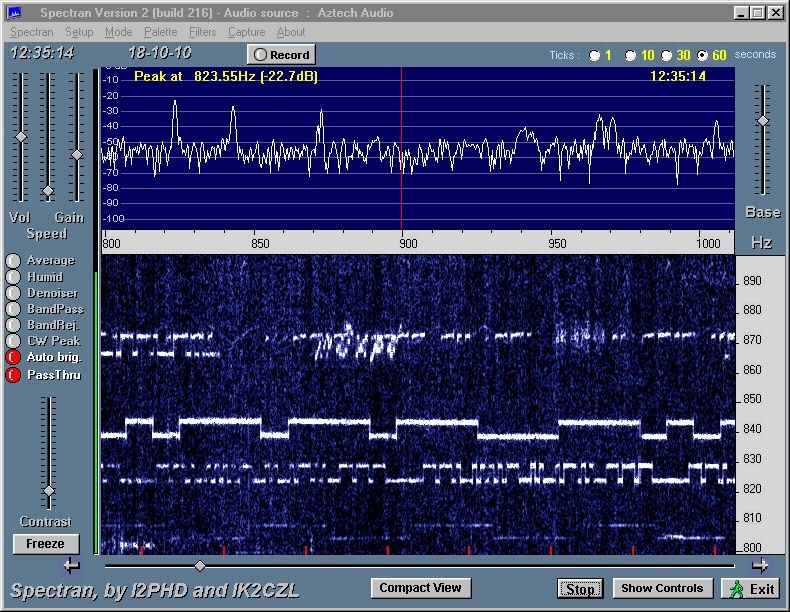
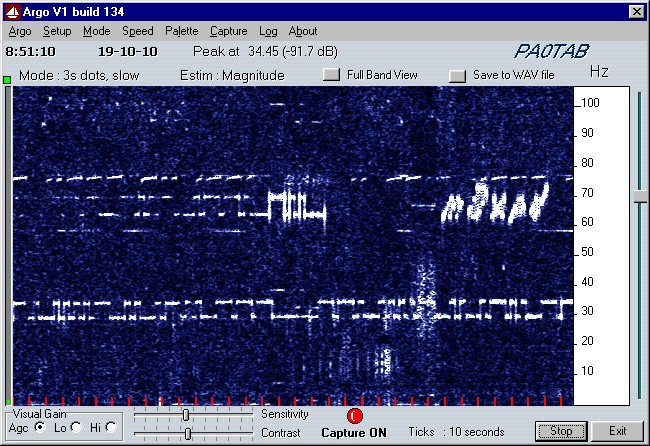
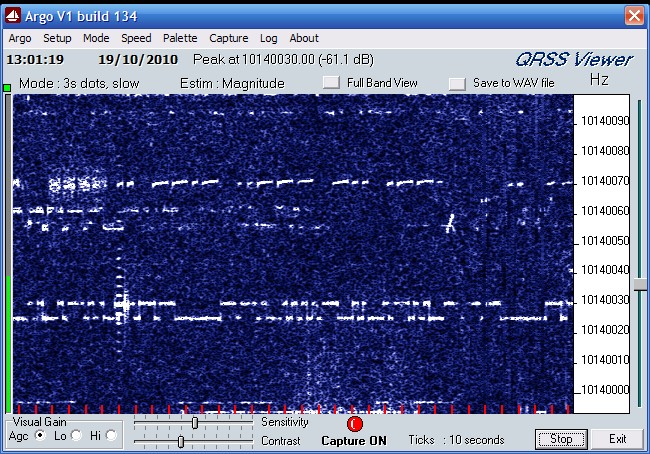
Here is a selection of grabs from stations that received my signal in the last 24 hours: