Posts Tagged ‘vhf/uhf’
 Rescue on Uncompahgre Peak (1992)
 February 18th, 2018 |
  Author:
 I came across this story in my archives, written by me way back in August 1992. This was before mobile phones were commonly available, so ham radio turned out to be critical in this incident. Even today, there are many places in the Colorado backcountry where mobile phones don’t work but amateur radio can communicate. My callsign at the time was KBØCY
Something happened on the way to Uncompahgre Peak on August 8, 1992.
Around noon, my brother, my two nephews and I made it to the summit and had just signed the log. I called on 146.52 and contacted Chris, NQ5V, who was somewhere to the east of me (Creede, I think). This must be his summer location, since his callbook address is Texas. We talked about the trail up Uncompahgre, since he was interested in hiking it.
After I signed clear with NQ5V and was about to start down the mountain, a teenage boy came up to me and said he had been sent to “find the guy with the radio” because a girl had been hit by a rock down below and was hurt. I am not sure how they knew I had a radio, other than I used it once on the way up the trail. The story seemed rather sketchy and I was skeptical but asked NQ5V to standby on frequency because we may have a medical emergency. At that time, Arnold, W7JRC, from Cedaredge, CO, came on frequency and said he had a phone nearby. (NQ5V did not have a phone available.) A second, older teenager came up the the trail with more information. He said he was a pre-med student and had search and rescue experience. He had more detailed info which made the story more clear. At this time, I concluded that we had a real emergency and asked W7JRC to call the authorities. I handed my HT to the older teenager and had him describe the victim’s condition to W7JRC. W7JRC had some trouble contacting the police, but eventually got through to the Ouray County Sheriff’s Office. (It turned out we were in Hinsdale County, but we did not know that at the time.)
Jim, NR5Y (also close to Creede, I think) came on frequency and said that he was close to a telephone. I was not always able to communicate with NR5Y, so NQ5V relayed to NR5Y. Since W7JRC was having trouble with getting the telephone call through, I asked NR5Y to also try to place a call. He called the Mineral County Sheriff, who relayed to Hinsdale County. All this time, I was moving down the mountain to try to get closer to the victim without losing my radio contact. About this time, my HT battery went dead, so I switched to my spare (Good thing I had one!) As I moved onto the saddle below Uncompaghre, I lost contact with W7JRC and contact with NQ5V got much worse, but usable. About this time, Doug, NØLAY, came on the air and his signal was very strong at my location which allowed me to stay on low power and conserve my HT batteries. N0LAY apparently came on the air in response to a call from the Hinsdale County Sheriff. N0LAY also had a radio which was on the sheriff’s frequency and relayed information from me to the sheriff’s dispatch.
I had not proceeded down any further because I was certain that I would lose radio contact with NØLAY. The victim had several people with her that had First Aid training and was about 1000 feet below me at the bottom of a cirque. I sent the older teenager back down to the victim with instructions to signal me as to her condition. We both had signal whistles – two whistles meant her condition was the same (stable), three whistles meant her condition had deteriorated. After I got the two whistles back, I felt like things were going to be OK.
About that time, NØLAY relayed that an ambulance had been dispatched to the trailhead and a search and rescue person was on the way up the trail with a trail bike. Also, a helicopter had been dispatched from Montrose. It took us a little while to communicate to the sheriff where the victim was, but we had a pretty good topo map, so we eventually gave them an accurate fix on the location. As I was listening to NØLAY relay, I realized that my Kenwood TH-77A could receive most police frequencies. NØLAY provided me with the frequency and I programmed it into the HT, scanning between 146.52 and the sheriff’s frequency. This allowed us to listen in on what was going on. In fact, many times I was clearly hearing the various parties while they were having trouble communicating.
The S&R guy on the trail bike made it to the accident scene without us noticing him. He had parked his bike about half a mile away from us and had scrambled down to the victim. The first time I was aware of his position was when he transmitted from the accident site. He confirmed that the girl was pretty bashed up, but stable, and needed a helicopter ride out. About this time, the sheriff’s dispatch reported that the helicopter was about 5 minutes out (I think it turned out to be more like 15 minutes away). Soon the helicopter came up on the sheriff’s frequency and I could hear the S&R guy coordinating with the helicopter pilot The two-seater helicopter landed and they put the girl in the second seat. Apparently, she was stable enough to walk to the helicopter with some assistance. The alternative was to put her outside the chopper in a litter. The helicopter lifted off and set back down a few minutes later near the ambulance which was near the trailhead. The two-seater chopper was not a medical evacuation helicopter and the plan was that Flight-For-Life from Grand Junction would pick up the victim at the ambulance location. It turned out that Flight-For-Life was unavailable so they took the victim to a hospital by ambulance (to a local clinic, then Gunnison, I think).
We stayed on the ridge until the chopper headed for home, then we did the same. On the way down, the S&R guy on the trail bike caught up with us and we talked about the accident. He said the girl lost some teeth, had facial cuts, internal bleeding and swelling in the face, but was in stable condition. He said that without the radio report that they would be just getting the initial call at the time he was heading home. That is, we saved about 5 hours on the response time with amateur radio.
I have carried my HT on every 14er hike I have ever done and had considered the possibility of using of using it for emergency communications. I guess I never gave it too much thought because people venturing into the backcountry need to have a self-sufficient attitude. That means being prepared and preventing or handling any emergency situation on your own. But the unexpected happens, and here I was in the middle of a medical emergency. It certainly has caused me to take this emergency communications thing more seriously.
Things I learned that day:
- Always carry an extra HT battery (or two)
- Always carry a decent portable antenna (more than a rubber duck)
- Always carry a good topo map, even if you don’t need it to follow the trail.
- Make note of what county you are hiking in when in unfamiliar parts of the state. This aids in getting to the right Sheriff’s office. (This is important because the person you contact via radio is likely to be two or three counties away.)
- My signal whistle (which has caused considerable abuse from a few hiking companions) is actually useful.
- Extended coverage receive is very useful in emergencies. (I am still thinking about extended transmit — I clearly could have used it in this case.)
I was very pleased that everyone reacted quickly but in a professional manner. The radio amateurs all helped out when they could be stayed out of the way when appropriate. I am sure we can find some things that could have been done better, but I felt like things went well overall.
– Bob KØNR
The post Rescue on Uncompahgre Peak (1992) appeared first on The KØNR Radio Site.
A Better Antenna for Dualband Handhelds
I’m a fan of using a half-wave antenna on a 2m handheld transceiver (HT). These come in a variety of forms but I’ve tended to use the telescoping half-waves that mount on the HT. These include the Halfwave 2 Meter Flex antenna from Smiley and the MFJ-1714 from MJF. One of the disadvantages of these two antennas is that they are designed for 2m operation only. Put it on a dualband HT and you can only use one of the bands.
Now there is a dualband alternative.

During a discussion of various VHF radios and antennas on the SOTA reflector, Phil/G4OBK recommended this antenna: TWAYRDIO RH 770 SMA-Male Dual Band Telescopic Handheld Antenna. I was mildly skeptical in that the antenna looks like cheap lowcost economy stuff from China. However, for $16.55 (free shipping), it seemed like something I should try out.
I’ve since used this antenna on several SOTA activations and have found it to work quite well. Not having to worry about whether I’m operating on 2m or 70 cm is a big plus. I liked the antenna so much, I now have three.
Recently, I wondered how well the antenna is really performing so I did a side-by-side comparison with the Smiley 2m halfwave. Now this kind of comparison is always a bit dicey unless you have a calibrated antenna range. I got on 2m fm with another ham running a home station some distance away such that I was not pegging his S-meter. We did several A/B comparisons between the Smiley and the RH 770. Much to my surprise, the RH 770 performed significantly better than the Smiley. The other ham saw his meter deflect higher with the RH 770. I can’t give that to you in dB but I can say its a little better. I actually thought that the single-band design might be slightly better due to less complexity in the antenna. The opposite was true. Your mileage may vary. No warranty expressed or implied.
The only thing I don’t like about the RH 770 is that the telescoping sections slide up and down really easy. Too easy for my taste. I’d rather have some stickiness to it so that I am sure it will remain fully extended. But I admit this is more of a personal impression than actual problem.
The antenna is available with a male SMA connector, a female SMA connector or a BNC. That should pretty much cover it.
So thanks Phil/G4OBK for pointing out this antenna. I also highly recommend it.
73, Bob K0NR
The post A Better Antenna for Dualband Handhelds appeared first on The KØNR Radio Site.
FM VHF: The Utility Mode
 I’ve been referring to the VHF FM as the utility mode for quite a while now. I picked this up from Gary Pearce/KN4AQ when I inherited the FM column from CQ VHF magazine (no longer being published). Gary recently filled me in on the origin of this term, which he captured in his first FM column for CQ VHF.
Gary describes how he got hooked on VHF operating, especially 2m FM:
I’ve been a ham since 1965 (age 15). Today, I have an Extra class license, and I operate some HF (mostly SSB and digital, with cw limited to occasional bouts at Field Day). But since my first days as a Novice with a Heathkit Twoer, I’ve been a VHFer. I went through the 2 and 6 meter AM days with a Heath Seneca and Utica 650, and then SSB with a Gonset Sidewinder and Hallicrafter HA-2 transverter. But what really flipped my switch as an early ham was an old, single-channel Motorola 80D on 146.94 simplex, installed in the car of a teenage friend’s father. For you newer hams, this is an exercise in nostalgia that I don’t have space here to explain – I wish I could. I will note that the Motorola 80D was an FM radio that began life in a police car or taxi cab somewhere. It was a huge, heavy, all-tube radio that sat in the trunk and improved traction on the ice. Below the dash was a control head with volume, squelch, and the microphone and speaker.
It wasn’t long before I learned about repeaters, which enhanced the FM experience immeasurably (all four of them in the Chicago area at the time). My interest in VHF SSB waned…Getting involved in a local repeater group felt comfortable – this was someplace where I could really participate.
But then things shifted as time passed. Gary wrote:
While I wasn’t looking, FM became just another mode. At least that’s the consensus I got from some of the guys who have been doing Amateur Radio publishing a lot longer than I have…
Some columns devoted to sub-sets of Amateur Radio have lasted for decades. VHF-UHF is one. That’s the weak-signal side of VHF, not the FM side. Digital modes go through enough reincarnations to keep interest up. DX, contesting, QRP, holding their own.
But not FM/Repeaters? QST editor Steve Ford, WB8IMY, suggested why, and gave me the idea for this column’s “Utility Mode” tag line. He said, “Our research has shown that while FM users comprise a very large portion of the amateur community, the majority tend to perceive their FM activity more as a ‘utility’ function rather than a hobby.”
FM VHF is arguably the most common mode used in amateur radio. (Can I back that up with reliable data? Not sure, but I’m pretty sure it’s true.) I do see where it fits into the concept of a utility function or utility mode. Think about the electrical system in your house (a utility). For the most part, you just plug things in and use it but you probably don’t consider yourself a 120 VAC hobbyist. Well, a few of you might but that’s another issue. FM VHF is a lot like that…most hams have it and they just use it without too much consideration. Push the button and it works.
But that definition is a little bit derogatory…FM VHF is just there and no one appreciates it. The Eeyore of ham radio modes.
Another definition of utility (as an adjective) is:
Utility: having or made for a number of useful or practical purposes rather than a single, specialized one:
This fits my perception of FM VHF: very useful for many things. Whether you are providing communications for a bike race, handling talk-in for a local hamfest, working the ISS, chatting across town while mobile, the first choice is likely to be 2m (or 70 cm) FM.
And that’s why I’ve always been a FM VHF enthusiast: there are so many things you can do with it. Just use your imagination.
73, Bob K0NR
To see what Gary KN4AQ has been up to lately, visit HamRadioNow.
The post FM VHF: The Utility Mode appeared first on The KØNR Radio Site.
Latest firmware for AP510 APRS tracker is superb
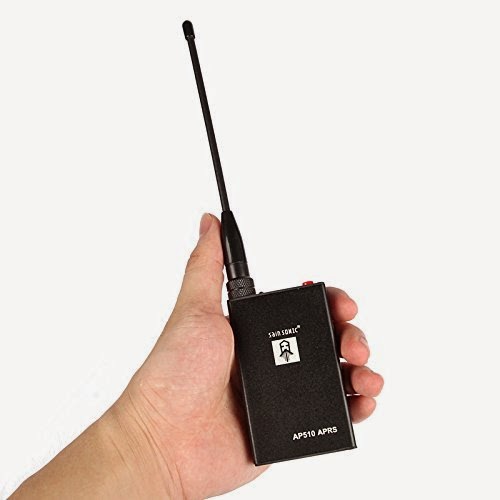
I got my AP510 APRS tracker a little more than a year ago. It kind of worked, but not very well in my car. But after the tracker got a new firmware dated 3 Nov 2015, it has become so much better. Now I can say that it is really useful.
Apparently, the Smartbeacon function didn’t work properly in earlier versions of the firmware. With some good debugging and error reporting by KC5EVE, Mark, working with the software developer for the AP510, BG6QBV, the annoying errors now seem to be gone. This is all documented in the Yahoo AP510 group.
I have fitted mine with a 16-45 cm telescopic antenna and even when attached to one of the rear headrests in my sedan, the 1 Watt of output power tracks very well.
The map below shows a drive from Telemark, about 100 km west of Oslo, to Oslo with as good coverage as one can expect given the valleys and the availability of APRS digipeaters on the way.

Latest firmware for AP510 APRS tracker is superb
I got my AP510 APRS tracker a little more than a year ago. It kind of worked, but not very well in my car. But after the tracker got a new firmware dated 3 Nov 2015, it has become so much better. Now I can say that it is really useful.
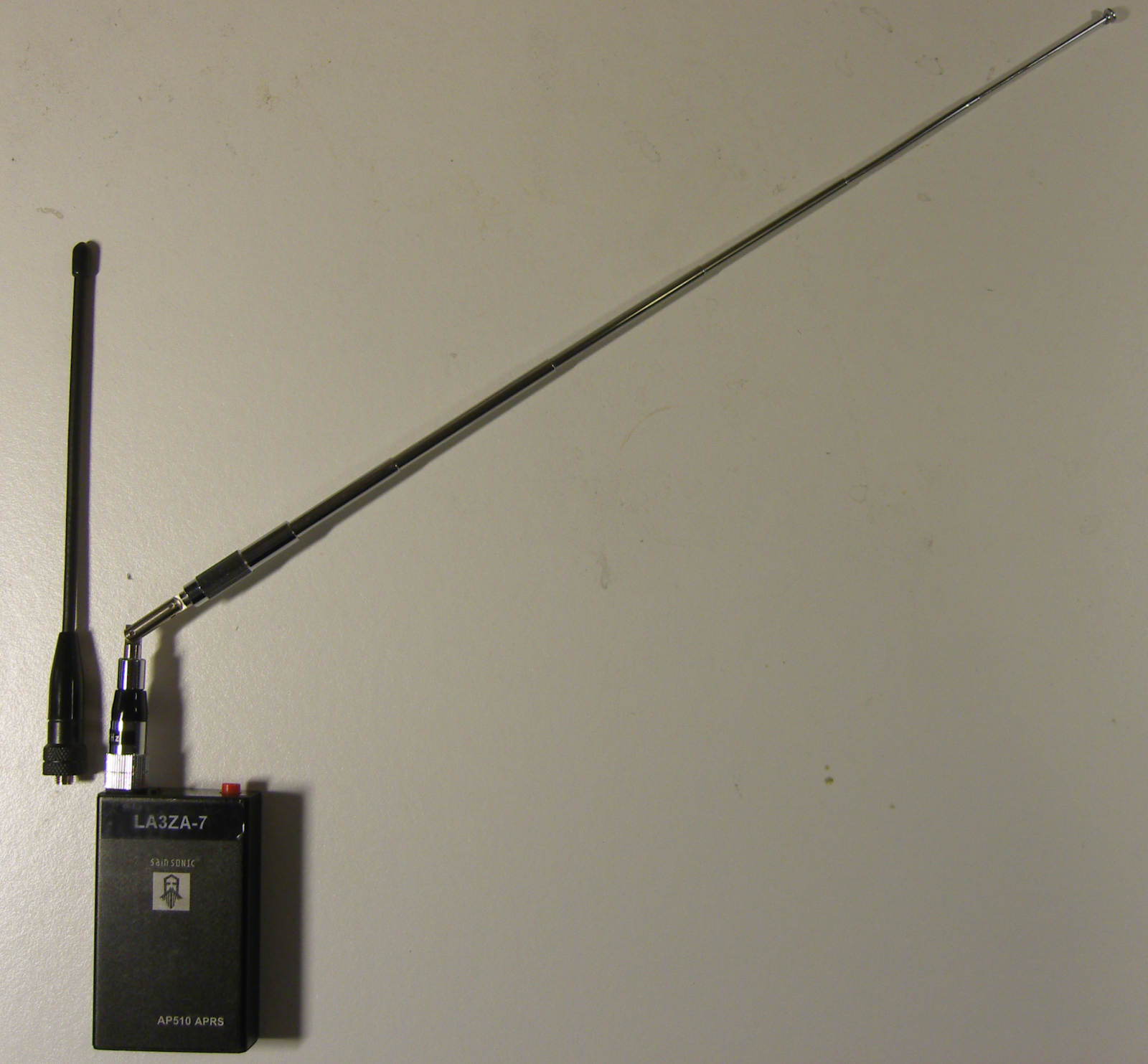 |
| AP510 with original short antenna and telescopic antenna |
Apparently, the Smartbeacon function didn’t work properly in earlier versions of the firmware. With some good debugging and error reporting by KC5EVE, Mark, working with the software developer for the AP510, BG6QBV, the annoying errors now seem to be gone. This is all documented in the Yahoo AP510 group.
I have fitted mine with a 16-45 cm telescopic antenna and even when attached to one of the rear headrests in my sedan, the 1 Watt of output power tracks very well.
The map below shows a drive from Telemark, about 100 km west of Oslo, to Oslo with as good coverage as one can expect given the valleys and the availability of APRS digipeaters especially in the western part.
|
| Note the missing tracks east of LA5PPA-1 which are due to a 3.5 km long tunnel, Strømsåstunnelen, between Drammen and Mjøndalen. |
2014 SET
Worst snow winter since 1958 and an indoor Yagi antenna

Norway has had its fair share of precipitation this winter. Along the coast most of it has been in the form of rain. But that is different in the mountains. Our cabin at 800 m above sea level is now about to disappear in the snow and we can hardly see out of the windows anymore. This is a result of having had to shovel the snow off the roof three times so far this winter. And there is yet more to come.
They say that one has to go back to the winter of 1958 for more snow than we have had this winter, and we are still only in February. The snow has also given us an unexpected problem. Our digital TV signal is now gone. The TV transmitter is at Mount Gaustadtoppen at 1883 m ASL which is about 10 km to the North and with almost free line of sight. It used to be possible to receive the signals from the national TV provider (Riks-TV) with just a simple indoor dipole, i.e. two wires each of length 13-14 cm connected to a coaxial cable. But not so anymore after all the snow has accumulated outside the windows.
Therefore I had to find a good Yagi-antenna calculator and make a better antenna. I put it on a cardboard of length 45 cm and used the antenna calculator of K7MEM (Martin Meserve). It is a little hard to figure out the exact frequency as there are 5 multiplexes in the TV system and for that particular transmitter they range from 506 to 620 MHz (http://www.finnsenderen.no/finnsender). I therefore just designed the antenna for the multiplex in the middle, 563 MHz. The wavelength is 53.3 cm and typical antenna element length is half of that.

The antenna calculator gave me a design with one reflector behind the receiver element, and four directors in front of it. In the picture, the reflector is to the left and the antenna points to the transmitter to the right.
I made the elements from thick wire, and just taped them to the cardboard. The connector to the coaxial cable is under the cardboard and attached to the center of element two from the left – the one which is split into two.
The Yagi antenna was first described by H. Yagi in the paper “Beam Transmission of Ultra Short Waves“, (Proceedings of the Institute of Radio Engineers, 1928). But as the contribution from his colleague Uda was at least as great as Yagi’s, the antenna should really be called the Yagi-Uda antenna. I seem to remember that Uda could not write English (both of them were Japanese), so the article was written in the name of Yagi only.
But what about my Yagi, eh Yagi-Uda antenna, did it work? Yes, actually it did! With digital signals there is a threshold effect and above a certain signal level the signal quality quickly goes to 100% with a low BER (bit error rate) and with this antenna I came above that threshold. The gain of this antenna is in the order of 8 dB or about 6 dB more than the old single element antenna. Luckily, that was enough to compensate for the attenuation through the snow pile. And as you can see, one doesn’t need aluminium to make a working TV antenna.
[In Norwegian: Verste snøvinter i manns minne og en innendørs TV-antenne]













