Posts Tagged ‘vhf/uhf’
 Not so busy 70 cm ISM band
 January 6th, 2014 |
  Author:
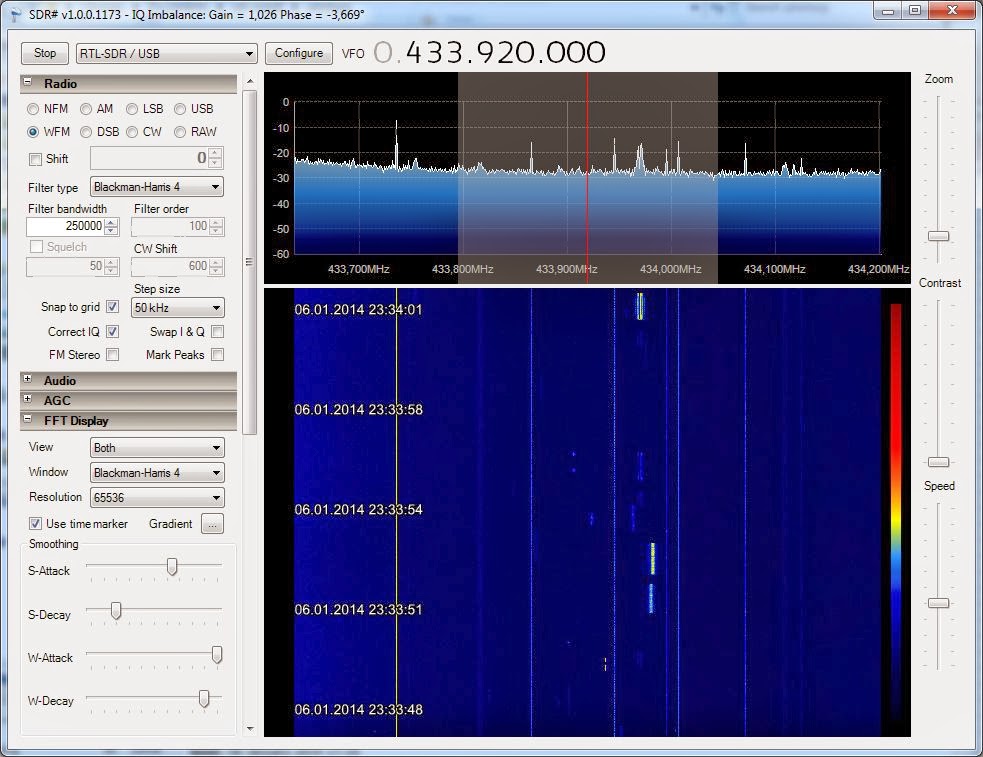
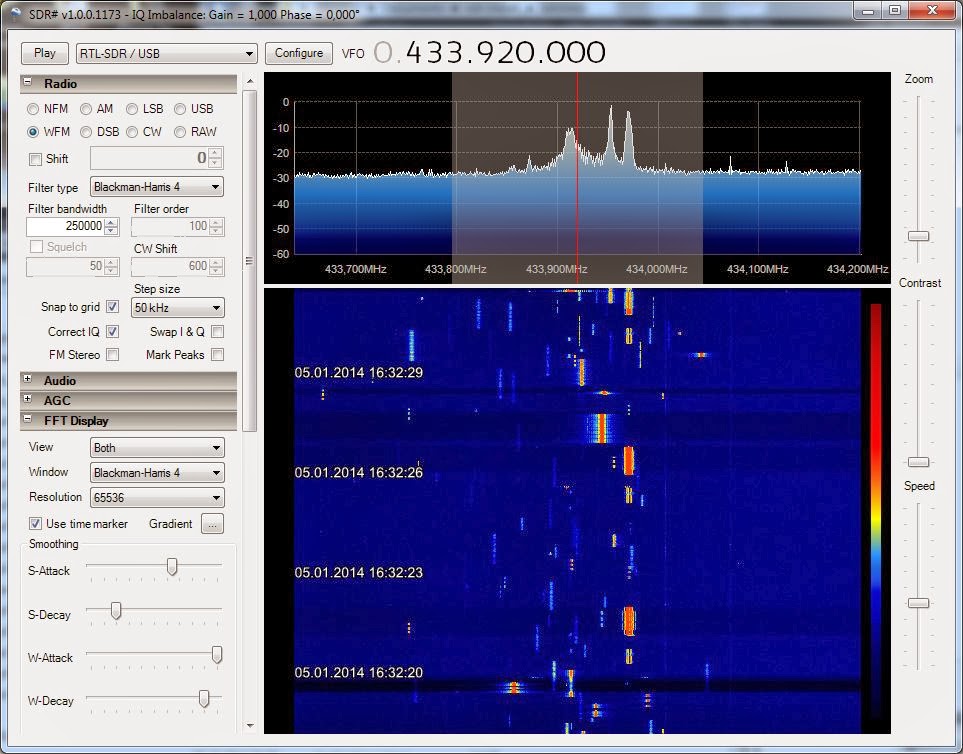
 Yesterday’s post entitled “Car keys in the 70 cm band” showed a very busy band around 433.92 MHz with up to 10 simultaneous transmissions. That snapshot was taken on a Sunday afternoon at 16:32 local time. Here is a much less crowded snapshot taken with the USB SDR-RTL dongle under the same conditions as the previous blog post. The difference is that this is from late Monday night at 23:34 local time:
 |
| Press image for a larger view |
Thanks to all viewers who have made the former blog post the most popular on my blog for this week. Thanks also to the RTL-SDR blog which gave it publicity in the blog post “Looking at the 432 to 438 MHz ISM band“.
Related posts:
Car keys in the 70 cm band
 |
| Press image for a larger view |
Related posts:
- “Not so busy 70 cm ISM band” showing the status on a late Monday night
- “Video of busy 70 cm ISM band due to car key fobs“
The best of the Baofeng handhelds
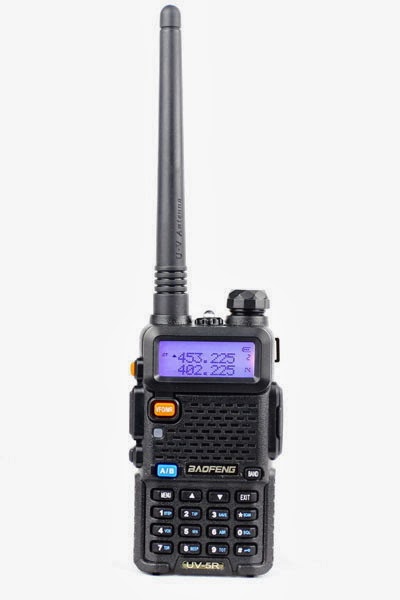
How do the cheap Baofeng handhelds compare? I have had the Baofeng UV-5R since I bought it from the 409shop in April 2012, but recently I noticed that the UV-B5, UV-B6, and UV-82 have appeared on the market also. If I should need another handheld transceiver for VHF/UHF, is there any advantage in getting any of the other models?
I prepared the following table in order to highlight differences and similarities. Bold characters signify an improvement for what I conceive to be typical radio amateur use.
Feature | 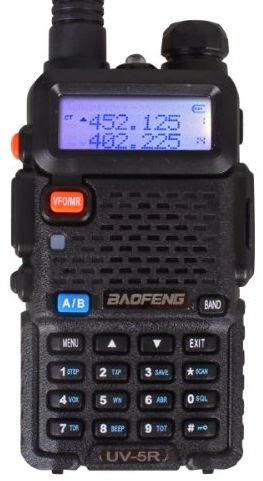 UV-5R |  UV-82 | 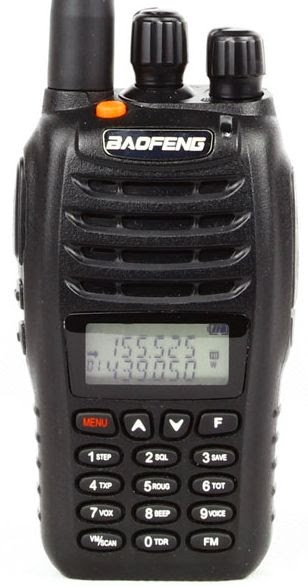 UV-B5 |
|---|---|---|---|
| Front-end | OK | OK | Improved |
| Antenna | Short | Longer | Longer |
| Signal meter | On/off | On/off | Dynamic |
| Squelch | VHF: On/off UHF: Tiny steps 21. Dec 2013 | As the UV-5R 21. Dec 2013 | Larger steps |
| Size and shape | Square and small | Fits better in hand, larger buttons | Fits better in hand |
| Frequency/channel change | Up/down | Up/down | Rotary encoder |
| VFO/MR button | Yes | Turn radio off, then press menu as you turn it on 3. Jan 2014 | Yes |
| Band button | Yes | No (in menu) | Switches automatically |
| Dual PTT button | No | Yes | No |
| Programming | Need a computer to enter alpha tags | Alpha tags can be entered from keyboard | Alpha tags can be entered from keyboard |
| Memory channels | 128 | 128 | 99 + 16 for FM radio |
| Display | 7 characters in name | 7 characters in name | Harder to read, only 5 characters in name |
| Modifications | Enlarge mic hole, (and here), Low modulation mod | – | Unused button as background light switch |
My main sources are the blogs of PD0AC (UV-82, UV-B5/B6) and the Miklor FAQs
In general I think the design of much radio equipment is lagging behind other electronics when it comes to user interfaces. Imagine a smart phone user interface on a handheld! That is why I emphasize user interface issues in my final evaluation.
I like the improved front-end, signal meter, and squelch of the UV-B5 making it a strong contender for the winner position. But I don’t think they are worth the price of a poorer display. On the other hand, the UV-82 is inferior in my view to the UV-5R due to the need to enter the menu for VFO/MR and band switch functions. So for now I’ll stick with the UV-5R.
How To Do a SOTA Activation On Pikes Peak
This post was updated on June 4, 2022, after the summit house construction was completed.
Perhaps this should be called The Slacker’s Guide to Activating Pikes Peak since I am going to describe the easy way to do a Summits On The Air (SOTA) activation on America’s Mountain. If you plan to hike up, you have my complete support but this post is not meant for you.

Pikes Peak (W0C/FR-004) is about 10 miles straight west of downtown Colorado Springs. See the Pikes Peak website for useful tourist information. At an elevation of 14,115 feet, the mountain towers over Colorado Springs and the other front-range cities. (You may see the elevation listed as 14,110 but it was revised upward in 2002 by the USGS.) This means that it has an excellent radio horizon to large populated areas. On VHF, it is possible to work stations in Kansas, Nebraska, Wyoming and New Mexico. See VHF Distance From Pikes Peak and Pikes Peak to Mt Sneffels. On HF, you’ll do even better.

Getting There
Access to the summit has three options: hike up, drive up via the Pikes Peak Highway or ride the Pikes Peak Cog Railway. Most people will probably choose the highway since the cog rail only gives you 30 to 40 minutes on the summit. (Normally, you return on the same train that takes you to the top. You can try to schedule two one-way trips but that is a challenge.)
After a few years of turmoil and construction, the summit of Pikes Peak is now back to operating normally but with some changes. The new summit house/visitors center is open and it is a beautiful new facility. The Cog Railway is also operational with brand new equipment. There is a new boardwalk that allows easy strolling on the summit and improved views near the edge of the summit.
Pikes Peak Highway
The highway is at a well-marked exit off Highway 24, west of Colorado Springs. There is a “toll” to use the highway (~$15 per person, check the Pikes Peak Highway website for the latest information and a $2 discount coupon.) Starting in 2022, you must have a reservation (2-hour window) to drive to the summit (roughly Memorial Day to Labor Day). The specifics are likely to change, so be sure to check the Drive Pikes Peak page for the latest updates.
The road is paved all of the way to the top and is usually in good shape. The only caution on driving up is that some people get freaked out by sections of the road that have steep drop-offs without guard rails. It is very safe, but some folks can’t handle it. The main caution driving down is to use low gear and stay off your brakes. There are plenty of signs reminding you to do this and during the summer there is a brake check station at Glen Cove where the rangers check the temperature of your brakes.
It takes about an hour to drive to the summit, assuming you don’t dawdle. It is best to drive up during the morning and avoid the afternoon thunderstorms.
On The Summit
The W0C Association Reference Manual (the SOTA rules for Colorado) used to suggest a “qualifying hike” of 100 vertical feet but this item has been removed from the manual. If you decide to do such a hike, I suggest you proceed down Barr Trail which is the main hiking trail coming up from the east side of the peak. Do not try to walk along the road, as the rangers will stop you. The trail starts on the east side of the summit house (towards Colorado Springs) and is marked with a sign. You have to cross over the cog rail tracks to get to it. (Please try to avoid getting run over by the train as it scares the tourists and makes a mess.)
The summit of Pikes is broad, flat and rocky, so pick out a spot away from the buildings for your SOTA adventure. There are quite a few radio transmitters on the peak so expect some interference. Since this is way above treeline, your antennas will have to be self-supporting. For VHF, giving a call on 146.52 MHz FM will usually get you a few contacts and sometimes a bit of a pileup. Be aware that on top of Pikes you are hearing everyone but they can’t always hear each other. It can get confusing. Another VHF simplex frequency worth trying is 146.58 MHz (The North America Adventure Frequency). On the HF bands, pray for good ionospheric conditions and do your normal SOTA thing.
Your body and your brain will likely be moving a little slower at 14,000 feet due to the lack of oxygen. Don’t be surprised if you have trouble deciphering and logging callsigns. Take it slow and monitor your physical condition on the peak.
Bring warm, layered clothes, even in the summer, since Pikes Peak can have arctic conditions any time of the year. Keep a close eye on the weather since thunderstorms are quite common during the summer months. Lightning is a very real danger, so abandon the peak before the storms arrive.
73, Bob K0NR
Resources
SOTAwatch web site
W0C SOTA Website
Pikes Peak Tourist Information
Pikes Peak (W0C/FR-004) SOTA Page
Pikes Peak Webcams
The post How To Do a SOTA Activation On Pikes Peak appeared first on The KØNR Radio Site.
GSM phone power control and signalling
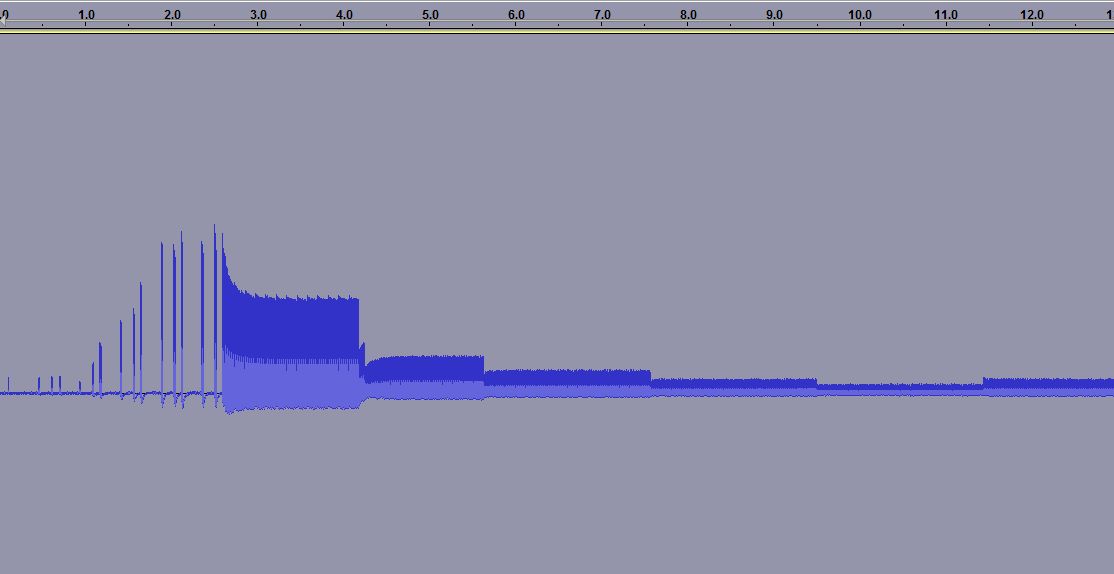
When you measure the energy out of a GSM cell phone at the moment of initiating a call, you get the picture to the right. It shows the first 15 seconds.
For the first 3.5 seconds there is the signalling between the phone and the base station. Then the connection is established, but after some time (at 4.2, 5.6, 7.5 and 9.5 seconds) one can see how the phone turns the power down, according to the commands it gets from the base station.
 The first example was for the case of a strong received signal, all bars are shown in the signal strength meter. The reduction in power, preservers battery life and as a side effect the user is exposed to a smaller amount of radiation. Interestingly, one can see that after a while there is a small adjustment of the power and it is turned up a bit (at 11.5 seconds).
 In other cases one can see a situation which follows the same pattern in time, except that the power stays at a high value. This second recording was done in my basement where GSM coverage is much poorer. Here the phone’s signal level indicator hardly shows any signal.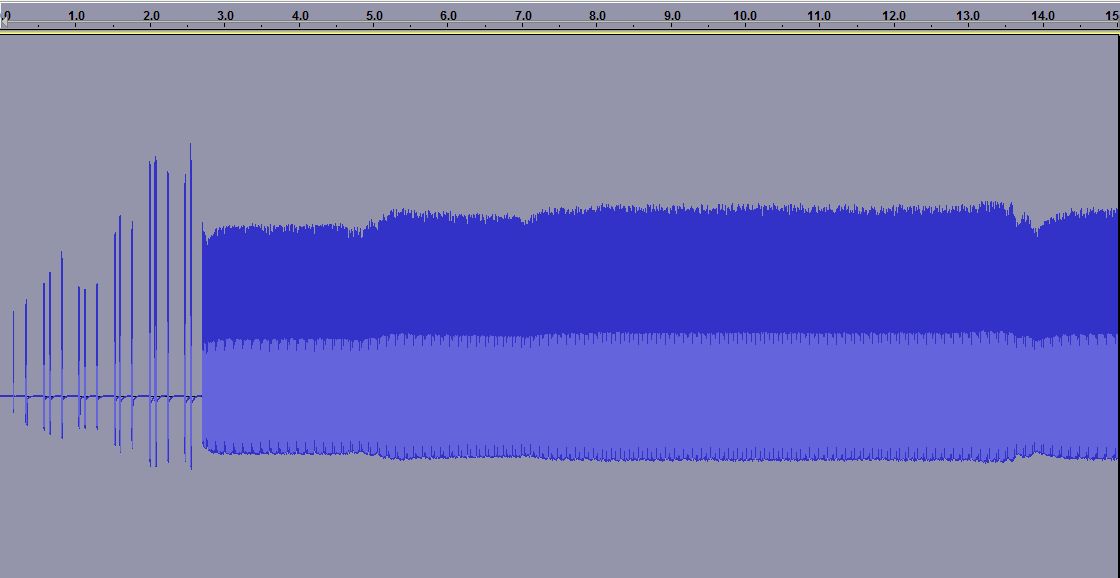

The third plot is a zoom of the previous one. Here one can see how the phone only transmits 1/8 of the time as it shares the channel with 7 other phones in a time multiplex. It is allowed to transmit every 4.6 ms and this is the reason why one often can hear a buzzing sound at 1/4.6 ms = 217 Hz in equipment which is placed close to a phone.
One also sees another frame structure, as the phone transmits 25 bursts and then breaks for one burst before continuing. Every transmission consists of 150 bits, but that is not possible to resolve with the simple setup that was used here.
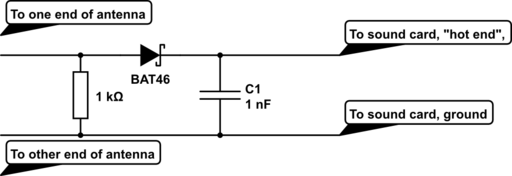
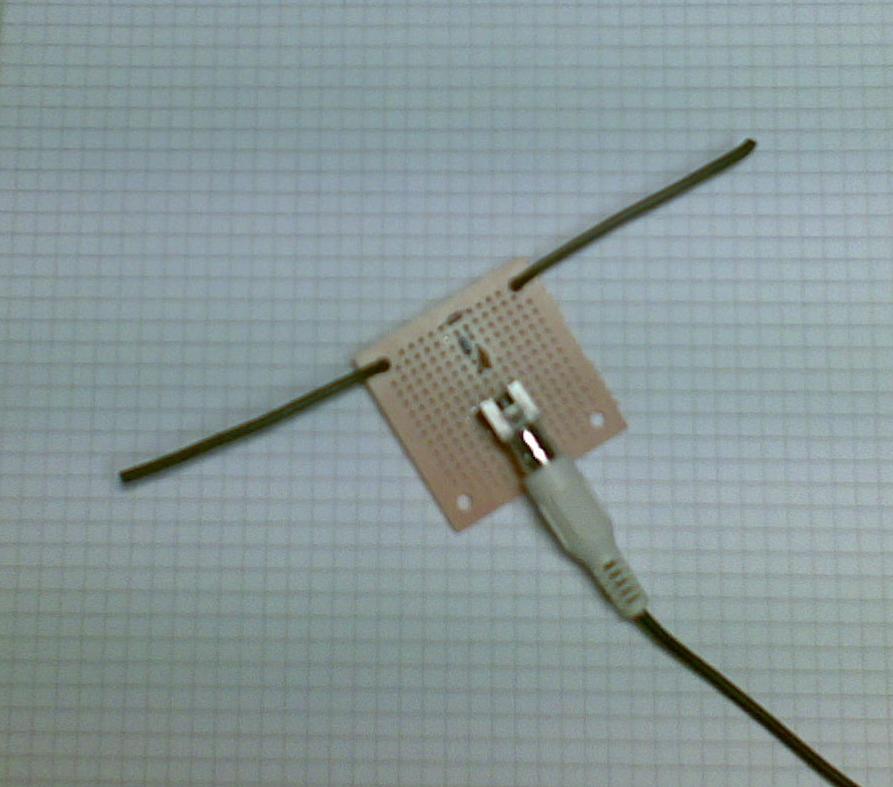 The equipment was a dipole antenna and a simple diode detector:
- A half wave dipole antenna for 950 MHz has a length of 0.5*3*108/950*106 = 15.8 cm, thus the antenna is about 2 x 8 cm (probably not very critical). The antenna was made from stiff self-supported wires.
- There is a resistor of R=1 kohm across the antenna and then a Shottky diode which acts as a detector (A Shottky diode which handles higher than 1 GHz is needed and BAT46 was used here), and finally a 1000 pF capacitor as a filter.
This post was inspired by William Andrew Steer’s “GSM phone signal analysis“.
Half a year of APRS temperature monitoring
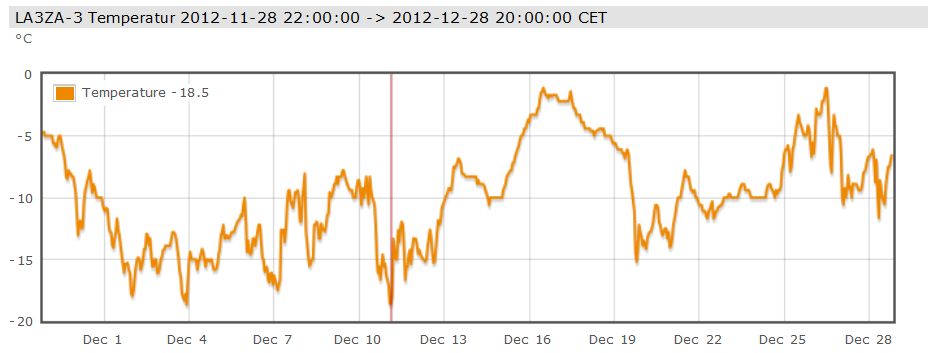 My APRS-based temperature monitor has now worked flawlessly for half a year. APRS stands for Automatic Packet Reporting System so it can send much more than temperature data, the chief usage is really for GPS position reports.
But I just needed a temperature monitor and here are the readings for December. As one can see, there were no days with temperature above freezing. At 800 m elevation in the mountains of Telemark in Norway, this is not unexpected for this time of year and makes for good skiing!
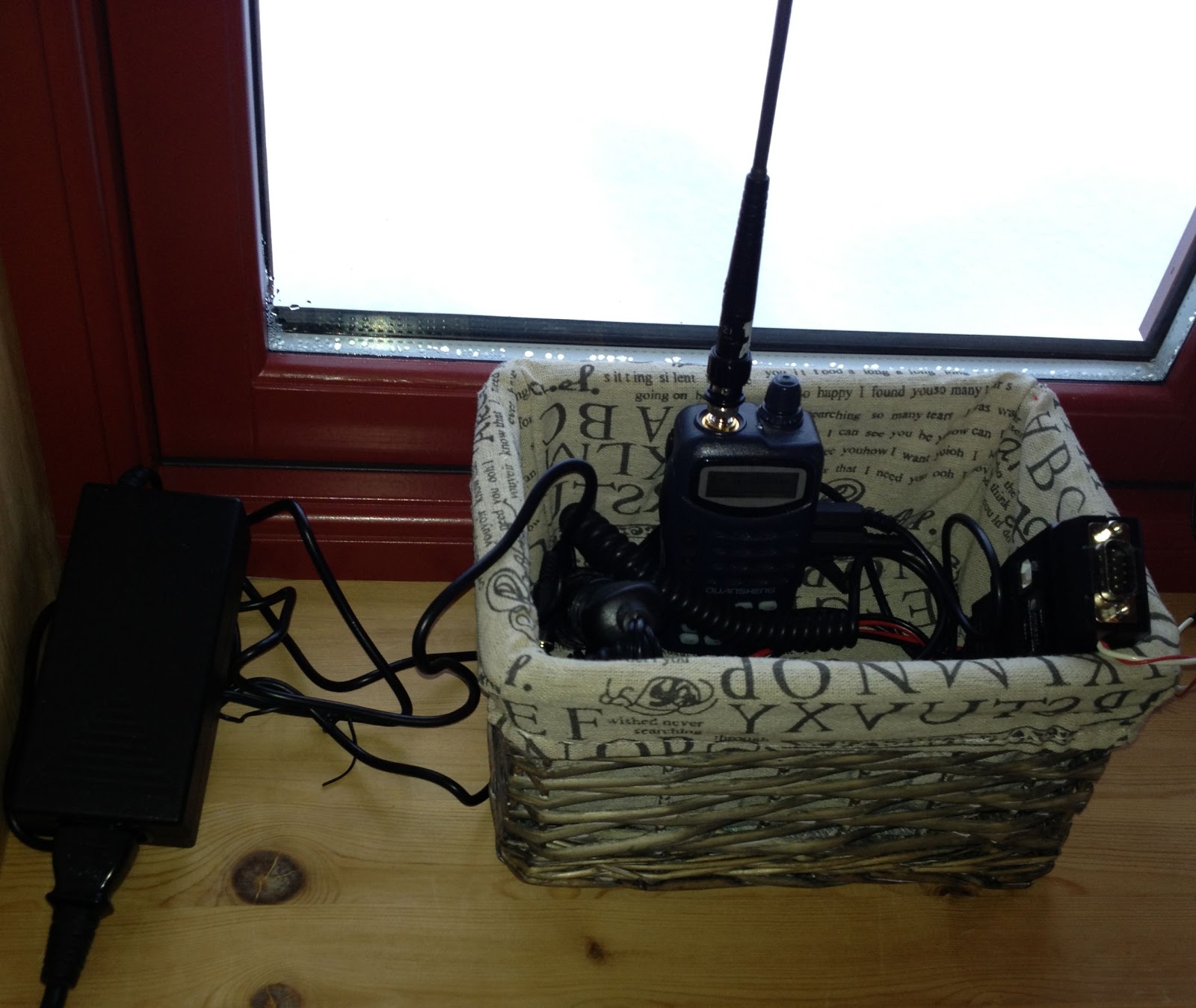
I use a Quanzheng TG-25AT handheld with a quarter-wave whip antenna on 144.800 MHz. Its signals reach the LD3GT digipeater at 1845 m above sea level. Although I don’t have direct line of sight, the low power (1 Watt) setting is adequate as the distance is only 10 km. The APRS-beacon is an OpenTracker USB set up for transmission every 15 minutes. An external DS18S20 temperature sensor which measures the outside temperature is connected to the 1-Wire® bus of the OpenTracker USB.
Thanks to the infrastructure providers: The Tønsberg group of NRRL (LA1T) who operate the LD3GT digipeater, probably the one with the largest coverage in Southern Norway (Gaustadtoppen). Thanks also to the various operators who receive packets from LD3GT and pass them on to the internet, and thanks to aprs.fi for processing and displaying the data on their excellent web site!
Altoids Projects
 |
| Press image for magnification |
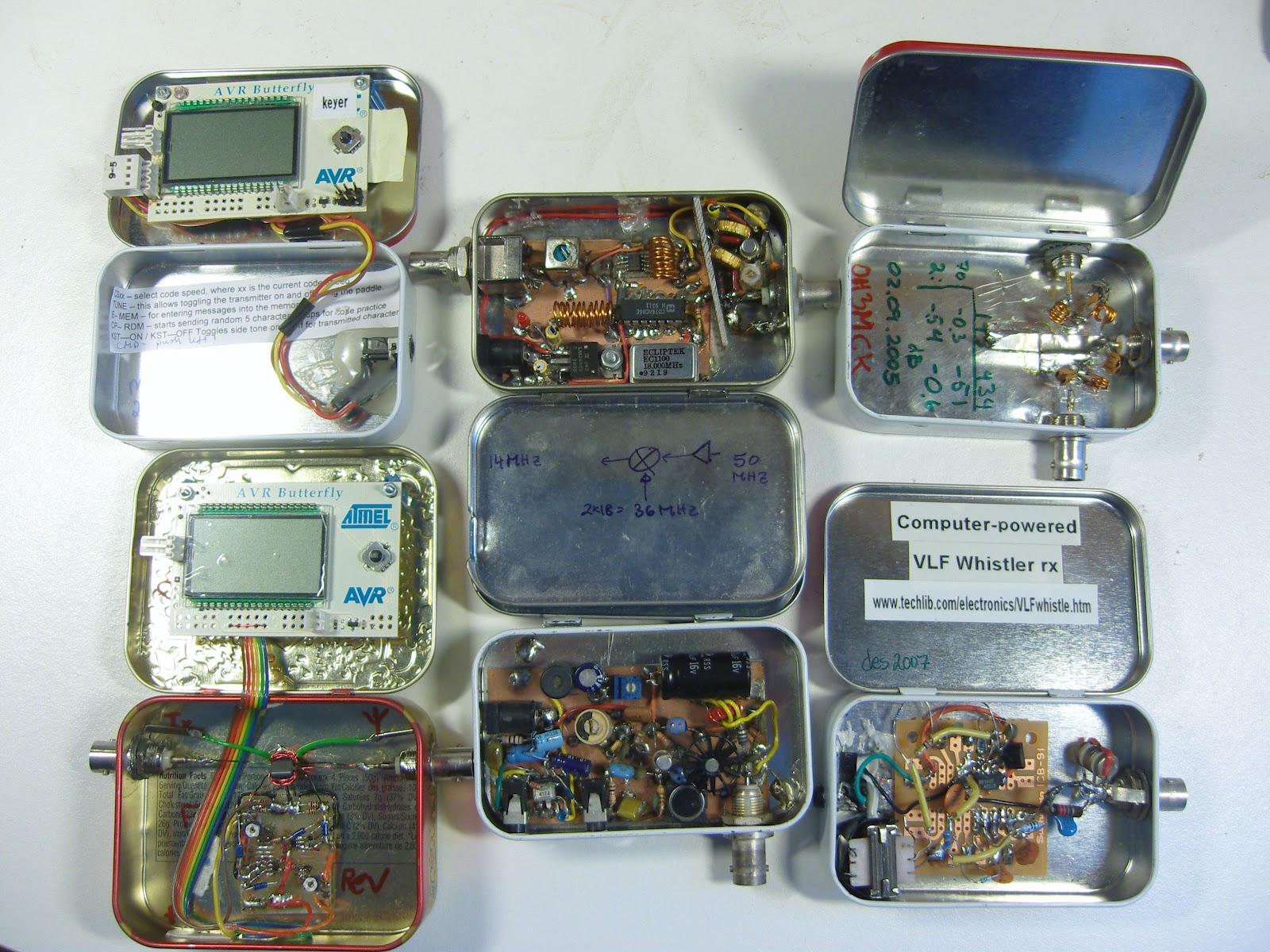
I like to build small electronics projects and like many others I have found the small Altoids tins to be excellent enclosures.
These tins are inexpensive, well shielded, easy to work with, and least but not least they enable you to make experimental circuits that are sturdy enough that they can be reused later.
Pictured here is a collection of projects I have built over the years with the hope that they may inspire others.
To the left:
- AVR Butterfly morse keyer (KD1JV)
- AVR Butterfly Digital SWR / Power Meter for low power transmitters (KD1JV). Actually this project was built in the slightly larger Whitman’s tin.
In the middle:
- 50 MHz to 14 MHz receive converter (WA3ENK) with a low-noise preamplifier
- Pixie II QRPP transceiver for 30 m
To the right:
 |
| Press image for magnification |
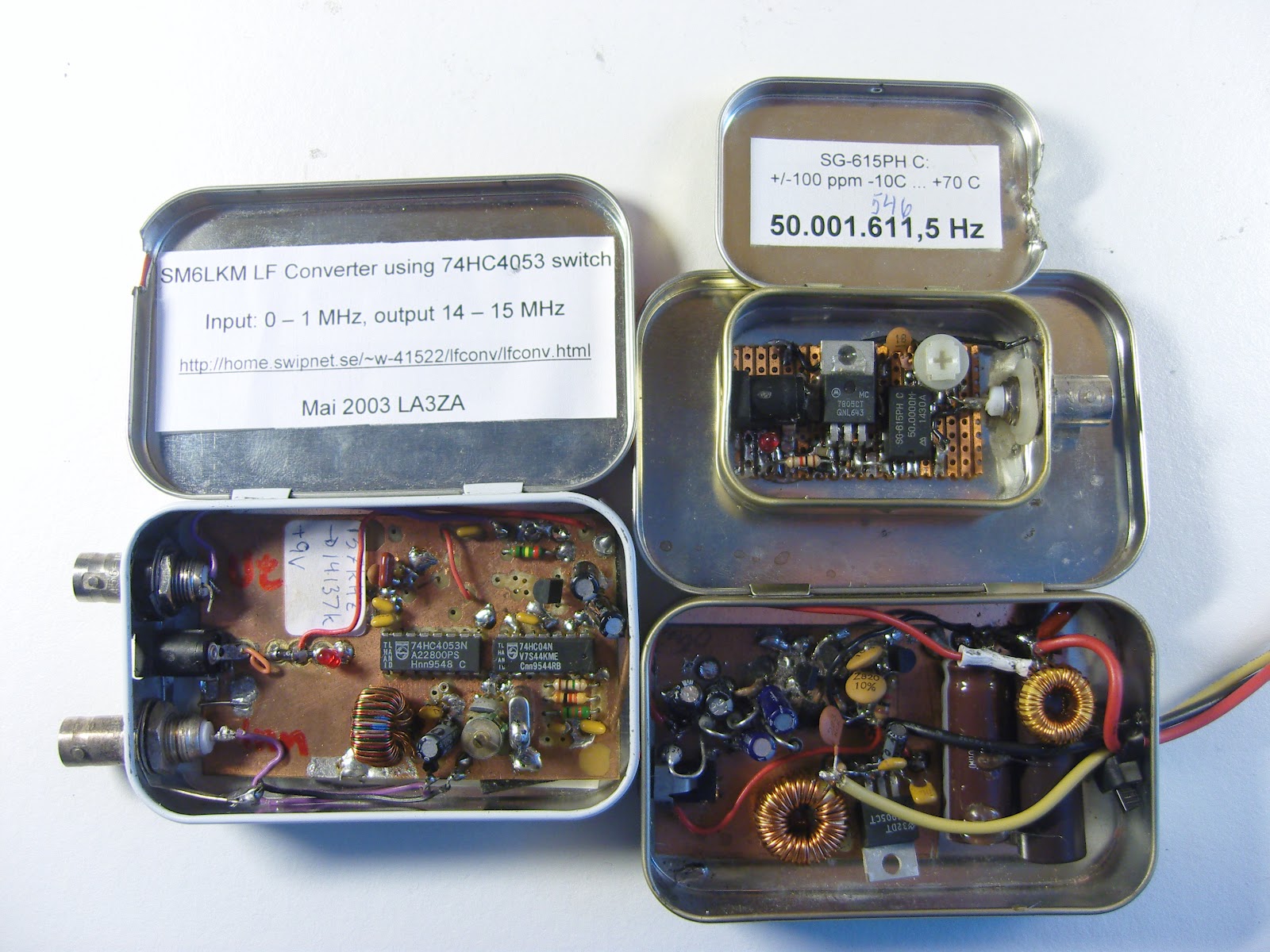
In the next picture there are some more projects:
- SM6LKM’s 4053 HCMOS converter from 137 kHz to 20 meter band.
- A 50 MHz test oscillator for testing 6 m receivers
- A switch mode power supply that converts 15 Volts into 4.5 and 30 Volts for a WWII miniature Sweetheartshortwave receiver. Design inspired by SM0VPO/G4VVJ’s practical voltage converter.
Here are some resources with tips:
- Maxim Tutorial 946: Disposable Metal Boxes Make Excellent Shielded Enclosures (via Dangerous Prototypes)
- Getting Started – Top 10 Small and Fun Electronics Projects – DIY Electronics
- Curiously Hackable: 8 Awesome Altoids Tin Hacks
- Altoids tin prototyping board (Make blog)
Added 17. September: Several of the comments on the page at Dangerous Prototypes are concerned with the difficulty of finding Altoids tins in many places of the world. That goes for Norway also. I have been lucky enough to have a job that allows me to travel to the US from time to time and then I have bought some. Ideas for local alternatives are needed!













