Posts Tagged ‘Operating’
 News: Olivia Digital Modes on HF
 July 25th, 2026 |
 Author:
Greetings Olivia and digital mode operators,
GREAT NEWS! WEBSITE UPDATE!
Here are the big three new features:

Live spotting is now available!
- Live Olivia spotting. Just like on POTA and other sites, this is a live show and tell of your activity either by self spotting, or spotting stations you copy. Dedicated live spot page, you can view even on a cell phone.
We are excited to announce a major new feature now live on OliviaDigitalMode.org: an interactive Live Station Spotting tool designed specifically for our digital HF community. Inspired by popular spotting platforms like DXWatch and POTA.app, this system makes it easier than ever to see who is active on the bands, find open Olivia QSOs, and share your own station reports in real time.
Come Join the Live Spotting of Olivia Digital Mode
Whether you are hunting for a contact or tracking band openings across different bandwidths and tone counts, the new spotting tool brings several powerful capabilities straight to your browser:
- Real-Time Live Feed: The spotting page automatically refreshes every 15 seconds, ensuring you always see the latest on-air activity without needing to manually refresh the page.
- Smart Spot Grouping: When multiple operators spot the same station, the system automatically groups those reports together into a single clean line. Instead of duplicate entries cluttering your view, you will see the station, frequency, mode, and a list of all operators who spotted them.
- Timeframe Visual Highlighting: You can easily filter for fresh activity. By selecting a window of 5 minutes, 15 minutes, 30 minutes, or 1 hour, brand-new spots are visually highlighted so you can jump on active signals immediately.
- Flexible Display Options: On the dedicated spotting page, you can choose how many spots to display at once (from 10 up to 250 rows) and toggle between a grouped callsign layout or a detailed chronological log.
- At-a-Glance Homepage Widget: A lightweight summary widget on the main homepage shows the top 5 to 10 most recent spots the moment you arrive on the site.
- Fast Performance and Historical Archives: Active spots stay on the main board for 12 hours to keep queries ultra-fast. After 12 hours, spots automatically move to a historical archive where they remain available for band activity research and propagation analysis.
To keep the spotting board reliable and free of spam, posting new spots will require a simple, free operator account. When you register, you will just need to include a short note for the site administrators to verify your callsign and approve your posting access. Once approved, you can log in anytime and share spots whenever you are on the air.
- Live Calendar of Olivia Events. I have now put live the active calendar functionality on the site, and seeded it with possible calendar events. I will start planning our upcoming events – which require YOUR input on such things as, monthly sprints, special events that you want to do, and, our quarterly QSO parties.
- Feedback form. This is a community website. Now, you can leave feedback; what would you like on the website. What should be different? What is not working? What is working? Please leave us feedback.
Come be a part of this conversational digital mode!
Echoes of CW: A Signal Corps Tribute to Virginia L. Scott and the WAVES of WWII
Looking at this historic photograph brings back a flood of memories from my own time in the Signal Corps. It shows WAVE operator Virginia L. Scott in March 1943, sitting in the Code Room of the U.S. Navy Radio School in Madison, Wisconsin.
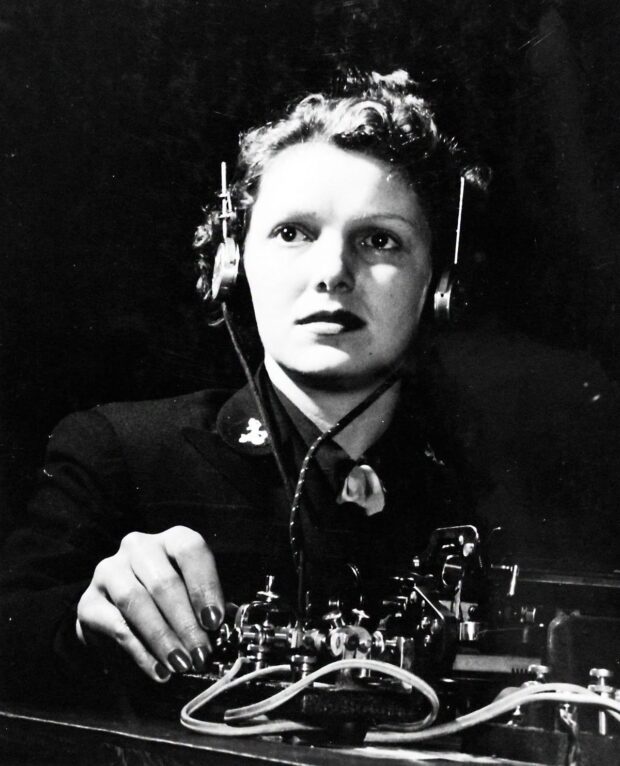
WAVE operator Virginia L. Scott in March 1943, sitting in the Code Room of the U.S. Navy Radio School in Madison, Wisconsin.
The photograph, catalogued in the National Archives as 80-G-431533, captures an ordinary phase of the highly technical work carried out by the WAVES during the Second World War. Seeing her at that workstation with her telegraph key, headphones, and operating table under the glare of direct lighting, I can almost hear the familiar rhythm of CW ringing in my own ears. It is a language of its own, and as an amateur radio operator who loves sending and receiving Morse code, I know exactly the kind of deep focus she is holding in that frame.
During World War II, the Women Accepted for Volunteer Emergency Service stepped up to fill critical roles so that men could be sent to combat zones. Virginia Scott was part of that groundbreaking wave of female personnel who took on demanding technical jobs in the Navy. As someone who has served in military communications, I have immense respect for the structured training and standardized procedures these women had to master.
Radiotelegraphy was the primary transmission tool of the era, the absolute lifeline of naval operations across vast and unforgiving oceans. Long before digital uplinks, it was the sheer skill of the operator that pushed the message through the static.
Her hand rests on that bug key in a way any seasoned Morse code operator would recognize immediately. Sending messages via CW is an art form that requires strict physical and mental discipline. You have to maintain a fluid, consistent rhythm so the operator on the other end, perhaps dealing with heavy interference on a ship thousands of miles away, can copy the signal without error. Scott is entirely focused on executing her message while maintaining the standard posture required by her training. It reminds me so much of the pride we took in the Signal Corps, ensuring every dit and dah was sent with perfect clarity. Dealing with secure information meant there was absolutely no room for sloppy sending.
This specific photograph was originally taken by the U.S. Navy for internal use, but it captured something so profound that painter John Philip Falter used it as a direct reference for a Navy recruitment poster. His painting faithfully reproduced the layout of the scene, turning a moment of routine operational work into a powerful piece of public communication. For anyone involved in the history of communications, and certainly for a fellow CW enthusiast like me, this photo represents a concrete example of how vital these women were. They kept the frequencies alive and proved that the steady hand of a skilled operator was an essential weapon in winning the war.
Here is one of the paintings based on this photograph, and served as a recruitment poster for the WAVES program.

This “It’s a Woman’s War Too! Join the WAVES” poster by John Falter was produced around 1942 as a World War II recruitment tool for the United States Naval Reserve.
This “It’s a Woman’s War Too! Join the WAVES” poster by John Falter was produced around 1942 as a World War II recruitment tool for the United States Naval Reserve. The WAVES (Women Accepted for Volunteer Emergency Service) was established in July 1942, allowing women to serve in the Navy in non-combat roles, such as radio operators and clerical staff. Artist John Philip Falter was a well-known American painter who created numerous propaganda posters and Saturday Evening Post covers, often featuring realistic portraits.
A Pileup? What It Is And How To Work One
Welcome to the chaotic, thrilling world of the HF pileup. Whether you are the one calling CQ from a park in Nebraska or the one hunting a rare DX station, success relies on rhythm, frequency management, and a deep understanding of human behavior.
Here is a proper look at how a pileup appears on a modern display, followed by a complete guide on how to survive it.

A “pileup” on shortwave amateur radio frequencies. The main station is at the low frequency, and stays put. The hunters spread out, above, and call on a single frequency somewhere in the calling window of frequencies (I.e., up five to ten).
Over my decades of working Morse code (CW on amateur radio), I have learned a few critical things about how to navigate the chaotic, thrilling world of the HF pileup. When a rare station or a Parks On The Air (POTA) activator goes on the air, dozens or even hundreds of operators might try to make contact at the exact same time. Working a pileup is an art that takes time to master. Whether you are the one calling CQ from a park in Nebraska or the one hunting a rare DX station, success relies on rhythm, frequency management, and a deep understanding of human behavior.
One of the most important strategies is to determine the operating style of the DX station, specifically discerning how that operator scans the pileup for the next station to work. With modern waterfall displays, that process is MUCH easier. As an example, I worked the Temotu DXpedition (H40RH) that had just started a few hours prior to my attempt. I broke through with only five calls into the pileup, and it took me a mere 60 seconds to call and get an answer. Of course, I first listened and watched the waterfall for about five minutes to get a hang of the operating style of H40RH. This was on 10 Meters where 28.026 MHz was the DX frequency. We callers spread out five to 15 kHz UP in frequency from the DX station because we never want to cover up the DX station with our own signals. Even with a long carrier of intentional interference visible on the waterfall, the visual aid of the SDR made the catch possible. Temotu was a new country for my DXCC, so I am incredibly pleased to have made the contact!
When You Are the Hunted (The Activator)
A Guide To Survive The Pileup
When you are the station that everyone wants in their logbook, you are the conductor of the orchestra. If the pileup senses hesitation, chaos ensues. You must dictate the pace, for both CW and SSB operations.
Controlling the Pileup on CW
Establish a Predictable Rhythm: Your CQ, your exchange, and your QRZ should follow a strict pattern. Consistency allows hunters to time their calls perfectly. If you change your cadence, the pileup gets messy.
Run Split for Large Piles: If the pileup merges into a single continuous drone, go split immediately. You might send “UP 1” to tell callers to transmit one kilohertz above your listening frequency. This spreads the callers out. Send your “UP” frequently enough that the self-appointed pileup police do not take over your transmit frequency. I suggest sending “UP” after each successful logged contact (QSO).
Own the Partials: If you only pull “NW7” out of the noise, send “NW7?”. Do not send “QRZ?” immediately. Stick to that partial call until that specific station finishes the exchange. If they fade out, clearly send “QRZ?” to reset the pile.
Adjust Speed to Control Volume: A slight speed increase (bumping up 3 to 5 WPM) will naturally thin the pileup down to the more experienced operators. Dropping your speed will invite the newer operators back in.
Receiver Management: Back off your RF gain and use a wider filter than you might expect (around 400 to 500 Hz). A filter that is too narrow will cause you to miss the operators who are smartly calling slightly off-frequency.
Controlling the Pileup on SSB
Command with Your Voice: Speak clearly and maintain a steady, authoritative tone. Avoid shouting. Just like in CW, a predictable rhythm helps callers know exactly when to key their microphones.
Use Standard Phonetics: Stick strictly to the standard NATO phonetic alphabet (Alpha, Bravo, Charlie). Cute or custom phonetics confuse operators who do not speak English as their first language.
Acknowledge and Isolate: When multiple voices blur together, listen for the last phonetic letter you can understand. If you hear “Sierra,” say “The station ending in Sierra, go ahead.” Ignore everyone else until that station completes the contact.

My POTA / Portable HF station (a low-power, or, QRP, station).
When You Are the Hunter (The Chaser)
When you are trying to break through a massive wall of sound, raw output power is secondary to timing and sharp observation.
Breaking the Pileup on CW
Listen First, Key Second: Before touching the paddle, listen to three or four complete exchanges. If the activator is working split, figure out their pattern. Are they tuning from the bottom up? Top down? Find where they listened last, and place your transmit frequency just above it.
Use XIT (The Golden Rule): Never perfectly zero-beat the DX station if others are calling. To the activator, three zero-beat stations merge into a single tone. Use your Transmitter Incremental Tuning (XIT) to shift your transmit frequency by 30 to 50 Hz. This slight difference in pitch makes your signal pop out of the receiver passband.
Time the Tail-End: Wait for the massive wall of sound to begin fading, and send your call exactly as the main group finishes. A perfectly timed tail-end call lets your suffix ring out in the clear.
Send Once: When the DX sends “QRZ?”, send your callsign exactly once and listen. Sending your call multiple times just causes interference and slows down the entire operation.
Follow Instructions: If the DX sends “NW7?”, and that is not you, keep your hand off the key. Transmitting over the station they are trying to work only prolongs the pileup for everyone.
Breaking the Pileup on SSB
Study the Cadence: Just like with Morse code, listen to the activator to find the rhythm. Wait for the exact moment the activator stops speaking before you key up.
Drop Your Call and Wait: Say your full callsign once using standard phonetics, then unkey and listen. If you are tail-ending, you might just drop the last two letters of your callsign precisely as the noise floor drops.
Adjust Your Pitch: If you have equalization controls on your radio, boost the mid-to-high frequencies on your microphone audio. A slightly punchy and higher-pitched voice will cut through the bass-heavy rumble of a dozen other stations calling at once.
Working a pileup tests your patience and your ear. Whether you are tapping out Morse code or speaking into a microphone, the operator who listens more than they transmit almost always makes the contact first.
Propagation and the Pile-Up
As many of you know, I was the space weather and radio propagation columnist in CQ Amateur Radio Magazine from 2001 through its demise. I strongly advocate for all HF radio operators to understand the basics of radio wave propagation on shortwave frequencies. There are a lot of myths and frankly, horrific theories on how radio waves propagate.
Understanding how the ionosphere refracts radio waves is a crucial tactical advantage. The behavior of a pile-up changes dramatically based on the frequency band you choose and the current mood of our sun.
The Sun Dictates the Rules
The ionosphere is charged by solar radiation. When solar activity is high, higher frequencies become usable for long distances.
Solar Flux Index: The SFI is a great indicator of overall ionization. A higher SFI means better conditions for the higher HF bands. When the SFI climbs, bands like 15, 12, and 10 meters open up globally.
Geomagnetic Storms: Measured by the K-index, these storms can disrupt communications entirely. A high K-index often absorbs signals crossing the polar regions. This can suddenly mute a massive European pile-up for North American operators.
Fading: The ionosphere is always shifting. Signals will constantly rise and fall in strength, which is known as QSB. A smart chaser listens for the rhythm of this fade and throws their callsign into the pile-up exactly when the band peaks for their specific location.
How Bands Shape the Pile-Up
Every amateur radio band has its own personality. The pile-ups you encounter will reflect these differences perfectly.
10, 12, and 15 Meters: These high bands are daytime frequencies that thrive on high solar activity. When 10 meters opens up, signals can be astonishingly loud with very low atmospheric noise. Pile-ups here can ignite suddenly and stretch very wide across the frequency spectrum.
20 Meters: This is the traditional workhorse band for global communication. Pile-ups on 20 meters are massive, sustained, and densely packed. You will often compete with high-power stations and massive beam antennas on this frequency day or night.
40 and 80 Meters: These low bands come alive at night. They are heavily affected by atmospheric noise and static crashes. Breaking a pile-up here requires an exceptionally well-tuned ear and the ability to pull faint CW tones or muffled voices out of a very high noise floor.
The Skip Zone Effect

The propagation of radio waves.
One of the most confusing aspects of a pile-up for a new operator is the skip zone. Radio waves bounce off the ionosphere and return to earth far away, which means they skip right over the geographic areas in between. You might hear the DX station perfectly, but you might not hear the hundreds of other operators calling them because those callers are inside your skip zone. This phenomenon is exactly why you must rely on the DX station’s cadence rather than waiting to hear the pile-up clear.
While raw power is often cited as the key to breaking a pile-up, your antenna system plays a far more decisive role in your overall effectiveness. A directional antenna, like a Yagi or a hexbeam, not only focuses your transmitted energy directly toward the DX station but also actively rejects interfering signals from other directions. However, do not be discouraged if you are running a simple wire antenna. A well-placed dipole or end-fed half-wave can still break monumental pile-ups if you leverage good timing, exploit the skip zone, and listen closely to the DX operator. Ultimately, the best antenna in the world cannot compensate for poor operating habits.
Over to You
Working a pile-up is one of the most rewarding challenges in amateur radio. It tests your patience, refines your ear, and forces you to understand both the science of radio wave propagation and the psychology of your fellow operators. Every massive wall of sound is a puzzle waiting to be solved.
Now, I would love to hear from you. What was your most memorable pile-up experience? Do you have a specific tactic that consistently helps you break through the noise, or perhaps a frustrating moment that taught you a valuable lesson? Drop your stories and questions in the comments below, and let us keep the conversation going.
From my shack to yours, 73 de NW7US.
The Art of DX Pileup Busting
SOME INFORMAL THOUGHTS ON WORKING CW DX
Recently, I came across some questions another amateur radio operator posed to a group of CW enthusiasts. Since I have an interest in Morse code, I thought I would explore these questions:
— begin quote —
1. When chasing some particular CW DX station needed for my DXCC punch-list, what are some things(s) that one can do to improve one’s chances of snagging that DX contact amidst a congested pileup? Is it truly the luck of the draw or roll of the dice? Or are there some time tested methods, less than obvious, that the experienced CW DX chasers have used that seem to improve one’s chances of snagging the DX contact? Yes, I’m aware that there are many variables to consider. I’m just looking for some general suggestions to improve my odds of success based on the experience of others.
2. If, let’s say, a DX station appends “UP 1” or “QSX 2” to his CQ call or just “UP” appears in a DX cluster spot listing, what is considered an acceptable amount of “UP”? I’m amazed sometimes at the amount of “UP” that I hear. LOL. Does a hefty amount of “UP” actually improve one’s chances? What does the DX op expect?
3. After a DX station sends their callsign how long should one wait to reply with one’s callsign? I hear stations respond immediately. But sometimes I hear others wait just a “bit”, and then respond to DX. And sometimes when the DX station is responding to a chosen station, other callers are STILL calling the DX op. What do most DX operators expect with regard to the response of a reply? Immediate? One-Mississippi …?
4. I hear stations reply to DX with their callsign once. Others sometimes twice. If I send my callsign twice I run the risk that the DX station has already begun his reply back to me with my sig-report while I’m still in the midst of sending my 2nd callsign reply. So … I should send my call just once?
— end quote–
Great questions! And, the answers translate over to working DX pileups on voice, too.

Here are some of my off-the-cuff remarks, based on my limited experience DXing since 1990:
(I am an avid DXer, with 8BDXCC, etc.)
1. Listen, Listen, Listen: The DX station typically does work split – the DX station on, say, 14.023 MHz, and the DX station is listening anywhere from 14.028 to 14.033 (up 5 to 10). You first, of course, need to listen to the DX station, but, also to hear the stations that are calling the DX station! The trick is to be able to hear some of the stations that are piling up on the DX, and to determine if the DX is working a station, then tunes up a little, or down a little, from the frequency on which the last caller was chosen.
Once you know this, you want to position your signal so that the DX operator tunes to or very near where you are transmitting your signal. If the DX station does not call you but continues in the same tuning direction, you reposition your transmit frequency (always in the pileup window) and try again. If you do not know where the DX station is listening next, and especially if you cannot HEAR the DX station, you are calling blind and are in for a long effort.
If you have a way to see the waterfall at and around the DX frequency, you can often see the general spread of “UP” where the callers congregate. When listening (and, let me tell you, listening is key) to the DX station, watch the waterfall for the responding caller (the station in the pile-up calling the DX), as sometimes it is very obvious who is answering the DX. Watch this exchange for a number of new callers – and get a sense of HOW the DX operator is moving through the pile-up. Anticipate where the DX might listen next. Choose that “next frequency in the pattern of movement” and use that as your calling frequency.
2. Timing your call: this takes a bit of effort. I typically listen to my chosen transmit frequency, trying to call never at the exact same time as others, on or near my calling frequency.
3. I always send my callsign TWICE… something like this:
DX: DX1ABC UP
ME: NW7US NW7US
DX: NW7US 5NN
ME: R R NW7US 5NN TU
DX: NW7US TU, DX1ABC UP
There are some fine CW-oriented DXing books, PDFs, and websites that talk about this. For instance:
http://sota-dl.bplaced.net/articles/cw_chasing_tips_for_newcomers.pdf
https://www.cadxa.org/getting-started-in-dxing.html
I hope this personal observation of mine about working a Morse code pileup is helpful in some way.
73 de NW7US
https://NW7US.us
..
What Headphones Do You Use, And Why?
What headphones do you use for your radio operation, and WHY do you use that particular make and model?

I use Audio-Technica ATH M30x professional monitor headphones (cans).
https://www.audio-technica.com/en-gb/ath-m30x

Audio-Technica ATH-M30x Professional Monitoring Headphones
I use my rig’s filters to shape the audio.
1. I’ve replaced the over-the-ear pads with Gel pads. Wearing these cans is comfortable enough to use for extended periods of time (such as contests).
2. The mid-range with these cans is superior to other cans I’ve had.
3. They are rugged, so taking them out to the field isn’t a problem.
73 de NW7US dit dit
..
Where’s My WAZ Certificate?
Guess what! Today, I received (by postal service) this very nice plaque from CQ, for working and confirming all 40 of the worldwide CQ DX Zones.

CQ WAZ NW7US – Mixed – Plaque
Many of you wonder, “where are my paper certificates for my WAZ efforts?”
At least one, if not all of the following, are reasons why there has been such a long delay in getting paper certificates for the WAZ CQ program:
- Paper certificates (blanks) were not available and backordered (Covid, folks).
- There is only ONE person doing the lettering (by hand).
- The advent of FT8 and FT4 in the WAZ program has SWAMPED the program. There’s a HUGE backlog.
That said, the new CQ WAZ Manager (N4BAA, JOSE CASTILLO) has made the following statement available:
— quote follows —
Effective September 1, 2022, CQ Magazine will no longer provide the Hand Lettered CQ WAZ paper certificate for free.
CQ WAZ AWARD RECIPIENTS HAVE 4 AWARD OPTIONS:
- Accept the standard award offering which is a High-Definition PDF file. This file can be printed in color and framed and is very nice. This award is delivered immediately with award letter, thus, no waiting.
- Select the traditional CQ WAZ Hand-Lettered award: the cost is $19.00 and includes shipping worldwide. This award option is managed by CQ Magazine and can take up to 180 days to receive.
- Select a Level I plaque: 7” x 9” two-tone engraved wood plaque: cost is $57 US / $100 International and includes shipping. Delivery time is under 30 days for US stations and less than 60 days internationally.
- Select a Level II plaque: 9” x 12” Floating Etched Acrylic over Black Wood: cost is $91 US / $135 International. and includes shipping.
Here is a video that the administrator has posted, about this:
[embedyt] https://www.youtube.com/watch?v=JFJBbZ0yb3c[/embedyt]
Delivery time is roughly 30 days for US stations and less than 60 days internationally depending on the actual address.
The intent of this program is to respond to the ever-increasing demand for more options that are still very personalized as well as very elegant.
Not every ham is able to achieve the requirements for a 5BWAZ or 160 Meter plaque, so he is making this offering to everyone!
All questions or inquiries and plaque orders should be directed to the CQ WAZ Manager via email at [email protected] or postal mail via QRZ.com address.
All plaque data will be taken directly from the information provided in your email. The CQ WAZ manager will not be responsible for errors in data supplied by the recipient other than AWARD type and Award number.
To Place Order: send the information below via email to [email protected] or via postal mail to my QRZ.com address and please double-check spelling etc.
Email Subject line should be: “WAZ PLAQUE ORDER – YOUR CALL”
Then, provide the following information:
Call Sign:
Desired Name on Plaque:
WAZ AWARD Type
(example: MIXED, RTTY, 15M CW, EME, etc.)
SERIAL NUMBER on award:
Date on Award:
Award Desired:
– Level 1 plaque – $57 US / $100 International
– Level 2 plaque – $91 US / $135 International
There you have it…
73 de NW7US dit dit
Interested in Amateur Radio Digital Mode FT8 Operations?
A VISUAL + AUDIO AIR CHECK OF DIGITAL MODE FT8 QSOs, ON THE 30-METER BAND
Here is a video capture of the reception and transmission of many digital FT8-mode amateur radio high-frequency (HF; Shortwave) communication signals. This video is a front-seat view of the software operation performed at the radio room of amateur radio operator, NW7US, Tomas Hood.
The software packages demonstrated are installed and operational on a modern personal computer. The computer is connected to an Icom IC-7610 radio transceiver, controlled by the software. While there is no narration in the video, the video provides an opportunity for you to see first-hand how typical FT8 operations are performed. The signals can be heard.
[embedyt] https://www.youtube.com/watch?v=VROGz-x9NyE[/embedyt]
The frequency used for the FT8 communication in this video is on or about 10.136 MHz, in the 30-Meter shortwave amateur radio allocation (or, band). As can be seen, the 30-Meter band was active at this time of day (0720 UTC, onward–local nighttime).
In this video you see (and hear) NW7US make two-way contacts, or QSOs, with stations from around the country and the world.
There are amateur radio operators within the amateur radio community who regard the FT8 digital mode (FT8 stands for “Franke-Taylor design, 8-FSK modulation“, and refers to the mode created by Joe Taylor, K1JT and Steve Franke, K9AN) as robotic (automatic, automated, and unattended) computer-to-computer communications, and not ‘true’ human communications–thus negating the spirit of ham radio. In other words, FT8, in their opinion, is not real amateur radio. While they pontificate about supposed automated computer communications, many of those holding this position have not installed and configured the software, nor tried communicating with the FT8 digital mode. They have perhaps formed their anti-FT8 opinion in a vacuum of knowledge. (This writer has other issues with FT8, but not on this point–see below)
As you watch the video linked in this article, consider these concepts:
+ A QSO is defined (as per common knowledge–see below) as the exchange of at least the minimum information needed as set by the requirements of a particular award, or, as is defined by law–for instance, a QSO would have at least an exchange of the legal call sign assigned to the radio station and/or control operator, the location of the station making the transmission, and a signal report of some kind about the signal received from the other transmitter at the other end of the QSO.
+ Just how much human involvement is required to make a full FT8 QSO? Does WSJT-X software run all by itself, with no human control? Is WSJT-X a robot, in the sense that it picks a frequency, then initiates or answers a CQ call automatically, or is it just powerful digital-mode software that still requires human control?
The video was captured from the screen of the PC running the following software packages interacting together as a system:
+ WSJT-X: The primary software featuring the digital mode, FT8. (See below for some background on WSJT-X software.)
+ JTAlert: Provides several audio and visual alert types based on decoded Callsigns within WSJT-X.
+ Log4OM, Version 2: A full-featured logging program, which integrates well with WSJT-X and JTAlert.
+ Win4IcomSuite: A full-featured radio controlling program which can remote control rigs, and provide control through virtual communication port-sharing.
+ Com0Com: The Null-modem emulator allows you to create an unlimited number of virtual COM port pairs and use any pair to connect one COM port based application to another. Each COM port pair provides two COM ports. The output to one port is the input from other port and vice versa.
As mentioned, above, the radio used for the communication of FT8 at the station, NW7US, is an Icom IC-7610 transceiver. The antenna is an off-center fed dipole that is over 200 feet in total length (end-to-end measurement).
Some Notes:
About WSJT-X
WSJT-X is a computer program used for weak-signal radio communication between amateur radio operators, or used by Shortwave Radio Listeners (SWLers; SWL) interested in monitoring the FT8 digital communications between amateur radio operators. The program was initially written by Joe Taylor, K1JT with Steve Franke, K9AN, but is now open source and is developed by a small team. The digital signal processing techniques in WSJT-X make it substantially easier for amateur radio operators to employ esoteric propagation modes, such as high-speed meteor scatter and moonbounce.
WSJT-X implements communication protocols or “modes” called FST4, FST4W, FT4, FT8, JT4, JT9, JT65, Q65, MSK144, and WSPR, as well as one called Echo for detecting and measuring your own radio signals reflected from the Moon. These modes were all designed for making reliable, confirmed QSOs under extreme weak-signal conditions. JT4, JT9, and JT65 use nearly identical message structure and source encoding (the efficient compression of standard messages used for minimal QSOs). They use timed 60-second Transmit/Rreceive (T/R) sequences synchronized with UTC (Universal Time, Coordinated). JT4 and JT65 were designed for Earth-Moon-Earth communications (EME, or, moonbounce) on the Very-High Frequency (VHF), Ultra-High Frequency (UHF) and microwave bands. JT9 is optimized for the Medium-Frequency (MF) and High-Frequency (HF) bands. It is about 2 dB more sensitive than JT65 while using less than 10% of the bandwidth. Q65 offers submodes with a wide range of T/R sequence lengths and tone spacings.FT4 and FT8 are operationally similar but use T/R cycles only 7.5 and 15 seconds long, respectively. MSK144 is designed for Meteor Scatter on the VHF bands. These modes offer enhanced message formats with support for nonstandard call signs and some popular contests. (The MSK in MSK144 stands for, Multiple Frequency Shift Keying.)
FST4 and FST4W are designed particularly for the Low-Frequency (LF) and MF bands. On these bands, their fundamental sensitivities are better than other WSJT-X modes with the same sequence lengths, approaching the theoretical limits for their rates of information throughput. FST4 is optimized for two-way QSOs, while FST4W is for quasi-beacon transmissions of WSPR-style messages. FST4 and FST4W do not require the strict, independent time synchronization and phase locking of modes like EbNaut.
As described more fully on its own page, WSPR mode implements a protocol designed for probing potential propagation paths with low-power transmissions. WSPR is fully implemented within WSJT-X, including programmable band-hopping.
What is a QSO?
Under the title, CONTACTS, at the Sierra Foothills Amateur Radio Club’s 2014 Technician Class webpage, https://www.hsdivers.com/Ham/Mod15.html, they teach,
An amateur radio contact (called a QSO), is an exchange of info between two amateur radio stations. The exchange usually consists of an initial call (CQ = call to all stations). Then, a response from another amateur radio operator, and usually at least a signal report.
Contacts can be limited to just a minimal exchange of call signs & signal reports generally between amateurs previously unknown to each other. Very short contacts are usually done only during contests while longer, extended ‘rag chews’ may be between newly met friends with some common interest or someone you have known for a long time.
Wikipedia has an entry for QSO, too.
My Issue With FT8 and WSJT-X
I have written in the past, on this website, about an issue that came about during the course of the development of the WSJT-X software package. The development team decided to widen the slice of ‘default’ (pre-programmed) frequencies on which to operate FT8. The issue was how the choice of new frequencies was made, and what choices were implemented in an upcoming software release. Read more about all of this, in these three articles:
+ Land (er, FREQUENCY) Grab (Part 1)
+ One Aspect of Amateur Radio: Good Will Ambassadors to the World
+ In Response — Can’t We All Just Get Along?
Has this issue been resolved? For now, yes. There appears to be more coordination between interested groups, and the proposed new frequencies were removed from the software defaults in WSJT-X. At least, up to this point, at the time of publishing this article.
..