 |
 Gift ideas for Hams
 2 December 2014 | by
 You look lovingly into her eyes and say, "A 60 foot Rohn tower with a 3 element beam". And then you get THAT look - and you know instantly, in your heart of hearts, that your request has gone over like the proverbial lead balloon.
Or maybe the wife of your best Ham bud calls you and asks, "What can I get Jim for Hanukkah this year? And no, I'm not getting him a 60 foot tower and a 3 element beam". What do you say? Somehow, I don't think K3, or IC-7800 or FT-DX5000 would go over too well, either.
So, as we get closer to the gift giving season, I'll post some items that I come across that may help break the "What do I get for my favorite Ham?" log jam. My aim will be to keep to suggest gifts that won't break the gift giving budget while at the same time would be a gift that almost ANY Ham would enjoy receiving.
I came across this one this morning on Facebook (see- Facebook is actually good for something!). I thought this was unique, and I sure wouldn't mind having one of these hanging from my shack wall.
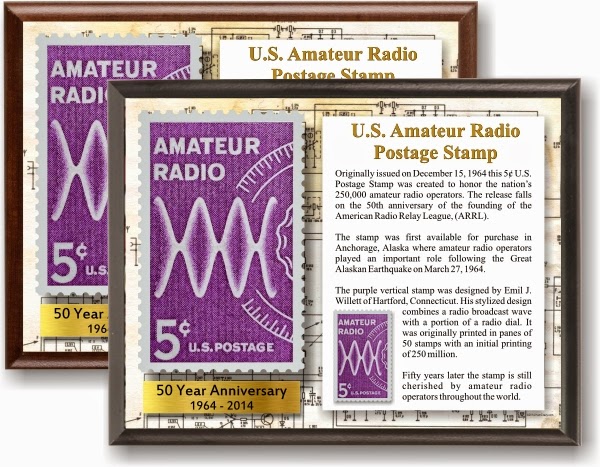
This is a little plaque commemorating the 50th anniversary of the ARRL postage stamp. It was issued by the United States government for two reasons - to celebrate the 50th anniversary of the ARRL, and in gratitude of all the valiant work performed by Hams during the Alaskan earthquake ans tsunami that occurred that year.
You can get this little beauty from Hamcrazy.com. It's reasonably priced and will not break the bank.
Suppose you are a CW aficionado, or perhaps your Ham bud is. The following is always a perennial favorite - the Morse Express Christmas Key.
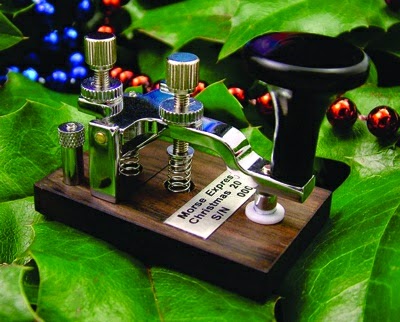
The above photo is the key being offered for 2014. These keys are small enough to be used as a Christmas Tree ornament, but yet are fully functional. One of my most favorite straight keys of all times is the 2004 Christmas Key which my lovely Marianne gave me that year. It has a fantastic feel to it and is perfect as a traveling portable QRP ops straight key.
Please note that I am in no way connected with any of the companies offering these fine wares. I receive no recompense and I have not even been asked to endorse any of these items. This is just W2LJ offering a public service to those of you out there who may be stymied by either of these two questions - "What can I give?" or "What would you like?".
To be continued as I come across neat stuff!
72 de Larry W2LJ
QRP - When you care to send the very least!
Larry Makoski, W2LJ, is a regular contributor to AmateurRadio.com and writes from New Jersey, USA. Contact him at [email protected].
Cycle 24….Still Teasing
 |
| Courtesy: http://www.noaa.gov/ |
With the solar flux index remaining relatively high over the past week, the F2 MUF has been spending most of the day in the mid 40MHz region. For 6m operators, it's always a good sign to see the MUF climb this high as it only takes a nudge to keep it climbing, hopefully to reach that magical 50MHz level.
The region between 10m and 6m is chalk-full of commercial two-way FM activity, particularly from 39MHz on up. With the skip zone running east-west, oftentimes the distinctive Boston accent or the unmistakable Bronx chatter can be heard...police, taxis, fire departments...sometimes even with sirens blazing away in the background. Other times, things will be further south, with accents favoring easily-recognized southern drawls.
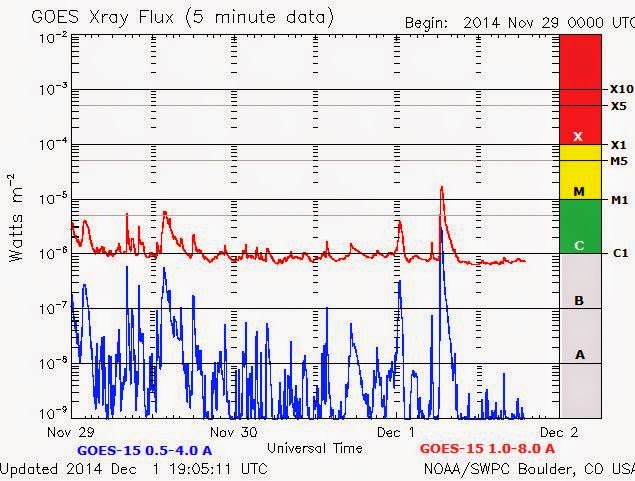
Early this morning at 0641Z, a small M1.8 flare added some extra fuel to the F2 fire, resulting in an unusually early-morning rise in the MUF.
 |
| Courtesy: http://www.solarham.net/xray2.htm |
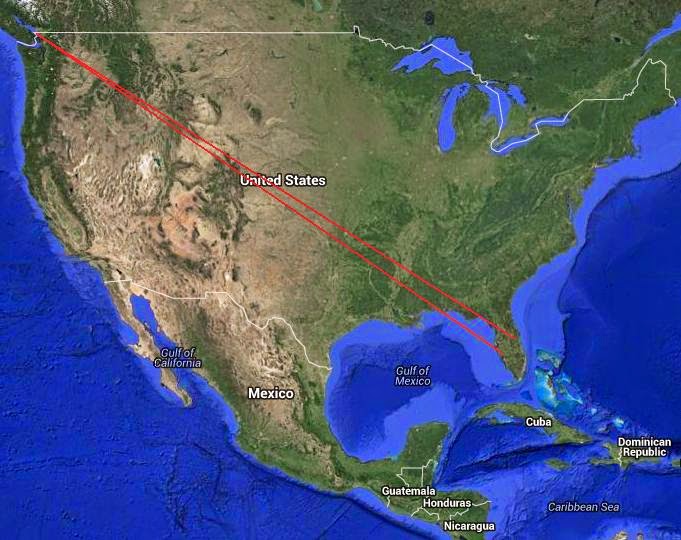
By 0900 local time, it was hovering around 46-47MHz when I started to hear the 22-watt W4CLM beacon near Atlanta, Georgia. Warming-up the transmitter and calling a few CQ's on 50.098, I was soon answered by Bob, N3LL, in EL86 on the west coast of Florida ....a nice single-hop (2600mile) F2 QSO. Another CQ brought KJ4E in EL98, to the northeast of Bob.
 |
| Courtesy: https://maps.google.com/ |
From here, things went south fast and for some reason, the normally slow climb halted as the MUF quickly retreated to the low 40MHz regions...it was all over.
The end of the opening can be clearly seen in the geomagnetic activity recorded at the Kiruna Magnetometer (Sweden). The circled area indicates the period of high MUF:
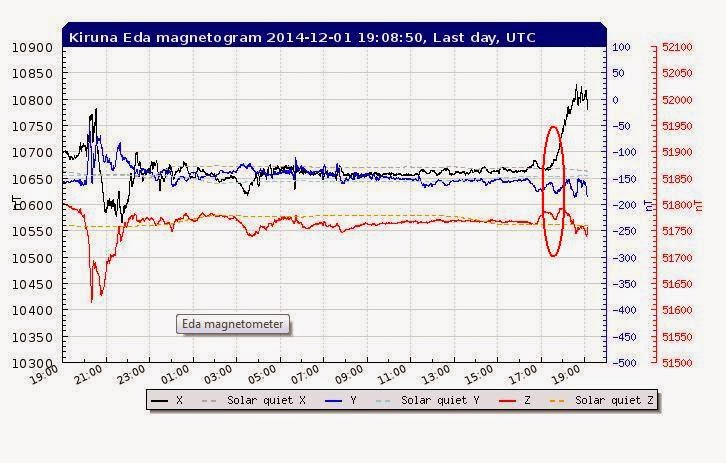
...but what started the sudden spike in the MUF today...was it the earlier flare or the suddenly south-going 'Bz' component of the Interplanetary Magnetic Field as seen about an hour earlier?
 |
| Courtesy: http://www.solarham.net/solarwind.htm |
I wonder what surprises tomorrow will bring?
Steve McDonald, VE7SL, is a regular contributor to AmateurRadio.com and writes from British Columbia, Canada. Contact him at [email protected].
CQ World wide CW contest and my station
 |
| You can see where the 15m band starts! |
 |
| 20m action Saturday afternoon |
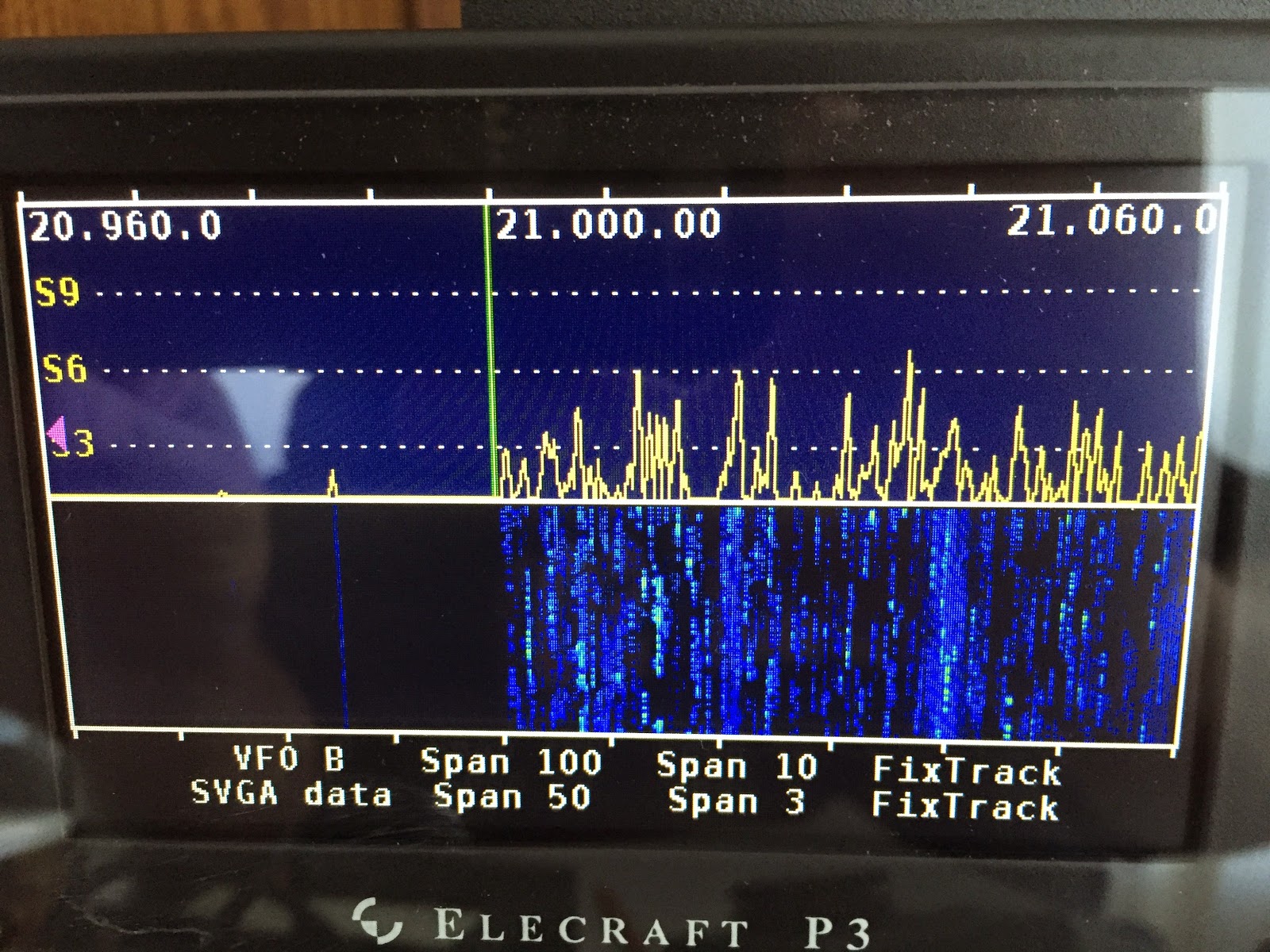
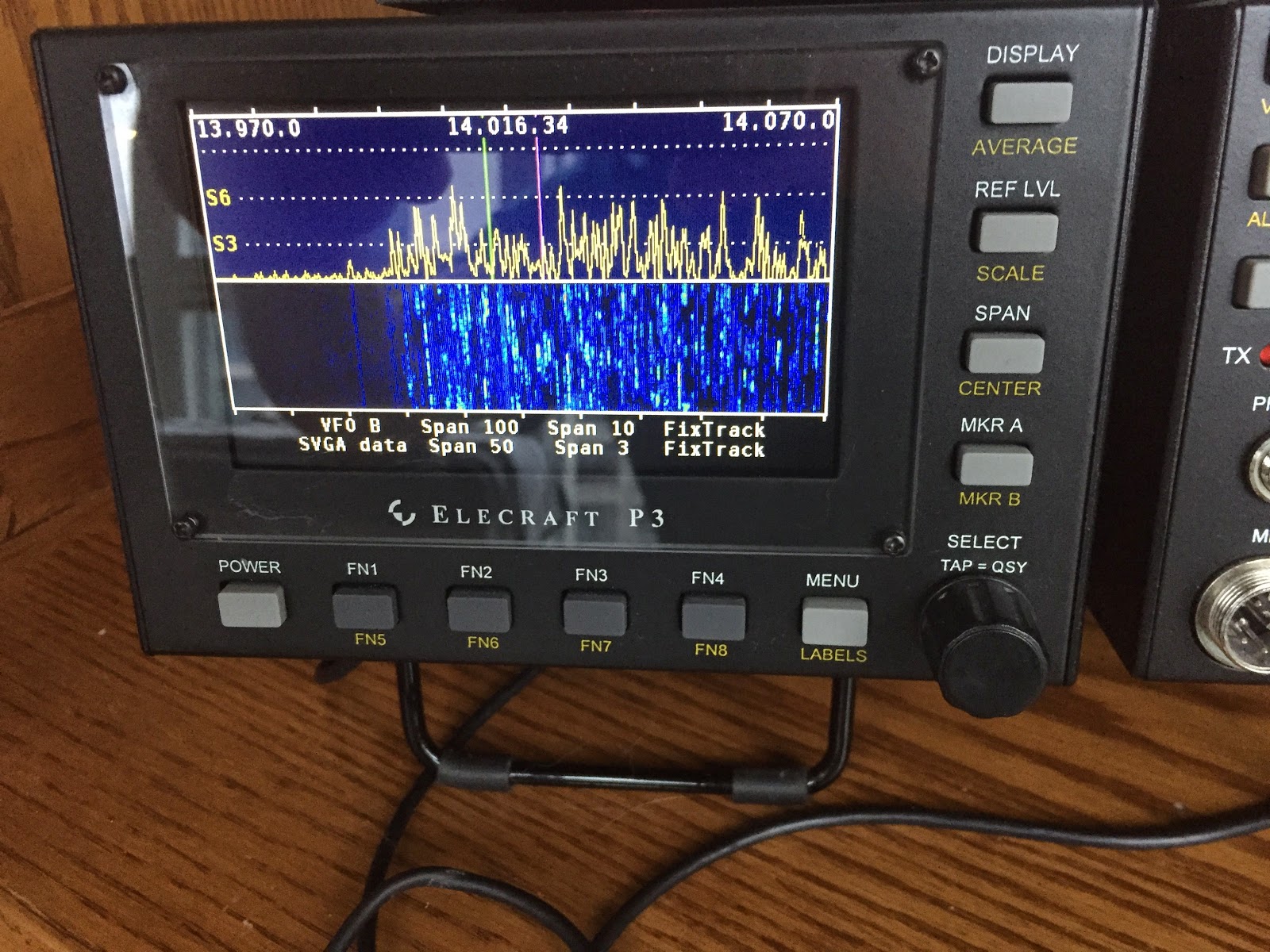
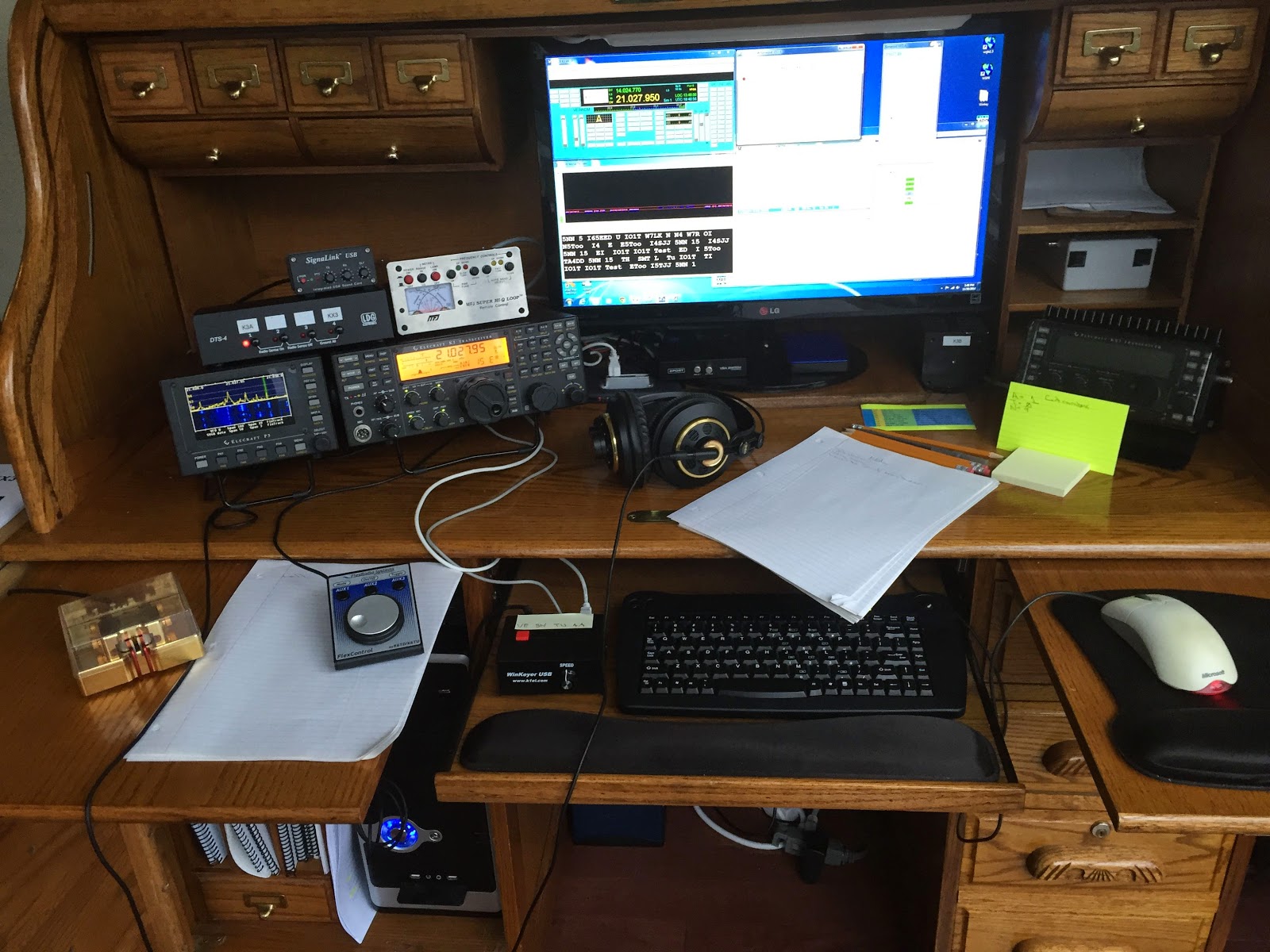
European stations booming in…..BUT……it was hard to raise a contact either on 15m or 20m. I have the MFJ 1788 loop antenna so 10m is not an option, I did hear that 10m was booming with great signals and propagation. I took Saturday evening off from the contest and decided to give things a go on Sunday. I had some running around to do Sunday morning so the contest time came early afternoon and I must say the conditions were still good and I was delighted my signal was being heard in Europe with some repeats but it was being heard. Some of the highlights were contacts into Hawaii, Canary island's off Africa and Jersey island. I was able to net 25 contacts in the contest so as you can tell I was not on all that much but I did enjoy the time. More important was the way I was able to set the station up for contesting. I plan on doing more contesting both local and DX so to get the software and hardware working well together was one of my plans for this contest. As you can see from the picture all my radio gear is nicely tucked away in a roll top desk. For me it's a great setup I only have to roll the top up, pull out a keyboard, pull out some side shelves, moves some accessories onto the shelves and presto Im on the air! Lets get back to my contesting setup….
 |
| The contest desk |
The software programs:
N4PY's radio control program. This program allows me to control my K3 and KX3 with very fast and convenient mouse clicks. As an added bonus the program has virtual com ports and it's simple to incorporate other programs and hardware. Also the support that is offered with N4PY is great and most questions I have had are dealt with same day.
N1MM contest software There are other software programs out there for contesting but this is the only one I have used from day one of my contesting. N1MM has come out with a new program called N1MM Plus, I have not tried it as of yet and a rule I have is to not try new programs or upgraded programs just before a contest. N1MM supports most if not all contests, it's very easy to use
works great and that's good enough for me. N4PY's program has virtual com ports and it allow me to setup N1MM so it seamlessly works with N4PY's program.
MRP40 CW decoder Yes you read it correctly I have a CW decoder program, this is not a free program but I have found it works the best of any I have ever tried out. So why do I use a decoder…..well I have found that in contests there are op's who for some reason send at speeds that only a decoder program can read. This program has helped me with making a contact that never would had happened if I was decoding by ear.
The hardware I use for contesting:
Elecraft P3 This is one of the best investments I have made it's a stand alone pan adapter that uses no PC memory. I have found it's nice to see how the band is doing and this piece of equipment does just that. For contests I can tuned from contact to contact. I am able to see 100, 50, 10 or 3 hz segments of the band. With my narrow band width MFJ 1788 I set the P3 to 10 hz and I can see a detailed segment of the band I can work before having to retune the loop.
Elecraft K3 What can I say it's a great contest and general QSO rig and to not get into boring details about the rig…..for contesting I have installed the following Inrad 8 pole filters 500 Hz, 400 Hz and 250 Hz and with the width control on the K3 I can narrow the filtering to 10 Hz!!
Winkeyer USB This unit came as a kit and was fun to build and is great for contesting. I have the keyer directly hooked into the K3. You can control it with N1MM software but as far as I know there is a latency issue with the keyer being used with N1MM, for that reason I hook it up directly to the K3. There are 4 programable buttons on the top (very easy to program via PC software) I program in my call, contest exchange, TU and the last button has a repeat of the exchange only less the 599. I place the Winkeyer beside my keyboard for very easy access to send my call and exchange, my hands are never to far away from the keyboard.
Flex Radio's Flexcontrol In the picture it's located in the white paper. N4PY's program again through a virtual port allows me to have VFO control of the K3. There are also 3 programable buttons as well to control the K3. I have programmed one of the buttons to the K3's spot function and in CW contests it's a great option to have.
Begali Contour Key I find with all the software ways to send CW it's very important to also have to old fashion key handy. Many times I have had a station asking for a repeat of my call or report, to send it with the key allows me to leave a longer spaces between letters of my call. This method has had my call or report get through to finalize the contact.
Mike Weir, VE9KK, is a regular contributor to AmateurRadio.com and writes from New Brunswick, Canada. Contact him at [email protected].
The Road to Extra
I’ve been a General class ham for many years now, but the thought of upgrading to Extra has always been hanging over my head. Honestly, it’s not really that I miss the additional band privileges — I really don’t — but after being licensed for close to a quarter of a century, I feel like I should take the time to just get it done.
I’ve been studying using Dave Casler’s (KEØOG) online self-study course. If you’re not familiar with his videos, you should check them out. They’re incredible and he offers programs for Technician and General, too.
What are you waiting for? Maybe it’s time for an early 2015 New Year’s Resolution?
http://www.youtube.com/watch?v=j99xlpv5zJU
Check out his website here.
Matt Thomas, W1MST, is the managing editor of AmateurRadio.com. Contact him at [email protected].
FreeDV
FreeDV has received a fair degree of publicity recently and is a GUI application for Windows, Linux and MacOS (other platforms are in development) that allows any single side band radio to be used for low bit rate digital voice communication.
I was primarily interested in it for possible use on VHF. It is hoped that the recently introduced 146-147MHz allocation available in the UK to full licence holders (via a Notice of Variation) will be used for digital mode experimentation. I have been constructing a data mode interface for use on the old TR9000 since it can operate on these frequencies but I decided to try the FT857D on HF to get an understanding of the program.
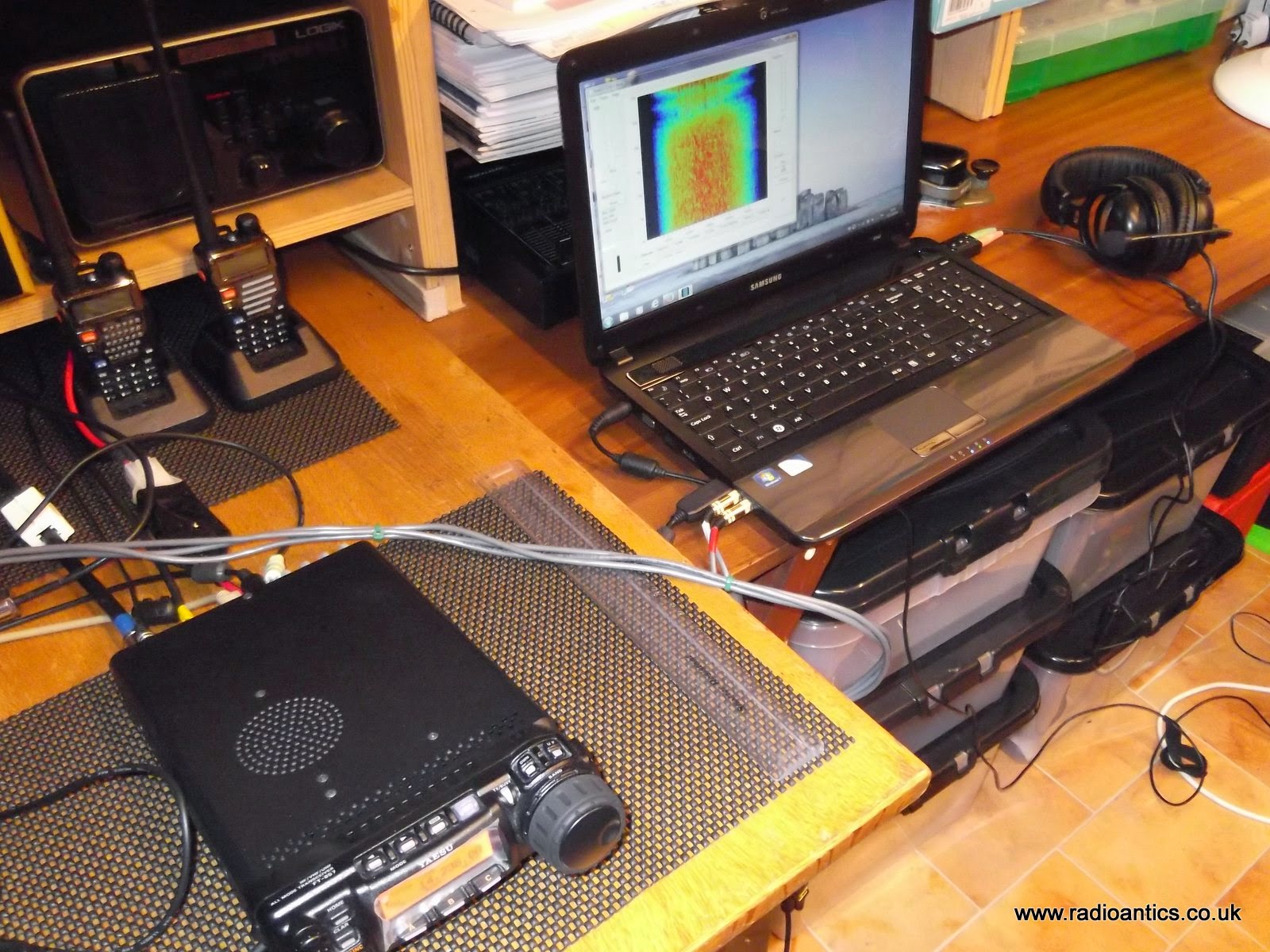
With FreeDV speech is compressed down to 1600 bit/s then modulated onto a 1.25 kHz wide 16QPSK signal which is sent to the mic input of a SSB radio. On receive, the signal is received by the SSB radio, then demodulated and decoded by FreeDV. The appeal being communications should be readable down to 2 dB S/N, and long-distance contacts should be possible using QRP power.
There is a lot of information. videos and guides available on the FreeDV website but the basics are straightforward. The computer requires two sound cards to handle the audio to and from the radio and the speaker/headphones and microphone. One method is to use a USB 'gamer' headset but since I already had a spare PC headset with 3.5mm plugs I opted for a cheap plug in USB soundcard (as detailed below)
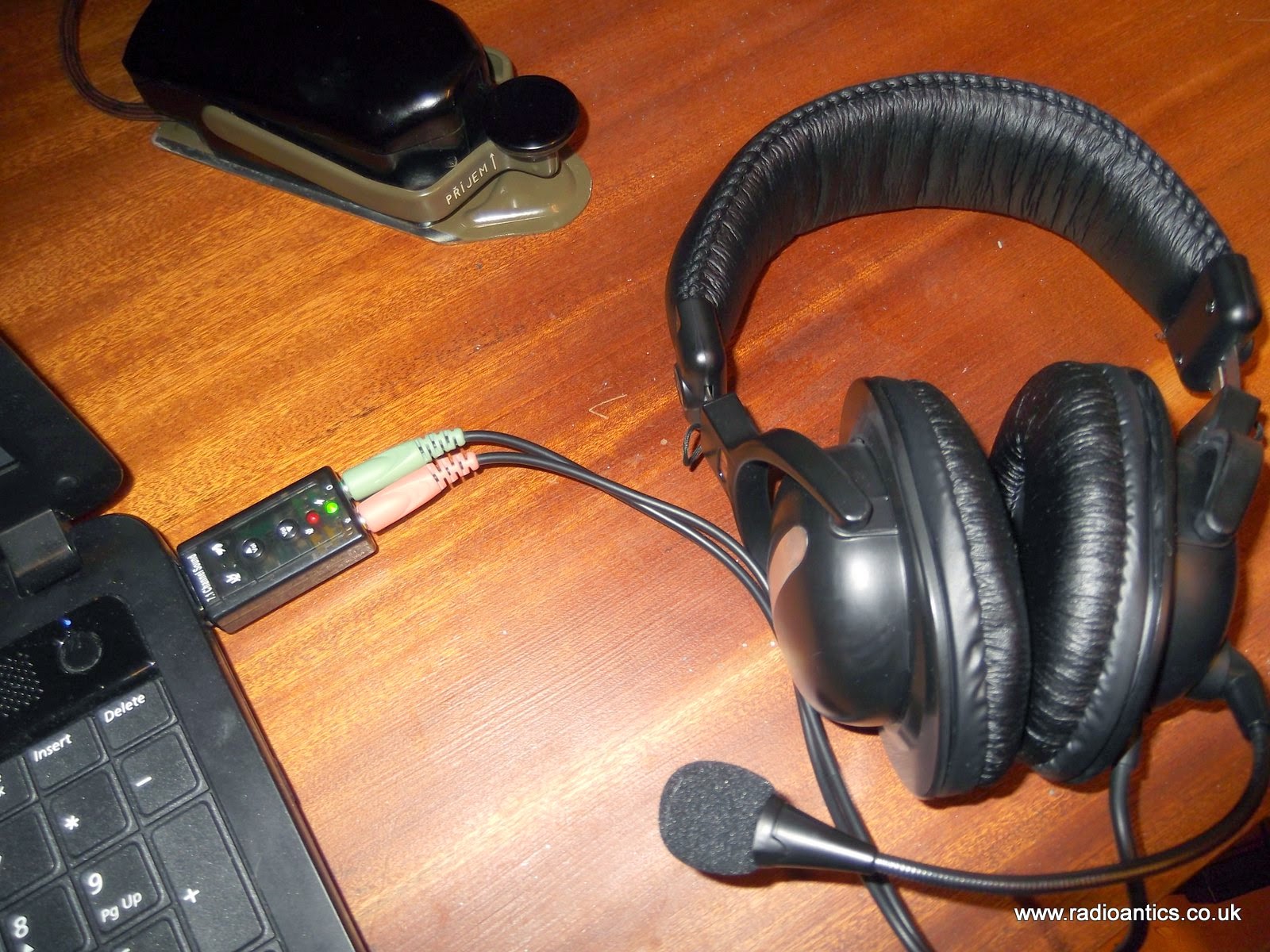
Once the audio devices and PTT control are installed and configured within FreeDV it is a matter of monitoring a frequency (in USB) and hopefully you can send and receive.
So far I have only managed two QSOs with Trygve (LA6UOA) and Fabrice (F4FPG) on 14.236MHz with both the audio was clearly understandable but did suffer from the odd breakup and stutter. This was probably due to the laptop being used rather than an issue with the signal as the FreeDV needs a reasonably powerful machine with a decent amount of memory.
The software is very picky, several times the audio device settings have been forgotten or it has come up with a cryptic error message:
../src/msw/bitmap.cpp(846):assert "image.IsOk()" failed inThis is a known issue with the Windows version and the solution is to manually remove all of the FreeDV settings from the registry. The full details of how to edit the registry are in the GOTCHA section of the FreeDV site. Editing the registry is not recommended to the inexperienced person so is not a great solution and when starting the program backup after this fix requires reconfiguration of callsign, sound card and PTT settings again.
CreateFromImage(): invalid image
Despite this setback it is an excellent and exciting new mode. Both Trygve (LA6UOA) and myself were first timers when we had our QSO and we were like excited school children once we were able to converse successfully. Fabrice (F4FPG) was an old hand at it and I thank him for allowing me to briefly interrupt a QSO he was having with another UK operator who I could not hear.
I would recommend using K7VE's QSO Finder website http://qso.k7ve.org/ to see who is monitoring and on what frequency as well as passing hints in real time.
Andrew Garratt, MØNRD, is a regular contributor to AmateurRadio.com and writes from East Midlands, England. Contact him at [email protected].
An introduction to socialhams, a ham radio social network

Because my dad has been an amateur radio operator for decades, my interest in ham radio is as old as I am. I had always wanted to get my license. Some time passed by and my interests changed in puberty. There were so many other interesting things like girls, music festivals, journeys all over the world for my job as industrial automation programmer. But my interest in amateur radio never left me and so I decided to get my license in 2012.
After getting my license, I built socialhams. It was hard work but I have really had a lot of fun. I am trying to spread the word about my project.
Socialhams is a community for ham radio operators. It combines features from typical social networks with ham radio related ones. To join socialhams all you need is a valid email address and, obviously, a ham radio callsign. It’s as simple as that!
As a registered member of socialhams you can freely meet like-minded people as well as join the Chat, write Blog and Forum posts, start Polls, create Groups and Events. Photos, Videos and Files can be embedded or uploaded to your profile and many other sections, too.
The iPhone App, allows you to browse profiles, watch photos and videos, upload photos, send mail, and lots more. All from your iPhone! And if you have an Android-powered device, our Android App lets you use socialhams while on the go, right from your own handset.
You can meet people; chat online; check our top rated, featured items; read about popular topics; wish someone a special greeting on his/her birthday; match your interests; and even take advantage of our elaborate people search option.
You will also find unique ham radio related modules:
DX Cluster
Use the DX Cluster feature to make that contact or Spot one for the rest of the community! The DXCluster tool allows users to locate and spot other Amateur Radio operators transmitting on specific frequencies to make those rare contacts or find that missing location you’ve been searching for. This is the world first HTML5 web socket based DXCluster client.
Logbook
The socialhams logbook allows you to record those important Amateur Radio contacts. This tool gives members the ability to add, edit, organize and sort their contacts all in one convenient location.
APRS Map
The APRS feature will display the location of any APRS station in the viewable area. This feature also provides each member with the ability to send a message from socialhams to any APRS device with messaging capability.
NCDXF Beacon
The Beacon Map displays the location, status and the current or future action of each NCDXF beacon in the network. By listening for each beacon on each band you can determine which bands are open and to what part of the world.
World clock
The World Clock allows each user to stay up to date with the time on any part of the globe. Users can also keep track of the Grey line as it moves to make use of this unique propagation condition.
Library
Collection of various documents like manuals, schematics, spreadsheets, etc
Elmer’s corner
The Elmer corner allows any socialhams member to create and publish a tutorial or guide for the entire community to use. Become an Elmer today!!
In our Feedback section, you can post your questions, comments, regards, etc. without any restrictions (of course, you must strictly avoid obscenity, rude language, and abide by the terms of socialhams). To cater to a wider ham radio community, all our features are offered in both English as well as German. Additional languages are in preparation.
We will steadily improve existing functions as well as develop new, interesting ham radio related modules. At the moment we are working on a Geophysics and SOTA module. All our work in process can be previewed on our development site http://dev.socialhams.net, and additionally all our developments are available as Git repository on http://gitlab.paan-systems.com. We would be happy to find developers that are interested in joining the project.
To enjoy the unique socialhams experience, all you need to do is sign up http://socialhams.net!
Andreas Pachler, OE8APR, is a special contributor to AmateurRadio.com and writes from Carinthia, Austria. He is the creator of socialhams, a social network for ham radio operators. Contact him at [email protected].
Counting Magic Beans
I’m a member of the Straight Key Century Club (3383T) and as such, have volunteered for the position of bean counter. That is to say, collecting awards and working toward an elevated status, which is at least half the fun of being in the club, requires a great deal of bookkeeping in the form of station logs and the curation of properly formatted electronic files for submission.
It’s not nearly as onerous a task as I’m making it out to be, if you’re a Windows user. If, on the other hand you’re as silly as me, and prefer another operating system, well, you’ve got your work cut out for you.
My main logging program is MacLoggerDX and a finer, more powerful electronic ham radio management tool has not been created. It does everything an operator could ask of it, and a lot more. But working inside the confines of certain specialty club rules is asking a lot from any application not crafted specifically for it.
On the other hand, there are several logging applications that have been built from the ground up to support the various awards and activities of the SKCC — all native Windows applications. Sure, there are ways to run Windows applications on a Mac, but this only minimizes the hardware required.
So over the holiday weekend, I spent time installing SKCC Logger on a Windows laptop that a client left in my possession over a year ago. It’s a beast of a machine. A 17-inch HP Envy with a non-lighted keyboard and Windows 8.1. It sports a fast, i7 processor and boatloads of memory, still, I’m perplexed why anyone would want to abuse themselves with such a combination (did I mention that the laptop was given to me for free?).
For the record, SKCC Logger is a brilliant application that handles SKCC tasks with ease. Connecting the laptop to my IC-7100 transceiver was a breeze and I can see how this will come in especially handy during the next Weekend Sprintathon.
But here’s where it gets a lot less enjoyable.
I first coaxed hundreds of valid SKCC contacts out of MLDX and into ADI format. This was no easy task as I had only noted that a contact was “SKCC” in the comment section of the log, and I didn’t consistently name them as such. Also, since I achieved the Centurion and Tribune levels last year, I thought I had to remove these from the pile, as well as the contacts made during the annual K3Y operation.
As it turned out, those were bad assumptions and I expended a lot of effort for nothing.
Once I had a base file created, I let SKCC Logger process the log and determine what, if any, new awards I might have become eligible for since achieving the Tribune level. Turns out, it wasn’t much. I qualified for the CX2 status which means I had 200 unique member contacts hiding in my log. I also discovered that I’m only a handful of contacts away from qualifying for Tx2 level – requiring another unique 100 confirmed contacts with select members – another step on the long road to ‘Senator‘.
I’ve no doubt that many valid Q’s were lost in the parsing and conversion. But i think I’m done with trying to go back and square the log. This has become like trying to balance a checkbook that just won’t be balanced and I’m tired and just want to move forward from this point and see where it goes.
By the way, if it all seems rather confusing, it is. I chuckle when I read this line at the bottom of the SKCC rules pages for differing levels: “Lets make it FUN and keep it SIMPLE!!”
It’s anything but simple – but it is fun and I do enjoy it very much. Except now I have two computers on my desk and I have to decide when sitting down whether tonight is going to be an ‘SKCC’ evening, or a ‘regular’ evening. And I still have to export the SKCC files back into main log on occasion.
Who was that idiot who said personal computers were going to make our lives easier and more enjoyable?
Filed under: Ham Radio, Syndicate Tagged: logging, mldx, skcc 


Jeff Davis, KE9V, is a regular contributor to AmateurRadio.com and writes from Indiana, USA.
 Ham Radio Deluxe |
 W5SWL Electronics |
 Ham Radio Prep |
 KB3IFH QSL Cards  Hip Ham Shirts  HamRadioAuctions HamRadioAuctions Reliance Antennas Reliance Antennas Enigma Shop Enigma Shop |  morseDX  Ni4L Antennas  R&L Electronics R&L Electronics antennas.us antennas.us QRV QRV |
- Matt W1MST, Managing Editor
