 |
 PLT Devices – Have I welcomed the Devil in to the shack?
 1 January 2016 | by
 I need to set up the ability to remotely operate the station via the internet as well as experiment with internet linking systems but the wi-fi link to the shack isn't fast or reliable enough. Now if I do a scan looking for wi-fi networks I can see well over a dozen, some of them quite strong and more are popping up all the time and I suspect this congestion is part of my problem.
The Samsung Smart TV in the house was also wi-fi linked but we were having increasing issues with the BBC iPlayer and Netflix with buffering or poor quality images because of poor signal and data rates.
Ideally I would be like to fit proper ethernet cables but it is totally impractical without major upheaval or unsightly trunking a definite no-no. In the end the only workable and affordable solution seemed to be to get some of those evil Powerline Transmission (PLT) devices.
I have suffered strong sporadic QRM myself which I have assumed were neighbours PLT networking devices as I'd read the horror stories, seen the videos and anecdotal reports of mains borne noise caused by them. So I hadn't even considered it until I saw a post and video by Dan Trudgian (M0TGN) about his experiences of using some Netgear devices and the apparant lack of interference to his radio activities. Some members of South Kesteven ARS had also started using them, so I took the plunge and ordered some Netgear ones reduced on Amazon in the Boxing Day sales.

Setting them up was easy, but the acid test was how much noise did they generate? I set up one device in the shack at the far end of the mains cable run to maximise radiation. Streaming internet radio and a HD movie on Netflix I then used the FUNCube Dongle PRO+ SDR connected to the OCFD to see what noise they were generating.
Here are my observations going through the various HF bands. Where noise is present I first stopped the streaming and then powered off the devices to eliminate them as the cause, where they were the cause it seemed eliminating the network traffic was sufficient to greatly reduce the effect.
80 Meters


While the antenna isn't optimised for 80m, signals can be seen as well as noise. Before you get excited this noise has been present for quite a while and isn't being caused by the new Netgear devices. This noise is what I suspected was generated by PLT devices used by my neighbours.
60 Meters

Shocking noise but again this isn't caused by my new devices, the noise has the same characteristics as that seen on 80m.
40 Meters
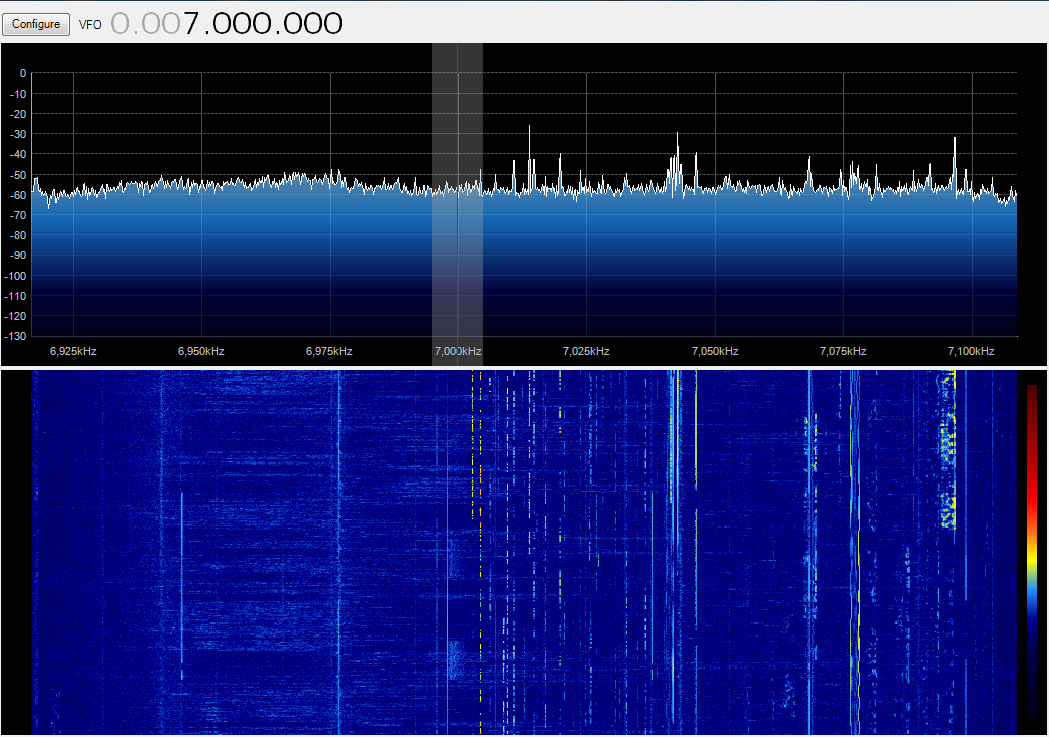

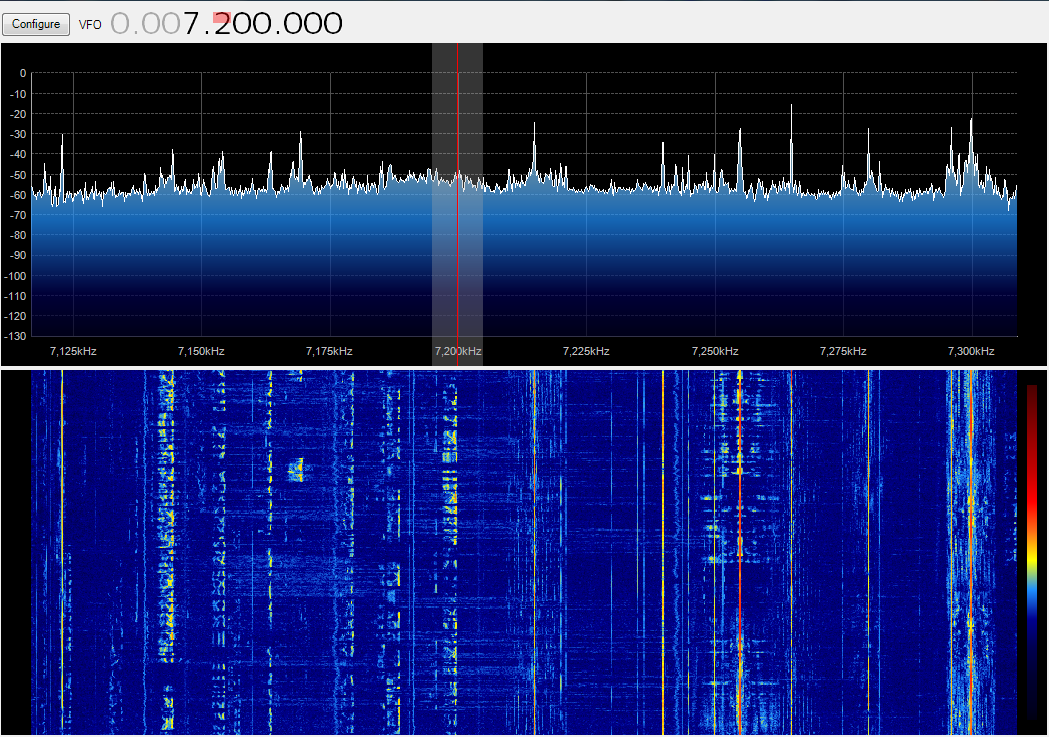

The band was busy, there is some noise again but not from the new devices, this was looking encouraging. I have also showed the adjacent broadcast band.
30 Meters

Again, largely noise free
20 Meters
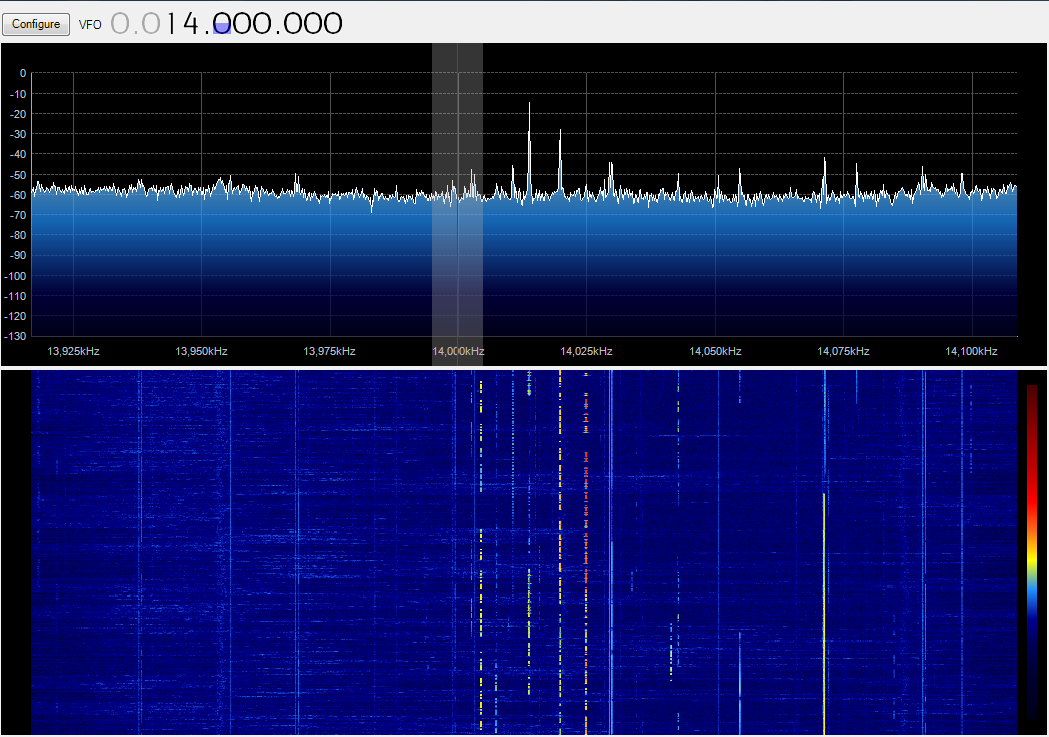


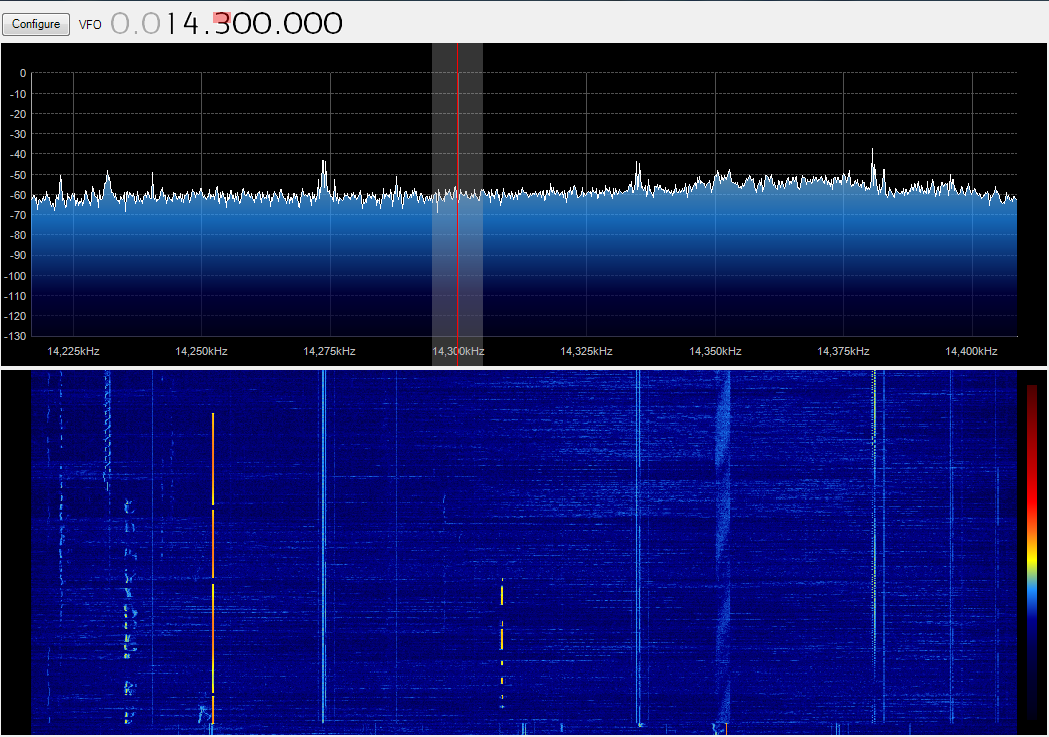
Still largely noise free, the QRM that is present still wasn't due to the new devices
17 Meters


This was the first indication of QRM from the new devices, however it appears effectively filtered to leave the amateur allocation clear. The faint noise in the middle picture is not from the new devices.
15 Meters


Again this band was clear of noise
12 Meters
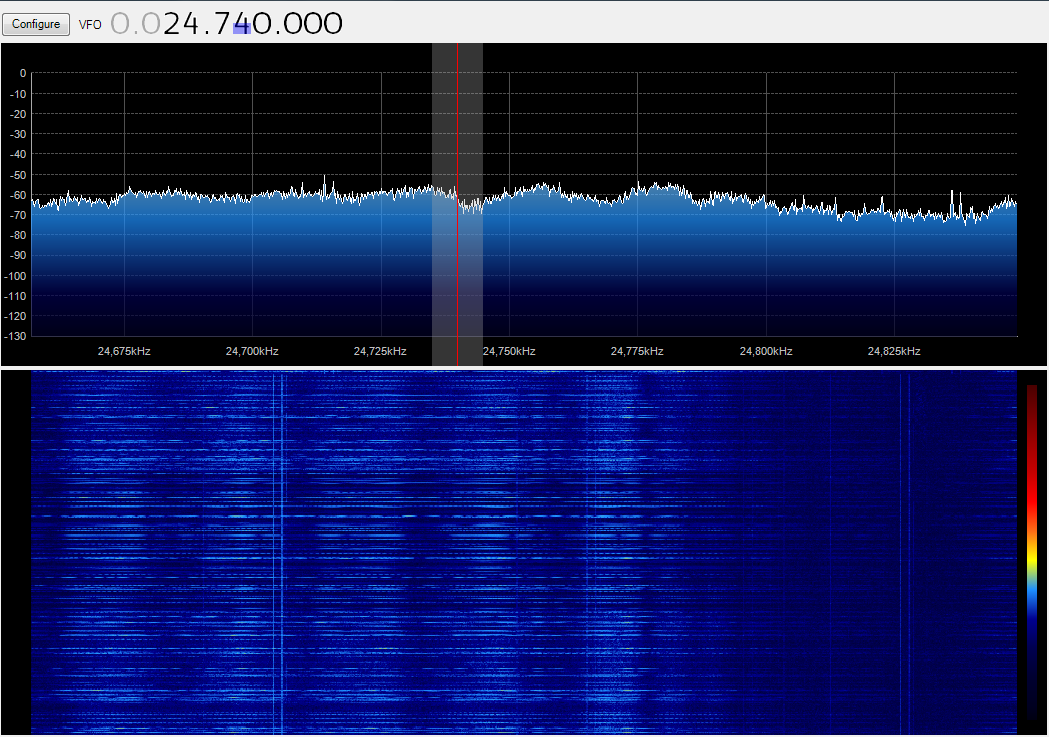

Showing the two ends of the band again the clear signal/noise from the devices again seems effectively filtered
10 Meter
I didn't observe any additional noise on this band, but unfortunately deleted the screen grabs ;-)So where was the QRM?


While the amateur bands appear to be filtered, the transmission can of course can clearly be seen on some non-amateur bands and apart from 16 meters seems to avoid the broadcast bands.
Conclusion
These Netgear XAVB5221 devices seem effective, indeed doing a speedtest in the shack was more than acceptable (the dire upload speed is a 'feature' of my cable ISP)
This fairly rudimentary testing has largely given me confidence that they won't be any issues. The band conditions weren't brilliant when I did test, but even with the absence of signals on the band any noise would be evident as seen. Yes they clearly do generate QRM but thankfully not it seems in the amateur bands. I haven't heard any extra noise on any of the radios over the last few days so all is looking promising. I will keep you posted if there is any change.
Andrew Garratt, MØNRD, is a regular contributor to AmateurRadio.com and writes from East Midlands, England. Contact him at [email protected].
PLT Devices – Have I welcomed the Devil in to the shack?
I need to set up the ability to remotely operate the station via the internet as well as experiment with internet linking systems but the wi-fi link to the shack isn't fast or reliable enough. Now if I do a scan looking for wi-fi networks I can see well over a dozen, some of them quite strong and more are popping up all the time and I suspect this congestion is part of my problem.
The Samsung Smart TV in the house was also wi-fi linked but we were having increasing issues with the BBC iPlayer and Netflix with buffering or poor quality images because of poor signal and data rates.
Ideally I would be like to fit proper ethernet cables but it is totally impractical without major upheaval or unsightly trunking a definite no-no. In the end the only workable and affordable solution seemed to be to get some of those evil Powerline Transmission (PLT) devices.
I have suffered strong sporadic QRM myself which I have assumed were neighbours PLT networking devices as I'd read the horror stories, seen the videos and anecdotal reports of mains borne noise caused by them. So I hadn't even considered it until I saw a post and video by Dan Trudgian (M0TGN) about his experiences of using some Netgear devices and the apparant lack of interference to his radio activities. Some members of South Kesteven ARS had also started using them, so I took the plunge and ordered some Netgear ones reduced on Amazon in the Boxing Day sales.
Setting them up was easy, but the acid test was how much noise did they generate? I set up one device in the shack at the far end of the mains cable run to maximise radiation. Streaming internet radio and a HD movie on Netflix I then used the FUNCube Dongle PRO+ SDR connected to the OCFD to see what noise they were generating.
Here are my observations going through the various HF bands. Where noise is present I first stopped the streaming and then powered off the devices to eliminate them as the cause, where they were the cause it seemed eliminating the network traffic was sufficient to greatly reduce the effect.
80 Meters
While the antenna isn't optimised for 80m, signals can be seen as well as noise. Before you get excited this noise has been present for quite a while and isn't being caused by the new Netgear devices. This noise is what I suspected was generated by PLT devices used by my neighbours.
60 Meters
Shocking noise but again this isn't caused by my new devices, the noise has the same characteristics as that seen on 80m.
40 Meters
The band was busy, there is some noise again but not from the new devices, this was looking encouraging. I have also showed the adjacent broadcast band.
30 Meters
Again, largely noise free
20 Meters
Still largely noise free, the QRM that is present still wasn't due to the new devices
17 Meters
This was the first indication of QRM from the new devices, however it appears effectively filtered to leave the amateur allocation clear. The faint noise in the middle picture is not from the new devices.
15 Meters
Again this band was clear of noise
12 Meters
Showing the two ends of the band again the clear signal/noise from the devices again seems effectively filtered
10 Meter
I didn't observe any additional noise on this band, but unfortunately deleted the screen grabs ;-)So where was the QRM?
While the amateur bands appear to be filtered, the transmission can of course can clearly be seen on some non-amateur bands and apart from 16 meters seems to avoid the broadcast bands.
Conclusion
These Netgear XAVB5221 devices seem effective, indeed doing a speedtest in the shack was more than acceptable (the dire upload speed is a 'feature' of my cable ISP)This fairly rudimentary testing has largely given me confidence that they won't be any issues. The band conditions weren't brilliant when I did test, but even with the absence of signals on the band any noise would be evident as seen. Yes they clearly do generate QRM but thankfully not it seems in the amateur bands. I haven't heard any extra noise on any of the radios over the last few days so all is looking promising. I will keep you posted if there is any change.
Andrew Garratt, MØNRD, is a regular contributor to AmateurRadio.com and writes from East Midlands, England. Contact him at [email protected].
The Spectrum Monitor — January, 2016
 Stories you’ll find in our January, 2016 issue:
Building Solar-Powered Amateur Radio Beacons for 630 and 10-Meters
By Geir Laastad LA6LU
In the August 2015 issue of TSM, Geir wrote about “Advanced Radio Noise Filtering Using DSP Technologies.” This time Geir puts his electronics know-how to work while he shows us how he built two amateur radio beacons for opposite ends of the amateur HF spectrum: the 630 and 10-meter bands. The site for his beacons is his remote cabin in the woods—far away from everything, which is why his beacons are also powered off the grid. Using QRP Labs Ultimate3 QRSS/WSPR kits, these beacons have to be very rugged to take the abuse Norway’s winters can dish out.
TSM Reviews: AOR DV-1 Wideband Receiver
By Chris Parris
AOR is a brand well known to monitoring enthusiasts. They have a long history of making high-end receivers featuring advanced technology capable of wideband reception from longwave to the high side of UHF. “Federal Wavelengths” columnist, Chris Parris, puts this pedigreed receiver through its paces and finds some welcome pluses and a few disappointing minuses. He especially liked this radio’s ability to seek out weaker digital signals that other radios missed and he found ways to overcome the radio’s anemic audio.
Retro Radio: Finding, Storing and Savoring Vintage Amateur Radio Gear
By Richard Fisher KI6SN
Knowledgeable radio amateurs describe “vintage” transmitters, receivers and transceivers as being somewhat relative—only you know it when you see it. That’s because each of us have our own radio experiences, some dating to decades ago and others more recent. Nostalgia is a many splendored thing. Last month he looked at broadcast-band and shortwave receivers of a rich, bygone era. In this second part, his focus is on collecting, restoring and enjoying commercially manufactured vintage amateur radio equipment. As Richard shows us, restoring these ham band workhorses requires more than just a fondness for days gone buy.
VHF and Above: Sporadic-E Propagation
By Joe Lynch N6CL
From late November to early January, and again in the middle of May through the end of July, sporadic-E propagation appears more often on VHF and above frequencies in the Northern Hemisphere. This type of propagation occurs when there is a sporadic ionization of the E-layer that appears in the late morning and late afternoon local time during those months. But, working meteor-scatter Sporadic-E is not for slow hands, Joe shows you how to work fast to successfully log QSOs using this ephemeral mode. And, for once, it’s not about expensive esoteric antennas!
ATSC Off-Air Local Television: The Programming
By Mike Kohl
The Golden Age of Television is really here. Never before has there been such an abundance of choices in TV entertainment for the home. Last month, Mike hinted at multiple delivery methods being used to deliver signals. This month he looks at the content provided by local television broadcasters to their local Over-the-Air (OTA) viewers in representative regions of North America. Mike continues to show us all how to “cut the cord,” this month looking at OTA programming rewards. You might be surprised at just how many OTA channels you can find where you live.
Scanning America
By Dan Veenaman
Pensacola’s APCO P-25 Phase 2 and Whistler’s New Scanners
Federal Wavelengths
By Chris Parris
DMR, APCO-25, MotoTRBO, and the IRS
Utility Planet
By Hugh Stegman NV6H
Mexican Military Returns to HF ALE
Digital HF: Intercept and Analyze
By Mike Chace-Ortiz AB1TZ/G6DHU
The US Navy HF Broadcast System Revisited
HF Utility Logs
By Mike Chace-Ortiz and Hugh Stegman
Digitally Speaking
By Cory Sickles WA3UVV
Digital Voice on the HF Bands
Amateur Radio Insights
By Kirk Kleinschmidt NT0Z
DVB Dongles: Beef Up your $20 SDR
Radio 101
By Ken Reitz KS4ZR
WorldSpace, WRN, WXFAX and More
Radio Propagation
By Tomas Hood NW7UST
Catching Those Winter Mediumwave DX Signals
The World of Shortwave Listening
By Jeff White
A South Pacific Radio Odyssey
The Shortwave Listener
By Fred Waterer
RNZI, BBC, RFI, WHRI and VOA
Maritime Monitoring
By Ron Walsh VE3GO
CMB: Continuous Marine Broadcasts
The Longwave Zone
By Kevin O’Hern Carey WB2QMY
SDR: I’m a Believer!
Adventures in Radio Restoration
By Rich Post KB8TAD
In Command Again Part 2: Experiments in Powering the Command Transmitters
Antenna Connections
By Dan Farber AC0LW
Stealthy Green Jolly Loop Revisited: On the Low Down
The Spectrum Monitor is available in PDF format which can be read on any desktop, laptop, iPad®, Kindle® Fire, or other device capable of opening a PDF file. Annual subscription is $24. Individual monthly issues are available for $3 each.
Ken Reitz, KS4ZR, is publisher and managing editor of The Spectrum Monitor. Contact him at [email protected].
Winter Assault on Mt Herman (W0C/FR-063)
On the last day of the year, it seemed like a good idea to get in one more SOTA activation. It turns out that I had not been up Mt Herman (W0C/FR-063) all year, even though it’s close by. See this page for the trail description. Joyce KØJJW and I decided to hike up in the morning, reaching the summit around 11 AM local time. This was my third SOTA activation of Mt Herman, but I’ve operated from there many more times in various VHF contests (back before SOTA was a thing in Colorado).
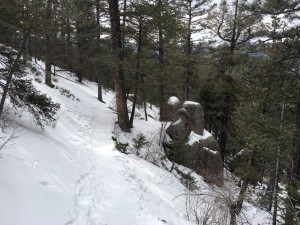
Winter conditions on Mount Herman trail.
The road to the trailhead was in good condition but snowpacked and icy. This road is not plowed during the winter but it is often passable with a decent 4WD vehicle. Today, you could make it to the trailhead with 2WD and some careful driving. The trail conditions were typical for winter time: almost completely covered in snow with a few bare spots showing here and there. The trail was packed powder and not particularly icy. Still, we appreciated having traction devices on our boots. This trail can be downright treacherous when it ices up, so traction devices (Yaktrax, Microspikes, etc.) are highly recommended. Trekking poles can be helpful, too.
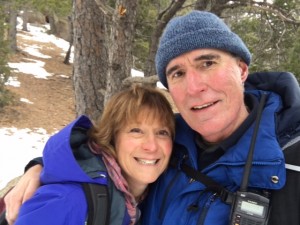
Joyce K0JJW and Bob K0NR on the trail.
Once at the summit, I used my Yaesu FT-60 handheld radio and a half-wave vertical antenna to work people on 146.52 MHz. Having notified a number of people that I would be on the air, I actually had a bit of a pile up on 2m fm. In short order, I worked KE5QNG, WA6MM, KH7AL, WG0AT, W7AWH, K9MAP, K0JQZ, K9DBX, W0STU, KD0MFO, WB0ROK, KD0VHD and KL7IZW. Best DX was about 50 miles with W7AWH in Pueblo West. Thanks to everyone that got on the air to work me.
The weather was cold, about 15 deg F, so we didn’t stay too long on the summit and headed back down the trail. OK, maybe “winter assault” is a bit of an exaggeration. Let’s call it a fun hike in cold weather.
73, Bob K0NR
Other postings on SOTA activation of Mt Herman:
Soggy Mount Herman SOTA Activation (W0C/FR-063)
Mt Herman: SOTA plus VHF Contest
The post Winter Assault on Mt Herman (W0C/FR-063) appeared first on The KØNR Radio Site.
Bob Witte, KØNR, is a regular contributor to AmateurRadio.com and writes from Colorado, USA. Contact him at [email protected].
Hunting For NDBs In CLE 202 – Using Remote SDRs
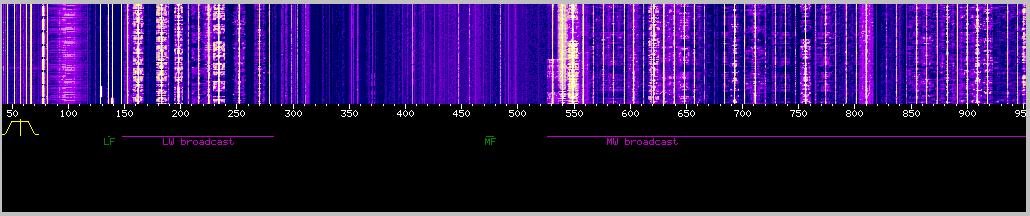 |
| courtesy: http://websdr.ewi.utwente.nl:8901/ |
If you've ever enjoyed listening to remote SDRs on the internet, then you might find this particular CLE of interest.
There really are some excellent receivers, with very quiet LF reception capabilities, being made available on the web ... all with just the click of a mouse!
If you have avoided previous CLE activities because of local noise issues, perhaps using one or more of these remotes will inspire you to give it a try ... but be careful ... hunting for NDB's can easily become addictive.
From CLE co-ordinator, Brian Keyte (G3SIA), comes the following (detailed) announcement of this weekend's interesting event:
It is quite easy to listen to NDBs in different parts of the World using remote receivers via the Internet. If you are a fan of 'Live Listening' without use of recordings - this is for you!
I have chosen ten receivers to use, located in eight different radio countries.
Most of them should give quite good coverage of NDBs by day and by night.
A brief description of how to log in to the receivers is given at the end of
this email.
Start: Friday 1 January at 12:00 UTC
End: Monday 4 January at 12:00 UTC
(note the UTC start/end times, NOT your local midday)
Frequencies: 190 kHz - 1470 kHz
Remote Receivers - all of the TEN receivers listed below.
Target: A maximum of TEN normal NDBs logged from EACH receiver.
Try to include as many different radio countries in your log
as you can.
Eight Global Tuners ( www.globaltuners.com ) located at:
Sydney, New South Wales, Australia *428 GLF
Grenoble, Rhone-Alpes, France 291 WS
Mojave Desert, Ridgecrest, California, USA 344 FCH
Odenwald, Hessen, Germany 292 NKR
Crema, Northern Italy 400.5 COD
Rimini, Italy 374.5 ANC
Rovigo, Italy 332 PDA
Vilhena, Rondonia, Brazil 395 VLH
Two WebSDRs located at:
University of Twente, Enschede, Holland *406.5 BOT
http://websdr.ewi.utwente.nl:8901
University of Southampton, Farnham, England 328 BLK
http://websdr.suws.org.uk
*As a starter for you, the kHz and Ident of a local NDB are given on each line.
LOGS (Please read CAREFULLY):
Please show your loggings in a SEPARATE GROUP for each receiver with
a line showing the LOCATION NAME OF THE RECEIVER before each group.
Please include on EVERY LINE of your log:
# the UTC date ( e.g. '2016-01-02' or just '02' )
# UTC time (the day changes at 00:00 UTC).
# kHz - the nominal, published, frequency.
# Call Ident.
Show those main log items FIRST. Any other, optional, details such as the
NDB's location, etc. must go LATER on the same line. You could include
any UNIDs - e.g. separately if you already have ten loggings for that receiver.
It would be OK to include the same NDB more than once if it was heard with
different receivers.
As this is a special kind of CLE, any extra comments in your log on your
listening experience will be of interest.
REMINDERS: Only use the ten SPECIFIED receivers. Not more than 10 loggings
from any receiver - so 100 is the (impossible?) maximum loggings for the CLE!
Only LIVE LISTENING for this event. Start/End at 12:00 UTC, not your midday.
Remember that reception conditions will depend on the local time of day/night
at the receiver.
We hope to send the owner of each of the ten receivers a list of all the
loggings that we manage to make using it - several of the owners may
not know much about NDBs, so it could help to advertise our hobby.
Whether you are taking part in this event or not - A HAPPY NEW YEAR
Brian
----------------------------------------------------------
From: Brian Keyte G3SIA ndbcle'at'gmail.com
Location: Surrey, SE England (CLE Co-ordinator)
----------------------------------------------------------
HOW TO USE THE RECEIVERS
GLOBAL TUNERS
Go to www.globaltuners.com and sign up for a free account.
You'll only need to choose a user name of 3 or more characters (almost
anything such as your call sign - I used NDBbk) and give your email address
for a password to be sent to you.
Choose one of the eight specified receivers when it is shown as 'Free'.
If available, one of the Italian receivers would be a good starter.
Read the brief information about it and then 'Open this receiver!'.
To start with, set a low volume (usually at the left hand side) and try these
settings: AM, Medium or Narrow, ATT, AGC and NB all UNselected.
The frequency selection is usually in MHz, so for 332 kHz you would enter .332
When you change any of the settings, including the frequency, there is a delay
of a few seconds for the change to take effect. Try CW settings as well as AM.
Please always look out for any messages in the 'chat' lines and give way
( 'Log out' ) if asked to do so (maybe by a Full User or by the owner of that
receiver). We have permission to use the receivers for our CLE as 'guests'.
Please try not to stay logged on to a particular Tuner for a long period.
WebSDRs
Go to http://websdr.ewi.utwente.nl:8901 or http://websdr.suws.org.uk
and read the advice (It would probably be easier to start with Twente).
Just as for the Global Tuners, you are invited to enter an Ident - name or
Callsign, etc. - in a box above the Waterfall.
You can begin listening right away.
To start with, set a fairly low volume (right hand side), type the desired
frequency in kHz, select AM-nrw and MAX in.
That should allow you to hear the suggested NDB for that receiver and you
can then enjoy improving reception with the big range of settings available.
In the big black area on the screen above, you can see the frequencies being
used and the Idents of maybe hundreds (for the Twente receiver) of the other
simultaneous users. You will probably recognise your own Ident there too
at the LF end - i.e down the far left hand side.
ENJOY!
These listening events serve several purposes. They:
- determine, worldwide, which beacons are actually in service and on-the-air so the online database can be kept up-to-date
- determine, worldwide, which beacons are out-of-service or have gone silent since the last CLE covering this range
- will indicate the state of propagation conditions at the various participant locations
- will give you an indication of how well your LF/MF receiving system is working
- give participants a fun yet challenging activity to keep their listening skills honed
Final details can be found at the NDB List website, and worldwide results, for every participant, will be posted there a few days after the event. If you are a member of the ndblist Group, results will also be e-mailed and posted there.
The very active Yahoo ndblist Group is a great place to learn more about the 'Art of NDB DXing' or to meet other listeners in your region. There is a lot of good information available there and new members are always very welcome.
You need not be an ndblist member to participate in the CLEs and all reports, no matter how small, are of much value to the organizers. 'First-time' logs are always VERY welcome!
Reports may be sent to the ndblist or e-mailed to either myself or CLE co- ordinator, Brian Keyte (G3SIA), whose address appears above.
Please ... do give the CLE a try ... then let us know what NDB's can be heard from your location! Your report can then be added to the worldwide database to help keep it up-to-date.
Steve McDonald, VE7SL, is a regular contributor to AmateurRadio.com and writes from British Columbia, Canada. Contact him at [email protected].
End Fed Antenna 40-6m
After some research on the Internet, I decided to build another antenna. I figure one can’t have too many antennas and this one would be a quick build. I chose the earchi 40-6m End Fed matchbox. The plans for it are available on the Emergency Amateur Radio Club of Hawaii’s web site. It’s an easy build and from what I have read on the ‘Net about it, it said to work well.
A trip to Radio Shack and Lowe’s provided all the components except for the torrid cores which I had to order online. The first picture is the wound core.

The second picture is the completed matchbox.

The connections are very straight forward is you follow the instructions to the letter. I cut a 30 ft piece of wire and crimped/soldered a ring terminal to the end of it. According to my research, various people use various lengths of wire with this. I chose 30 ft as that’s is what the club supplies if you purchase a completely built antenna from them.
I though this antenna would be an quick and easy one to deploy in the field if needed.
I have used this antenna a few times. The first time was in June during Field Day. I had my homemade Buddistick in use, and decided to take a break and put this antenna up. I threw some paracord over a branch and hauled up the wire. It worked great, about the same as the Buddistick in terms of signals heard. I have also used it at home a couple times with similar results. It is going to be a nice antenna to have in the kit for certain situations.


Wayne Patton, K5UNX, is a regular contributor to AmateurRadio.com and writes from Arkansas, USA. Contact him at [email protected].
Skeeter Hunt – NPOTA News
First - The NJQRP Skeeter Hunt for 2016 is moving from the second Sunday in August to the third. So please mark Sunday, August 21st on your calendar for this year's Skeeter Hunt. There are two reasons for this. The most important is that yours truly has an outstanding monthly commitment each 2nd Sunday of the month. That's the Sunday I go help out at the soup kitchen in the next town over. I kind of blew that off the past couple of Augusts, and that's not right. There are some things more important than Amateur Radio, and this is one of those.
But hey, the organizer shouldn't go AWOL, right? (That's how I feel, anyway). So I have moved it back a weekend to the third Sunday in August, where it shall occur forever more. Another added benefit is that this makes the spacing between Flight of the Bumblebees, the Skeeter Hunt and QRP Afield and the Peanut Power Sprint a bit more even.
Second - I have gotten blessing from Sean Kutzko KX9X to incorporate NPOTA into the NJQRP Skeeter Hunt this year. Is that COOL or what? I'm not exactly sure how it's going to all work out. Maybe bonus points for activating an NPOTA unit for the Hunt - or possibly some special "memento" for activating an NPOTA unit during the Hunt. I'll have to ruminate on that one for a bit - but there's time.
Third - On a personal level, Sean announced some new NPOTA units the other day. This was a biggie for me, because in the Northeast, the Washington - Rochambeau Historical Trail was added. This is the route taken by General Rochambeau's French forces and General Washington's Continental forces as they both marched on towards the siege at Yorktown, which all but brought the American victory in the Revolutionary War.
The Washington - Rochambeau Historical Trail is within a stone's throw from my house - literally. To make this situation even better, there is the Frazee house located on the trail in Scotch Plains, NJ - the next town over. Rather than try and explain the significance of the Frazee house in my own words - allow me to post something from the official Website.
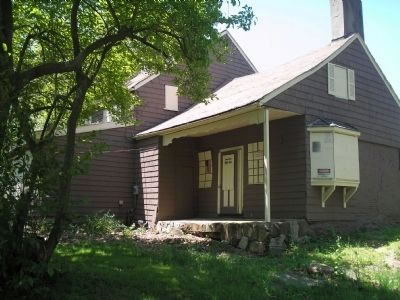
"As the legend holds, after the Battle of Short Hills, General Cornwallis and his troops passed by the house while marching toward the Watchung mountains, located a few miles to the north. Known to the locals as a prolific baker, Aunt Betty was baking bread at the time. Hungry and tired, the troops smelled the bread and Cornwallis approached her stating, "I want the first loaf of bread that next comes from that oven." Betty is said to have replied, “Sir, I give you this bread through fear, not in love.” Evidently impressed by her courage, Cornwallis is said to have stated, “Not a man in my command shall touch a single loaf.” While history offers evidence that Betty lived in the house and did, indeed, bake bread, the story of the actual conversation is not authenticated by primary source documents. The words allegedly spoken by the principals are found in the earliest authoritative source on the subject, F.W. Ricord's History of Union County, page 513, which is one of the sources cited in the National Register of Historic Places filing that led to the Frazee House being placed on the Register."

I'll have to look onto getting permission to operate from the property that the house is on. If that's not obtainable, there are plenty of other locations that can be operated from on the Trail, right in my local area. In fact, right in front of the Ashbrook Golf Course, is a monument to The Battle of Short Hills.
72 de Larry W2LJ
QRP - When you care to send the very least!
Larry Makoski, W2LJ, is a regular contributor to AmateurRadio.com and writes from New Jersey, USA. Contact him at [email protected].
 Ham Radio Deluxe |
 W5SWL Electronics |
 Ham Radio Prep |
 KB3IFH QSL Cards  Hip Ham Shirts  HamRadioAuctions HamRadioAuctions Reliance Antennas Reliance Antennas Enigma Shop Enigma Shop |  morseDX  Ni4L Antennas  R&L Electronics R&L Electronics antennas.us antennas.us QRV QRV |
- Matt W1MST, Managing Editor
