Archive for the ‘ham radio’ Category
 Chuck Adams, K7QO on a Mission
 September 15th, 2015 |
  Author:
 Charming audio interview with Chuck Adams, K7QO on a recent QSO Today podcast. Chuck’s infectious enthusiasm for the hobby, CW, and especially his austere approach to getting on the air will delight many, especially dedicated low-power enthusiasts.

Don’t miss it and be sure to visit the program Web site as there are many links referenced from the interview. This episode highlights precisely why Eric Guth, 4Z1UG and his program are firmly affixed at the top of the ham radio podcast pile.

A Few New Ham Radio Podcasts
 Listening to podcasts has been part of my daily habit for almost a decade. I lean heavily towards audio podcasts (as opposed to video), so I can listen to them while driving. My smartphone is always loaded with hours of content on a variety of topics which is especially useful for international flights.
Podcasts come and go (or podfade) and recently I’ve noticed a few new ham radio podcasts. Well, they might not be all that new…perhaps I just woke up and noticed them. Anyway, I am passing them along in case you have not come across them.
The QSO Today Podcast by Eric 4Z1UG:
QSO Today is a weekly conversation between me, Eric Guth, 4Z1UG, and my amateur radio operator guest. Each guest tells his or her’s ham radio story to the present time. I select guests based on their contributions to the hobby through their publishing of articles and books on ham radio, their involvement in the creation of new technologies that enhance the hobby, and the role that they played to bring the amateur radio to others.
The Fo Time – The Other Ham Radio Podcast by Cale K4CDN:
It’s a new Podcast for the Up and Coming Amateur Radio Operator aka Ham Radio Operator. Whether you’re looking for the latest news, a different take on an idea, or just some good humor, Fo Time is the Podcast for you.
If you aren’t sure about the name, this might help.
The 100 Watts and a Wire by Christian KØSTH:
Created by Christian Cudnik, KØSTH in 2015, 100 Watts and a Wire is a program celebrating amateur radio through the eyes of a new ham. The show features topical conversation and interviews, news and an entertaining look at the adventures of a ham trying to figure it all out.
I’ve found all three of these podcasts to be well done and interesting. They all typically run about an hour long. Frankly, that’s a bit much for me, mostly because it does not fit my commute time. Not bad for an airplane ride, but too long for driving to work. More importantly, my smartphone is overflowing with interesting audio content, so I have to be selective.
Other Podcasts
I’ll mention a few other podcasts that deserve attention: The Ham Nation podcast has set a new standard for ham radio video podcasts. Hats off to Bob Heil and crew for their efforts. The Amateur Radio Newsline got its start by delivering audio programs via telephone for hams to play on their local repeater. Many repeaters still play their program but I get their feed via my smartphone. They continue to do an excellent job of stuffing interesting content into a 20-minute format. While not a ham radio podcast, This Week in Tech from TWiT remains a quality source of tech news and opinion (lots of opinion).
Give these podcasts a listen and let me know what you think.
73, Bob K0NR
The post A Few New Ham Radio Podcasts appeared first on The KØNR Radio Site.
Creating open-source ham radio hardware with Kickstarter
When I started my company last year, it was mainly set up as a design consulting outfit to pick up a few jobs on the side. At the end of 2014, it became much more when I decided to plunge full-time into my own work. At the time, one of my respected friends and colleagues, Don Powrie of DLP Design, said to me that the only way to make consistent money is to have a product line rather than rely on consulting work. I’ve been thinking of how to bring that to market ever since. I could certainly design some familiar products to me, but they would get lost in the plethora of similar items. I needed something unique.

I started out with a 5V @ 5A design. I drew the schematic and completed the PCB layout and started to check pricing and availability of the parts. Most everything was available at Digi-Key, and the Anderson Connectors from Mouser, but the total was getting close to where I wanted the selling price to be. For a $35 computer, I couldn’t justify a $70-$80 power board!! The DC-DC converter also had a very large ground pad for heat dissipation. I wanted this project to be able to be hand-soldered and started wondering about that large pad. That design got scrapped and I started looking for another buck converter. There were several TI and Linear products I considered, but they would have required a reflow oven – either with a center pad, as a BGA, or leadless formats. Then I found the Alpha & Omega AOZ1031AI. This is a 8-pin SOIC without any special pad. The only heat-dissipation suggestion was that pins 7 and 8 do not have any thermal relief, but connect fully to the surrounding plane. I selected larger commodity parts (0805) that could be seen without a microscope and created the layout, and all parts were in stock at either Digi-Key or Mouser Electronics. I got everything on order, and even managed to get a couple free PCBs from Pentalogix. I had attended a Pentalogix-sponsored Cadsoft Eagle webinar at Newark and the perk was a code for two boards. I just had to cover shipping.
I did other tests: Let it run for 8 hours (check), ramp voltage from 6 to 18V input (check). At 7V input, the Pi kept rebooting. At 8V, it was solid – well past the design spec. Same at 18V.
Next up was the load test. With 2A going direct to load resistors, I was still able to run the Pi with all four USB ports occupied. I even dipped the supply to 8V. The bench supply showed about 1.8A output. Based on an approximate 80% efficiency of DC-DC converter, I calculated I was drawing about 3.5A on the 5V side – a little past its limit, so backed off the load. I’ve been running this directly from my radio supply now for several days, and the Pi keeps chugging along.

I’m a believer in open-source hardware and software. This project will be published in the coming days, probably on GitHub. Eagle uses XML design files, so version control should work just fine. I still need to write the manual, but everything will be made available as soon as I get the proper README and LICENSE files in place. All of my work for this project is published under the Creative Commons Attribution and Share-Alike license. The hardware itself is published under the TAPR Open Hardware License.
Colorado 14er Event: Mount Antero (W0C/SR-003)
For the 2015 Colorado 14er Event, Joyce K0JJW and I activated Mount Antero (W0C/SR-003) on the 2m and 70 cm bands. Alan NM5S joined us on the summit, operating mostly HF plus some 2m fm.
We took our Jeep Wrangler up the moderate 4WD road and parked at 13,800 feet. This makes for a very manageable hike to the 14,269 foot summit. Of course, you can always choose to start the hike from lower on the mountain, but you’ll end up walking along the road. This web site provides a good overview of the 4WD road. The 14ers.com web site and summitpost.org are additional sources of summit info.
Here’s a short video of our operation on the summit.
Here’s the K0NR log on the 2m band, fm and ssb:
August 2, 2015 K0NR Log, time in UTC
15:09     144MHz     FM     K0JJW
15:13     144MHz     FM     W0CP
15:16     144MHz     FM     KC5JKU     Mt Elbert
15:17     144MHz     FM     KD0WHB     Grays Peak
15:21     144MHz     FM     N0XDW      Pikes Peak
15:37     144MHz     FM     KD5HGD     Mt Elbert
15:42     144MHz     FM     KD0MRC
15:42     144MHz     FM     KE0DMT
15:44     144MHz     FM     NQ0L       Franktown
15:45     144MHz     FM     KE0EUO     Mt Democrat
15:46     144MHz     FM     K7SO       Mt Democrat
15:50     144MHz     SSB    KD0YOB     W0C/PR-005
15:53     144MHz     SSB    W0BV       Buena Vista
15:53     144MHz     SSB    K0YV       Buena Vista
15:57     144MHz     SSB    W0STU      Monument
16:06     144MHz     FM     KD0WHB     Torreys
16:13     144MHz     FM     KI6YMZ     Mt Elbert
16:19     144MHz     FM     KE0EKT     Mt Elbert
16:29     144MHz     FM     WZ0N
16:29     144MHz     FM     KE0DAL
16:31     144MHz     FM     WO9S
16:33     144MHz     FM     K0UO
17:10     144MHz     FM     KD2FHB     Pikes Peak
It was a great day on the mountain with quite a few Summit-to-Summit (S2S) SOTA contacts. See you next year on a Colorado mountaintop!
73, Bob K0NR
The post Colorado 14er Event: Mount Antero (W0C/SR-003) appeared first on The KØNR Radio Site.
2014 September VHF Contest Certificate
The certificate for my entry in the 2014 ARRL September VHF Contest arrived in the mail last week. Given that it has been 11 months after the contest, I had pretty much forgotten about the effort. The ARRL VHF contest certificates look great, even if they do take a while to get issued. It turns out this contest entry was the combination VHF contest plus Summits On The Air (SOTA) activation from Mt Herman that I blogged about.
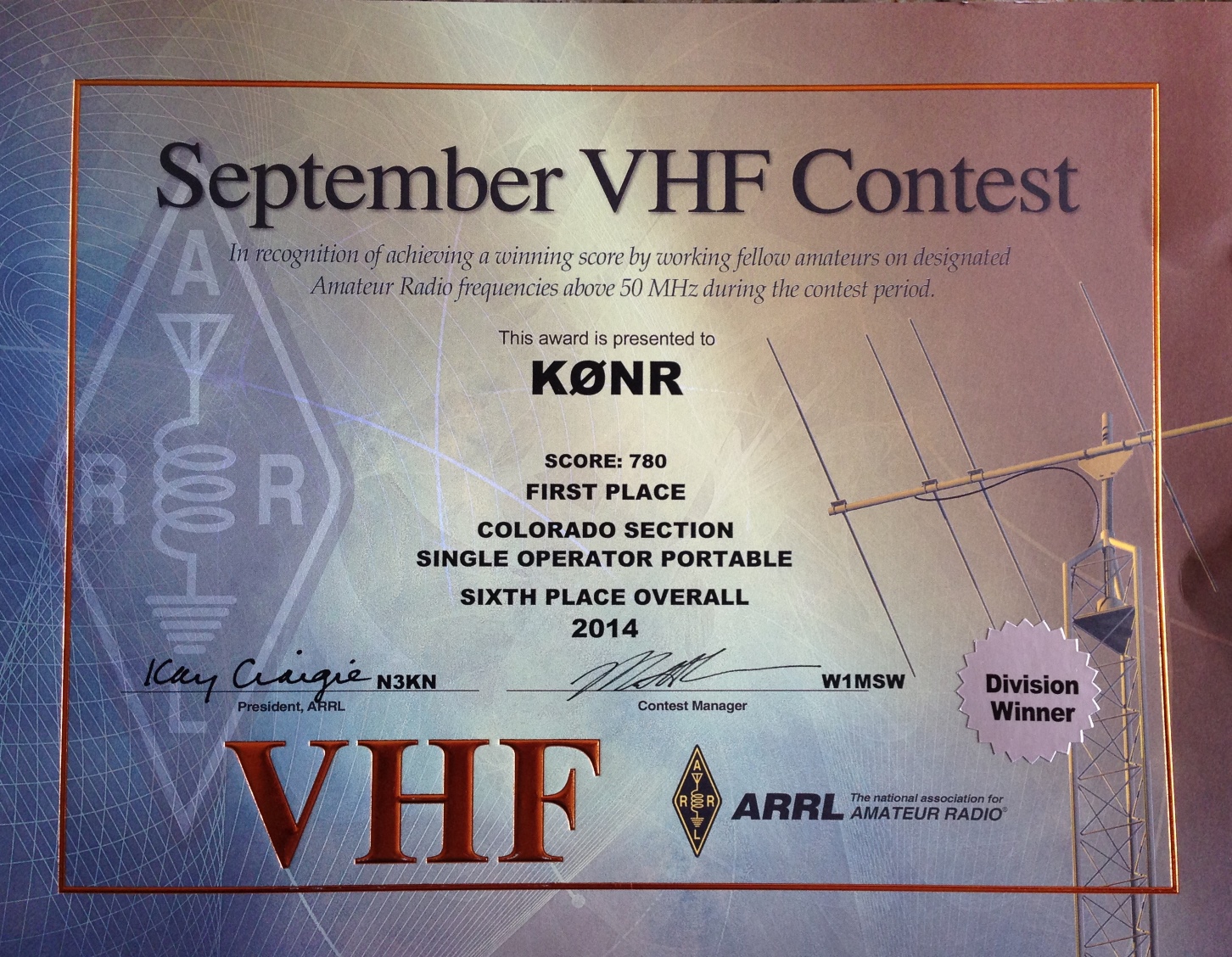 My blog posting said my score was 767 but the actual score was 780. Not a big score by any standard but not bad for ~4 hours of operating on a Saturday afternoon. As I suspected, this sets a new record for the Single Operator Portable category in the Colorado Section. What I did not expect is placing sixth in the overall contest (for my category). For the most part, this was just a really fun SOTA activation that included some VHF contest action.
Summary: The score doesn’t matter; any day having fun with ham radio is a good day.
73, Bob K0NR
The post 2014 September VHF Contest Certificate appeared first on The KØNR Radio Site.
West Buffalo Peak (W0C/SP-018)
Buffalo Peaks are a pair of 13er summits that stick up quite prominently on the west side of South Park. West Buffalo peak is the taller of the pair (13,326 feet) and the SOTA summit (W0C/SP-018). I’ve had my eye on these peaks for a while, wanting to do a SOTA activation. Here’s a winter view of the summits from the south near Trout Creek Pass.
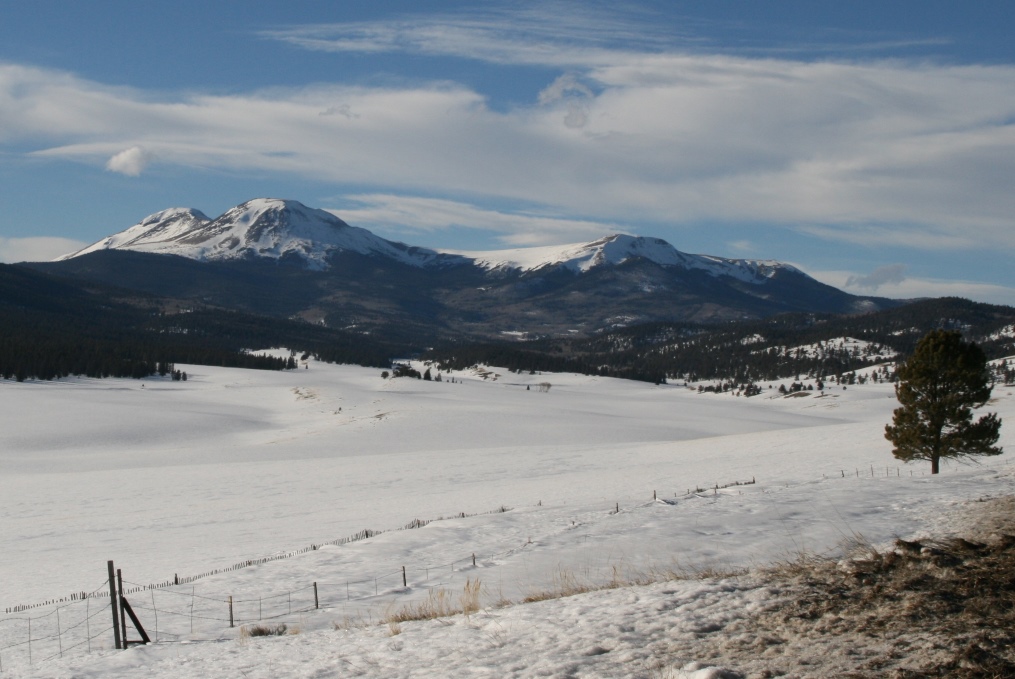
Buffalo Peaks in the Winter
There’s quite a bit of good information on the peaks at SummitPost.org.
Joyce K0JJW and I hiked in from the north, off of Buffalo Peaks Road (FS 431). The trailhead is not marked and is easy to miss but this trip report on the 13ers.com web site is very helpful. Pay special attention to the photo of the trailhead. This trip report describes doing both East and West Buffalo in a bit of a loop. We opted to focus on just West Buffalo, skipping East Buffalo.

Joyce K0JJW on the trail.
Here’s my favorite hiking partner on the trail near the trailhead. The “trail” is not very well marked, following various old logging roads. We roughly followed the route indicate on 13ers.com. Once we cleared the trees we had a good view of both peaks and aimed for West Buffalo. We did make a critical error by going for the summit too early and got onto some very steep talus. Not fun. So the main route finding advice I am going to provide is make sure you approach the summit from the (more) gentle saddle on the northwest side. I marked this waypoint (N 38.99444, W 106.12866) as a good point to aim for on the way up so that you stay far enough west.
Once on the summit, I worked the following stations on 146.52 MHz: KD0MRC, KJ6NES, AF5KS, W9GYA, KE0DMT, W0BV and K5UK.
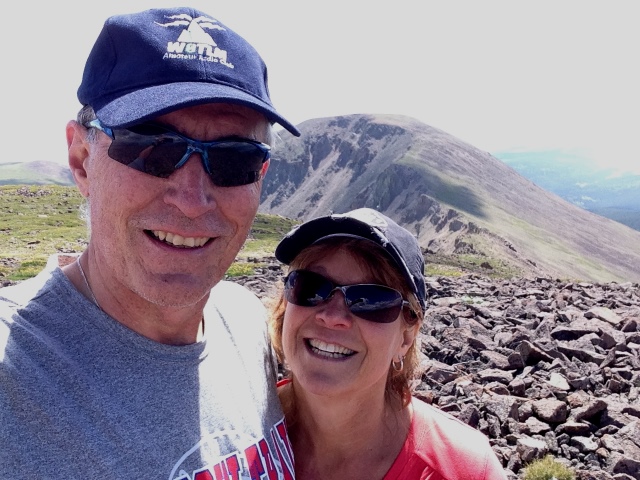
Bob K0NR and Joyce K0JJW on West Buffalo Peak, with East Buffalo Peak in the background.
On the descent we stayed west of the route marked on the 13ers.com trip report with the intent of having an easier route. However, mostly what we did was encounter additional off trail hiking, so that is probably not recommended. It would have been better to just retrace our ascent route. Eventually, we found a different trail that led back to FS 431, popping out about a quarter mile west of where we parked. I had the location of our Jeep marked in the GPS, so it was easy to backtrack to the vehicle.
This was the first SOTA activation for West Buffalo Peak, so it was great to get that in the log. Thanks to everyone that got on the air to work me.
73, Bob K0NR
The post West Buffalo Peak (W0C/SP-018) appeared first on The KØNR Radio Site.
The 10 Essentials for Hiking (and SOTA Activations)
 Most backcountry hikers are familiar with the Ten Essentials that you should take with you whenever you head into the wilderness. Over the past few years, I noticed that I was getting a bit sloppy with regard to what is actually in my pack when I head out on the trail. This hit home one day when my GPS battery went dead. I fumbled around to find my compass which was supposed to be in my pack. Well, it was in my pack, the other one that I left at home.
This caused me to review the list of ten essentials to make sure I had the right stuff in my kit. A search on the internet revealed that the classic list of ten has been modified and augmented by various people to make it better. (Innovation runs rampant on the interwebz, you know.) One of the better resources I found was this page on the REI web site, which explains how the Classic Ten Essentials have been updated to the Ten Essential Systems:
- Navigation (map and compass)
- Sun protection (sunglasses and sunscreen)
- Insulation (extra clothing)
- Illumination (headlamp/flashlight)
- First-aid supplies
- Fire (waterproof matches/lighter/candles)
- Repair kit and tools
- Nutrition (extra food)
- Hydration (extra water)
- Emergency shelter
Read through the REI web page to get the fine points of this system approach. I won’t repeat that information here. They also include a Beyond the Top Ten list which calls out the need for:
Communication device: Two-way radios, a cell phone or a satellite telephone can add a measure of safety in many situations.
Of course, what they really mean is an amateur radio transceiver and antenna but they probably can’t say that in print due to licensing issues. (Not everyone in the backcountry has an FCC ham license. I know, they all should have an amateur license but many don’t…very hard to understand.)
So how are you doing with your Ten Essentials list? Are you consistent in taking along the right stuff in your pack? Any tips to share with hiking hams?
73, Bob K0NR
The post The 10 Essentials for Hiking (and SOTA Activations) appeared first on The KØNR Radio Site.













