Author Archive
 QSO Today Virtual Ham Expo………will you be attending?
 December 22nd, 2020 |
  Author:
2021 QSO Today Virtual Ham Expo
Last year in my blog I asked this same question, but it was before the Expo had started. I received a mixed bag of responses but now that one Expo has completed some of my readers may have a better idea about the Expo and if they will attend this year?
In my humble opinion, over this past year are a few new givens......COVID is still with us and a new type of stain noticed, video conferencing for personal and business has become the norm, working from home is no longer a novelty, most if not all ham radio clubs have cancelled monthly in-person meetings. On a positive note, clubs have stepped up and offered 2 meter weekly net meetings, club meetings via the many video conferencing programs, contesting has been tweaked to allow for events such as field day to be a success, there is a vaccine to bring hope for 2021 and finally on March 13-14 the 2nd QSO Today Virtual Ham Expo begins.
I did attend the online Expo last year but in a very part-time effort. At times, I found it frustrating to find my way around (which I did mention in my online survey to the hosts) navigating to sections of the Expo. I found some seminars a bit "fluffy" in content and some were just an advert. Last year it was free this year it's 10.00 early bird or 12.50 at the door.....virtual door that is. I will say that if I am going to drop 10.00 I will make more of an effort to attend the site more often over the 2 days. I have not as yet decided if I am going to drop the 10.00 but will take some time to look over the changes that are in effect for the 2nd annual show.
My questions to the blog readers are:
-Did you attend last year's QSO Today Virtual Expo?
-If you did what is some of your input regarding the show?
-If you did not attend why not?
- Who is going to attend this year either for the first time as an alumnus and why?

Online Holiday shopping joy rides………
COVID 19 has been with us for some time now and I imagine for some time to come as well. The holiday season is a huge time for retail stores and COVID 19 has added a strange twist for them. They have customers who have no issues getting out and shopping but at the same time, there are those that stay home and choose online shopping. Has the retail world kept up with these changing times? I have done some online shopping over the past months and had far too many "Are you kidding me" moments and these are a few of them.
I ordered some computer equipment recently and not to mention the name but fill in the blanks and you can figure it out........Bacon and _ _ _ _ Anyway I ordered some very pricey items that were in stock, indicated when shipping would happen and free shipping. The order was placed and right away I was sent a tracking number indicating the shipping label was made. Well 8 days later the status was still shipping label was made. It was way past the indicated online arrival day and low and behold on the site that date was nowhere to be found. I then noticed shipping was 49.00 not free. I have to give the company credit that they do have online chat assistance. I use the word "assistance" very loosely as when I contacted them and wanted my money back I was told because a shipping label had been made this was not possible.....how convenient I thought. They sure did take my money very fast and a second later informed me a shipping label was made up to stop any refund. Now I have to wait 5 days until they decide what is going to happen. I do know the items are still at their warehouse with just a shipping label on them.
I had ordered some shower products for a very good friend of mine. I wanted to ship it to them directly and the site indicated I was able to do so. I was never offered in the order process an alternate shipping location other than the address that was on my credit card. I called them and the computer recording told me to go back to the online site to the FAQ and all my questions can be answered there. Not so I ended up shipping the package to myself and then sending it to my friend on the other side of the country. Adding insult to injury this person lived in the same city where I ordered the product from and shipping was next to nothing but I could not do it.....oh but the site said I could.
Now there is an Amateur radio company......well 2 of them that I will for sure mention their names DX Engineering and Radio World in Toronto. Both of these companies I recently ordered items from and they were outstanding! Excellent communications, shipping on time with over the top packaging for a safe shipment. These two companies know how to handle this new exploding online shopping industry. Well, other companies I have dealt with get a failing grade.
I sent a very new SDR radio down to the U.S for repairs a very straightforward process I thought and it went off without a hitch until it DIDN'T arrive at my home. What arrived was a card from the post office saying I had to pay duty and taxes before it would be released! A long story short the SDR company filled in the paperwork indicating it was brand new radio and the full cost of the radio was included in the documentation. The cost was well over 500.00. I paid the amount thinking it would be a simple phone call for a refund.....nope! I got the runaround, excuses and no replies to emails I eventually gave up.
These are just a few of my online dealings and sadly most have been negative and that's sad as this is a new and exploding frontier. Companies are not reaching to be over the top with most if not all aspects of online dealings. I have had my fair share of unanswered emails, very annoying chatbot sessions and finally live chat that has no idea what to say other than their scripted lines.
Time to house clean and sell sell some equipment.
Recently I have been doing some thinking......It's always nice when there is an easy answer to things BUT it just does not seem to be! In the past, I have sold radio equipment to later find myself kicking myself. There have been way too many times than I would like to admit where I have sold something to later purchase that same item!
Lately, I have been (in my head) going back and forth with regards to selling some radio items....I don't want to keep it just to have it just in case and it just gets older and holds less value......or sell it and take a chance. It reminds me of when I dabbled in stocks if I only knew the right time to sell and buy. My best information I have at this time is it's time to move some equipment out the door.
Locally (in Canada) I have put the following items up for sale:
1. Chameleon CHA P mag loop antenna.
2. Elecraft KX3 along with some extras.
3. LDG DTS-4 antenna switch.
4. Palm mini paddle.
The first two items are my portable op's stuff and we moved to the east coast over a year ago and it has just sat on my desk doing lots of nothing. I just don't want to see it sitting there if someone else can use it. The other items have been doing the same and I hope I don't end up next year or so kicking myself in the backside that I sold them but such is life.
CQ WW CW 2020 contest is on the books!
This past weekend was the CQ WW CW contest which if I can I always partake in. This year I made it a point to set aside the time to indulge.....well I'm retired now so it's really not all that hard to set the time aside. But this time around it was going to be a toss-up whether the monitor troubles I was having were going to give me issues. In a nutshell, if the monitor was turned off it was a 50/50 chance I could be greeted with a black screen. If that was the case I then had to play around starting and restarting the PC and turning the monitor off and on to get it working again. My solution was during the day when I took a break from contesting was to leave the PC and monitor on. This seemed to work very well and it was only when the PC was turned off at night did I only have one time with issues trying to get the monitor up and working.
I was really looking forward to seeing how the new upswing in the solar conditions treated me with my 100 watts of power into a mediocre Endfed antenna. I did have plans to hit the airwaves on Friday evening but Julie and I decided to have a date night COVID style at home with a home-cooked meal and a movie. On Saturday and Sunday, I was able to spend a good amount of time in the operating chair. The new solar conditions made the contest a pleasure!
There was really no dead bands from 10m to 80m in my case. The highlight for me was making contact on 2 occasions with Hawaii both times on 15m. There were other possible opportunities with some exotic places but the pile-up was that of a DXpedition. I did not want to waste valuable time to make or not make the contact.
It was a pleasure to see 10m meters open and it had me rope some contacts in South America and Europe and well as the U.S. I also gave 80m a shot as I can use my external tuner (AT200Pro II) to get a decent SWR. This opportunity netted me some U.S contact points.
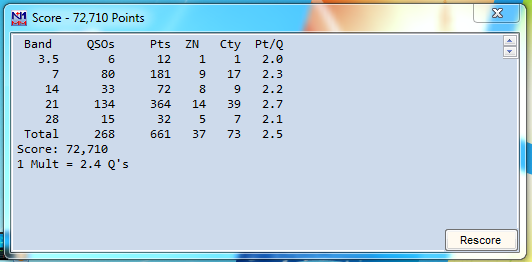
My score for sure is not going to be in the CQ WW CW record books but I really enjoyed this contest and the propagation brought even more joy and really had me staying in the radio chair to make contacts.
Below is the score breakdown:
Finally the computer issue is solved.

A short time ago I posted about a computer issue which had my monitor screen now and then after the system started looking like the picture above. It only happened now and then on startups and I was not really concerned about it. I knew that over time it would get worse and it did......The consensus regarding the issue seemed to centre around the graphics card. I removed my PC from under the desk (easier said than done) opened it up and checked to see if the graphics card fan was working and it was, checked to see if it was seated firmly and it was. I then changed out the DVI-I cable from the PC to the monitor. For a time things seemed to be going just fine until a few days ago.
I started my PC and when to do somethings while it started and when I returned to the room the monitor was black no desktop was being displayed. I moved the mouse around thinking the monitor went to sleep but that did not fix the issue. I powered the monitor off and on via its power button and nothing. I then restarted the PC and all was ok. Now I am thinking the graphics card is on its way downhill finally. I restarted the PC several times and once in a while I was greeted with the black screen but not always. I then found I did not have to restart the PC to fix the black screen issue but rather just turn the monitor off and on several times.......interesting. One time after the PC had restarted and the desktop was being displayed without issue I then started to turn the monitor off and on to see if I could get the black screen issue to pop up. While I was doing this the screen looked like the above picture with just simply turning the monitor off and on again......interesting. I am not suspecting the monitor to be the issue which is cheaper than a sound card. I had the monitor connected via a DVI-I cable so I then removed that and tried an HDMI cable. A very short time later had the same issues again, so it was not a cable issue. I have a second monitor that I use with the Icom 7610 as a radio display. I decided to connect it to the PC and enable my dual monitor option on my video card. This way I can use both monitors at the same time and see if both monitors display the same issue of just the troubled monitor.
It only took a few restarts before the suspect monitor was black but the smaller monitor was working just fine which confirmed to me it was the monitor all along. A new monitor was ordered and should be here in a few days. At this point time time the suspect monitor only acts up only on startup or if I cycle it off and on. Once it is working I have no issues with it, I am thinking that over time this is going to change as the monitor gets worse the reason for ordering a new one. This weekend is the CQ WW DX CW Contest and I am hoping my monitor will last me until the end contest. I want to reconnect my other monitor to the Icom 7610 as it is very handy to have during a contest.
Contesting at QRPp levels!

Yesterday I dabbled in the OK/OM DX CW contest for about an hour and a half. This time for some fun and interest I entered QRP level but lowered my power to just one watt. Propagation has been surprisingly nice over the past week or so and I wanted to give the new solar flux a test run. My radio is the Icom 7610 and my antenna is a slopped Endfed antenna at about 25 feet. I stayed on 20m as the radio gods seemed to be smiling on me there. I made only 10 contacts as I was not in the contest for scoring just to see how the fishing was with one watt. I was only asked for repeats regarding my exchange twice other than that the 1 watt made it through.
Because I was operating at only 1 watt I also wanted to take the loss of my SWR into account. I checked with my antenna analyzer and the CW portion on 20m my SWR was 2.3:1. According to the power loss at various SWR readings chart at 2.3:1, I was in around 15% so this took my 1 watt down to 850 milliwatts.
Below are the results of my QRPp contest efforts:
Band 20m
QSO 10
Score 300
Contacts and Miles per watt using grid square to grid square for millage
1. OM7M 3720 miles 4376 miles per watt at .850 watts.
2. OM3CGN 3795 miles 4464 miles per watt at .850 watts.
3. OL3Z 3515 miles 4135 miles per watt at .850 watts.
4.OK7K 3503 miles 4121 miles per watt at .850 watts.
5. OK1DOL 3478 miles 4091 miles per watt at .850 watts.













