Posts Tagged ‘Software’
 Chirp, chirp
 March 30th, 2011 |
  Author:
 I discovered some free radio memory management software this morning. Called CHIRP, which is presumably an acronym that ends with “Radio Programming”, it is a free, cross-platform, cross-radio programming tool that is being developed by Dan Smith, KK7DS. CHIRP works on Windows and Linux (and MacOSX with a little work, according to Dan). It supports a whole list of radios from manufacturers such as Alinco, Icom, Kenwood, Yaesu and Wouxun.
As the VX-8R is listed, I thought I’d give it a try with my VX-8GR. Unlike the excellent but non-free FTBVX8 software from G4HFQ, CHIRP doesn’t prompt you with the steps you need to perform on the radio. If you just connect the radio, load the software and start the download nothing will happen. With the VX-8R you must begin with the radio turned off, then after starting the download press and hold the F/W button on the side while turning the radio on. When CLONE appears on the display, press BAND. The download will then start and the program will display its progress. With other radios different steps will no doubt be needed. Hopefully at some point prompts will be incorporated into the software.
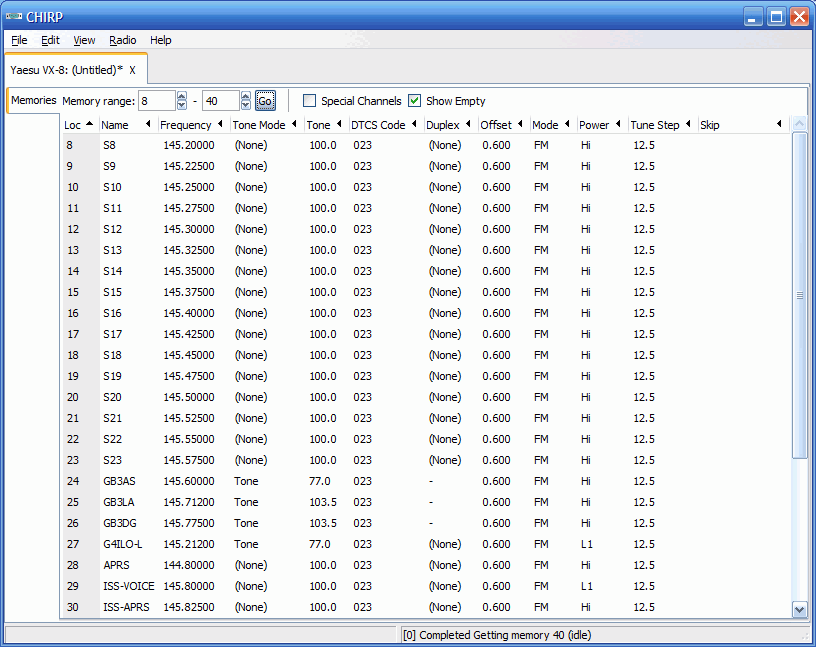
My first download attempt did not complete. Instead an error message appeared near the end. But I tried again. This time the memories were downloaded successfully and displayed in the program as you can see. The “cross-radio” part of the specification means, presumably, that memories are saved in a unified format so you can download them from one radio and upload them to a different one.
I didn’t try uploading to the radio. I have heard of people bricking radios by using software that wrote unexpected stuff and I’d already seen one error message. Besides, I have the FTBVX8 software and I didn’t have any changes I wanted to make anyway. But if you don’t want to pay for memory management software, you want to maintain one memory file and upload it to multiple different radios or you want a program that will run on Linux or Mac OS, CHIRP is a development that’s worth keeping an eye on.

Firefox 4 just works
Following my rant about Internet Explorer 9 this morning I noticed that Firefox 4 had now been released so I decided to update my 3.6 version. The update took less than half the time, there was no disabling of security software or restart required, it checked my add-ons for compatibility and automatically updated those as well. And all the pages I have tried to view display perfectly. A flawless, hassle-free update, just as it should be.
Remind me again why Microsoft is so successful?

Microsoft Arrogance
I had seen rumblings in various forums that the new Internet Explorer 9 caused problems for some websites so I thought that I had better install it for myself in order to check mine. The installation process itself was alarming. A window came up to say that various programs that included system functions were in use and had to be closed. I agreed, while making a mental promise to myself that if this f***s up my computer then I’m switching to Linux for good!
I also saw my security software disabling itself. If any other program from any other source did that I would bail out quick. It really is sheer arrogance on the part of Microsoft to expect users to allow an installer to do things that security common sense says it shouldn’t, just because the software came from Microsoft. I wonder how long it will be before the malware guys set up fake IE9 downloads which exploit the knowledge that the setup disables security to load bad stuff on a computer?
After the install was finished the computer had to be restarted. Windows just loves being restarted. I wonder how many millions of hours of productivity are lost every year waiting for Windows to restart after an update? But I was now ready to try Internet Explorer 9.
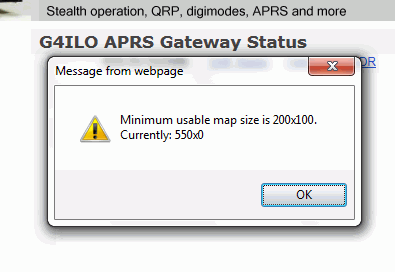
The first thing I spotted is that the embedded APRS maps from aprs.fi on my website and also the WOTA website no longer work. Instead of the expected map you get a message box that says: “Minimum usable map size is 200×100. Currently: 550×0.” This is something that has worked on every single browser on every computer platform until now. It is another example of Microsoft arrogance to release a browser that is incompatible with everything that went before, knowing that because so many people use their lousy browser website developers will have to change their sites to make them work with Internet Explorer.
On my QTH Information page where I had an embedded map from Google Maps showing an aerial view of the neighbourhood centered on my house, the map is replaced by a # and a pop-up panel appears at the foot of the page to say “Internet Explorer has modified this page to help prevent cross-site scripting.” I have no idea what that’s all about. I guess I’ll just have to dump the maps.
I gave up writing software except for my own use because Microsoft made it impossible for self-taught amateurs like myself to write programs that work on all the different versions of Windows. Now it seems they are trying to make it impossible for self-taught amateurs to create web pages. Why can’t they keep things simple, and if something worked why did they have to break it? Perhaps it’s time to reinvent those little badges that people used to put on websites in the 1990s, only this time the badge would say: “This website works best in anything other than Microsoft Internet Explorer.”

Free Windows sound recorder needed
Here’s a question for you software experts out there. Do you know of a free, simple, no-frills sound recorder application that can record audio from any sound card?
Windows Sound Recorder has the simplicity I need, but it can only record from the default recording device. If I want to record from the radio I have to change the default input device to whatever sound card is attached to that radio. This usually results in hours of head-scratching later on after I forget to switch the default sound card back.
Audacity is the sound recorder application most people recommend. It is free, and it can record from any sound card, but the user interface is so complicated I can’t figure out how to use it.
So I have decided to ask you, my readers. I imagine this is something that many hams have tried to do. What do you use?

On the tiles
The best APRS client just keeps getting better. The latest treat for beta testers of APRSISCE/32, the APRS client for Windows desktops and Windows Mobile (which also runs under wine on Linux) is configurable map tile servers. This feature allows users to switch between a variety of different map servers to use a range of different maps in addition to the default OSM mapping.

Probably the most useful for most users will be the Mapquest OSM mapping which is a high contrast map similar in appearance to a road atlas. Mapquest also has a set of satellite view tiles, shown above in a screenshot from my 30m APRS gateway. These tiles don’t unfortunately let you get closer than about 10,000 metres so you can’t zoom in on somebody’s house like you can with Google mapping.
For UK users especially those of us in hilly areas the ability to use the UK specific Freemap mapping is a massive benefit. These OSM based maps show topographical detail (contours) as well as footpaths and walkers’ routes as illustrated by the screenshot below centered on a recent SOTA activation in the Lake District.

The ability to seamlessly pan and zoom around an area as well as switch map types with a couple of mouse clicks puts APRSISCE/32 miles ahead of UI-View. This new feature is another example of the amazing dedication and support given by Lynn, KJ4ERJ, to his program. Only last weekend while Lynn was on a trip to Spain a handful of us were discovering and sharing details of alternative map sources and hand-editing them into the configuration files so use the maps with the software. On his return the suggestion was made that it would be nice to be able to switch between map sources from within the program. Four days later, we’re testing the new feature. It’s like Christmas every day when you’re an APRSISCE/32 user!

Screaming for help
I wonder if readers could help me locate a couple of software utilities I need for current projects?
Screamer 1.7 PIC boot loader (or successor.) This was developed by or for Sparkfun, who have version 1.6 on their website. Unfortunately it only allows serial ports COM1 – COM6, which is not convenient for me due to all the COM ports dedicated to radios and TNCs on my shack computer. Forum posts mention a version 1.7 that lets you enter larger COM port numbers but the links to it are now dead. The version 1.6 download includes VB6 source code so I could fix the problem myself except that I only have VB.NET which is totally incompatible with it (don’t you just love Microsoft?) So does anyone know where I can find a copy of Screamer 1.7 or later?
Programming software for Friendcom FC-201SA UHF Transceiver Module. I purchased one of these a few months ago but have only just got round to using it. However it is operating on its default frequency of 430.000MHz. There is a serial interface that can be used to set the frequency in each of the 16 channels and also set the channel. The manual describes the module’s command set but I don’t really want to spend days writing a program for it. The manual also mentions programming software but it was not supplied when I purchased the module from Elcom Research and their website is now defunct. I can’t find the utility on the download page of the Friendcom website and the email I sent to Friendcom did not receive an answer. Does anyone know where I can find a copy of this software?
In case anyone has what I’m looking for and is thinking of emailing software to me, please contact me first. Google doesn’t just block executable attachments, it blocks the entire email so I’d never even know you’d written. The trick is to put it into a zip file and then change the file extension to something other than zip.

Resonant Frequency Video Edition 1 (short Intro to Linux for Radio Operators)
This is a short introduction to Linux for Amateur Radio Operators showing a few things that are available for Amateur Radio.













