Posts Tagged ‘SDR’
 Planning My New QTH (Ham Radio Station) Part II Of III: Modern Contesting Tools
 December 24th, 2012 |
  Author:
 I’ll be writing a lot in future postings about how FlexRadio’s new 6000 series transceiver technology has influenced my new station’s design. Today’s post will focus on these rigs’ ‘Slice Receiver’ capabilities.
First, however, allow me a digression on 21st Century Radio-Sport a/k/a “Contesting.” There are hundreds of radio-sport events spread across the calendar each year from state QSO (QSO = radio contact) parties to major global events such as the CQ World Wide DX Contests (CQ WW DX, ‘DX’ = long distance radio contact) held across two weekends – one for CW (Morse code) and one for Phone (Signal Sideband = voice) – in the northern hemisphere autumn. The smaller events have a friendly ‘small town’ vibe. On the other end of the scale, the big DX contests are hard fought struggles that test technology, skill and endurance (you try averaging two international contacts via morse code per minute for 48 hours straight!).
The big contests have a multitude of classes to parse the competitors. Single operator, multiple operators with one transmitter, multiple operators with multiple transmitters, high power, low power, really low power (also known as ‘QRP’), assisted and unassisted. You compete against others in your class in your country and in your class on a regional and global scale depending on your ambition.
I mentioned ‘assisted’ and ‘unassisted’ classes in the previous paragraph. This can mean various things but the major source of assistance during a contest is the so-called ‘cluster’, Internet resources that reports what stations are active and on what frequencies. These networks started in the ’80s with hams transmitting short reports of the distant stations they were hearing, generally on the HF (short wave) bands, via the amateur VHF digital networks which were generally local, within a city or region. These were know as ‘DX Packetclusters’ back then and I used to operate a node in Tiffany, Colorado in the ’90s.
These networks later migrated to the Internet, became interconnected and are now global in scope passing literally millions of ‘spots’ (as each report of a station and its frequency is called). DX Summit, based in Finland but with visitors from around the world, has reported over 23 million such spots since it launched in 1997!
One of the challenges of big data is finding actionable useful information shooting out of the digital firehose. The cluster networks go bonkers during the big contests with several spots per second streaming by. This is not always helpful. An operator can be overwhelmed by choice; which station do I try to contact? It’s like getting a restaurant menu with a thousand choices. And with spots being reported from all corners of the planet much of the data is not actionable. A station being heard in say Mongolia might not be making it to your shack in Peoria at that time of day on that particular frequency.
I will manage this onslaught of data by disconnecting from the Internet clusters and generating my own spots distilled from radio signals actually being detected at my station in real time. The data will thus become relevant and actionable. Many stations are already doing this to supplement the Internet spots that every assisted class station sees. K3LR and W3LPL, two giants of multi-operator contesting, are doing this effectively using CW Skimmer software written by Alex Shovkoplyas, VE3NEA. CW Skimmer uses ‘sensitive CW decoding algorithm based on the methods of Bayesian statistics’; in other words your computer listens for Morse code on your radio and tells you who is transmitting and on what frequency. CW Skimmer, of course, is not much use in Phone (voice) contests.
There are several challenges to using CW Skimmer effectively. The first challenge at most stations is receiver bandwidth. Most ham radios can only listen to relatively small segments of radio spectrum at any one time limiting the size of the net CW Skimmer can cast. If a particular contest has its competitors spread out over say 70-kHz and your radio can only monitor 2.8-kHz you are going to miss a lot of the action. So called SDRs (Software Defined Receivers) overcome this limitation and can look at much larger chunks of spectrum at once. An operator using one of these radios (older generation FlexRadios for example) can actually look at a visual spectral display showing where signals are and indicate their relative strength; a CW Skimmer software working with one of these radios can decode and report on the activity of dozens of stations with this set up.
That hurdle jumped, another one looms ahead. If you are monitoring stations on one band how do you know what’s happening on other bands? Most contests are spread across several of the amateur radio bands. Some bands are good during the day, some are good during the night and propagation on all the bands is always changing. Europe might be good in the morning on a particular band , say the 21-MHz (15m) band, Africa in midday and Japan in the afternoon. The general propagation trends are predictable but there are large daily variations in propagation that are not predictable (in other words, what signals are being refracted back to earth and where). Some stations (K3LR, for example) have separate SDRs for each amateur contest band. Other stations (W3LPL for one) uses the QS1R receiver which can listen to several bands at once.
The Flex 6000 series radios listen (via direct sampling, more on that in a future posting) to 77-MHz of spectrum at the same time. That is truly spectacular! With my multiple Flex-6700s (I have two on order and plan on ordering a third unit later in 2013) i will be able to assign ‘Slice’ receivers (each Flex-6700 can have up to eight of these, created in software and 384-kHz) to each amateur band from 1.8-MHz (160m) to 144-MHz (2m) and let them run all the time, during contests and in between. I will have live, actionable intel on what CW (Morse) signals are propagating to Glade Park, Colorado at any given time on all the amateur bands. I will be feeding this data out to the Reverse Beacon Network (RBN) and using it for my own contesting and day-to-day DXing operation. (More on the RBN in a future Blog posting.)
How I plan to keep transmissions on one frequency from overloading and possibly damaging receivers listening – and running CW Skimmer software – on other frequencies on co-located (and sometimes the same) antenna will be covered in a future posting. The Flex 6000 series radios are full-duplex (in other words, they can transmit and receive at the same time) so the listening on the same band I’m transmitting on becomes a possibility but one with significant challenges.
I should point out here that many hams operate without any kind of assistance in contests whatsoever. These are some of the world’s most skilled and motivated amateur radio operators and I admire this type of contesting. However, my personal current motivation is to see where I can go with technology in contesting and amateur radio in general. Assisted, in so many words, but seeking innovation.
Elecraft KX3 NaP3 Configuration Highlights
In mid November I sold my Kenwood TS-590 to finance the purchase of an Elecraft KX3 and become a full time QRP operator. One of the advantages of the KX3 is SDR I/Q output, which can be used to drive a panadapter. After some fidling around, I have a configuration that works with the popular NaP3 software and thought I would share the highlights in hope of saving you some effort. This is by no means an exhaustive setup and configuration guide for NaP3, but it should be enough to get you started. Remember you can click on the images to enlarge them.
For this example I have used the integrated sound card in my PC and have not yet put a ground loop isolator inline which are both opportunities for improvement.

NaP3 Audio In Advanced Tab
We begin by manipulating the input sound card port configuration as shown above. This will vary somewhat from sound card to sound card, but we want to be sure that we are capturing two channels and that the sampling rate is set at the maximum your card supports, which may take some experimentation and is not necessarily the highest sampling rate shown in the drop down.

NaP3 Setup Tab
Here on the setup tab of the NaP3 configuration, we need to select the sound card input we are using and where we would like NaP3 to output decoded audio. Once again we have the option to manipulate the sampling rate, which as you can see is 48k for my sound card. In addition, we need to select “Elecraft K3” for the Rig Type and specify our CAT parameters. I began this adventure trying to use the “Elecraft KX3” Rig Type, but I found it to not work very well.

NaP3 IF Tab
Here is the “fun” part, at least it was for me until I started banging my head on the desk. Be sure to set your “Global Offset” to 0 and select “Swap I/Q Channels”. The “IF Frequency Offsets” is where you will have to spend some time playing. The method I used was to tune to WWV in CW mode on the KX3 and determine the differential between the frequency displayed on the KX3 and the panadapter display. I then set the offset to compensate. To configure the offset for USB and LSB modes, I reduced the offset by the amount equal to my CW sidetone. This should get you pretty close, but may still require a little tweaking. Feel free to try my numbers, but I am unsure if they are valid from KX3 to KX3.
If you determine some other method to set the offsets, please let me know as this is the most time consuming portion of the configuration.

NaP3 Spanadapter View
When it is all over, this is similar to what you will end up with, a nice broad view of the spectrum centered on your rigs current frequency!
Show Notes #088
Introduction:
- A sticky, stormy night in Texas, just right for podcasting and Russ’ attempt to take over the MintCast.
Announcements:
- Pimpin’ the band: Thanks, as always, to Gamma Leonis for the theme music for the show.
- We recently learned of Tom, KB4HQA’s, unfortunate car accident after leaving the Dayton Hamvention this past May. We wish him a speedy recovery and return to podcasting.
- Richard is a fan of America’s Test Kitchen.
Topics:
- Pimpin’ the network: If you have a podcast and want to reach LHS listeners, please visit Black Sparrow Media and contact us to become a member! The Waveguides Podcast did and so can you.
- Who is your hero in amateur radio, living or dead? Let us know! Richard is gathering information for his super-secret project.
- Storm watchin and workin on radios. While a storm raged in Texas, Richard received an email about an IC-735 that would not power on reliably. Richard’s trouble-shooting philosophy: start with the things that are cheap to replace.
- Richard is hoping to pursue a high-speed multimedia (HSMM) and mesh radio project using DD-WRT or OpenWrt for use in emergency communications. Used routers, such as the Linksys WRT54GL, are ideal and can be found for little money.
Feedback:
- Leif, KC8RWR, wrote to clarify a comment to episode 86, explaining that he’d like to try using an NE602 frequency converter to an RTLSDR radio to receive ham bands.
- Brian, G3XGY, heard Russ on the Mintcast and is looking forward to listening to episodes of LHS! Welcome, Brian.
- Leif, KC8RWR, offers a suggestion for Grant, who was having difficulty with the LHS live Linux CD handed out at Dayton. He thinks it may have been due to Linux not recognizing Grant’s video card. Thanks, Leif.
- Harrison, VE2HKW, a sometime participant in MintCast, expresses his appreciation for episode 85, our interview with David Rowe and discussion of Codec2. Thanks, Harrison. Speaking of Codec2, Russ reports that David Rowe has won the 2012 ARRL Technical Innovation Award for his work on Codec2. Congratulations, David!
- Harrison, VE2HKW, wrote to ask for help with his Icom IC-735 (as mentioned above).
- Claudio of the LinuxBasement podcast thanks us for the mention in episode 87.
Contact Info:
- Contact Richard at [email protected], Russ at [email protected], or both at the same time at [email protected].
- Listen to the live stream every other Tuesday at 8:00pm Central time. Check the LHS web site for dates.
- Leave us a voice mail at 1-909-LHS-SHOW (1-909-547-7469), or record an introduction to the podcast.
- Sign up for the LHS mailing list.
- Sign up for the MAGNetcon mailing list.
- LHS merchandise is available at the Merch link on Web site. Check out the Badgerwear or buy one of the other LHS-branded items at PrintFection.com/lhs or Cafe Press. Thanks!
- Thanks to Dave from Gamma Leonis for the theme music.
Music:
- “The Television Song” by Bryan Dunn, from the album Vicious Waltz, courtesy of Jamendo.
- “Total Breakdown” by Brad Sucks, from the album Out of It, courtesy of Jamendo.
RTL-SDR Adventures

DVB-T Dongle from eBay seller digitalhome88
I received my DVB-T dongle from eBay finally about a week ago. Here’s a link to the vendor I purchased from. After getting the drivers loaded in Windows 7 on my aging Dell D630, I was able to get the SDR running. Using the instructions here at rtlsdr.com, I finally got things up and running. There was one mistake that made me lose several minutes. I missed the instruction: If your dongle doesn’t automatically show up, select Options then List all Devices. Read carefully! I’ve found that in my case, SDR# is the better choice of software. For some reason HDSDR causes the dongle to lock up after changing bands. I’m sure I’ll find out why because I see many others having good luck with it. The old Dell was able to keep up, but seemed a bit choppy. I dropped the sampling rate down a bit, and everything was fine.
My first tests were a little disappointing, yet this was with the cheesy antenna the dongle arrived with, and then with MacGuyver-ing an antenna adapter together. The DVB-T dongles have a PAL-female connector on them, and nothing in my tin-o-connectors seemed to work. Radio Shack carries an adapter that is PAL-male on one side and F-female on the other. I went out and picked one up, as well as an extra F-to-BNC adapter. Then I was able to go from the dongle to my simple outdoor antenna.
With a solid connection to my outdoor wire antenna (just a wire thrown into a nearby tree, and a counterpoise out on the roof slope), I was able to get all of the local repeaters, as well as repeaters in Manhattan, and much farther. 4 different NOAA stations came in, and aircraft traffic from the whole tri-state area. I even grabbed a couple of 2 meter USB contacts, and quickly switched over to the TR-9000 to speak with one of them. Performance with this setup was much, much better than I had expected.
My Elmer had stopped by Sunday to deliver a rig he repaired for me on his way out to Eastern Long Island, and I gave him a quick demo. After playing with it for about 20 minutes he said “Send me the info. I need to get one of these!” Here is a quick video I took of some local repeaters, including a Ham ordering coffee from a McDonald’s drive-thru. Sorry for the shaky video.
Click here for video: RTL SDR with SDR#
–Neil W2NDG
Show Notes #086
Introduction:
- Tonight’s episode is proof that LHS is at least as popular as the All-Star Game.
Topic:
- Interview with Bob Finch, W9YA, principal maintainer of yfktest.
- Bob got involved with the yfktest project because he was looking for a logging program like the old DOS program, WR9R.
- His ideal logger did not use graphics, did not require a mouse, and was very easy to learn. yfktest was close, but had a few problems, so Bob began submitting fixes and improvements.
- Over the past year, Bob began submitting code changes and eventually became the principle maintainer of the program, and has made over 150 patches in that time.
- Russ described his problem with the program for Field Day logging. Bob explains that the issue was due to the error checking, and had Russ not tried to enter the signal report into the Class field, it would have worked fine. Russ suggests having a line of text above the fields that provides hints as to what each field should contain. Bob added that to his To-Do list.
- yfktest is written in Perl, so no compilation is necessary to install.
- Bob is working on a version that is completely contained on a USB stick that would be operating system agnostic.
- Rudimentary networking features are in the code now, but disabled. So, it’s possible that networking might be a future enhancement.
- Get your copy of the latest version of yfktest by following the instructions in the README.NOW link at bfinch.net.
- Bob then describes another of his interests, rocketry, and is involved in the open source/open hardware rocketry project Altus Metrum.
Feedback:
- Rich, KD0BJT, of the Low SWR podcast writes to tell us of a Field Day logging program called fdlog. It’s written in Python and has networking capabilities for multiple stations. Rich also mentions the Java-based logging program JL. Thanks, Rich. fdlog is a graphical Field Day logging program written in Tcl/Tk, but hasn’t been updated in about a year.
- Leif, KC8RWR, sends us a link to a series of Youtube video tutorials for GNU Radio, the open source software project for RTL Software Defined Radios. He wonders if he could use an NE602 at the front end of the radio for HF, and use a Raspberry Pi to run GNU Radio. Our hosts discuss this and the Signetics NE602, a balanced mixer and oscillator on a chip.
- Dave, M0DCM, has been catching up on LHS episodes while convalescing. He describes his system for listening, and some experiences with the Ettus SDR, Funcube Dongle, and digital modes with his new Yaesu FT-817ND.
- David, KE0AZ, tells us that the power output of the Ettus transmitter daughterboards is anywhere from 50 to 200 mW.
Contact Info:
- Contact Richard at [email protected], Russ at [email protected], or both at the same time at [email protected].
- Listen to the live stream every other Tuesday at 8:00pm Central time. Check the LHS web site for dates.
- Leave us a voice mail at 1-909-LHS-SHOW (1-909-547-7469), or record an introduction to the podcast.
- Sign up for the LHS mailing list.
- Sign up for the MAGNetcon mailing list.
- LHS merchandise is available at the Merch link on Web site. Check out the Badgerwear or buy one of the other LHS-branded items at PrintFection.com/lhs or Cafe Press. Thanks!
- Thanks to Dave from Gamma Leonis for the theme music.
Music:
- “Ancient (The Deepest Sky I’ve Ever Seen)” by Olga Scotland from the album Castles Under the Water, courtesy of Jamendo.
The $20 Software Defined Radio
Despite my interest in boat-anchors I do find myself peeking ‘over the wall’ from time to time and taking a look at new and emerging technologies. After several demonstrations from friends I had become convinced of the incredible potential of software defined radios and even found thinking about owning one … one day.

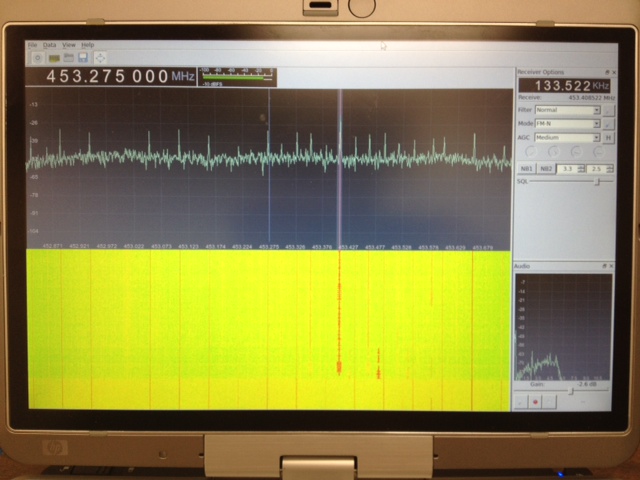
Software (Linux) : After poor results with the software running on MS Windows I moved across to Linux and got it working well there. I can’t point you to a single howto for this because I used several different guides and tried a few things before it started working. The most helpful, and probably all you really need, are the build-gnuradio script which gets hardware support and gnu-radio running and the “Getting Started With RTL-SDR” page by Tom Nardi which covers installing Gqrx. All the software used is in development and requires familiarity with the command line to install and use at the moment.
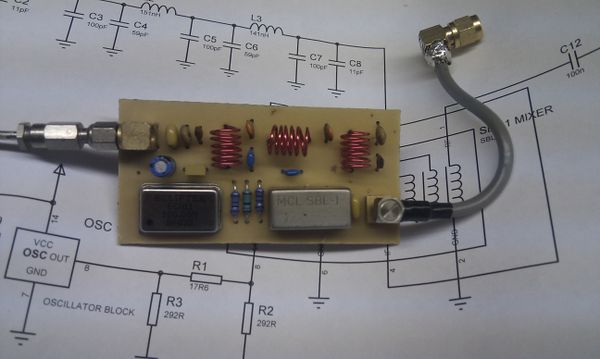
Update : Thanks to a link from Neil W2NDG to an EBay sale I’ve been able to track down a pre-assembled HF up-converter on this page : New HF Converter Kit for the SDR Fun Cube Dongle The price seems to be 45 euros, or about $55 US.
Show Notes #084
Introduction:
- No music this time; just one hour jam-packed with LHS goodness!
Announcements:
- Remember to sign up for the following LHS services:
- The LHS SubReddit
- The LHS Mailing List
- The LHS Mobile app. Follow our updates via the mobile applications available for iPod, iPhone, iPad and Android devices.
- Be an LHS Ambassador! Please join our Ambassador program. The event calendar has expanded quite a bit and we need your help. These events are now world-wide, so we could use some help outside the US as well as all over the country from California to Maine.
- YFKtest: Yes, there really does seem to be a problem. It’s been confirmed by John, EI7IG, that the program does not log contacts for the ARRL Field Day contest. Other contests work fine. Russ plans on emailing the developer, DJ1YFK, with these observations.
- From the “Yes, It’s an Antenna” File: Multi-band HF dipole made from horse fencing.
- Pulling a Lunduke: Holding Source Code Hostage. Our hosts discuss this blog post by Tom Nardi about Bryan Lunduke’s recent move to open source his software. Bryan is one of the hosts of The Linux Action Show.
Topics:
- Software Defined Radio (SDR)
- A common topic Russ encountered at Dayton was about the available Linux options for software defined radios.
- GNU Radio Project
- Version 3.6.0 released in early May, 2012.
- Version 3.2.2 is in the Debian Sid repository.
- The latest version can be retrieved with git. (Install git with the command “apt-get install git”.) To download the software, issue the command “git clone git://gnuradio.org/gnuradio”.
- Build instructions are available for most of the major Linux distributions.
- SDR Hardware
- Ettus USRP series works with the GNU Radio Project software. There are various models ranging in price from $700 to $2000, depending on the frequency range and options. Various modules allow receive and/or transmit on bands from 30kHz to 5.9GHz. Unfortunately, power output appears to be just 50-200mW, depending on the bands provided by the transmitter daughter board chosen.
- Funcube Dongle costs £128 (~$200) and is a receiver only. The Funcube Dongle is a “radio receiver designed to allow anyone to try their hand at reception of satellites like FUNcube”. It covers 51.5MHz – 1.7GHz, less the region from 1.1GHz to 1.2GHz.
- Perseus SDR costs $1000 and is also receive-only. It receives 10kHz to 40MHz.
- SoftRock SDR is a kit available in various models from $20 to $90. Most are receive-only, but the Ensemble is a 1W HF transceiver. Some models are unavailable at the moment. The SoftRock RXTX Ensemble Transceiver Kit will allow you to build a 1W transceiver for one of the following bands or band groups: 160m, 80m/40m, 30m/20m/17m, or 15m/12m/10m.
- RTL-SDR Devices range in price from $20 to $200 and are receive-only. More on the RTL-SDR project in an upcoming episode.
Feedback:
- Stewart, VA3PID, wrote to say that Russ was the first person, possibly ever, to correctly place his Scottish accent at Hamvention. He also remarked (in reference to a discussion in episode 71) that Chirp has come a long way; it can now program his Yaesu FT-857D!
- Jonas recently re-discovered LHS and expressed his appreciation for the show. Thanks, Jonas!
- Stefano, IZ3NVR/KD2BGM, asks for more help getting so2sdr built on his Linux machine. Russ suggests installing the compiler with “apt-get install g++ build-essential”, installing Qt and several other packages as described in Episode 83, then try building the so2sdr program again.
- Lastly, David Dominicki left a mostly unintelligible comment in response to Episode 78. Um, thanks… we think.
Contact Info:
- Contact Richard at [email protected], Russ at [email protected], or both at the same time at [email protected].
- Listen to the live stream every other Tuesday at 8:00pm Central time. Check the LHS web site for dates.
- Leave us a voice mail at 1-909-LHS-SHOW (1-909-547-7469), or record an introduction to the podcast.
- Sign up for the LHS mailing list.
- Sign up for the MAGNetcon mailing list.
- LHS merchandise is available at the Merch link on Web site. Check out the Badgerwear or buy one of the other LHS-branded items at PrintFection.com/lhs or Cafe Press. Thanks!
- Thanks to Dave from Gamma Leonis for the theme music.
Music:
- None.













