Posts Tagged ‘JT65A’
 Life on 6m
 May 1st, 2011 |
  Author:
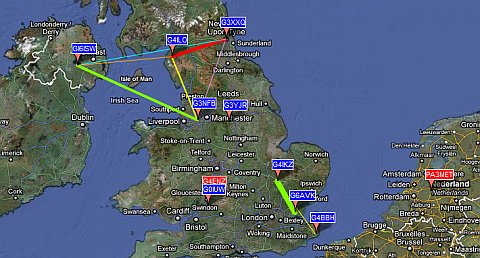
 The 6 metre band is showing signs of life, as this map of WSPR activity from this afternoon shows.
However, some of the traces on the WSPR application screen look a bit odd.

I don’t claim to be an expert but I think what I am seeing is the result of doppler shift on the signals being reflected by fast-moving Sporadic-E clouds. In several cases what seems to be a trace has not been decoded.
I’ve said this before, but I wonder if WSPR mode with its 110 second transmit periods and tiny frequency shift encoding is really suitable for detecting Sporadic-E propagation. But no-one has ever commented on this, leaving me to wonder whether they think I’m an idiot who doesn’t know what he is talking about or whether nobody knows.
The digital mode most people seem to use on 6m is JT6M, however this entails using the WSJT program which I find rather confusing. I’m interested in trying JT65A but I’m not sure if it is any more suitable than WSPR for this type of work.
In the absence of any expert advice I’m going to try JT65A using a dial frequency of 50.276MHz. With the JT-Alert accessory to tell me when anyone replies I can leave the rig calling CQ whilst I am otherwise occupied. It will be interesting to see what we can work on 6m with the JT65A mode.

Life on 6m
The 6 metre band is showing signs of life, as this map of WSPR activity from this afternoon shows.
However, some of the traces on the WSPR application screen look a bit odd.
I don’t claim to be an expert but I think what I am seeing is the result of doppler shift on the signals being reflected by fast-moving Sporadic-E clouds. In several cases what seems to be a trace has not been decoded.
I’ve said this before, but I wonder if WSPR mode with its 110 second transmit periods and tiny frequency shift encoding is really suitable for detecting Sporadic-E propagation. But no-one has ever commented on this, leaving me to wonder whether they think I’m an idiot who doesn’t know what he is talking about or whether nobody knows.
The digital mode most people seem to use on 6m is JT6M, however this entails using the WSJT program which I find rather confusing. I’m interested in trying JT65A but I’m not sure if it is any more suitable than WSPR for this type of work.
In the absence of any expert advice I’m going to try JT65A using a dial frequency of 50.276MHz. With the JT-Alert accessory to tell me when anyone replies I can leave the rig calling CQ whilst I am otherwise occupied. It will be interesting to see what we can work on 6m with the JT65A mode.
Time to ditch Dimension 4
Digital modes such as WSPR and JT65A are time-synchronous and require the computer clock to be accurate to within a second. New users frequently don’t realize this and find that they aren’t decoding any signals. When they go to a forum for advice they are inevitably advised by well-meaning helpers to run a bit of software called Dimension 4.
Once upon a time there may have been a good reason for using this program but today it is not a good idea at all. I have seen several forum threads where people have installed Dimension 4 and believed that their PC clock was now accurate, but were still not decoding signals. I suspect that this is because newer versions of Windows have tightened the security controlling whether programs are allowed to do things like change the system clock. Dimension 4, being last updated in 2004 according to its website, knows nothing of this.
There may or may not be ways to make Dimension 4 work under Windows 7 or Vista but there is no reason to bother with them. Instead, just install Meinberg NTP for Windows. Not only is this every bit as free as Dimension 4, it is also the official Network Time Protocol client software. Nothing is ever going to keep your computer clock more accurate than this, and if installed using the default settings it will “just work” even on the latest versions of Windows.
So please, computer Elmers, stop telling people who need to get their clocks synchronized to install an old and unsupported program.

IC-9100 USB audio issue
No, I haven’t gone and bought an Icom IC-9100. Nor am I planning to. However, through the JT65-HF Google group I learned of an issue that could be a serious annoyance to anyone who owns one of these radios and wishes to use it for digital modes on a computer that runs Windows XP. The issue is that the audio output from the radio is at a fixed level and cannot be altered. I thought it deserved wider publicity, because if I had been thinking of buying an IC-9100 I would have found this out the hard way, and I don’t think many people would be happy at having to buy a new computer to go with their £3000 radio.
The IC-9100 (and the IC-7600) both have USB connections between the rig and the radio. Hailed by many as the way to go (though not by me) this single connection provides both a virtual serial port for rig control and a USB sound device for digital modes. Unfortunately under Windows XP when you select the Icom sound device and open the mixer settings to set the audio level from the radio there is no slider. It is fixed. I’m told there isn’t a control in the radio itself to change the level either.
Most digital mode programs don’t have a level control within the software, they expect you to use the Windows level controls. So if your waterfall is bright yellow because the audio level is too high there is nothing you can do if you own one of these Icom radios (except, presumably, use the good old-fashioned analogue audio connections.)
Progress. Don’t you love it?

Stealth operation
One of the problems with operating in the evening is that on most HF bands even a few watts of RF is enough to turn on the neighbours’ security lights. So there is an extra incentive to work QRP. This evening I tried JT65A at 2W on 30m, then moved to 20m with 5W. This map shows where my QRP signals were received.
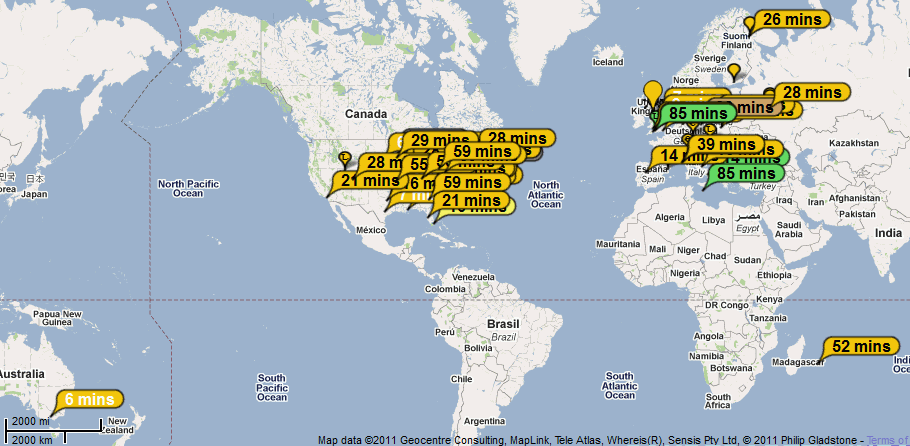
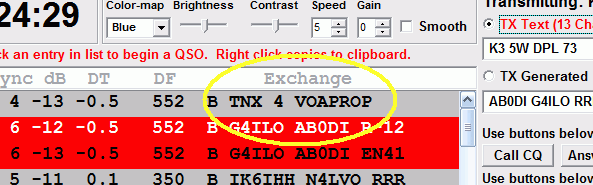
The antenna on 20m was the multiband attic dipole. Stations worked included K3AXR (FM28), KF4NX (EM83), AB0DI (EN41), VA3WLD (FN03) and KD2A (FN13). By the way, whoever said JT65A is not a chat mode!

Changing the 30m bandplan
I have never had a JT65A contact on 30m. This is surprising. The 30m band is the most popular band for the WSPR mode which has demonstrated that it provides good propagation 24 hours a day. The trouble is that there is nowhere for JT65A to operate. The JT65-HF software frequency menu offers two choices for VFO frequencies: 10.139MHz and 10.147MHz. But the former will cause interference to WSPR and have you fighting it out with a phalanx of PSK signals and the latter conflicts with the frequencies used by APRS packet and other digital networks.
To those who wonder why you can’t just find a clear frequency and operate I would point out that this doesn’t work with weak signal digital modes. Not only will users of other modes not know you’re there and call on top of you, but the DX you hope to work won’t be able to find you either. So it’s important to have a frequency of operation that has a good chance of being clear, where other users know to listen.
From recent discussions it appears that the two previously mentioned 30m frequencies were chosen in a desire to find a place to operate that fits in with the IARU Region 1 and Region 3 bandplans. In the USA (which is Region 2) narrow band digital modes can use 10.130-10.140MHz but in the rest of the world the area up to 10.140MHz is allocated to CW.
I have long believed (and have probably written before in this blog) that it is absurd to have different bandplans and different rules for different parts of the world because radio waves don’t stop at national boundaries. I suspect that the allocation of just 10kHz for digital modes was made back in 1979 when the 30m was first allocated to amateurs, when the only digital mode was RTTY. Since then, and especially in the last ten years or so, there has been an explosion in the number of digital mode users (due to the increasing use of computers) as well as a proliferation of different digital modes. It is time the band plans were updated to reflect that.
I think the bandplan for 30m in the rest of the world should be brought into line with that in the USA. I have nothing against the CW mode but if 30kHz is enough for US amateurs to get by with then the rest of the world can also manage with 30kHz.

JT-Alert
JT65A is a wonderful mode, and JT65-HF by Joe Large W6CQZ is a wonderful program that makes it enormous fun to operate. True, the mode only allows the exchange of signal reports, though a very brief amount of extra information (such as power and antenna) can be sent in a custom message. But so many contacts using other modes also only result in the exchange of such limited information. On the other hand, there is a certain magic in seeing faint musical tones sent by a faraway station translated into a message on your screen. Many people have said that JT65A is addictive. I agree.

If there is one problem with the mode, it is that the 50 second transmit cycles where nothing is decoded on to the screen until the end makes it easy for your attention to wander. I’m ashamed to admit it, but many is the time someone has replied to my calls and I missed it because my mind was elsewhere. So I was really pleased to discover an add-on for JT65-HF written by Laurie VK3AMA called JT-Alert. One of a pair of add-ons he has written (the other is a kind of macro tool for custom messages) it watches the decoded text and sounds an audible alert when a CQ call is received or when a station replies to your call. You can have different sounds for the two alerts, and the audible alert is optional and can be disabled. The tool can dock to the bottom of the JT65-HF window (as in the screenshot above) so the two function as one program.
I have been monitoring for activity on ten metres, which is dead most of the time. It would get pretty boring sitting in front of a blank window for hours at a time but I have set the CQ alert to a loud klaxon which will bring me running to the shack from wherever I am in the house if/when a call on 10m is received. It’s a really useful tool (though it does get a bit annoying when working on 20m and my XYL isn’t so keen on it either!)
I made a number of nice contacts on 20m using JT65A today, including CO2VE (Cuba), PJ2MI (Curacao) and LU6AM (Argentina). I also worked a fellow blogger, David K2DBK. Unfortunately my custom message to David didn’t get sent as I got caught by a quirk in the JT65-HF program that was pointed out to me later by members of the JT65-HF support group. Apparently if you start a message with 73, those two characters are sent as a special shorthand sequence and the rest of the custom message is ignored. I had actually read that in the documentation, but I’m afraid due to the onset of senility RTFM often isn’t the answer as I FTFM (Forget The Frigging Manual) immediately after I’ve read it. Oh well. 🙁