Posts Tagged ‘Equipment’
 Your First (and Second) Ham Transceiver
 March 21st, 2020 |
  Author:
 We recently completed a Technician License class that produced a herd of new ham radio licensees. This always leads to a discussion of what radio should I get? Often, this is centered on the idea of getting a handheld VHF/UHF radio to get started. That is a good first move. However, for many new hams it is worth looking ahead a bit to potential future purchases.
Handheld Transceiver (HT)
Let’s start with an HT. Even if your ham radio future is going to be on the high-frequency bands, an HT is a useful tool to have. After all, FM VHF is the Utility Mode for ham radio. Many new hams opt for an inexpensive Chinese radio such as the Baofeng UV-5R. Recently, I’ve been steering them toward the slightly more expensive Yaesu FT-4XR (around $70).

It is a significantly better radio than the UV-5R but still affordable. Some new hams decide to spend more on an HT, which is also a good option. There are many radios to choose from in the $150 to $350 range.
For hams just interested in local (perhaps emergency) communications, this might be the only radio they get. If it meets your needs, that’s just fine.
FM VHF/UHF Base Station
Another option to consider is to set up a more capable station at your home, focused on FM VHF/UHF operating. This is probably going to be a dual-band radio that covers 2 meters and 70 centimeters, FM only. One way to do this is to use a mobile transceiver powered by a DC power supply and connected to an external antenna on the roof.

With higher power (50W typical) and a good antenna mounted in a high location, this type of station has better range than an HT. See A VHF FM Station at Home and Considering a VHF/UHF Antenna For Your Home. This could be your first radio but why not have an HT in your toolkit?
The All-Band Base Station
Many new hams have their eyes on working distant stations via the high-frequency bands. For many people, this is what ham radio is all about. (Honestly, you’re going to need your General license to really participate on these bands.)

The equipment manufacturers have developed the Do Everything Transceiver that covers 160m though 70 centimeters in one box. (Well, they do leave out the 1.25m band which is lightly used in North America.) The leader in this category is arguably the Yaesu FT-991A. This type of rig has the advantage of providing all modes on all bands, including SSB on 2 m and 70 cm. While most VHF/UHF activity is FM, SSB (and CW) can be a lot of fun.
Setting up operations on multiple bands will require some additional antennas. This can be a deep topic so take a look at this introductory article to understand it better: Antennas…How Many Do I Need?
Two-Radio Base Station
Another approach that many hams adopt is to build their home station around two radios: a 2m/70cm radio to cover local communications and a high frequency (HF) radio for the lower bands.
The 2m/70cm radio is the same idea as the FM VHF/UHF Base Station mentioned previously. It is really handy to be able to leave this radio on your favorite 2m frequency while still having another radio available to operate HF. Compare this to the All Band Transceiver approach which can normally only receive one frequency at a time.
A very popular HF radio these days is the ICOM IC-7300. Like many HF rigs, it covers the HF bands of 160m through 10m AND tosses in the 6m band, too. Recall that 6 meters is actually a VHF band but the general trend is to include this band in HF rigs.

The Mobile Station
Another popular operating style is to have a transceiver in your vehicle. Because our society is so mobile, this approach can be very compelling. This might just be an HT that you take with you when mobile. The rubber duck antenna might be sufficient but an external (magnetic mount?) antenna can really improve your signal.
Many hams install a VHF/UHF FM transceiver in their car. This provides a more capable station (more power, better antenna) when mobile and it’s always there for use. Again, this will probably be a 2m / 70cm radio that operates only FM, the most common mobile ham station.
Some folks set up their mobile station to include HF operating. This is one way to sidestep HF antenna restrictions at home and it fits into our mobile society. There are Do Everything Transceivers that come in a mobile-type form factor. The Yaesu FT-857D is a popular mobile radio that covers HF, 6m, 2m and 70cm in one rig.

General Progression
You can see that there are some paths that hams tend to follow in terms of equipment. What you decide to do is going to depend on your interests and budget. Of course, when you are first starting out you may not know what part of ham radio is going to be your favorite and your approach may evolve as you gain experience.
A good first, affordable step is getting an HT. This puts you in touch on the air with the local amateur radio community. It is clearly a VHF/UHF FM play which aligns well with your Technician operating privileges. You can choose to expand on this general direction by adding in an FM VHF/UHF Base Station, an All-Band Base Station, or a Mobile Station.
If you are interested in using the HF bands, then think about either the All-Band Base Station or the Two-Radio Base Station. Again, obtaining a General class (or Extra class) license is going to be important for HF.
I’ve tried to keep this discussion focused on newly licensed hams. As you gain experience, you’ll find all kinds of other operating activities that are available to you. Sometimes these can be supported by the equipment described above…sometimes you’ll need to purchase additional gear. I’ve mentioned specific radio models that I have experience with but there are many others to choose from. Take a look at the eham.net product reviews to see how well other people like a particular radio.
73 Bob K0NR
The post Your First (and Second) Ham Transceiver appeared first on The KØNR Radio Site.
What About the Yaesu FT-4XR?
A few years ago, the Baofeng UV-5R set a new price point for an entry-level handheld transceiver and quickly became the “easy choice” for a newly licensed Technician. It is a very impressive piece of technology for the money (about $30).
However, it is well known that the UV-5R struggles to meet the FCC Part 97 emission requirements. The ARRL lab has published the results of testing a large number of the Baofeng radios and many of them do not meet the FCC spec. Also, the receiver performance is not that great, primarily with respect to adjacent channel and out-of-band rejection. In other words, it is easily overloaded by strong radio signals.
In response, Yaesu created a low-cost radio using similar technology as the UV-5R but with (supposedly) higher quality. This radio escaped my attention when introduced but some recent reviews caught my eye. In particular, the QST review of the radio includes a detailed lab test report. (The ARRL does a good job with these test reports.) The review basically says that this radio performs well, especially considering its price class. The price of the radio is currently about $70, so it is more expensive than the UV-5R, but under $100.
Evaluating the FT-4XR
So I went ahead and purchased an FT-4XR to try it out for myself. The main question on my mind is should I recommend the FT-4XR as a good choice for a new radio amateur. I am a license class instructor for our radio club (W0TLM), so I often encounter new hams that are looking for advice on what radio to buy.
My general impression of the FT-4XR is that it looks and feels like a quality product, giving a better first impression than the Baofeng. It fits nicely in my hand and just felt good.
The usability of the FT-4XR is on par with the Baofeng, but a notch down from something like a Yaesu FT-60. In particular, the FT-4XR loads up the keys with multiple functions: press quickly for one function, press and hold for another function, use the “function shift” key for a third function. Yikes! None of this is labeled so you have to memorize all of this or carry a quick reference card with you. Not a huge problem because these are mostly features that are not used frequently or maybe not at all. This means that the FT-4XR is a radio that needs to be set up via programming software to get the desired memories in place. Then, you just choose the right memory / channel. Not any worse than the Baofeng and similar to many, many radios on the market these days.
The standard FT-4XR manual is adequate but not great. There is an “advanced manual” available on the Yaesu.com web site that may help. The USA version of the radio does not allow transmit outside of the ham bands. This is probably a good thing, especially for a new user. Some people may see this as a disadvantage compared to the Baofeng, which usually transmits over a wider range of frequencies.
Transmitter Harmonics
I trust the ARRL lab tests but I wanted to measure the transmitter to see the harmonic performance up close and personal. The spectrum analyzer measurement below shows the transmitter with very clean harmonics on 2m, just as I would expect from Yaesu. If you look carefully, you can see a tiny third harmonic just poking up out of the noise floor. (Sorry about the poor graphics, I just took a quick photo of the screen using my phone.)

The 70 cm harmonic performance is also very solid, as shown below.

I also checked the power output, transmit frequency, FM deviation and receiver sensitivity on both bands. Very solid performance. Again, nice job, Yaesu!
Yaesu Inconsistency
One thing I found disappointing is that the radio operation and accessories are not consistent with other Yaesu radios. I’ve got a decent collection of Yaesu handhelds, speaker/microphones, antennas, programming cables, etc. None of these work with the FT-4XR. In particular, the FT-4XR uses the male SMA connector (same as Baofeng) and requires a new type of programming cable. However, for the first-time buyer, this doesn’t matter and it is no different than buying a Baofeng.
Some other reviews that you may want to consider:
Recommendations
Back to the main question:
Do I recommend the FT-4XR as a good choice for a new radio amateur?
The answer is YES, this is a better radio than the Baofeng UV-5R and it actually meets FCC Part 97 requirements. If you are considering the UV-5R, scrape up a few more bucks and get the FT-4XR.
If you want an even better radio, I’d suggest moving up to something like the tried and true Yaesu FT-60, about $160. It has a more robust receiver and is easier to use.
The post What About the Yaesu FT-4XR? appeared first on The KØNR Radio Site.
VHF/UHF Omni Antenna for SOTA Use
For Summits On The Air (SOTA), I’ve been using just the VHF/UHF ham bands, with the 2m band being the most popular. For most activations, I use a 3-element Arrow II yagi antenna that has a gain of about 6 dBd. Sometimes that extra gain makes the difference between completing a contact or not.
Omnidirectional Antenna

But it is also handy to have an omnidirectional antenna that is easy to deploy. Sometimes I’d rather just call or monitor using an omni without having to point the antenna. “Easy and good enough” can be an effective strategy for SOTA.
A key advantage to an omnidirectional antenna is that it is always pointed in the right direction.
I usually carry one of the TWAYRDIO RH770 VHF/UHF antennas for use with my 2m/70cm handheld transceiver. Despite its low cost, I have found that its performance to be quite good. That antenna is offered with a variety of connectors, including a BNC.
This led me to the idea of putting together a simple antenna mount with a BNC on it, attach an RH770 antenna to it and support it using some kind of pole. I have several monopod devices (intended for use as a camera support) that use the standard 1/4-20 thread. I also have a trekking pole that has the same camera mounting thread. Another option is to use an actual camera tripod which is a bit bulky but may work for some SOTA activations.
After a short visit to the hardware store, I selected crossbar for mounting a light fixture that was about the right size and shape. I happened to have a bulkhead-mount BNC-to-BNC connector which I inserted into the large hole in the crossbar. That hole was not quite large enough for the connector, but a few minutes work with a round file solved that problem.

The crossbar was originally flat but I bent one one end of it 90 degrees, with the idea that this might offer other mounting configurations in the future. For example, I might be able to strap or tape the 90 degree angle member to a pole or support.

The other end of the crossbar has a large slot that accommodated the 1/4-20 mounting stud. Actually, the slot was not quite wide enough, so some addition work with a round file opened it up. I secured the 1/4-20 thread using a nylon wing nut.

I’ve used this setup on one SOTA activation and was pleased with the results. I carried the crossbar mount attached to the monopod in my pack. On the summit, I simply installed the RH770 antenna onto the top BNC and extended the monopod. On this summit, I found the perfect pile of rocks that made a good support for the monopod. Then I used a short length of RG-8X coax between the bottom BNC and the 2m/70cm transceiver.

Although my primary interest was with the 2 meter band, it was really convenient to have both 2m and 70cm on the same antenna. I am pleased with operation of the antenna and the ability to deploy it quickly. I expect to carry this on most of my SOTA activations.
73 Bob K0NR
The post VHF/UHF Omni Antenna for SOTA Use appeared first on The KØNR Radio Site.
Handheld Transceiver Accumulation Syndrome
A Handheld Transceiver (HT) is a convenient, compact all-in-one wireless device for FM operating on the VHF/UHF bands. HTs are sometimes referred to as a Shack On The Belt. There’s a lot to like about a transceiver that has wide frequency range, built-in antenna and power source.

The attractiveness of these devices coupled with a distinct lack of self-control on the part of some radio amateurs can lead to a condition known as Handheld Transceiver Accumulation Syndrome (HTAS). The main indicator of HTAS is that the radio amateur (the HTAS patient) accumulates a large number of HTs for no apparent reason. These radios end up sitting on the shelf or workbench at home, largely underutilized.

Coincident with the accumulation of radios, there is usually a pile of battery chargers, both drop-in and wall-wart style. These chargers are almost always proprietary designs that work with the original radio but no others.
The chargers are just the beginning of a broader accessory quagmire. The HTAS sufferer also tends to accumulate other accessories such as DC power cables, extra battery packs, speaker/microphones and aftermarket antennas. Many of these are also unique to the specific model of HT.
Psychologists that study HTAS note that there are specific buying habits that play into this harmful condition:
The Impulse Buy
HTs have always been relatively affordable with street prices of less than $200. However, the situation changed in the last decade with the introduction of cheap HTs from the Chinese manufacturers, driving the entry price down to around $30. This puts a VHF/UHF radio in the price range of a tank of gas or dinner at a local restaurant, clearly setting up an HT as an impulse buy. “Heck, its only $30, so why not buy the camo version of the Baofeng radio?”
The Mode Buy
Sometimes the HTAS patient is motivated to buy another HT to fill in a specific capability that is missing in their ham radio gear. Of course, the equipment manufacturers are complicit in this — introducing new features and modulation types to drive additional purchases. No single radio does it all, so you need multiple devices to cover a range of features, such as APRS, DMR, D-STAR and Fusion. “I need this new HT to work the other guys on DMR.”
The Special Purpose Buy
A really subtle driver of purchasing behavior is buying a radio for a specific purpose. This is similar to the Mode Buy but is driven by a specific situation. The patient conjures up specific communication needs that justify a particular radio. For example, they may think “I need a small HT that fits in my shirt pocket while doing work around the house.” Or “I need a little DMR radio just to talk to my hotspot.” Another one is “I need to keep a Baofeng in the glove compartment of the car, just in case.”
Living with HTAS
Fortunately, medical professionals that encounter HTAS report that in most cases the syndrome is not completely debilitating. Many radio amateurs are able to lead normal lives while suffering from the effects of HTAS. In severe cases, HTAS can lead to financial problems, depending on income level and the severity of the problem. HTAS is also associated with a breakdown in personal relationships, especially with married subjects. HTAS sufferers living alone report far fewer relationship problems.
If you know someone suffering from HTAS, encourage them to seek professional help. Treatment options may include psychotherapy and medication.
73 Bob K0NR
The post Handheld Transceiver Accumulation Syndrome appeared first on The KØNR Radio Site.
My SOTA Battery Journey
Batteries are a necessity for portable operation, including Summits On The Air (SOTA) activations. In situations where I’m using a handheld transceiver, it has its own battery. I might carry a spare battery or two, depending on how long I intend to operate.
I also make use of my Yaesu FT-817 (mostly for 2m ssb/cw) and a small 2m/70cm FM transceiver (Yaesu FT-90). The FT-817 has an internal battery pack but I worry that it will run out of charge during the activation. The FT-90 needs a battery to function, drawing 9.5 A at full power. However, I usually run it at a lower power setting, probably drawing about 5 or 6 A.
Sealed Lead Acid Battery

I started out using a small sealed lead acid (SLA) battery. These use well-established battery technology that has stood the test of time. They are easy to charge and do a good job. But they are a bit heavy. Initially, I thought “what’s an extra pound or two in my backpack?” Later, I started looking around for something more compact and lighter. As backpackers and SOTA activators know, a pound here and a pound there means you up end up with a really heavy backpack.
Lithium Iron Phosphate Battery

Many SOTA activators use lithium iron phosphate (LiFePo4) batteries that are commonly used for radio-controlled aircraft/vehicles. I bought two of these batteries (Zippy 4200) and a special charger that handles LiFePo4. These batteries are lightweight and have great power density. One charge handled several SOTA activations…I never ran out of power.

As shown in the photo, these battery packs have two connections: one for charging that accesses each cell individually and one for current output that you connect to your radio. I removed the output connectors that came installed and replaced them with PowerPole connectors.
These batteries worked pretty well for me. They had plenty of capacity and held their voltage nicely during discharge. Then one of the batteries failed early in life. (I think I was taking good care of them, too.) One annoying thing with these batteries is that the charger was relatively large and had a fragile adapter that connected to the battery charging port. (This allows one charger to handle a wide variety of battery packs.) This was not a problem at home but I found it to be a disadvantage when traveling.
Bioenno Power 12 Volt Series
When the Zippy battery failed, it caused me to look further for other options. I ended up adopting the Bioenno series of batteries, specifically their 12V series: 12V Series – LFP (LiFePO4) Batteries. These battery packs also use LiFePO4 cells, but the charging controller smarts are embedded into the battery pack. These packs also have short circuit protection which is an awesome safety feature for lithium batteries. This makes the battery pack friendlier to use but it does cost a bit more. They also come with PowerPole connectors installed (along with another connection that I don’t use.)
From the Bioenno web site:
Our 12V LFP Lithium Iron Phosphate batteries give you the following advantages:
- We guarantee our entire battery range comes with built-in protection-circuit-modules (PCM) micro-computers that internally balanced cells and confer protection including from overcharge, overdischarge and short circuiting.
- A Bioenno Power battery is thermally and chemically stable
- A Bioenno Power battery is dependable and reliable without the possibility of lithium fires
- A Bioenno Power battery is 50% to 70% lighter than a traditional SLA (sealed lead acid) battery
- A Bioenno Power battery allows for extraction of >80-90% of the rated capacity, whereas an SLA battery only allows for 50% of the rated capacity
- A Bioenno Power product has a service life of 2000+ charge cycles at 5-10+ years with a shelf life that far exceeds the service life of many other batteries

I bought two of their battery packs. The 4.5 Ah pack is for normal SOTA use, small and lightweight (1 pound). The second pack is 9 Ah for when I’m operating for a longer time (weighs 2.6 pounds), such as mountaintopping for a VHF contest. The Bienno 2A charger, which has a nice compact form factor, works with both of them. This charger is much better for packing up when traveling.


I have used the Bioenno batteries on several SOTA activations and I’m quite happy with the setup. The Zippy LiFePO4 (and Sealed Lead Acid) are fine to use but I have found that the Bioenno system is superior overall. I will probably add a few more Bioenno battery packs to my collection over time. They make some really large batteries that would be good for EmComm work, but too heavy for hiking.
That’s my story on battery packs. What are you using?
73 Bob K0NR
The post My SOTA Battery Journey appeared first on The KØNR Radio Site.
Flair For Your Radio Bag

The world is divided into two groups: Bag Guys and Not Bag Guys. (I am using “guy” as gender neutral.) I am a Bag Guy. I am always looking for just the right backpack, computer bag, luggage or duffel bag. For example, I’ve got this special bag, a backpack, that I use for hauling my portable VHF/UHF radio gear. You might call it a Go Bag but it really only has radio gear in it.
My gear for Summits On The Air (SOTA) has expanded a bit, so obviously it was time for a new bag. I decided to buy this backpack

I chose the “Coyote” color for two reasons: 1) my kids keep making fun of me for always buying black bags and 2) it doesn’t show the dirt as much. This bag came with a US flag attached to it, which was a nice bonus. I kind of like patches but I don’t actually attach them to my gear or clothing very often. My interest in any particular patch changes with time and location. And I don’t want to put on so many of them that I look like a Boy Scout with a sash full of merit badges.
Well, the military has solved this problem through the use of hook-and-loop attachments (“Velcro”) on tactical gear. Feel like a little flair? Slap on a patch. Get tired of it, just take it off. Brilliant. For a little background on proper flair, see this video clip from the movie Office Space.

I thought the US Flag was pretty cool, so I found a Colorado flag to add to the collection. Then I got to thinking about using patches to label the bag. I noticed the many vendors that make custom text patches (often referred to as “Name Tapes”). These work great for labeling bags, pouches, etc. I ordered mine from a third-party on Amazon: 3 Inches/Hook Fastener/ Personalized Custom Name Tape
Of course, another option is to put my name on the patch. By name, I really mean name and call sign. If there are a pile of radio bags, everyone will know which one is mine. This is where it can get tricky because my call sign has a zero in it and not all vendors know how to handle the slash-zero thing. I decided to give it a try by just inserted a slash-zero character into the entry field on the web page. As you can see in the photo, it worked out just fine.

Do a little websearching and you’ll find plenty of military/tactical gear that has hook-and-loop fasteners built into the design. But, you may already have your favorite backpack that doesn’t have this feature. No problem, go ahead and attach a strip or two of the fuzzy (loop) material to it and you can slap your favorite patch on it.
I can already see how this may will get out of hand. There are so many packs, pouches, bags, hats, jackets that could use some proper labeling, or maybe just a little flair.
73, Bob K0NR
The post Flair For Your Radio Bag appeared first on The KØNR Radio Site.
TyMD380tools for Tytera MD-380
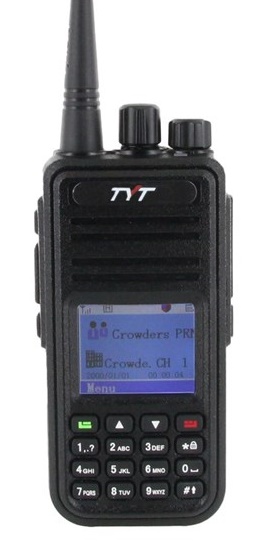 The Tytera MD-380 is an low cost radio for analog FM and DMR on the 70cm band (see video here). One of the limitations with the radio is that it only holds 1000 contacts…which seems like a lot of contacts but it fills up quickly. With DMR, each radio or user has a unique 7-digit radio ID number. For ham radio use, the DMR-MARC organization maintains a database that maps radio ID number to user name and callsign. If a user is in your contact list, the user’s name and callsign pops up in your radio’s display. Otherwise, you just see the radio ID which is not very helpful. There are over 63,000 users in the database with more being added on a daily basis.
There are a number of firmware updates to the MD380 and I have not checked them all out. I heard some guys talking about the TyMD380Tools on one of the DMR talkgroups, so I decided to give it a try. This software was developed by KG5RKI (go here) and is easily installed from Windows without a lot of messing around. This firmware upgrade loads the entire DMR-MARC database into the radio.
Now that I have the worldwide database of DMR users loaded onto the radio, its like having caller ID on my HT (see photo below). Actually, its better than that, it pulls up the other ham’s full name, callsign and location information.
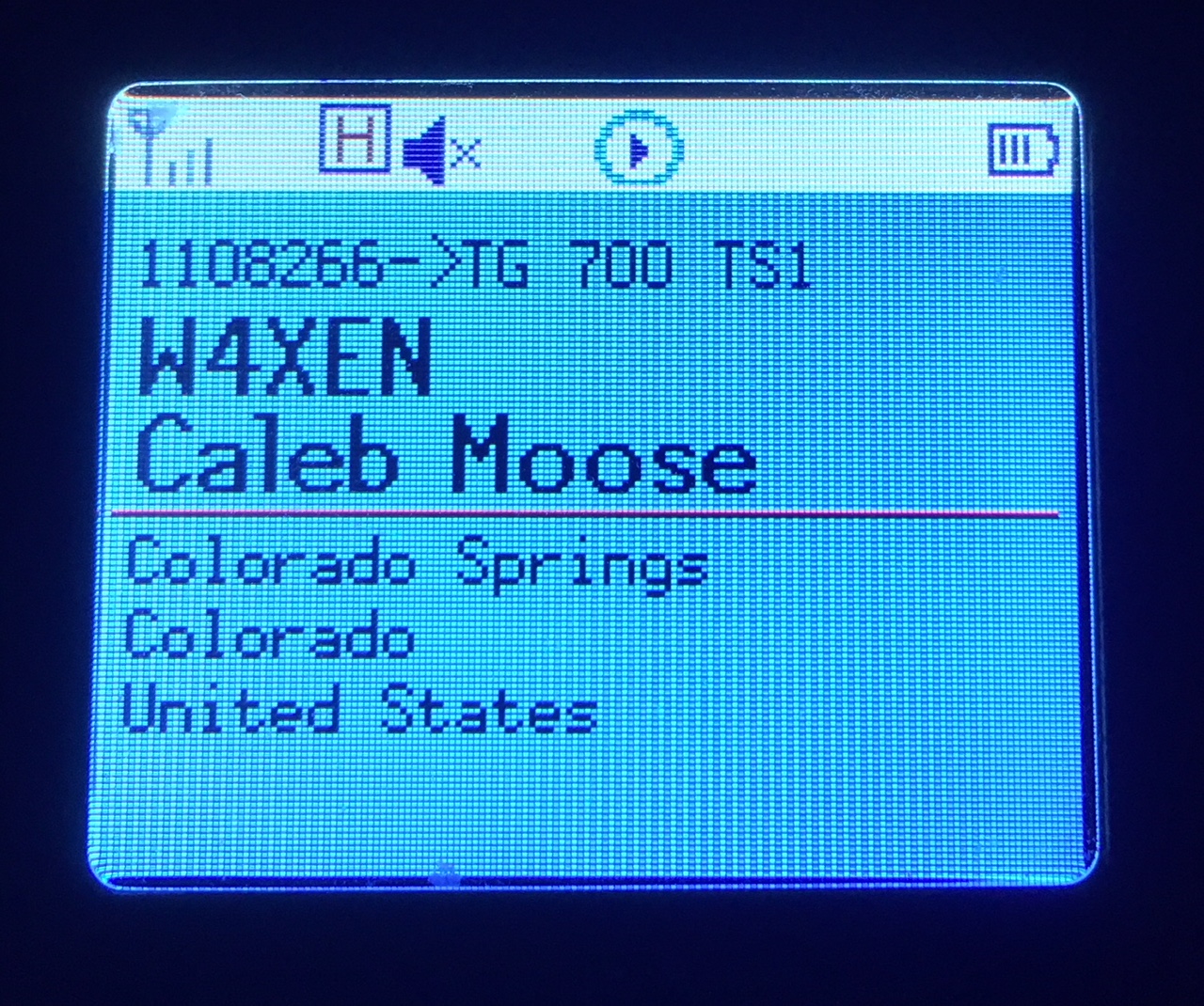 This may not seem like a big deal but I’ve found it to be surprisingly useful. I am often scanning a few channels or talkgroups with my radio and just listening casually. I may not be tracking who’s talking but I can just look at the radio to see who’s on the air. It’s one of those convenience features that makes me think “why don’t all of my radios do this?”
The TyMD380Tools implements a bunch of other features but increasing the number of contacts has been the most important one for me. This is a great example of radio amateurs adapting (“hacking”) commercial gear with improvements for ham radio use. KK4VCZ, DL4YHF and others contributed to this code. Check out the software…seems to work great.
73, Bob K0NR
The post TyMD380tools for Tytera MD-380 appeared first on The KØNR Radio Site.













