Posts Tagged ‘Electronics’
 Software-Defined Radio: Try Before You Buy? You Might Like It!
 August 20th, 2020 |
  Author:
 Sure! You don’t need to have a software-defined radio (SDR) before you start learning how to use the technology; there are a few different paths you can take, exploring and learning about SDR.
One way to gain some experience with SDR without spending a dime is to install a free software package for the very popular, non-Linux, operating system (that starts with ‘W’), and give SDR a test drive. If you like it, you might consider getting your own hardware (like the SDRplay RSPdx, for instance), and connecting it up to your computer and running this software, too.
Why I Dived Into SDR
I have always loved radio, ever since the early 1970s, when I discovered shortwave radio. In the last couple of years, I’ve had an increasing interest in the world of SDR. When I am working, but away from home (remember those days, before Covid?), I want to sample news and programming from around the world, but through shortwave. The way to do that, I found, is by using the various SDR options which allow a person to tune a remote receiver, and listen.
I also find working with the waterfall of a typical SDR-software user interface rewarding because, instead of blindly searching for signals in a subband, I can see all of the received signals on the scrolling time representation of a slice of frequency. Simply select that signal on the waterfall, and the radio tunes right to it.
I often connect to different SDR radios around the world, to catch all manner of shortwave signals, from maritime, military air, trans-oceanic air, or coast guard radio traffic, or other interesting HF communications including amateur radio CW and SSB signals. Occasionally, I also check out VHF and UHF signals from around the world. All of that, while instead an office building that is not suited for shortwave radio reception.
I’ve now decided to give back to the community; I’ve added my SDR receiver to the collection of receivers located around the world on the SDRSpace network of SDR radios.
My new SDRplay RSPdx software-defined radio receiver is live, via http://www.sdrspace.com/Version-3, using the SDR Console software (Version 3).
The receivers are online whenever I am not transmitting and when there are no local thunderstorms.
Antenna Port A is connected to a wire antenna (a horizontal 100-foot wire that runs out from my house’s chimney to a tall tree; about 10 feet of that wire is oriented vertically, where the wire passes through a pulley and then is weighted down so it can move with wind-driven tree movement), while Antenna Port B is connected up to a VHF/UHF discone.
Both antenna systems have an AM Broadcast band notch (reject) filter reducing local AM Broadcast-Band radio station signals by about 30 to 40 dB. I need to use these because the very close KLIN transmitting tower is just miles away and those signals overwhelm the receiver. When I use the signal filters, the local AM Broadcasting signals no longer overwhelm the receiver.
In the following video, I first explain my SDR setup, and in the second half of the video, I tune around the radio spectrum, using the software to control my SDR receiver.
[embedyt]https://www.youtube.com/watch?v=DHj917E1bKA[/embedyt]
A Couple of Questions
After watching this video, WO9B wrote an email to me. Michael asked of me two questions, summed up as:
1. Your SDR window has the IF screen on top. How is that accomplished?
2. Your AM Broadcast filters; more info, please. I live in the area of mucho broadcast stations and that looks like something I could use.
In the following video, I demonstrate how I changed my layout of the SDR Console software. And, I mention the AM Broadcast Filter for SDR Receivers (the hardware filter is found here: https://g.nw7us.us/3kU5SJN).
[embedyt]https://www.youtube.com/watch?v=YLBLHi441Zg[/embedyt]
To Use My Receiver
Download the latest version of SDR-Console from https://www.sdr-radio.com/download – there is a 32-bit and a 64-bit Windows installation package.
The 64-bit installation package may be downloaded from one of these three sources:
1. Google: https://g.nw7us.us/3auBq44
2. DropBox: https://g.nw7us.us/310ooIG
3. Microsoft: https://1drv.ms/u/s!AovWaZDu7Hrd3U-yqK1bs3wuaFw2?e=o4nKeh
The 32-bit installation package can be downloaded from one of these three sources:
1. Google: https://g.nw7us.us/3iLasrZ
2. DropBox: https://g.nw7us.us/3g4VcVc
3. Microsoft: https://1drv.ms/u/s!AovWaZDu7Hrd3U4mJiiRtI9lm70s?e=HDG4ZX
Install the SDR Console package according to the directions given. Once you have the software installed, you will want to add my server. It takes some work to get familiar with the software, but there are online FAQs on how to begin.
One guide on how to add a server to the list from which you can pick may be found, here:
https://www.sdrplay.com/wp-content/uploads/2018/02/SDRConsoleV3-ServerGuide1-1.pdf
I worked on getting all of the bugs worked out of my installation before making the video. It did take some work, and reading up on things. But, the software is solid and a good contender against SDRuno, and HDSDR, and, this way I can share it online with you.
My server is known as, ‘0 NW7US‘ — it will be online when I am not using my antenna systems for transmitting. It will be offline during thunderstorms, or during times when I must use the systems for transmitting.

Software-defined radio is a great way to hear all sorts of communications, from local AM broadcast stations, FM stations, VHF Air Traffic, to shortwave radio stations including amateur radio HF communications.
Thank you for watching, commenting, and most of all, for subscribing; please subscribe to my YouTube Channel: https://YouTube.com/NW7US Also, please click on the bell, to enable alerts so that when I post a new video, you will be notified. By subscribing, you will be kept in the loop for new videos and more.
73 de NW7US
.. (yes, this is an expansion of an earlier post… forgive the redundancy… thank you) ..
Check Out My New SDRplay RSPdx Software-Defined Radio Receiver – Live!
My new SDRplay RSPdx software-defined radio receiver is live, via http://www.sdrspace.com/Version-3, using the SDR Console software (Version 3).
The receivers are online whenever I am not transmitting and when there are no local thunderstorms.
Antenna Port A is a wire antenna (100′), while Antenna Port B is a VHF/UHF discone. Both have an AM Broadcast band reject filter, reducing local AM Broadcast signals by about 30 to 40 dB. I need to use these because the very close KLIN transmitting tower is just miles away and those signals overwhelm the receiver. When I use the signal filters, the local AM Broadcasting signals no longer overwhelm the receiver.
Let me know what you think. Enjoy!
To use my receiver:
Install the latest version of SDR-Console which can be downloaded from https://www.sdr-radio.com/download
Install SDR Console according to the directions given. Once you have the software installed, you will want to add my server.
It takes a little to get familiar with the software, but there are online FAQs on how to begin.
My server is known as, ‘0 NW7US‘ — it will be online when I am not using my antenna systems for transmitting. It will be offline during thunderstorms, or during times when I must use the systems for transmitting.
Software-defined radio is a great way to hear all sorts of communications, from local AM broadcast stations, FM stations, VHF Air Traffic, to shortwave radio stations including amateur radio HF communications.
Thank you for watching, commenting, and most of all, for subscribing; please subscribe to my YouTube Channel: https://YouTube.com/NW7US Also, please click on the bell, to enable alerts so that when I post a new video, you will be notified. By subscribing, you will be kept in the loop for new videos and more.
Video:
[embedyt] https://www.youtube.com/watch?v=DHj917E1bKA[/embedyt]
73!
Radio Frequency Interference From 12V-to-USB Adapters
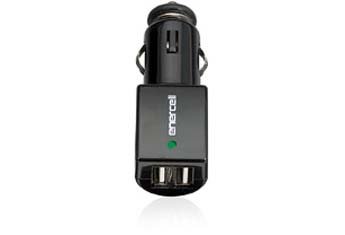 Many small electronic devices have switching regulators in them that can generate a bunch of Radio Frequency Interference (RFI). This is not my first encounter with RFI-spewing devices. See this article about a automotive 12V-to-USB adapter giving me trouble: This Interference Seems To Follow Me Everywhere
I recently bought a couple of adapters that are physically larger than the one I wrote about. I was thinking that a larger size might allow for a little more filtering and a design that does not radiate. I was half right: one of them works pretty well, the other is an RFI Bad Boy.
Take a look at this short video where I check them out.
This is an Amazon link to the adapter that works pretty well.
Enercell® 2-Port USB CLA Car Charger

73, Bob K0NR
The post Radio Frequency Interference From 12V-to-USB Adapters appeared first on The KØNR Radio Site.
Add an On The Air LED to Kenwood MC-60 Desk Mic
In this video I show a few things to test before adding an “On The Air” LED indicator to a Kenwood TS-50 ham radio transmitter. I tested for the best brightness of the LED and lowest current using a ganged restore test box I built. The LED was then mounted in my Kenwood MC-60 desktop microphone.
You can help support my channel by purchasing items from my Amazon Store at no additional cost simply by using my store links.
I have lots of store categories and I own most items or similar items that you’ll find in my store.
Thanks for joining and please subscribe to my YouTube channel.
HF Ham Radio Kenwood TS-50S Panel Button Repair
The buttons in my Kenwood TS-50S ham radio started falling out when the foam inside started getting old. The foam was the only thing holding the buttons in so I used jewelry repair rings from Michaels Store to clamp around the base of the buttons inside the bezel face plate which then holds the buttons in nicely yet lets them have full travel and good tactical feel.
ISO-TIP 7700 Soldering Iron Review
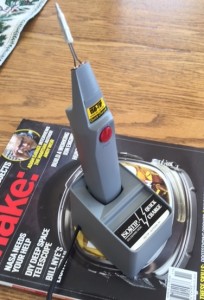
Model 7700 soldering iron
I recently had the opportunity to try out a new ISO-TIP 7700 soldering iron. This is a rechargeable soldering iron without a lot of extra features but it is plenty capable for small soldering tasks. Here’s a few specs from the ISO-TIP web site:
– Fully recharges in 3.5 to 4.0 hours
– Partially charged battery to full capacity in one to two hours
– Up to 125 soldering joints per charge during continuous use
– Withstands high-rate charging without damage
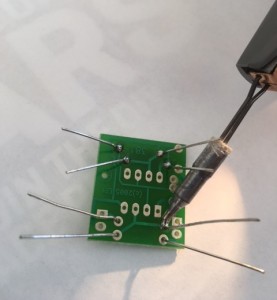
Soldering iron in action
Here’s a short video of the circuit blinking away, proving that I can solder together a simple circuit: Video of circuit blinking Yes, the circuit did work the first time.
The post ISO-TIP 7700 Soldering Iron Review appeared first on The KØNR Radio Site.
GQRP / Kanga receiver

I was sent a kit this week by Kanga UK, who supplied me a new regen receiver. The kit in question makes its debut at the GQRP convention at Rishworth UK this week. Its appearance is marked by the annual buildathon.
The buildathon is a great way for anyone who has an interest in electronics, radio or has indeed has no experience in construction, build a kit and walk away with a working radio. The step by step guide we supply with the kits allows easy installation of the components and instant gratification.
I wrote the instructions for this kit and whilst doing so, I managed to video the whole build. The video is sped up, but the build actually took about 2 hours, not rushing and includes the videoing & taking pictures.











