Posts Tagged ‘DXpedition’
 A Pileup? What It Is And How To Work One
 June 14th, 2026 |
 Author:
Welcome to the chaotic, thrilling world of the HF pileup. Whether you are the one calling CQ from a park in Nebraska or the one hunting a rare DX station, success relies on rhythm, frequency management, and a deep understanding of human behavior.
Here is a proper look at how a pileup appears on a modern display, followed by a complete guide on how to survive it.

A “pileup” on shortwave amateur radio frequencies. The main station is at the low frequency, and stays put. The hunters spread out, above, and call on a single frequency somewhere in the calling window of frequencies (I.e., up five to ten).
Over my decades of working Morse code (CW on amateur radio), I have learned a few critical things about how to navigate the chaotic, thrilling world of the HF pileup. When a rare station or a Parks On The Air (POTA) activator goes on the air, dozens or even hundreds of operators might try to make contact at the exact same time. Working a pileup is an art that takes time to master. Whether you are the one calling CQ from a park in Nebraska or the one hunting a rare DX station, success relies on rhythm, frequency management, and a deep understanding of human behavior.
One of the most important strategies is to determine the operating style of the DX station, specifically discerning how that operator scans the pileup for the next station to work. With modern waterfall displays, that process is MUCH easier. As an example, I worked the Temotu DXpedition (H40RH) that had just started a few hours prior to my attempt. I broke through with only five calls into the pileup, and it took me a mere 60 seconds to call and get an answer. Of course, I first listened and watched the waterfall for about five minutes to get a hang of the operating style of H40RH. This was on 10 Meters where 28.026 MHz was the DX frequency. We callers spread out five to 15 kHz UP in frequency from the DX station because we never want to cover up the DX station with our own signals. Even with a long carrier of intentional interference visible on the waterfall, the visual aid of the SDR made the catch possible. Temotu was a new country for my DXCC, so I am incredibly pleased to have made the contact!
When You Are the Hunted (The Activator)
A Guide To Survive The Pileup
When you are the station that everyone wants in their logbook, you are the conductor of the orchestra. If the pileup senses hesitation, chaos ensues. You must dictate the pace, for both CW and SSB operations.
Controlling the Pileup on CW
Establish a Predictable Rhythm: Your CQ, your exchange, and your QRZ should follow a strict pattern. Consistency allows hunters to time their calls perfectly. If you change your cadence, the pileup gets messy.
Run Split for Large Piles: If the pileup merges into a single continuous drone, go split immediately. You might send “UP 1” to tell callers to transmit one kilohertz above your listening frequency. This spreads the callers out. Send your “UP” frequently enough that the self-appointed pileup police do not take over your transmit frequency. I suggest sending “UP” after each successful logged contact (QSO).
Own the Partials: If you only pull “NW7” out of the noise, send “NW7?”. Do not send “QRZ?” immediately. Stick to that partial call until that specific station finishes the exchange. If they fade out, clearly send “QRZ?” to reset the pile.
Adjust Speed to Control Volume: A slight speed increase (bumping up 3 to 5 WPM) will naturally thin the pileup down to the more experienced operators. Dropping your speed will invite the newer operators back in.
Receiver Management: Back off your RF gain and use a wider filter than you might expect (around 400 to 500 Hz). A filter that is too narrow will cause you to miss the operators who are smartly calling slightly off-frequency.
Controlling the Pileup on SSB
Command with Your Voice: Speak clearly and maintain a steady, authoritative tone. Avoid shouting. Just like in CW, a predictable rhythm helps callers know exactly when to key their microphones.
Use Standard Phonetics: Stick strictly to the standard NATO phonetic alphabet (Alpha, Bravo, Charlie). Cute or custom phonetics confuse operators who do not speak English as their first language.
Acknowledge and Isolate: When multiple voices blur together, listen for the last phonetic letter you can understand. If you hear “Sierra,” say “The station ending in Sierra, go ahead.” Ignore everyone else until that station completes the contact.

My POTA / Portable HF station (a low-power, or, QRP, station).
When You Are the Hunter (The Chaser)
When you are trying to break through a massive wall of sound, raw output power is secondary to timing and sharp observation.
Breaking the Pileup on CW
Listen First, Key Second: Before touching the paddle, listen to three or four complete exchanges. If the activator is working split, figure out their pattern. Are they tuning from the bottom up? Top down? Find where they listened last, and place your transmit frequency just above it.
Use XIT (The Golden Rule): Never perfectly zero-beat the DX station if others are calling. To the activator, three zero-beat stations merge into a single tone. Use your Transmitter Incremental Tuning (XIT) to shift your transmit frequency by 30 to 50 Hz. This slight difference in pitch makes your signal pop out of the receiver passband.
Time the Tail-End: Wait for the massive wall of sound to begin fading, and send your call exactly as the main group finishes. A perfectly timed tail-end call lets your suffix ring out in the clear.
Send Once: When the DX sends “QRZ?”, send your callsign exactly once and listen. Sending your call multiple times just causes interference and slows down the entire operation.
Follow Instructions: If the DX sends “NW7?”, and that is not you, keep your hand off the key. Transmitting over the station they are trying to work only prolongs the pileup for everyone.
Breaking the Pileup on SSB
Study the Cadence: Just like with Morse code, listen to the activator to find the rhythm. Wait for the exact moment the activator stops speaking before you key up.
Drop Your Call and Wait: Say your full callsign once using standard phonetics, then unkey and listen. If you are tail-ending, you might just drop the last two letters of your callsign precisely as the noise floor drops.
Adjust Your Pitch: If you have equalization controls on your radio, boost the mid-to-high frequencies on your microphone audio. A slightly punchy and higher-pitched voice will cut through the bass-heavy rumble of a dozen other stations calling at once.
Working a pileup tests your patience and your ear. Whether you are tapping out Morse code or speaking into a microphone, the operator who listens more than they transmit almost always makes the contact first.
Propagation and the Pile-Up
As many of you know, I was the space weather and radio propagation columnist in CQ Amateur Radio Magazine from 2001 through its demise. I strongly advocate for all HF radio operators to understand the basics of radio wave propagation on shortwave frequencies. There are a lot of myths and frankly, horrific theories on how radio waves propagate.
Understanding how the ionosphere refracts radio waves is a crucial tactical advantage. The behavior of a pile-up changes dramatically based on the frequency band you choose and the current mood of our sun.
The Sun Dictates the Rules
The ionosphere is charged by solar radiation. When solar activity is high, higher frequencies become usable for long distances.
Solar Flux Index: The SFI is a great indicator of overall ionization. A higher SFI means better conditions for the higher HF bands. When the SFI climbs, bands like 15, 12, and 10 meters open up globally.
Geomagnetic Storms: Measured by the K-index, these storms can disrupt communications entirely. A high K-index often absorbs signals crossing the polar regions. This can suddenly mute a massive European pile-up for North American operators.
Fading: The ionosphere is always shifting. Signals will constantly rise and fall in strength, which is known as QSB. A smart chaser listens for the rhythm of this fade and throws their callsign into the pile-up exactly when the band peaks for their specific location.
How Bands Shape the Pile-Up
Every amateur radio band has its own personality. The pile-ups you encounter will reflect these differences perfectly.
10, 12, and 15 Meters: These high bands are daytime frequencies that thrive on high solar activity. When 10 meters opens up, signals can be astonishingly loud with very low atmospheric noise. Pile-ups here can ignite suddenly and stretch very wide across the frequency spectrum.
20 Meters: This is the traditional workhorse band for global communication. Pile-ups on 20 meters are massive, sustained, and densely packed. You will often compete with high-power stations and massive beam antennas on this frequency day or night.
40 and 80 Meters: These low bands come alive at night. They are heavily affected by atmospheric noise and static crashes. Breaking a pile-up here requires an exceptionally well-tuned ear and the ability to pull faint CW tones or muffled voices out of a very high noise floor.
The Skip Zone Effect

The propagation of radio waves.
One of the most confusing aspects of a pile-up for a new operator is the skip zone. Radio waves bounce off the ionosphere and return to earth far away, which means they skip right over the geographic areas in between. You might hear the DX station perfectly, but you might not hear the hundreds of other operators calling them because those callers are inside your skip zone. This phenomenon is exactly why you must rely on the DX station’s cadence rather than waiting to hear the pile-up clear.
While raw power is often cited as the key to breaking a pile-up, your antenna system plays a far more decisive role in your overall effectiveness. A directional antenna, like a Yagi or a hexbeam, not only focuses your transmitted energy directly toward the DX station but also actively rejects interfering signals from other directions. However, do not be discouraged if you are running a simple wire antenna. A well-placed dipole or end-fed half-wave can still break monumental pile-ups if you leverage good timing, exploit the skip zone, and listen closely to the DX operator. Ultimately, the best antenna in the world cannot compensate for poor operating habits.
Over to You
Working a pile-up is one of the most rewarding challenges in amateur radio. It tests your patience, refines your ear, and forces you to understand both the science of radio wave propagation and the psychology of your fellow operators. Every massive wall of sound is a puzzle waiting to be solved.
Now, I would love to hear from you. What was your most memorable pile-up experience? Do you have a specific tactic that consistently helps you break through the noise, or perhaps a frustrating moment that taught you a valuable lesson? Drop your stories and questions in the comments below, and let us keep the conversation going.
From my shack to yours, 73 de NW7US.
3Y0K in the log

Finally, it has started to warm up here and on Saturday temps hit a nice 7C, and we celebrated by burping the house. It ended up raining all day, but that helps melt the snow faster which is ok with me. I was in the radio room doing some this and that, I decided to check (again) the DX Heat cluster and see what if anything was going on with 3Y0K on Bouvet island. As way of background I have seen them many times on the cluster followed by a huge pile up but never could hear them.
As I was looking over the spots on the cluster 3Y0K just popped up with a new spot on 20m. I flipped the switch on the 7610 and ventured down to there spotted frequency on 20m. For the first time I could hear them at about S3, even better there was next to no pileup.....YET! The Icom 7610 was on CW, I tapped Dual then split and joined the fray.
In the right ear I could hear the pileup and was looking at the waterfall to see where the lonely signal was who answered 3Y0K's beck and call. Very fast I caught on to how they were working the pileup. One issue was 3Y0K would reach out to a caller BUT still many would continue to send their call sign. Once 3Y0K worked a station many like me have a waterfall display and could see were the action was. Then all of a sudden that small wedge of the frequency became very busy. What I noticed was 3Y0K moved down frequency a bit more than normal to get away from the clump of callers. I decided to do the same. I noticed that 3Y0K now had moments of fading in and out, also the pileup was starting to grow fast. But after only 3 tries I was in the log.
During my attempt there were those calling on 3Y0K's frequency, someone for about 30 seconds or more sending a carrier over top of 3Y0K and those who just sent their call continually no matter who 3Y0K was working. Oh well just part of the fun I guess.
3G0YA in the log on 20m CW.

The other day I joined the 21st century loaded Ham Alert on my iPhone and set up Easter Island. On the first attempt to enter 3G0YA into HamAlert, I did not add a CW only and was flooded with digi and SSB spots. I managed to check out some YouTube videos and got that organized. Up to this point, I have been hit and miss using the DXheat cluster with no luck. I have never been able to hear them just the pileup they were working. Well, yesterday morning Ham Alert told me to head over the 20m, I did that and there they were but only at S1. I waited and then they bumped up to S4 and away my call went out onto the waves of opportunity.
In the past, I have been hoping so badly for a DXpedition station to hear me so felt I somehow heard part or all of my call. To only let down that I was not actually in the log once I checked. Hearing my call was only my ambitious imagination. This time when I dropped my call I was not sure if I heard or maybe imagined I heard my call. As Murphy would have it they went from S4 to S1 with their comeback to me. I listened and maybe heard again VE9KK 5NN.....so what the heck I tossed out my 5NN TU.
I continued to listen and wow for a few moments they were S6 or more so I tried again and this time I was sure I made it in the log. They called back "VE9", I tossed my call again and they came back "VE9KK 5NN" The funny thing was when I checked Clublog I found I was in the log the first time and it was not Murphy playing with me.
Taking the side road……
This weekend the LZ dx contest was up and running, I have never taken part in this contest and I was pleasantly surprised by the amount of activity. It's a 24-hour contest that started at 8 am out my way and it gave me a nice workout for the upcoming weekend for the CQ World Wide DX CW contest. I took part for about a total of 4 hours and made 120 contacts for a score of 13,110.
Midway into the contest I was taken down a side road for a pleasant surprise. At some point on Saturday afternoon calling CQ contest was slowing down on 20m. I decided to make a left turn and head down the 10m side road. There were very few LZ contesters there but I did notice a commotion on the waterfall. When I went to investigate it was H44WA DXpedition in the Soloman islands calling CQ North America (CQ NA) and he was all alone. I put the Icom 7610 in split and dual mode (hearing both VFOA and VFOB) and made the mental change from CW contesting to CW DXpedition. After a few short tries, I was in the log. I was glad I made a left turn and took a side road from the contest.
A pleasant surprise….

From time to time over the past week, I have seen 3B7M dxpedition spotted on the DX Heat Cluster and most of the time I either did not hear them or they were at or below the noise floor. I knew they were there as the pile-up was alive and well and responding with their call signs hoping to make it into 3B7M log. Yesterday they were spotted on 15m at their usual CW watering hole of 21.005 and as with all dxpedition they were operating split.
Before setting up my radio in split operation I wanted to make sure I could hear 3B7M. As I listened they did top out at S4 at times and that was good enough for me to give them a go. With my radio configured to split operation the next task was to watch my waterfall and see who 3B7M was contacting. With VFO A in my left ear (3B7M) and VFO B in my right ear (the pileup) I paid attention to who 3B7M was calling and then looked at the pile up on the waterfall to see the lonely signal that was coming back to him. The problem here was call signs not even close to the one 3B7M was calling were throwing their calls out again.
It took about 10 mins to figure out where 3B7M was dropping his call, now having said that there are a lot of radios with waterfalls out there now and they too have ferreted out 3B7M's pattern. Now the game is to figure out when we're exactly to drop my call. Most of the time it's just luck that you drop your call at the right time and right place! There are times in the waterfall you see stations running a KW or more signified by a bright red line on the waterfall as well as splatter. During those times I just rest as there is no use jumping in and getting nowhere.
It took about 20 minutes but I did finally hear 3B7M call "VE9KK 5NN". Now call me a bit skeptical but I have had times when I think that was my call or just one close to it? So I never get too excited until I check their online long which most dxpeditions have now and see if I am in it. This morning I checked and there I was in the log.

Finally, I am not sure why but there seems to be a new operating practice when it comes to dxpeditons and that is DQRMing (deliberate QRMing) In the past there have been those who forgot to put their rigs in split and transmit on the dxpetions calling frequency and I have been guilty of that! Also, those by mistake are tuning up their amp on top of the dx station as well. BUT recently I have unfortunately witnessed outright DQRMing. In the case of 3B7M I heard stations sending a series of fast CW dits over top of 3B7M or sending a series of the letter "V". I am almost positive they were intentional as this QRM was only sent when 3B7M was sending out a call sign they were seeking to make contact with. The DQRM was consistently dropped at just the right time each and every time. Fortunately, they grew tired of their childish behavior and moved on to something else.
For those Icom 7610 owners a different way to work split.
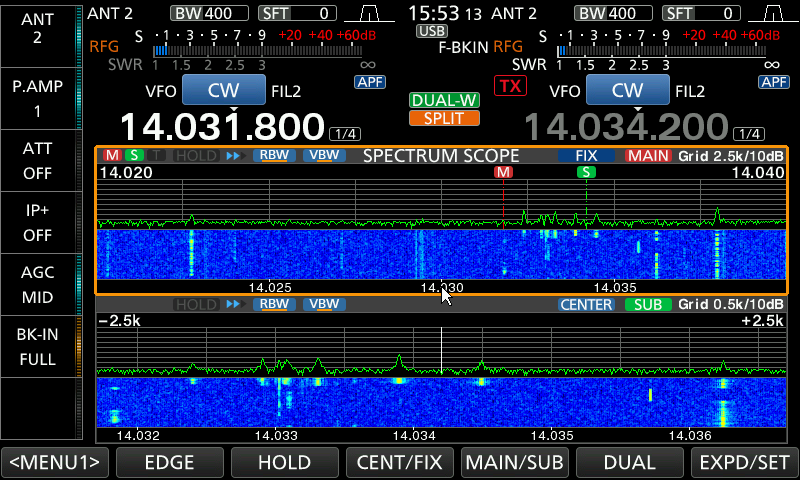 |
| Fixed mode with 20kHz span |
I have had my Icom 7610 for several years now and am still very much enjoying it. From time to time I enjoy working DXpeditions and having Dual receivers and dual spectrum scopes with the Icom 7610 is very handy. The spectrum scope has 2 tuning options which are fixed and center modes. It could just be me but I find center mode hard to follow were as fixed mode seems very easy to follow. When you come across a station that is working split more often than not it’s because there is a large pileup and it’s more efficient to work split. For those readers who are not certain what split operation is this LINK explains it better than I can.
During split operation especially with a very rare DX station, there are LOTS of operators trying to contact the prized DX station. For this reason on the DX’s listening frequency, there are many ops trying to make contact. When you as an operator want to get involved and try to contact the DX station you have to drop yourself in the pool of stations calling the DX station.
The trick is where to set your VFO dial to have a chance to be heard by the DX station. In most cases, the DX station has a routine to move up or down his listening frequency which is your transmit frequency. One must listen and watch the waterfall to see who the DX station is answering call after call. You can then get the idea if he is moving up or down his listening frequency and by how much.
As I said there could be lots of callers and this translates to a very crowded waterfall display. To find out where to drop your call one must have a closer look at the waterfall. When this is done you can get some separation between the calling stations. Thus allowing you to better see who the DX station is answering. Then you have a good idea when and where to drop your call and hopefully be heard.
As I said the center mode I find very confusing and when I use it in split mode and spin the VFO I am just lost as to who is where and for this reason I use fixed mode.
As a side note: In center mode when you spin the VFO the signals on the waterfall move and the VFO marker remains stationary. In center mode when the VFO is changed the waterfall signals remain stationary and the VFO marker moves to the next signal.
As was said earlier it is best to have a closer look at the waterfall to see the action. In fixed mode, the smallest slice of the band you can have is 20khz. When operating CW as I do this for me is not enough for a very crowded calling group. In center mode, you can get a slice all the way down to +/- 2.5kHz or +/- 5kHz. For me, these are great options and with CW I generally would choose +/-2.5kHz but the rig has to be in center mode and that just does not work for me.
I have found a workaround so I can use the center mode, select +/-2.5kHz and still have the moving VFO B marker and not a moving waterfall! Below are the setup steps I take to make this happen.
In fixed mode, I find the DX station with VFO A
I then press the Dual-W button
Then press and hold Dual-W button to get the settings for VFO B the same as VFO A
I then press the split button
I press the Dual soft key my scope becomes over-under as this is how it is setup. You can see the dual scope view in the post pictures.
I change both scopes to center mode if not there already.
I now set the span to the same on each lower and upper scope in my case it is +/-2.5kHz I then touch VFO B frequency readout on the upper band scope (to activate VFO B)
Now in the upper band scope, VFO A remains stationary on the DX station. VFO B (in the upper band scope) now moves when the VFO dial is turned. The VFO marker moves (like fixed mode) and the band signals remain stationary.
The lower scope is still there but I don’t pay any attention to it. I found if I did not stay in dual scope mode I would lose the CENTER mode for VFO A and FIXED mode for VFO B.
 |
| 5+/-kHz in center mode but VFO acts like fixed mode |
Now with all this said I just know there is going to be a comment that informs me I can press 2 simple buttons on the rig and get the same results. I seem to always take the long way around with things. I have added some screen pics of how the waterfall looks when in 20kHz, +/-5kHz and +/-2.5kHz span during a DXpedition. As you can see when in +/-2.5kHz mode the calling station are easy to see compared to fix 20kHz and +/-5kHz selections. But best of all I have fixed mode operation of VFO B with these small spans.
 |
| +/-2.5kHz span view of pile up calling DX station |
K7K expedition how did it work out for you?
It's Tuesday early morning and I am greeting my first cup of java along with some radio time. I found myself drifting off to the weekend of radio operating. I very much enjoyed the Islands on the air contest (IOTA). It was also my plan to get K7K from Kiska island in the log as well. As the saying goes "sometimes things do not work out as planned".
I was keeping an eye on the DX clusters to see when K7K was on air and where. This year is my "year of CW" so I was looking forward to getting them in the log using CW. Again sometimes things don't work out as planned. I noticed once K7K was up and running that FT8 seemed to be their mode of choice for most of the time. I was reading on the cluster posts there were some upset ops... that very little time was spent on SSB or CW.
I am not here to rag on FT8 and to be honest, I used this mode a great deal last year and very much enjoyed it. But having said that in my humble opinion they operated FT8 about 70-80 percent of the time and left modes such as SSB and CW alone.
In the expeditions, defence conditions for them could not have been great and the Digi mode FT8 would sure fill their logs up and better than a poor showing in the log book. Also maybe the tide is shifting and with the Dx Peditions to come FT8 and other Digi modes may be the choice of the operators.
I did notice K7K on their website indicated FT8 would be used but they also included CW and SSB.
There was an occasion CW and SSB were used but on a limited basis. I will chime in and say the only long period of time they used CW was in the IOTA contest. They are indeed an island and rare as well, it was expected for them to take part BUT this seemed to be the only time K7K used CW.
I checked the clusters during the contest to see where they were. I did notice comments of frustration, K7K was operating split and some contest ops were calling on K7K calling frequency. Other comments indicated stations calling CQ contests in the responding TX frequency. Then I found they went back to FT8 in a very short time during the contest.
This is just my humble blog opinion regarding the K7K "event" but when you indicate CW, SSB and FT8 on your site giving equal time to all would be a positive thing. From what I read in the cluster comments there were more than a few unhappy campers.