 |
 Rebuilding the Shack PC
 21 April 2020 | by
 My ham shack PC is an older Dell desktop PC. It’s not fancy, but it does the job I need it to do. I’m pretty sure this PC and its present Windows installation date back to 2011 or 2012. Initially it was built with Windows 7 and then I applied the free Windows 10 upgrade whenever that came out. With exception to just general sluggishness which one can expect from a machine of this age…the machine still works fine. It’s just slower than molasses on a cold winter day. This slow/sluggishness can be eliminated by reformatting the HDD and reloading the OS and all the software.
Sticking with Windows
While I’ve certainly dabbled in Linux, I’m a Windows guy by profession. Plus my main ham radio software is Ham Radio Deluxe. I’ve been running HRD since I was first licensed back in 2007. It’s what I like, it’s what I’m used to and it does everything I need it to do. I use HRD for all my general logging and use DM-780 for PSK, RTTY etc. and it seamlessly works well with WSJT apps for all things JT/FT. For contesting, I generally stick with either N1MM Logger or the N3FJP logging software. While I realize there are Linux solutions available, I’m just not interested in taking the plunge.
Taking Backups
The first order of business for this project is backup. Backup everything. Of course the most important thing to backup is my HRD Logbook. It is automagically backed up each time I exit the logbook to my Dropbox folder. But I wanted to make sure I had a good backup. Done!
Ham Radio Deluxe also has a feature to archive/export all HRD settings. I’ve never actually tried this feature, so this will be the first attempt. Hopefully this works and will help speed up the process of getting HRD running again after the rebuild.
The next important item to backup is my TQSL file. You can easily export your TQSL file by launching the TQSL app and exporting your station data. this makes getting this app set back up a breeze. Again…Dropbox comes to the rescue.
As I’m running a few USB to Serial dongles, I wanted to make sure I had the driver software stored safely somewhere I could find it. Once again Dropbox is the answer. I also verified I had a few other misc. files that I may or may not need readily available and saved on my Dropbox (Just in Case).
Finally, I’ve backed up all the other files/folders of the machine just to make sure I have everything I might need. I don’t anticipate I’ll need anything other than the items I’ve moved over to Dropbox, but you never know.
Reset Windows
Windows 10 has option to perform a full reset of the OS which removes all applications, settings, configurations and files/folders on the machine. Essentially this is a fresh install of the OS and is the option I opted to go with. I could have performed a partial reset which keeps the files/folders…but as this machine had 8-9 years of clutter on it…I wanted to completely start over.
The process of resetting Windows 10 took about 30 minutes or so. I was doing a few other things in my office at the time. But in the end, I was left with a fresh install of Windows 10 and a much faster performing PC.
After reconnecting Dropbox, I proceeded to reinstall Ham Radio Deluxe, WSJT etc. The HRD settings saved me a lot of time and by mid-morning, I had the PC connected to both my Yaesu FT-897 which I use for digital modes and my FTDX 1200. I made a few FT-8 QSO’s on 20 meters and tested to make sure I could upload both to ARRL LoTW and eQSL. My callsign lookup is functional with QRZ and my QSO’s get updated to HRDLOG.net so they are visible on my blog site. I still need to reinstall a few additional items such as N1MM Logger and N3FJP Logging Software. I’ll get these done before the next contest.
For now, I feel this old Dell will last me at least another year or perhaps more. I really don’t need it to do anything other than serve as my ham shack PC and it works very well in this function. Even better now.
I certainly hope all who are reading this are safe, healthy and weathering the quarantine as well as can be expected. Of course our hobby is perfect for times like this and I hope you are getting some quality on-air time.
Until next time…
73 de KDØBIK (Jerry)
Jerry Taylor, KD0BIK, is a regular contributor to AmateurRadio.com and writes from Colorado, USA. He is the host of the Practical Amateur Radio Podcast. Contact him at [email protected].
Rebuilding the Shack PC
My ham shack PC is an older Dell desktop PC. It’s not fancy, but it does the job I need it to do. I’m pretty sure this PC and its present Windows installation date back to 2011 or 2012. Initially it was built with Windows 7 and then I applied the free Windows 10 upgrade whenever that came out. With exception to just general sluggishness which one can expect from a machine of this age…the machine still works fine. It’s just slower than molasses on a cold winter day. This slow/sluggishness can be eliminated by reformatting the HDD and reloading the OS and all the software.
Sticking with Windows
While I’ve certainly dabbled in Linux, I’m a Windows guy by profession. Plus my main ham radio software is Ham Radio Deluxe. I’ve been running HRD since I was first licensed back in 2007. It’s what I like, it’s what I’m used to and it does everything I need it to do. I use HRD for all my general logging and use DM-780 for PSK, RTTY etc. and it seamlessly works well with WSJT apps for all things JT/FT. For contesting, I generally stick with either N1MM Logger or the N3FJP logging software. While I realize there are Linux solutions available, I’m just not interested in taking the plunge.
Taking Backups
The first order of business for this project is backup. Backup everything. Of course the most important thing to backup is my HRD Logbook. It is automagically backed up each time I exit the logbook to my Dropbox folder. But I wanted to make sure I had a good backup. Done!
Ham Radio Deluxe also has a feature to archive/export all HRD settings. I’ve never actually tried this feature, so this will be the first attempt. Hopefully this works and will help speed up the process of getting HRD running again after the rebuild.
The next important item to backup is my TQSL file. You can easily export your TQSL file by launching the TQSL app and exporting your station data. this makes getting this app set back up a breeze. Again…Dropbox comes to the rescue.
As I’m running a few USB to Serial dongles, I wanted to make sure I had the driver software stored safely somewhere I could find it. Once again Dropbox is the answer. I also verified I had a few other misc. files that I may or may not need readily available and saved on my Dropbox (Just in Case).
Finally, I’ve backed up all the other files/folders of the machine just to make sure I have everything I might need. I don’t anticipate I’ll need anything other than the items I’ve moved over to Dropbox, but you never know.
Reset Windows
Windows 10 has option to perform a full reset of the OS which removes all applications, settings, configurations and files/folders on the machine. Essentially this is a fresh install of the OS and is the option I opted to go with. I could have performed a partial reset which keeps the files/folders…but as this machine had 8-9 years of clutter on it…I wanted to completely start over.
The process of resetting Windows 10 took about 30 minutes or so. I was doing a few other things in my office at the time. But in the end, I was left with a fresh install of Windows 10 and a much faster performing PC.
After reconnecting Dropbox, I proceeded to reinstall Ham Radio Deluxe, WSJT etc. The HRD settings saved me a lot of time and by mid-morning, I had the PC connected to both my Yaesu FT-897 which I use for digital modes and my FTDX 1200. I made a few FT-8 QSO’s on 20 meters and tested to make sure I could upload both to ARRL LoTW and eQSL. My callsign lookup is functional with QRZ and my QSO’s get updated to HRDLOG.net so they are visible on my blog site. I still need to reinstall a few additional items such as N1MM Logger and N3FJP Logging Software. I’ll get these done before the next contest.
For now, I feel this old Dell will last me at least another year or perhaps more. I really don’t need it to do anything other than serve as my ham shack PC and it works very well in this function. Even better now.
I certainly hope all who are reading this are safe, healthy and weathering the quarantine as well as can be expected. Of course our hobby is perfect for times like this and I hope you are getting some quality on-air time.
Until next time…
73 de KDØBIK (Jerry)
Jerry Taylor, KD0BIK, is a regular contributor to AmateurRadio.com and writes from Colorado, USA. He is the host of the Practical Amateur Radio Podcast. Contact him at [email protected].
LHS Episode #340: Hamlib Deep Dive Redux
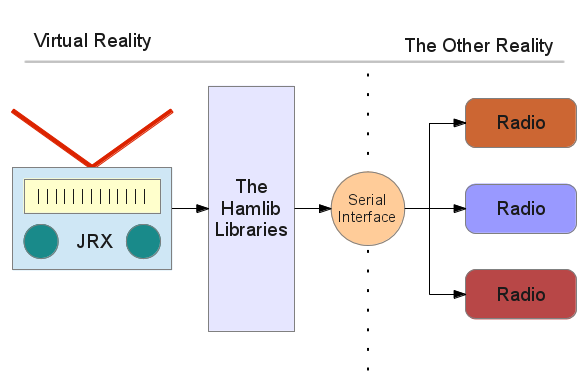
Welcome to the 340th installment of Linux in the Ham Shack. In this episode, the hosts revisit Hamlib, the rig-, rotor-, amplifier- and tuner-control library that is at the heart of many applications' intregration with your ham radio gear. Our guest tonight is Michael Black, W9MDB, the maintainer and lead developer of the Hamlib project. We explore every aspect of the software from where to get it to how to use it and even some esoteric use cases with remote serial devices and more. Thank you for listening and we hope you have a wonderful week.
73 de The LHS Crew
Russ Woodman, K5TUX, co-hosts the Linux in the Ham Shack podcast which is available for download in both MP3 and OGG audio format. Contact him at [email protected].
Weekly Propagation Summary – 2020 Apr 20 16:10 UTC

Here is this week’s space weather and geophysical report, issued 2020 Apr 20 0123 UTC.
Highlights of Solar and Geomagnetic Activity 13 – 19 April 2020
Solar activity was very low throughout the reporting period. No sunspots were obseved on the visible disk and no Earth-directed CMEs were observed in available coronagraph imagery.
No proton events were observed at geosynchronous orbit.
The greater than 2 MeV electron flux at geosynchronous orbit was at normal to moderate levels throughout the reporting period.
Geomagnetic field activity ranged from quiet to unsettled. Unsettled levels were observed on 14-15 Apr in response to several periods of prolonged southward Bz. The remainder of the reporting period observed quiet conditions.
Forecast of Solar and Geomagnetic Activity 20 April – 16 May 2020
Solar activity is expected to be very low throughout the outlook period.
No proton events are expected at geosynchronous orbit.
The greater than 2 MeV electron flux at geosynchronous orbit is expected to be at mostly normal to moderate levels. 29-30 April will likely observed high levels in response to coronal hole influence.
Geomagnetic field activity is expected to be at quiet to active levels. Active levels are likely on 20 Apr, 27 Apr and 05 May; unsettled levels are likely on 21-23 Apr and 30 Apr. All enhancements in geomagnetic active are in response to multiple, recurrent CH HSSs. The remainder of the outlook period is expected to observed quiet conditions.
Don’t forget to visit our live space weather and radio propagation web site, at: http://SunSpotWatch.com/
Live Aurora mapping is at http://aurora.sunspotwatch.com/
If you are on Twitter, please follow these two users: 1. https://Twitter.com/NW7US 2. https://Twitter.com/hfradiospacewx
– – – – – – – – – – – – –
Be sure to subscribe to our space weather and propagation email group, on Groups.io
https://groups.io/g/propagation-and-space-weather
Spread the word!
– – – – – – – – – – – – –
Links of interest:
+ Amazon space weather books: http://g.nw7us.us/fbssw-aSWSC
+ https://Twitter.com/NW7US
+ https://Twitter.com/hfradiospacewx
Space Weather and Ham Radio YouTube Channel News:
I am working on launching a YouTube channel overhaul, that includes series of videos about space weather, radio signal propagation, and more.
Additionally, I am working on improving the educational efforts via the email, Facebook, YouTube, Tumblr, and other activities.
You can help!
Please consider becoming a Patron of these space weather and radio communications services, beginning with the YouTube channel:
https://www.patreon.com/NW7US
The YouTube channel:
https://YouTube.com/NW7US
..
Visit, subscribe: NW7US Radio Communications and Propagation YouTube Channel
Chat From a Quarantined Software Engineer – Welfare Check!
This is a welfare check on you. Please leave a comment on how you are faring, what is happening in your situation with the lock-down.
Are you quarantined? Working from home? Did you lose your job? How are you doing during this crazy time?
What is going on with you during this challenging situation?
I talk about what I’m doing, too. I’m quarantined at home. I can work from home, as I am a senior software engineer. I can do my job by remote access to a virtual workstation, through a secure VPN connection. I’m blessed that I still can work during this lock-down.
But, I have a medical emergency – a dental problem – and trying to be seen by a dentist is difficult, because all of the local dentists were told to shut down their daily business and quarantine. Only emergency appointments are being made! I was finally, after two days of phone calls, able to schedule an emergency visit to my dentist!
I want to know: How do you use amateur radio, now that we are all stuck at home? Are you using ham radio more, now? Less?
Please leave a comment to let me know how you are doing, and answer the other questions, too. I hope to hear from you.
I hope to meet you on the shortwave amateur radio bands. I am usually using Olivia, or Morse code CW. More information about Olivia: http://OliviaDigitalMode.net.
Be healthy, be safe, stay sane!
Visit, subscribe: NW7US Radio Communications and Propagation YouTube Channel
LHS Episode #339: The Weekender XLVI

It's time once again for The Weekender. This is our bi-weekly departure into the world of amateur radio contests, open source conventions, special events, listener challenges, hedonism and just plain fun. Thanks for listening and, if you happen to get a chance, feel free to call us or e-mail and send us some feedback. Tell us how we're doing. We'd love to hear from you.
73 de The LHS Crew
Russ Woodman, K5TUX, co-hosts the Linux in the Ham Shack podcast which is available for download in both MP3 and OGG audio format. Contact him at [email protected].
World Amateur Radio Day 630m Activity!
Steve McDonald, VE7SL, is a regular contributor to AmateurRadio.com and writes from British Columbia, Canada. Contact him at [email protected].
 Ham Radio Deluxe |
 W5SWL Electronics |
 Ham Radio Prep |
 KB3IFH QSL Cards  Hip Ham Shirts  HamRadioAuctions HamRadioAuctions Reliance Antennas Reliance Antennas Enigma Shop Enigma Shop |  morseDX  Ni4L Antennas  R&L Electronics R&L Electronics antennas.us antennas.us Ears to Our World Ears to Our World |
- Matt W1MST, Managing Editor
