 |
 Configure a Pi-Star based multi network DMR hotspot
 3 June 2020 | by
 Often when people create a DMR hotspot they set them up for only one network. But if they want to use DMR+ one moment, then Brandmeister the next and then later talk with someone on the TGIF network they will need to switch back and forth depending on which network they want to use. Switching back and forth between networks works well. But this involves loading the configuration for the network that you want to use. But what if you want to be able to use multiple networks at the same time? This can easily be done by configuring the following within your Pi-Star settings. You will also need to update the code plug within your radio. But once you have everything setup you will be able to go from Brandmeister to DMR+ to TGIF all within the radio. No need to change the configuration within your hotspot.
Hotspot Setup
To get started, first you will want to backup your configuration. This way if something goes wrong you will be able to get back to where you started. Next, in pi-star click on configuration, then Expert, then in the Full Edit row click on DMR GW. You will want to configure the various DMR Networks. Cut and paste the following into the section showing your DMR networks in the expert configuration file. Be sure to modify the proper sections with your DMR ID etc otherwise the network will not let you connect. Your DMR network sections should look exactly like my examples below except for the following: DMR Network 1 – you will need to enter your Brandmeister Hotspot Security Password between the quotes and your DMR ID where it is called for. You may also want to change your Brandmeister master server to the one closest to your physical location however it probably won’t really make much of a difference in performance. The Canadian server works quite well and has very low latency from just about anywhere. It also has fewer users than other servers so you may actually find it works a little better. In DMR Network 2 you need to enter your DMR ID where it is called for. I suggest keeping the IPSC2 server as IPSC2-QuadNet. Full disclosure, I am an admin and founding member with QuadNet so I am probably a little biased. IPSC2-QuadNet is the server that we run and one that we can make sure works and works well. If there is a problem, we fix it. If our users have an issue we can try to help We can’t say the same about other servers. That being said you can use any IPSC2 server that you prefer. If you select a different server you may find that talkgroups may not work as expected but you can contact the server owner for assistance. The options= line in this section is configured with the most active DMR+ talkgroups and is how I have my configuration setup. But you can change these as desired.
DMR Network 3 can be left as is
DMR Network 4 – Enter your DMR ID where it is called for
[DMR Network 1]
Enabled=1
Address=158.69.203.89
Port=62031
TGRewrite0=2,9,2,9,1
TypeRewrite1=1,9990,1,9990
TypeRewrite2=2,9990,2,9990
SrcRewrite0=2,4000,2,9,1001
PassAllPC1=1
PassAllPC2=2
PassAllTG1=1
PassAllTG2=2
Password=”Enter your BM Hotspot Security Password here”
Debug=0
Name=BM_Canada_3021
Id=Enter your DMR ID here
[DMR Network 2]
Enabled=1
Address=168.235.109.210
Port=55555
TGRewrite0=2,8,2,9,1
TGRewrite1=2,80505,2,505,1
TGRewrite2=2,80800,2,800,100
TGRewrite3=2,83801,2,3801,8
TGRewrite4=2,89990,2,9990,1
TGRewrite5=2,80001,1,1,9999
TGRewrite6=2,80001,2,1,9999
PCRewrite0=2,84000,2,4000,1001
Password=”PASSWORD”
Debug=0
Id=Enter your DMR ID here
Name=DMR+_IPSC2-QUADNET
Options=”TS1_1=1;TS1_2=2;TS1_3=3;TS1_4=13;TS1_5=133;TS1_6=235;TS1_7=315;TS1_8=320″
[DMR Network 3]
Enabled=0
Name=HBLink
Address=1.2.3.4
Port=5555
TGRewrite0=2,11,2,11,1
Password=PASSWORD
Location=0
Debug=0
[DMR Network 4]
Enabled=1
Name=TGIF_Network
PCRewrite1=1,4009990,1,9990,1
PCRewrite2=2,4009990,2,9990,1
TypeRewrite1=1,4009990,1,9990
TypeRewrite2=2,4009990,2,9990
TGRewrite1=1,4000001,1,1,999999
TGRewrite2=2,4000001,2,1,999999
SrcRewrite1=1,9990,1,4009990,1
SrcRewrite2=2,9990,2,4009990,1
SrcRewrite3=1,1,1,4000001,999999
SrcRewrite4=2,1,2,4000001,999999
Address=tgif.network
Password=passw0rd
Port=62031
Location=0
Debug=0
Id=Enter your DMR ID here
Once your DMR Networks are configured as shown in the examples, scroll to the bottom of the page and click on Apply Changes. Next click on Admin, then power, finally click on reboot to restart your hotspot.
Radio Setup
The next thing you will need to do is to configure your radio to work with the new hotspot settings. Each talkgroup you add to your code plug will need to have the proper prefix added except for Brandmeister. BM talkgroups can be used as you always have without a prefix. This should make updating your code plug fairly painless. The other networks you will need to add the prefix as follows:
DMR+ Setup
The DMR+ prefix is 8 and each talkgroup has 4 digits. So to use access the QuadNet Array you would use talkgroup 80320. To program the talkgroup for North America you would use 80003 and so on. The following are the most active DMR+ talkgroups so I converted them to the proper format for you:
80001 – World Wide (All languages)
80002 – Europe
80003 – North America
80013 – World Wide English
80113 – UAE 1 (User Accessible English 1)
80123 – UAE 2 (User Accessible English 2)
80133 – USA Wide
80235 – United Kingdom
80302 – Canada Wide
80315 – QuadNet Technical (Linked to D-STAR)
80320 – QuadNet Array (linked to D-STAR, Brandmeister DMR, Yaesu System Fusion & Wires X
80505 – Australia Wide
89990 – DMR+ Parrot. This needs to be setup as a group call.
Brandmeister Setup
Brandmeister has no prefix. Just program the talkgroup number as you always have
TGIF Setup
TGIF is 4 and the talkgroup numbers are 6 digits. So to use the IRN talkgroup on TGIF talkgroup 320 would be programmed as 4000320
Testing your hotspot
Now let’s test your setup to confirm everything is working using each network’s Parrot. To test the Brandmeister connection, do a private call to 9990. To test DMR+ send a group call to 89990 and to test TGIF send a private call to 4009990. Each should play back what you transmit. If one of the networks does not work check the configuration file to be sure you entered all of the required information such as your DMR ID or your Brandmeister hotspot security password, save and try again.
Private Calls
To make a private call to another station, just enter their DMR ID in your code plug and select private call. The call will be routed over the Brandmeister network.
I hope this helps you to get your multi network hotspot up and running. If you have any questions, feel free to give me a call on the QuadNet Array DMR+ talkgroup 320. You can also send an email to [email protected]. If you have any questions about the IPSC2-QuadNet server, send an email to [email protected]
I would like to thank Cliff VE6PLC and Andy MW0MWZ for your help with this configuration. Without your input this solution would not have been nearly as elegant. I would also like to thank the many volunteers that helped make sure this worked on their hotspot. If it weren’t for you helping to find bugs this project would have been a lot more difficult.
73 – Jeff VE6DV
Jeff Bishop, VE6DV, is a special contributor to AmateurRadio.com and writes from Alberta, Canada. Contact him at [email protected].
Carlos/KD9OLN Parachute Mobile on 2m FM
Gaining some elevation for VHF operating is always a good idea. Most of the time, we think about this in terms of operating from summits or towers. Another option is to go up in an aircraft…and maybe jump out of it. Carlos/KD9OLN did just that with a parachute mobile operation captured on video.
In the video, the first altitude he mentions is 9000 feet, while over Illinois, which is about 800 feet above average sea level. That’s what we call Height Above Average Terrain.
73 Bob K0NR
The post Carlos/KD9OLN Parachute Mobile on 2m FM appeared first on The KØNR Radio Site.
Bob Witte, KØNR, is a regular contributor to AmateurRadio.com and writes from Colorado, USA. Contact him at [email protected].
CQ WPX CW contest summary.


Below is the contest breakdown:
20m 73 contacts
15m 20 contacts
10m 7 contacts
Total 100
Score 18,778
WPX 83
Mike Weir, VE9KK, is a regular contributor to AmateurRadio.com and writes from New Brunswick, Canada. Contact him at [email protected].
LHS Episode #349: Docker Deep Dive

Hello and welcome to Episode 349 of Linux in the Ham Shack. In this episode, we take an in-depth look at the Docker containerization platform. We discuss all aspects of the project from how to install it to how to use it to where to get support when something goes awry. You can use docker to easily install and deploy applications, microservices, application stacks, scalable and resilient webapps and much more. We hope you enjoy our hopefully no-too-rambling look at the ease and power of Docker.
73 de The LHS Crew
Russ Woodman, K5TUX, co-hosts the Linux in the Ham Shack podcast which is available for download in both MP3 and OGG audio format. Contact him at [email protected].
Weekly Propagation Summary – 2020 Jun 01 16:10 UTC
Here is this week’s space weather and geophysical report, issued 2020 Jun 01 0138 UTC.
Highlights of Solar and Geomagnetic Activity 25 – 31 May 2020
Solar activity reached moderate levels on 29 May due to an M1.1 flare at 0724 UTC from an unnumbered region beyond the northeast limb. This region also produced a C9.3 flare at 29/1046 UTC. Both flares were believed to cause CMEs off the eastern limb. However, no Earth-directed CMEs were observed in LASCO coronagraph imagery. Very low activity was observed for the remainder of the summary period.
No proton events were observed at geosynchronous orbit.
The greater than 2 MeV electron flux at geosynchronous orbit was at normal background levels.
Geomagnetic field activity was quiet to unsettled for the period. There was possible CME influence on 30 May. The IMF was enhanced to a peak of 14 nT near 30/0500 UTC, while the Bz component reached a maximum southward deflection of -13 nT at 30/0520 UTC. However, the geomagnetic field only managed unsettled levels.
Forecast of Solar and Geomagnetic Activity 01 June – 27 June 2020
Solar activity is expected to be very low for the period.
No proton events are expected at geosynchronous orbit.
The greater than 2 MeV electron flux at geosynchronous orbit is expected to be at normal to moderate levels for the forecast period.
Geomagnetic field activity is expected to be at mostly quiet levels for the period.
Don’t forget to visit our live space weather and radio propagation web site, at: http://SunSpotWatch.com/
Live Aurora mapping is at http://aurora.sunspotwatch.com/
If you are on Twitter, please follow these two users: 1. https://Twitter.com/NW7US 2. https://Twitter.com/hfradiospacewx
– – – – – – – – – – – – –
Be sure to subscribe to our space weather and propagation email group, on Groups.io
https://groups.io/g/propagation-and-space-weather
Spread the word!
– – – – – – – – – – – – –
Links of interest:
+ Amazon space weather books: http://g.nw7us.us/fbssw-aSWSC
+ https://Twitter.com/NW7US
+ https://Twitter.com/hfradiospacewx
Space Weather and Ham Radio YouTube Channel News:
I am working on launching a YouTube channel overhaul, that includes series of videos about space weather, radio signal propagation, and more.
Additionally, I am working on improving the educational efforts via the email, Facebook, YouTube, Tumblr, and other activities.
You can help!
Please consider becoming a Patron of these space weather and radio communications services, beginning with the YouTube channel:
https://www.patreon.com/NW7US
The YouTube channel:
https://YouTube.com/NW7US
..
Visit, subscribe: NW7US Radio Communications and Propagation YouTube Channel
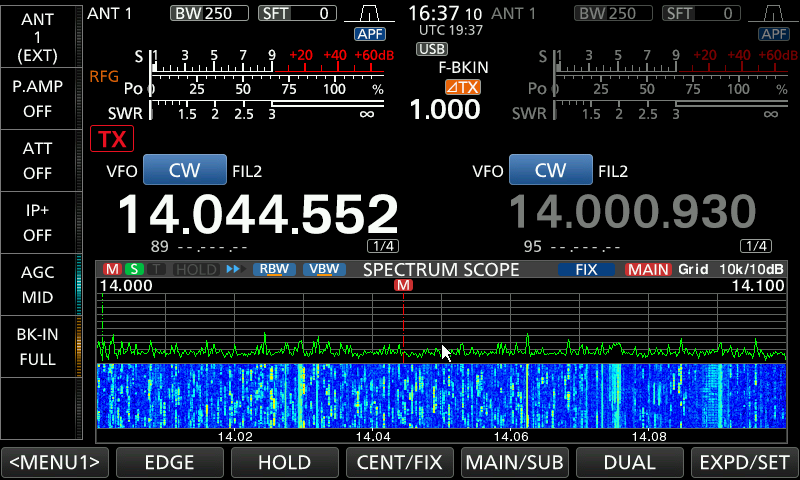
What is wrong with this picture???
Mike Weir, VE9KK, is a regular contributor to AmateurRadio.com and writes from New Brunswick, Canada. Contact him at [email protected].
One Aspect of Amateur Radio: Good Will Ambassadors to the World
This article is part two of the series taking a look at band plans and gentlemen agreements.
See part one, here: Land (er, FREQUENCY) Grab. See part three, here: In Response — Can’t We All Just Get Along?
Displaced and Marginalized
There are some unhappy amateur radio operators in the world of shortwave operations. Users of Morse code, and digital modes other than the highly-popular modes engineered by Joe Taylor, K1JT, feel displaced on the many amateur radio bands where Joe’s wildly-popular mode FT8 has erupted.
Joe (born March 29, 1941), is a friend of hams everywhere, and is an American astrophysicist and Nobel Prize in Physics laureate (https://g.nw7us.us/2Ptquv1) for his discovery with Russell Alan Hulse of a “new type of pulsar, a discovery that has opened up new possibilities for the study of gravitation.”
Many have asked questions like, “Did Joe Taylor K1JT Destroy Amateur Radio? Did Joe Taylor K1JT, Nobel Laureate and noted friend of hams everywhere, accidentally destroy amateur radio?” This question remains relevant, even as more and more FT8 operators take to the HF bands to chase wallpaper and awards.
FT8 Has Validity and Usefulness
Full disclosure: I administer a Facebook group for FT8 and FT8-related modes, because I believe that the mode has a valid place in our amateur radio technology portfolio. Here is the Facebook group URL, if you would like to join the fun: https://www.facebook.com/groups/FT8.FT4.HF.6m/. Understand, I have used and will continue to use FT8.
Because it has a place, it stands to reason that everyone should become more aware of the impact of using FT8 on the bands. It also stands to reason that it should be used ethically, and in the best spirit of amateur radio.
Many amateur operators use the FT8 digital mode as a novelty when there isn’t much else happening on amateur radio shortwave bands. One of the great things about it is that you can tell when a band is open–even though you don’t hear any other signals of other modes on the band in question, you very well may hear the roar of FT8 on the band where propagation actually exists to somewhere else than your QTH.
Others use it to finally get their DXCC, or WAS, or other award and wallpaper. This is especially popular during this season of the sunspot cycle where there are no sunspots–propagation is limited to lower-HF amateur bands because there’s just not enough solar activity to energize the ionosphere enough to open up the higher segment of shortwave.
FT8 Has Limitations
Can FT8 be used for two-way conversations? No. However, the JS8CALL digital mode is designed from the FT8 mode, by changing the protocol in a way that allows free text. It is designed for ragchewing and the new version 2.0 offers three modes of chat with 50 Hz and 16 wpm, 80 Hz and 24 wpm, and the turbo mode at 160hz and 40wpm with turbo only having a 6-second turn around time. The designated frequency is 7.078, which many find much nicer to use.
However, many find JS8CALL combersome, and non-intuitive. How fast and how reliably can it handle critical messages, say, during an emergency? I’m sure the software will improve, but how good is the protocol?
A mode such as Olivia has been field proven, and time tested. It can reliably handle traffic.
The Rant
During the early days of widespread FT8 operation that came with the first public non-Beta release of FT8-equipped WSJT-X software, I tried to reason with the FT8 development leadership team. I made a polite attempt at explaining how incredibly rude they were in purposefully programming into the software the default operating frequencies such as 7.075, 14.075, and so on.
One of the main leaders of that team slammed me and stated that “we only suggested those frequencies; the operator is free to change them.” Additionally, he stated that the team used a common QSO/Mode spotting website to see what digital modes or other operations (like CW) were sparser. They perceived that the frequencies they proposed where no longer active because they saw few if any spots. They thought that no one would care.
I explained that a single website-spotting strategy was illogical and very lazy. This is true for several reasons, at least.
I guess you have to have a Ph.D. to know better than any average ham who went by gentleman’s agreements. I have an extremely dim view of JT and his disciples. CW is not the only operating group he’s engineered out of traditional slices of spectrum. Olivia, and other modes, now have been pushed down into PSK subbands, and everyone is feeling the crowding. As far as my thinking of FT8, well, it is radio, but it doesn’t foster goodwill and building serious communications skill. IMHO.
Play Nice, Be Positive and Polite. Smile.
I’ve received wise counsel from a number of fellow amateur radio operators. They implore us to not promote hostility between “us and them.” That even though the WSJT team is playing the playground bully, we should not be vengeful, but polite and willing to negotiate in good faith.
If we don’t play nice with the bully then the bully won’t play with us. And, the general public will side with the bully because the bully has the nice toys…
Good negotiations, though, take a willingness by both sides, so that conversation evolves, resulting in positive, cooperative actions embraced by both parties. There are other amateur radio operators who have made attempts to open up talks with Joe and crew. What are the results, so far?
We can hope that Joe Taylor and his group of developers and leadership take a proactive role and join a conversation that is with a wider group of amateurs than just the WSJT enthusiasts. We hope that they will play fairly, and cooperatively, with the rest of the amateur radio community.

Tomas Hood, NW7US, is a regular contributor to AmateurRadio.com and writes from Nebraska, USA. Tomas is the Space Weather and Radio Propagation Contributing Editor to ‘CQ Amateur Radio Magazine’, and ‘The Spectrum Monitor’ magazine.
Visit, subscribe: NW7US Radio Communications and Propagation YouTube Channel
 Ham Radio Deluxe |
 W5SWL Electronics |
 Ham Radio Prep |
 KB3IFH QSL Cards  Hip Ham Shirts  HamRadioAuctions HamRadioAuctions Reliance Antennas Reliance Antennas Enigma Shop Enigma Shop |  morseDX  Ni4L Antennas  R&L Electronics R&L Electronics antennas.us antennas.us QRV QRV |
- Matt W1MST, Managing Editor
