 |
 Checking Out The KT-WP12 Transceiver
 17 December 2021 | by
 I’ve been interested in the idea of a microphone-centric radio and wrote about it here: How About a Mic-Centric Mobile Transceiver? Shortly thereafter, I discovered that QYT has introduced a VHF/UHF ham rig that has the display and controls in the microphone (Model KT-WP12).
You may want to watch the video by Tech Minds, which does a good job of introducing the radio.
I was very keen on trying this radio out, so I purchased one, paying about $110.
On the Bench
First, I did some bench tests to check the basic performance of the radio. The receiver sensitivity, transmit frequency and FM deviation all looked very good. The one specification that was disappointing was the RF power output. On the 2m band, the output power was 20.6 W, while the 70cm band was 15 W. The specification for the radio is 25 W. The power was measured using an HP 8920A RF Communications Test
I’ve noticed this on other radios from Chinese manufacturers: the basic specs of the radio check out, except the RF power level is low.
User Interface
As you might expect, cramming all of the controls into the microphone is a challenging user interface design. I spend quite a bit of time playing with the radio at home before actually using it on the air. Overall, I found the user interface to be acceptable, but several areas that should be improved.
QYT relies on the menu system to provide control of many of the settings. This is similar to the various Chinese handhelds where you push the MENU button to access the menus, followed by UP/DOWN to sequence through the menus, followed by MENU to access the specific setting. Then the UP/DOWN buttons choose the value of the setting and another push on MENU to accept it. The volume control setting is buried in this menu system, which seems like a poor choice. Fortunately, Mick/M0VMK pointed out that the volume can also be set by enabling the monitor feature (big button on the top of the mic) and hitting UP/DOWN.

This design depends too much on the menu system. A few user-defined buttons would be a real help. This radio could benefit from a serious redesign using User-Centered Design.
This radio has one receiver but allows for three independent frequencies to be displayed simultaneously. There is a scanning mode that tries to emulate a multi-receiver radio. This too is all too common with the Chinese radios…somehow they have it in their heads that this adds value for the user. My experience is that it mostly confuses the user. Most users would be better served with a single frequency display, supplemented with dual-watch and scanning capability.
You probably won’t be surprised that the user manual is terrible, also common with Chinese manufacturers, but this one is particularly bad. Same with the programming software…it mostly works (I had a few crashes) but it is poorly written.
On The Air (SOTA)
I was very interested in trying out this radio for Summits On The Air (SOTA) use. The idea is that the radio can be stuffed into a fanny pack, with the microphone, speaker, display, and controls in your hand.

The basic concept of holding everything in the palm of my hand worked out quite well. The display was visible in bright sunlight, the speaker audio was clear, and the microphone worked great. I made a number of SOTA contacts and received good signal reports. I held the microphone in one hand and pointed the 3-element Yagi antenna with the other hand. (Joyce/K0JJW assisted with logging and we took turns working the SOTA chasers.)
As soon as I fired up the radio, I heard interference on the 2m band, not very strong but noticable. It sounded like it was coming from an FM broadcast station. Pointing the Yagi antenna in the direction of the FM station on the adjacent mountain seemed to confirm the source. I did not hear any interference on the 70cm band. I’ve operated from this SOTA summit before and have not noticed any interference with other equipment, including Yaesu handhelds. Also, I switched to my Yaesu FT-90 and the broadcast station was not heard. As various people have suspected, this indicates that the receiver in the QYT is not very robust in terms of rejecting off-channel signals. Of course, this is an anecdotal report, not based on bench measurements.

I also encountered an anomaly where after my transmission, the radio did not revert back to receive quickly. There was a few seconds where no audio was coming out of the transceiver. This caused me to miss a few responses to my CQ call. This issue requires some additional investigation. It may have just been operator error on my part. However, I suspect that the radio was probably locking onto another frequency but I am not sure (see previous comments about the three frequency scanning mode). So file this issue under “stay tuned for more information.”
Note that I did not use the radio very much on repeaters, focusing on SOTA simplex operating with no transmit offset or CTCSS.
Conclusion
On the positive side, I really like the microphone-centric approach that this radio uses. The user interface can be improved but it is good enough.
The two big limitations of this radio are 1) low RF power output and 2) weak off-channel receiver performance. Now you might say that the RF power is not off by that much but my interest is having a SOTA radio that greatly exceeds the power of a typical 5 W handheld. On the 70 cm band, this radio only put out 15 W, so only 4.7 dB better than a handheld. The poor receiver performance will tend be an issue on summits that have radio installations nearby. In some cases, this can completely prevent a VHF SOTA activation.
I will probably use this radio again for SOTA activations but I’ll be bringing along a backup rig, just in case.
The post Checking Out The KT-WP12 Transceiver appeared first on The KØNR Radio Site.
Bob Witte, KØNR, is a regular contributor to AmateurRadio.com and writes from Colorado, USA. Contact him at [email protected].
Solar Cycle 25, and a Life-Changing Event (Part 1 of 2)
From the RAIN HamCast episode #56, 2021-XII-11 (used with permission):
When you were knee high to a grasshopper, did you undergo a game-changing experience that shaped your future career?
Here is text from the introduction:
Tomas Hood/NW7US did. Tomas has been a shortwave enthusiast since 1973. He was first licensed as a ham in 1990 at age 25.
In the mid 1990s Tomas launched the first civilian space weather propagation website, HFRadio.org, which later spawned SunSpotWatch.com. His website, NW7US has been up and running since June, 1999. Tomas has contributed to the Space Weather Propagation column in CQ magazine for over 20 years, and for The Spectrum Monitor magazine since 2014.
A product of the Pacific northwest, Tomas resides today in Fayetteville, OH. RAIN’s Hap Holly/KC9RP spoke with Tomas recently about Solar Cycle 25 and the game-changing afternoon Tomas experienced in 1973 at age 8 ( Read more about this, at his amateur radio and space weather blog: https://blog.NW7US.us/ ).
Here is the first part of the two-part interview:
Mentioned in the interview is Skylab:
From Wikipedia’s article on Skylab: Skylab was the first United States space station, launched by NASA, occupied for about 24 weeks between May 1973 and February 1974. It was operated by three separate three-astronaut crews: Skylab 2, Skylab 3, and Skylab 4. Major operations included an orbital workshop, a solar observatory, Earth observation, and hundreds of experiments.

Tomas was drawn into space weather as a life-long passion, by inspiration from Skylab, and from the hourly propagation bulletin from the radio station WWV.
WATCH FOR THE NEXT EPISODE, PART TWO
This video is only part one. The RAIN HamCast will conclude Hap’s conversation with Tomas in RAIN HamCast #57, scheduled for posting Christmas Day.

Hap Holly, of the infamous RAIN Report (RAIN = Radio Amateur Information Network), is now producing The RAIN HamCast. The results are both on https://therainreport.com and on the RAIN HamCast YouTube channel, https://www.youtube.com/channel/UCUbNkaUvX_lt5IiDkS9aS4g
KEEP ON HAMMING!
The RAIN Hamcast is produced and edited by Hap Holly/KC9RP; this biweekly podcast is copyright 1985-2021 RAIN, All rights reserved. RAIN programming is formatted for Amateur Radio transmission and is made available under a Creative Commons license; downloading, sharing, posting and transmission of this ham radio program via Amateur Radio in its entirety are encouraged. Your support and feedback are welcome on https://therainreport.com. Thanks for YouTube Technical Assistance from Tom Shimizu/N9JDI.
Visit, subscribe: NW7US Radio Communications and Propagation YouTube Channel
Practice practice and more practice.
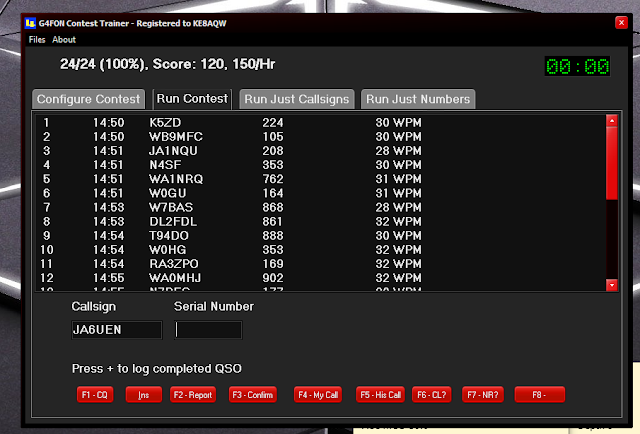
Moving along with my contest code...I call it contest code as it's really not conversation code as that takes a bit more skill. Not saying that contest code does not take skill but you kinda have an idea with contest code what to expect.........a call sign, a number or in some instances a name. Conversational code is more whatever the heck you both are going to talk about. Now mind you the RST, name, QTH and WX are kinda standard it's when the op deviates from the plan and gets going on about the vacation his family took in your hometown.......I digress.
I have been trying to build on my contest CW speed, accuracy and most of all confidence. I have been doing that with these programs G4FON cw traner, RufzXP, Morse Runner and LCWO code practice programs. What I have found is you have good days and you have not-so-good days. There was a practice session when I would hear the code and freeze wondering for some crazy reason what that letter was. Then the mixing up of letters on the keyboard, going to a "G" but end up typing an "H". Oh and then a big confidence builder is when the contest program send you "SH5IH"
The most recent issue I was having was hitting between the letters on the keyboard and gong for letters on the 3rd row up such as "W, T or Y" but hitting the numbers above those letters. I finally figured out what the issue was. Seems when I was practicing on my Mac laptop the keys are closer together than on my Lenovo keyboard. I was doing twice as much practicing on my Mac laptop and my fingers were trained to only move slightly on the keyboard. This meant issues on the larger Lenovo keyboard. The solution was to bring the Lenovo keyboard to the make and use that.
Anyway today I was thrilled to get zero mistakes on the G4FON CW contest trainer today......I know I know I am all ready for the big ego bubble burst the next session when missing more than I copy. But so goes the contest CW battle. For now, I am bathing in the success!
This weekend is the annual running of the RAC Canada Winter contest and I am entering the CW only category and yes you guessed it I am going to be calling CQ..........unless I see a nice RAC multiplier worth 20 points!!
Mike Weir, VE9KK, is a regular contributor to AmateurRadio.com and writes from New Brunswick, Canada. Contact him at [email protected].
Practice practice and more practice.
Moving along with my contest code...I call it contest code as it's really not conversation code as that takes a bit more skill. Not saying that contest code does not take skill but you kinda have an idea with contest code what to expect.........a call sign, a number or in some instances a name. Conversational code is more whatever the heck you both are going to talk about. Now mind you the RST, name, QTH and WX are kinda standard it's when the op deviates from the plan and gets going on about the vacation his family took in your hometown.......I digress.
I have been trying to build on my contest CW speed, accuracy and most of all confidence. I have been doing that with these programs G4FON cw traner, RufzXP, Morse Runner and LCWO code practice programs. What I have found is you have good days and you have not-so-good days. There was a practice session when I would hear the code and freeze wondering for some crazy reason what that letter was. Then the mixing up of letters on the keyboard, going to a "G" but end up typing an "H". Oh and then a big confidence builder is when the contest program send you "SH5IH"
The most recent issue I was having was hitting between the letters on the keyboard and gong for letters on the 3rd row up such as "W, T or Y" but hitting the numbers above those letters. I finally figured out what the issue was. Seems when I was practicing on my Mac laptop the keys are closer together than on my Lenovo keyboard. I was doing twice as much practicing on my Mac laptop and my fingers were trained to only move slightly on the keyboard. This meant issues on the larger Lenovo keyboard. The solution was to bring the Lenovo keyboard to the make and use that.
Anyway today I was thrilled to get zero mistakes on the G4FON CW contest trainer today......I know I know I am all ready for the big ego bubble burst the next session when missing more than I copy. But so goes the contest CW battle. For now, I am bathing in the success!
This weekend is the annual running of the RAC Canada Winter contest and I am entering the CW only category and yes you guessed it I am going to be calling CQ..........unless I see a nice RAC multiplier worth 20 points!!
Mike Weir, VE9KK, is a regular contributor to AmateurRadio.com and writes from New Brunswick, Canada. Contact him at [email protected].
Power Box for Bioenno Battery
When operating portable, I use Lithium Iron Phosphate batteries from Bioenno. Most of my portable operating is for Summits On The Air (SOTA) and I wrote about it here:
For POTA activations, I purchased a larger, 20 Ah Bioenno battery and use it to power a Yaesu FT-991 (and other radios). This battery has worked out really well. It is a bit large for backpack portable and weighs 5.4 pounds, but I have taken it along on a few SOTA activations.
Powerwerx PWRbox
I decided the battery could use a case to protect it while being tossed around in the back of the Jeep. Powerwerx has a really good battery box that includes a digital voltage readout, automotive (“cigarette lighter”) socket, dual PowerPole plugs and high-current binding posts.

Initially, I did not think I needed the extra gizmos, and I did not want to take up more space with the battery system. Later, I figured that I could always pull the battery out of the box and use it in its original form.

The power switch is handy for turning on/off the battery power and the digital voltmeter provides a simple view of the battery condition. Most of the time, I use the PowerPole connectors to connect up my radios but occasionally the automotive socket comes in handy.

I used some of the plastic packing material that came with the box to hold the battery in place. A little bit of cutting with a sharp knife produced a good fit. There is enough room above the battery for the Bioenno charger, so it makes for a nice kit. The charger connects to the original charging plug on the battery.

As expected, Powerwerx did a good job of wiring up the various components and included fuses in both the positive and negative cables. The box is big enough to hold a 40 Ah battery and I am tempted to upgrade it for larger capacity, but the 20 Ah battery has been sufficient, so far.
I’ve used this battery box for multiple POTA activations and a few other situations when I just needed to power up a radio at home. It works great. The voltmeter gives me a quick check of the battery status and the PowerPole connectors make for easy hookup.
The PWRbox costs $109.99, battery not included.
73 Bob K0NR
The post Power Box for Bioenno Battery appeared first on The KØNR Radio Site.
Bob Witte, KØNR, is a regular contributor to AmateurRadio.com and writes from Colorado, USA. Contact him at [email protected].
LHS Episode #444: Knock It Off

Hello and welcome to the 444th installment of Linux in the Ham Shack. In this episode, the hosts discuss several short topics including some year-end news about the show, tiny SSB transceivers, the Wayland X server, the EU adopting and promoting open source, WSJT-X and much, much more. Thank you for listening and have a great week.
73 de The LHS Crew
Russ Woodman, K5TUX, co-hosts the Linux in the Ham Shack podcast which is available for download in both MP3 and OGG audio format. Contact him at [email protected].
A keyboard is a keyboard……….but is it?

As frequent readers of my blog, you know my interest in contesting, and specifically CW contesting. Just a few weeks ago, for the first time, I called CQ in a contest and was running for the entire contest. I had a great time and also a time of growing. As with all bloggers, we have different keyboarding levels. To be a blogger, you have to be somewhat of a typist. There are single finger, two-finger and home row typists. There is a saying "mom knows best" and well in grade 7 I was not so sure about that saying. You see, I had what was called in school a spare period. It was a time slot with no class, and really it was my first one ever, and I planned it as a rest time. Well, mom knows best, and she had to sign off on my spare period and well she had other plans for me.
She looked at my school timetable and the available classes for my so-called spare period. She found a class that fit right into the spare period time slot..........TYPING.....yup that's right typing! With my mom it's not a suggestion.....it's "your taking typing, and you will end up thanking me for it one day" I went to school in the '70s, and you know how many guys were in typing class.........ME!
In I went and well there was a positive note and that is it was a great place to meet girls anyway I digress. The first thing I noticed was you can't look at the keyboard to find the letters as there were no letters to be found, the keyboard was blank. To make a long story short I learned about something called home row and I can still hear the teacher calling out "AAA BBB EEE" and so on. I have to admit that yes, mom knows best, and I took 2 semesters of typing class. It made my university years way easier for term papers and so on.
Fast forward to now......getting a blog post together runs along very smoothly, BUT who would have thunk that my CW contest would benefit as well? I found that when I was running in a CW contest, having the ability to not look down at the keyboard was a bonus. I can hear the calls or exchange and just look at the PC screen and enter the information.
Here is the catch........ I can type, and my speed is ok for blogging, but typing a call sign and then an exchange at 25-34 WPM takes practice. In the past I felt keyboard was a keyboard right ?? Well, I found over time, frustration and trial and error that all keyboards for contesting anyway are not alike.

The keyboard of choice for the longest time was the wireless Logitech k830. It was a smaller keyboard that had a mouse pad. The keys had a soft touch, meaning not much pressure was needed when typing. Also, the keys were close together therefore no ambidextrous finger moves to hit certain letters were needed.
When practicing with this keyboard for CW contest call sign copying at slower speeds it was good but up around 25 WPM, I found myself hitting two keys at once a lot. At 25 WPM when this happens you lose track of the next letters coming at you, and it can get frustrating. The Logitech keyboard is not going to cut it.

I have heard it said that most times the solution is right under your nose, and you just can't see it. This was the case with the perfect keyboard. My wife was working from home during the height of the pandemic, and for some time that has not been the case. Her company PC has sat ideal at home for some time now along with a KEYBOARD! It was a full size keyboard, much different from my other go-to keyboards, but I thought I would give it a go. This keyboard is a Lenovo Pro 2 and when she requires it again I have already scoped them out online. I am thinking I will purchase one as a New Years gift for myself.

I have been using it for about 2 weeks now, and it's amazing, the keys are the right height and key sensitivity is spot on as well. Not only that, but I am having no issues copying calls and exchanges around 33-35 wpm. So no, a keyboard is a keyboard is not true. I found that it's a personal thing and once you get the right keyboard for you, it sure can make a differance ....in contesting anyway.
Mike Weir, VE9KK, is a regular contributor to AmateurRadio.com and writes from New Brunswick, Canada. Contact him at [email protected].
 Ham Radio Deluxe |
 W5SWL Electronics |
 Ham Radio Prep |
 KB3IFH QSL Cards  Hip Ham Shirts  HamRadioAuctions HamRadioAuctions Reliance Antennas Reliance Antennas Enigma Shop Enigma Shop |  morseDX  Ni4L Antennas  R&L Electronics R&L Electronics antennas.us antennas.us Ears to Our World Ears to Our World |
- Matt W1MST, Managing Editor
