 |
 EchoLink on Android
 6 September 2010 | by
 An EchoLink app has recently been released for Android mobile phones. That makes two smartphone platforms – Android and iPhone – that can now be used to access EchoLink. Is this really a good idea?
Let me make it clear from the start: I like EchoLink. What I like about it is that it can be used to link repeaters in different parts of the country or the world, and even allows individual operators like myself to set up simplex voice nodes without the technical complications, expense and licensing issues of running a repeater, the aim being simply to get some interesting activity on what may otherwise be a more or less dead band.
I realize that contacts made using EchoLink are not traditional amateur radio point to point contacts, so I don’t want to start up the old “it’s not ham radio” argument again. But I don’t think the point of most contacts made on VHF FM is that you worked direct and exchange QSLs afterwards. They are just conversations between hams. The fact that the transmission went most of the way over the internet is of no more significance than if you used a conventional repeater. However it does matter to me that radios are used at each end, otherwise it’s internet chat not a radio contact in any shape or form. So far, that seems to be the case with most of the EchoLink contacts I have made, but for how long?
The trouble with EchoLink apps for smartphones is that they are VoIP apps pure and simple. They encourage the use of EchoLink as a VoIP chat mode. Smartphones are so popular now that I’m afraid this could become the dominant way of using the system. It could even replace ham radio handhelds. Users are going to ask themselves: Why bother carrying this goofy looking radio about when I can just use my phone? One more nail in the coffin of amateur radio?

Julian Moss, G4ILO, is a regular contributor to AmateurRadio.com and writes from Cumbria, England. Contact him at [email protected].
Making my position clear
Observant readers may have noticed a change in the “strapline” in the header logo of my blog. It now reads “My position on amateur radio.”
The new strapline reflects more accurately what the blog is currently about. If you haven’t already realized, it is also a play on words. “My position” alludes to my present interest in APRS which is the subject of many of my postings. But it also makes it clear that this is an opinion blog; that I use this blog to express my thoughts on various ham radio related matters, to give my point of view without any obligation on my part for that view to be fair, balanced or uncontroversial.
So don’t expect any changes to the content, other than a gradual evolution as my interests move from one thing to another. I expect that I will still occasionally write on topics related to stealth ham radio operation, but I feel I have probably pushed things about as far as they can go in my present situation. Now it’s just a matter of waiting and hoping that I don’t experience the Final QRN that puts paid to my radio activities for good.

Julian Moss, G4ILO, is a regular contributor to AmateurRadio.com and writes from Cumbria, England. Contact him at [email protected].
Open digital voice codec released
David Rowe has released an early version of his low bit rate open source digital voice codec. Whilst this is certainly a significant achievement, I can’t get very excited about it for two reasons. First, it is incompatible with the AMBE codec used by Icom in D-Star, so it is never going to be able to work with existing D-Star equipment and it is not all that likely that it will be incorporated in future versions. And second, I still don’t see what benefits digital voice offers us as radio hams in the real world.
Digital audio gives you clear “fully quieting” audio up until the signal starts to be lost, when it quickly breaks up and you get nothing. Analogue audio experiences a gradual degradation as the signal gets weaker. Those who have used the two report that an analogue signal is usably copyable about 15 – 20% further out than a digital signal. I can understand that for some professional services nothing but clear copy will do. But we are amateurs who are supposed to be good at digging weak signals out of the noise. Is this really “progress”, in the context of what ham radio is used for?
The other reason for my antipathy to digital voice is that I question whether we need another voice mode at a time when VHF analogue voice operation itself seems to be in decline. Surely it would be better to be making more use of existing technologies like Echolink to create more activity for users of existing equipment than to introduce new digital modes that will have an even smaller number of users. I’ve seen D-Star radios up for sale because the original purchaser found there was hardly anyone to talk to, and D-Star has now been around for several years. I don’t see the availability of an open source digital voice codec changing that situation somehow.

Julian Moss, G4ILO, is a regular contributor to AmateurRadio.com and writes from Cumbria, England. Contact him at [email protected].
T Time
Labor Day here in the USA! So a day to play for most of us. Depending on the weather I may get a bit more on air time, but I have a project lined up too.
Some time ago I purchased a Deluxe Tuner kit from Dan’s Small Parts and Kits aka a QRP Mini Tuner by Mark L. Meyer as described in a 73 magazine article. It is a nice little set of parts and a schematic for the price.

QRP Mini Tuner Kit
So I’m thinking this holiday might be the time to build that little T tuner out and see if I can load up the downspout that runs down the side of my back porch. I’ll let you know how it works!
Hope the bands hold up. Tonight’s QRP-L has a message from N4QA about how nice 40m is sounding right now! Sure would be fun to have our bands back from the QRN and low sunspot streak of late!
Kelly McClelland, K4UPG, is a regular contributor to AmateurRadio.com and writes from Florida, USA. Contact him at [email protected].
The best cheap sound card for digimodes
The popularity of web videos and podcasts means that most ham radio enthusiasts who want to use sound card digital modes no longer want to dedicate their computer’s built-in sound card for that purpose. The usual solution is to buy a purpose made interface such as a RigExpert or SignaLink (expensive but highly recommended by all who own one) or an external USB sound card. However a great many people claim that the cheapest USB sound card “dongle” costing just 99p on eBay is good enough. Take it from me, it isn’t.
I have had several online discussions bordering on arguments with self proclaimed experts who claim that the sound chip in these cheapo “dongles” is exactly the same as the one in a £100 SignaLink USB interface so the £1 dongle must be just as good. I have no idea if they are right about the chip. What I do know is that when I played back a recording of very weak CW using one of these devices all I could hear was noise. And when I tried to use one of these devices to decode a fast digital mode such as packet, I decoded nothing at all, not a single packet, even though I could see the signal loud and clear on the waterfall.

I have tried a number of these cheap devices. I bought two of the cheap thumb sized “dongles”. One I threw away after seeing the noise it introduced on the waterfall. The second I bought thinking it would be good enough for computer audio, which it was, but had to throw it away when it failed after a week. I also spent a bit more on a slightly fancier sound card “dongle” which I currently use for computer audio, but which still displayed the inadequacies on weak signals and fast data modes that I have mentioned.
Finally I tried the device pictured above. It doesn’t have a brand name but can be readily identified from the picture and is advertised on eBay as something like “USB 6 Channel 5.1 External Sound Audio Card For Laptop”. It costs around £8.50 including postage from China. It comes in a small extruded aluminium case, has connections for SP/DIF input and supports sample rates of up to 48kHz so it would probably be suitable for basic SDR use. It has decoded every digital mode I have so far tried it with. And it’s small enough to build into your own box to make a DIY SignaLink.
It comes with a mini-CD containing a Windows driver. This installs a small mixer/control panel application that loads in the task bar and provides the usual control over the various sound effects. I used one of the start-up program managers (Autoruns) to remove it and find that it works perfectly well for my purposes without it, just using the standard Windows mixer settings. This is certainly preferable to the Creative SoundBlaster USB device that some people recommend which allegedly installs 200MB of junk on your hard drive.
I think this is probably the cheapest external sound device that is worth using for sound card digital modes. I’d be interested to know of alternatives, but please don’t recommend something unless you have actually done A/B comparisons with a known good sound card using weak signals, fast modes and different software packages. I hate to think of the frustration some people must have experienced following the advice of the self proclaimed experts, buying one of the £1 “dongles” and wondering why they can see a trace on the waterfall and can’t decode it.

Julian Moss, G4ILO, is a regular contributor to AmateurRadio.com and writes from Cumbria, England. Contact him at [email protected].
WOTA success
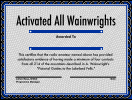 I think it’s fair to say the Wainwrights On The Air (WOTA) scheme has become a big success. At the start it was probably true that the main participants were existing Summits On The Air (SOTA) enthusiasts who appreciated the opportunity to make more of their Lake District excursions by activating the hills they would otherwise have walked past on their way to a SOTA summit. But recently several local amateurs have got started specifically in WOTA chasing and activating. There has even been a request for a list of the easiest Wainwrights to climb! There isn’t an award for that, but it does suggest that WOTA is encouraging people to get out on the hills who were not previously enthusiastic fellwalkers and I think that is one of the best possible outcomes for the scheme.
It’s a pity, though, that no-one offered to design a nice award certificate for the scheme, which the Workington Radio Club was then going to get professionally printed. The ones I made using a free online certificate maker and print on our cheapo HP multifunction printer (with expensivo ink cartridges) look a poor reward for all the time and sweat that has been expended earning them. I always have a fight getting them to print correctly anyway, so having some professionally printed certificates would have saved me a lot of hassle.

Julian Moss, G4ILO, is a regular contributor to AmateurRadio.com and writes from Cumbria, England. Contact him at [email protected].
APRS Chat
It has been a while since I wrote about the new APRS client for Windows and Windows Mobile being developed by Lynn, KJ4ERJ and known as APRSISCE/32 but it has been coming on apace with new versions being released almost every day. Many of the improvements probably won’t mean much to anyone who doesn’t know anything about APRS. But one of the more recent and quite revolutionary developments has been the chat window, which allows you to carry out a two-way text chat conversation with another APRS user.
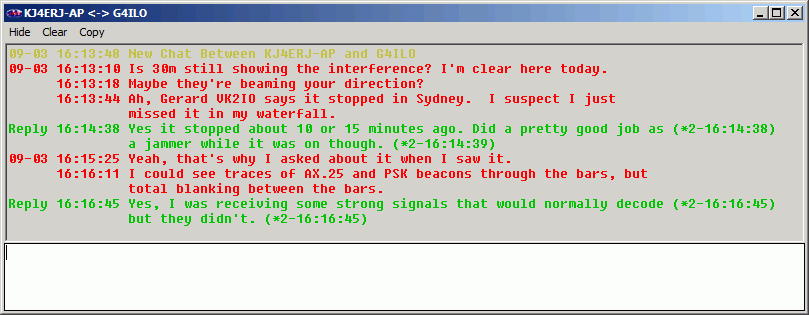
Instead of the primitive edit box found in most APRS clients in which you would have to type your messages in 64-character chunks due to the limitations of APRS messaging you can now type just what you want and APRSISCE/32 will split it up and send it as separate messages transparently. It also takes care of ensuring the parts are displayed in the right order at the other end. You can also view the entire conversation in its own window – useful if you are having conversations with two or more people when you are tired late at night and lose track of what you are saying to whom!
You can chat with anyone, anywhere in the world. True, at the moment most of these conversations are being conveyed over the internet not RF, which will inevitably incur the complaints that “it’s not ham radio.” But they could just as easily use RF. The only problem is that for most of us an adequate APRS RF infrastructure to support worldwide messaging doesn’t exist. But the more people are attracted to the mode – and even the hobby – by cool developments like this, the more likely it is that an effective infrastructure will be built. In many parts of the world you could certainly link up across town on VHF like this.
Regular digital modes are fun. But is there any reason why the only way to have a contact is for two people to have sole occupancy of a frequency and one sends to the other, then the other replies back, repeat until finished, the way contacts have been made ever since Marconi first picked up a morse key?

Julian Moss, G4ILO, is a regular contributor to AmateurRadio.com and writes from Cumbria, England. Contact him at [email protected].
 Ham Radio Deluxe |
 W5SWL Electronics |
 Ham Radio Prep |
 KB3IFH QSL Cards  Hip Ham Shirts  HamRadioAuctions HamRadioAuctions Reliance Antennas Reliance Antennas Enigma Shop Enigma Shop |  morseDX  Ni4L Antennas  R&L Electronics R&L Electronics antennas.us antennas.us QRV QRV |
- Matt W1MST, Managing Editor
