 |
 Terminator
 16 September 2010 | by
Ethan Miller, K8GU, is a regular contributor to AmateurRadio.com and writes from Maryland, USA. Contact him at [email protected].
Handiham World for 09 September 2010
Welcome to Handiham World!
Back at work!
The Handiham World weekly is finally back at work after a couple weeks of rest & relaxation. While the e-letter went on holiday, I also took my vacation at exactly the same time. What a coincidence!

In the accompanying photo, I am posing in front of something that would make a perfect ham radio antenna support – the Eiffel Tower. My XYL and I made the trip to celebrate our anniversary, and she was a saint to put up with my obsession with ham radio and antennas. According to Wikipedia, “The tower stands 324 meters (1,063 ft) tall, about the same height as an 81-storey building.” Just imagine the signal you could get out with a multielement Yagi antenna on top, right?
As nice as it is to travel, it’s always great to be back. Today will be mostly filled with member contacts like phone calls and emails, because I have quite a backlog. I hope to get our audio magazine digest updated either later today or perhaps tomorrow if I run out of time today, but rest assured I will eventually catch up – in the meantime, I am coping with the jet lag by draining out the entire coffee pot.
One of the most fun things was checking in to the PICONET on 3.925 MHz via the Handiham remote base from France and Italy. This is certainly proof that a remote base station can be useful when setting up antennas or traveling with lots of radio gear is simply not practical. I also enjoyed making some Echolink contacts, including a check in on the daily Handiham net. These days, one does not need to give up regular operating just because you are staying in a hotel. These new ways to use technology enhance our options to use ham radio, and I’m sure thankful to all of our volunteers and supporters who make it possible. The best thing about ham radio for me has always been staying in touch with my community of friends. In order to get through all of the calls today, this edition will be a bit shorter than usual, but hopefully still worth a few minutes of your time.
73,
Patrick Tice, WA0TDA
Handiham Manager
[email protected]

Pat Tice, WA0TDA, is the manager of HANDI-HAM and a regular contributor to AmateurRadio.com. Contact him at [email protected].
We all should know the benefits of salt water and antennas…. but salt water AS the antenna……
OK, I just had to post this.
I’ve experimented with saltwater when operating portable (one of the benefits of living about a half hour from the shore). I know friends that have made antennas using salt water, and they had great luck.
This guy, took the idea and spun it on it’s head. Check out the induction as well – SWEET!
Jonathan Hardy, KB1KIX, is a regular contributor to AmateurRadio.com and writes from Connecticut, USA. Contact him at [email protected].
The GPS you didn’t know you had
The great thing about the internet is that you can find the answer to anything. You may not understand the answer, it may not even be the correct answer, but you can find it. And sometimes you will find out more than you were expecting.
Yesterday I happened to think “If I have a computer or smartphone with a GPS, can my position be accessed from its web browser?” A quick search of Google turned up the answer that yes, it could, in newer browsers that support HTML 5 like Firefox 3.6 and Google Chrome and the Android web browser. I even found some example code showing how to use it. I made a test page to try it out for myself. The results were a little unexpected.
First I tried it using my shack PC, which is a mini-tower with only a wired connection to my router. It told me that I was in Sheffield. This was actually not unexpected, as that is similar to the location I see when visiting some blogs that have a widget to show where visitors come from. I presume they, and the web browser, use geolocation by IP address if that is the only available method, and Sheffield is presumably the location of my broadband ISP’s data centre.
When I tried using my smartphone running Android I saw the GPS status icon flicker on for a couple of seconds and my page then reported my position as being in Broughton, a village a couple of miles west of here. I’m guessing that the GPS didn’t have time to get a good fix so I got a poor one, or else it is reporting the location of the cell the phone is connected to.
But the really surprising result was when I tried using my laptop. This doesn’t have a GPS and is connected using wi-fi to my router, so it has the same IP address on the web as the shack system. Yet my test page pinpointed my location as across the street over the back, only about 20 yards from my actual location. I tried my netbook as well and got more or less the same position . How the heck did it know where I am?
After a bit more Googling I discovered that this is done by triangulating your position using the names or SSIDs of the wi-fi access points your computer can receive. A firm called Skyhook has created a database of access points and their locations by driving around every street in every town and city in the US. There is also a site called Geomena.org that has an access point database created by ordinary individuals. You can even add to it by installing a client app in your iPhone or Android phone and going walkabout. Google has a database which it presumably created at the same time it drove around doing Street View mapping and snooping on people’s unsecured data. In Firefox you can see which wi-fi geolocation database is used by going to the address about:config (no http://) and examining the value of geo.wifi.uri. By default it’s Google’s. You can also disable browser geolocation by changing the value of geo.enabled.
I think the geolocation feature is pretty cool but I’m sure many privacy-obsessed types will be horrified by the thought that even without an actual GPS their position can be located to that kind of accuracy.
If you are interested in trying this for yourself then you can visit the Geolocation Test page that I created. If your browser supports geolocation (and you have Javascript turned on, which is necessary for the page to work) then you will be asked if you want to share your location with g4ilo.com. This is presumably a privacy thing, because if I wanted to I could log all the positions in a database. I don’t, and in any case you’re all hams so I can find out where you are from qrz.com, so hopefully you won’t have a problem with that. If you allow the site to see your position it will then display your latitude, longitude and Maidenhead locator and show the position on a map so you can easily see if it is accurate.
If you do try my test page I’d be interested to know, via comments, how accurate the position was and whether your computer had a GPS, wi-fi or you were using a smartphone. If you have a mobile wi-fi device, does it track your position as you move around? If the results are promising I might make a permanent page for determining your grid locator using geolocation.

Julian Moss, G4ILO, is a regular contributor to AmateurRadio.com and writes from Cumbria, England. Contact him at [email protected].
Life, Death, and Technology

Life, Death, and Technology

Anthony Good, K3NG, is a regular contributor to AmateurRadio.com and writes from Pennsylvania, USA. Contact him at [email protected].
Experiences with Android
The Micro SD card I ordered arrived on Monday so I was eventually able to try installing the Google Android OS on my HTC Touch Pro. The delay turned out to be a benefit as I was able to take the advice of Eric SA5BKE who commented to my earlier post that he had found a better set of installation instructions to the ones I mentioned.

Still, as usual when I try to do anything with computers, if something can go wrong it will. First, the phone could not see the new SD Card. I had to format it with a utility from the SD Card Association. Then I messed up the screen calibration where you have to click, when prompted, on the corners of the screen, and wasted some time trying to recover from my mess-up. But eventually I was rewarded with the sight of the Android home screen on my HTC Touch Pro.
The effort was worthwhile. I really like the Android OS. It is so much better a smartphone operating system than Windows Mobile 6.1. You still feel that you are using a phone, not a Windows PC that has an annoyingly small screen. Making phone calls and sending text messages is really simple, as it should be. And once you have found out how the new OS is supposed to be used (since the download doesn’t come with a user guide) it’s easy to use.
I am a huge fan of Google – I have five GMail accounts and probably make hundreds of Google searches a week – and what I really like about Android is the way Google features are integrated into the OS. Until now I could never understand why people liked smartphones and would actually want to use them to answer email because my experience was based on trying to access GMail using one of the two awful web browsers on my Windows phone. But now I get a notification whenever a new email comes into any of my inboxes and I can either clear it or click on the email to read it in full or reply on a display designed to make full use of the small screen. I guess that’s how other smartphones work if you have a corporate mail server running Microsoft Exchange, but I’ve never had one.
I was also very impressed with the Google search widget on one of the virtual desktops of the home screen. It had a microphone icon so, out of curiosity, I clicked it and was invited to speak. A moment later it typed what I had said into the search box and was performing a search on it. Fortunately I hadn’t said something rude! I then had some fun composing emails and text messages without using the keyboard. Unfortunately the speech engine doesn’t recognize words like “comma”, “full stop” or “newline” as punctuation and formatting, nor does it recognize commands like “send.” But I was very impressed with the accuracy with which it understood what I said – the last time I tried voice input was at least a decade ago on a PC and I found it ultimately frustrating.
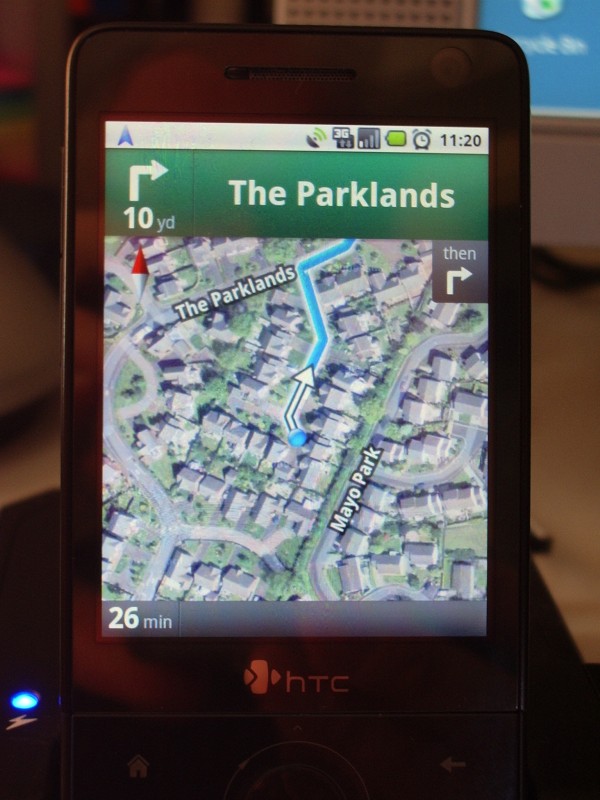
One of the applications I was keen to try out was Navigation, Google’s free satnav program based on Google Maps which is not available for Windows Mobile. I haven’t had a chance to test it in the car, but it seems like the full works, with a text to speech engine that barks directions at you. The optional but probably rather unnecessary satellite view looks rather cool, though I was rather less impressed by the route it suggested from home to Keswick, south-east of here, which involved turning right at the end of the cul-de-sac and going north, then west for a mile to reach the A66 before going east, instead of turning left and heading east which would save best part of two miles. My old satnav does that too, but that’s because the estate hadn’t been completed when the maps were made and it believes the top of the estate is still a building site.
The Android Market contains thousands of apps that you can download, either free or for a modest charge. However, sorting the wheat from the chaff seems like one of those things life’s too short for. It reminds me a bit of the early Windows “shareware” market when anyone who had taught themselves Visual Basic thought they would be the next Bill Gates by releasing some flaky software that did very little and usually crashed as soon as it experienced some condition the programmer hadn’t thought of.
There seem to be very few ham radio applications, though, and almost no really good ones. I saw quite a few apps to do with Morse, giving the lie to the idea that code is dead, but nothing that looked worth trying. The only professional quality radio application I could find is the new EchoLink client for Android.
My feelings about this have mellowed a bit since I wrote about it just over a week ago. Last Friday just before dinner I received a call through my EchoLink node from Practical Wireless VHF columnist and fellow blogger Tim Kirby, G4VXE, who was on his way home from work by train and called me using the EchoLink client for his iPhone. Though we’ve exchanged blog comments a few times it was very pleasant to speak with Tim for the first time. This was a contact we would be unlikely to make over radio and certainly not in that particular situation. Only EchoLink made it possible.
In the interests of research I had a conversation with myself using the EchoTest server and found the audio quality to be just as good as when I use my Kenwood TH-F7E to make contacts via my RF node. However the cellphone client has one disappointing limitation. You can’t make a direct connection using the cellular network. You have to use a communication option called “Relay” which only allows you to call other non-cellphone EchoLink users. It doesn’t allow other EchoLink users to call you. It’s a bit like having a radio and not being able to call CQ.
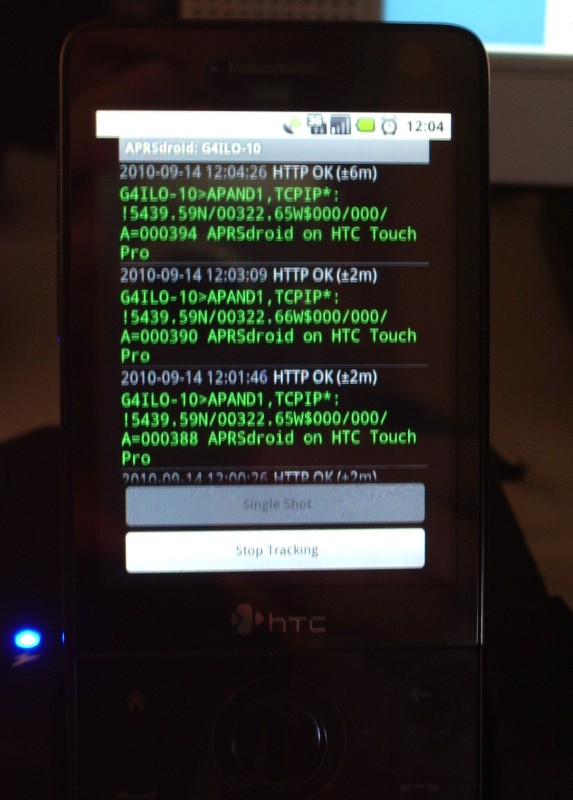
I was somewhat unimpressed by the Android APRS app, APRSdroid, not just in comparison with Lynn, KJ4ERJ’s APRSISCE for Windows Mobile, but even with the iBCNU app for the iPhone. The user interface is basically a console window: you can see position packets going out, and if you wish you can see raw packets of other users within a selected radius of your location. There is no support for messaging at all in the present version.
Tracking doesn’t seem to work very well either, unless you are also running another application such as Navigation that keeps the GPS on all the time. I think the problem is that the app tries to save power by turning on the GPS, waiting for a fix and then turning it off again until the next time interval. It didn’t work too badly when the phone was sitting in its charger cradle on my desktop, but getting a GPS fix when you are moving can take a very long time. There is a need for a simple APRS tracking and messaging application for Android but this has a way to go before it gets there.
The HTC port of Android OS is not an official release and has quite a few bugs and things that are still To Be Done. I’ve had the phone lock up and fail to respond to anything and have had to pull the battery a few times. There is no support for the built-in camera and the battery charge indication is completely fictitious. It’s also best not to use wi-fi as it warms up the phone and consumes a lot more power than under Windows Mobile.
Unlike most people I bought my HTC Touch Pro SIM-free and unlocked because I don’t like to be tied to a network. As a consequence I’m not going to be offered an upgrade for no extra cost when my contract runs out. I need to keep the phone for a while but I’d be more than happy to dump Windows Mobile because as a phone it’s too much hassle, even though it does allow me to run some pretty powerful applications. I hope that the issues with the HTC Android port will be resolved in order that it becomes stable enough and functional enough for me to use it on my phone all the time.

Julian Moss, G4ILO, is a regular contributor to AmateurRadio.com and writes from Cumbria, England. Contact him at [email protected].
 Ham Radio Deluxe |
 W5SWL Electronics |
 Ham Radio Prep |
 KB3IFH QSL Cards  Hip Ham Shirts  HamRadioAuctions HamRadioAuctions Reliance Antennas Reliance Antennas Enigma Shop Enigma Shop |  morseDX  Ni4L Antennas  R&L Electronics R&L Electronics antennas.us antennas.us QRV QRV |
- Matt W1MST, Managing Editor
