 |
 Handiham World for 13 October 2010
 13 October 2010 | by
 Welcome to Handiham World!
It’s time for a new HF net.
When was the last time you thought about getting on 20 m and being part of the Handiham net? Don’t be embarrassed to admit that you haven’t thought about it for a long time. Neither have I, as a matter of fact, so you are not alone. The 20 m net died several years ago when our last regular net control volunteer Mike Knox, WA0KKE, finally had to throw in the towel.
What happened?
Like many things in our technologically-driven existence, there was no single cause for the demise of the Handiham net. A prime suspect certainly had to be the relentless, never-ending sunspot minimum that we are trying to claw our way out of with limited success, even now in 2010 when the sun should be really perking up. As most of you know, the higher solar activity associated with more sunspots creates ionospheric conditions that favor really good high-frequency radio propagation. In a really good solar maximum, the HF bands crackle with strong DX signals and one can “work the world” with just a few watts of power on bands like 10 and 15 m. Sad to say, it has been so long since we have seen those conditions that many operators have simply drifted away from regular HF operation, especially if they did not have room for wire antennas that would allow them to tune 160 through 40 m, bands that remain usable even during solar minimum conditions.
The 20 m band sits astride the critical part of the HF spectrum that just barely remains inside the “always useful” zone. At sunspot minimum, it is generally crowded with DX seekers and anyone else simply looking for an open band with capability of working stations at some distance during daylight hours. Even then, 20 isn’t always reliable when solar storms wipe out the bands. So what happened was that the conditions on 20 simply didn’t favor continued scheduled net activities. The net control station would be faced with terrible band conditions and fewer and fewer check-ins. In spite of my efforts to find another net control station, no one was interested, and I guess I don’t blame them. Who wants to preside over a net with no stations checking in?
But we can’t ignore other factors that came into play during the deterioration of the HF bands during the sunspot minimum. The rise of the Internet followed by the spread of broadband connectivity made EchoLink much more practical and reliable than HF communications. The VHF and UHF repeater systems with EchoLink capability came into their own as HF activity deteriorated. More and more people made the move to EchoLink. The Internet is also a huge factor in siphoning away people from ham radio – and most other leisure time activities. It’s not that the Internet is good or bad per se, it’s just that people only have so much time for all of the competing leisure time activities, and ham radio is simply finding a new “normal” in this very different world.
Another factor is that a daytime 20 m HF net is simply too hard to conduct when more and more people with disabilities are going to school and work, instead of the “bad old days” situation in which people with disabilities simply sat around housebound. We are glad that those days are gone, but Handiham members who work and go to school cannot be expected to have the time to check into a daytime net on any regular basis. You simply can’t count on enough folks having a day off from work or a school holiday to keep a critical mass of net participants.
So what to do?
I would suggest a change in net frequency and timing. We need at least consider moving our HF net to 160, 75, or 40 meters, and those bands are likely to be most useful in the evening. Because 160 requires a very long antenna, it is impractical for many users. 40 can get crowded, but requires the shortest antenna of the three. Of course we can consider reviving our 17 meter “non-net roundtable”, which was originally started by Alan, K2WS, but the sun will have to spit out a few more spots for that band to get where it needs to be. So what do you think? 160? 75? 40? Or something else? And what about the time and day?
I hope to hear from you about this suggestion soon. Please drop me an email, and I’ll share your thoughts with our readers and listeners.
New at the Hong Kong Electronics Fair: Wouxun KG-UV920R

The Hong Kong Electronics Fair opened today, October 13, and runs through October 16.
Amateur radio is about to be introduced to a brand-new entry in the mobile dual-band radio category, the Wouxun KG-UV920R. Although at this time we have little in the way of product specs, the Wouxun dual-band handheld radio that was demonstrated at Handiham Radio Camp early this year created quite a lot of interest because of its built-in speech frequency readout for blind users. The KG-UV920R features dual-frequency display and cross-band repeater capability. It comes with more than a thousand memory channels. It also includes an unusual receiver that covers the short-wave bands! We are waiting for a more detailed specification document so that we can tell if speech frequency readout will be a feature – and we sure hope that it is! At this time, no pricing is available.

Pat Tice, WA0TDA, is the manager of HANDI-HAM and a regular contributor to AmateurRadio.com. Contact him at [email protected].
Computer Does Not Save Time
Remember when we used to think computers would save us time?

Why did we think the computer would save us time?
I spent the last 6 hours running updates, fixing the problems the updates created and figuring out how to install the updates that would not install automagically. Grrrrrrr!
Think I need some time to play radio, but I won’t be taking a SDR radio with me for a bit. Grrrrr…. need to recover from the 26 reboots and all the time wasted surfing and reading the small print.
Good thing there is a QRP ARCI event this weekend and the following weekend is our Polar Bear Moonlight Madness Event. Grrrr! I’m ready for some CW. CU on the bands!
72,
Kelly K4UPG PB #173
Kelly McClelland, K4UPG, is a regular contributor to AmateurRadio.com and writes from Florida, USA. Contact him at [email protected].
Grab me a callsign
While I wait for a correctly programmed chip for my QRSS keyer kit I thought I would investigate the receive side of QRSS beaconing. It’s no good transmitting if nobody receives, and unlike WSPR every transmitter isn’t automatically a receiver during its off periods. This is a mode where you need to give as well as take, to receive in order to be heard, otherwise you can’t complain if no-one tells you that they heard you.
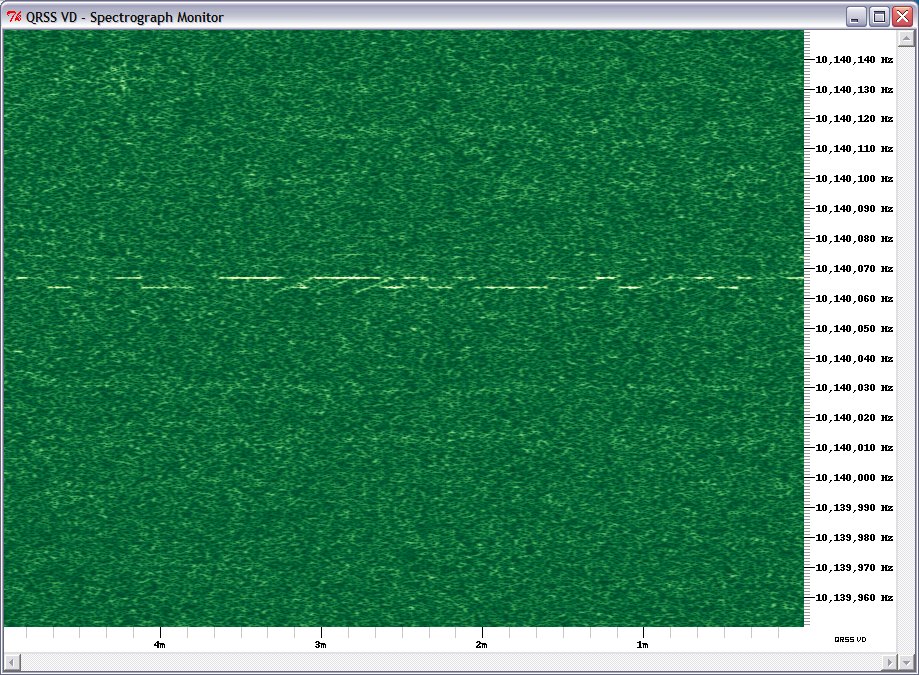
QRSS signals are decoded visually using a spectrograph, a waterfall display similar to that found in digital mode software. However, you can’t use a digimode software waterfall for two reasons: it moves too quickly – to capture a full callsign in QRSS you need to be able to see at least a couple of minutes worth of transmission – and it scrolls down vertically so trying to read calls would give you a crick in your neck!
Fortunately there are programs that have been specially written for just this application – and they are free so there is nothing to stop you trying them. The most popular program for Windows appears to be Argo. However there is alternative called QRSS VD by Scott Harden (the odd choice of name becomes clear when you realized that Scott’s call is AJ4VD.) QRSS VD has one problem: it is a CPU hog. On my fairly modern shack PC it runs at about 50% CPU utilization. For that reason, you might have no alternative but to use Argo. But if you can run QRSS VD it has some nice features that add to the enjoyment of this aspect of the hobby.
QRSS VD includes three programs: a Spectrograph, a Viewer and a Grabber. The QRSS VD Grabber automatically captures the live waterfall and creates images suitable for uploading to a website so others can see whether you are receiving their signals. It doesn’t have any way of automatically uploading the images to the web server, though. It’s really for people who want to run an online grabber, which is only worth doing if you are going to run it regularly. I don’t have enough radios and antennas to do that so I probably won’t investigate this feature further.
QRSS VD Spectrograph is the program that displays in real-time what you are receiving. It has no obvious user interface – you have to right-click the window and then you will get a menu of options. One option lets you select the sound card that is connected to your radio. Another is for setting the frequency. The main settings option determines the size of the window and the maximum and minimum frequencies that are displayed.
There is also an option to save these settings. If you don’t, you will have to set them all over again the next time you start the program. Finally there is the Resume option which you must click to start the spectrum display working.
Most QRSS activity takes place on the 30m band, in the first 100Hz above 10.140 MHz. This is just below the 200Hz used by WSPR, which is itself just below the region where PSK31 operation takes place.
To start receiving QRSS, set your receiver to USB mode and tune it to 10.139.000. If your rig has a DATA mode that is USB you can use that. Don’t be tempted to use the CW mode – most rigs add an offset to the displayed frequency so it shows the frequency in the centre of the CW filter passband, and some rigs use LSB for CW, so finding the right spot gets confusing.
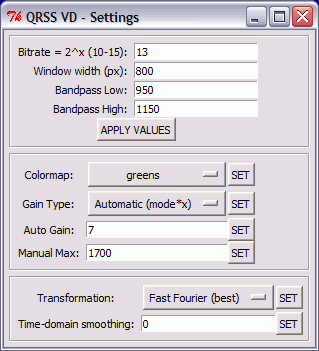
Select the sound card in QRSS VD, then set up the settings dialog. The window width in pixels can be whatever suits your screen size. The bandpass low and high settings define the height of the window, the minimum and maximum audio frequencies displayed on the spectrograph. With the radio on 10.139.000 USB, signals in the QRSS sub-band will be heard at audio frequencies of 1000 to 1100Hz. I set the low and high values to 950 and 1150Hz respectively to give a 50Hz margin on either side. (Note: if you aren’t sure of your receiver’s accurate calibration you might want to choose a wider margin initially because you could miss the QRSS band entirely of it is more than 100Hz out.) The other values on this dialog are all defaults.
[If you are interested in receiving WSPR as well, you could tune the radio to 10.138.700 and enter low and high values of 1250 and 1450Hz. Then you could run WSPR and QRSS VD on 30m simultaneously.]
Right-click the spectrograph window, click Resume and the screen should start scrolling to the left and filling with received signals. Conditions are pretty poor at the moment so there isn’t much to see on the screenshot I made, but when I first tried this program I immediately received a trace of a signal from Steve, G0XAR who coincidentally is the producer, together with Hans G0UPL, of the QRSS beacon kit I just bought. I don’t know if he was using one of these kits but it was producing a heck of a signal. (Ignore the frequency shown, this was received using my K2 whose calibration is considerably out.)

What’s nice about the QRSS VD software is that you don’t have to watch the output in real time to capture signals and it is simple to produce nicely formatted records of signals received like the one above. Every few minutes the spectrograph dumps a bitmap file in the program’s Output folder. When you want to see what you caught you start up the QRSS VD Viewer, select a group of bitmaps to view and it will stitch them into a seamless time continuum. You can then scroll through from start to finish looking for the traces of QRSS signals.
When you find one, you can capture a region of the spectrograph by clicking to specify the top left and bottom right of the desired area. You can even specify a custom caption. The selected area is then copied to the Windows clipboard and pasted into your default bitmap viewer ready for you to save in a format of your choosing (for example, as a JPG file.)
Why would you want to do this? As I mentioned at the beginning, there is no way of finding out how far your signals got (apart from a handful of online grabbers) unless someone sends you a signal report, so if you receive someone’s beacon you should send them a report too. The only way to do this is to look up their email address at qrz.com and send them an email. A picture is worth a thousand words, so it’s nice to be able to send a screen grab of their actual signal as an attachment to the email.

If my initial experience is anything to go by, this personalized way of sending signal reports makes for a very friendly aspect to the hobby. I sent this capture (above) of a beacon from IQ2DP with an emailed report. This morning I received a nice reply from Teo I2RIT thanking me for the report and telling me all about the beacon, which is made from junk box parts and runs well under 100mW into a ground plane made of scrap aluminium tubing. He also sent a link to an article about it. The article is in Italian but here is a translation. If you’ve read this far then you will probably find it interesting. Yet another facet to our amazingly varied radio hobby.

Julian Moss, G4ILO, is a regular contributor to AmateurRadio.com and writes from Cumbria, England. Contact him at [email protected].
Getting old
After breakfast this morning I went up to the shack as usual. I switched on the computer, switched on the main power supply and switched on the Kenwood TM-D710. When Windows came up I started my VHF instance of APRSIS32 for my local APRS gateway. Then I switched on my K2 to start the HF gateway. The LCD showed the usual “Elecraft” but then the segments went crazy and the radio emitted a noise that can best be described as an endless fart.
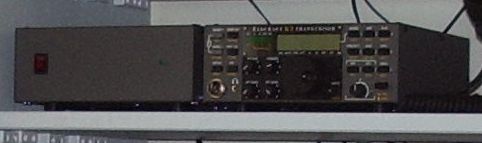
I switched off. Then I realized that I had forgotten to switch on the K2’s power supply. I switched it on, then I switched the radio on again and this time it started up normally. Phew! Then my fuddled brain worked out that this must mean the K2’s internal SLA battery has finally given up the ghost.
I built my K2 in 1999. Originally only the basic radio was available as a CW-only kit. Other options were soon added including the KSB2 module for SSB, the internal ATU and an internal battery pack. I added these options as soon as they were available, which must have been around the end of 1999 or early 2000, so the battery must be around ten years old.
As it happened I have rarely used my K2 portable so I have made little use of the battery pack. I used the radio in the field once earlier this year. The previous occasion on which I ran the K2 from the battery was during the floods a year ago when the power went off for several hours and I was able to experience what the bands were like without all the local QRN. Ten years is a very good life for an SLA battery and I wondered when it would fail, but I hated to throw it out while it was still doing its job. It seems that time had finally come.
I removed the top cover from the K2, disconnected the cables and lifted it off. Then I undid the screws securing the aluminium bracket that holds the battery in place. I noticed a small patch of corrosion in the area adjacent to one of the terminals, and when I removed the battery I noticed a drop of liquid in the same place. The battery had started to leak. I had got to it just in time. If my fuzzy-headedness hadn’t caused me to turn on the K2 without the power supply I might never have noticed the problem until it was too late and some of this electrolyte had dripped into the radio itself!
I’m not sure whether to replace the battery pack or not. In the meantime I thought I would put the battery bracket back and tape the battery cables to it, then put the top back on the K2 and get my HF gateway back on the air.
But it isn’t just the K2 that is getting old. I am, too, and I hate it. I’ve never had particularly good co-ordination but it seems to be getting worse. I can’t use a Morse paddle now and I can’t send faster than 12wpm with a straight key. Sometimes I have days where I’m even more clumsy than usual and my hands shake too much to do any constructional work. In that state it’s impossible to hold nuts and washers in hard to access positions while you turn a screw from the other side. I’m having one of those days today and I found that I couldn’t put the battery cover back. So I’ve put the K2 in a drawer until a day when I’m feeling sharper. Hopefully I’ll be able to give it a realignment at the same time, something else it probably needs after ten years. Until that time I will be off the air on HF APRS.

Julian Moss, G4ILO, is a regular contributor to AmateurRadio.com and writes from Cumbria, England. Contact him at [email protected].
Some info for the current PJ operations
I’ve started collecting a list of the websites for the ongoing operations from the new DXCC entities in PJ (Netherland Antilles). I originally intended to do this for myself (so that I could make sure that my contacts were in the logs), but realized that it’d be useful for others. (I apologize if this has been done already, I couldn’t find a simple list myself.) The list as it stands is definitely incomplete and I’ll be adding to it as I find other websites. I’ve set it up as a separate page here on my blog which you can get to by clicking Websites for 10/10/10 Operations from PJ2-7 from the list of pages at the top of my blog (or by just clicking that link).
At the time that I’m writing this, at least two of the sites have live video streams, most have online logs that seem to be updated very frequently, and one (PJ4D) even has a real-time log. It’s fun listening to the op (either via the video stream or over the air) and watching the calls scroll up the screen.
Please let me know either by email or a comment to this of any additions or corrections and I’ll be happy to publish them.

David Kozinn, K2DBK, is a regular contributor to AmateurRadio.com and writes from New Jersey, USA. Contact him at [email protected].
Some info for the current PJ operations
I’ve started collecting a list of the websites for the ongoing operations from the new DXCC entities in PJ (Netherland Antilles). I originally intended to do this for myself (so that I could make sure that my contacts were in the logs), but realized that it’d be useful for others. (I apologize if this has been done already, I couldn’t find a simple list myself.) The list as it stands is definitely incomplete and I’ll be adding to it as I find other websites. I’ve set it up as a separate page here on my blog which you can get to by clicking Websites for 10/10/10 Operations from PJ2-7 from the list of pages at the top of my blog (or by just clicking that link).
At the time that I’m writing this, at least two of the sites have live video streams, most have online logs that seem to be updated very frequently, and one (PJ4D) even has a real-time log. It’s fun listening to the op (either via the video stream or over the air) and watching the calls scroll up the screen.
Please let me know either by email or a comment to this of any additions or corrections and I’ll be happy to publish them.
David Kozinn, K2DBK, is a regular contributor to AmateurRadio.com and writes from New Jersey, USA. Contact him at [email protected].
VHF Tropo still going well
Most of yesterday evening was spent very enjoyably, getting to know our new cats – they are real stars! However, just before bed, I did pop into the shack to see what was happening.
OP7V from Belgium was very loud on 432.200 and I enjoyed a QSO with him. By the time I listened, 432MHz was quieter, so I switched over to 144MHz was was pleased to find DK3EE (JO41) coming through at great strength – so had a nice quick QSO with him and also DF0WD (JO42) who I also worked quickly.
Swapped e-mails with Allan, GM4ZUK and he’d been out portable last night and worked over 300 stations on 144/432/1296 over a few hours last night. Allan’s best DX on 1296MHz was OY and SP!
(Edited this in thanks to Ralf, DK4KW for letting me know about it)
This morning conditions were still good and ON0WV was coming through at S9 on 145.650 on my drive to the station. There was a very strong repeater on 145.6375 too, with French stations QRV. I didn’t hear it ID, so it may have been the Jersey repeater, GB3GJ.

Tim Kirby, G4VXE, is a regular contributor to AmateurRadio.com and writes from Oxfordshire, England. Contact him at [email protected].
 Ham Radio Deluxe |
 W5SWL Electronics |
 Ham Radio Prep |
 KB3IFH QSL Cards  Hip Ham Shirts  HamRadioAuctions HamRadioAuctions Reliance Antennas Reliance Antennas Enigma Shop Enigma Shop |  morseDX  Ni4L Antennas  R&L Electronics R&L Electronics antennas.us antennas.us QRV QRV |
- Matt W1MST, Managing Editor
