 |
 APRS could have helped protect Charles and Camilla
 11 December 2010 | by
 The Metropolitan Police are denying that the incident in which a car carrying Prince Charles and his wife came under attack by student demonstrators occurred through a failure in radio communications. Reports that royal protection officers were using a different frequency to those policing the protest are “untrue”, the police insist. The two teams were in communication using email or mobile phones. They what?? Perhaps they had carrier pigeons as a backup.
It seems to me that someone needs to knock on the door of Scotland Yard and suggest that they need a tactical digital communications system on the lines of APRS. If the officers escorting the royal couple could have seen on a map display where the demonstrators were and exchanged brief tactical messages with other officers in the area, this embarrassing incident would never have happened. It makes you wonder just how competent our security forces really are.

Julian Moss, G4ILO, is a regular contributor to AmateurRadio.com and writes from Cumbria, England. Contact him at [email protected].
Lost memory
I am a strong believer that “if it ain’t broke, don’t fix it.” I also find that, particularly if it is anything to do with computers, the law “if something can go wrong, it will” operates with near 100% certainty. As a consequence, I an extremely reluctant to upgrade or update anything unless it fixes a problem I’ve experienced or am likely to experience, or provides new functionality that I actually need. I get anxious whenever the “Windows has new updates” balloon pops up, worrying about whether my computer is going to get screwed fixing some obscure vulnerability I don’t understand in some bit of Windows I may not even use.
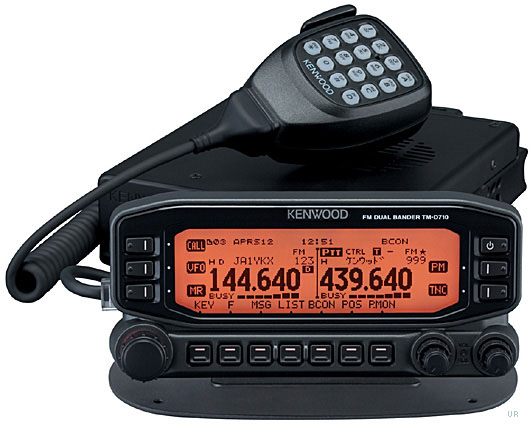
One of the problems of getting old is that you tend to forget things and sometimes I do something having forgotten that the day before I had decided there was no point in doing it. And so, this morning, I decided to update the firmware in my Kenwood TH-D710 in order that it could identify from APRS packets newer radios like the VX-8G and TH-D72, regardless of the fact that I hardly ever use the radio’s own APRS display and the update would not affect the ability of APRSIS32 to identify these radios on my PC.
I downloaded the update software, browsed the help file that came with it and then ran the program and followed the instructions it displayed. The update went without a hitch. I was a bit concerned when the concluding instruction was to perform a full reset, which I thought would erase all my settings, but I had not seen any dire warnings about this so I went ahead. Sure enough, on completion the Kenwood was now in factory default mode, with all my settings and laboriously entered memory channels lost forever! Arrghh! If only there was a System Restore for real life!
Kenwood does provide a free memory management program for the TM-D710, MCP-2A, which can be used to edit, back up and restore memories and settings. However it needs a second serial cable attached to a different port to the one used for the built-in TNC. I had never got around to making up another cable as I don’t need computer control of the radio and storing channels in memory manually isn’t that hard so I don’t usually bother with programming software. Besides, all four serial ports on the shack PC were already used. So I had never tried it.
In the hope that it would save me time re-entering the settings and memories, which I could then back up, I installed MCP-2A and moved my serial cable from the radio’s control head (the TNC port) to the PC port at the back. But no matter what I tried, the program could not communicate with the radio.
Now I’m completely stumped. I’m using the same PC serial port and cable as I used to perform the upgrade and access the TNC, so the port and serial cable work. I tried the “Auto” baud rate setting and several manual selections and it made no difference. As this is the first time I have used it, I’m wondering if the rear PC port is actually broken. Have I overlooked something stupid? Is there anything else I could try to test if it works?

Julian Moss, G4ILO, is a regular contributor to AmateurRadio.com and writes from Cumbria, England. Contact him at [email protected].
UPS: Useless Pathetic Shower
What a useless courier company UPS is. I ordered something from Martin Lynch on Tuesday afternoon and was informed that it had been shipped an hour later by UPS. At 7.45 on Wednesday morning the UPS tracking site showed the package had arrived in the depot at Carlisle and was marked as in transit for delivery that day. I waited in all day and nothing arrived. Later that evening I checked the site again and found the message at 6.45pm: THE PACKAGE WAS MISSED AT THE UPS FACILITY, UPS WILL DELIVER ON THE NEXT BUSINESS DAY / DELIVERY RESCHEDULE. The delivery date was changed to today (Thursday.)
So I waited in all day today and still no UPS man. Again I checked the UPS tracking site this evening and the same message had been added, this time at 7.48pm. The delivery date is now rescheduled for tomorrow (Friday.)
We have had poor weather conditions and the roads have been icy but FedEx called as usual around lunch time to the neighbour across the road who has a regular delivery. And Interlink Direct called to pick up two packages of items I’d sold on eBay the shipment of which I’d arranged online yesterday. (Tip: use the code XMAS10 to get £5 off a delivery before Christmas.) So I don’t think that’s a valid excuse, really.
I wonder what the chances are that I will actually receive my new toy tomorrow? I just hope that when it does arrive I don’t find they have lived up to the other meaning of their acronym: United Package Smashers.

Julian Moss, G4ILO, is a regular contributor to AmateurRadio.com and writes from Cumbria, England. Contact him at [email protected].
With a little help from my friends, Part I
As I wrote about last week, my G5RV antenna came down as the result of a storm. My original plan was to try to repair the existing antenna, but after examining it further, I decided that I’d be better off buying a replacement which is exactly what I did. (I’ll look at fixing the old one one of these days.) Matthew, K2NUD, and David, K2DSL, volunteered to come over last Saturday to help me get the antenna up in air, so we planned to meet at my house at around 2:30 which would give me enough time to run out to KJI Electronics to pick up the new antenna. The one that they had in stock from from MFJ and while it didn’t seem to be build as sturdily as what I’d had in the air, I figured that getting some copper in the air was better than nothing.
 |
| Throw bag |
The old antenna was suspended between two trees with the farthest end being at probably 60 or 70 feet in the air. (I’m terrible at estimating height, but I know that it’s significantly higher than the roof of my house, which is at about 35 feet or so.) The antenna snapped at the far end, leaving the line suspending it about 50 feet in the air and somewhat tangled in the branches. As a result, it wasn’t possible to get to that rope to re-use it, so Matthew came up with a better plan: a potato gun. The link tells you lots about potato guns, but in a nutshell, this is a gun made from PVC pipe that’s used to fire a potato. (Why would you do that? Because it’s unbelievably fun!) In order to get the potato to do something other than just shoot up in the air (and make a pretty cool sound), we put the throw bag which trailed 100 feet of line on top of the potato which worked like a champ.
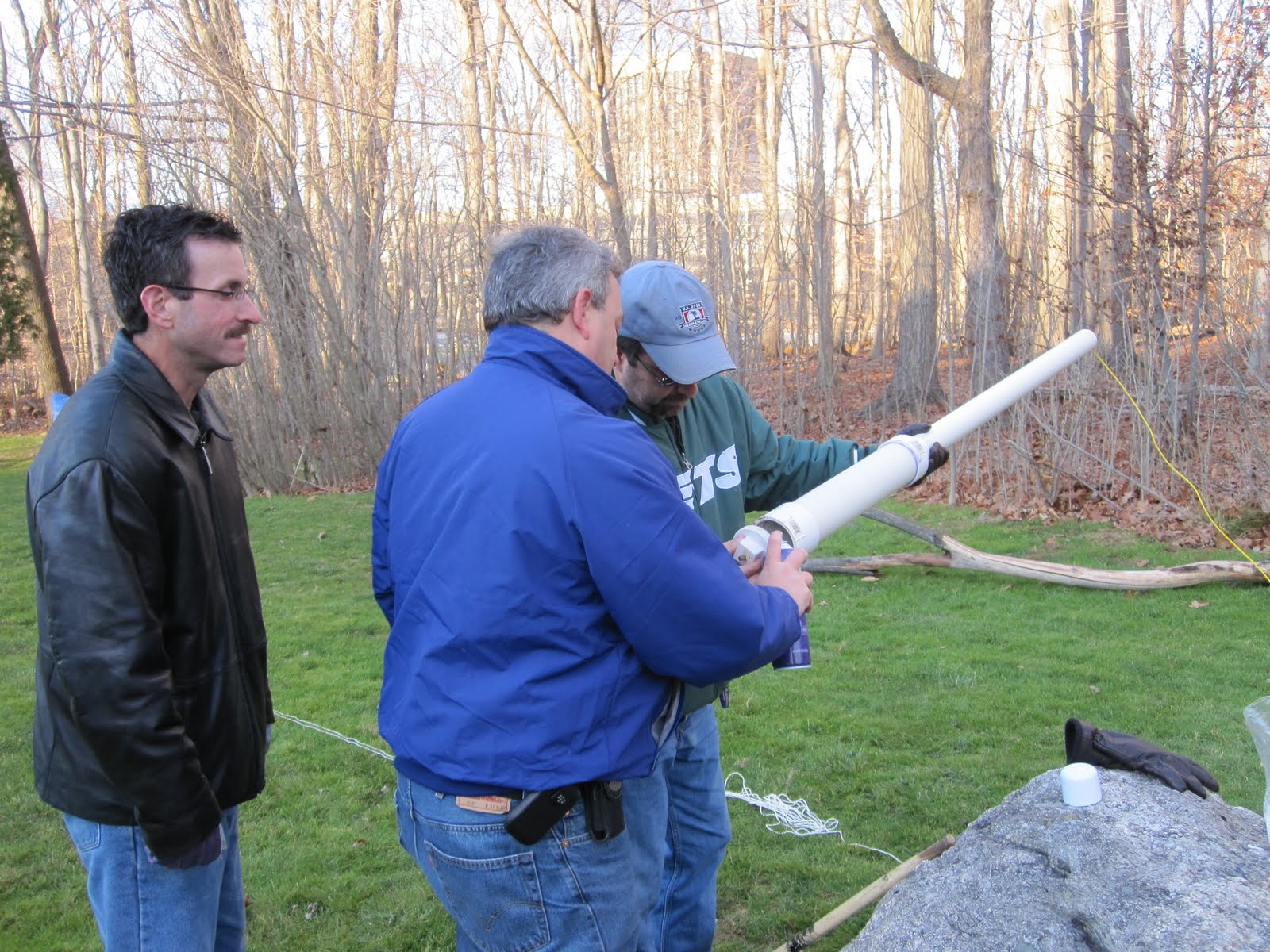
The way the potato gun works is that you put the “fuel” (old-fashioned non-environmentally friendly Aqua-Net hairspray) into a chamber and ignite it which forces a potato, previously jammed down the barrel, up and out of the barrel at a pretty high rate of speed. In the picture here, Matthew (green jacket) is holding the gun while I spray in the “fuel” into the combustion chamber. That’s David on the left. Somewhere out there I’m sure someone has done some calculations about amount of force that’s being generated to launch the potato that far (not to mention the added one-pound throw bag), but physics aside, as I mentioned earlier, it’s fun to watch.
It took a few tries, but Matthew managed to get the line over the right branch, which is a lot more difficult than it sounds. Although made somewhat easier by the fact that there are no leaves on the trees at this time of the year, it’s still a lot like threading a needle that’s about 50 feet away and 75 feet in the air. We came close a couple of times, but Matthew wanted to keep trying to get it exactly right, which I think was an excuse to fire off a few more shots. There’s more to the story which I’ll talk about in Part II, but here’s a video taken by my son Justin during one of the “firings”. (If you’re reading this in an RSS reader or email and can’t see the video, you click here to go directly to the video on YouTube.)

David Kozinn, K2DBK, is a regular contributor to AmateurRadio.com and writes from New Jersey, USA. Contact him at [email protected].
With a little help from my friends, Part I
As I wrote about last week, my G5RV antenna came down as the result of a storm. My original plan was to try to repair the existing antenna, but after examining it further, I decided that I’d be better off buying a replacement which is exactly what I did. (I’ll look at fixing the old one one of these days.) Matthew, K2NUD, and David, K2DSL, volunteered to come over last Saturday to help me get the antenna up in air, so we planned to meet at my house at around 2:30 which would give me enough time to run out to KJI Electronics to pick up the new antenna. The one that they had in stock from from MFJ and while it didn’t seem to be build as sturdily as what I’d had in the air, I figured that getting some copper in the air was better than nothing.
|
| Throw bag |
The old antenna was suspended between two trees with the farthest end being at probably 60 or 70 feet in the air. (I’m terrible at estimating height, but I know that it’s significantly higher than the roof of my house, which is at about 35 feet or so.) The antenna snapped at the far end, leaving the line suspending it about 50 feet in the air and somewhat tangled in the branches. As a result, it wasn’t possible to get to that rope to re-use it, so Matthew came up with a better plan: a potato gun. The link tells you lots about potato guns, but in a nutshell, this is a gun made from PVC pipe that’s used to fire a potato. (Why would you do that? Because it’s unbelievably fun!) In order to get the potato to do something other than just shoot up in the air (and make a pretty cool sound), we put the throw bag which trailed 100 feet of line on top of the potato which worked like a champ.
The way the potato gun works is that you put the “fuel” (old-fashioned non-environmentally friendly Aqua-Net hairspray) into a chamber and ignite it which forces a potato, previously jammed down the barrel, up and out of the barrel at a pretty high rate of speed. In the picture here, Matthew (green jacket) is holding the gun while I spray in the “fuel” into the combustion chamber. That’s David on the left. Somewhere out there I’m sure someone has done some calculations about amount of force that’s being generated to launch the potato that far (not to mention the added one-pound throw bag), but physics aside, as I mentioned earlier, it’s fun to watch.
It took a few tries, but Matthew managed to get the line over the right branch, which is a lot more difficult than it sounds. Although made somewhat easier by the fact that there are no leaves on the trees at this time of the year, it’s still a lot like threading a needle that’s about 50 feet away and 75 feet in the air. We came close a couple of times, but Matthew wanted to keep trying to get it exactly right, which I think was an excuse to fire off a few more shots. There’s more to the story which I’ll talk about in Part II, but here’s a video taken by my son Justin during one of the “firings”. (If you’re reading this in an RSS reader or email and can’t see the video, you click here to go directly to the video on YouTube.)
David Kozinn, K2DBK, is a regular contributor to AmateurRadio.com and writes from New Jersey, USA. Contact him at [email protected].
More real radio and Cyrillic morse
When I called Radcom VHF editor, David, G4ASR last weekend in the 144MHz AFS contest, it was fun when he replied “Good to see you doing real radio, Tim, don’t bother with the other stuff!”. Thanks for reading the blog, Dave!
There couldn’t be anything much more ‘real radio’ than 3.5MHz CW, could there? Last night Julie was out at a WI meeting (oooh – I haven’t mentioned her Etsy shop for a while – there are some lovely gifts for someone in your life – look out particularly for things she’s made featuring our home-grown lavender) and I switched on the HF radio for some ‘company’ as some people would the TV…
Looking around the low-end of 80m, I tuned from station to station to get a sense of what the band was doing and stopped on a CW ragchew to see who it was. My CW’s not quite as sharp as it used to be, but it’s not bad and I don’t miss much. But this QSO was getting me worried – I really couldn’t understand much at all. Fortunately all became clear when the callsigns were sent – it was a UA4 talking to a UA1. Of course, they were using Cyrillic Morse – hence it seemed like some of the characters might be familiar, yet weren’t! I always love to hear those Russian QSOs and on a winter’s evening, it’s surprising just how deep into the Asian continent you can hear if the band’s quiet.
And so it was until an expedition landed in the vicinity (ZL8X?) and all hell broke loose. Then, it was time to go and make a coffee…

Tim Kirby, G4VXE, is a regular contributor to AmateurRadio.com and writes from Oxfordshire, England. Contact him at [email protected].
Death of 20m incorrectly reported
It’s a good job I looked at the beacon reports this morning or I wouldn’t have noticed that there were no reception reports for the 20m band. The problem was that I had visited 20m yesterday and put the K3 into data mode. An annoying feature of the K3 is that when you change bands it restores the mode you last used on that band. It does that even if the band change is being made under software control, even if the mode it is restoring is inappropriate for the frequency you are changing to under the band plan. This is totally bonkers logic because no computer program worth its salt should make assumptions about the state of the radio so when changing the frequency it should also set the mode. Unfortunately if it sets the mode too quickly, or before the frequency change is sent, the K3 “feature” overrides the mode set by the software. Consequently the option in Faros to “force CW mode” doesn’t work on the K3 and you are left in the mode you last used on that band.
Faros is not alone in experiencing this problem. Complaints have been frequent on the Elecraft reflector that when clicking on DX cluster spots in various programs the radio changes to the right frequency but is in the wrong mode. One of the reasons I wrote KComm specifically for the Elecraft radios was that I could make it work the way the radios work instead of being stuck with some generic logic. But there is nothing I can do about programs I didn’t write. I wish that more ham radio applications were open source so you could fix problems like this yourself instead of having to ask a developer to make the necessary changes (and very often getting nowhere.)

Julian Moss, G4ILO, is a regular contributor to AmateurRadio.com and writes from Cumbria, England. Contact him at [email protected].
 Ham Radio Deluxe |
 W5SWL Electronics |
 Ham Radio Prep |
 KB3IFH QSL Cards  Hip Ham Shirts  HamRadioAuctions HamRadioAuctions Reliance Antennas Reliance Antennas Enigma Shop Enigma Shop |  morseDX  Ni4L Antennas  R&L Electronics R&L Electronics antennas.us antennas.us QRV QRV |
- Matt W1MST, Managing Editor
