 |
 Combating Interference: From AC and Antenna
 16 March 2011 | by
  Depending on the type of rig you’re working with, interference from antennas or the AC line are likely degrading signal strength. While U.S. and international Hams face different interference challenges based on their hardware, man-made noise, the electrical grid and more, I wanted to share my experience using a piece of power management equipment typically suited for high-end audio gear. In addition to being a UK-based operator, I’m also an “audiophile,” which led to this experiment.
Recently, I decided to try a power management device designed to provide, component level filtering and protection to any AV system, on my HF transceiver, a top of the range Japan Radio Company JST-245 just to see what effect it had on the noise floor which has been increasing bit by bit every year.
Suffice to say the product lowered the noise floor from a constant S4 to an acceptable S1-S2 on the rigs meter. I was amazed and replaced the standard JRC kettle IEC several times with and without the product in line, and the same results came back every time when the piece was in the chain. My experiment was on 28.535 MHz where I normally work DX on the 10 meters.
These measurements show how dirty the mains are (at least in the UK) since you could actually see the reduction on the rigs meter. It’s worth noting that my AC power is fed through overhead lines, and not underground as with many modern homes, which likely adds interference. But with many UK and international hams lamenting the rising levels of QRM, in my experience, electrical main noise is the biggest culprit.
From what I understand, interference in the U.S. and internationally is driven by the antenna side of the receivers and not through the AC side. I also understand that a high percentage of ham radio transceivers used by hams worldwide have external DC power supplies that are usually well filtered, and wouldn’t require an external AC line filter since they feed the radios directly with 12 -14 volts DC. However, based on this, I’d say any international ham operator with an internal AC power supply (like mine) could benefit from an external power filter.
I know many new radios feature advanced DSP filtering/processing, but hearing the difference this product made inspired me to share my experience. One last cool thing is that the power unit also acts as a under/overvoltage protector which adds a layer of safety while protecting expensive investments from power surges, sags and spikes.
Now, to find a solution for filtering the RF signal before it reaches the radio antenna.
Rick, MØOPR, is a special contributor to AmateurRadio.com and writes from Bristol, UK.
Spot the mistake


Julian Moss, G4ILO, is a regular contributor to AmateurRadio.com and writes from Cumbria, England. Contact him at [email protected].
Charging the Albrecht
Several people seem to have found what I have written about the Albrecht AE2900AFS a.k.a. Dragon SS-301 and various other names useful. Now here’s a chance for owners of those radios to help me.
The radio came without a charger. I haven’t even seen one advertised for sale. No problem – I can make one. But I have no idea what the charging voltage should be. The manual is no help whatever. If you apply 12V or even 13.8V DC no current is taken – hardly surprising as that is not a high enough voltage to charge nine NiMH cells which probably have some reverse polarity protection in series with them.
Is the charger a regulated or unregulated wall-wart and what is the voltage and current rating?

Julian Moss, G4ILO, is a regular contributor to AmateurRadio.com and writes from Cumbria, England. Contact him at [email protected].
IC-290A disappearing display
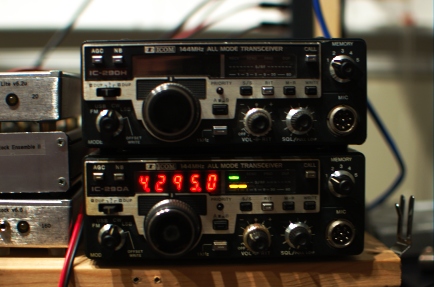
Regular readers know that I enjoy a good deal on a good project and just such an opportunity presented itself again recently, this time in the form of an Icom IC-290A, which is a 10-watt 144-MHz all-mode transceiver whose age rivals my own. It was from a large estate of much more valuable (think solid-state HF kilowatt, etc) items and the sellers were probably just happy to unload it since the display would come up at first but then disappear after a few minutes. After cleaning a film of nicotine residue off of case and knobs, I set to work diagnosing the problem.
I tuned into the two beacons that I can always hear: W3APL/B on 144.295 and WA1ZMS/B on 144.285. They sounded just as good as they did on the TS-700, the IC-290H, and the borrowed FT-736R. Then, the display went blank. But, I was tuned into WA1ZMS and I could still hear it just fine. Turning the main dial no longer changed the frequency. When I turned the radio off and back on, a clicking noise emanated from the speaker above the background hiss, but there was no receive and no display. Disconnecting the power supply and allowing the radio to sit for a few minutes restored normal operation…until the display blanked again. This seemed to me to be a thermal problem, perhaps a bad capacitor or two as I had found in a IC-290H obtained on similar terms.
I popped the cover off of the radio and immediately noticed a few dry/cold/oxidized solder joints on the “Sensor Unit” board that sits on the top of the radio behind the front panel.
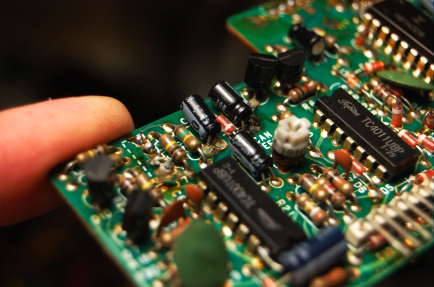
In each case, the bad joints were associated with electrolytic capacitors. I desoldered all of them, cleaned the pads, and replaced the capacitors with new units. It was somewhat of a miracle that I had all of them in my junkbox.
The problem persisted and for a while I thought it was getting worse. For good measure, I went through all of the boards looking for leaky capacitors and cold solder joints and found nothing. The “Troubleshooting” section of the Service Manual was an abject waste of pulp, but I did go through it. The “PLL” (synthesizer) alignment section yielded no clues except that the reference oscillator (6.070 MHz nominally) level was a tad bit low in amplitude. I heeded the warning of the manual that it had been carefully adjusted at the factory and should not need adjustment. When the radio arrived, it was missing a number of case screws, suggesting that someone else had been inside. So, who knows what the Golden Screwdriver hath wrought!
After reseating the row of connectors at the front of the “Logic/PLL” board just behind the radio’s front panel, I noticed that the problem seemed to have vanished. It has not failed yet since doing that and replacing the Sensor board capacitors. I hooked the radio up to a Bird Termaline wattmeter borrowed from W3APL and it made 10 watts on FM and CW. The needle barely moved on a 10-watt full scale in USB. So, I need to verify if it’s the microphone or the radio. My new plan is to use this radio as the microwave IF and keep the more-powerful IC-290H for liaison and other portable purposes. So, USB operation is critical.
So, like I always say, it seems that there are a lot of repairs that can be done just by cleaning things up. I’m not totally satisfied with the technical explanation of why reseating those connectors seemed to have fixed the problem. But, that is what happened and it is consistent with a lack of communication between the encoder/display unit in the front of the radio and the microprocessor in the logic unit. It seems to be working for now!
Note (May 6th 2011): See update here.
Ethan Miller, K8GU, is a regular contributor to AmateurRadio.com and writes from Maryland, USA. Contact him at [email protected].
From the Workbench: Arduino CW Keyer
I’m pleased to announce my Arduino CW keyer code is ready for prime time and available for download here. At first this started out as merely porting my PIC keyer code to the Arduino, but the advanced features and ease (and joy) of coding for this platform encouraged me to venture further. Beyond my original PIC keyer features, this creation also has a speed potentiometer, a serial port command line interface, more and bigger memories, QRSS, HSCW, and memory macros. It also has a callsign receive practice mode, CW keyboard, and Hellscreiber sending capability. I’m trying to figure out a way to interface with Ham Radio Deluxe and N1MM, and I have in the works a frequency counter option for use within homebew rigs, like my original PIC keyer.

The code is stable at this point, and I’m not aware of any bugs. If anyone tries this code out and has bug reports, feedback, or feature requests, please drop me a comment. Next I’m going to finish the Yaesu rotator computer interface.
I have a lot of ideas for an Arduino controlled antenna tuner swimming around in my mind. After having two commercial automatic antenna tuners that were disappointing, I think I can build a better mousetrap. The tuner will be a balanced L design capable of 150 watts or more, but still capable and accurate at QRP power levels.
Fun stuff!


Ham Radio Needs a Super Hero!
What if we had a super hero for ham radio? Many hams are sci-fi fans and love movies and TV shows like Star Trek, Star Wars, Superman and all those other great gadget filled plots. Who hasn’t grown up dreaming of flying to the rescue of the world?
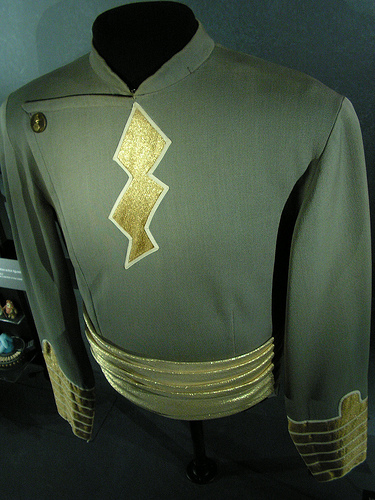
Wanted: Super Hero (tks to Wiki Commons)
If we were to design our own super hero, what would be the unique abilities and powers that he or she would have? Imagine the cw speed that a super hero could handle while building a surface mount kit using heat vision or x-rays. Hmmmm…. Antenna man? Sparks? Capt. Hertz? Contester Supremo? Commander QRP? Elmer? What would we call this super hero?
It’s your chance to sound off… let’s hear your thoughts. Leave a comment and dream on…
Kelly McClelland, K4UPG, is a regular contributor to AmateurRadio.com and writes from Florida, USA. Contact him at [email protected].
Silencing the Albrecht
Since writing about the Albrecht AE2990AFS 10m multimode handheld, where I wrote: “There is an annoying beep at every button press, but this can easily be silenced” I have received several emails asking “How?” The answer is in the manual, on page 25, under “Other Functions: Beep Tone and Roger Beep” which is how I found out how to do it.
To save any further questions, here’s how I did it. Press and hold the SCAN/M-SCN button for three seconds, then press it again. The display will show BP ON. Press the DOWN button and it will change to BP OF which is obviously short for BEEP OFF. There is a musical note icon on the LCD that appears when the beep tone is on. The roger beep is activated / disabled in the same way if you press SCAN/M-SCN twice after the initial long press. There is another icon of two musical notes to show when that is on. Easy, isn’t it?
Actually there’s no need to hold SCAN/M-SCN for as long as three seconds, only until the display changes to SH. This doesn’t seem to be mentioned in the manual at all but it is clearly where you set the amount of shift used when the “+” and “-” shift functions are invoked to work through a repeater (repeater shift is enabled by pressing FUNC followed by STEP/CH.FR, but it only works in the ham band modes.) On mine, the shift was set to 600kHz so you need to dial it down to 100 for 10m repeater use. It’s a pity the radio doesn’t support selectable CTCSS repeater access tones since most 10m repeaters in Europe use something other than the provided 88.5Hz access tone.
I suppose it is possible that this function is not available in similar radios to the Albrecht sold under other names. It appears to be the case that other radios don’t possess the ability to switch between 10m and 12m by pressing the CH 9/19 button.

Julian Moss, G4ILO, is a regular contributor to AmateurRadio.com and writes from Cumbria, England. Contact him at [email protected].
 Ham Radio Deluxe |
 W5SWL Electronics |
 Ham Radio Prep |
 KB3IFH QSL Cards  Hip Ham Shirts  HamRadioAuctions HamRadioAuctions Reliance Antennas Reliance Antennas Enigma Shop Enigma Shop |  morseDX  Ni4L Antennas  R&L Electronics R&L Electronics antennas.us antennas.us QRV QRV |
- Matt W1MST, Managing Editor
