 |
 IC-290A disappearing display
 16 March 2011 | by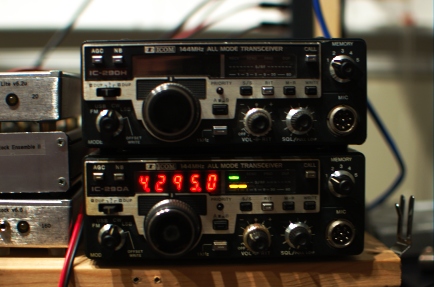
Regular readers know that I enjoy a good deal on a good project and just such an opportunity presented itself again recently, this time in the form of an Icom IC-290A, which is a 10-watt 144-MHz all-mode transceiver whose age rivals my own. It was from a large estate of much more valuable (think solid-state HF kilowatt, etc) items and the sellers were probably just happy to unload it since the display would come up at first but then disappear after a few minutes. After cleaning a film of nicotine residue off of case and knobs, I set to work diagnosing the problem.
I tuned into the two beacons that I can always hear: W3APL/B on 144.295 and WA1ZMS/B on 144.285. They sounded just as good as they did on the TS-700, the IC-290H, and the borrowed FT-736R. Then, the display went blank. But, I was tuned into WA1ZMS and I could still hear it just fine. Turning the main dial no longer changed the frequency. When I turned the radio off and back on, a clicking noise emanated from the speaker above the background hiss, but there was no receive and no display. Disconnecting the power supply and allowing the radio to sit for a few minutes restored normal operation…until the display blanked again. This seemed to me to be a thermal problem, perhaps a bad capacitor or two as I had found in a IC-290H obtained on similar terms.
I popped the cover off of the radio and immediately noticed a few dry/cold/oxidized solder joints on the “Sensor Unit” board that sits on the top of the radio behind the front panel.
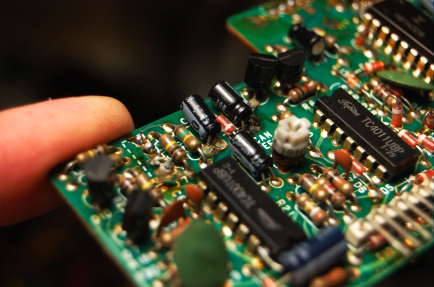
In each case, the bad joints were associated with electrolytic capacitors. I desoldered all of them, cleaned the pads, and replaced the capacitors with new units. It was somewhat of a miracle that I had all of them in my junkbox.
The problem persisted and for a while I thought it was getting worse. For good measure, I went through all of the boards looking for leaky capacitors and cold solder joints and found nothing. The “Troubleshooting” section of the Service Manual was an abject waste of pulp, but I did go through it. The “PLL” (synthesizer) alignment section yielded no clues except that the reference oscillator (6.070 MHz nominally) level was a tad bit low in amplitude. I heeded the warning of the manual that it had been carefully adjusted at the factory and should not need adjustment. When the radio arrived, it was missing a number of case screws, suggesting that someone else had been inside. So, who knows what the Golden Screwdriver hath wrought!
After reseating the row of connectors at the front of the “Logic/PLL” board just behind the radio’s front panel, I noticed that the problem seemed to have vanished. It has not failed yet since doing that and replacing the Sensor board capacitors. I hooked the radio up to a Bird Termaline wattmeter borrowed from W3APL and it made 10 watts on FM and CW. The needle barely moved on a 10-watt full scale in USB. So, I need to verify if it’s the microphone or the radio. My new plan is to use this radio as the microwave IF and keep the more-powerful IC-290H for liaison and other portable purposes. So, USB operation is critical.
So, like I always say, it seems that there are a lot of repairs that can be done just by cleaning things up. I’m not totally satisfied with the technical explanation of why reseating those connectors seemed to have fixed the problem. But, that is what happened and it is consistent with a lack of communication between the encoder/display unit in the front of the radio and the microprocessor in the logic unit. It seems to be working for now!
Note (May 6th 2011): See update here.
Ethan Miller, K8GU, is a regular contributor to AmateurRadio.com and writes from Maryland, USA. Contact him at [email protected].
From the Workbench: Arduino CW Keyer
I’m pleased to announce my Arduino CW keyer code is ready for prime time and available for download here. At first this started out as merely porting my PIC keyer code to the Arduino, but the advanced features and ease (and joy) of coding for this platform encouraged me to venture further. Beyond my original PIC keyer features, this creation also has a speed potentiometer, a serial port command line interface, more and bigger memories, QRSS, HSCW, and memory macros. It also has a callsign receive practice mode, CW keyboard, and Hellscreiber sending capability. I’m trying to figure out a way to interface with Ham Radio Deluxe and N1MM, and I have in the works a frequency counter option for use within homebew rigs, like my original PIC keyer.

The code is stable at this point, and I’m not aware of any bugs. If anyone tries this code out and has bug reports, feedback, or feature requests, please drop me a comment. Next I’m going to finish the Yaesu rotator computer interface.
I have a lot of ideas for an Arduino controlled antenna tuner swimming around in my mind. After having two commercial automatic antenna tuners that were disappointing, I think I can build a better mousetrap. The tuner will be a balanced L design capable of 150 watts or more, but still capable and accurate at QRP power levels.
Fun stuff!


Ham Radio Needs a Super Hero!
What if we had a super hero for ham radio? Many hams are sci-fi fans and love movies and TV shows like Star Trek, Star Wars, Superman and all those other great gadget filled plots. Who hasn’t grown up dreaming of flying to the rescue of the world?
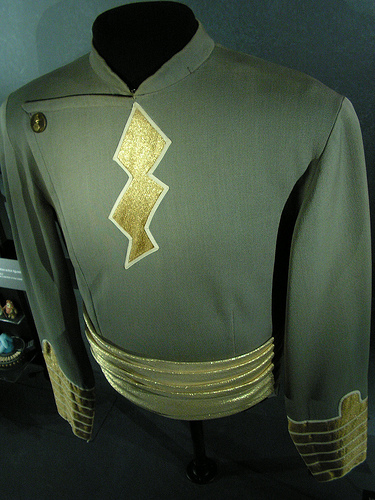
Wanted: Super Hero (tks to Wiki Commons)
If we were to design our own super hero, what would be the unique abilities and powers that he or she would have? Imagine the cw speed that a super hero could handle while building a surface mount kit using heat vision or x-rays. Hmmmm…. Antenna man? Sparks? Capt. Hertz? Contester Supremo? Commander QRP? Elmer? What would we call this super hero?
It’s your chance to sound off… let’s hear your thoughts. Leave a comment and dream on…
Kelly McClelland, K4UPG, is a regular contributor to AmateurRadio.com and writes from Florida, USA. Contact him at [email protected].
Silencing the Albrecht
Since writing about the Albrecht AE2990AFS 10m multimode handheld, where I wrote: “There is an annoying beep at every button press, but this can easily be silenced” I have received several emails asking “How?” The answer is in the manual, on page 25, under “Other Functions: Beep Tone and Roger Beep” which is how I found out how to do it.
To save any further questions, here’s how I did it. Press and hold the SCAN/M-SCN button for three seconds, then press it again. The display will show BP ON. Press the DOWN button and it will change to BP OF which is obviously short for BEEP OFF. There is a musical note icon on the LCD that appears when the beep tone is on. The roger beep is activated / disabled in the same way if you press SCAN/M-SCN twice after the initial long press. There is another icon of two musical notes to show when that is on. Easy, isn’t it?
Actually there’s no need to hold SCAN/M-SCN for as long as three seconds, only until the display changes to SH. This doesn’t seem to be mentioned in the manual at all but it is clearly where you set the amount of shift used when the “+” and “-” shift functions are invoked to work through a repeater (repeater shift is enabled by pressing FUNC followed by STEP/CH.FR, but it only works in the ham band modes.) On mine, the shift was set to 600kHz so you need to dial it down to 100 for 10m repeater use. It’s a pity the radio doesn’t support selectable CTCSS repeater access tones since most 10m repeaters in Europe use something other than the provided 88.5Hz access tone.
I suppose it is possible that this function is not available in similar radios to the Albrecht sold under other names. It appears to be the case that other radios don’t possess the ability to switch between 10m and 12m by pressing the CH 9/19 button.

Julian Moss, G4ILO, is a regular contributor to AmateurRadio.com and writes from Cumbria, England. Contact him at [email protected].
Dymo LabelManager 210D
This is my latest eBay acquisition: a Dymo LabelManager 210D. Clearly there is not a big demand for these things on eBay – I got it for £5.50, though the postage was nearly as much again. So the total cost was less than a third what it would have been to buy a new one. That is about what it is worth to me as I only wanted it to make front panel labels for my home-brew projects.
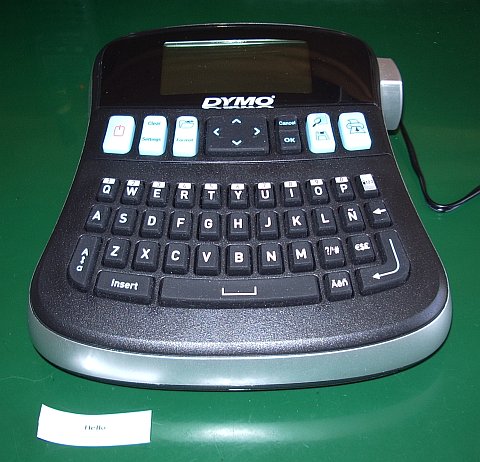
The labelmaker was used and didn’t come with a manual or power supply but that wasn’t a problem. Google quickly located a PDF manual to print out and I have plenty of power sources in the shack. The one thing I will have to watch is that although the DC input uses a standard barrel type connector the centre pin is negative which is the opposite of everything else that uses that type of connector. So I will have to remember to check the polarity before plugging it in.
The label tape that came with the machine produces black text on white. But you can buy cassettes of tape in different colours. This particular model accepts cassettes that include a choice of white on transparent, which will look better on painted front panels.

Black on transparent would look better on bare metal than these labels which I made for the front panel of my 10MHz rubidium frequency standard but they still look better than the old embossed Dymo labels we used to use in the 70s. (I also have none too fond memories of trying to label front panels using Letraset.) Life is much easier for those constructors who don’t care what their projects look like but I always like to try to make them look professional even if the construction itself is definitely amateur!

Julian Moss, G4ILO, is a regular contributor to AmateurRadio.com and writes from Cumbria, England. Contact him at [email protected].
Weird things heard on the radio
As I was sitting next to my radio this afternoon, I had tuned to a frequency on 12 meters sideband where I’d seen a spot for a station in Madagascar (5R). I need 5R on 12m so I was listening to see if the station would build (grow in strength) to the point where I could attempt a contact. While waiting for that to happen, I heard another US station call him, giving his callsign properly. Although I couldn’t hear the 5R station, what I did hear was this (callsign changed mostly because I don’t remember exactly what it was, and to protect the not-so-innocent): “5R8UI, did you come back to my-callsign question mark?“. The US station literally said the words “question mark“!
Ok, while I can understand that had this happened on CW, the operation would have sent the code for “question mark”, but given that this was a voice contact, wouldn’t you think that the tone of voice and the fact that the sentence was actually a question would have been sufficient?
There’s been a lot written about the overuse of the CW Q-signals when using a voice mode, and while you can debate some of those (saying “My QTH is River Vale” rather than saying “I live in River Vale”), it just struck me as pretty funny to hear someone actually say the words “question mark“.
By way of explanation, the reason the Q-codes were invented was to provide a shorthand way to send information over telegraph lines and later wireless. It does make sense in particular on CW, where the operators at both ends of the conversation might not both be fluent in a common language. So on CW, it does make sense to say “QTH River Vale New Jersey” rather than spelling it out. It becomes, along with some other abbreviations, it’s own common language.

Weird things heard on the radio
As I was sitting next to my radio this afternoon, I had tuned to a frequency on 12 meters sideband where I’d seen a spot for a station in Madagascar (5R). I need 5R on 12m so I was listening to see if the station would build (grow in strength) to the point where I could attempt a contact. While waiting for that to happen, I heard another US station call him, giving his callsign properly. Although I couldn’t hear the 5R station, what I did hear was this (callsign changed mostly because I don’t remember exactly what it was, and to protect the not-so-innocent): “5R8UI, did you come back to my-callsign question mark?“. The US station literally said the words “question mark“!
Ok, while I can understand that had this happened on CW, the operation would have sent the code for “question mark”, but given that this was a voice contact, wouldn’t you think that the tone of voice and the fact that the sentence was actually a question would have been sufficient?
There’s been a lot written about the overuse of the CW Q-signals when using a voice mode, and while you can debate some of those (saying “My QTH is River Vale” rather than saying “I live in River Vale”), it just struck me as pretty funny to hear someone actually say the words “question mark“.
By way of explanation, the reason the Q-codes were invented was to provide a shorthand way to send information over telegraph lines and later wireless. It does make sense in particular on CW, where the operators at both ends of the conversation might not both be fluent in a common language. So on CW, it does make sense to say “QTH River Vale New Jersey” rather than spelling it out. It becomes, along with some other abbreviations, it’s own common language.
David Kozinn, K2DBK, is a regular contributor to AmateurRadio.com and writes from New Jersey, USA. Contact him at [email protected].
 Ham Radio Deluxe |
 W5SWL Electronics |
 Ham Radio Prep |
 KB3IFH QSL Cards  Hip Ham Shirts  HamRadioAuctions HamRadioAuctions Reliance Antennas Reliance Antennas Enigma Shop Enigma Shop |  morseDX  Ni4L Antennas  R&L Electronics R&L Electronics antennas.us antennas.us QRV QRV |
- Matt W1MST, Managing Editor
