 |
 The thrill of the hunt
 19 October 2011 | by
 I often think of amateur radio as if I’m on a hunting or fishing expedition. I know for younger and perhaps less patient individuals, this thrill may or may not be shared with the same excitement and enthusiasm. When I walk down the fourteen steps into my basement ham shack or drive up to the mountains for a few hours of portable, outdoors operating….I don’t always know what is waiting for me on the bands.
I’m reminded of an interview I did with Duncan McLaughlin, KU0DM back in episodes 28 and episode 29. I hope you’ll listen to those two older episodes. Duncan and I discussed the possible challenges of attracting todays youth into the hobby. The youth of today are growing up in the information age where everything is instant and immediate. Want to talk to someone on the other side of town? They probably have a cell phone. Want to talk to someone on the other side of the planet? They probably have Skype. Duncan believed the possible ice breaker was in the area of Radio Sport or contesting. Duncan described his philosophy as the difference between fishing and fish sticks. One can take a fishing pole to your favorite lake, pond or stream and may or may not catch a fish….but chances are the local grocery store will be well stocked in boxes of fish sticks. This simple, yet truly interesting way of looking at things is really what amateur radio is all about and in my opinion what makes it special.
While amateur radio requires a license in order to operate on the bands, what amateur radio gives us in return is a license to learn. What we learn might fall into the category of electronics, antennas, solar propagation etc. and these are all important. However, just as important, I enjoy learning more about the geography of those new DX stations I’ve been working.
Of course, when I see a station call sign such as a M0, ON or JA I do recognize them being geographically located in England, Belgium and Japan respectively. However, I’ve also really enjoyed learning more about the callsigns I’m not as familiar with such as UT, CT3 and my most recent DX entity of T32.
Yes our planet is large, but our wonderful hobby of amateur radio can make it much smaller if we let it. As most have probably heard, band conditions are getting better and better. Even for US technician class operators, the 10 meter band has been booming with lots of excellent DX opportunities. Go to your ham shacks and get those rigs fired up and enjoy the thrill of the hunt.
Until next time….
73 de KD0BIK (Jerry)
Jerry Taylor, KD0BIK, is a regular contributor to AmateurRadio.com and writes from Colorado, USA. He is the host of the Practical Amateur Radio Podcast. Contact him at [email protected].
LHS Show Notes #067
Introduction:
- It’s a ramblin’ show tonight.
Announcements:
- Texoma Hamarama 2011 will be October 21-22, 2011 at the Ardmore Convention Center, 2401 North Rockford Road, Ardmore, OK. Richard hopes to be there.
- If you attended the Huntsville, AL hamfest in August, let us know if you think it would be a good venue for LHS.
- Thanks, as always, to Gamma Leonis for the theme music.
Topics:
- Russ talks about the antenna feedline window passthrough panel he bought at Dayton. He’s also hoping to get a radio in his truck. Richard describes the window passthrough methods he’s used in the past, with foam pipe insulation or air conditioning insulation foam.
- Richard talks about the lack of ham radio activity in his area (Kaufman County, TX): no club, no RACES group, no ARES, etc. He called his ARRL SEC (Section Emergency Coordinator), Walt, KG5SOO, and learned that the local groups weren’t happy with the current ARES manager. The SEC says paperwork is being processed and the new emergency coordinator of Kaufman County, TX is Richard, KB5JBV! Currently, there are just two ARES members, Richard and the Emergency Manager, so if you’re in Kaufman County, TX, get in touch with Richard! (Congratulations, Richard!)
- There’s a new podcast out there: Richard’s Radio Adventures. Look for it on the Resonant Frequency feed.
- In Linux-related news, Russ lets us know that kernel.org was hacked a few weeks ago. Because the code was in an encrypted git repository, it was safe, but they moved it to github, anyway.
- Russ also says there was a brief period that GNU Emacs was packaged and distributed with a binary blob in it, which violates the GPL. It’s since been fixed.
- A security hole in SSL/TLS has been reported.
- Simon, HB9DRV, has sold the rights to his Ham Radio Deluxe software. Our hosts discuss the possible ramifications.
- Richard wanders into a discussion of Arch Linux. It seems there was an issue with Arch not being free (as in speech). However, Parabola GNU/Linux is Arch, but free of all the entanglements.
- If anyone out there is an Emergency Coordinator or Assistant Emergency Coordinator, send an email to Richard about how your EC is going. Richard is looking for advice on how to best set up the ARES EC organization in his county.
- Russ admits that his other podcast, QSK Netcast, has stalled, mostly due to a lack of his available time.
- Since some parts of the LHS website are now subscription only, Russ began researching SSL certificates. He found a couple of places that issue inexpensive or free browser-compatible certificates: CheapSSLs , under $10 per year, and StartSSL will issue personal certificates for free.
- Russ and Richard discuss their love for the Sansa Clips. Russ likes DoggCatcher for listening to podcasts on his Android phone.
- Richard talks about his secret antenna project. He’s now in an area with Codes, Covenents and Restrictions (CCRs) which preclude outside antennas. Years ago, he bought an Arrow dual-band J-pole antenna, and used it for packet and other stuff. Using some military surplus olive-drab fiberglass tent poles, he strapped the J-pole to the top of the tent poles and the poles to the top of an 8′ fence. He assures the neighbors that it’s just a flower pot hanger.

Contact Info:
- Contact Richard at [email protected], Russ at [email protected], or both at the same time at [email protected].
- Listen to the live stream every other Tuesday at 8:00pm Central time. Check the LHS web site for dates.
- Leave us a voice mail at 1-909-LHS-SHOW (1-909-547-7469), or record an introduction to the podcast.
- Sign up for the LHS mailing list.
- Sign up for the MAGNetcon mailing list.
- LHS merchandise is available at the Merch link on Web site. Check out the Badgerwear or buy one of the other LHS-branded items at PrintFection.com/lhs or Cafe Press. Thanks!
- Thanks to Dave from Gamma Leonis for the theme music.
Russ Woodman, K5TUX, co-hosts the Linux in the Ham Shack podcast which is available for download in both MP3 and OGG audio format. Contact him at [email protected].
Radio Tirana
Propagation on 10m today is as good as I can remember. I made a few nice contacts using SSB including Japan, India and Bahrain. I heard several Chinese stations as well but have yet to work one.
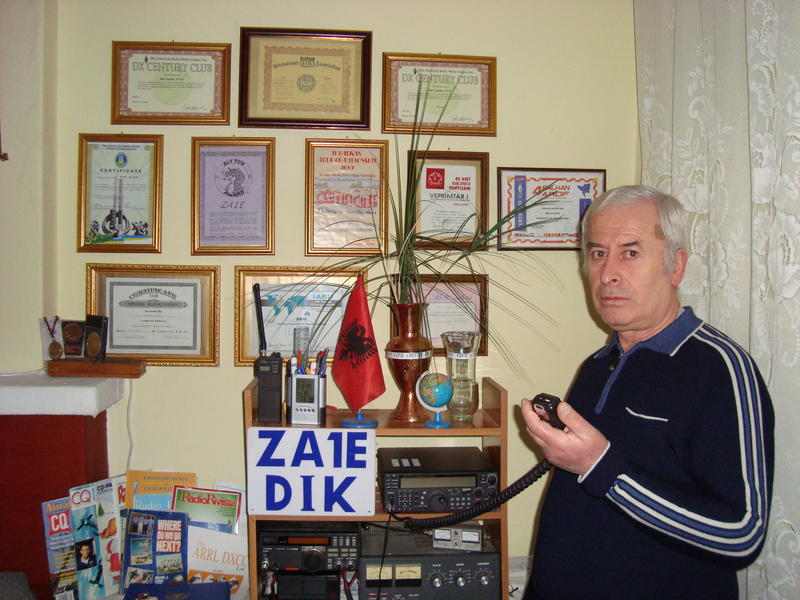
Not really DX but a new country for me was Albania, in the shape of Dik, ZA1E. Decades ago as a teenaged short wave listener I remember hearing Radio Tirana, a huge signal on 7.065MHz, smack in the middle of the 40m phone band. I wonder whether anyone ever listened to its broadcasts? They were pure anti-capitalist tirades read by a woman announcer who sounded like she had a beard and no sense of humour. They actually used phrases like “capitalist running dogs” if I remember correctly. At least Radio Moscow tried to make life on the other side of the iron curtain sound attractive.
I don’t think there was any ham radio activity in communist Albania and there still aren’t all that many hams there now so I was pleased to work Dik for a new one.

Julian Moss, G4ILO, is a regular contributor to AmateurRadio.com and writes from Cumbria, England. Contact him at [email protected].
A Look Back at the Heathkit AT-1 [VIDEO]
With Heathkit‘s recent announcement of them getting back into the kit building business, and Amateur Radio is one of those category of kits coming back, I thought that this little video look at Heathkit’s first Amateur Radio kit would be a good way to celebrate that.I know they announced it some time ago, but better late then never right? Well, this video wasn’t uploaded till about a month ago and I just found it. But You’re the first ones I’m sharing it with. My only complaint about this video, is the presenter is very mono tone. He doesn’t sound enthused with anything. But all in all, it’s still a nice video. Hope you enjoy!
73.
Rich also writes a Tech blog and posts stories every Tuesday and Thursday on Q103, Albany’s #1 Rock Station website, as well as Amateur Radio stories every Monday thru Friday on AmiZed Studios and hosts a podcast called The Kim & Rich Show with his fiance’ Kim Dunne.
Rich Gattie, KB2MOB, is a regular contributor to AmateurRadio.com and writes from New York, USA. Contact him at [email protected].
Sneaking a QSO with T32C
The T32C Dxpedition to Chrismas Island (T3) has been going for a little while now. What with one thing and another, as well as poor conditions, I haven’t really listened very much. Having said that, I’ve been in regular e-mail contact with some of the team which has been good fun. They are doing a great job and are amassing a huge QSO total; over 170,000 QSOs at the time of writing. Neville, G3NUG will be delighted!
I popped up to the shack briefly last night around 20:30z – mostly to have a look at VHF/UHF as conditions had seemed reasonable on the way home. Just out of curiosity, I had a look at the most recent T32C cluster spots. There were a few on 24MHz from Europe from a bit earlier, so I quickly tuned the FT1000MP to have a look. To my great surprise I could just hear them.
After a couple of minutes, the signals came up a little and I could hear that they were listening up 1. Nothing ventured, nothing gained! Dropped my call in a couple of times and was completely surprised when they came back with my call!
What a great surprise. This morning, I’m pleased to see my callsign in the online log.
I may look a little earlier, if I have the chance, on 28MHz. That’s a handy opening over Central and South America in the evenings. Over the years, I’ve worked ZL7, ZL9 and now T32 on 24 or 28MHz around that time.

Tim Kirby, G4VXE, is a regular contributor to AmateurRadio.com and writes from Oxfordshire, England. Contact him at [email protected].
RF Choke
The New Carolina Windom uses part of the feedline as a vertical radiator — the voltage balun used to feed the off-center fed dipole allows common mode current to travel down the feedline. How do you determine how much of the feedline radiates? From what I’ve read, you do this by placing an RF choke (sometimes called a “line isolator”) at some point in the feedline to clamp off the common mode current. For an 80 meter version, you put the RF choke 20 feet below the feedpoint. For a 40 meter version (like I’m building), you put it 10 feet below the feedpoint.
To build my RF choke I followed the instructions provided by Len Carlson, K4IWL. In an addendum published here, Mr. Carlson wrote:
A note about the choke [between the balun and the feedline]: The choke [line-isolator] is simply a straight piece of coax with ferrite cores strung on it. Just use the same coax that you are using for the field line from the Xceiver to the choke. I have made a mod to the choke also. Instead of bending it back inside of the CPVC tube, make it a straight piece of coax about 0.3 meter. The length is not critical but should be no shorter than about 12 inches. Use as many ferrite tubes that will fit in-line on that length.
I built my RF choke using 12 FB-56 ferrite beads (mix 43) from Palomar Engineers strung on a piece of RG-58 coax and secured on each end with wire-ties. While Mr. Carlson chose CPVC for a lighter enclosure, I used PVC. In order for the SO-239 bulkhead-mount coax connectors to fit in the endcaps, I had to go with 1 1/4″ pipe. This did make for a pretty large enclosure — the beaded coax in the pipe does slop around a bit in there when shaken. If I have to do this all over again I’ll figure out some way to secure the innards of this thing (maybe by injecting some expanding foam?). As it was I inserted a few inches of double-sticky foam mounting tape inside the last end to be sealed, which did help somewhat.
I attached one end of the beaded coax directly to an SO-239 connector/end cap, but the other end required several inches of slack to stuff into the tube when it came time to push the final end-cap onto the pipe.
Here is a slideshow of my RF choke. After I took these photos I covered the coax connectors with cling-wrap and spray-painted the whole thing forest green.


Todd Mitchell, NØIP, is a regular contributor to AmateurRadio.com and writes from Minnesota, USA. He can be contacted at [email protected].
Battery boost

A couple of years ago I won a 25 year old “spares or repair” Kenwood TH-205E for a few pounds in an eBay auction. I successfully repaired it, but the ni-cad pack had failed short-circuit. I then had a stroke of luck as I found someone selling an 25 year old but unused KNB-4 battery pack for a couple of quid. It held a charge, so the problem was solved. The only disadvantage was that it was the large high capacity battery pack, much taller than the original, making the radio even bulkier than it already is. I nicknamed it “the brick.”
A few days ago I was looking at the Strikalite web site and noticed that they do battery pack refurbishment. I enquired whether they could repair the 205E’s original battery pack. “Send it to us and we’ll take a look at it” they said, so I did.
A few days later I received a phone call from Strikalite saying “We need to take some money off you.” I was a bit concerned as to how much it would be as they had not provided me with an estimate before starting. But I need not have worried. The total cost including postage and VAT was £19.99 which I think is very reasonable. They did quite a neat job, with only a little marking of the case where they had to pry the two halves apart.
£20 may seem like more than a 25 year old boat anchor that doesn’t support 12.5kHz spacing nor CTCSS for repeater access is worth. But actually the TH-205E has the best, most intermod-resistant receiver of any of my HTs due to the fact that it is designed for the 2m band only, not wide band coverage. If I ever get out on the fells again, the TH-205E would be a strong candidate to take. There’s life in the old thing yet!

Julian Moss, G4ILO, is a regular contributor to AmateurRadio.com and writes from Cumbria, England. Contact him at [email protected].
 Ham Radio Deluxe |
 W5SWL Electronics |
 Ham Radio Prep |
 KB3IFH QSL Cards  Hip Ham Shirts  HamRadioAuctions HamRadioAuctions Reliance Antennas Reliance Antennas Enigma Shop Enigma Shop |  morseDX  Ni4L Antennas  R&L Electronics R&L Electronics antennas.us antennas.us QRV QRV |
- Matt W1MST, Managing Editor
