 |
 First run with the Raspberry Pi
 11 June 2012 | by
  Like many others my little Pi turned up on the doorstep in a little cardboard box. As expected there wasn’t much in the box apart from a sort of ‘Welcome Note’ and directions for downloading the OS. Needless to say it took longer to download the OS than it did to write it to the SD card. So all connected up to the keyboard, mouse, screen and ethernet and away we go. Power on.
The first boot took a little while longer than expected but I expect it was creating bits and bobs all over the place. This was confirmed as subsequent boots to the command line, or rather to the login part of the command line took considerably less time. Login details are simple enough with the user name as Pi and the password as Raspberry. Something that you may want to change later on.
Once you’re into the command line it could seem a little confusing as to what to do next. Especially if you are used to a nice looking GUI with a mouse etc. Have no fear as a simple “startx” without the quotes fires up the window manager (LXDE – Lightweight desktop environment).
One thing I like to do is to run “sudo apt-get update” from the LX terminal just to make sure everything is up to date before we get started. The other thing that may be useful is to install synaptic package manager with “sudo apt-get install synaptic”. Again from the terminal window.
Time was running out for me at this point so I thought I’d have a quick look at Xastir (APRS application) to see if it would work. After a bit of a turned up face at the look of the interface I confirmed that it works as easily as it would on any platform. A bit of configuring and you’re away. I didn’t connect up the radio then as it’ll need a sound modem like the AGWPE for windows. That’ll be the next step.
One thing I hadn’t noticed is that there is no on board clock and the Pi get the time either by you setting it in the command line or through the ethernet. This could mean that if applications like WSPR can run on it then an external clock is going to be needed or a permanent connection to the ethernet.
So first impressions are done with and I have to say that it does struggle a bit if you ask it to do too much at once but that’s more to do with managing your own expectations but this is going to be a very interesting little gizmo to keep an eye on for ham radio
Alex Hill, G7KSE, is a regular contributor to AmateurRadio.com and writes from Cumbria, UK. Contact him at [email protected].
A good weekend on 70MHz
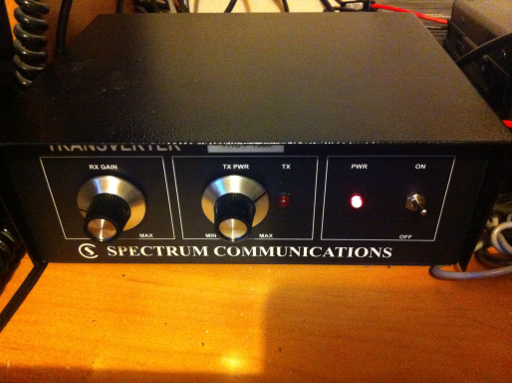
Back in April, for my birthday, both Julie and my Mum very kindly gave me some money. I decided to put it towards a new 70MHz transverter. I had been undecided whether to try and improve the FT-847 performance to an acceptable level or to go the transverter route. I didn’t really fancy some of the modifications required to the 847, so the transverter beckoned.
I decided to try one of the Spectrum transverters – the price was fair and the other options seemed to require importing. I ordered a transverter in mid-April and Tony, G4CFY told me that because he would be so busy, there would be some delay. I was ok with that and Tony was very good on keeping me informed.
Last Thursday a box arrived at home! It was the transverter. I was able to get it setup pretty quickly and found that I could receive the GB3RAL 70MHz beacon at Harwell by sticking my finger in the aerial socket of the transverter! Applying an antenna produced even better results but the band was quiet.
When I got home from work on Friday I had a quick listen around 70MHz before our customary Friday night homemade pizza. To my surprise and delight, I worked 2 stations; OK1TEH and TF3ML/P – Iceland was new on 70MHz for me!
This morning, as soon as I switched on 50MHz the band was open into southern Italy, so I wondered if 70MHz would be open. Sure enough it was and I was quickly working stations all over Italy on Es. Most stations were in the area of Rome, but I was pleased to work IF9/I2ADN (JM67). Later in the morning, the opening moved and I was able to work EA6SX and several 9A and S5 stations.
I definitely feel that the new transverter is working much better; the receive is much more sensitive than the FT847 and of course, 25W is proving handy. For now, I have used the FT847 at 28MHz as an IF. I just need to remember to drop the power down when I switch over to the transverter to avoid bad things happening.
Clearly this weekend has been a good one on 70MHz, but I hope to be able to devote more time to the band in the future

Tim Kirby, G4VXE, is a regular contributor to AmateurRadio.com and writes from Oxfordshire, England. Contact him at [email protected].
Limited space, antenna restrictions and HOA’s….there is hope!!

 |
| Not to shabby |
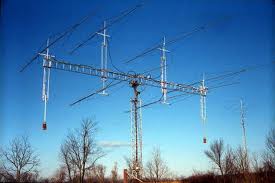
The SWR for such an antenna mounted undercover is below...
7.000 - 7.060 = 2.58- 2.03 tuner brings it too 1.01
14.000 - 14.060= 2.26-2.08 tuner brings it too 1.01
21.000 - 21.060= 1.01-1.15
28.000 - 28.060= 1.15-1.12
Extra bands with tuner
18.068-18.100= 1.01-1.01 with tuner and 9.98 after tuner
10.100-10.130=1.01-1.01 with tuner and 9.13 after tuner.
So where can 5 watts QRP power and an attic antenna go??
Italy, Switzerland, Japan, Jordan, South Africa, all of South America, England, Greece, Azerbaijan, Cyprus, Niger, Algeria,Gambia, Alaska,Turkey, Ascension Island.........and the list could go on!!
How about 1 watt........
Germany, England, Scotland, Italy, South Africa, Czech Republic, France, Ireland, Poland, Ukraine, Sweden,
Lets move things down to 100mW's
Portugal, Finland, Germany, Netherlands, Madeira Island, Spain, Croatia, Italy, Hungary, Czech Republic and so on.
Until I get an attenuator 100mW's is a low as my K3 will take me new adventures await me when my Hendricks 41dB step attenuator is built.
1. Contact with HA8JV with 100mW's which worked out to 45,868 miles per watt contact.
2. This year I have worked 73 DXCC countries and am working towards my Diamond Jubilee award by year end.
3. Up to this point 80 contacts that are 1,000 miles per watt or more.
4. Lastly and most important......having a loads of fun!!!!!
If your situation does not allow you to install a dipole or similar medium size antenna my first QRP antennas were two mobile whip antennas made into a dipole configuration. With these antennas I was able to add to my 1000 miles per watt count......and more. So don't let some restrictions stop you from taking advantage of our hobby because less can mean more!!
UPDATE.......as Julian G4ILO has reminded me with his comment, I forgot to mention all the above was done with CW.

Mike Weir, VE9KK, is a regular contributor to AmateurRadio.com and writes from New Brunswick, Canada. Contact him at [email protected].
17 Meters
has been very good the past few days. I have worked a lot of European stations the past couple of days, and I have taken to listening for Special Event stations for the European Football Championships.
These stations are on the air from June 1st to July 5th. So far, the few that I have contacted, from the Ukraine and Poland have been superb ops with great ears! If you want to find out more about this program, you can visit:
http://sq2rh.idsl.pl/efc/index_en.php
The KX3 continues to impress. Except for not being able to connect two antennas, like I can on my K2, it has all the features my K2 has (plus many more) in a much smaller footprint. And the smaller footprint is not annoying, and I am a fudge fingered kind of guy. The buttons have multi-functions, but not so many levels that it is frustrating.
I like having 6 Meter capability, which I have never had before. I like the feature where the KX3 will auto zero beat the desired CW signal that you want to work. The APF feature – Audio Peak Frequency really helps dig out the weak signals. I can easily hear stations that cannot hear me, so I really, really have to get used to the fact that just because I can hear them, they might not be able to hear me, with me at only 5 Watts.
There’s more to be discovered, I am sure. I still have to come into the 21st century and hook up the radio to my computer and at least give computer control a try. Up till now, I have been a “twirl the dial” kind if guy. I don’t anticipate that changing really; but I’d like to give it a try, anyway.
One thing I am not too thrilled with is the weighting of the CW. To my ear, the dits and dahs sound a little truncated, even with the weighting turned to the max. Several folks have also mentioned this on the KX3 reflector and Wayne from Elecraft has agreed. Once he gets back from a well deserved vacation later this month, he is going to incorporate a fix in an upcoming firmware update.
After watching W0EA’s video about the Lowepro Traveler 150, I went out to Wal-Mart and picked one up at a great price. I am going to see how everything fits in, later this week, to start getting ready for our Lake George summer sojourn. Maybe I’ll do my own video and post it here.
That’s it for now – going to head on down the shack and see who I might be able to work.
72 de Larry W2LJ
QRP – When you care to send the very least!

Larry Makoski, W2LJ, is a regular contributor to AmateurRadio.com and writes from New Jersey, USA. Contact him at [email protected].
General Test Passed!
Today at the NW Arkansas Hamfest, I took the General test and passed! I am planning on participating on Field Day and will probably get my first contacts on HF then.
Note: The FCC database shows me as a General License holder now on 6/11/2012


Wayne Patton, K5UNX, is a regular contributor to AmateurRadio.com and writes from Arkansas, USA. Contact him at [email protected].
Something’s messed up Firefox
I was doing some web surfing in Firefox (Windows) when I had a bit of finger trouble. In response, Firefox popped up a message that said something like “you have chosen to open 27 pages at once, do you really want to do this, continue or quit.” I responded “quit”, Firefox didn’t open any pages and I carried on with what I was doing. However, the next time I opened a new tab it opened, not with a blank tab but one containing large thumbnail images of pages I had recently (or not so recently) visited. I assumed that my bit of finger trouble had accidentally done something to Firefox. But how to undo it?

I racked my brains for a solution until I remembered that I had got Magicure on my system. Magicure is a bit like System Restore but it works for all types of file not just system files. It has got me out of many a scrape in the years since I installed it. So I used Magicure to roll the system back to its state yersterday morning and Firefox appeared to be back to normal. I started the browser, opened a new tab and it came up blank as I wanted.
Everything seemed fine until late this morning, when I opened a new tab in Firefox and it was full of recently visited pages again. This was not how it was yesterday morning. Magicure has never yet failed to restore my computer to its exact state on the date I roll back to. So what the heck is up with Firefox or my computer and how do I get it back to normal?

Julian Moss, G4ILO, is a regular contributor to AmateurRadio.com and writes from Cumbria, England. Contact him at [email protected].
Gremlins Lurk in the Junk Heap
Three weeks ago my EchoLink station went deaf. Thanks to the West Central MN Amateur Radio Club’s antenna analyzer, I figured out right away that the problem was in the feedline/antenna system. Ever since then I have been either too busy or too nervous to go on the roof, so it has remained a mystery . . . until this afternoon.

Antonio Mitchell checking SWR on the Edison Fong J-Pole
Antonio, my son, went up on the roof with the antenna analyzer while I watched from the ground. He did a great job taking all the tape and coax seal off the PL-259, disconnecting the coax from the antenna, and hooking up the antenna analyzer to the antenna with a patch cord. “One point two!” he called down to me. There you have it — it was the coax! I realized what I’d done. Here I had some brand-new coax in my field-kit, but I ended up grabbing a different coil of junk coax and got bitten by a Gremlin. I found the new, already-terminated coil of coax and Antonio swapped it for the bad length, carefully wrapping the PL-259 with coax seal and rescue-tape. In short order we had the station back on the air.
All that, and Antonio doesn’t even get to use it yet. Hopefully soon! Antonio has been studying hard for his Technician exam this week. He is eager to take the test.
Thanks, Antonio, for getting the EchoLink back up and running for all of us.


Todd Mitchell, NØIP, is a regular contributor to AmateurRadio.com and writes from Minnesota, USA. He can be contacted at [email protected].
 Ham Radio Deluxe |
 W5SWL Electronics |
 Ham Radio Prep |
 KB3IFH QSL Cards  Hip Ham Shirts  HamRadioAuctions HamRadioAuctions Reliance Antennas Reliance Antennas Enigma Shop Enigma Shop |  morseDX  Ni4L Antennas  R&L Electronics R&L Electronics antennas.us antennas.us QRV QRV |
- Matt W1MST, Managing Editor
