 |
 Derventio
 23 September 2012 | by
I have been itching to try venturing further afield and thought we might go down to the river Derwent at Papcastle. I carried the Kenwood TH-D72 on my belt to track the walk using APRS and see how far we got. When we reached the path down to the river we saw a paper sign saying “Derventio.” Olga thought – wisely with hindsight – that it would not be a good idea to walk down to the river as we would then have to climb back up again. We walked a bit further along the road and looked down towards the river where we could see substantial excavations were taking place. This looks like being a major archeological site. One day when I’m just a bit fitter we will go down and take a closer look.
We continued our walk with a loop through the village of Papcastle, then returned home the way we had come. On the way I heard and worked Richard G1JTD portable on the summit of Great Calva, and Liz M6EPW on my local SOTA summit of Watch Hill. That will undoubtedly be the first summit I will attempt but at the moment it is still too far – about 3 miles from our front door.
I was pretty tired and very sweaty by the time we got back to Cockermouth but I resisted Olga’s suggestion that we finish the excursion by taxi. Although what we had done was an easy walk by normal standards this was my most ambitious outing since finishing my treatment.

When we got home I could see that our track had been perfectly recorded by APRS. I was happy with that – and with the two contacts I made. I had only been using one of those stubby antennas about 5 cm long which are a couple of dB down on a rubber duck.
I saved the track as a GPX file and then produced a report using one of the online GPX report generators. According to the report we had walked exactly 4 kilometres. 1.5km of this had been climbing for a total ascent of 87m. To me it felt as if I had just climbed Scafell Pike!

Julian Moss, G4ILO, is a regular contributor to AmateurRadio.com and writes from Cumbria, England. Contact him at [email protected].
A cheaper approach to Virtual Radar using the microADSB dongle
For quite sometime, I have been intrigued by the whole ADS-B Virtual Radar thing. As you know, if you’ve read this blog for a while, I love maps and plotting objects on them. I love planes too and whenever I look up and see a plane I always wonder where it has come from and where it is going to. Not to mention the propagation angle. ADS-B (Virtual Radar) operates at 1090MHz, so how interesting to have a set of beacon sources operating at around 1GHz and to be able to monitor propagation to and from them.
How to achieve it? Until recently, the only way to do it appeared to see some very interesting, if expensive units such as the SBS-3 Virtual Radar devices. These look great, well put together but seemed a lot of money for something that would probably not be a core part of the station here.
Dave G4FRE had told me of his experiments of using Ubuntu and the RTLSDR dongle to monitor ADS-B which looked effective and interesting. I did not really want to get into the whole Linux thing. I’ve nothing against Linux, but I spend my days looking into the technicalities of computer systems and though it is something that fascinates me it is not something I want to reproduce at home! I might give it a go in the future though. Dave has had some good results with his Ubuntu box and RTLSDR which does sound worth experimenting with.
However, talking to Mark VK3PI on Twitter he mentioned that he had got a lower cost ADS-B receiver which was showing good results.Mark had obtained a USB dongle from Miro LZ2RR called the microADSB The cost was modest compared to other solutions, so I placed an order.
The microADSB arrived on Thursday and I wasted no time getting it going. The package consists of the dongle itself, a CDROM of software, a USB cable from the dongle to the PC and a small magmount antenna terminated with an SMA that connects to the dongle.
Software installation was straightforward. On plugging the dongle in, I was prompted for the drivers which installed happily off the CD. The software that comes with the dongle is adsbScope. All I had to do to get it working was to select the virtual COM port that the dongle had attached to and then connect ADSB Scope to the dongle.
I was doing this at around 10pm at night with a few less planes flying, but I moved the antenna close to the window of the lounge on the ground floor and was soon seeing points plotted from the planes at surprising distances from home. Having got it all setup, I transported the laptop and the dongle upstairs to the shack, which has an easterly facing window and set it up. Range seems to be regularly 50-60 miles with occasional greater distances.
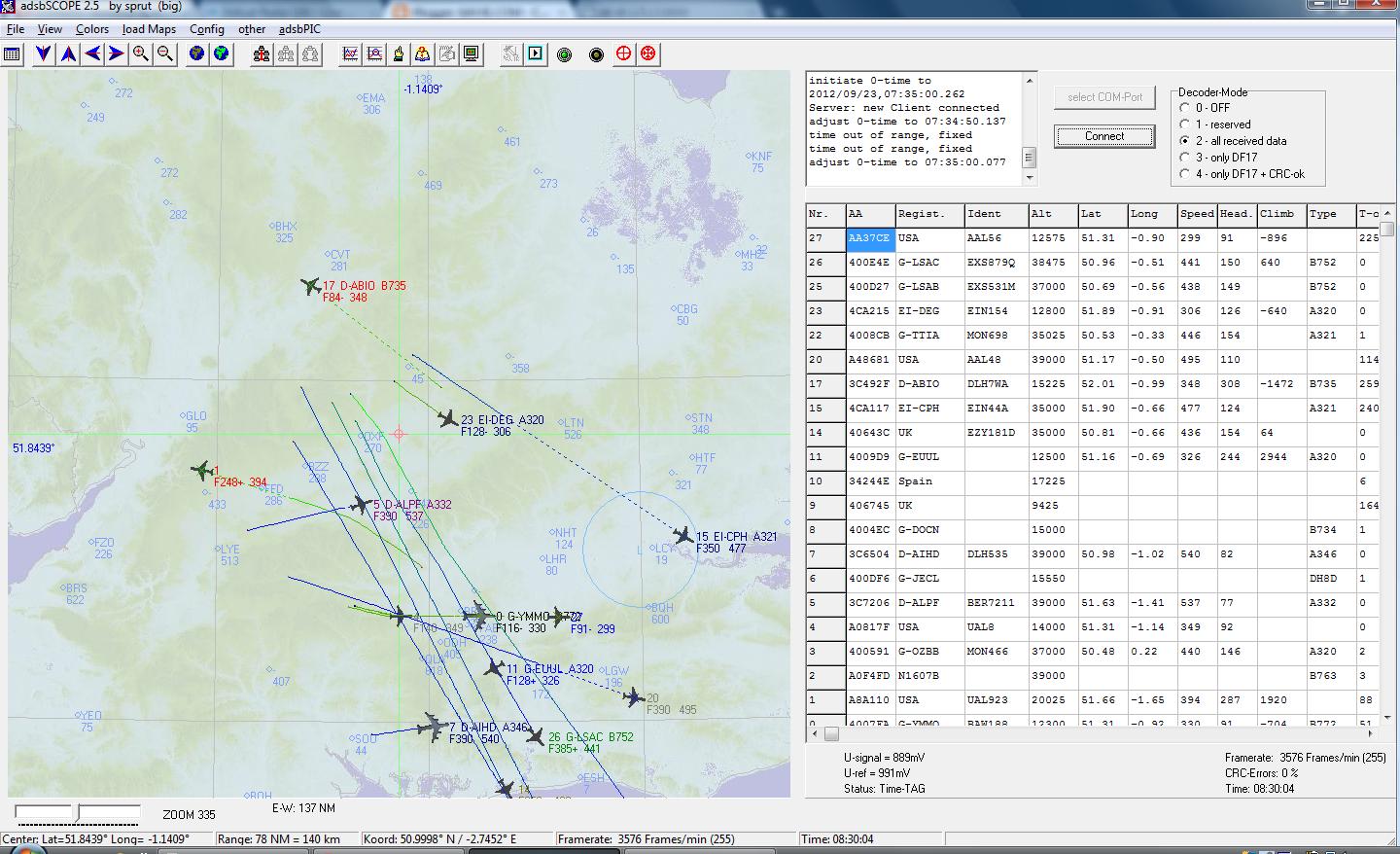
adsbScope allowed me to plot planes easily and it shows, where possible, the country of registration and the flight number, However, this didn’t entirely satisfy my curiosity about where the planes were flying to and from.
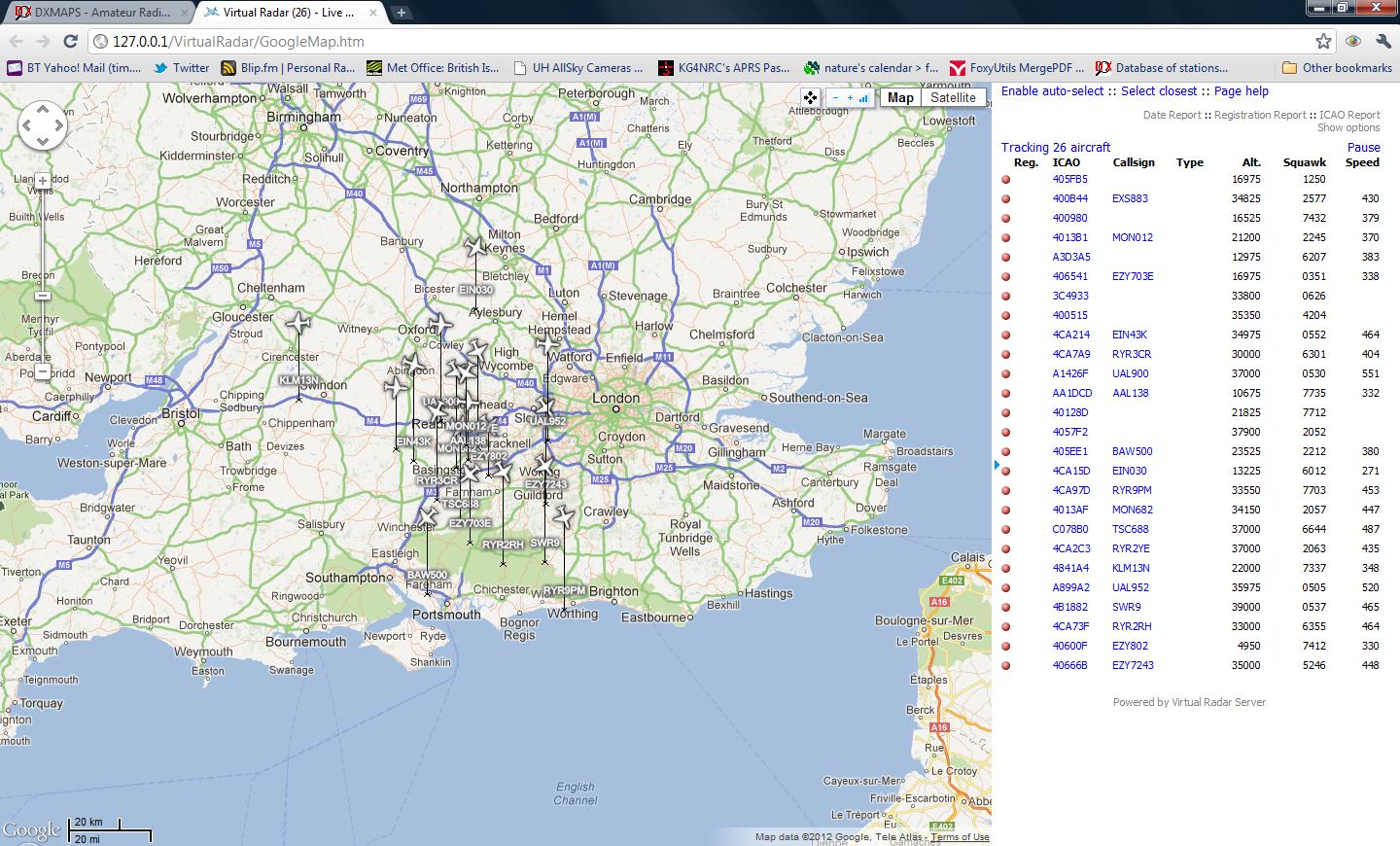
I had noticed an application called Virtual Radar server which runs as a webserver on your PC and picks up the data from adsbscope and augments it with information from a routes database and plots the planes on a nice Google map. I had to start adsbScope’s server functionality which Virtual Radar Server was able to read. Virtual Radar Server expects an SBS type installation, so I had to install a plugin called Database Writer which reproduced the basestation.sqb file/database which the SBS software seems to work on. I enabled the plugin and then allowed it to create the database file and granted it permissions to update it.
That did the trick! I was then able to browse to the URL which the Virtual Radar server provided on the local machine to see the planes plotted, along with the route information. I’m finding that so far, if I just want to get a sense of what propagation is like, I stick with adsbScope as that tells me all I need to know, but if I want a bit more information abut the flights, then I start up Virtual Radar Server.

Tim Kirby, G4VXE, is a regular contributor to AmateurRadio.com and writes from Oxfordshire, England. Contact him at [email protected].
Oopsy!
Forgot a score. And it affects the Top Ten – mea culpa, mea culpa. mea maxima culpa!
My apologies to Pete W1PNS who came in with a score of 4620 – so let me rephrase this …..
The Top 11 Finishers
W1PNS – 4620 points
Golly gee, and Pete went to so much trouble to post niceness about the Skeeter Hunt on his blog and I went and left him out – truly and purely accidentally with no malice a forethought.
Thanks, Pete, for being so understanding. I’ll get the hang of this yet, I promise!
72 de Larry W2LJ
QRP – When you care to send the very least!

Larry Makoski, W2LJ, is a regular contributor to AmateurRadio.com and writes from New Jersey, USA. Contact him at [email protected].
2012 NJQRP Skeeter Hunt Results
Are in! Well, partly that is!

Larry Makoski, W2LJ, is a regular contributor to AmateurRadio.com and writes from New Jersey, USA. Contact him at [email protected].
Beacon update
I have updated the beacon data file for VOAProp today. The NCDXF/IARU beacons in Kenya (5Z4B) and Argentina (LU4AA) are back on the air after a long absence.
The thought crossed my mind: Now we have WSPR and remote beacon skimmers covering all bands, does anyone use these beacons any more?

Julian Moss, G4ILO, is a regular contributor to AmateurRadio.com and writes from Cumbria, England. Contact him at [email protected].
Very embarrassing
Mike Weir, VE9KK, is a regular contributor to AmateurRadio.com and writes from New Brunswick, Canada. Contact him at [email protected].
Ham Nation 65

http://dts.podtrac.com/redirect.mp4/twit.cachefly.net/video/hn/hn0065/hn0065_h264m_1280x720_1872.mp4
http://dts.podtrac.com/redirect.mp4/twit.cachefly.net/video/hn/hn0065/hn0065_h264m_864x480_500.mp4
http://dts.podtrac.com/redirect.mp4/twit.cachefly.net/video/hn/hn0065/hn0065_h264b_640x368_256.mp4
http://www.podtrac.com/pts/redirect.mp3/twit.cachefly.net/hn0065.mp3
Hosts: George Thomas (W5JDX), Gordon West (WB6NOA), and Bob Heil (K9EID).
Phased array explained, Bob narrates PBR, build at home Open Beacon, and more.
Guests: Cheryl Lasek (K9BIK), and Don Wilbanks (AE5DW)
Download or subscribe to this show at http://twit.tv/hn.
Submit your own video to Ham Nation! See the Video Guidelines, http://www.frozen-in-time.com/guide/
We invite you to read, add to, and amend our show notes at wiki.twit.tv.
Thanks to Joe Walsh who wrote and plays the Ham Nation theme.
Thanks to Cachefly for the bandwidth for this show.
Dr. Bob Heil, K9EID, is the founder of Heil Sound and host of TWiT.tv's Ham Nation which streams live each Tuesday at 6:00pm PT (9:00pm ET) at http://live.twit.tv. Contact him at [email protected].
 Ham Radio Deluxe |
 W5SWL Electronics |
 Ham Radio Prep |
 KB3IFH QSL Cards  Hip Ham Shirts  HamRadioAuctions HamRadioAuctions Reliance Antennas Reliance Antennas Enigma Shop Enigma Shop |  morseDX  Ni4L Antennas  R&L Electronics R&L Electronics antennas.us antennas.us QRV QRV |
- Matt W1MST, Managing Editor
