 |
 QRP Operating Events
 20 February 2013 | by
 So you say you’re not into the “Big Gun” contests; because as a QRPer, you feel like a fish out of water. What’s a QRPer to do?
Fortunately, there are a bunch of operating events (contests, if you will) that were designed just with you in mind. Some of these are annual events, some are monthly, some are seasonal. Here are some good ones that I can think of right off the top of my head:
Monthly ARS Spartan Sprint – this occurs on the first Monday of every month – this is a two hour sprint that runs from 9:00 to 11:00 PM Eastern time (you can do the math for your time zone). Sponsored by the Adventure Radio Society, there are two divisions – the Tubby and Skinny Divisions. The divisions are determined by the weight of the equipment you are using. The goal is to use as small and light and portable a station as you can manage – although that’s not a requirement to participate. Information about these Sprints can be found here.
Flying Pigs Run For the Bacon – this sprint occurs on the third Sunday of every month. Another two hour sprint that again, runs from 9:00 to 11:00 PM Eastern time. This is a very friendly, low pressure sprint where slow speed coders are welcome. You don’t need to be a member of the Flying Pigs to participate; but it’s fun to have a Piggie number to exchange instead of just the “standard” 5W designation. Besides, it’s free to join – the club’s motto? “No dues, no rules, just have fun!” Further information can be found here.
NAQCC Monthly Sprint – these sprints are rapidly gaining in popularity. The North American QRP CW Club was founded by Tom Mitchell WY3H and John Shannon K3WWP. They recently just held their 100th sprint since the club was founded and close to 200 logs were submitted after all was said and done. That amount of logs has to rival even the bigger QRP ARCI contests, I’ll wager. You have to pay attention to the days on these sprints however, because they alternate monthly between Tuesday and Wednesday evenings. And the contest time is a bit different also – 8:30 to 10:30 Easter time. Membership in the NAQCC is also free and more info can be yours, here.
Of course the QRP Amateur Radio Club International sponsors a whole bunch of contests and sprints throughout the year. There are Spring and Fall QSO Parties and events such as the Hoot Owl Sprint, QRP Field Day, the HF Grid Square Sprint, Fireside Sprint, etc. QRP ARCI is a fine organization and they publish a tremendous magazine called “QRP Quarterly”. More information about these operating events can be found here.
Then there are also the seasonal, primarily outdoor sprints such as the recently completed Freeze Your Buns Off, and others such as QRP To The Field, QRP Afield, Flight of the Bumblebees, (and my favorite) the NJQRP Skeeter Hunt. You can Google any of those for further information.
The NJQRP Skeeter Hunt will be held again this August. The sprint will be have an SSB category for 2013, so those of you who are not into CW can also join in on the fun. There will be a theme and bonus points awarded for home brewing something specifically for the event; but those details haven’t been ironed out yet. A general contest announcement will be made near the beginning of May, and Skeeter numbers can be applied for as of May 1st.
Lastly, there are also “miscellaneous” indoor QRP operating events that are held each year, that are not sponsored by major clubs. The one that comes to mind immediately, for example, is the Zombie Shuffle which is run by Paul Hardin NA5N and his wife Jan N0QT. This is usually held the weekend before Halloween and is a ton of fun.
There are also the Winter and Summer QRP Fox hunts. If you like the thrill of navigating your way through a QRP pile up, then these are for you. The Winter season runs from November to March. There are two hunts each week, usually on Tuesday and Thursday evenings. One is on 80 Meters and the other is on 40 Meters. During the Summer, the hunts are on 20 Meters and past practice is that they have been held on Thursday evenings. Details here.
If you want to build up your log totals, hone your operating skills and have a ton of fun in the process, take some time to investigate what I’ve mentioned here. If you’ve never tried any of these before, get your feet wet and join in. You’ll be an Old Pro in no time!
72 de Larry W2LJ
QRP – When you care to send the very least!
Larry Makoski, W2LJ, is a regular contributor to AmateurRadio.com and writes from New Jersey, USA. Contact him at [email protected].
Migrating to Linux (Again)
I’m no stranger to Linux. I’ve run numerous distributions since about 1995, even venturing into BSD territory, running FreeBSD and some other Berkeley variants. I’ve also used Linux quite a bit in my professional life for servers. However, I’ve never made the jump to using it as my primary desktop operating system at home; it’s always been a novelty to play with and never a desktop workhorse that I would use to actually get things done.
Linux Mint is a Linux distribution that has become more popular recently. It’s based on the venerable Ubuntu distribution and appears to be taking some market share from Ubuntu. Ubuntu in my opinion went off the tracks with its migration to the Unity desktop. For the first time recently I hit a brick wall trying to install the latest Ubuntu within a virtual machine. While Ubuntu was quite polished and arguably had the best usability in the Linux world, I still felt that I was often fighting the operating system to make it work.
 Linux Mint seems to have taken care of those issues. Last night I made the plunge and partitioned off some space on my hard disk and installed it so I could dual boot between Windows and Linux. The installation went extremely well and within two hours I was able to browse the web, play videos and hear sound, send email, work on Kicad schematics, compile Arduino code, open Excel and Word docs, do my banking with the same program I used on Windows, and I had amateur radio logging and digital programs installed. The only speed bump was getting my wireless working. I was able to fix that in five minutes after Googling and finding one command line to run. On previous distributions, items like this would take hours to resolve and there would be several of them to deal with. For the first time I feel I have something equivalent to what I had on Windows, and it doesn’t look goofy and didn’t require days of tweaking with arcane command line syntax to make it acceptable. The browser actually renders things like they look on Windows. You install a program and it actually appears in the menu. Quite simply, Linux Mint isn’t a compromise like previous desktop installations.
I’ve often complained about the state of amateur radio open source software. I stand by my previous statements as I think we still don’t have a suite of amateur radio open source software that compares with offerings in Windows, mainly in the areas of logging and contest programs. However, CQRLog has evolved quite a bit and I’ve decided to take a more minimalist approach and see if I can make it work. I still think Ham Radio Deluxe is the gold standard, but lately I’ve become annoyed with its bloat and the commercialization and marketing of it.
I’m still keeping my Windows partition, mainly to run one particular contest program and store my documents (which I access from Linux), but I may eventually run Virtual Box on Linux and have a small Windows installation virtualized to run the contest program rather than booting back into Linux.
Will this be the time I finally run my shack on Linux? I hope.

Anthony, K3NG, is a regular contributor to AmateurRadio.com.
Too close for CW comfort

So why did I title this post "To close for CW comfort" this has to do with the other CW "events" that I was exposed to! I have read about this in other blogs from other op's which are CW operators who seem for some reason to blend letters together regarding their call. I had at least 6 op's who's call I had a very very hard time making out. There was one DX station who's call ended in WVR BUT for the longest time I was not sure if it was W##, even the code reader on the KX3 was having a real hard time. I then ran across 10+ on the S meter European station but I could not give him a call as I had (and I mean NO CLUE) what his call was!! It was very hard to tell were the CQ stopped and the call was being sent. Now folks for any of you reading my blog and who also have had a CW QSO with me I know my code elegance has left you scratching your head at times.....but I just can't understand how code that has no spaces and just runs as one long word how these op's ever get answers to their CQ requests.
When I got home I put my Elecraft k3 into test mode (meaning no code is sent over the air) and tried to send some sloppy code and watched to see if the K3 was able to decode. (you can setup the K3 to not only show incoming code but also your code as you send it) The only reading the K3 would give me were not letters or numbers just lots of *****......translation...the K3 also has no idea. As with most CW op's out there you also have your code being sent to you through your headphones. Does the code not sound odd to these op's???
Anyway time to get off my soapbox now.............
Mike Weir, VE9KK, is a regular contributor to AmateurRadio.com and writes from New Brunswick, Canada. Contact him at [email protected].
handiham – ham radio for people with disabilities 2013-02-20 15:31:00
Pat Tice, WA0TDA, is the manager of HANDI-HAM and a regular contributor to AmateurRadio.com. Contact him at [email protected].
ARRL DX 2013 – Illustrated
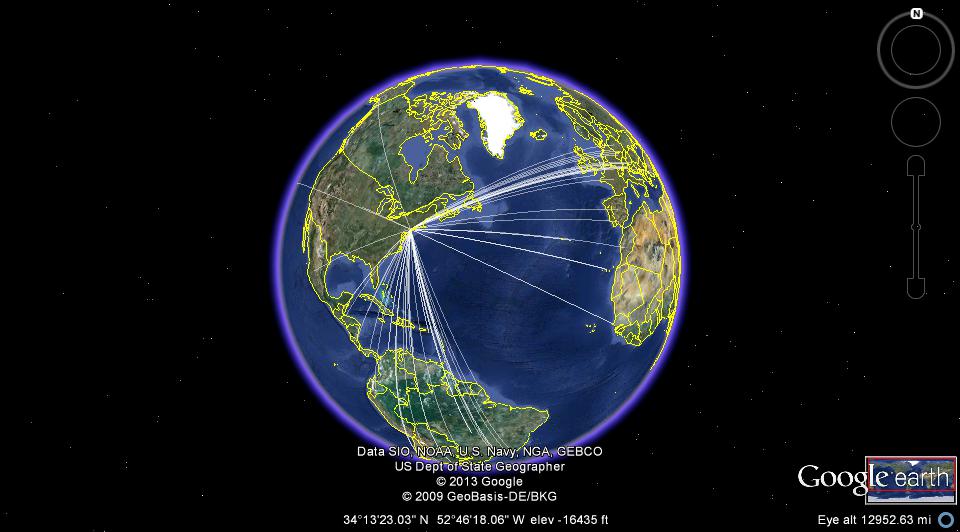
Google Earth is so cool!
72 de Larry W2LJ
QRP – When you care to send the very least!
Larry Makoski, W2LJ, is a regular contributor to AmateurRadio.com and writes from New Jersey, USA. Contact him at [email protected].
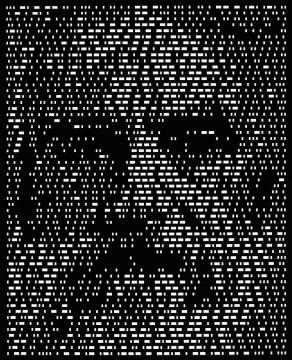
Mr. Morse
72 de Larry W2LJ
QRP – When you care to send the very least!
Larry Makoski, W2LJ, is a regular contributor to AmateurRadio.com and writes from New Jersey, USA. Contact him at [email protected].
Low-tech transmitter hunting
As I’ve mentioned before, KD2CHE and I belong to a local transmitter hunting group. We get together one or two times a month. One member will hide the  box and give us a general area, which is usually a radius from a point (i.e. 2 miles from the intersection of routes 1 and 2 in Anytown, NY). We are the only ones without doppler equipment, yet we almost always find the transmitter. Here’s some pointers for those of you that enjoy a bunny hunt every now and then, but may not think you can participate without sophisticated direction-finding equipment, or for those of you with dopplers that want to refine your techniques.
First of all, when I know the area, I print a map from the computer, and draw a circle for the hunting area. Then, using either our knowledge of the area, or a combination of Google Maps, and Bing Maps, I find a large building that I can drive all the way around, as close to the center as possible. I mark the spot on the map as our starting point. KD2CHE drives, while I navigate. When the time comes to leave for the location, I load up the equipment:
- The mobile in the car, for communicating with the other hunters, an Icom IC-207H
- An older Kenwood all-mode 2 meter mobile, with an RF-gain control, attached to an OPEK micro mag mount antenna
- A smartphone with Google Maps, or a laptop with a broadband connection
- Bright flash-lite
- 1 HT set to the third harmonic of the hunt frequency, usually my Icom IC-T90A with a good antenna
- 1 HT set to the hunt frequency with the antenna off, usually my Baofeng UV3R MkII
- 1 HT set to the hunt frequency for KD2CHE to use out of the car
Once the transmitter is activated, KD2CHE drives slowly around the building at the starting point, stopping when the transmitter stops, and starting up again when it comes back (the one we use is usually 30 seconds on / 30 seconds off). I mark the points in our loop where the signal was strongest and weakest, drawing a line with an arrow to get our initial vector. Then we navigate in that direction, using Google Maps as a guide. As the signal changes I mark the observed strength on the map. When we reach the point where the signal strength goes back down, we determine the high point, and KD2CHE drives as close to perpendicular to the original route as she can.
During this process, the RF gain control on the Kenwood comes in handy. The box puts out a full 5 Watts, so as you get close to it, an un-attenuated receiver becomes useless. For the signal readings with the RF gain all the way down, I write an ‘A’ in front of the s-meter reading on the map. As the strength goes up again, we keep an eye on the 2 HTs. When we’re within 1 or 2 blocks, one or both of them will become active. The third harmonic will usually not work until you are almost on top of the transmitter, which comes in handy. This is when we start looking for a good spot. In many cases there will be a public park, or area of some sort nearby, and the rest of the hunt is done on foot with the HTs, and the flash-lite if necessary.
Body shielding will get you a direction to walk in. Hold a radio that is getting a weak signal (the IC-T90A has a fixed-level attenuator I can activate) close in to your chest and slowly turn around, and make note again of the weak and strong points in the circle. Keep in mind though that sometimes, a good hider will put the box in a location that creates reflections and ghosts. Sometimes you just need to use logic, or in the case of our last hunt, KD2CHE found the box simply by looking, while everyone else was wandering around the woods with Yagis and other fancy equipment.
Of course it helps to know the area, and to have some insight into where people like to hide things. One of our hiders frequently hides in places he discovers while hiking. Another likes to hide in very unique, and sometimes questionable places. Once or twice we’ve had to explain to the authorities what we were doing.
I’m convinced that a doppler might enhance our abilities, but I’m afraid of relying on it too much. We actually have one, but it needs some work. We’ll see.
73! Neil W2NDG
Neil Goldstein, W2NDG, is a regular contributor to AmateurRadio.com and writes from New York, USA. Contact him at [email protected].
 Ham Radio Deluxe |
 W5SWL Electronics |
 Ham Radio Prep |
 KB3IFH QSL Cards  Hip Ham Shirts  HamRadioAuctions HamRadioAuctions Reliance Antennas Reliance Antennas Enigma Shop Enigma Shop |  morseDX  Ni4L Antennas  R&L Electronics R&L Electronics antennas.us antennas.us QRV QRV |
- Matt W1MST, Managing Editor
