Archive for the ‘Technology’ Category
 For those of us who are less technically inclined.
 February 29th, 2016 |
  Author:
 For those of you in the same boat, I would highly recommend the contents of the You Tube channel provided and maintained by Alan Wolke W2AEW. Alan is a fellow member of the Raritan Valley Radio Club. As a VE, I've attended a couple of Ham Crams where Alan was the lead instructor - I can readily testify that Alan knows his stuff, inside and out, upside down and backwards.
Alan has "The Knack" in more ways than one. Not only is he technically gifted, but the also has the ability to take the Greek out of electronics (no offense to my friends from Greece or of Greek decent), and make difficult concepts understandable, in plain English. And that's a pretty good talent to have when you're a Technical Specialist for Tektronics.
In addition to Alan's You Tube channel, to which I think just about every Amateur Radio op should be subscribed to, Alan gave an excellent interview to Eric on "QSO Today". You can listen to it here - http://www.qsotoday.com/podcasts/w2aew
Now, I'm not saying that if you watch all of Alan's videos that you'll be able to instantly comprehend every technical article you read in any Amateur Radio publication. But I can tell you that more and more of the content will be understandable and that you won't be totally clueless - like I used to feel. I'm getting better, but still have a long way to go.
72 de Larry W2LJ
QRP - When you care to send the very least!
For those of us who are less technically inclined.
For those of you in the same boat, I would highly recommend the contents of the You Tube channel provided and maintained by Alan Wolke W2AEW. Alan is a fellow member of the Raritan Valley Radio Club. As a VE, I've attended a couple of Ham Crams where Alan was the lead instructor - I can readily testify that Alan knows his stuff, inside and out, upside down and backwards.
Alan has "The Knack" in more ways than one. Not only is he technically gifted, but the also has the ability to take the Greek out of electronics (no offense to my friends from Greece or of Greek decent), and make difficult concepts understandable, in plain English. And that's a pretty good talent to have when you're a Technical Specialist for Tektronics.
In addition to Alan's You Tube channel, to which I think just about every Amateur Radio op should be subscribed to, Alan gave an excellent interview to Eric on "QSO Today". You can listen to it here - http://www.qsotoday.com/podcasts/w2aew
Now, I'm not saying that if you watch all of Alan's videos that you'll be able to instantly comprehend every technical article you read in any Amateur Radio publication. But I can tell you that more and more of the content will be understandable and that you won't be totally clueless - like I used to feel. I'm getting better, but still have a long way to go.
72 de Larry W2LJ
QRP - When you care to send the very least!
Smartphones
"What do you need a smart phone for anyway? I detest them, they are the mark of the Beast - the Devil's plaything, they are everything that is wrong with society! I use a real radio that has knobs ...... remember what those are?" I am paraphrasing, of course. ;-)
And so on, and so on, and so on. Sigh - heavy sigh.
It's a tool, guys ...... just another tool in the Ham radio arsenal, get it?
I have a pre-owned (sound so much better than "used") Samsung Galaxy S3, which I recently picked up on eBay. It's my first personal 4G cell phone. (I know, forever behind the times.) Even though it's an older model, it's in excellent shape and I'm familiar with the S3, as my work-issued cell phone used to be an S3. For work, they recently upgraded me to an iPhone 5s, which I don't like (or use) - but this post is not about that.
My Galaxy S3 is a great companion for portable QRP ops. It's works much better than the Motorola Droid 2 that I previously used. It has more system memory, so it doesn't lock up or lag on me, like the Droid 2 used to. I have the following Amateur Radio apps on it:
HamLog
SOTAwatch
Morse Trainer by Wolphi
QRZDroid
DX Cluster
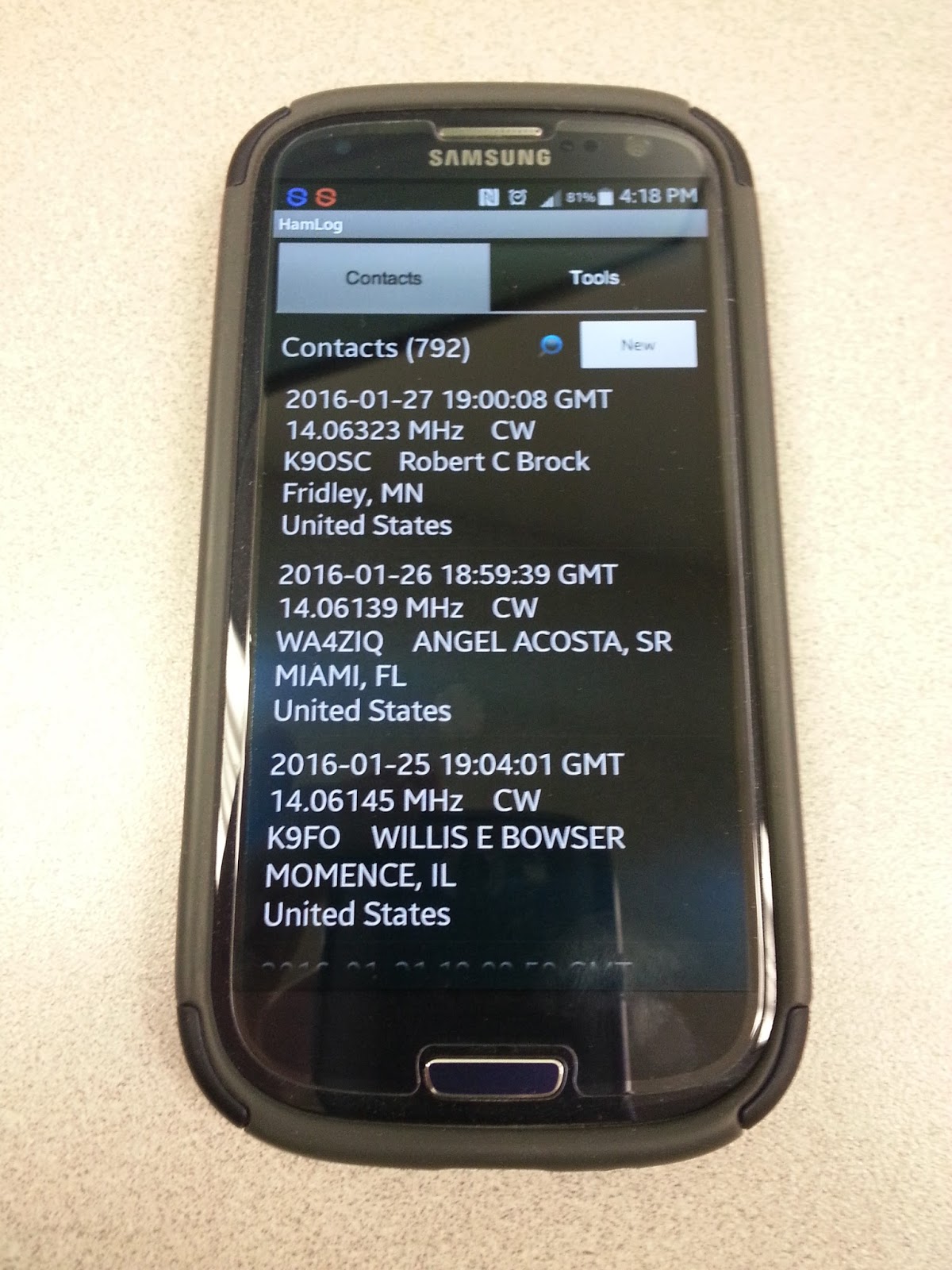
HamLog is great! It's easy to use and has a lot of features. If I'm not in a pileup situation (ragchew mode, or even causal sprint operation), it's easy enough for me to type in my contacts. In a hectic pileup situation (think activating NPOTA or the Skeeter Hunt), where things are happening fast and furious, I get flustered a bit. I can start out logging on the cell phone, but inevitably, I end up getting fumble-fingered and have to resort to old school - paper and pencil. If I'm near a wi-fi source (I have a very limited monthly data allowance, so my data connection is always off), it will even look up the names and QTHs of the operators that I am currently working. I can easily export the log to an ADIF file, so that I can add my portable ops contacts to my main log on Log4OM.
SOTAwatch - turn it on and it shows you the current activations. Call signs, peak, frequency and mode. It has other features which I haven't even explored yet.
Morse Trainer - This is one of the best Morse Code trainers out there IMHO. It will allow Morse to be sent as fast as 60 WPM. I keep mine set to a speed of about 40 WPM and have it send regular words. I try to listen to some code practice several times a week in my never ending goal to become an even more competent CW op. Boy, 25 WPM sure sounds easy-peasy after listening to 40 WPM for a while!
QRZDroid - QRZ.com in an app. Easy call sign look up.
DX Cluster - Very helpful in tracking NPOTA stations. The only drawback with DX Cluster is that you can filter it for either all HF bands or mono-bands. It would be nice if I could filter say, 20 and 17 Meters in one shot. But, hey, if wishes were nickels, I'd be a rich man. Wish I was smart enough to write apps like these, then maybe I would be a rich man!
The bottom line is that a smart phone can be a useful tool to compliment and enhance your overall Amateur Radio experience. It's not a replacement or any other kind of bogeyman. It is what you make of it.
72 de Larry W2LJ
QRP - When you care to send the very least!
Smartphones
"What do you need a smart phone for anyway? I detest them, they are the mark of the Beast - the Devil's plaything, they are everything that is wrong with society! I use a real radio that has knobs ...... remember what those are?" I am paraphrasing, of course. ;-)
And so on, and so on, and so on. Sigh - heavy sigh.
It's a tool, guys ...... just another tool in the Ham radio arsenal, get it?
I have a pre-owned (sound so much better than "used") Samsung Galaxy S3, which I recently picked up on eBay. It's my first personal 4G cell phone. (I know, forever behind the times.) Even though it's an older model, it's in excellent shape and I'm familiar with the S3, as my work-issued cell phone used to be an S3. For work, they recently upgraded me to an iPhone 5s, which I don't like (or use) - but this post is not about that.
My Galaxy S3 is a great companion for portable QRP ops. It's works much better than the Motorola Droid 2 that I previously used. It has more system memory, so it doesn't lock up or lag on me, like the Droid 2 used to. I have the following Amateur Radio apps on it:
HamLog
SOTAwatch
Morse Trainer by Wolphi
QRZDroid
DX Cluster
HamLog is great! It's easy to use and has a lot of features. If I'm not in a pileup situation (ragchew mode, or even causal sprint operation), it's easy enough for me to type in my contacts. In a hectic pileup situation (think activating NPOTA or the Skeeter Hunt), where things are happening fast and furious, I get flustered a bit. I can start out logging on the cell phone, but inevitably, I end up getting fumble-fingered and have to resort to old school - paper and pencil. If I'm near a wi-fi source (I have a very limited monthly data allowance, so my data connection is always off), it will even look up the names and QTHs of the operators that I am currently working. I can easily export the log to an ADIF file, so that I can add my portable ops contacts to my main log on Log4OM.
SOTAwatch - turn it on and it shows you the current activations. Call signs, peak, frequency and mode. It has other features which I haven't even explored yet.
Morse Trainer - This is one of the best Morse Code trainers out there IMHO. It will allow Morse to be sent as fast as 60 WPM. I keep mine set to a speed of about 40 WPM and have it send regular words. I try to listen to some code practice several times a week in my never ending goal to become an even more competent CW op. Boy, 25 WPM sure sounds easy-peasy after listening to 40 WPM for a while!
QRZDroid - QRZ.com in an app. Easy call sign look up.
DX Cluster - Very helpful in tracking NPOTA stations. The only drawback with DX Cluster is that you can filter it for either all HF bands or mono-bands. It would be nice if I could filter say, 20 and 17 Meters in one shot. But, hey, if wishes were nickels, I'd be a rich man. Wish I was smart enough to write apps like these, then maybe I would be a rich man!
The bottom line is that a smart phone can be a useful tool to compliment and enhance your overall Amateur Radio experience. It's not a replacement or any other kind of bogeyman. It is what you make of it.
72 de Larry W2LJ
QRP - When you care to send the very least!
What is the big deal with amateur radio? What is it that you hear? (Part 1)

Shortwave radio has been a source for great sci-fi plots, spy intrigue novels, movies, and so on, since radio first became a “thing.” But, what is the big deal, really? What is it that amateur radio operators listen to?
In this video, I share some of the types of signals one might hear on the high frequencies (also known as shortwave or HF bands). This is the first video in an on-going series introducing amateur radio to the interested hobbyist, prepper, and informed citizen.
I often am asked by preppers, makers, and other hobbyists, who’ve not yet been introduced to the world of amateur radio and shortwave radio: “Just what do you amateur radio operators hear, on the amateur radio shortwave bands?”
To begin answering that question, I’ve taken a few moments on video, to share from my perspective, a bit about this shortwave radio thing:
Link to video: https://youtu.be/pIVesUzNP2U — please share with your non-ham friends.
From my shortwave website:
Shortwave Radio Listening — listen to the World on a radio, wherever you might be. Shortwave Radio is similar to the local AM Broadcast Band on Mediumwave (MW) that you can hear on a regular “AM Radio” receiver, except that shortwave signals travel globally, depending on the time of day, time of year, and space weather conditions.
The International Shortwave Broadcasters transmit their signals in various bands of shortwave radio spectrum, found in the 2.3 MHz to 30.0 MHz range. You might think that you need expensive equipment to receive these international broadcasts, but you don’t! Unlike new Satellite services, Shortwave Radio (which has been around since the beginning of the radio era) can work anywhere with very affordable radio equipment. All that you need to hear these signals from around the World is a radio which can receive frequencies in the shortwave bands. Such radios can be very affordable. Of course, you get what you pay for; if you find that this hobby sparks your interest, you might consider more advanced radio equipment. But you would be surprised by how much you can hear with entry-level shortwave receivers. (You’ll see some of these radios on this page).
You do not need a special antenna, though the better the antenna used, the better you can hear weaker stations. You can use the telescopic antenna found on many of the portable shortwave radios now available. However, for reception of more exotic international broadcasts, you should attach a length of wire to your radio’s antenna or antenna jack.
Creating open-source ham radio hardware with Kickstarter
When I started my company last year, it was mainly set up as a design consulting outfit to pick up a few jobs on the side. At the end of 2014, it became much more when I decided to plunge full-time into my own work. At the time, one of my respected friends and colleagues, Don Powrie of DLP Design, said to me that the only way to make consistent money is to have a product line rather than rely on consulting work. I’ve been thinking of how to bring that to market ever since. I could certainly design some familiar products to me, but they would get lost in the plethora of similar items. I needed something unique.

I started out with a 5V @ 5A design. I drew the schematic and completed the PCB layout and started to check pricing and availability of the parts. Most everything was available at Digi-Key, and the Anderson Connectors from Mouser, but the total was getting close to where I wanted the selling price to be. For a $35 computer, I couldn’t justify a $70-$80 power board!! The DC-DC converter also had a very large ground pad for heat dissipation. I wanted this project to be able to be hand-soldered and started wondering about that large pad. That design got scrapped and I started looking for another buck converter. There were several TI and Linear products I considered, but they would have required a reflow oven – either with a center pad, as a BGA, or leadless formats. Then I found the Alpha & Omega AOZ1031AI. This is a 8-pin SOIC without any special pad. The only heat-dissipation suggestion was that pins 7 and 8 do not have any thermal relief, but connect fully to the surrounding plane. I selected larger commodity parts (0805) that could be seen without a microscope and created the layout, and all parts were in stock at either Digi-Key or Mouser Electronics. I got everything on order, and even managed to get a couple free PCBs from Pentalogix. I had attended a Pentalogix-sponsored Cadsoft Eagle webinar at Newark and the perk was a code for two boards. I just had to cover shipping.
I did other tests: Let it run for 8 hours (check), ramp voltage from 6 to 18V input (check). At 7V input, the Pi kept rebooting. At 8V, it was solid – well past the design spec. Same at 18V.
Next up was the load test. With 2A going direct to load resistors, I was still able to run the Pi with all four USB ports occupied. I even dipped the supply to 8V. The bench supply showed about 1.8A output. Based on an approximate 80% efficiency of DC-DC converter, I calculated I was drawing about 3.5A on the 5V side – a little past its limit, so backed off the load. I’ve been running this directly from my radio supply now for several days, and the Pi keeps chugging along.

I’m a believer in open-source hardware and software. This project will be published in the coming days, probably on GitHub. Eagle uses XML design files, so version control should work just fine. I still need to write the manual, but everything will be made available as soon as I get the proper README and LICENSE files in place. All of my work for this project is published under the Creative Commons Attribution and Share-Alike license. The hardware itself is published under the TAPR Open Hardware License.
LHS Episode #152: Man Smart (Woman Smarter)
 Hello, ladies and gentlemen! It's time for another action filled episode of Linux in the Ham Shack. Topics for this episode include, women in technology, the Amateur Radio Parity Act of 2015, photo editors (of all things), databases for Linux hardware compatibility, ham radio-specific Linux distributions and much more. Thanks for spending an hour of your day with us. We appreciate all of our listeners. Also, don't forget to send us feedback. We'd love to hear from you.
73 de The LHS Guys











