Archive for the ‘radio’ Category
 Travel Footage: 3Y0Z Antarctic Bouvet Island DXpedition 2018 Expedition (by EY8MM)
 February 27th, 2018 |
  Author:
 Here is video footage of the journey to Antarctic Bouvet Island, made by the 3Y0Z amateur ham radio team. This footage caught a few moments on the deck of M/V Betanzos.
As you can see in the last moments of this footage, the weather conditions contributed to the decision to abort the DXpedition, as it was far too dangerous to continue this expedition.
As reported by ARRL:
“Our captain has decided that it is in the best interest of safety and expediency to proceed directly to Capetown, South Africa, rather than Punta Arenas, Chile. We are now heading north to avoid the possibility of encountering ice. Currently, there is no ice in sight or on radar. In due time, we will head easterly toward Capetown. Our entire team is safe. Most are resting in their bunks and in good spirits. We will keep the amateur radio community and our families informed, as we continue our journey.”
In a huge disappointment for the DX community and the members of the 3Y0Z Bouvet Island team, the DXpedition’s leaders announced at 2000 UTC today (February 3) that a decision had been made to abort the DXpedition and head back to Chile.
“During the last 72 hours, we continued to experience the high winds, low clouds, fog and rough seas that have prevented helicopter operations since our arrival at Bouvet,” said an announcement on the 3Y0Z Bouvet Island website. “No improvement was predicted in the weather forecast for the next 4 days. Then, last night, an issue developed in one of the ship’s engines. This morning, the captain of the vessel declared it unsafe to continue with our project and aborted the DXpedition. We are now on our long voyage back to Punta Arenas. As you might imagine, the team is deeply disappointed, but safe. There is already talk about rescheduling the DXpedition.”
Bouvet Island currently is the third most-wanted DXCC entity, behind Kosovo and North Korea. The 3Y0Z DXpedition, comprised of top operators with considerable DXpedition experience, has been in the planning stages for 2 years and had attracted contributions from clubs and individuals around the world.
A dependency of Norway, Bouvet is a subantarctic island in the South Atlantic. The last Bouvet activation was 3Y0E, during a scientific expedition over the winter of 2007-2008.
Video Author: Nodir Tursun Zade, EY8MM
This copy is used BY PERMISSION from EY8MM, given in writing on 23 February 2018
Let’s Call CQ – QSO Today Episode 184 with NW7US
I got a Skype call a few weeks ago from Eric, 4Z1UG–the creator and host of the QSO Today Podcast–during which he asked me about how and why I got into amateur radio. Here’s the result.
Eric writes,
We talk a lot about the band conditions due to the Sunspot cycle. Most of it on Facebook and other places is about how “dead” the bands are at this point. We all can’t wait until the cycle starts to rise and we will be making contacts with little effort. I remember in my conversation with Chuck Adams, K7QO in Episode 58, that he really enjoys operating is “Pigrig”, one watt, CW transceiver on 20 meters. When I asked him, (I liberally paraphrase) “but Chuck, the bands are dead. How does that work for you?”. His reply was that while most hams are listening to the bands, he calls CQ until he gets a reply. Works every time.
My QSO this week is with Tomas Hood, NW7US, who has years of expertise in propagation and Solar activity. He is the propagation editor of more than a few radio magazines and websites. In our post-recording conversation we discussed this phenomenon of listening and not calling CQ. I even had this idea that maybe one of the reasons that the digital modes are so successful is because they “beacon”, as part of the whole digital experience, the same as calling CQ. This is why they make contacts. From what I see, looking at PSK Reporter, hams are making lots of contacts worldwide using the digital modes. While SSB may not be working so well, CW and the digital modes seem to work fine.
I like to work on my bench or make the podcast while listening to the bands. Jeff Damm, WA7MLH, in Episode 177, says that he will put his keyer in CQ mode while he is working on a new radio. Invariably, sometimes after many minutes, he gets a reply. Great idea Jeff!
73,
Eric, 4Z1UG
Episode 184 can be found here: https://www.qsotoday.com/podcasts/nw7us
Highlights of Episode 184:
Tomas Hood, NW7US is the propagation editor of a number of shortwave and amateur radio magazines, and has a wide variety of websites, that grew out of his love for all things radio, and for listening on the bands to far off DX and commercial broadcast stations. Tomas shares his understanding of propagation and the lessons we can learn from listening, really listening to the QSOs and exchanges during contest operation.
All of the QSO Today episodes are great. I enjoy hearing about many different hams. Do check out all of the episodes that Eric has published.
73 de NW7US dit dit
Diversity in the shack
When I get asked ‘what is ham radio?’ I generally get a bit tongue tied and waffle on a bit. There is nothing harder as a ham than actually defining the hobby. This is really down to how diverse the hobby is. Fundamentally at the core is a like of RF. Other than that it sort of sprays out a heap of sub genre’s that have a variety of different followers. Amateur TV, DX chasing, GHz…. the list goes on and on. Perhaps one day a map will be available that shows the full spectrum and a few of the relationships, but for now here is another one. I’m going to call it ham radio services as a working title, it is defined as the ham who uses his knowledge and equipment to provide a service based on RF. APRS igates are an example of this.
So what else is there? The Raspberry Pi has certainly opened up the opportunity to provide low cost services. I have one the is an APRS igate, one that runs my SatNOGS ground station and that was it until last week when I put an unused older Pi2 to good use as an ADSB receiver using a system called PiAware. Essentially a way of melding together an RPi, rtl-sdr dongle and an ADSB antenna. All so that it can listen out for the aircraft beacons and report positional information to the Flightaware website.
The ‘project’ took no more than a couple of hours, mainly because my Micro-SD card died and I had to scrabble around for another one. It is very simple to do and will put your Raspberry Pi to good use. Steps are summarised as
- Sign up with the Flight Aware website and read through the docs on the PiAware page
- Download the image
- Burn the image to a (non corrupt) micro SD card. Plonk it in the pi
- Plug in an Rtl-sdr (or you could splash out on a Flight Aware Prostick)
- Power on
- Find IP address of RPi on network (look in the router settings)
- Go to site (mine is 192.168.1.100). You should have a screen that looks a bit like this

- Claim you receiver (Instructions are on the screen). There will be a link in the place where it says ‘View your site statistics online’
- Sit back and watch the packets come in. When you’re ready go to the FlightAware website and see how well you are doing.

Looking west is best as always from my QTH. Where’s the fun in that? I hear you say?
Its good to experiment, after all there is DX to be had, just not in the conventional sense. Lets take a comparison between WSPR and ADSB. A bit off beat but here goes, WSPR will tell you the distance and signal to noise of your station as heard by another, DX, station. You do the transmitting and someone else does the receiving. With the PiAware setup someone else does the transmitting and you do the receiving. Is this not the same thing? A different band ok but actually the same thing.
Beats attempting to get in contact with some short lived station in a rarely activated location by shouting into a microphone for hours on end. Say I. Wouldn’t it be boring if we all liked the same thing.
One final note. There are lots of RTL-SDR dongles to choose from. The cheap £3 ones from eBay work, they are reliable enough and coupled with the (normally) supplied antenna give me a range around 150-200 nautical miles. the Pro Stick mentioned earlier will extend that range by using a broadband low noise amp (LNA). If you live in an urban environment you can use the Pro Stick Plus that comes with a band pass filter or add in your own. you may also need to adjust gain settings and have a play. I am only using a wire antenna, I will find a reasonable supplier for a colinear or similar and report back.
Onwards and upwards
What Got You Interested in Radio? What Hooked You? (Story Time, with Video)
What got you interested in radio? What hooked you?
I’ve been asked, “What got you interested in radio, space weather, and the science of radio-wave propagation?”
Here’s a short answer as to why (and when) I became a radio enthusiast. It all started…
[embedyt] https://www.youtube.com/watch?v=0XBth62JgwA[/embedyt]
https://www.youtube.com/watch?v=0XBth62JgwA
The following picture is of my first shortwave radio, discovered in my home sometime between 1971 and 1973: a Sony portable transistorized four-band radio receiver. This was my very first shortwave radio (well, truthfully, it was my dad’s). This radio is responsible for my love of radio, electronics, and communications.
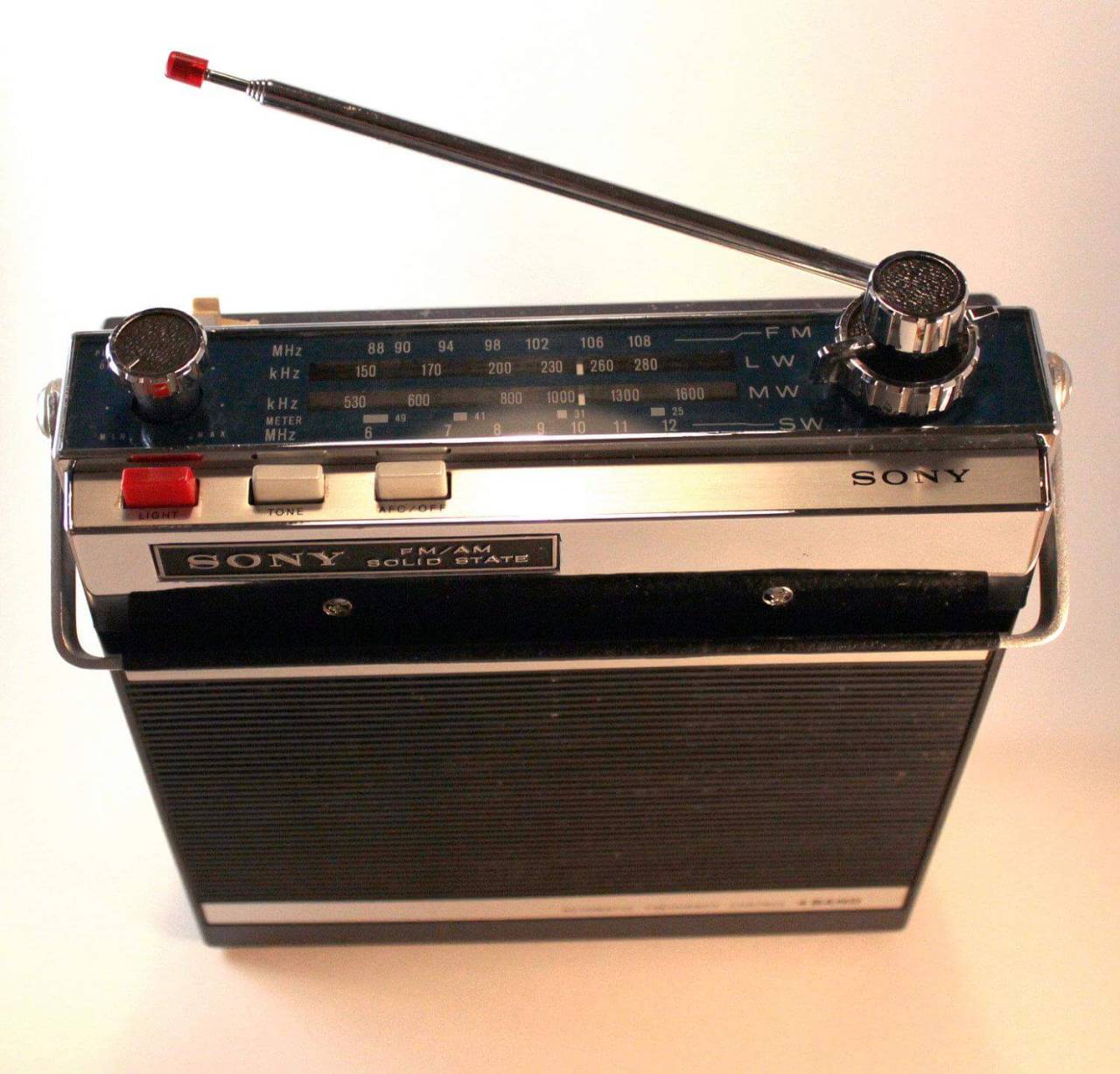
Sony Portable 4-Band Radio – the model 7F-74DL (my First Radio)
I still use this, sometimes, when listening to late-night AM-broadcast-band-radio DX. It is horrible for shortwave radio listening, as it has no noise blanker. For MW (Medium-wave) AM Broadcast DXing at night, it is excellent. The internal bar antenna is very directional so I can rotate the radio around until I get the best reception of some station. Back when I was a child, that made the radio very fun to use.
This next radio is a really capable military surplus radio circa WWII or shortly after (the late 1940s, early 1950s). This radio was my world starting around 1975. From Medium-wave to Shortwave, this radio could hear a pin drop around the world! Many late nights when I was supposed to be sleeping, I was up with the light dimmed and the tubes singing signals from exotic places.
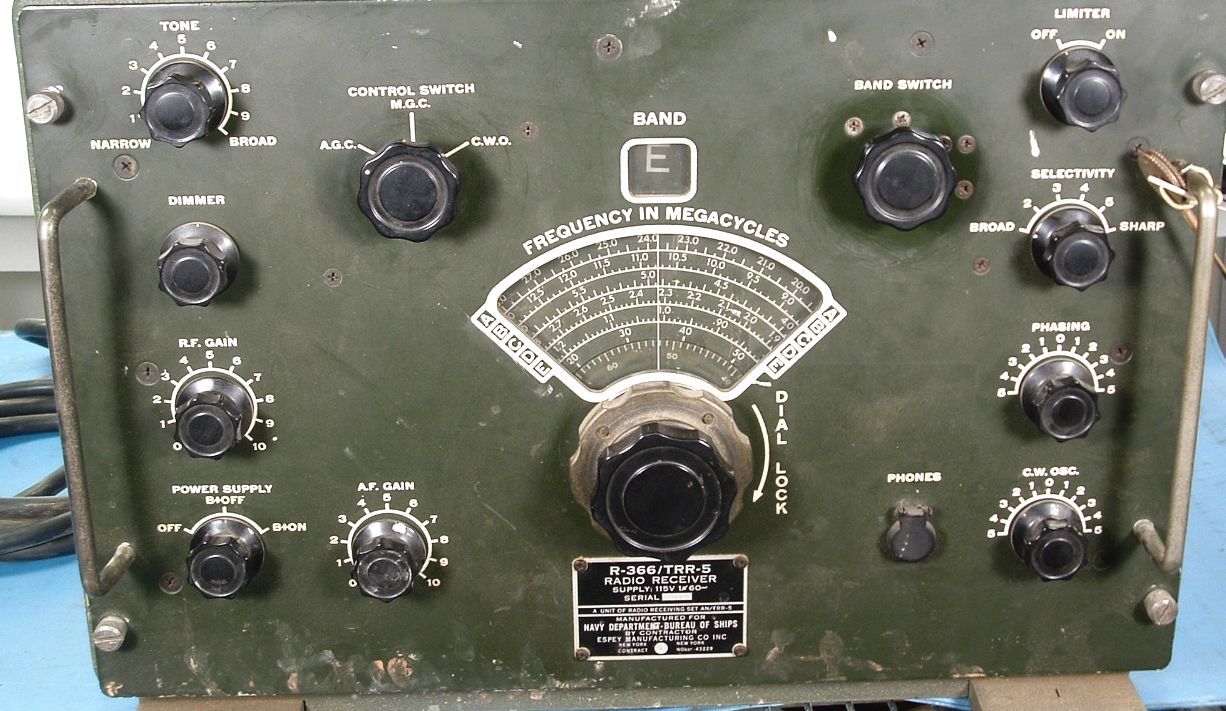
Espey R366 Tube Receiver (my Second Radio)
What is your story?73 de NW7US
Addendum:
https://www.youtube.com/watch?v=y8bBM9Dy38o
[embedyt] https://www.youtube.com/watch?v=y8bBM9Dy38o[/embedyt]
Rest in Peace, David Collingham, K3LP, SK

RIP David Collingham, SK – K3LP is now SK.
My condolences to the family and friends, and to our radio community, for the tragic loss of David Collingham, K3LP.
I am sad and sorry for his loved ones and friends who now grieve this loss.
May his memory echo through the ether like radio waves, reaching the receivers of our hearts.
Passing along a note from Paul, N6PSE:
Dear Friends of David Collingham-K3LP:
I have learned additional information concerning his death.
Last night, during a heavy winter storm, David let his dog outside. David later took his truck to search his 25-acre property when his dog did not return. David found that his dog had fallen into an icy pond that adjoins his property with another property.
David made the heroic decision to go into the pond to try and save his dog.
After some time had passed, David’s wife Rebecca went looking for him. She found his truck at the pond and called 911. Fire personal recovered David’s body as well as his dog. Efforts to resuscitate him were unsuccessful.
David lived his life bold, courageous and heroically and he died trying to save his beloved dog. He will always be a hero in our hearts.
RIP David R. Collingham, age 59.
Yaesu VX8gr APRS problem
I took the dog for a walk today, as you do on new years day. We went down to the beach and then up the headland. Usually I don’t take a handheld with me but today I did, my Yaesu VX8gr which has been up quite a few fells with me and has always been very dependable. Today however I noticed a fault, even though the GPS was on and there was a valid fix the beacon refused to accept the co-ordinates and told me I was at home (I checked back when I got home).
This is a bit of an annoying habit.
A full reset and reprogram didn’t seem to get it to work so I’ll have to search around for a way to solve this. A quick search didn’t reveal users with similar faults. This could be very annoying if I’m out on a fell and using the APRS to report back to Mrs g7kse where I am!
Demonstration: Using FLDigi to Communicate with Olivia Digital Mode on Shortwave
Are you interested in starting out with the amateur-radio digital modes on the high frequencies? Have you heard of FLDigi? FLDigi is a software control and modem suite that interfaces with your transceiver, your computer sound card, and other input/output interfaces so that you can receive and transmit one of many digital modes. For example, FLDigi allows you to operate using the Olivia digital mode.
Demonstration: Using FLDigi to Communicate with Olivia Digital Mode on Shortwave
Unlike the JT/FT digital modes–modes that do an incredible job under marginal propagation conditions–there are other modes that offer keyboard-to-keyboard conversational QSO opportunities that can overcome rough shortwave radio propagation conditions. (The meaning of QSO on Wikipedia: An amateur radio contact, more commonly referred to as simply a “contact”, is an exchange of information between two amateur radio stations.)
While making quick work of getting DX stations into your logbook by exchanging callsigns, a signal report, and a grid square, the JT/FT modes (JT stands for Joe Taylor, the fellow that pioneered these modes) are limited. They cannot handle any additional communications beyond a callsign, a signal report, a grid square, and a very limited set of acknowledgments and sign-off messages.
When you desire to get to know people from other areas of the world, or if you need to establish networks around the world for passing information–perhaps an emergency net in support of the Red Cross–or if you are motivated by any other of a myriad reasons to establish a keyboard-to-keyboard conversation by way of the ionosphere, modes like Olivia are great candidates for your consideration.
In this video, contributing editor with CQ Amateur Radio Magazine, NW7US shares some starting points in the FLDigi software for Olivia keyboard-to-keyboard chat mode.
[embedyt] https://www.youtube.com/watch?v=ejSNfXiT8FE[/embedyt]
Current CENTER Frequencies With 8/250 in MHz:
1.8269, 3.5729, 7.0729, 10.1429, 14.0729, 18.1029, 21.0729, 24.9229, 28.1229, and so on. See the pattern?
By the way: The current suggested CENTER frequency With 16/1000 or 32/1000 on 20 meters is 14.1059.
(Why the …9 frequencies? Experts say that ending in a non-zero, odd number is easier to remember!)
Q: What’s a ‘CENTER’ Frequency? Is That Where I Set My Radio’s Dial?
For those new to waterfalls: the CENTER frequency is the CENTER of the cursor shown by common software. The cursor is what you use to set the transceiver’s frequency on the waterfall. If your software’s waterfall shows the frequency, then you simply place the cursor so that its center is right on the center frequency listed, above. If your software is set to show OFFSET, then you might, for example, set your radio’s dial frequency to 14.0714, and place the center of your waterfall cursor to 1500 (1500 Hz). That would translate to the 14.0729 CENTER frequency.
The FLDigi Manual of Operation is found here: http://www.w1hkj.com/FldigiHelp/
FLDigi can be downloaded here: https://sourceforge.net/projects/fldigi/
Join the Olivia movement:
1. Subscribe to the mailing list: https://Groups.io/g/Olivia
2. Join the Facebook group: https://www.facebook.com/groups/olivia.hf
For additional information on Olivia, check out:
http://blog.nw7us.us/post/168515010062/olivia-digital-mode-great-compromise
http://blog.nw7us.us/post/169114702522/are-you-an-amateur-ham-radio-operator-check-out
73 de NW7US













