Archive for the ‘radio’ Category
 NI0L…. Happy Trails!
 February 28th, 2016 |
  Author:
 I have a new, bright, and shiny callsign!
When I made the decision back in 2013 to stay in Kansas after retiring from the military, I decided I would try to get a callsign for zero-land (or ten-land, if you like). It was time to leave my 7-land callsign and fully embrace being a citizen of the sunflower state. NI0L was available and I applied for it without much thought. After having the callsign for a while, I noticed many hams were confused with the 2×1 call. The most common mistake was flip flopping the zero and the “i”. Another common mistake was interpreting the “i” as one and then the zero would become an “o” (N1OL). All very confusing.
The hunt for a new callsign was on. I determined that a new callsign would still be from zero-land, thus greatly reducing the pool of available calls. In an effort to avoid callsign confusion, I further resolved that the call would be a 1×2 call. The good news was that the vanity callsign fee was no more. The bad news was that everybody and their brother was applying for vanity calls. For the last few months I kept at it – watching which calls became available and then submitting applications. Waiting. The odds where never in my favor. Often there would be 10 or twelve applying, all in competition.
Perseverance finally paid off. Last week the FCC said that I was now the proud holder of N0ZB. It is a 1×2 call, that should alleviate some confusion. The “zero” and the “zulu” may prove to be a bit of a tongue twister, but I think it will be far less of an issue and having the “zero” and an “i” next to one another.
NI0L…. Happy Trails!
I have a new, bright, and shiny callsign!
When I made the decision back in 2013 to stay in Kansas after retiring from the military, I decided I would try to get a callsign for zero-land (or ten-land, if you like). It was time to leave my 7-land callsign and fully embrace being a citizen of the sunflower state. NI0L was available and I applied for it without much thought. After having the callsign for a while, I noticed many hams were confused with the 2×1 call. The most common mistake was flip flopping the zero and the “i”. Another common mistake was interpreting the “i” as one and then the zero would become an “o” (N1OL). All very confusing.
The hunt for a new callsign was on. I determined that a new callsign would still be from zero-land, thus greatly reducing the pool of available calls. In an effort to avoid callsign confusion, I further resolved that the call would be a 1×2 call. The good news was that the vanity callsign fee was no more. The bad news was that everybody and their brother was applying for vanity calls. For the last few months I kept at it – watching which calls became available and then submitting applications. Waiting. The odds where never in my favor. Often there would be 10 or twelve applying, all in competition.
Perseverance finally paid off. Last week the FCC said that I was now the proud holder of N0ZB. It is a 1×2 call, that should alleviate some confusion. The “zero” and the “zulu” may prove to be a bit of a tongue twister, but I think it will be far less of an issue and having the “zero” and an “i” next to one another.
speed = distance over time

Speed does = distance over time. In terms of CW my speed is currently around 12wpm with a character speed of around 20wpm. I have been at a distance from a qso for over a month now and I am experiencing what is called a plateau. Or is this my natural speed?
If I go for a run, I know I can run at a certain pace for a certain distance. Nowadays no amount of training will get me down to what I could once do when I was in my teens (back then I could do around 1 to 2 minutes quicker for a mile). This was the same back then. I have a capacity and I know it well. Is the same true for CW?
Can I only do a certain speed?
How do I find a natural speed and maintain it? (Overtraining is a crime!)
My normal excuse is I need a new pair of trainers. Surely I need a new morse key, right?
The Day The Computer Died
I have been using small footprint computers in ham shack for a while. It started with the Dell Zino. Always a bit under powered, but enough to get the hamming done. The latest computer driving everything was one of those barebones models that was the size of a shoe box. The first sign of decline was when the fan kept getting louder and LOUDER. The the drive (500GBs of SATA) then decided to give up the ghost.
An immediate lesson learned… back up my log. I have been good at uploading my logs (almost daily, when on the air) to LOTW, QRZ.com, and eQSL. But I would only export that days contacts, consistently replacing the previous days exported log.
I choose not to abandon the small footprint computer and went back to the Shuttle. Newegg.org was my one stop shopping:
The case and motherboard: Shuttle XH81 Intel Core i7 / i5 / i3 / Pentium / Celeron 65W Intel H81 1 x HDMI Barebone system
– small form factor, fits neatly underneath monitor.
– 2x RS-232 connections on the back. Perfect for connecting to the Elecraft amp and tuner.
– Plenty of USB connections
Intel Core i7-4770S Haswell Quad-Core 3.1 GHz LGA 1150 65W BX80646I74770S Desktop Processor Intel HD Graphics
– not the fastest, but fast enough.
– comes with a super quiet fan.
Transcend JetRam 8GB 204-Pin DDR3 SO-DIMM DDR3 1600 (PC3 12800) Laptop Memory Model JM1600KSH-8G
– I got two DIMMs to keep things moving… 16GBs = snappy!
SAMSUNG 850 EVO 2.5″ 250GB SATA III 3-D Vertical Internal Solid State Drive (SSD) MZ-75E250B/AM
– Good bye disk, hello solid state. Faster. Silent.
The actual build was plug and play. The Shuttle line has come a long way since my last experience with their product. I think these specific computers are designed to operate older types of technology (hint…. 2x RS-232 connections?) which works great with most amateur radio needs.
The next step was loading the OS. LiLi USB Creator is my go to solution for installing linux when I don’t have an optical drive (which is more often the case). This allows you to load the OS through booting directly from the USB stick.
The linux flavor of the day: Mint with the MATE edition. I was an Ubuntu man until Unity. Then made the jump to Mint. The OS loaded without issue and I was off and running.
Amazingly enough, I was able to install TQSL-2.2. In the past, I have been able to install TQSL from the Software Manager. But this has been an older version of TQSL. The newer versions ALWAYS gave my problems with dependency issues during attempted installs. I stayed with it this time and finally got it working. Phew!
The install of fldigi went smoothe, but configuring it to work with my Elecraft K3 was giving me fits. In my past setup, I’ve always used hamlib for rig control and the trick was just finding which USB number was being used for my USB Microham III. But this time, the USB Microham III was identified by name as a choice. Great! But it didn’t initialize. I tried USB0 (…. nothing), combed over the results of lsusb…. not… working. After some intense Googling, I ran across a command I had never seen before:
sudo adduser [username] dialout
Dialout!? Who knew? But that did the trick.
Now, here is something funny. We all have our junk boxes. As hams, we are pack rats. We hang on to stuff that has no current use, but may someday. I had a box RS-232 cables. When Fall Cleaning swept through the ham shack, I looked at the RS-232 cables. I am really going to need 15 RS-232 cables ranging in length between two and 15 feet? The box headed to the dump.
Now, with my growing K-Line, I can use Elecraft software (linux versions available) to monitor data from the amp and tuner. But the connections are serial. SERIAL. I turned the ham shack upside down and not an RS-232 cable to be found. I really don’t want to have to actually go out and BUY a serial cable.
Minima Digital Board
After procrastinating for a very long time I finally summoned up the ‘whatever it was I needed to summon up’ to get a move on with the Minima transceiver. I planned on tackling the digital board first as it seemed logical. It did however need me to solder an Si570 onto the board without any solder paste. So it was going to be a bit of a struggle.
The method I chose was to put a healthy load of flux on the pads and a blob on both of the ends. Align the chip then solder one end, applying a small amount of pressure onto the chip. Then the other end, then back to the first and then to the second again. Making sure I had seated it correctly. after that the other pads seemed dead easy.
The result was that it worked (I think). Although I am unsure as to why is does stay on a single frequency. This will need a bit of looking at. Here’s a very brief video.
It’s chilly in here
I’m going to use it as an excuse but really it isn’t….The shack is cold (Its a garage really) and the thought of going in there really wasn’t that appealing. We’ve had some pretty miserable weather since the end of November and its been a full time effort just to go out and walk the dog. I’d also taken on the mechanical build of the SatNOGS project as part of the club project and that took up way more time that I thought. Now that’s finished it was time to get on with a few things of my own.
First things first, looking at the Minima digiatl board it seemed like something that could be built and tested in an afternoon. I was nearly right, in the interim I had lost / put in a safe place, the LM1117 3.3v regulator and didn’t have a spare (Like I keep spares of stuff like that, I’m not a professional you know).

Built what I could and here is the result. Stone me it actually powered on an worked first time, but there isn’t any power to the Si570 and that’s a whole different ball of solder.
Onwards and upwards
I Need You in My Log! SKCC K3Y/0 Special Event (January 2016)
I need your help!
Come meet me on the shortwave (HF) ham bands for the Morse code (CW mode) special event, the Straight Key Century Club (SKCC) celebration, with special callsign, K3Y. During the shifts (time slots) listed below, I am the control operator as K3Y/0.
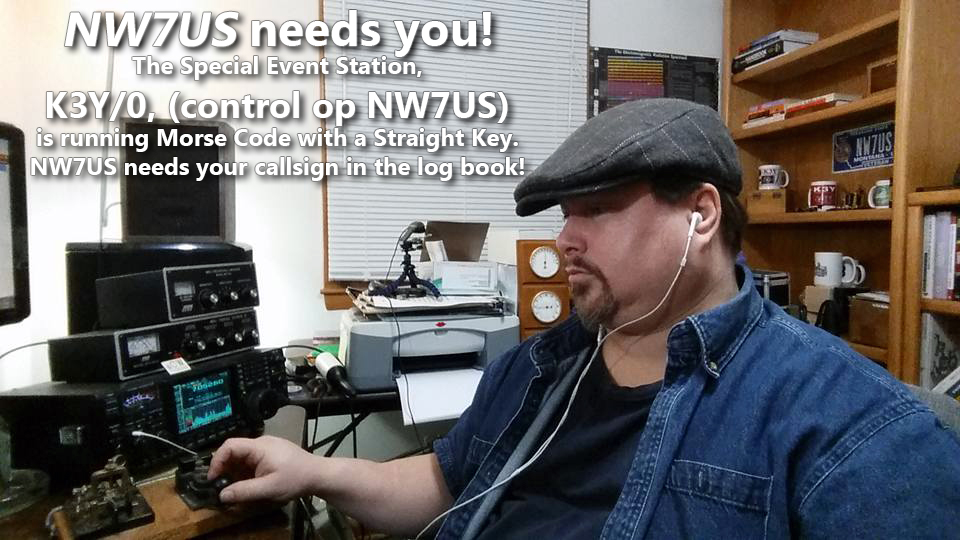 I need you to make a contact with me.
This special event takes place every year during January. We celebrate the legacy of Morse code, and promote Morse code and manual creation of the code by any non-electronic (digital) device and method. Which means that we love mechanical bugs, straight keys, two ends of a wire, or any other manual device, if Morse code is generated. The Straight Key Century Club is a free membership group. The link to their website is below.
I need you to make a contact with me, during my scheduled times, listed below.
NOTE: YOU DO NOT NEED TO BE A MEMBER OF THE (free) SKCC GROUP. To get into my logbook, you meet me on my frequency, and use Morse code to communicate with me. It is painless. If you must, you can use computer-generated Morse code. Or, you can tap it out on any Morse code signalling device, like a bug, a set of paddles, or a straight key; whatever you choose to make Morse code emanate from your HF transmitter.
HOWEVER: For those of you who want to get fully immersed in the spirit of this event, you are invited to use a straight key. And, as a bonus, you may and can join the SKCC group for FREE. Then, you would have your own SKCC number. That’d be cool; we SKCC members use that number in our exchange during our QSO information exchange. But, you don’t need that. Since it is free, why not?
What is needed is simply you, getting on the shortwave band, finding me, hearing me, and responding to me with Morse code. In other words, we need to have a QSO using Morse code. I am not a fast operator, so no problem if you are not very fast. I’ll meet your speed.
In any case, here are some of the times I will be on the air as K3Y/0… please dust off your straight key, bug, paddles, whatever, and make a QSO with me. Thanks!
My current schedule:
UTC Start/End (remember, these are NOT your local times, but are the UTC (GMT) times!)
(revised times, as of edit date)
 00:00 - 02:59 19-Jan-16
 00:00 - 02:59 20-Jan-16
 00:00 - 02:59 21-Jan-16
 00:00 - 02:59 22-Jan-16
 00:00 - 05:59 23-Jan-16
 14:00 - 18:59 23-Jan-16
 20:00 - 21:59 23-Jan-16
 00:00 - 02:59 24-Jan-16
 14:00 - 18:59 24-Jan-16
 21:00 - 21:59 24-Jan-16
 00:00 - 02:59 25-Jan-16
 00:00 - 02:59 26-Jan-16
 00:00 - 02:59 27-Jan-16
 00:00 - 02:59 28-Jan-16
 00:00 - 02:59 29-Jan-16
 00:00 - 05:59 30-Jan-16
 13:00 - 18:59 30-Jan-16
 20:00 - 21:59 30-Jan-16
 00:00 - 03:59 31-Jan-16
 13:00 - 23:59 31-Jan-16
Now, what frequency will I be on?
To find out what frequency I am on:
Visit http://g.nw7us.us/sched4SKCC and look on the right side for my callsign, NW7US. I usually post my frequency of operation right after my call sign.
Typically, evening operation is 30m, then 40m, and then possibly 80m.
If you are trying to alert me to your presence, you may message me on my personal Facebook profile, under my “Tomas David Hood” profile messages, but I may not see that right away.
Here is the detail covering the K3Y operation and the SKCC group: http://skccgroup.com/k3y
73 de NW7US
dit dit
This was last year:
https://www.youtube.com/watch?v=UfRvITFpTb4
..
..