Archive for the ‘radio’ Category
 Project collaboration
 May 19th, 2016 |
  Author:
 During my working life I collaborate with a large groups on multiple sites and we do stuff together. When I am attempting a radio projects I take on a different tack. I attempt to be either an expert in many things or I follow sets of instructions slavishly. Most of the time it takes a long time and there are numerous failures or dead ends along the way. I’m not sure why I do this.
There are many websites that will offer support to the frustrated builder or keen expert. But few that offer hobby collaboration (or at least I haven’t looked too hard but a quick trawl didn’t really yield much). I wonder why that is? A probably misquoted quote goes along the lines of ‘Travel alone, travel fast. Travel together, travel further’. You could argue that sites such as forums offer support and collaboration by using a project management analogy, I can not agree with that. Tasks are not identified, resources are not defined and task durations are not agreed. Expertise is sought, sometimes this results in no responses.
A local ham was at the centre of a project that has now become a major SDR rig. He worked from home, in the evenings with a group spread around the world. They have developed a really astounding product that is now sold as part of the Apache Labs brand. Why is this approach not prevalent?
I’m not offering a solution, just a question. Does a place exist or am I right in assuming that there are some international superstars that produce lots of ‘things’ from 3D designs through to circuit boards and kits that hobbyists use? I think there ought to be a place where we can go to collaborate. I just don’t know where it is or how to engage with it….yet.
April 2016 trip to American Sa’moa
I had originally planned to make a maintenance and upgrade visit to my instrumentation in American Samoa in February 2016. There are lots of advantages to February: It’s cold here in W3, the ARRL DX CW contest is in February, and the phenomenon I’m studying is most active during the equinoxes. I scheduled a 7-day trip that ended with the weekend of ARRL DX so I had the opportunity work through the weekend or play some radio if work went better than expected.
My flight had been booked out of Washington National (DCA) airport at 5:15 am Monday morning, which is the best possible time of day at the worst possible airport. A snowstorm of unknown magnitude was bearing down on the mid-Atlantic. And, around 4:00 pm on Sunday afternoon, I fell asleep on the couch. When I awoke 90 minutes later, it rapidly became clear that I had a nasty stomach flu. As my condition deteriorated further, I finally decided I didn’t want to be fighting that for the next 24 hours on 767s on my way to a foreign place where I wasn’t sure what kind of medical facilities I could access. I cancelled the trip and spent the next 24 hours in bed instead.
The trip was rescheduled for three weeks later in March and I managed to get this itinerary out of BWI, which is much more convenient. I loaded up my gear and went to the airport at 4:00 am. My upgrade had cleared so I didn’t pay excess on my overweight and extra Pelican cases. We sat at the end of the runway on the tarmac doing the preflight checks and the cabin lights started flickering intermittently. And we sat, and we sat. And, we returned to the gate and sat some more. I nervously refreshed the ETA on my phone finally watching the arrival in PHX slip past the departure to HNL. I deplaned.
The agents tried to convince me that I could “just take the flight to Honolulu tomorrow.” With some effort, I communicated to them that the HNL-PPG (Sa’moa) leg my journey only goes on Mondays and Fridays and that I would rather be stuck at home for a week rather than a week in Honolulu. So, I cancelled the trip for a second time. My bags went to PHX and were delivered to my house the next day. I rescheduled the trip for late April with a night in Honolulu on the outbound leg to avoid this bit of bad luck happening twice.
Two days before I left, my local contact called me on the phone to tell me that Tropical Cyclone Amos was bearing down on the island. Fortunately, the hurricane dumped some rain and brought some winds but passed to the north of island. The April trip went off without a hitch, although it was scheduled for four days (Monday night – Friday night) instead of the original seven. So, I was hustling to get my work done and find time for radio.
I was vaguely aware that KC0W is also in KH8, but given my historical bad luck with this particular visit, I didn’t reach out to him. In fact, he’s the one that contacted me once I arrived. We met for breakfast at the McDonald’s in Tafuna one morning and had a nice long ragchew about radio and travel. Typical hams. I decided to focus on bands (especially 160) that Tom wasn’t on given my limited time on the island.
Fortunately, I had access to this mobile phone tower, which I use for my wireless networking for instruments as well. So, I climbed up to check on the network equipment and put a pulley on the tower so I could raise and lower ham antennas safely after-hours when no one was around.
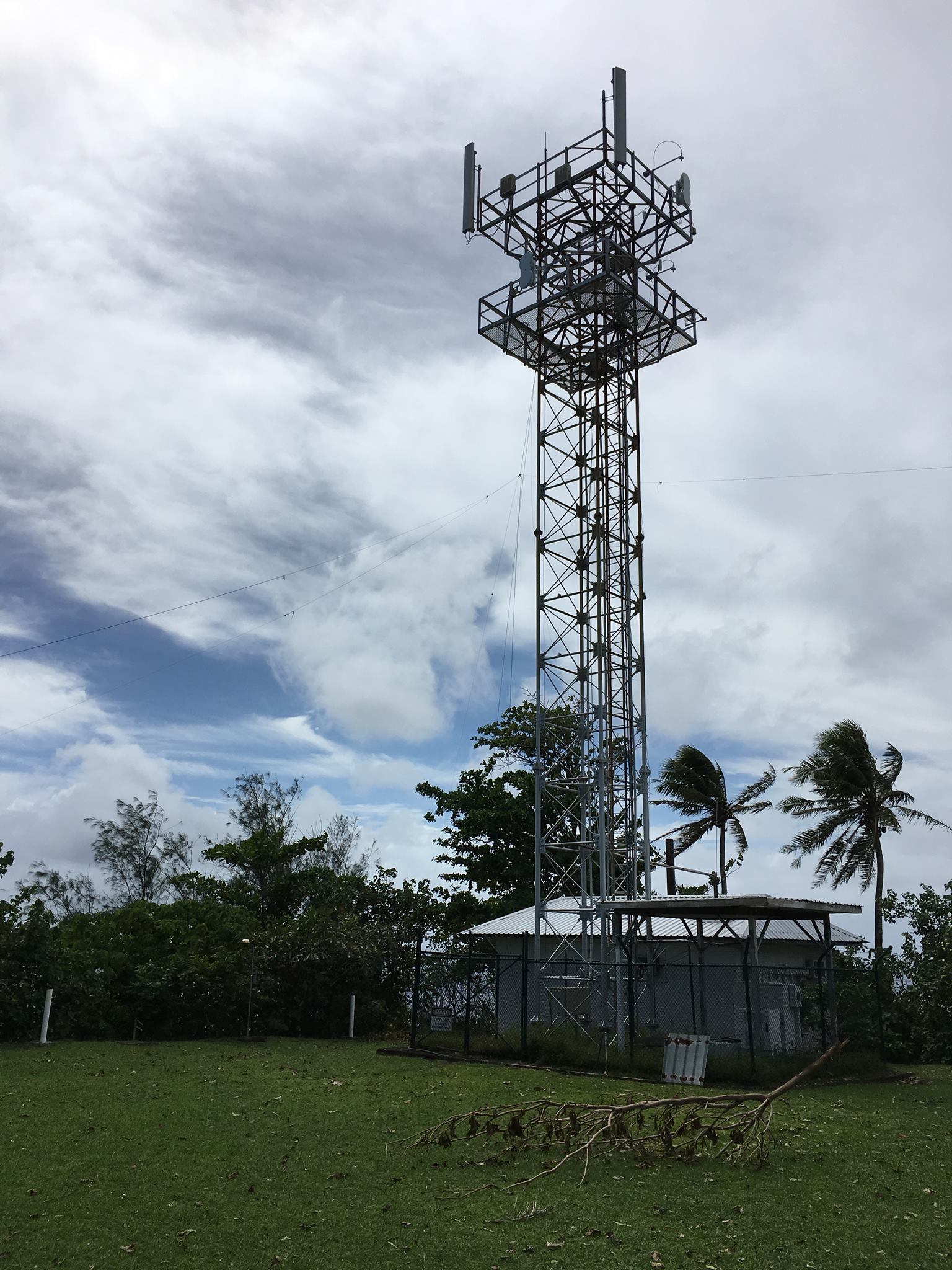
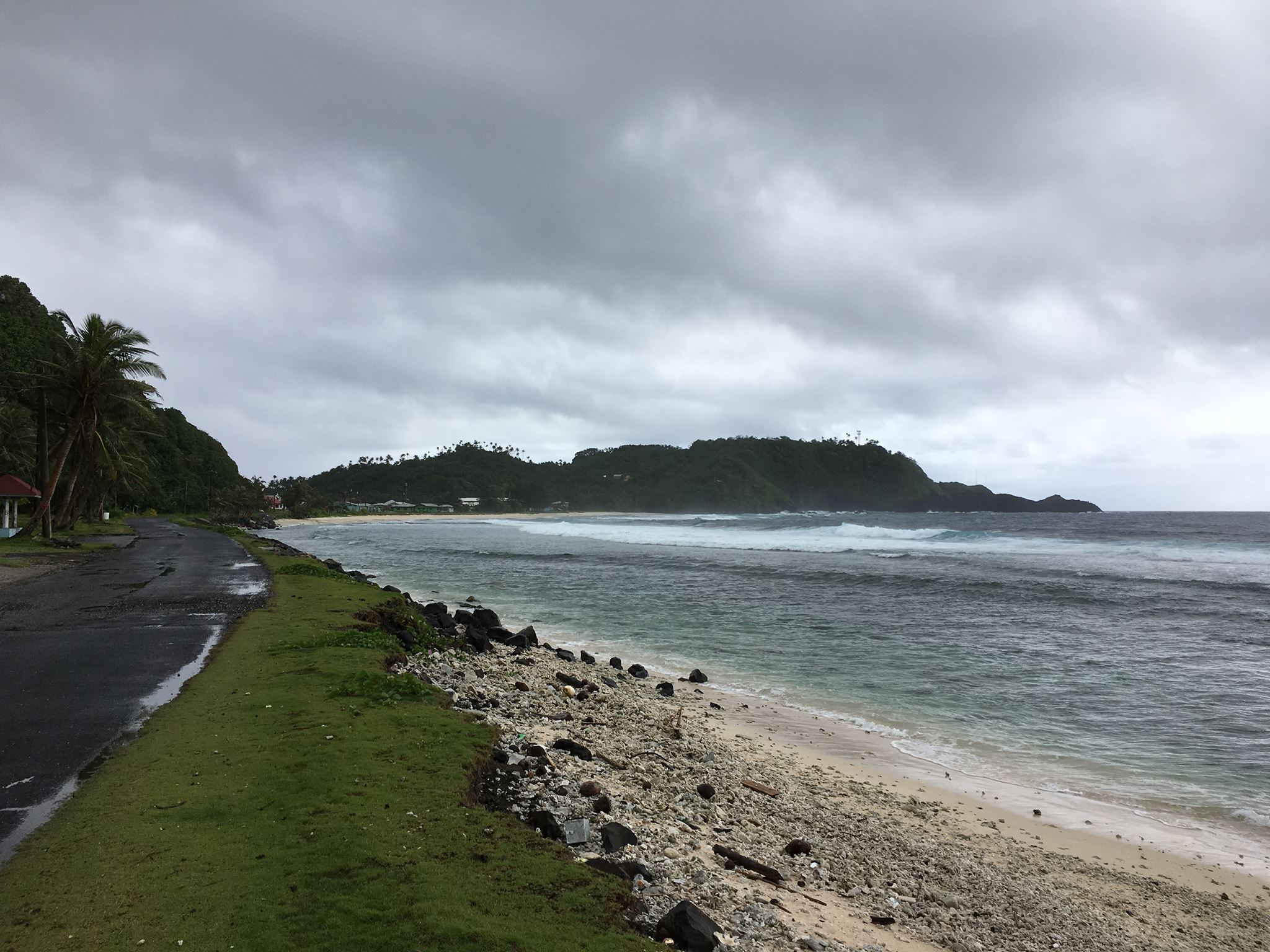
The tower is on the top of Cape Matatula, which sticks out of the northeast corner of Tutuila island. It’s the bit of land jutting out in the middle of the photo below. If you open the full-size photo, you can see the tower just at the edge of a rather precipitous drop-off toward the rocky shore about 1/3 of the way from the right-hand side of the frame. Needless to say, it’s a great QTH with 270 degrees of saltwater view as I’ve mentioned before. At sunrise and sunset, the middle and higher bands are open to EU, JA, and NA/SA all at once. The pileups are thrilling but very challenging.
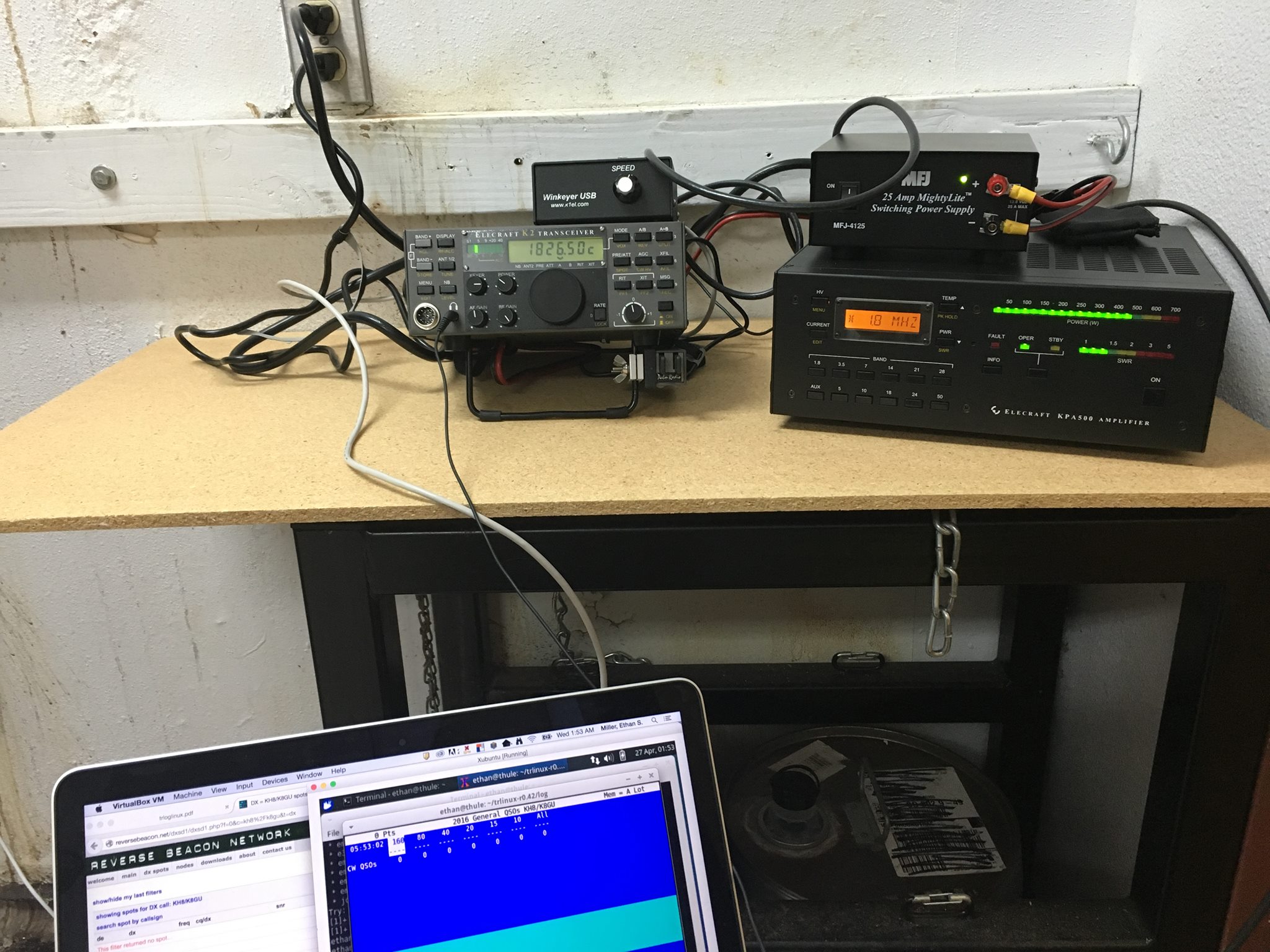
Here’s the radio setup from this trip: K2/100, KPA500, WKUSB, and TRLinux running under VirtualBox on my Mac. This worked OK, but the WKUSB would drop out every few QSOs and needed to be completely rebooted which meant that I had to unplug the USB cable and restart TRLinux. Obviously, this worked when I tested it at home but I was not stressing it like I was in the field. I’m not sure whether it was an RF issue or software/hardware. In any case, I will probably be installing another Windows VM like I’ve used previously.
I only ended up making about 400 QSOs on this trip, which is way down from the approximately 3000 QSOs I made over the past two trips. The combination of aggressive work schedule, glitchy keying, and poor 160-meter conditions (too late in the season, but I made a few guys happy), made it hard to get excited about operating a lot. Furthermore, my operating position was located in a room with an air compressor nearby that would kick on every few minutes. Even with the excellent Etymotic MC5 earbuds, it was still loud. Enough complaining! There will be at least one more trip out there under my present project and if KC0W hasn’t worked everybody, I’ll be there to give you all new counters again. I just uploaded the log to LoTW before I posted this blog entry. I have not responded to any direct QSL cards yet.
HF Email From The Mobile?
Last summer when we were camping in the national parks, there were many campsites where we had no cell phone service. I am not complaining about that, but our work around to communicate back home to the XYL often required a trip to the pay phone (sometimes hard to find). I thought about perhaps using APRS’s capability of relaying short pieces of text as emails. Part of the problem is that there are many areas of the parks that don’t have any APRS digipeater coverage (Glacier and Yellowstone National Parks for example). How to get a message through?
Then I remembered my MARS station (AEN5AC) in Iraq. I was using an ICOM IC-7000 and an SCS PTC-IIusb modem to pass MARSGRAMS from my location north of Baghdad to another station at the US embassy in Qatar. The pairing worked quite well and I was consistently able to connect and pass traffic using PACTOR 3 at the 1400 baud rate. Could I use a similar setup to provide an HF email option while camping this summer?
I dug out my SCS PTC-IIusb modem. I had not used it since shutting down the MARS station in June of 2008. Everything was still in the box. To include the cables necessary to interface the modem with an ICOM IC-706MKIIG… the same rig I use for HF mobile.
I pulled out my spare IC-706MKIIG. Coming back to Kansas from Field Day in California back in 2009, my IC-706MKIIG quit on me. I ended up buying a second at the HRO in Denver and sent the broke one to ICOM. ICOM fixed it and returned it. I kept it in the box and it went back on the shelf. I did order a 6 pin Molex connector with powerpoles to allow for an easy power connection (#9). I connected the two cables from the modem to the rig. Once cable is for the data and plugs into the 706’s 13 pin accessory connection (#4). The other cable connects to the 706’s CI-V interface (#6) to have the radio change frequencies based on what station is being contacted.
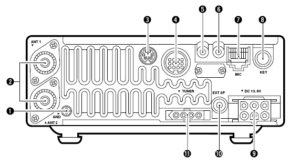
I had the basic hardware of a HF email station, except for a computer. I would need one that would function out of the vehicle. This would probably require a laptop. I also decided for the ease of simplicity that the computer should be Windows driven (instead of Linux). Gasp! The bottom line is that the software and drivers required to send email via HF and use the SCS PTC-IIusb modem is Windows based. The answer ended up being an Dell XPS 15.

Using a Windows based computer helped me with a number of summer travel tasks that could not be accomplished by my small Linux laptop:
(1) Run the software required for HF email (more on Winlink and Airmail later)
(2) Run ARRL’s TravelPlus for Repeaters
(3) Run RT Systems radio programming software for my TM-D710A
(4) Run RT Systems radio programming software for my VX-8RGs
(5) Read the SD card from my Canon digital camera
Interestingly enough, the new laptop does not have a CD/DVD drive nor an RJ-45 connection for a LAN cable. Neither of these have been a show stopper yet.
ARRL’s TravelPlus for Repeaters
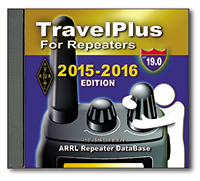 I had purchased TravelPlus for Repeaters with the intent of installing it on my existing Linux laptop and running it under a VirtualBox Windows session (similar to how I run iTunes on my Linux laptop). However the software failed to install. I tried troubleshooting and looking at suggested fixes found on the forum sites but still had no luck. I tried installing TravelPlus using WINE. It installed but would not run as well.
Dell XPS 15 to the rescue. As the laptop does not have a CD/DVD drive, I copied the drive onto network storage. I then was able to install TravelPlus over the network and it is working without issue.
RT Systems Programming Software
The RT Systems programming software works fine under a VirtualBox Windows session. As I was moving all my vehicle related radio/computer tasks to the new Windows laptop, I attempted to install the programming software for the TM-D710A (used for beaconing the location of my vehicle and talking on VHF/UHF). Following a similar procedure that worked for TravelPlus, I copied the programming software from the install disks to a network drive. The software installation for the TM-D710A worked without a hitch. The software for the VX-8RGs (HTs we use for around camp and hiking) failed to load. The error said that I must use the original disk to install. A big challenge when the laptop doesn’t have a CD/DVD drive. The work around is that you find another Windows computer with a CD drive, load the software CD, then back on the driveless laptop, map the CD drive (like you would map a network drive). That worked and I was able to install the programing software for the VX-8GR.
HF Email Software
There are two main choices for software to allow for HF email: RMS Express and Airmail. I installed both. Airmail was the same program I used in Iraq and it offered easy configuration with the IC-706MKIIG and the SCS PTC-IIusb.
I now had all my equipment for a test run setup in my basement hamshack: spare IC-706MKIIG, SCS PTC-IIusb, and the Dell XPS 15 with Airmail. I connected the IC-706MKIIG to my Elecraft tuner and used my existing G5RV antenna. Airmail configures easily. The software has a list of stations offering mailbox services that can be viewed on a propagation chart by frequency and distance. Based on time of day, I selected a station in Texas that offered a 40M PACTOR 3 connection. Airmail allows me to click on the frequency in the propagation chart which then changes the dial frequency of the radio. After listening to see if there were any ongoing connections, I initiated contact. The modem lights flashed and the rig clicked between transmit and receive. The connection was made and I was able to send a test email as well as a position report.
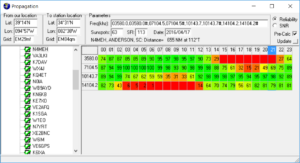
Success! The position reports that go into the Winlink system are copied over into APRS. Now, even if I am not able to reach a digipeater with my VHF APRS beacon, I can send a position report over HF to let the XYL know where we are.
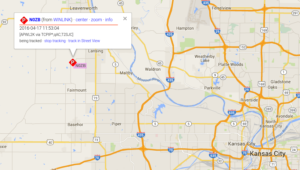
I then thought about the steps I would have to take of transitioning my IC-706MKIIG configured for HF mobile to be ready to work with the PTC-IIusb to send email. As the remote head is located up near the drivers seat, this would present problems with being able to observe the modem, laptop, and radio control head all at the same time.
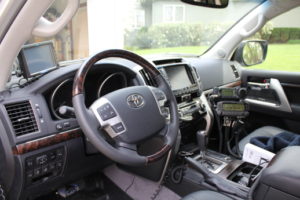
What if I just dedicated the spare IC-706MKIIG rig to the task of HF email? It would save me time and bother in pulling and plugging cables. It would also give the camping option of being able to operate HF from outside the vehicle.
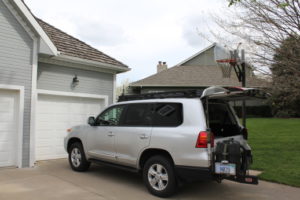
Using an additional iPortable box, I rack mounted the spare IC-706MKIIG and the SCS PTC-IIusb. Now I will have a spare HF rig with me, so if one goes out I will still be operational. I also attached the Tarheel screwdriver antenna’s rocker switch to raise and lower the antenna on the side of the box. During normal HF mobile operations, the TurboTuner (connected to the other IC-706’s tuner connection and CI-V connection) manages achieving a correct match between the operating frequency and the screwdriver antenna.
I only have the one TurboTuner. The TurboTuner requires a connection to the CI-V. So does the SCS PTC-IIusb. My solution was to leave the TurboTuner alone. Instead, using the rocker switch, I can manually tune the antenna while visually observing the 706’s SWR meter.
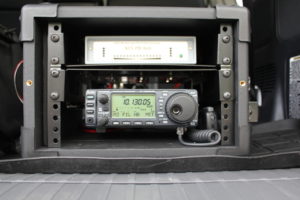
To transition between using the 706 dedicated to HF mobile to the 706 now dedicated to HF email, I have to do the following:
(1) disconnect the antenna feedline from the TurboTuner
(2) disconnect the control line that goes from the TurboTuner to the Tarheel screwdriver antenna
(3) connect the antenna feedline directly to the HF email 706
(4) connect the control line to the rocker switch
(5) connect the laptop to the SCS PTC-IIusb via a USB cable
(6) connect the iPortable’s powerpole connection to the junction box in the back of the vehicle
… then I am ready to go. The iPortable box rests nicely on the vehicle’s tailgate, next to the laptop. All at about lawn chair height. Not only can I use this setup to send email via HF, but I can also use it for causal National Parks On The Air contacts as well.
What’s left to do:
(1) Constant cooling fan modification for both IC-706s (see AD5X’s article)
(2) An extended control cable for the Tarheel screwdriver antenna. This will allow me to further remote away from the vehicle, but still use the antenna.
(3) A length of antenna feedline for remoting.
(4) A length of powerpole-ready powerline to attach to either the travel trailer battery or directly to the spare vehicle battery… again for remoting away from the vehicle.
(5) I have a set of Heil headsets that worked with my IC-7000. I think if I get the AD-1ICM, I should be able to use them with the 706.
(6) A Heil HS-2 hand PTT switch to use with the headset.
Thirty Minutes of Dazzle: The Sun in UHD 4K by SDO (NASA)
Take a front-seat view of the Sun in this 30-minute ultra-high definition movie in which NASA SDO gives us a stunning look at our nearest star.
This movie provides a 30-minute window to the Sun as seen by NASA’s Solar Dynamics Observatory (SDO), which measures the irradiance of the Sun that produces the ionosphere. SDO also measures the sources of that radiation and how they evolve.
SDO’s Atmospheric Imaging Assembly (AIA) captures a shot of the sun every 12 seconds in 10 different wavelengths. The images shown here are based on a wavelength of 171 angstroms, which is in the extreme ultraviolet range and shows solar material at around 600,000 Kelvin (about 1 million degrees F.) In this wavelength it is easy to see the sun’s 25-day rotation.
The distance between the SDO spacecraft and the sun varies over time. The image is, however, remarkably consistent and stable despite the fact that SDO orbits Earth at 6,876 mph and the Earth orbits the sun at 67,062 miles per hour.
Scientists study these images to better understand the complex electromagnetic system causing the constant movement on the sun, which can ultimately have an effect closer to Earth, too: Flares and another type of solar explosion called coronal mass ejections can sometimes disrupt technology in space. Moreover, studying our closest star is one way of learning about other stars in the galaxy. NASA’s Goddard Space Flight Center in Greenbelt, Maryland. built, operates, and manages the SDO spacecraft for NASA’s Science Mission Directorate in Washington, D.C.
Charged particles are created in our atmosphere by the intense X-rays produced by a solar flare. The solar wind, a continuous stream of plasma (charged particles), leaves the Sun and fills the solar system with charged particles and magnetic field. There are times when the Sun also releases billions of tons of plasma in what are called coronal mass ejections. When these enormous clouds of material or bright flashes of X-rays hit the Earth they change the upper atmosphere. It is changes like these that make space weather interesting.
Sit back and enjoy this half-hour 4k video of our Star! Then, share. 🙂
73 dit dit
How-To: Send Perfect Morse Code by Hand (Vintage Video)
What is the proper (and most efficient) technique for creating Morse code by hand, using a manual Morse code key? Ham radio operators find Morse code (and the ‘CW’ mode, or ‘Continuous Wave’ keying mode) very useful, even though Morse code is no longer required as part of the licensing process. Morse code is highly effective in weak-signal radio work. And, preppers love Morse code because it is the most efficient way to communicate when there is a major disaster that could wipe out the communications infrastructure.
While this military film is antique, the vintage information is timeless, as the material is applicable to Morse code, even today.
More about Morse code, at my website: http://cw.hfradio.org
Thank you for watching, commenting, and most of all, for subscribing. By subscribing, you will be kept in the loop for new videos and more… my YouTube Channel: https://YouTube.com/NW7US
See my Video Playlist for related Morse code vidoes:
Making the Palm Mini Paddle Stay Put
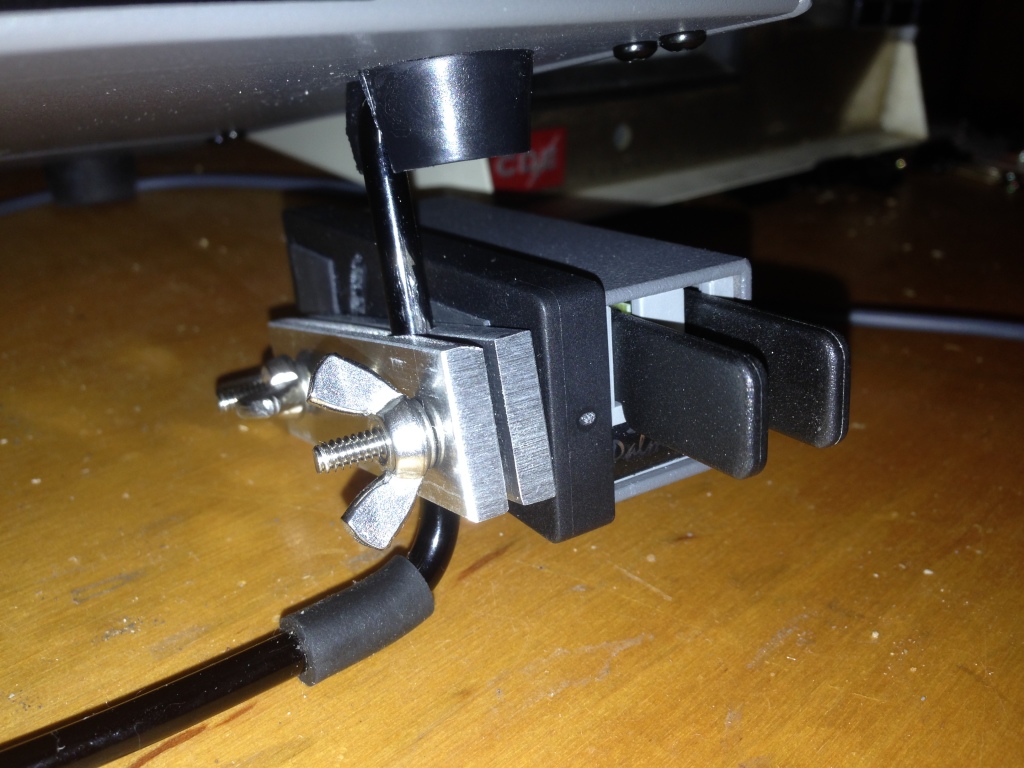
In my on-going quest to produce a lightweight yet good-performing kit of portable equipment to carry along on my exotic work travels, I set my sights once again upon the Morse keying paddles. When I was a student, I carried what I had: a black-base Bencher BY-1. This caught the attention of nearly every airport security screener and was obviously quite heavy, but it stayed put on the table (for the most part) when I aggressively worked a pileup. A few years back, my wonderful, loving, and patient wife, solicited suggestions for Christmas gifts and I suggested a Palm Radio Mini Paddle. (She’s grateful when I provide a link to a web site with a shopping cart in these situations.)
The Palm is really a joy to use and is extraordinarily lightweight, which is perfect for travel. However, I’ve always struggled with how to keep it steady on a table. I have the magnetic base, but that presupposes a ferromagnetic surface to which it will mount. Since both the Elecraft K3 and K2 have aluminum panels, I can’t count on the radio. I tried a variety of additional things, up to and including, trying to design a 3D-printed carrier that is akin to the Begali Traveler. So, I shelved the project, only using the Palm key for casual portable operating when mass trumped long-term operating comfort and efficiency. Good fortune happened upon me and I built this.
When I decided to add an amplifier (more on this in the future) to my portable setup, again pressure set in on the mass of everything. So, I revisited the Palm Mini project. I had purchased a number of mounting clips for the key (hedging my bets against the ephemeral nature of ham radio businesses); so, I set out to attach one to the K2. I’d seen the photo of the base attached to the right-hand side panel of the K2 by the power switch. But, I really didn’t want to drill holes in the panel, plus that puts the paddles too high when the tilt bail is raised (which is necessary to see the display).
So, I fabricated two strips of 3/16-inch aluminum plate (leftover from the hexagonal beam I built a few years ago) with a hole bored down between them to clamp on the tilt bail of the K2 or the K3. There’s nothing particularly critical about the construction of it, although I used a Bridgeport mill to do all the cutting; you might be able to do it in a drill press. I think I ended up with a #14 drill for the clamp hole. I used 6-32 hardware because I had it on-hand and I like the bigger stuff. I had to enlarge the adjustment slot in the Palm base to handle the bigger diameter.
The FCC says you have a new callsign. Now what?
Once I knew that I had a new callsign, I sat down a wrote down a list of what I needed to do…
(1) QRZ.com website. When my callsign changed a few years back from AD7MI to NI0L, I jumped on the air to “test it out”. On 20m, I was having a PSK31 QSO when the distant party thought I was a pirate station because on QRZ.com my new callsign did not reflect the name and QTH I was using. A pirate! I explained that it was a new callsign but I could tell that the other guy was not buying it.
I thought I would need to go on to QRZ.com and register as a new user. I made a posting in the QRZ.com forum category dedicated to callsign problems. The end result: just wait… the change will take place automatically in a few days.
And that is the case. If you are a US ham and change your callsign, just wait. Within two or three days the callsign change will be reflected on QRZ.com. If you get on the air before QRZ.com is updated, be prepared for people to think you are a pirate.

(2) Log of The World. Easy to do. Just submit for a new certificate under the new callsign. ARRL usually responds within one working day.
(3) EchoIRLP node. This ended up being much easier than I thought it would be.
a. To change your callsign in the IRLP database, go to this webpage using a computer connected to the same router as the IRLP node.
b. Go into your node and edit irlp/custom/environment file to change the old callsign to the new callsign. Restart the node and verify the changes have taken effect.
c. For the EchoLink side:
– Validate your new callsign.
– Check for validation of the new EchoLink call sign / node number on EchoLink using the EchoLink PC client software. Remember, EchoIRLP only allows link (-L) or repeater (-R) nodes.
– Note: you can only register the new callsign once the EchoLink folks of pulled the latest and greatest database update from the FCC. This may take a day or two. Once that is done, you can validate your new callsign. Your new callsign will be assigned a new EchoLink node number. If you want to use your previous node number, EchoLink allows you to swap node numbers between your old callsign and your new callsign.
– Once you are validated and have swapped node numbers edit the files and settings listed below:
/home/EchoIRLP/ custom/tbd. conf
ConferenceCall =
ConferencePass =
/home/EchoIRLP/ custom/echo_ environment
export ECHO_MYCALL=
/home/EchoIRLP/ custom/userdata. txt
Restart IRLP from root login with script /home/irlp/custom/ rc.irlp, or reboot the node.
IRLP node 4433 and EchoLink node 536398 are up and operational.
(4) APRS – change the callsign in my vehicle, HTs, and UI-View32. Pretty straight forward. The home weather station info can now be found here.
(5) Change the blog website. I have been keeping an amateur radio blog for about 10 years now. Web hosting companies make it pretty easy to get a domain for your website and then setup web hosting. I like using WordPress to setup and maintain the actual blog. Fairly straight forward but flexible to do just about anything you would want for a amateur radio blog. The new website is up and running.
(6) Callsign license plate. Kansas makes the pretty simple. I went down to my county office on Friday after work. The application process was smooth and the wait should be about 4-6 weeks.
(7) New QSL card. I am thinking of going with this: