Archive for the ‘radio’ Category
 Thirty Minutes of Dazzle: The Sun in UHD 4K by SDO (NASA)
 April 14th, 2016 |
  Author:
 Take a front-seat view of the Sun in this 30-minute ultra-high definition movie in which NASA SDO gives us a stunning look at our nearest star.
This movie provides a 30-minute window to the Sun as seen by NASA’s Solar Dynamics Observatory (SDO), which measures the irradiance of the Sun that produces the ionosphere. SDO also measures the sources of that radiation and how they evolve.
SDO’s Atmospheric Imaging Assembly (AIA) captures a shot of the sun every 12 seconds in 10 different wavelengths. The images shown here are based on a wavelength of 171 angstroms, which is in the extreme ultraviolet range and shows solar material at around 600,000 Kelvin (about 1 million degrees F.) In this wavelength it is easy to see the sun’s 25-day rotation.
The distance between the SDO spacecraft and the sun varies over time. The image is, however, remarkably consistent and stable despite the fact that SDO orbits Earth at 6,876 mph and the Earth orbits the sun at 67,062 miles per hour.
Scientists study these images to better understand the complex electromagnetic system causing the constant movement on the sun, which can ultimately have an effect closer to Earth, too: Flares and another type of solar explosion called coronal mass ejections can sometimes disrupt technology in space. Moreover, studying our closest star is one way of learning about other stars in the galaxy. NASA’s Goddard Space Flight Center in Greenbelt, Maryland. built, operates, and manages the SDO spacecraft for NASA’s Science Mission Directorate in Washington, D.C.
Charged particles are created in our atmosphere by the intense X-rays produced by a solar flare. The solar wind, a continuous stream of plasma (charged particles), leaves the Sun and fills the solar system with charged particles and magnetic field. There are times when the Sun also releases billions of tons of plasma in what are called coronal mass ejections. When these enormous clouds of material or bright flashes of X-rays hit the Earth they change the upper atmosphere. It is changes like these that make space weather interesting.
Sit back and enjoy this half-hour 4k video of our Star! Then, share. 🙂
73 dit dit
How-To: Send Perfect Morse Code by Hand (Vintage Video)
What is the proper (and most efficient) technique for creating Morse code by hand, using a manual Morse code key? Ham radio operators find Morse code (and the ‘CW’ mode, or ‘Continuous Wave’ keying mode) very useful, even though Morse code is no longer required as part of the licensing process. Morse code is highly effective in weak-signal radio work. And, preppers love Morse code because it is the most efficient way to communicate when there is a major disaster that could wipe out the communications infrastructure.
While this military film is antique, the vintage information is timeless, as the material is applicable to Morse code, even today.
More about Morse code, at my website: http://cw.hfradio.org
Thank you for watching, commenting, and most of all, for subscribing. By subscribing, you will be kept in the loop for new videos and more… my YouTube Channel: https://YouTube.com/NW7US
See my Video Playlist for related Morse code vidoes:
Making the Palm Mini Paddle Stay Put
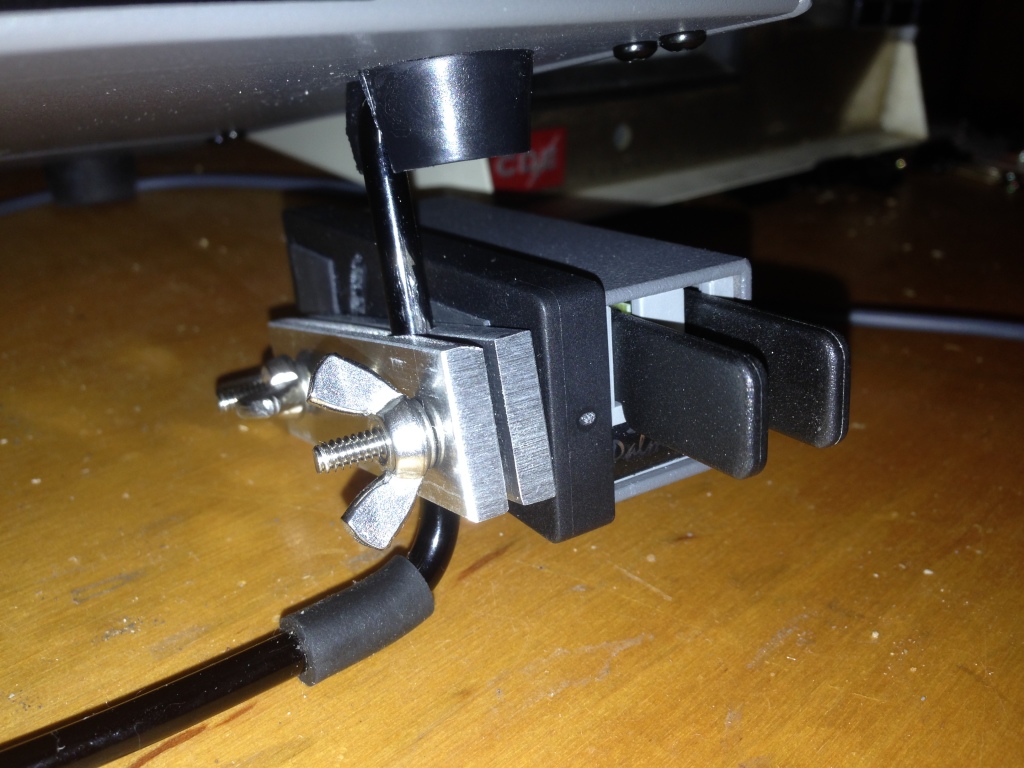
In my on-going quest to produce a lightweight yet good-performing kit of portable equipment to carry along on my exotic work travels, I set my sights once again upon the Morse keying paddles. When I was a student, I carried what I had: a black-base Bencher BY-1. This caught the attention of nearly every airport security screener and was obviously quite heavy, but it stayed put on the table (for the most part) when I aggressively worked a pileup. A few years back, my wonderful, loving, and patient wife, solicited suggestions for Christmas gifts and I suggested a Palm Radio Mini Paddle. (She’s grateful when I provide a link to a web site with a shopping cart in these situations.)
The Palm is really a joy to use and is extraordinarily lightweight, which is perfect for travel. However, I’ve always struggled with how to keep it steady on a table. I have the magnetic base, but that presupposes a ferromagnetic surface to which it will mount. Since both the Elecraft K3 and K2 have aluminum panels, I can’t count on the radio. I tried a variety of additional things, up to and including, trying to design a 3D-printed carrier that is akin to the Begali Traveler. So, I shelved the project, only using the Palm key for casual portable operating when mass trumped long-term operating comfort and efficiency. Good fortune happened upon me and I built this.
When I decided to add an amplifier (more on this in the future) to my portable setup, again pressure set in on the mass of everything. So, I revisited the Palm Mini project. I had purchased a number of mounting clips for the key (hedging my bets against the ephemeral nature of ham radio businesses); so, I set out to attach one to the K2. I’d seen the photo of the base attached to the right-hand side panel of the K2 by the power switch. But, I really didn’t want to drill holes in the panel, plus that puts the paddles too high when the tilt bail is raised (which is necessary to see the display).
So, I fabricated two strips of 3/16-inch aluminum plate (leftover from the hexagonal beam I built a few years ago) with a hole bored down between them to clamp on the tilt bail of the K2 or the K3. There’s nothing particularly critical about the construction of it, although I used a Bridgeport mill to do all the cutting; you might be able to do it in a drill press. I think I ended up with a #14 drill for the clamp hole. I used 6-32 hardware because I had it on-hand and I like the bigger stuff. I had to enlarge the adjustment slot in the Palm base to handle the bigger diameter.
The FCC says you have a new callsign. Now what?
Once I knew that I had a new callsign, I sat down a wrote down a list of what I needed to do…
(1) QRZ.com website. When my callsign changed a few years back from AD7MI to NI0L, I jumped on the air to “test it out”. On 20m, I was having a PSK31 QSO when the distant party thought I was a pirate station because on QRZ.com my new callsign did not reflect the name and QTH I was using. A pirate! I explained that it was a new callsign but I could tell that the other guy was not buying it.
I thought I would need to go on to QRZ.com and register as a new user. I made a posting in the QRZ.com forum category dedicated to callsign problems. The end result: just wait… the change will take place automatically in a few days.
And that is the case. If you are a US ham and change your callsign, just wait. Within two or three days the callsign change will be reflected on QRZ.com. If you get on the air before QRZ.com is updated, be prepared for people to think you are a pirate.

(2) Log of The World. Easy to do. Just submit for a new certificate under the new callsign. ARRL usually responds within one working day.
(3) EchoIRLP node. This ended up being much easier than I thought it would be.
a. To change your callsign in the IRLP database, go to this webpage using a computer connected to the same router as the IRLP node.
b. Go into your node and edit irlp/custom/environment file to change the old callsign to the new callsign. Restart the node and verify the changes have taken effect.
c. For the EchoLink side:
– Validate your new callsign.
– Check for validation of the new EchoLink call sign / node number on EchoLink using the EchoLink PC client software. Remember, EchoIRLP only allows link (-L) or repeater (-R) nodes.
– Note: you can only register the new callsign once the EchoLink folks of pulled the latest and greatest database update from the FCC. This may take a day or two. Once that is done, you can validate your new callsign. Your new callsign will be assigned a new EchoLink node number. If you want to use your previous node number, EchoLink allows you to swap node numbers between your old callsign and your new callsign.
– Once you are validated and have swapped node numbers edit the files and settings listed below:
/home/EchoIRLP/ custom/tbd. conf
ConferenceCall =
ConferencePass =
/home/EchoIRLP/ custom/echo_ environment
export ECHO_MYCALL=
/home/EchoIRLP/ custom/userdata. txt
Restart IRLP from root login with script /home/irlp/custom/ rc.irlp, or reboot the node.
IRLP node 4433 and EchoLink node 536398 are up and operational.
(4) APRS – change the callsign in my vehicle, HTs, and UI-View32. Pretty straight forward. The home weather station info can now be found here.
(5) Change the blog website. I have been keeping an amateur radio blog for about 10 years now. Web hosting companies make it pretty easy to get a domain for your website and then setup web hosting. I like using WordPress to setup and maintain the actual blog. Fairly straight forward but flexible to do just about anything you would want for a amateur radio blog. The new website is up and running.
(6) Callsign license plate. Kansas makes the pretty simple. I went down to my county office on Friday after work. The application process was smooth and the wait should be about 4-6 weeks.
(7) New QSL card. I am thinking of going with this:
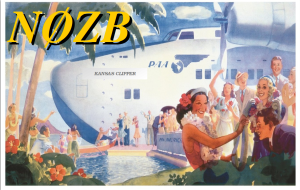
NI0L…. Happy Trails!
I have a new, bright, and shiny callsign!
When I made the decision back in 2013 to stay in Kansas after retiring from the military, I decided I would try to get a callsign for zero-land (or ten-land, if you like). It was time to leave my 7-land callsign and fully embrace being a citizen of the sunflower state. NI0L was available and I applied for it without much thought. After having the callsign for a while, I noticed many hams were confused with the 2×1 call. The most common mistake was flip flopping the zero and the “i”. Another common mistake was interpreting the “i” as one and then the zero would become an “o” (N1OL). All very confusing.
The hunt for a new callsign was on. I determined that a new callsign would still be from zero-land, thus greatly reducing the pool of available calls. In an effort to avoid callsign confusion, I further resolved that the call would be a 1×2 call. The good news was that the vanity callsign fee was no more. The bad news was that everybody and their brother was applying for vanity calls. For the last few months I kept at it – watching which calls became available and then submitting applications. Waiting. The odds where never in my favor. Often there would be 10 or twelve applying, all in competition.
Perseverance finally paid off. Last week the FCC said that I was now the proud holder of N0ZB. It is a 1×2 call, that should alleviate some confusion. The “zero” and the “zulu” may prove to be a bit of a tongue twister, but I think it will be far less of an issue and having the “zero” and an “i” next to one another.
NI0L…. Happy Trails!
I have a new, bright, and shiny callsign!
When I made the decision back in 2013 to stay in Kansas after retiring from the military, I decided I would try to get a callsign for zero-land (or ten-land, if you like). It was time to leave my 7-land callsign and fully embrace being a citizen of the sunflower state. NI0L was available and I applied for it without much thought. After having the callsign for a while, I noticed many hams were confused with the 2×1 call. The most common mistake was flip flopping the zero and the “i”. Another common mistake was interpreting the “i” as one and then the zero would become an “o” (N1OL). All very confusing.
The hunt for a new callsign was on. I determined that a new callsign would still be from zero-land, thus greatly reducing the pool of available calls. In an effort to avoid callsign confusion, I further resolved that the call would be a 1×2 call. The good news was that the vanity callsign fee was no more. The bad news was that everybody and their brother was applying for vanity calls. For the last few months I kept at it – watching which calls became available and then submitting applications. Waiting. The odds where never in my favor. Often there would be 10 or twelve applying, all in competition.
Perseverance finally paid off. Last week the FCC said that I was now the proud holder of N0ZB. It is a 1×2 call, that should alleviate some confusion. The “zero” and the “zulu” may prove to be a bit of a tongue twister, but I think it will be far less of an issue and having the “zero” and an “i” next to one another.
speed = distance over time

Speed does = distance over time. In terms of CW my speed is currently around 12wpm with a character speed of around 20wpm. I have been at a distance from a qso for over a month now and I am experiencing what is called a plateau. Or is this my natural speed?
If I go for a run, I know I can run at a certain pace for a certain distance. Nowadays no amount of training will get me down to what I could once do when I was in my teens (back then I could do around 1 to 2 minutes quicker for a mile). This was the same back then. I have a capacity and I know it well. Is the same true for CW?
Can I only do a certain speed?
How do I find a natural speed and maintain it? (Overtraining is a crime!)
My normal excuse is I need a new pair of trainers. Surely I need a new morse key, right?













