Archive for the ‘ham radio’ Category
 Introducing Ham Radio School
 July 15th, 2012 |
  Author:
  For several years now, I’ve been teaching a Technician License course with a team of instructors from our local radio club. We use a very successful 2-day format (90% success rate on the FCC exam), holding the class on 2 consecutive Saturdays at the local fire station. Our next session starts on Sept 29th.
For this compressed two-day class, we’ve been using the Gordon West Technician Class book and (optionally) encouraged the class to read the ARRL Ham Radio License Manual. The Gordon West book is very focused on the exam questions, with some explanation around each one. The ARRL book is more thorough and deeper technically, so it is a good reference to round out the student’s understanding. Basically, the Gordon West book is good for “teaching the exam questions” and the ARRL book is good for providing a more comprehensive understanding.
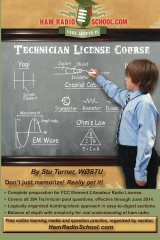 My fellow instructor, Stu Turner WØSTU, got the idea into his head that it would be good to create a license manual that gave a solid treatment of the material while still highlighting the specific questions on the exam. The next thing you know, he is off creating a new book, Ham Radio School.com Technician License Course. Stu did an excellent job writing this book, keeping it focused on the relevant topics but going beyond just teaching the exam questions. He also has a good knack for keeping it interesting.
The story didn’t end there. One thing led to another and the book concept blossomed into a integrated learning system that includes a web site, iPhone/iPad app and (of course) the book. The web site offers some written content and interesting videos that help people learn about amateur radio. I will be contributing some material to the web site from time to time.
The Ham Radio School iPhone app is really sweet…check it out on iTunes. All the questions from the current Technician question pool are included in both review-style quizzes and in properly weighted, full 35-question practice exams, just like the one you’ll take at your VE session.
The most important thing is that the book, the web site and the iPhone app are coordinated and work together as a system. We all have different learning styles, so the system approach allows the student to focus on what suits them best.
73, Bob K0NR
Technician License Class – Sept 2012
 Monument, Colorado
Saturday Sept 29 and Saturday Oct 6 (8 AM to 5 PM) 2012
Location: Tri-Lakes Monument Fire Station 1
Sponsored by the Tri-Lakes Monument Fire Radio Association
The Technician license is your gateway to the world-wide excitement of Amateur Radio…
- Earn your ham radio Technician class radio privileges
- Pass your FCC amateur radio license exam right in class on the second day
- Multiple-choice exam, No Morse Code Required
- Live equipment demonstrations
- Learn to operate on the ham bands, 10 Meters and higher
- Learn to use the many VHF/UHF FM repeaters in Colorado
- Find out how to participate in emergency communications
There is no cost for the class (donations accepted)
However, students must have the required study guide:
HamRadioSchool.com Technician License Course $19.95
And pay the FCC Exam Fee: $15.00
Advance registration is required (no later than one week before the first session, earlier is better!)
To register for the class, contact: Bob Witte KØNR
Email: [email protected] or Phone: 719 659-3727
For more information on amateur (ham) radio visit www.arrl.org or www.wedothat-radio.org
The ARRL Radiogram, Part 1
 Who knew the ARRL radiogram could be so easy to send and receive — and so enjoyable? All those old-time NTS operators, of course! The National Traffic System — the “Relay” in the American Radio Relay League — has been around since 1915, yet never have I had the courage to take part until now. I wish I’d done it sooner. My son, a ham for only a month, has already passed two radiograms of his own! How about you? Would you like to give it a try?
 The first step is to find a net that is part of the NTS. I found one by searching the ARRL database (click here) for a “Section Net” in Minnesota. Unfortunately the database is a bit cluttered, so it may require a bit of patience as you sift through the listings and tune around listening for a listed net. But that’s not a bad way to start, really. Patient listening will get you far in this hobby, especially when you’re trying to learn something new.
Once I found the MN Section Phone Net on 3860 kHz I listened to a few sessions before checking in. My biggest fear was that I might be asked to receive a radiogram without understanding the procedure. But I didn’t have anything to worry about — surprisingly, very little traffic is actually passed these days. The same is true of the SD NEO Net which immediately follows the MN Section net on that frequency.
We need more radiograms in the system. It doesn’t matter how trivial your message is, honestly. Know somebody who has a birthday coming up? Send him a radiogram! It is a novel way to send a greeting, and it helps keep the NTS running the way it’s supposed to. As the ARES EC for my county I have a vested interest in the proficiency of the NTS, which works closely with ARES during a disaster. But I digress.
 To learn how to send and receive a radiogram I turned to The ARRL Operating Manual For Radio Amateurs. The chapter on traffic handling is very well written; read through it a couple of times and you’ll be ready to handle radiograms by a voice-mode. CW is a little tougher because it involves unique prosigns and Q-signals — the book is indispensable as a starting-point, but I’m still not ready to check into a CW traffic net quite yet. I’m listening when I can, though, and learning.
Before passing a radiogram in the NTS, I practiced sending and receiving a test-radiogram with my son on 2 meter simplex. Then I practiced sending a test-radiogram to the Yellow Medicine County ARES Training Net on our local 2 meter repeater. We were ready to do it for real. On the next Training Net my son sent me a bona fide radiogram bound for his friend in Virginia. No turning back now — I couldn’t let my son down! The next chance I had to put it into the NTS was with the SD NEO Phone Net, so I tuned in, gulped, and took the plunge. Pretty soon the radiogram was on its way and I was grinning. This is easy!
In my next post I’ll describe how to compose a radiogram. Obviously I’m new at this, but that also means some of these things are fresh in my mind. I hope it will help one of you get on the air and send a radiogram!


Waldo Canyon Wildfire in Colorado
You probably already heard about the terrible wildfire on the west side of Colorado Springs. The fire burned 18,247 acres, destroyed 346 homes and killed 2 people.
Here’s a map of how the fire progressed over time.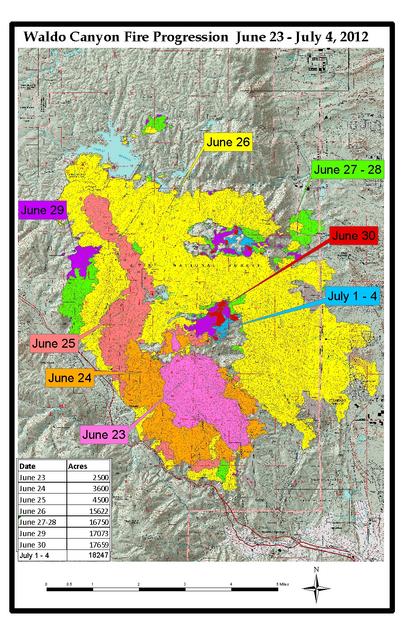
18,247 acres is a little more than 28 square miles of area burned. Think about a fire that consumes 28 square miles in your back yard. Pretty sobering.
Here’s a time lapse video that shows the fire from a distance.
The Denver Post has some of the best photos of the fire as it burned structures on the northwest side of Colorado Springs.
There were two major ham radio activities (that I am aware of) in response to the fire:
The RACES team (Special Communications Unit) attached to the El Paso County Sheriff’s office staffed the Emergency Operations Center in Colorado Springs. I did help out for one 12-hour shift, a relatively minor role.
Pikes Peak ARES supported the Red Cross, who operated the emergency shelters for ~32,000 people that had to evacuate their homes. The Pueblo newspaper ran an article about this.
The real heroes are the firefighters that battled the blaze, especially on that terrible Tuesday night when so many houses were lost. Those guys and gals are awesome!
- 73, Bob K0NR
Heartwarming: My Son Takes My Old Novice Callsign, KAØCEM

Novice Station KAØCEM, circa 1978.
Today my son, Antonio, was granted my old Novice call sign from 1978: KAØCEM. He has wanted this call sign ever since he began studying for his Technician license. What a moving thing this is to behold my son showing such honor to his father, if even in such a trivial matter as an amateur radio call sign. It gives me pause to contemplate my relationship with Antonio and the man he has become.
Back in 1996, when he was born, I could not foresee the year 2012. I’ll never forget that day when we came home from church to hear a message from Antonio Maset, the director of our adoption agency. Our hearts leaped to hear him say that a baby boy had been born the night before in Guatemala City. Mr. Maset said he would call back later that evening. We spent the afternoon with another adoptive family with a boy from Guatemala, and my wife and I looked at each other in awe when the mother told us we should have a name picked out when Mr. Maset called us back. Watching her boy and imagining a son of our own like him, our minds whirled as we tried to grasp the magnitude of what was happening.
When we went home and waited for the phone to ring, the minutes crawled by like hours. Finally, the phone rang and my wife and I each picked up. Antonio Maset was on the line with Helen de Rosal, the lady who ran the home where this little baby would spend his early days. We eagerly told them that we did indeed want to adopt this little baby, and we told them we wanted to name him after Mr. Maset. Thus was my son named Antonio before he left the hospital that day. Five months later, after our lawyer in Guatemala City finalized the adoption with the courts, I flew to Guatemala to bring Tonito (as we called him then) to the American Embassy for a visa. And a day later, I delivered him into my wife’s loving arms at the Minneapolis-St. Paul airport as my daughter and a host of smiling friends and relatives looked on.

Antonio’s last lab in book one of the Electronic Learning Lab: a frequency meter using 555 & 4046 chips.
Now Antonio is sixteen, and he has chosen my old Novice call sign as his own. As heartwarming as it is, this symbolic gesture reminds me of far more important things about my son. Most importantly he has given himself to Jesus Christ; as a Christian he is as much my brother in the church as he is my son. He has grown up to be a respectful, hard-working young man who disdains teen culture and loves ham radio because he gets to talk with adults who treat him as an adult. He adores his sister, respects his mother, and honors me not only as his father but as his homeschool-teacher. He keeps up with his chores, and he willingly tilled and planted the garden this year. He loves playing classical guitar, riding and training horses, and reloading various kinds of ammunition.
And now, he’s a ham radio operator — with my old Novice call sign. He wants to master CW, but until then he is active on 2 meter FM and 10 meter SSB. He has registered as an ARES operator, and last night he even passed his first radiogram on the Yellow Medicine County ARES Training Net (a radiogram that I need to pass along on the MN Section Net today!). Not bad for being a ham for only one month!
I pray that God will guide Antonio as he continues to grow in wisdom and stature. Son, may you always keep amateur radio and your other pursuits in their proper place, and strive above all else to bring glory to God as you seek to know him and love him — not only to live well, but to die well.


Handiham World for 11 July 2012 (early release)
Welcome to Handiham World.
The band police
Recently I got an e-mail from a new amateur radio operator who told me about an encounter with an unpleasant character on the bands. This new operator was following all the rules of identification while enjoying an EchoLink contact with a DX station. Someone jumped in and told him he should get off the air if he wasn’t going to identify. Interestingly enough, the guy with this unsolicited advice didn’t identify his station at all. The whole incident confused and worried our new amateur radio operator. It wasn’t exactly a way to feel welcomed on the amateur radio bands, was it?
Let’s deconstruct this incident.
First off, our new amateur radio operator says that he was following all of the rules of identification and I believe him. Because it was an EchoLink contact, it is possible that because of delays in the various interconnected systems and possible packet loss, the station that broke in with the comment about identification may not have been able to hear all of the conversation. So there could be a technical issue here, but there is certainly no need to break into a conversation to rudely chastise someone with unsolicited advice. After all, all identifications were being done properly and sometimes band conditions or Internet connectivity can change what a third station might hear. Even if there is a compelling need to break in, the best way to do so is with one’s callsign, not with an unidentified scold.
What our new amateur radio operator had the misfortune to experience was a visit from one of the lower life forms on the amateur radio bands: the band police. Who knows if they even hold valid amateur radio licenses? If they do, do they think the rules about identification do not apply to them when they are busy butting into another conversation to complain about something they don’t like? Well, I suspect that these “band police” are pretty under socialized in other respects. I’d be willing to bet they are blowhard know it all’s at the Field Day site and at the radio club meetings. For them it’s “my way or the highway”, and that probably extends to other areas of life aside from amateur radio!
We all know that there are unpleasant and even downright toxic personalities out there, so in amateur radio as in the rest of life we need to have a strategy. Just as you would avoid contact as much as possible with an unpleasant and unreasonable neighbor or a pushy bully at the office, you can devise a strategy to minimize your contact with unpleasant people on the amateur radio bands. You may wonder how this is possible when they break in with unsolicited comments, but the best advice is the long-standing recommendation from experienced operators: simply ignore them. Don’t acknowledge them. Like Internet trolls, they like to interrupt and disrupt with off-topic and controversial or unsolicited comments. The more you engage them, the more you feed their egos. Ignoring the band police may not be as satisfying as telling them to mind their own business, but if you go down that road you are asking for trouble. Yes, there may be times when the situation gets so bad that you may need to escalate it by bringing it to the attention of the ARRL official observers in your area. One thing you should NOT do is let an incident like this spoil your enjoyment of the amateur radio bands. Almost all amateur radio operators are friendly, helpful, and understanding – and especially so when it comes to welcoming new amateur radio operators to a lifetime of fun on the bands.
This is a reminder that the Handiham office is open only with very limited services and hours this week. No renewals or new membership requests can be processed until July 16.
Email me at [email protected] with your questions & comments.
Patrick Tice, WA0TDA
Handiham Manager
Handiham remote base stations up & running, but…
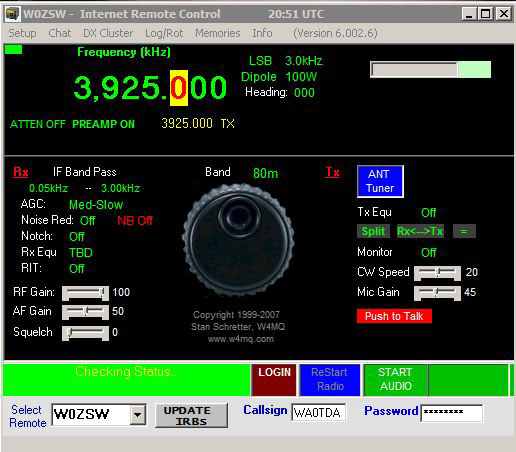
…there are a couple of issues.
While W0EQO has returned to complete service following severe storms which took down over 20 trees at Courage North, W0ZSW remains only marginally useful. The problem is the internet connectivity and network problems at the Handiham headquarters office at Camp Courage. I do plan to spend some time working on these problems this week, which unfortunately means even less time to answer phone calls and emails or to work on the new Extra Class lecture series. Both stations remain accessible via Echolink for receive, but with occasional dropouts on W0ZSW.
The $20 Software Defined Radio
Despite my interest in boat-anchors I do find myself peeking ‘over the wall’ from time to time and taking a look at new and emerging technologies. After several demonstrations from friends I had become convinced of the incredible potential of software defined radios and even found thinking about owning one … one day.

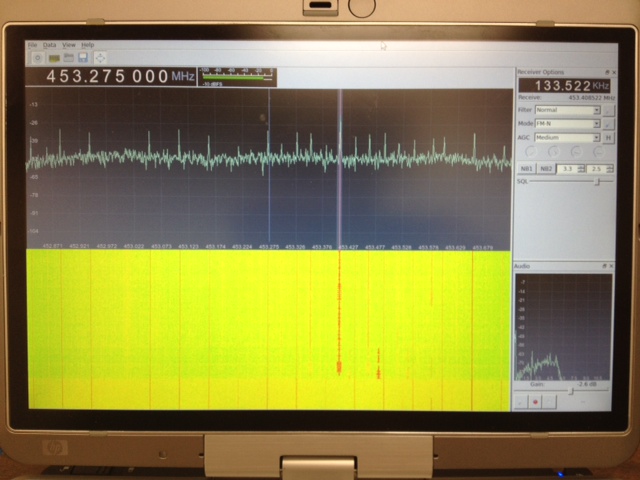
Software (Linux) : After poor results with the software running on MS Windows I moved across to Linux and got it working well there. I can’t point you to a single howto for this because I used several different guides and tried a few things before it started working. The most helpful, and probably all you really need, are the build-gnuradio script which gets hardware support and gnu-radio running and the “Getting Started With RTL-SDR” page by Tom Nardi which covers installing Gqrx. All the software used is in development and requires familiarity with the command line to install and use at the moment.
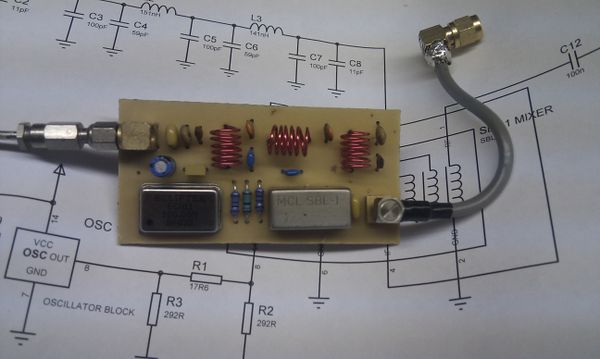
Update : Thanks to a link from Neil W2NDG to an EBay sale I’ve been able to track down a pre-assembled HF up-converter on this page : New HF Converter Kit for the SDR Fun Cube Dongle The price seems to be 45 euros, or about $55 US.













