Archive for the ‘ham radio’ Category
 March 27th, 2013 |
  Author:
  FCC Grants Waiver on TDMA
 From the That Took A Long Time department, the FCC granted a waiver requested by the ARRL that clarifies the rules concerning the use of TDMA (i.e., MOTOTRBO or DMR) on the ham bands. I posted on this topic way back in March 2011, so refer to that article for the background. Update: ARRL article posted here.
I was surprised to find that the FCC quoted my comments that I filed on this proceeding:
Some commenters state the proposed rule change “removes an ambiguity in Part 97 concerning the use of single slot TDMA technology” and it “enable[s] and encourage[s] the adoption of spectrally efficient narrowband technology.” Comments of Robert Witte at 1.
OK, fine, it was buried in the footnotes but I appreciate the mention. I can now die in peace knowing that my name is in the FCC record and not associated with a rules violation 
Thanks to Jeff K0RM, for pointing this out.
73, Bob K0NR
This Spewed Out of the Internet #24
 Here’s another update of
 interesting important stuff spewing forth from the internet.
The Noise Blankers continue to run amuck on these interwebz, with cutting edge reporting like this: Amateur Radio Club Indicted on Ferritte Trafficking Charges, Special Event Station to Mark Departure of Mother-In-Law, and Man Claims CQ Contest Victory Despite No Contacts. In a related matter, still no word on the status of the Lost Island DX Society (LIDS).
The FISTS CW Club has a web page that measures your callsign weight. The basic idea is that shorter is better, so plug your callsign in and the ham with the lowest score wins! Mine weighs 52, what’s yours?
The ARRL Field Day information is available for download. The logo looks pretty good this year! 
Plain Old Telephone Service (POTS) is on the way out.
Lots of new content on HamRadioSchool.com. Stu W0STU has been discussing the Technician License Question of the Week and I contributed some Shack Talk articles.
And remember, everything on the internet is true because the government is watching it.
73, Bob K0NR
5 Foot Diameter Magnetic Loop Antenna

A bonus picture here. The one on the left is a 3 foot in diameter loop.
Note: The little box at the bottom of the small one contains an air variable capacitor for tuning.
Compare it to the 5 foot in diameter loop on the right. ‘

5 Foot Mag Loop
I made a QRP CW contact with this mag loop from right where it stands in my drive way.
 Small Loop Feeds the Big One

Home Made Capacitor Clamps.
Home made cap clamps. The clamps are soldered to keep the contact resistance low.
This is very important with High Q antennas.

5 to 150 Pfd capacitor
Russian capacitor. It is available at E-Bay for about $150

Easy to Make PVC Pipe Stand
Where would hams be without PVC pipe!
This stand is made from 2 1/2 inch sewer pipe.
This is a fun antenna to build and use. I made my first contact with W9GY this afternoon on 20 meters. I used 5 watts, he used 10. RST out was 459, RST in was 579. The antenna was in my drive way in front of the garage that you see here. And Jeff was in Indiana. What a hoot! Making contacts on a home made antenna is great fun. The parts are readily available and with a little planning and shop time you can have a Magnetic Loop antenna to play with.
This is my second Mag Loop. The first one is 3 feet in diameter and covers from 20 through 15 meters. I’m planning another for 17 meters through 10 meters. Mag Loop calculator is available at http://aa5tb.com/index.html
Yahoo has Mag Loop groups that are very helpful to get you started. http://groups.yahoo.com/group/MagLoop/
and http://groups.yahoo.com/group/MagneticLoopAntenna/
Copper foil or strapping is available at http://stormgrounding.electrical-insulators-and-copper-ground-bars.com/copper-foil-2.html
If you’d like more information about Mag Loops, please feel free to contact me. [email protected]
73 De AA1IK
Ernest Gregoire
How to Get a $10,000 FCC Fine
The ARRL web site reported on this Notice of Apparent Liability for Forfeiture from the FCC. That’s government talk for “we are fining you.”
In case you are wondering how you can get fined by the FCC, here’s the sequence of events that resulted in a $10,000 fine for this person:
- Get a Technician License and then let it expire.
- Repeatedly transmit on 14.312 MHz, interfering with licensed radio amateurs.
- Have FCC agents track the signal to your house
- When the FCC agents enter your house to inspect your radio station, leave the transmitter sitting on 14.311 MHz.
- Tell the FCC agents that you will remove the microphone from the transmitter and only use it as a receiver.
Hmmm, why does 14.312 MHz sound like a familiar frequency?
73, Bob K0NR
This Interference Seems to Follow Me Everywhere
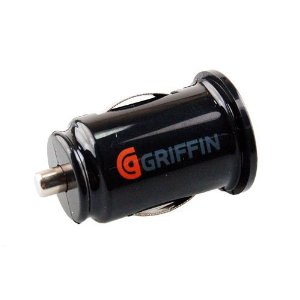 A few weeks ago, I was at my day job working diligently on something. I popped up the SotaWatch web site to see of anyone was out activating SOTA summits. Sure enough, Steve (AKA Goathiker, AKA WG0AT) was headed up Mt Herman for the day. (I have recently declared Mt Herman to be the Most Radioactive Summit in Colorado…at least for amateur radio.)
When I had a few minutes break, I went out to my amateur-radio equipped SUV in the parking lot to call Steve on 146.52 MHz. Steve came back to my call and we made a quick contact and he was in the log. Even though he was an easy line-of-sight path away, I had trouble copying him. Opening the squelch revealed that I had a large noisy signal sitting on 146.52 MHz. I didn’t think too much of it and assumed it was coming from the vast array of electronic equipment inside the building.
As I left work that day, I tuned to 146.52 MHz to see how quickly the interference disappeared as I drove away. I was surprised to find that the interference did not go away, it was covering a wide area. On my commute home, the noise was remarkably constant. This interference seems to follow me everywhere! Eventually, it sunk in that the interference was coming from my own vehicle. Huh, I didn’t have that problem before.
When I arrived home, I turned off the ignition and the noise was still there. I started disconnecting everything in sight, trying to make the noise disappear. Finally, I unplugged the cute little USB charger/adapter that was inserted into the cigarette lighter socket. Bingo, the interference disappeared. It seems that this little adapter has a switching circuit in it that is generating a large amount of hash. I have not investigated it fully, but it trashes out a substantial portion of the 2 Meter ham band.
It used to be my favorite adapter. Buyer beware.
73, Bob K0NR













