Author Archive
 Icom 7610 heat sink issue
 April 23rd, 2020 |
  Author:
  |
| Bottom cover removed |
 |
| No issues with heat sinks. |
A funny thing happened on the way down the hall to work today…….

What was going through my mind was how was the radio and Julies' new company PC and internet phone going to react to my Icom 7610? All was good and the only issue was her two monitors would wake up from sleep when I transmitted on certain bands (40m and 60m) I had this same issue with my PC and I added snap on toroids and it did the trick. So I did the same to Julies monitors and the problem was solved. We were operating both PC's from a wifi connection and Julie felt her PC was running a bit slow. It was no big deal for me to run a LAN cable from the modem to a gigabit ethernet network switch in our office. Julie was thrilled as was I too as both our connections were much faster. Now here is the catch.....I was on my PC today looking up some info regarding the upcoming weekend QSO parties. Julie was on a call and all of a sudden her call dropped and a type of busy signal was going off in her ear. I was not on my radio and only my PC. The day before I was on my PC while Julie was working away and without issue. When I shut my PC down her phone reset and all was good again. My way to deal with this is to think about what was different from yesterday and today when the issue happened. The only difference I could think of is we are off the wifi and on LAN connection. What this has to do with this new issue is beyond me but I left Julies PC on the LAN connection and I moved my PC back over to the wifi connection. After I did this and many tests all was ok.......I have no idea why both PC's being on LAN would cause this issue as with both being on wifi or one on wifi and one on LAN there was no issue. All that concerns me is that Juile's PC is working without issue and can get on my PC and my rig. My question is does anyone out there have any idea why I had the issue?
CWops club
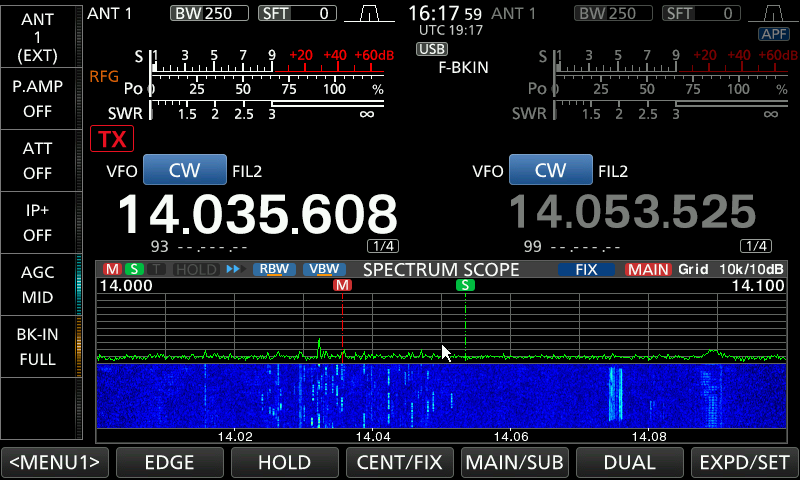 |
| CW ops in action |
Greetings to all my blog readers I think it's safe to say that a majority of you 6 months ago never thought we would be where we are today! Life is so fragile along with our environment my hope and prayer is that all of you stay safe. I am so thankful that up to this point Julie and I are doing just fine without any COVID 19 issues. I'm retired so I can stay at home and Julie is an essential service and has to go to work but she may be able to work from home soon. I am so so so thankful that I have a pension income and that Julie is still working my heart and prayers go out to those who I can't even for a second imagine what you are going through. To all the essential workers such as medical, grocery store, pharmacy, truckers, call centres, the essential trades, border patrol, military, firefighters, EMS, police, public transit and please forgive me if I missed your type of work that helps the wheels turn during this time. Thank you thank you very very much!
Ham radio is a very good way to pass the day and I was thinking today how ham radio can play a key roll in this time we are in. My radio time was very simple yesterday basically turn on the radio and see what is going on out there. My wife works these crazy shifts and Friday is never Friday and for the next 6 weeks, our Friday is Tuesday. So we both just say thank god Friday is coming and when it's it's actually Tuesday so when it's Wednesday it's our Saturday. Having said that yesterday when I flipped the radio on and 20m was dead and I thought why is it dead on a Saturday........WRONG it's really Wednesday.
All of a sudden the band became very busy with CW traffic and I was not sure what was going on so I ventured over to WA7BNM contest page which is a fantastic site for contest goings-on. It turns out from 1300 -1400 it was the CWops mini CWT contest and WOW was it ever busy.
The CWops or CW operators club has only been around since January 2010 and according to there website now have over 1000 members and I would think that to date it's more than that. Even more exciting is that in 2012 the CW academy was founded within CWops. The CW academy is for those who are interested in learning code to those who want to improve their speed and then at the top end those who want to head copy the code! CWops also have a morse code trainer page this is a very detailed page and I can only imagine the hours that were put into its creation. With the spare time that has been unexpectedly placed upon our lives and if your interested in morse code or want to improve your code the CWops page is the place to go. I have enrolled in their intermediate coarse and opted to start in the fall as I am not sure I can put the time aside that is needed during the summer.
A short but rewarding time on 30m last evening.
I went into the radio room last evening around 2130 UTC to have a listen as to what was going on. I found myself on 30m and noticed there was a few CW signal but really not all that much action. I spun the VFO down to the first signal at 10.110.0. It was EA6Y from Balearic Island located in the Mediterain Sea and on his QRZ page there are some amazing pictures of his surroundings. It was a very fast CW QSO with RST and TU (thank you) I then spotted him on DX Summit . He seemed to be calling CQ for some time before any takers. His CW signal was clean and crisp into Atlantic Canada and my 100 watts made it without issue.
I then moved onto the next CW signal on the waterfall of my Icom 7610 and 4O4T from Montenegro Lou's signal was very crip as well and once again my 100 watts had no issue making the trip to Montenegro. At 2200 UTC the band seemed to drop it's DX adventures and it was time to move on to things such as reading my many amateur radio periodicals a rewarding evening on the radio none the less.
I then moved onto the next CW signal on the waterfall of my Icom 7610 and 4O4T from Montenegro Lou's signal was very crip as well and once again my 100 watts had no issue making the trip to Montenegro. At 2200 UTC the band seemed to drop it's DX adventures and it was time to move on to things such as reading my many amateur radio periodicals a rewarding evening on the radio none the less.
The weekend of radio
 |
| Russian CW contest was Rockin the band |
So how was the Virginia QSO Party you ask.........well on 20m things were really hopping but not with the QSO Party but the Russin CW contest. The band was packed with DX and very tempting to just jump in BUT I wanted to keep up with my goal of working all the QSO parties this year, I jumped up to 40m and worked a few Virginia station ground wave from my location. I was able to get 4 in the logbook only on 40m as I did have some "to do" items that needed to be done around the house. I checked in again on Sunday and went back to 40m but the strange thing was on Sunday I could only hear the stations making contact with stations in Virginia?? Oh well, propagation can be a funny thing at times.
Other related radio adventures were I was able to work fellow blogger John AE5X from Texas. John was working POTA and activating location KFF-3054. I was not able to hear John at all on CW but it was great he grabbed his laptop for the trip as we made contact on FT8. On Sunday I checked out the POTA cluster to see what was up and I was able to contact KB3WAV and at the time I did not realize it until I went to the POTA website and found that Kerri is a top leader for POTA activations.
His stats are:
Activations 1266
Unique parks 446
Total contacts 4730 Now this is an old number I would believe after this past weekend activation.
I also noticed on Sunday 20m was dead again as the Russian Contest had ended but it goes to show propagation is alive and well.
If you are like me and trying to work all the QSO parties this year by taking part in ARRL's State QSO party challenge make sure your seatbelt on during the weekend of April 3-5. The QSO Parties for the weekend are Nebraska, Missouri, Florida, Mississippi, and Louisiana!
Finally, on a lighter note, today is a milestone for me.........I'm 60 today! My car dealership sent me an email birthday wish bright and early this morning way before anyone would have been at work. Darn computers programs just don't sleep...:))
Social distancing…..things are getting interesting.
One site I have booked marked and is a link on my blog is Southgate Amateur News. I was browsing it this evening and came across but yet another change COVID 19 has brought about. This time it's contesting and to tell you the truth I was wondering when this was going to come about. The RSGG or the Radio Society of Great Britain to which I might mention I am a member of. It was released today by the Society that contest rules regarding Multi op entries will no longer be accepted with immediate effect. The post does say it is until June 2020 but I imagine this is a fluid date. Single op from a shared station will not be accepted unless certain criteria are met. This is all to practice social distancing to which I support. I have not yet heard if Canada (RAC)or the United States (ARRL) will follow and any of the Europian countries as well. Speaking of social distancing I was watching the news and it seems like Spring Break is underway, here in Canada a gaming company released 2 new games. The message was "you just have to come and get your hands on it" This had young people in very long lines go purchase the game. I just don't get it I'm not a fear monger but we have to stop COVID 19.
Here in New Brunswick a state of emergency has been instated all stores are closed excluding pharmacies, hardware stores, automotive gas stations and finally grocery stores. Things are getting interesting!
Keep well my fellow Hams.
Here in New Brunswick a state of emergency has been instated all stores are closed excluding pharmacies, hardware stores, automotive gas stations and finally grocery stores. Things are getting interesting!
Keep well my fellow Hams.
Comparing 2 Endfed antennas.
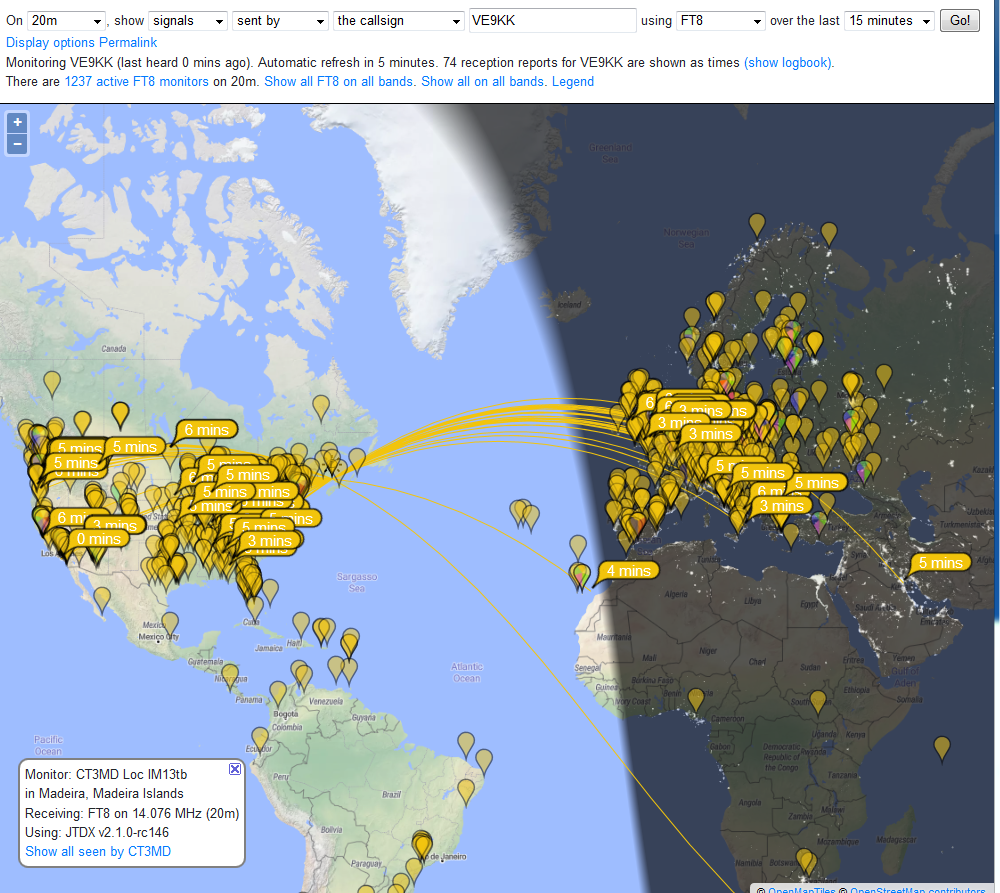
At my location with the lot size, the best antenna for me is an Endfed. Now I am not at all complaining because just a short time ago I was in a condo using the MFJ 1788 loop antenna. My first Endfed antenna was the W1SFR 6m-40m. I will once again repeat myself saying this antenna is great I have kept mine for portable operations once the summer comes. The top rating for this antenna is 100 watts and since I operate digital at power levels that could be beyond this antenna rating. I did not want to overdo it and lose this great antenna. I then purchased the DXextreme Endfed from DX antennas. Mine is the 33-foot version which is the shortest but is the right size for my lot. While using my W1SFR Endfed on FT8 I monitored it's results on PSK reporter and captured these results with pictures. I wanted to see if there were any noticeable differences in results between the two antennas. The new antenna went up on February 28th and I have been monitoring PSK reporter and taking pictures of the new antenna results. The mode of operation has been FT8 and the power output for both antennas was 60 watts. The location for the new antenna was the same as the old and the old antenna was 35 feet long and the new antenna is 33 feet long. I was not really expecting any differences but I was surprised when I compared the results.
The first comparison was 20m during the day between 14:15-14:45 local time. The first picture is from W1SFR's Endfed antenna at 14:16 and the second picture is at 14:40 from the DXextreme Endfed antenna.
 |
| W1SFR 20m |
 |
| DXextreme 20m |
To my surprise, the DXextreme antenna seemed to make it into Europe and a few other spots the W1SRF EndFed did not. I do have other pictures from other times as well that show the same results but I did not want to fill the post with them as I have other bands to show.
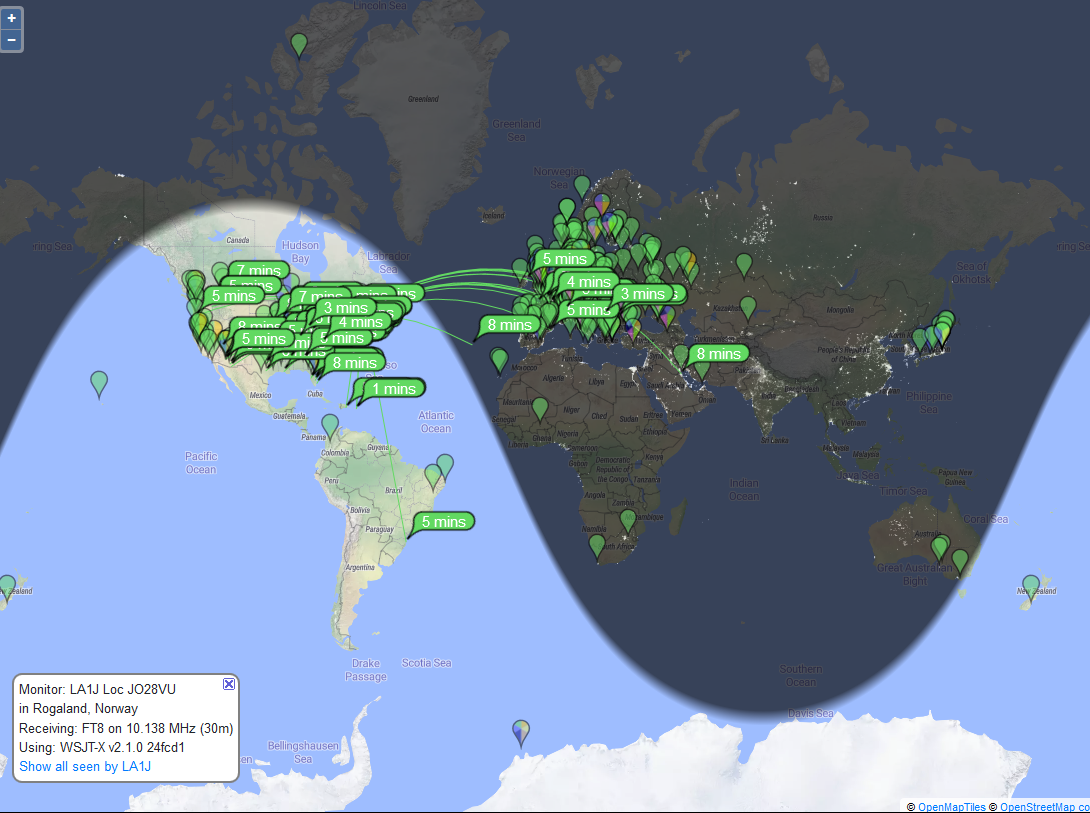
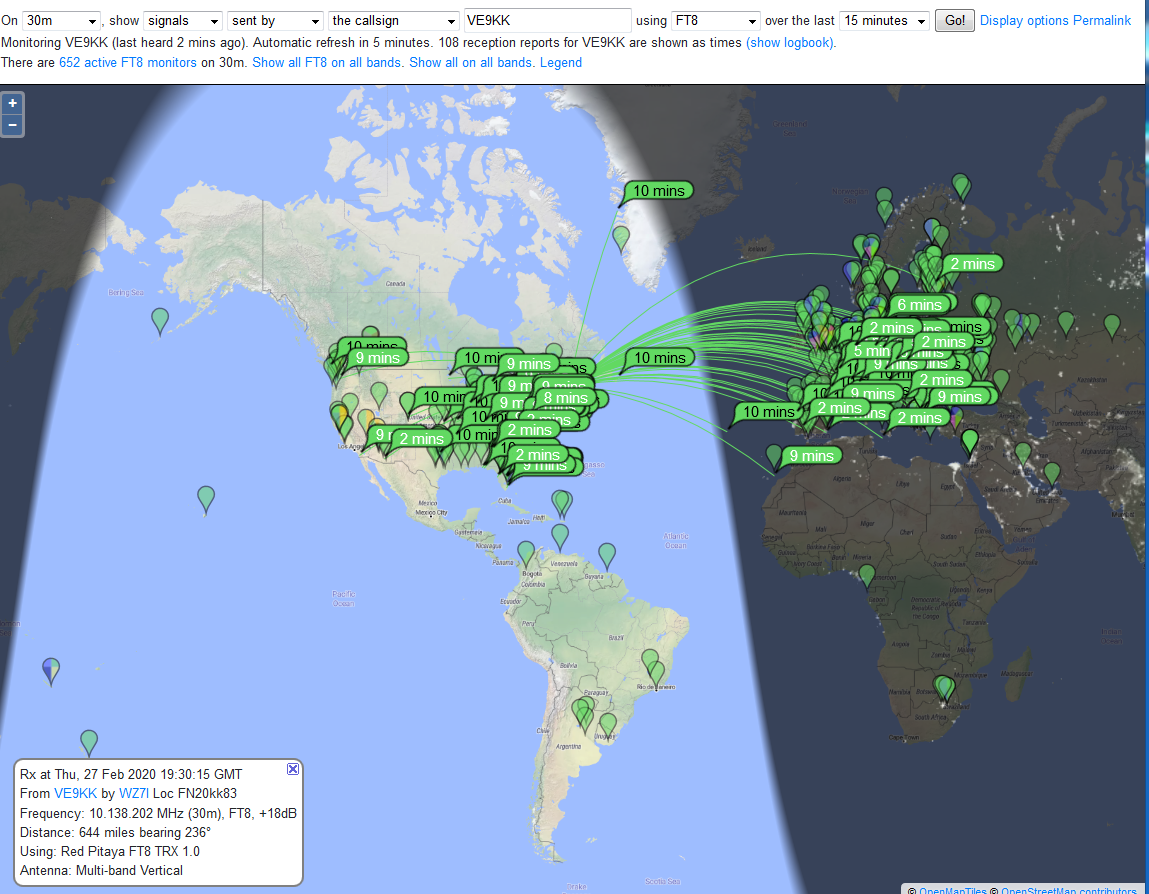
The next band is 30m and again these pictures are from early afternoon at 14:50 local time for W1SFR's antenna and 15:40 using the DXextreme antenna.
Once again I noticed that my spots in Europe were more with the DXextreme antenna over the W1SRF.
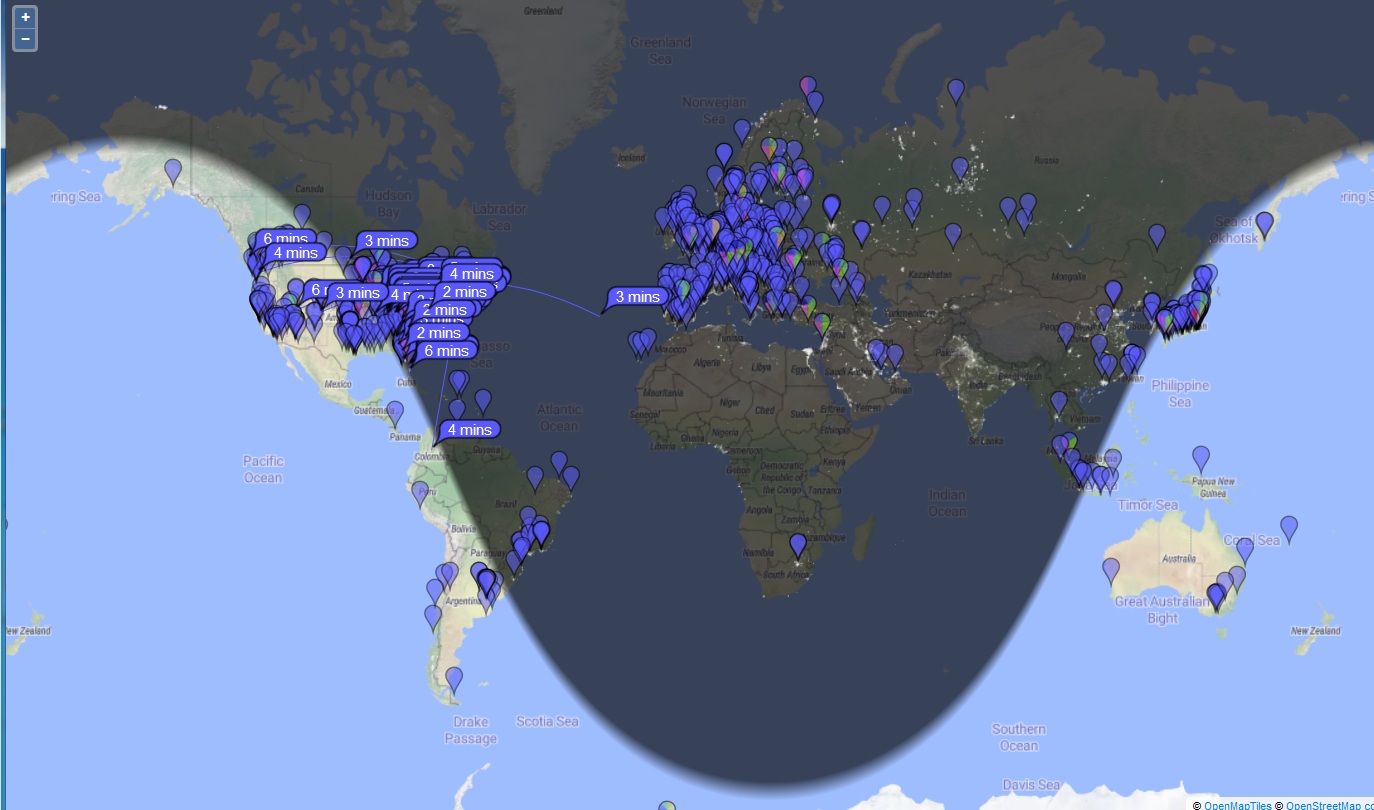
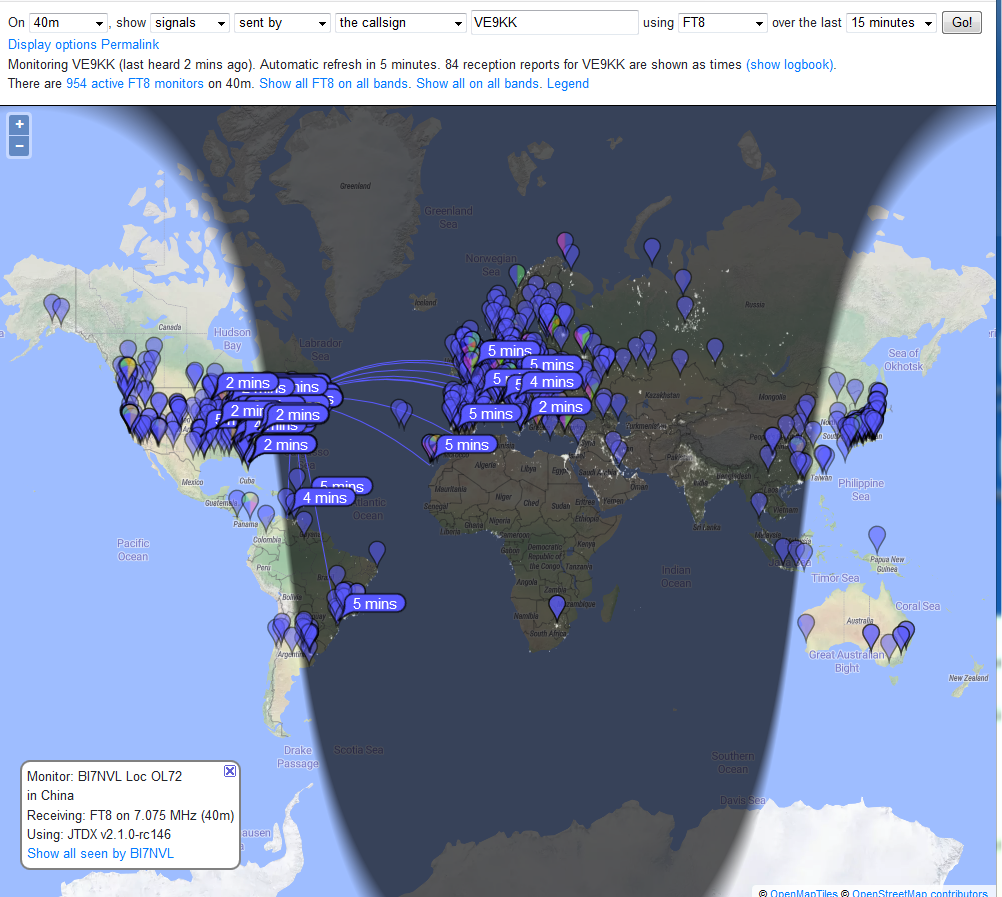
Regarding 40m I was happy with the W1SFR antenna compared to my balcony mounted MFJ 1788 back in the condo as I really had no luck reaching Europe on 40m with the loop antenna. The W1SFR allowed me to get into Europe and I was happy with that. But the DXextreme really opened things up for me overseas.
Overall I am very happy with the performance of the new antenna it also allows me to rest at ease knowing I am not overtaxing the W1SFR Endfed in the digital modes.
The next band is 30m and again these pictures are from early afternoon at 14:50 local time for W1SFR's antenna and 15:40 using the DXextreme antenna.
 |
| W1SRF 30m |
Once again I noticed that my spots in Europe were more with the DXextreme antenna over the W1SRF.
Regarding 40m I was happy with the W1SFR antenna compared to my balcony mounted MFJ 1788 back in the condo as I really had no luck reaching Europe on 40m with the loop antenna. The W1SFR allowed me to get into Europe and I was happy with that. But the DXextreme really opened things up for me overseas.
 |
| DXextreme 30m |
 |
| W1SRF 40m |
 |
| DXextreme 40m |













