Author Archive
 The End of the Internet
 July 14th, 2010 |
  Author:
 For those who don’t believe that the internet is flat.

Up the Amazon
The September issue of PC Pro (a British computer magazine) arrived today. Featured on the front cover was an article exposing the rip-off prices charged by music download sites. Madonna’s Celebration (which I presume is a popular music album) would set you back £11.18 at MSN Music or £11.99 at Spotify but would cost you only £2.98 from Amazon.
Included with the magazine was a DVD which contained a free copy of Paragon System Backup 2010. As I didn’t have any backup software for 64-bit Windows I thought this was fortuitous, so I decided to install it. But after handing over my email address in exchange for a free registration code it failed to install. The developers had used the ridiculously overpriced, overcomplicated and error-prone InstallShield (programmers will know what I mean) to create the setup wizard and only a few seconds into the install it threw up an error message about being unable to initialize the Javascript runtime and died.
I tried the obvious things like checking that Java was installed, running the installer in administrator mode, and even Googling the error message and trying the suggested remedy of registering the Javascript DLL, all to no avail. So I decided that I was not going to rely on backup software from a company that could not even produce an installer that would run on a brand-new computer, and consigned Paragon to the Recycle Bin (both literally and virtually.)
I spent a couple more hours downloading, being unimpressed by and then uninstalling a number of other free backup programs. I even discovered that there was a backup program included with Windows, but for some reason the version that comes with Windows 7 Home Premium has been hobbled by only being able to back up to writeable DVDs or removeable hard drives, not my network attached backup server. After being advised that the backup would take 6 or 7 DVDs I decided against it.
In the end I decided to stump up for a copy of Acronis, which most people seem to regard as hands-down the best backup software you can get. It can create disk images from which you can restore even if Windows won’t run and it has a continuous backup option that backs up your files while you work so you can revert back if you mess up a file. It even has a “Try and Decide” sandbox that lets you safely try out software you aren’t sure about to see if it will do anything nasty to your hard drive.
The Acronis website informed me that this paragon (small p) of backup software would cost £39.95. After checking some reviews, in my usual lazy fashion I typed “acronis trueimage” into the Google search box to find my way back to the website, and Google helpfully included three “shopping results” in its list of related sites. Included there was an offer of Acronis TrueImage Home 2010 from Amazon for £17.99.
Eh? I can buy online and pay £40 for an electronically delivered product the manufacturing and delivery costs of which are near zero, or I can have a physical product that has been mastered onto CD and put into a printed box, possibly with a manual, which has then been driven to a warehouse and stored waiting for me to buy, after which it will be put into a cardboard mailer and sent through the post to be delivered to my door, for less than half the price (with SuperSaver free delivery.) Sorry, I don’t see the logic in that, but thanks very much Google and Amazon.

Android envy
I’m suffering from a severe case of Android envy. I was just checking the latest post in Jeff KE9V’s excellent blog (glad you haven’t forsaken the blogosphere in favour of podcasts, Jeff) which mentions in passing that Google has just released AppInventor, a free simple application builder for the Android platform.
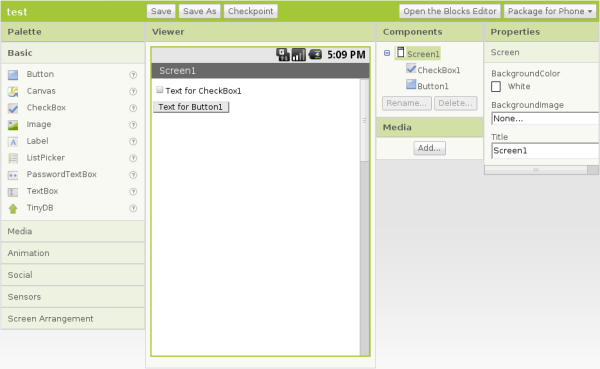 What piques my interest particularly is that AppInventor includes building blocks that allow you to talk to things like the GPS, so you can write location-aware apps, perhaps even apps that are APRS related.
I own a Windows Mobile smartphone. I also own a currently uninstalled copy of Microsoft Visual Studio, which can create apps for the phone. I once wrote an app to sync the clock to an internet time server. But like everything to do with Windows it’s all just too darn complicated and my ageing brain doesn’t feel like getting to grips with it.
The AppInventor approach looks much easier and more fun. I see an Android in my life before too long.

Inspirational
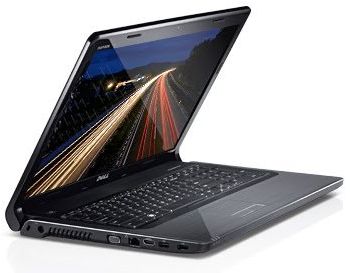 My new work laptop came this morning. It’s a Dell Inspiron 1764 with an Intel i3-350M(2.26GHz) Mobile CPU, 3GB of RAM and a 250GB SATA hard drive. It isn’t the most portable laptop, having – like the Toshiba it replaces – a full-sized keyboard and a 17.3in. widescreen display. It looks and feels absolutely gorgeous, the screen is superb, the keyboard perfect for my fat fingers, and it’s blisteringly fast. Click on the Firefox icon and the browser is there in a second or two.
What’s more, the Dell doesn’t cause any RF interference that I’ve noticed. The old Toshiba caused an increased level of hash that broke the squelch on my 2m FM receiver unless I cranked the knob round quite a way. Since I started receiving HF APRS I noticed that the Tosh caused a 3 S-point noise level on 30m as well, which all but prevented reception of any packets. So I am delighted with the new PC for that reason as well. I can now leave my radio station running all day as a VHF and HF APRS gateway while I work.
The old Toshiba had Linux installed on it early on in its life for security reasons plus the fact that Linux has some good web development tools. I was going to buy a PC with Linux preinstalled but I couldn’t find what I wanted so I resigned myself to paying the Microsoft Tax. The Dell came with 64-bit Windows 7. I thought that I should try it under Windows for a few days just in case there was a fault and I had to send it back. But to be honest I think I may stick with Windows. It looks more polished than Linux, it’s fast and I’ve already started to find replacements for the Linux tools I used. Firefox, which I spend most of the day using, looks and works exactly the same on both platforms, of course.
I certainly wouldn’t choose Windows 7 64-bit for a shack PC as there are too many compatibility problems with popular hardware and ham radio applications. But for what I need to do to keep the business running it looks like being a good choice.

APRS on the Wainwrights
I noticed today that Richard G1JTD had a GPS-equipped VX-8R with him on his activation of several Wainwright summits in the Fairfield round. I spoke to Richard on his VX-8R a fortnight or so ago when I was out with my VX-8GR and he mentioned that he might get the GPS option so as to do some APRS. It’s good to see more APRS activity from the Lakeland fells.
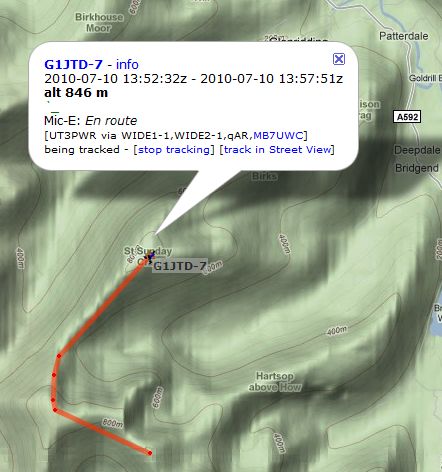 You can see Richard’s track captured from aprs.fi. As you can see, his position reports were only received when he was on the summits and a few other points on the highest parts of the ridge. This is inevitable given that the only digipeaters and iGates are situated around the edge of the mountains located at the homes of amateurs and not at any great height.
From my experience it’s quite common to lose cellular data coverage once you get off the beaten track so smartphone based APRS isn’t really much better in this situation. Running the GPS drastically shortens the phone’s battery life so you are also likely to end up with a dead phone just when you might need it. I think RF based tracking is the best solution for taking APRS into the wilds.
It’s a pity that the power requirement and antenna size for HF operation would make it impractical to use HF for portable APRS operation.

On the road
The last couple of days I’ve been wasting way too much time tracking mobiles using the new Google Street View feature of aprs.fi, which since I wrote about it last is now live on the production server. I have been running a second instance of APRSIS32 linked to my K3 on 30m using the AGWPE soundcard modem. Surprisingly, I have found quite a few mobile stations beaconing their position on 30m and even more surprisingly they are often being picked up direct by my attic mounted MFJ magnetic loop. It’s fun to follow these mobiles and see what they are seeing as they drive along, but I get a bit of a thrill when I see my station displayed as the one that gated their position report to the internet. I suppose it’s a bit like reverse WSPR.
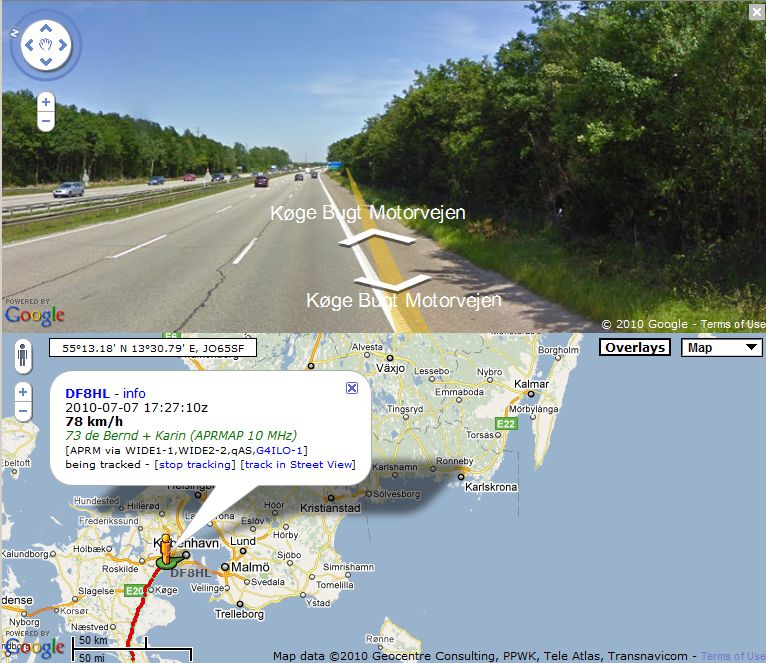 Yesterday and today I have been following Bernd DF8HL and his XYL Karin DF8HY who are touring Scandinavia an an old VW camper van festooned with antennas, as you can see from their website. It must be great to just tour in your mobile shack, going from one place to another, yet in touch with your friends by amateur radio. But Olga wouldn’t agree, so instead I must content myself to do it virtually with the help of APRS and Google Maps.

Being taken for an idiot
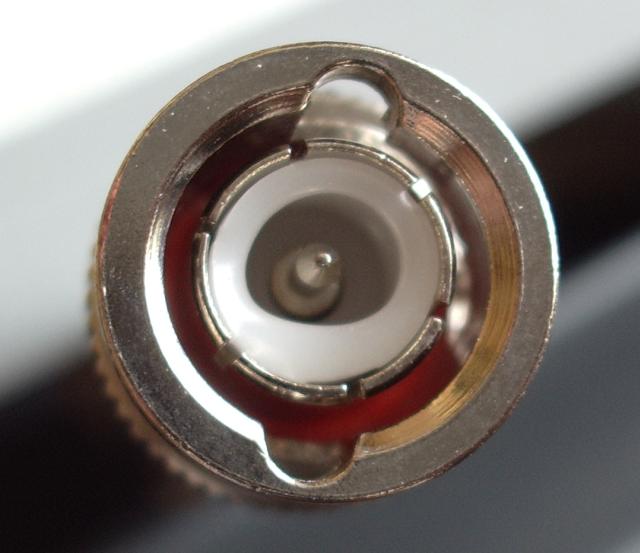 I just received a phone call from the service department at Waters and Stanton who had just received the faulty helical antenna I returned to them.
I was asked: “What frequency did you use it on? It looks as if it as been used to transmit at high power on the wrong frequency.”
Do they imagine that it would be possible to overheat an antenna in such a way as to melt the connector without having any effect on the antenna itself, leaving the connector impossible to attach to a socket? You would think perhaps the fact that the antenna was untrimmed and the top cap not placed in position would give the game away that I hadn’t even used it.
In fairness, they did then agree that it must have been a manufacturing fault and they would send a replacement. But I was left feeling that I had been taken for an idiot. They didn’t even have the grace to apologize to me for the inconvenience of receiving a faulty product.














