Author Archive
 APRS could have helped protect Charles and Camilla
 December 11th, 2010 |
  Author:
 The Metropolitan Police are denying that the incident in which a car carrying Prince Charles and his wife came under attack by student demonstrators occurred through a failure in radio communications. Reports that royal protection officers were using a different frequency to those policing the protest are “untrue”, the police insist. The two teams were in communication using email or mobile phones. They what?? Perhaps they had carrier pigeons as a backup.
It seems to me that someone needs to knock on the door of Scotland Yard and suggest that they need a tactical digital communications system on the lines of APRS. If the officers escorting the royal couple could have seen on a map display where the demonstrators were and exchanged brief tactical messages with other officers in the area, this embarrassing incident would never have happened. It makes you wonder just how competent our security forces really are.

Lost memory
I am a strong believer that “if it ain’t broke, don’t fix it.” I also find that, particularly if it is anything to do with computers, the law “if something can go wrong, it will” operates with near 100% certainty. As a consequence, I an extremely reluctant to upgrade or update anything unless it fixes a problem I’ve experienced or am likely to experience, or provides new functionality that I actually need. I get anxious whenever the “Windows has new updates” balloon pops up, worrying about whether my computer is going to get screwed fixing some obscure vulnerability I don’t understand in some bit of Windows I may not even use.
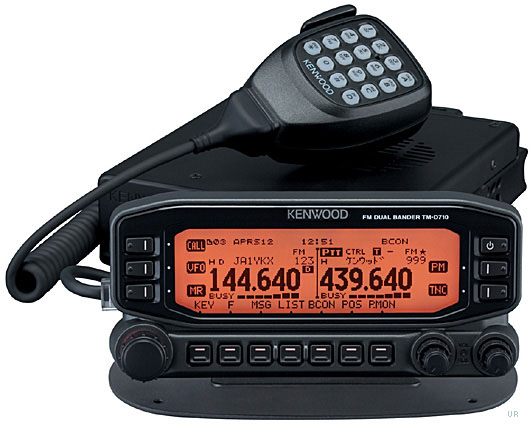
One of the problems of getting old is that you tend to forget things and sometimes I do something having forgotten that the day before I had decided there was no point in doing it. And so, this morning, I decided to update the firmware in my Kenwood TH-D710 in order that it could identify from APRS packets newer radios like the VX-8G and TH-D72, regardless of the fact that I hardly ever use the radio’s own APRS display and the update would not affect the ability of APRSIS32 to identify these radios on my PC.
I downloaded the update software, browsed the help file that came with it and then ran the program and followed the instructions it displayed. The update went without a hitch. I was a bit concerned when the concluding instruction was to perform a full reset, which I thought would erase all my settings, but I had not seen any dire warnings about this so I went ahead. Sure enough, on completion the Kenwood was now in factory default mode, with all my settings and laboriously entered memory channels lost forever! Arrghh! If only there was a System Restore for real life!
Kenwood does provide a free memory management program for the TM-D710, MCP-2A, which can be used to edit, back up and restore memories and settings. However it needs a second serial cable attached to a different port to the one used for the built-in TNC. I had never got around to making up another cable as I don’t need computer control of the radio and storing channels in memory manually isn’t that hard so I don’t usually bother with programming software. Besides, all four serial ports on the shack PC were already used. So I had never tried it.
In the hope that it would save me time re-entering the settings and memories, which I could then back up, I installed MCP-2A and moved my serial cable from the radio’s control head (the TNC port) to the PC port at the back. But no matter what I tried, the program could not communicate with the radio.
Now I’m completely stumped. I’m using the same PC serial port and cable as I used to perform the upgrade and access the TNC, so the port and serial cable work. I tried the “Auto” baud rate setting and several manual selections and it made no difference. As this is the first time I have used it, I’m wondering if the rear PC port is actually broken. Have I overlooked something stupid? Is there anything else I could try to test if it works?

UPS: Useless Pathetic Shower
What a useless courier company UPS is. I ordered something from Martin Lynch on Tuesday afternoon and was informed that it had been shipped an hour later by UPS. At 7.45 on Wednesday morning the UPS tracking site showed the package had arrived in the depot at Carlisle and was marked as in transit for delivery that day. I waited in all day and nothing arrived. Later that evening I checked the site again and found the message at 6.45pm: THE PACKAGE WAS MISSED AT THE UPS FACILITY, UPS WILL DELIVER ON THE NEXT BUSINESS DAY / DELIVERY RESCHEDULE. The delivery date was changed to today (Thursday.)
So I waited in all day today and still no UPS man. Again I checked the UPS tracking site this evening and the same message had been added, this time at 7.48pm. The delivery date is now rescheduled for tomorrow (Friday.)
We have had poor weather conditions and the roads have been icy but FedEx called as usual around lunch time to the neighbour across the road who has a regular delivery. And Interlink Direct called to pick up two packages of items I’d sold on eBay the shipment of which I’d arranged online yesterday. (Tip: use the code XMAS10 to get £5 off a delivery before Christmas.) So I don’t think that’s a valid excuse, really.
I wonder what the chances are that I will actually receive my new toy tomorrow? I just hope that when it does arrive I don’t find they have lived up to the other meaning of their acronym: United Package Smashers.

Death of 20m incorrectly reported
It’s a good job I looked at the beacon reports this morning or I wouldn’t have noticed that there were no reception reports for the 20m band. The problem was that I had visited 20m yesterday and put the K3 into data mode. An annoying feature of the K3 is that when you change bands it restores the mode you last used on that band. It does that even if the band change is being made under software control, even if the mode it is restoring is inappropriate for the frequency you are changing to under the band plan. This is totally bonkers logic because no computer program worth its salt should make assumptions about the state of the radio so when changing the frequency it should also set the mode. Unfortunately if it sets the mode too quickly, or before the frequency change is sent, the K3 “feature” overrides the mode set by the software. Consequently the option in Faros to “force CW mode” doesn’t work on the K3 and you are left in the mode you last used on that band.
Faros is not alone in experiencing this problem. Complaints have been frequent on the Elecraft reflector that when clicking on DX cluster spots in various programs the radio changes to the right frequency but is in the wrong mode. One of the reasons I wrote KComm specifically for the Elecraft radios was that I could make it work the way the radios work instead of being stuck with some generic logic. But there is nothing I can do about programs I didn’t write. I wish that more ham radio applications were open source so you could fix problems like this yourself instead of having to ask a developer to make the necessary changes (and very often getting nowhere.)

My first QSO with V4 mode
This was on 80m, running 25W to the bent 80plus2 dipole in the attic. I also copied snatches from WD4KPD and KC2DMC. I have never worked across the Atlantic on 80m on any mode, so this new mode seems quite promising.

Yet Another Digital Mode
Windows PC users now have the option to try yet another weak signal digital mode. Called V4, it is described as “a robust, easy to use, keyboard sound card mode that would fit into the narrow digital segments of our HF bands.” The mode is 200Hz wide and capable of sending text at 40 – 60 words per minute.

Do we need yet another keyboard digital mode? Although PSK31 is very popular and very narrow, performance deteriorates under conditions of multipath reception (such as in NVIS propagation) or when the ionosphere is disturbed (polar paths during periods of auroral activity) while RTTY, though also popular, is archaic, inefficient and successful only by brute force methods (a big amplifier and a beam.) More robust FSK modes such as MFSK, Olivia, Thor and DominoEX perform better but are much wider which can be a barrier to use. V4 uses the same robust modulation scheme as WINMOR but has been optimized for use as a keyboard chat mode. A detailed protocol description can be found here and the software can be obtained after joining the V4 Protocol Yahoo Group.
I have only just been admitted to the group so I have some reading to catch up on and it will be a few days before I can find the time to try V4 for myself. However I am quite interested in this mode which seems to have been developed by licensed hams keeping in mind the need for responsible band use (so no 2.2kHz wide signals!) and with all the details being published and open. The software modem has been implemented as a standalone TNC that can be interfaced with other applications such as my own program KComm which is also interesting to me. So I think you can expect to hear more about the V4 Protocol in this blog in the weeks to come.

Beacon monitoring with Faros
Alex, G7KSE wrote recently about monitoring the International Beacon Project beacons on 20, 17, 15, 12 and 10 metres, which gave me the idea to try it again for myself. I did try the Faros beacon monitoring software by VE3NEA a few years ago but being a tightwad I never registered it so the trial came to an end after 30 days. I was also less than enthusiastic about leaving the computer and radio running every day 24/7. Work out the power consumption and it can add a significant amount to the quarterly bill which is unlikely to go unnoticed by the chancellor of the exchequer (the XYL.)
These days the computer is usually running from when I get up (or after breakfast) until when I go to bed in order to run my HF and VHF APRS gateways so it is no extra trouble to do some beacon monitoring as well. I don’t have a spare radio or antenna so I will have to use my main radio (my K3) and antenna for the beacon monitor. This means that if I want to go on the air the beacon monitoring will stop. Currently my enthusiasm for actually making contacts is at a very low ebb so this is not much of a problem. I shall still shut down at night and restart in the morning, at least during the winter months when there is no night time propagation on 20m and up. Apart from the pointless waste of joules, the loud click from the K3 each time Faros changes bands will be a disturbance as the shack is only just across the landing from our bedroom.
The antenna I am using is the short multiband 80plus2 dipole bent to fit into the roof space, with additional 10m and 6m elements. It works fine on 20, 15, 12 and 10m. On 17m I can get a good SWR with the aid of the K3’s built-in tuner (which is the source of the loud clicks) but performance is noticeably down on the magnetic loop. However, the magnetic loop is used by my K2 for the HF APRS gateway so it is not available.
VE3SUN has written a very good article explaining how to set up a system to display the beacon reception charts created by Faros on a web page. It looked easy so I went ahead and set up an IBP Beacon Reception page on G4ILO’s Shack. I found that the WinSCP software that VE3SUN recommends to automate the uploading of the reception charts to the website popped up annoying windows whenever it updates so I used SyncBack SE instead. Unlike WinSCP it isn’t free, but I had purchased a license a few years ago and the code still worked with the latest version.
I converted the JavaScript in VE3SUN’s example page to PHP. This means that I can test for the existence of the beacon monitor graphics and display a friendly message rather than have the browser display a “missing picture” graphic if the monitor has not been running and that day’s GIF image doesn’t exist.
I have added to the page a short list of currently active beacon monitors to make it easy to compare my reception reports with other people’s. It would be nice if, instead of each beacon monitor having his own results on his own web site, there was a central site that collated all the IBP reception reports and displayed them on a map, like WSPR does. Perhaps that would rejuvenate interest in the IBP which seems to have been overshadowed in recent years by WSPR and reverse beacons.














