Author Archive
 Doing the splits
 July 5th, 2013 |
  Author:
 At the end of last month I was testing a new version of WSJT-X for Joe, K1JT, under NDA. The program has now been released, so I can write about it.
 |
| WSJT-X 1.1 can decode both JT65 and JT9 at the same time |
The major new feature is that WSJT-X 1.1 supports both JT65 and JT9. What is even more remarkable about it is that it can decode both modes at the same time! Enabling dual modes is optional, but if you use the feature and double-click on a station to reply to it the program will switch to the correct mode for the reply.
Another thing about this new version is that it can decode signals in a bandwidth 4kHz wide. If you have a transceiver that can receive such a wide bandwidth – Flex SDR radios can do this, as can the Kenwood TS2000 and my Elecraft K3 with FM filter installed – then you can take advantage of this capability. I didn’t think my K3 could go that wide, but all that was needed was to run the K3 Utility and enable the FM filter in DATA mode.
If you’re sharp then you will have thought of a snag. What happens if you reply to a station on the right hand side of the bandwidth? Receiving may be OK through the FM filter but on transmit the 2.7KHz SSB filter is used. The solution is clever: you keep the audio in the range 1 to 2kHz, engage SPLIT mode and set the transmit frequency to shift the signal up or down so that it matches the frequency of the station you are working.
I must admit that this perplexed me at first as I didn’t understand the significance of operating in split mode. My audio tones (heard with the K3 monitor turned up a little) were often lower or higher than the station I was replying to, and I was afraid I was replying on the wrong frequency. In fact, I was: I had forgotten to switch SPLIT on!
To avoid mistakes in future I created a Windows shortcut using a little utility I wrote to send a CAT SPLIT ON command before starting WSJT-X 1.1 and equally importantly, set SPLIT OFF when I had finished a session with WSJT-X. It’s just too much to expect me to remember to do this manually! I suggested to Joe that WSJT-X itself should send the split commands, but apparently it’s not that simple when you have to cater for every transceiver under the sun. So if you are working JT9 or JT65 and stations reply to you one or two kHz off-frequency don’t be surprised.
I should make it clear: WSJT-X 1.1 doesn’t decode both modes across 4kHz. It decodes JT65 in the lower half and JT9 in the upper half. You get to decide where the dividing line lies.
Joe K1JT thinks that JT9 users will move down a bit into the top end of the JT65 range, to enable people whose transceivers don’t give them 4kHz bandwidth to take advantage o9f the ability to work dual modes. In fact, at the moment, the result seems to be to have enabled JT65 users to spread out over 3kHz or more as is clearly illustrated by my screenshot. Time will tell.
Time and trouble
I’m still reconstructing my PC system after the disk got trashed. I didn’t lose any important files nor my ham radio stuff. But many of the configuration settings that Microsoft helpfully squirrels away in hidden locations like the registry or somewhere off Documents and Settings were not backed up. Mea culpa. Unfortunately I never came across a full backup system that I liked (I purchased Acronis but it was full of bugs that they want you to pay for an upgrade to sort out.
I keep on discovering things that need to be restored. I was getting some gobbledygook decodes from WSJT-X and then remembered that I needed to install Meinberg NTP. But the installation failed: the service wouldn’t start, reporting the error that “NTP failed to respond in a timely manner.” There is a note on the Meinberg website that the service might fail unless you install some Visual Studio restributable package, so I installed it but still no luck. I’ve run Meinberg NTP for years and have recommended it to everyone and it’s so annoying that I can’t install it.
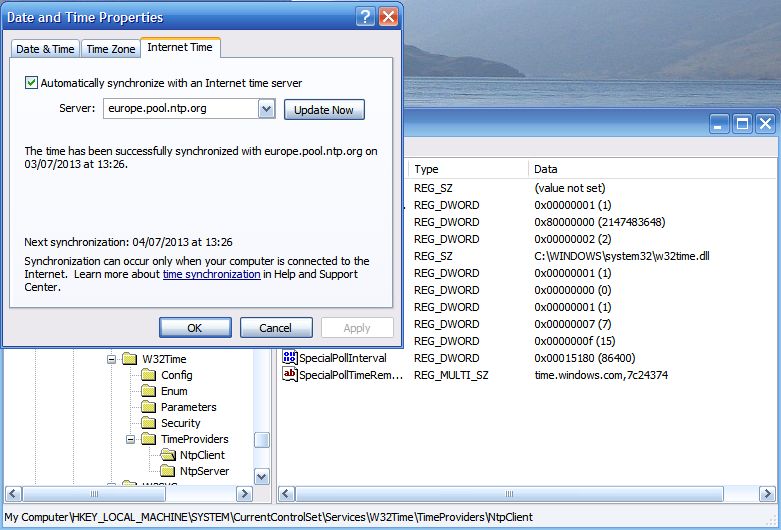 |
| Hacking the registry to up the frequency of Windows Time updates. |
Nothing for it but to rely on good old Windows Time Service. I found the registry hack that lets you increase the frequency of updates. I also changed the time server to europe.pool.ntp.org which responded much more quickly that time.windows.com. Hopefully that will do the trick. I hunted for an old version of Meinberg from before 2009 which I must have installed when I first set the PC up, but no luck.
Disaster!
I have just trashed my shack PC. Not intentionally, you understand. I was trying to resolve a problem and the result was that the system has restored itself to the state it was in when it was new back in 2006 or whenever it was.
I have been using a backup program called Magicure. I’ve probably mentioned it in this blog before. It’s kind of a System Restore on steroids. It has saved my bacon countless times and I have come to depend upon it. But it started giving an error message when it tried to do a backup. No new backups were being made. So I had to do something about it.
I emailed Magicure support for help but didn’t receive a reply. I saw that there was a newer version of the software so I decided to download and install that in the hope that this would get it working again.. But the installer complained that there was another version present and asked me to remove it first. So I started to uninstall Magicure. That was a mistake.
The uninstaller said that it was going to roll back to before Magicure was first installed. If I was a bit sharper-witted I might have smelt a rat at this point. But I thought “no, surely it isn’t going to do that.” I just want to remove Magicure. So I clicked OK and within a few seconds I was looking at a Windows XP login screen with only Administrator as the available login. This looked ominous. No user “Julian”. It looked as if it had rolled back the entire system to the state it was in when new, when I first installed Magicure.
I have no idea what the Administrator password was. But if I knew it I would be no better off because the computer won’t respond to the mouse or keyboard. So I can’t get in to the system to assess the extent of the damage. I don’t seem to have a Windows XP disc to reinstall from scratch, either.
What an utter disaster. I have no idea what to do at this point.
Yet Another APRS Client
An apt title for this post, but also for the software in question. Yet Another APRS Client (YAAC from now on) is a new program written by Andrew, KA2DDO that has recently entered beta test status. I stumbled across it a few days ago and am now running it on my G4ILO-2 VHF iGate.
 |
| YAAC map display with US Geological Survey topographic data.) |
YAAC is written in Java so it runs equally well on Windows, Mac and Linux platforms as long as you have a recent Java runtime installed.
YAAC is open source software and uses open source mapping (Open Street Map – OSM). APRSISCE does too, but whereas it uses bitmap tiles, YAAC uses vector-based map data. This makes the maps look a bit different (more as if they were drawn by a spider.) You can easily add topographical data from the US Geological Survey (the screenshot above shows this.) YAAC also supports the use of scanned-in maps but I haven’t tried this.
YAAC is very easy to use. There is a wizard to help you set up the program, though there is also an expert mode that allows you to get to all the settings directly. There are far fewer things that can be changed than APRSIS32 has which is one reason it is easier to use, but YAAC’s user interface is more standard. A File menu is on the left of the menu bar, Help on the right, and all the configuration settings are on a multi-tabbed dialog box not nested in three levels of menus. YAAC would be an ideal program for someone new to APRS, which is not to belittle the program in any way as it does all the things that most users would be perfectly happy with.
YAAC supports a wide range of TNCs including TNC2 compatibles and the Kenwood mobiles. In APRS mode the Kenwood D700/D710 can only be used receive-only. In Packet mode the Kenwood can be used as a KISS TNC. Believe it or not I hadn’t realized it had this capability until Andrew pointed it out to me. Just two commands (KISS ON, RESTART) are needed to put the Kenwood into KISS mode. The other thing that confounded me for quite a while is that the Kenwood TNC expects hardware flow control. Once that setting had been made everything started to run perfectly.
 |
| YAAC’s “Radio View” |
One disadvantage of using the Kenwood D700/D710 in Packet mode is that the rig’s display doesn’t show any APRS information.However, Andrew has implemented a rather neat “radio view” which emulates the Kenwood display. The only extra thing that would make the emulation complete would be to limit it to only those packets received over the radio. With an APRS feed covering a wide area the display changes too quickly to be readable.

YAAC doesn’t provide as much information about APRS objects as APRSISCE does.The window on the right is what you get when you click on one of the G4ILO icons. When two or more stations are co-located the calls overwrite one another making them unreadable. APRSISCE manages to position the calls so they don’t overlap at all.
Because YAAC uses vector graphics it does a better job of displaying APRS icons and even orients the icons of moving objects in the direction of motion. Zoom in to street level and you’ll discover that icons are provided for points of interest. I was quite impressed when I saw what was displayed for our small town of Cockermouth. I think these objects come from OSM data.
 |
| Street-level display of Cockermouth including places of interest |
You might get the impression that I really like this new APRS client. It appears to be well designed, well written and is well supported by Andrew, its developer. It’s a very impressive piece of software. I originally intended just to try it out for a couple of days but I think I’ll stick with it for the time being.
Milestone at the end of the road
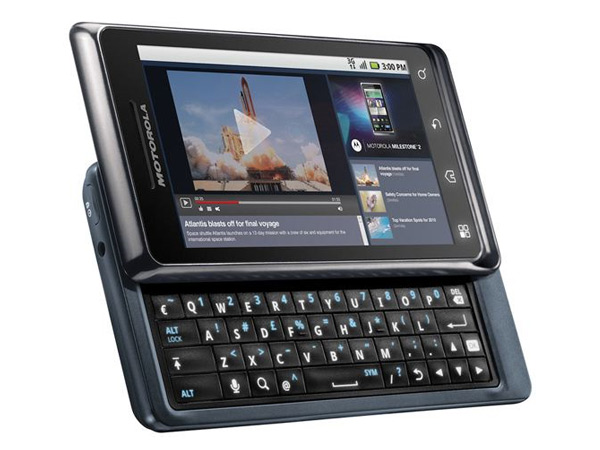
My Motorola Milestone 2 smartphone, which I bought nearly two years ago, has gone kaput. When I slide out the keyboard, the display goes blank. The device is usable, but only as an ordinary phone. I can imagine what has happened. There is probably a flexible ribbon cable like in the KX3 connecting the two halves, and a trace has broken. (A good job I’ve got the charger for the KX3 so I don’t have to keep opening it up to change the batteries.)
Of course, it is out of warranty. The question is, is it repairable at a reasonable cost? Motorola’s support site won’t give an estimated cost of repair. “Send it to us and we’ll give you a quote” they say. I’d really like a ballpark figure for what it is going to cost before doing that.
I guess I’ll just have to spring for a new phone. But there weren’t many alternatives with a real hardware keyboard and I expect there are even fewer now. I wish I could type using the software keyboard (which I’ll have to for now) but I have a 50% error rate. I don’t think my fingers are much fatter than normal. How do you guys manage? Perhaps you don’t text much and don’t do email on the phone.
Another Android APRS client
Good news for APRS enthusiasts with Android devices. Lynn Deffenbaugh, KJ4ERJ, is embarking on a port of his popular and successful APRSISCE to the Android platform, called APRSISDR.
I use the words “embarking on” advisedly. Although there is a Yahoo group and a collection of testers (including yours truly) the software is in an embryo stage at the moment. You can see the beginnings of an APRS client starting to form but Lynn is really just testing the Android platform at the moment to see how various key things can be accomplished. I would hazard a guess that it will take several months before something usable appears, though those who were in at the start of APRSISCE development will recall that it advanced in leaps and bounds. It’s going to be a fun ride, but for most I think it will be best to wait patiently for more news to emerge. Watch this space!
An Aaargh! moment
Some of you may have received an invitation to join my LinkedIn network from me today. To those who accepted, thank you. To those who found the invitation unwelcome, I apologize.
It was not my intention to spam you in any way. Unfortunately I didn’t look carefully enough at what was displayed so that instead of emailing just those whom I had painstakingly selected from the list, the invitations went to all of the hundreds of addresses in my Gmail contacts list.
It was a real Aargh! moment, but by the time I had uttered the exclamation it was too late! Judging by all the invitations I have received in the past from people I don’t remember, I don’t think I am the first person to have done this.













