Posts Tagged ‘WSPR’
 LHS Show Notes #053
 December 14th, 2010 |
  Author:
 Announcements:
- Thanks, again, to Gamma Leonis for the opening and closing music for the show.
- LHS Merchandise is available at PrintFection and Cafe Press. LHS items make great Christmas gifts! Or, make a donation by clicking the Donate link on the website. Donations cover such things as the telephone lines, server fees, and more. Thank you!
Topics:
- Articles seem to be popping up at www.amateurradio.com designed to get us talking about Linux and Amateur Radio. The latest one is by Anthony, K3NG, self-proclaimed radio artisan. Our hosts discuss his assertions that:
- Ham Radio Deluxe, DXLab, and N1MM software all beat any Linux offerings. (Note: Russ has found that both Ham Radio Deluxe and N1MM logger will run under WINE in Linux. DXLab, on the other hand, will not.)
- There is more amateur radio software available for Windows than Linux.
- CQRLOG is an adequate Linux program for casual logging, but not great for contesters.
- “Quite simply, if one intends on using Linux exclusively in the hamshack they have to lower their expectations and requirements for logging and are between a rock and a hard place when it comes to contesting.”
- He does praise fldigi, but still claims Windows software is better.
- In summary, he thinks hard-core contesters may wish to stay with Windows. Our suggestion: run Linux and write a program that works better!
- Russ talks about his success with WSPR and Echolink.
- He found that instead of using “dpkg -i” to install the latest Debian WSPR package, use “dpkg -x”. You’ll extract the files to the current directory. You then run the program from a terminal session in your home directory using “./wspr”. If you run it that way, instead of letting it install, it seems to work a lot better. The Gnome launcher doesn’t seem to work with that sort of installation, but running it from a terminal works well.
- Russ has Echolink running under WINE v1.13. This version of WINE was chosen for it’s native support of PulseAudio, which made configuring EchoLink much easier. Russ’ node is on 146.225MHz simplex, Echolink node 54711.
- Russ then tells us why Echolink and IRLP are different and why IRLP might be “better.” (Hint: Echolink may not have an amateur radio anywhere in the link, while IRLP definitely uses a radio somewhere in the link.)
Feedback:
- Scott, HL2/AD7MI, sends his appreciation for the discussion in Episode 50 of his blog entry about his Ubuntu installation, and adds a note about problems with running CQRLOG under 64-bit Linux. He says you can install CQRLOG on a 64-bit machine, but it will only work with the 32-bit version of hamlib. Unfortunately, that breaks 64-bit fldigi, which expects the 64-bit version of hamlib. This issue has been reported on both the linuxham Yahoo group and the CQRLOG forum. Scott has also successfully installed Xastir, and is looking forward to receiving a MicroHAM III interface.
- Matt, KC8BEW, asks “What is a good and easy Linux distribution for a web server?” Russ recommends a plain vanilla installation of Debian server, without the X-windows environment, and either Apache or nginx (a light-weight web server).
- Dave, M0DCM, tells us of his success running fldigi and CQRLOG under Ubuntu 9.10 on an Acer Aspire A0751h netbook. Well done, Dave!
Donations:
- A very generous donation was received from Gerrit R. Thanks, Gerrit!
Contact Info:
- Contact Richard at [email protected], Russ at [email protected], or both at the same time at [email protected].
- Listen to the live stream every other Tuesday at 8:00pm Central time. Check the LHS web site for dates.
- Leave us a voice mail at 417-200-4811, or record an introduction to the podcast.
- Sign up for the LHS mailing list.
- Sign up for the MAGNetcon mailing list.
- Thanks to Dave from Gamma Leonis for the theme music.
Music:
- “Steel Concrete” by Mad Mav from the album “Black Sheep II”, courtesy of Jamendo.
LHS Episode #053: Windows in the Ham Shack?
 Hello, everyone. We're coming to the end of another year and the world is aglow with holiday spirit. With that in mind, we bring you the second-to-last episode of Linux in the Ham Shack for 2010. We will have one more recording and release before the end of the year, so don't miss out on our holiday extravaganza.
We no longer broadcast video via Ustream, but we do have a live audio feed. Just point your streaming audio player at http://stream.lhspodcast.info:8008/lhslive starting about 30 minutes prior to air time (8:15pm CT). You can join in the chat room scene as well with your favorite IRC client. We are at irc.freenode.net in channel #lhspodcast. The channel is available 24/7, even when we're not doing a live show. Join in when you can and chat with other LHS listeners. During the live show, #lhspodcast becomes our chat room and our live connection with YOU.
Cheers and 73 from the LHS Guys
Beacon monitoring with Faros
Alex, G7KSE wrote recently about monitoring the International Beacon Project beacons on 20, 17, 15, 12 and 10 metres, which gave me the idea to try it again for myself. I did try the Faros beacon monitoring software by VE3NEA a few years ago but being a tightwad I never registered it so the trial came to an end after 30 days. I was also less than enthusiastic about leaving the computer and radio running every day 24/7. Work out the power consumption and it can add a significant amount to the quarterly bill which is unlikely to go unnoticed by the chancellor of the exchequer (the XYL.)
These days the computer is usually running from when I get up (or after breakfast) until when I go to bed in order to run my HF and VHF APRS gateways so it is no extra trouble to do some beacon monitoring as well. I don’t have a spare radio or antenna so I will have to use my main radio (my K3) and antenna for the beacon monitor. This means that if I want to go on the air the beacon monitoring will stop. Currently my enthusiasm for actually making contacts is at a very low ebb so this is not much of a problem. I shall still shut down at night and restart in the morning, at least during the winter months when there is no night time propagation on 20m and up. Apart from the pointless waste of joules, the loud click from the K3 each time Faros changes bands will be a disturbance as the shack is only just across the landing from our bedroom.
The antenna I am using is the short multiband 80plus2 dipole bent to fit into the roof space, with additional 10m and 6m elements. It works fine on 20, 15, 12 and 10m. On 17m I can get a good SWR with the aid of the K3’s built-in tuner (which is the source of the loud clicks) but performance is noticeably down on the magnetic loop. However, the magnetic loop is used by my K2 for the HF APRS gateway so it is not available.
VE3SUN has written a very good article explaining how to set up a system to display the beacon reception charts created by Faros on a web page. It looked easy so I went ahead and set up an IBP Beacon Reception page on G4ILO’s Shack. I found that the WinSCP software that VE3SUN recommends to automate the uploading of the reception charts to the website popped up annoying windows whenever it updates so I used SyncBack SE instead. Unlike WinSCP it isn’t free, but I had purchased a license a few years ago and the code still worked with the latest version.
I converted the JavaScript in VE3SUN’s example page to PHP. This means that I can test for the existence of the beacon monitor graphics and display a friendly message rather than have the browser display a “missing picture” graphic if the monitor has not been running and that day’s GIF image doesn’t exist.
I have added to the page a short list of currently active beacon monitors to make it easy to compare my reception reports with other people’s. It would be nice if, instead of each beacon monitor having his own results on his own web site, there was a central site that collated all the IBP reception reports and displayed them on a map, like WSPR does. Perhaps that would rejuvenate interest in the IBP which seems to have been overshadowed in recent years by WSPR and reverse beacons.

LHS Show Notes #052
Episode 50: A milestone!
Announcements:
- Russ talks about his California trip: attending the Large Installation Systems Administration conference (LISA).
- The 50th episode is a milestone – Richard explains why. See also The Internet Archive.
- Lord Drachenblut reminds us of the upcoming Indiana LinuxFest in Indianapolis, Indiana. If you’d like to register, use the promotional code LHSPODCAST50 (all capital letters) and you’ll get a $15.00 discount on the ticket.
- Music in this episode is from 20lb Sounds, fronted by Dan Lynch of Linux Outlaws fame.
Topics:
- Scott, AD7MI, posted an article on his blog about moving to an all-Linux ham shack. Richard and Russ discuss the article, including Shackbox Linux, Ham Radio Deluxe, CQRLog, and more. Ultimately, Fldigi and CQRLog resulted in “100% Linux Nirvana”.
- Scott also asks what we think would be the ideal Linux-based ham shack. Russ describes his shack, which he thinks IS ideal. Our hosts then discuss various soundcard interfaces:
- Most sound cards work fine, and Russ recommends the SoundBlaster series over all, but suggests staying away from the SoundBlaster Audigy SE (model CA0106) sound cards as they don’t seem to work well (or at all) under Linux.
- Richard likes his Yaesu FT-897D. Most modern rigs allow a fixed-audio level connection to the computer sound card, as well as computer rig control. Russ has the Kenwood TS-570D, and it, too, is well-supported in the Linux ham libraries.
- Russ and Richard discuss the fact that most hams don’t log VHF/UHF contacts, other than in contests or toward an award.
- The FCC, created by the Communications Act of 1934, included the requirement to maintain a log book in the rules. Sometime between 1983 and 1986, this requirement was dropped as the FCC determined that the information was of little use to them. (If someone can point us to a reference that identifies when the exact rule change occurred, please let us know. I was unable to find the specific change online. -Ed.)
Feedback:
- Leif, KC8RWR, writes that Internet over EME (earth-moon-earth) isn’t likely to work due to the high latency involved. (This may be in reference to a comment in Episode 48.) NASA and DARPA are involved in a Deep-Space Internet project.
- Leif also asks “Isn’t Morse code dead?” and wasn’t it replaced by “Gerke Code”? Our hosts discuss.
- Craig, KB5UEJ, writes that he thinks Russ’ audio is louder and muddier than Richard’s in episodes 46 and 47. Russ agrees that the audio on a few of the recent episodes did suffer, but should be much improved now.
- Grant, KC9SJQ, comments that he doesn’t see a link to Russ’ screencast about SSL anywhere. Yes, it somehow disappeared, but Russ is working on it. He’ll either find the file or redo it.
- William, KB9TMP, sends his comments about Episode 48 where we discuss KE9V’s article that questioned the relevance of amateur radio.
- Craig, KB5UEJ, commenting about WSPR, says that you can run less than 5W on an FT-897 by reducing the audio drive from the computer to the radio. Richard points out that the reduction is often not uniform across the audio freqeuncies used, so some intelligibility may be lost. He had that problem with packet, but he’ll try it with WSPR.
- Matt wants to know the artist and title of a song in Episode 48. The song was “Endline (Choose Nothing)” by I Am Not Lefthanded from the album “Yes Means No”. Check out the show notes for Episode 48 for a link to the song.
Donations:
- Scott, AD7MI, sent a donation just before we recorded! Thanks, Scott.
- If you’d like to help the podcast, please consider making a donation. It’s easy! Just a click on the Donate button on the web site.
Contact Info:
- Contact Richard at [email protected], Russ at [email protected], or both at the same time at [email protected].
- Listen to the live stream every other Tuesday at 8:00pm Central time. Check the LHS web site for dates.
- Leave us a voice mail at 888-455-0305 or 417-200-4811, or record an introduction to the podcast.
- Sign up for the LHS mailing list.
- Sign up for the MAGNetcon mailing list.
- Thanks to Dave from Gamma Leonis for the theme music.
Music:
- Redemption Song performed by 20lb Sounds.
- Jimmy Carter, also by 20lb Sounds.
A little RF goes a long way
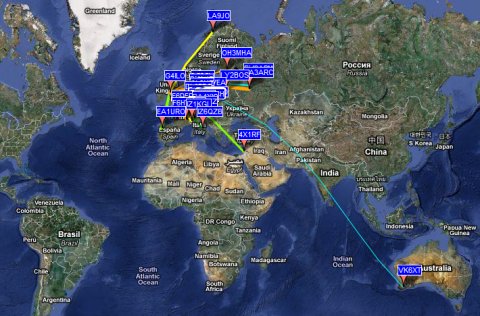
In this case, 5W of WSPR on 40m to a bent attic dipole. Not, perhaps, as impressive as M0XPD’s results with 50mW on 30m. But it’s still nice to be heard on the other side of the planet.

LHS Show Notes #051
Ubuntu 10.10 – Maverick Meerkat
Russ upgraded from 10.04 to 10.10, which isn’t particularly easy. as 10.04 is the long-term-support (LTS) version, but 10.10 isn’t.
There is a command line command to upgrade:
do-release-upgrade
which will work, but you must first make a change in the Ubuntu software center. Click Edit -> Software Sources -> Updates tab. At the bottom of the Updates tab, there are three options for the release upgrade: Never, Long-term Support Only, and Normal Releases. You must select “Normal Releases”. Russ then issued the do-release-upgrade command. Once the downloads were complete, the upgrade just took about 45 minutes. A reboot is necessary due to the newer kernel.
The desktop background is a bit different, but otherwise it looks and runs much the same as 10.04. Russ had some performance issues with 10.04 on some of his machines. He thinks 10.10 runs much better.
- GNOME updated to current 2.32 version.
- Gnome desktop manager (gdm) version 3. Russ thinks it looks more like OS-X.
- Evolution updated to version 2.30. Russ thinks they should drop Evolution entirely. There would be room for GIMP if Evolution were deleted.
- Shotwell replaces F-Spot as the default photo manager. F-Spot replaced GIMP in a previous release due to space issues, and now Shotwell replaces that. Isn’t this kind of silly?
- Gwibber updated to use Twitter’s new authentication scheme.
Kubuntu changes:
- More updates to KDE.
- Updates to Qt, and KDE (4.5.1).
- Switched to PulseAudio. Russ says: BOOOOO!, because he’s unhappy with all audio systems on Linux.
Ubuntu Server changes:
- Eucalyptus updated for cloud computing environments.
Kernel update:
- 2.6.35-22.33 Based on 2.6.35.4 upstream stable kernel.
- Support for i586 and older processors, and i686 processors without the conditional move opcode (CMOV), has been dropped. Bad news for older machines.
WSPR was highlighted in the November, 2010 issue of QST.
- What is WSPR? From the WSPR Users Guide:WSPR (pronounced “whisper”) stands for “Weak Signal Propagation Reporter.” The WSPR software is designed for probing potential radio propagation paths using low-power beacon-like transmissions. WSPR signals convey a callsign, Maidenhead grid locator, and power level using a compressed data format with strong forward error correction and narrow-band 4-FSK modulation. The protocol is effective at signal-to-noise ratios as low as –28 dB in a 2500 Hz bandwidth. Receiving stations with internet access may automatically upload reception reports to a central database. The WSPRnet web site http://wsprnet.org/drupal/ provides a simple user interface for querying the database, a mapping facility, and many other features.
- Developed by Joe Taylor, K1JT.
- System Requirements:
- SSB receiver or transceiver and antenna.
- Computer running the Windows, Linux, FreeBSD, or OS X operating system.
- 1.5 GHz or faster CPU and at least 100 MB of available RAM.
- Monitor with at least 800 x 600 resolution.
- Sound card supported by your operating system and capable of 48 kHz sample rate.
- If you will transmit as well as receive, an interface using a serial port to key your PTT line or a serial cable for CAT control. Linux and FreeBSD versions can also use a parallel port for PTT. Alternatively, you can use VOX control.
- Audio connection(s) between receiver/transceiver and sound card.
- A means for synchronizing your computer clock to UTC.
Richard’s setup:
- Yaesu FT-897D Transceiver.
- G5RV Antenna.
- Rascal GLX sound card interface.
- Ubuntu 9.10.
- 3 gigs of memory and an Intel 3.0 Ghz CPU.
- Onboard sound card.
Installation:
- Richard downloaded what looked like the .deb package from the web site.
- He used Gdebi to unpack and install it, but could not get it to stay running. Every time he tried to do anything it crashed.
- After reading the Linux installation instructions from the user guide, he attempted to install it in the manner described:
- Download the appropriate file from http://physics.princeton.edu/pulsar/K1JT/wspr.html, place it in your home directory, and run the following commands in a terminal
$ sudo dpkg --instdir=. -i wspr_2.00r1714_i386.deb
$ cd WSPR
$ ./wspr
- This resulted in a program that would receive after some fooling around with the sound card, but no rig control, and no transmit.
- As a last resort, Richard downloaded the Windows version and loaded it under Wine, which gave him rig control, transmit, and receive, without much of a problem.
- It did leave him with a few minor annoyances: he has to start it from the file manager with “Open with Wine” from the directory “.wine/Drive_c/Program Files/WSPR”. The menu bar at the top was only partially functional, but he thinks it has to do with his USB mouse, as keyboard control works fine.
- Richard was heard in Argentina on 40m running 5 watts and reported on the wsprnet site.
- WSPRNet website
- WSPR net offers a wide variety of information on the network in real time.
- Page of stations currently active on WSPR.
- Map of stations that can be filtered by callsign and/or band.
- Offers dicussion forums for Q and A, setting up schedules, and general WSPR discussion.
Donations
If you’d like to help the podcast, please consider making a donation. It’s easy! Just a click on the Donate button on the web site. Every dollar helps. Or purchase some LHS merchandise at the SHOP! link on Web site. Check out the Badgerwear or buy one of the other LHS-branded items at PrintFection.com/lhs or Cafe Press. Thanks!
Contact
- Contact Richard at [email protected], Russ at [email protected], or both at the same time at [email protected]
- Listen to the live stream every other Tuesday at 8:00pm Central time. Check the LHS web site for dates.Leave us a voice mail at 888-455-0305 or 417-200-4811, or record an introduction to the podcast.
- Sign up for the LHS mailing list.
- Thanks to Dave from Gamma Leonis for the theme music.
Music
LHS Episode #051: Careless WSPR
 A short while ago, Canonical released the latest version of Ubuntu: the fabled Maverick Meerkat, 10.10. This is the latest in Ubuntu’s normal release cycle and is not LTS. I had occasion to upgrade a couple of my personal computers running Ubuntu to the wily Meerkat. Find out what’s new in 10.10, and what’s old, in the first segment of LHS #049.
After that, Richard and I tackle the WSPR protocol for ham radio again. When it was discussed the first time around, neither of us had much of an idea what it was or how it worked. Armed with a broader understanding and a lot more experience, we talk about what works and what doesn’t work with WSPR, how to get it up and running on your system and what we like and don’t like about it.
Following that it’s on to witty banter, a passel of badgers, some hijinks, censorship, feedback and more entertainment than you can shake a wet hedgehog at. Thanks for tuning in. We love you all.
73 de The LHS Guys













