Posts Tagged ‘SWL’
 Check Out My New SDRplay RSPdx Software-Defined Radio Receiver – Live!
 August 17th, 2020 |
  Author:
 My new SDRplay RSPdx software-defined radio receiver is live, via http://www.sdrspace.com/Version-3, using the SDR Console software (Version 3).
The receivers are online whenever I am not transmitting and when there are no local thunderstorms.
Antenna Port A is a wire antenna (100′), while Antenna Port B is a VHF/UHF discone. Both have an AM Broadcast band reject filter, reducing local AM Broadcast signals by about 30 to 40 dB. I need to use these because the very close KLIN transmitting tower is just miles away and those signals overwhelm the receiver. When I use the signal filters, the local AM Broadcasting signals no longer overwhelm the receiver.
Let me know what you think. Enjoy!
To use my receiver:
Install the latest version of SDR-Console which can be downloaded from https://www.sdr-radio.com/download
Install SDR Console according to the directions given. Once you have the software installed, you will want to add my server.
It takes a little to get familiar with the software, but there are online FAQs on how to begin.
My server is known as, ‘0 NW7US‘ — it will be online when I am not using my antenna systems for transmitting. It will be offline during thunderstorms, or during times when I must use the systems for transmitting.
Software-defined radio is a great way to hear all sorts of communications, from local AM broadcast stations, FM stations, VHF Air Traffic, to shortwave radio stations including amateur radio HF communications.
Thank you for watching, commenting, and most of all, for subscribing; please subscribe to my YouTube Channel: https://YouTube.com/NW7US Also, please click on the bell, to enable alerts so that when I post a new video, you will be notified. By subscribing, you will be kept in the loop for new videos and more.
Video:
[embedyt] https://www.youtube.com/watch?v=DHj917E1bKA[/embedyt]
73!
Chat From a Quarantined Software Engineer – Welfare Check!
This is a welfare check on you. Please leave a comment on how you are faring, what is happening in your situation with the lock-down.
Are you quarantined? Working from home? Did you lose your job? How are you doing during this crazy time?
What is going on with you during this challenging situation?
I talk about what I’m doing, too. I’m quarantined at home. I can work from home, as I am a senior software engineer. I can do my job by remote access to a virtual workstation, through a secure VPN connection. I’m blessed that I still can work during this lock-down.
But, I have a medical emergency – a dental problem – and trying to be seen by a dentist is difficult, because all of the local dentists were told to shut down their daily business and quarantine. Only emergency appointments are being made! I was finally, after two days of phone calls, able to schedule an emergency visit to my dentist!
I want to know: How do you use amateur radio, now that we are all stuck at home? Are you using ham radio more, now? Less?
Please leave a comment to let me know how you are doing, and answer the other questions, too. I hope to hear from you.
I hope to meet you on the shortwave amateur radio bands. I am usually using Olivia, or Morse code CW. More information about Olivia: http://OliviaDigitalMode.net.
Be healthy, be safe, stay sane!
How I Reunited Two Devils Brigade Canadian and American Veterans of World War Two
In the 1990s while living in eastern Montana, I had the amazing experience of reuniting two soldiers that served in the Devil’s Brigade. They both trained near Helena, Montana.
One day, I was operating on the amateur radio shortwave Ten-Meter band, and a gentleman answered my, “CQ, CQ, CQ, this is N7PMS in Montana, Over”. I took notes of our conversation.
The next day, when again I called for any station to answer my call for a conversation, another fellow, from Canada, answered me. I learned something amazing: Both of these two men mentioned that, during World War Two, they both were in the same special forces unit, training near Helena, Montana.
One of these Veterans served in the Canadian Armed Forces, and the other in the American Armed Forces. Listen to my story, for the full details of this amazing experience I had as an amateur radio operator.
Jump to 3:22 if you wish to skip my introduction to the story, during which I give some background on when and so on:
https://youtu.be/YFMplHjxy6s?t=3m22s
This certainly was one of the most memorable moments in my amateur radio hobby experience! The joy of reuniting friends is good.
From https://en.wikipedia.org/wiki/First_Special_Service_Force:
The 1st Special Service Force (also called The Devil’s Brigade, The Black Devils, The Black Devils’ Brigade, and Freddie’s Freighters), was an elite American-Canadian commando unit in World War II, under command of the United States Fifth Army. The unit was organized in 1942 and trained at Fort William Henry Harrison near Helena, Montana in the United States. The Force served in the Aleutian Islands, and fought in Italy, and southern France before being disbanded in December 1944.
The modern American and Canadian special operations forces trace their heritage to this unit. In 2013, the United States Congress passed a bill to award the 1st Special Service Force the Congressional Gold Medal.
Thank you for watching, and sharing. Comments are welcome: do you have a memorable moment in your radio hobby experience on the air?
73 de NW7US
Short Demonstration of Using Ham Radio Deluxe with WSJT-X and FT8 Digital Mode
Ham Radio Deluxe can log your WSJT-X FT8, JT65A, and JT9 QSOs, via the JT-Alert software. This is a demonstration of my use of HRD and Logbook, during an FT8 QSO,today.
As some of you know, I have had some differences of opinion regarding the selection of frequencies chosen by the FT8 creators and advocates. Regardless, I do still use the mode. Here is proof:
Go ahead and share, if you would. And, please subscribe to my YouTube channel, as I will be creating many how-to videos in the near future.
Thanks and 73 … de NW7US
Let’s Call CQ – QSO Today Episode 184 with NW7US
I got a Skype call a few weeks ago from Eric, 4Z1UG–the creator and host of the QSO Today Podcast–during which he asked me about how and why I got into amateur radio. Here’s the result.
Eric writes,
We talk a lot about the band conditions due to the Sunspot cycle. Most of it on Facebook and other places is about how “dead” the bands are at this point. We all can’t wait until the cycle starts to rise and we will be making contacts with little effort. I remember in my conversation with Chuck Adams, K7QO in Episode 58, that he really enjoys operating is “Pigrig”, one watt, CW transceiver on 20 meters. When I asked him, (I liberally paraphrase) “but Chuck, the bands are dead. How does that work for you?”. His reply was that while most hams are listening to the bands, he calls CQ until he gets a reply. Works every time.
My QSO this week is with Tomas Hood, NW7US, who has years of expertise in propagation and Solar activity. He is the propagation editor of more than a few radio magazines and websites. In our post-recording conversation we discussed this phenomenon of listening and not calling CQ. I even had this idea that maybe one of the reasons that the digital modes are so successful is because they “beacon”, as part of the whole digital experience, the same as calling CQ. This is why they make contacts. From what I see, looking at PSK Reporter, hams are making lots of contacts worldwide using the digital modes. While SSB may not be working so well, CW and the digital modes seem to work fine.
I like to work on my bench or make the podcast while listening to the bands. Jeff Damm, WA7MLH, in Episode 177, says that he will put his keyer in CQ mode while he is working on a new radio. Invariably, sometimes after many minutes, he gets a reply. Great idea Jeff!
73,
Eric, 4Z1UG
Episode 184 can be found here: https://www.qsotoday.com/podcasts/nw7us
Highlights of Episode 184:
Tomas Hood, NW7US is the propagation editor of a number of shortwave and amateur radio magazines, and has a wide variety of websites, that grew out of his love for all things radio, and for listening on the bands to far off DX and commercial broadcast stations. Tomas shares his understanding of propagation and the lessons we can learn from listening, really listening to the QSOs and exchanges during contest operation.
All of the QSO Today episodes are great. I enjoy hearing about many different hams. Do check out all of the episodes that Eric has published.
73 de NW7US dit dit
What Got You Interested in Radio? What Hooked You? (Story Time, with Video)
What got you interested in radio? What hooked you?
I’ve been asked, “What got you interested in radio, space weather, and the science of radio-wave propagation?”
Here’s a short answer as to why (and when) I became a radio enthusiast. It all started…
[embedyt] https://www.youtube.com/watch?v=0XBth62JgwA[/embedyt]
https://www.youtube.com/watch?v=0XBth62JgwA
The following picture is of my first shortwave radio, discovered in my home sometime between 1971 and 1973: a Sony portable transistorized four-band radio receiver. This was my very first shortwave radio (well, truthfully, it was my dad’s). This radio is responsible for my love of radio, electronics, and communications.
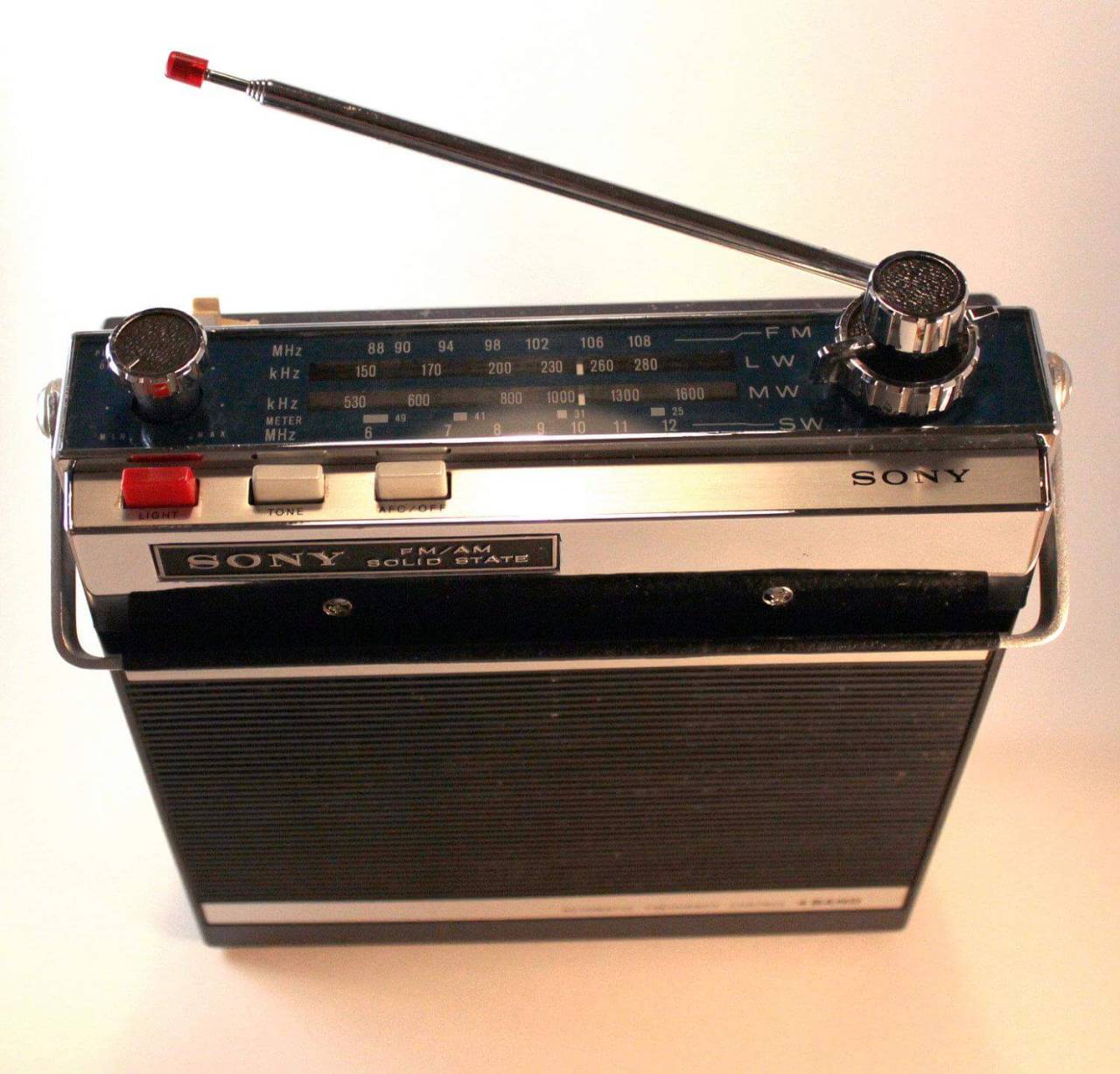
Sony Portable 4-Band Radio – the model 7F-74DL (my First Radio)
I still use this, sometimes, when listening to late-night AM-broadcast-band-radio DX. It is horrible for shortwave radio listening, as it has no noise blanker. For MW (Medium-wave) AM Broadcast DXing at night, it is excellent. The internal bar antenna is very directional so I can rotate the radio around until I get the best reception of some station. Back when I was a child, that made the radio very fun to use.
This next radio is a really capable military surplus radio circa WWII or shortly after (the late 1940s, early 1950s). This radio was my world starting around 1975. From Medium-wave to Shortwave, this radio could hear a pin drop around the world! Many late nights when I was supposed to be sleeping, I was up with the light dimmed and the tubes singing signals from exotic places.
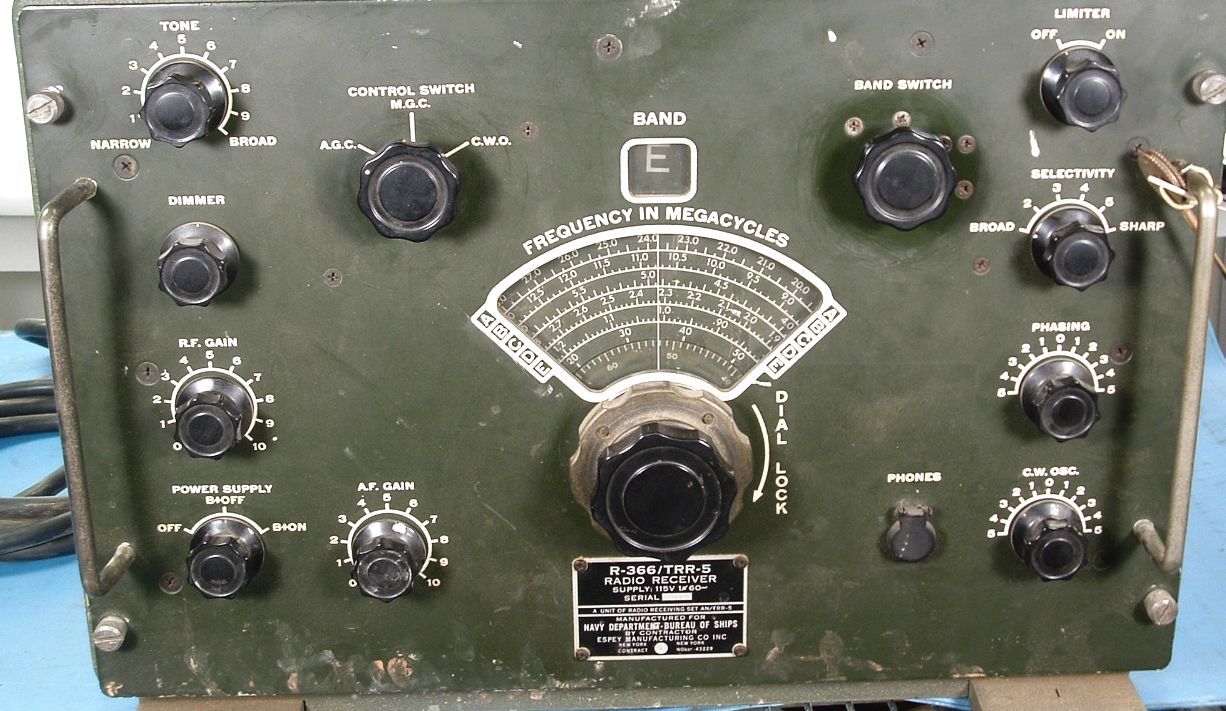
Espey R366 Tube Receiver (my Second Radio)
What is your story?73 de NW7US
Addendum:
https://www.youtube.com/watch?v=y8bBM9Dy38o
[embedyt] https://www.youtube.com/watch?v=y8bBM9Dy38o[/embedyt]
Demonstration: Using FLDigi to Communicate with Olivia Digital Mode on Shortwave
Are you interested in starting out with the amateur-radio digital modes on the high frequencies? Have you heard of FLDigi? FLDigi is a software control and modem suite that interfaces with your transceiver, your computer sound card, and other input/output interfaces so that you can receive and transmit one of many digital modes. For example, FLDigi allows you to operate using the Olivia digital mode.
Demonstration: Using FLDigi to Communicate with Olivia Digital Mode on Shortwave
Unlike the JT/FT digital modes–modes that do an incredible job under marginal propagation conditions–there are other modes that offer keyboard-to-keyboard conversational QSO opportunities that can overcome rough shortwave radio propagation conditions. (The meaning of QSO on Wikipedia: An amateur radio contact, more commonly referred to as simply a “contact”, is an exchange of information between two amateur radio stations.)
While making quick work of getting DX stations into your logbook by exchanging callsigns, a signal report, and a grid square, the JT/FT modes (JT stands for Joe Taylor, the fellow that pioneered these modes) are limited. They cannot handle any additional communications beyond a callsign, a signal report, a grid square, and a very limited set of acknowledgments and sign-off messages.
When you desire to get to know people from other areas of the world, or if you need to establish networks around the world for passing information–perhaps an emergency net in support of the Red Cross–or if you are motivated by any other of a myriad reasons to establish a keyboard-to-keyboard conversation by way of the ionosphere, modes like Olivia are great candidates for your consideration.
In this video, contributing editor with CQ Amateur Radio Magazine, NW7US shares some starting points in the FLDigi software for Olivia keyboard-to-keyboard chat mode.
[embedyt] https://www.youtube.com/watch?v=ejSNfXiT8FE[/embedyt]
Current CENTER Frequencies With 8/250 in MHz:
1.8269, 3.5729, 7.0729, 10.1429, 14.0729, 18.1029, 21.0729, 24.9229, 28.1229, and so on. See the pattern?
By the way: The current suggested CENTER frequency With 16/1000 or 32/1000 on 20 meters is 14.1059.
(Why the …9 frequencies? Experts say that ending in a non-zero, odd number is easier to remember!)
Q: What’s a ‘CENTER’ Frequency? Is That Where I Set My Radio’s Dial?
For those new to waterfalls: the CENTER frequency is the CENTER of the cursor shown by common software. The cursor is what you use to set the transceiver’s frequency on the waterfall. If your software’s waterfall shows the frequency, then you simply place the cursor so that its center is right on the center frequency listed, above. If your software is set to show OFFSET, then you might, for example, set your radio’s dial frequency to 14.0714, and place the center of your waterfall cursor to 1500 (1500 Hz). That would translate to the 14.0729 CENTER frequency.
The FLDigi Manual of Operation is found here: http://www.w1hkj.com/FldigiHelp/
FLDigi can be downloaded here: https://sourceforge.net/projects/fldigi/
Join the Olivia movement:
1. Subscribe to the mailing list: https://Groups.io/g/Olivia
2. Join the Facebook group: https://www.facebook.com/groups/olivia.hf
For additional information on Olivia, check out:
http://blog.nw7us.us/post/168515010062/olivia-digital-mode-great-compromise
http://blog.nw7us.us/post/169114702522/are-you-an-amateur-ham-radio-operator-check-out
73 de NW7US













