Posts Tagged ‘Software’
 SDR Radio
 December 14th, 2011 |
  Author: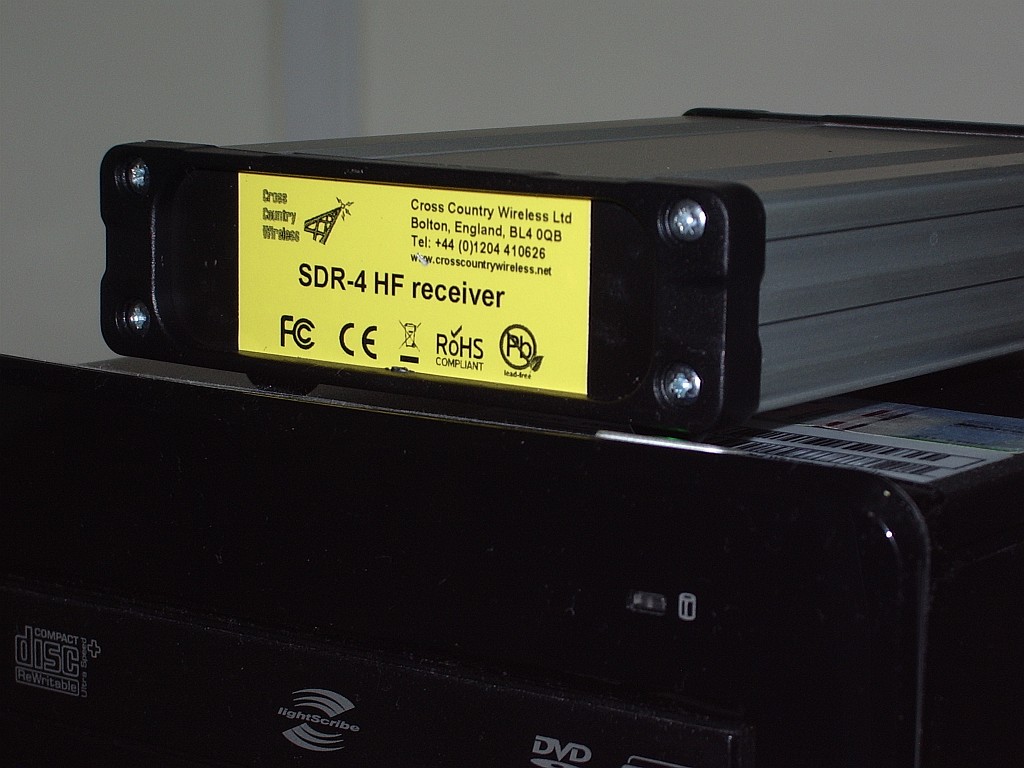
An early Christmas present to myself is this SDR-4 HF receiver from Cross Country Wireless. Actually, it wasn’t intended to be a Christmas present. I decided to get one a couple of months ago when I first found out about it.
I think the SDR-4 is the lowest cost ready built HF bands software defined radio on the market (£150 or about $250 US). Unless you know different, of course. However it seems that a lot of other people thought so too, as there is a waiting list – people are ordering them faster than the designer Chris G4HYG can make them!
The SDR-4 works with the usual free SDR applications. But it also works with the free version of Simon Brown HB9DRV’s SDR-Radio.com application. This is the best SDR software by a mile, though due to all the treatment and medication I am receiving for my brain tumour my mind is a bit slow at the moment and I find figuring out how to do what I want with it a bit challenging.
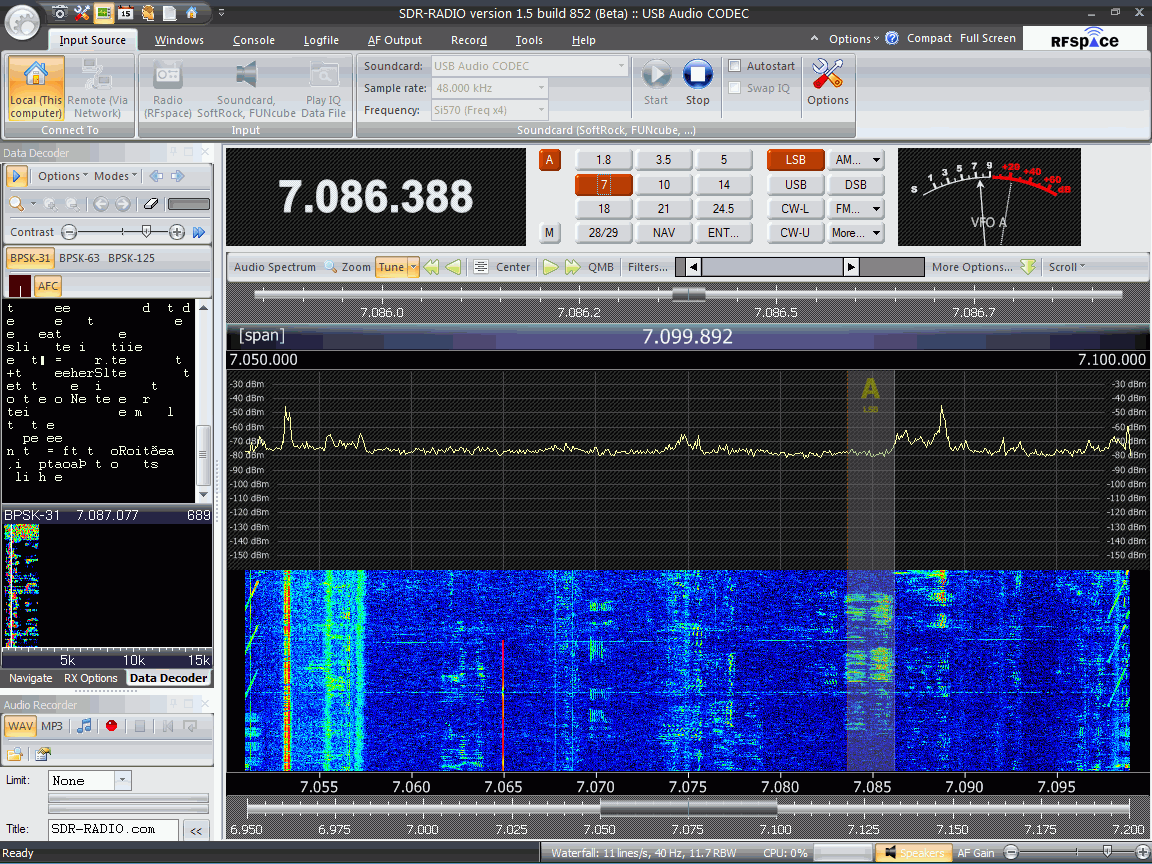
As you might expect from the author of Ham Radio Deluxe, SDR-Radio.com has built-in support for decoding digital modes. Unfortunately I haven’t managed to work out yet how to get the digital decoder waterfall to be a reasonable size: At the moment it’s a small window on the left hand side which is trying to display 15kHz worth of spectrum and although I’m hearing PSK31 I can’t find a trace to click on! I’m also still trying to discover if there is a PSK Browser in the program that sends reports to the PSK Reporter reverse beacon site. Hopefully someone will enlighten me.
I’m sure I’ll be writing more about the SDR-4 receiver and SDR-Radio.com in due course, but in the meantime if you want more information or to ask questions about the receiver there is a Cross Country Wireless Yahoo! group. You can even try an SDR-4 out over the Internet if you follow the instructions posted by Chris. I did and it worked perfectly – and it was so nice to hear the amateur bands without the awful frying noise I have to endure here.
Yahoo! is also the place to go for information and support of SDR-Radio.com (the software.) I look forward to seeing some comments and experiences of any of my readers who are tempted into trying this software defined radio.

20 over 9 into Michigan
Propagation has again been excellent on 10m. I heard many US stations and other DX at good strength. I didn’t make many contacts, though. Most of the stations I was hearing were enjoying 5 or 10 minute QSOs. You can use up a lot of time listening to such contacts, especially when you make your call and the station you are hoping to work replies to someone else and not you, so you get to wait another 5 or 10 minutes for the next chance.
Not that I’m complaining. But it doesn’t help that I refuse to use bad operating tactics to get a contact. One station I waited for got angry and went QRT because other European stations were calling over the final of the station he was working. If I can only hear the DX side of the conversation I won’t call until I hear the DX call CQ or say QRZ or listening for any calls. Others do, and too often they get rewarded with a contact. It makes me angry, too.
My first contact of the day was with UT1AN Alex on 10m FM. His QTH is not far from Kharkiv, Olga’s home town. Alex gave me an S9+20dB report.

The last – so far, anyway, was on 10m SSB with W8ERN Angelo in Brighton, Michigan, pictured right. I waited a long time before my call was heard. But it was worth the wait because Angelo replied with are you the G4ILO that wrote the VOAProp software? I ‘fessed up and Angelo told me how much he liked the program.
We also talked about web pages and logging programs. Angelo’s web page is produced using a software program called CommCat Live. You can hear live streaming audio from his station and see a graphical S meter plot of the station he is receiving. He told me my signal – 100w to the attic dipole – was almost peaking 20 over 9 and sure enough when I looked at the screen it was. Perhaps my QTH is not so bad after all.
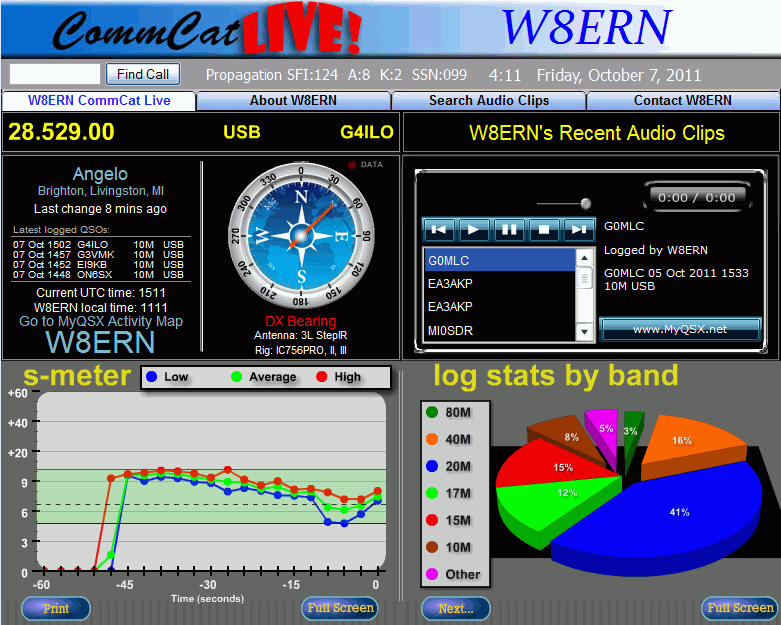
Here is the proof: W8ERN’s web page snapped while I was in QSO with him.
CommCat certainly adds interest to a ham radio web page. Unfortunately – but not surprisingly – it doesn’t support my home-written logging program KComm.

UV-3R programming software
A new programming software has been released for the Baofeng UV-3R. At the moment you can download it here. I used BitZipper to open the rar file.
This software is claimed to be for the UV-3R MkII with the dual frequency display but it works with my MkI as well. I took the precaution of reading from the radio before modifying and writing anything: some people who didn’t do that with the old program experienced problems.
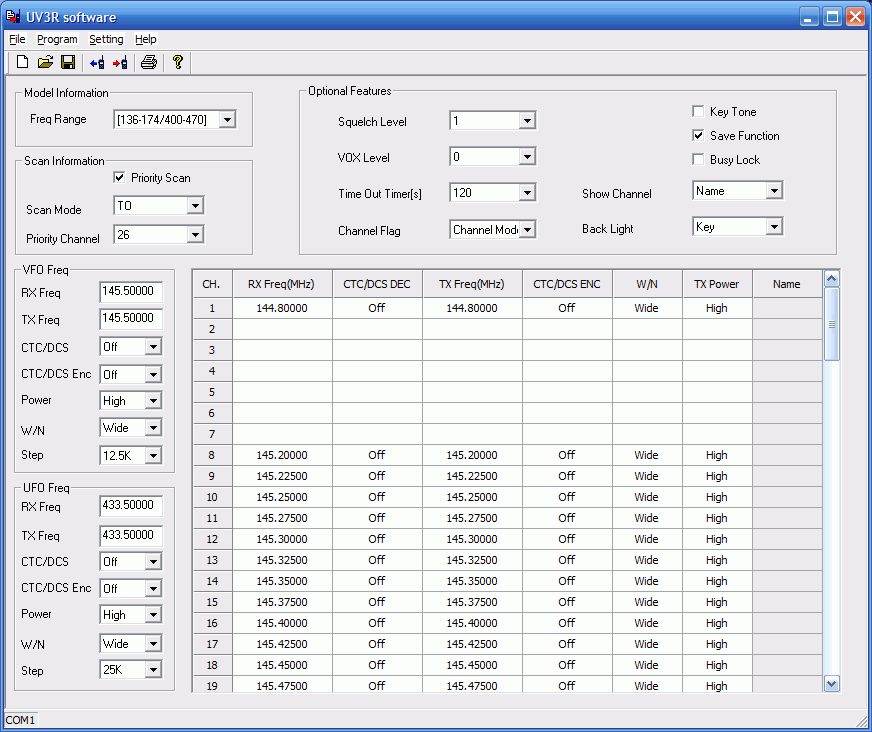
The new program is easy to use. Interestingly, it has two options for frequency range, one of which limits the range to the ham bands 144-146MHz and 430-440MHz. I assume that is to get approval in some countries that don’t allow radios that can transmit out of band. There is also a column called Name for each channel, though I couldn’t type anything in there. Perhaps a newer model will allow you to have channel names as well.
I discovered a bug with setting the priority channel, though it’s kind of hard to explain. You choose the priority channel from a drop-down list of channels that have been used. If you haven’t used all the channels between channel 1 and the priority channel then the radio will check the channel corresponding to the position in the list of the one you selected instead of that actual channel number. I wanted to make channel 20 the priority channel butthe radio started checking channel 14 because 20 was the 14th filled channel in
the list! To use channel 20 as the priority channel I had to select channel 26, which was the 20th one in the list.
I don’t know what would have happened if the channel I’d picked was one that didn’t have a frequency programmed into it – and I’m not going to risk finding out!
I ought to mention that the cross-platform multi-radio supporting memory management software CHIRP supports the UV-3R as well. Not sure about the UV-3R MkII though.

Could Google Get Into Ham Radio? Let’s Speculate
So Google has announced that it is buying Motorola Mobility, a spin off of the original Motorola. The main focus of the company is mobile handsets. But with a little extra work, could Google maybe diverse even more into ham radio? Chances are, they wouldn’t, but let’s take a trip to “Fantasy Land” and see what it could be.

Photo Courtesy of Wikipedia/Coolcaesar
So, Google decides to move into Ham Radio. Motorola has already been building commercial radios for years. Some of them can be re-tuned for the ham bands. So let’s say they design and build a small “Smart HT”. Using Android, they could offer a ton of great features on it. Maybe like a Software Defined Radio type of device, with DSP filtering, along with standards like CTCSS. APRS built in and maybe even a D-Star alternative codec, but still have backwards compatibility with the current. Why not Bluetooth and WiFi for Echolink? Use apps to increase functionality? Can it be done? Would you want something like that? How would it look and work? Or am I basically describing an iPod Touch or Google Android Phone?
This is all speculation of course, but could Google build a “Smart HT”? What would be the next generation of HT’s be like? I wouldn’t mind hearing what you would like to see in these “Smart HTs” should they ever be built. It almost fuels the imagination huh? Let me know what you think in the comments.
73.
Rich also writes a Tech blog and posts stories every Tuesday and Thursday on Q103, The Rock of Albany’s website, as well as Amateur Radio stories every Monday thru Friday here on AmiZed Studios.
Lost treasure
Earlier in the year I was hunting through some folders on my hard drive and discovered an unreleased version of my Morse training program MorseGen. I had no memory at all of having updated it so I had no idea whether I had finished or tested the update. The main changes from the last released version 1.4 appeared to be that there was now a batch mode for creating recordings to play on an MP3 player and a “Common words” mode. This jogged my memory as to the reason for updating the program. A couple of years ago in QST there was an article which suggested that in order to be able to copy Morse at high speed you should learn to recognize the sounds of complete words not just individual letters. So I had added the ability to play random selections from a list of some of the most common words and CW abbreviations.
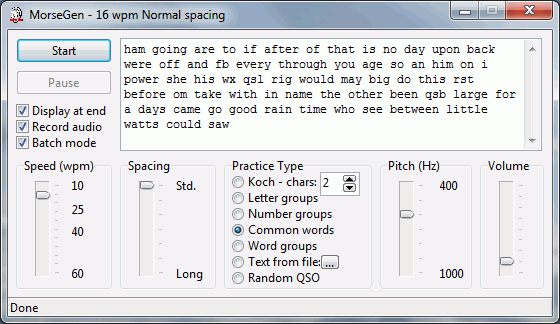
Today I placed this new version of MorseGen on the G4ILO’s Shack website. The previous version is still available to be downloaded in case the new one has problems. My interest in programming has now fallen to absolute zero and I no longer even have the development tools used to compile MorseGen so this is definitely, without argument the last ever version.
This is actually a bit of a nuisance as the new version seems to have a small bug. Occasionally, in Random QSO mode the program will halt with an error message “List index out of bounds.” You have to close the error message and continue. I’m guessing that I added some QSO templates and the random number generator sometimes generates a number that is more than the number of templates. If so, this would be easy to fix if I still had the development tools. But I don’t, so I can’t, so tough luck! But no-one has any grounds for complaint because MorseGen is free!
Despite the bug, I still think MorseGen is a useful program. I often use it whenever I get the urge to try to improve my Morse reading skills. Admittedly it hasn’t done me any good, but I think that is more due to something peculiar to my brain that is just incapable of mastering the code. Over the years since I wrote the first version of MorseGen I’ve had many emails thanking me for it so it appears that it does work for people less Morse-resistant than me!

Time to ditch Dimension 4
Digital modes such as WSPR and JT65A are time-synchronous and require the computer clock to be accurate to within a second. New users frequently don’t realize this and find that they aren’t decoding any signals. When they go to a forum for advice they are inevitably advised by well-meaning helpers to run a bit of software called Dimension 4.
Once upon a time there may have been a good reason for using this program but today it is not a good idea at all. I have seen several forum threads where people have installed Dimension 4 and believed that their PC clock was now accurate, but were still not decoding signals. I suspect that this is because newer versions of Windows have tightened the security controlling whether programs are allowed to do things like change the system clock. Dimension 4, being last updated in 2004 according to its website, knows nothing of this.
There may or may not be ways to make Dimension 4 work under Windows 7 or Vista but there is no reason to bother with them. Instead, just install Meinberg NTP for Windows. Not only is this every bit as free as Dimension 4, it is also the official Network Time Protocol client software. Nothing is ever going to keep your computer clock more accurate than this, and if installed using the default settings it will “just work” even on the latest versions of Windows.
So please, computer Elmers, stop telling people who need to get their clocks synchronized to install an old and unsupported program.

Getting the plot
A few years ago I read about a program called Radio Mobile which was supposed to be able to plot maps showing your VHF or UHF station coverage using actual terrain data. I downloaded it but couldn’t figure out how to get it to work so I gave up. A few days ago someone mentioned that it is possible to hook the program into an APRS server so I thought that I would try again. I was given a hint that for UK users the G3TVU Quick Start package was the easiest way to get Radio Mobile going.
The default setup is for a location in the Derbyshire Peak District so I followed the instructions on Changing Location to try to create maps centered on G4ILO. I got as far as producing an elevation map but was then baffled by the sentence: “Which can then be ‘Merged/Copy’ with a road map and ‘Kept in new picture’ to produce.”
James VE6SRV came to my assistance with an explanation in English: “On the menu select EDIT then in the drop down menu select MERGE PICTURES… F7. You’ll get a dialog box opened up. It will have a list of various sources on the left, detailed choices about the source in the middle and operation controls on the right.Try picking OSM, and then clicking DRAW. After the merge is complete, you’ll be asked how you want to keep the resulting image, or to discard it. The four options equate to SAVE, SAVE AS, LET ME LOOK AT IT FOR NOW, and TOSS IT. If you chose copy, the OSM tiles will overwrite the relief map. ADD, MULTIPLY, and BITWISE are 3 different methods of merging the shaded relief map with the OSM tiles. Depending upon the colours, and the type of output you want, you’ll need to play a bit with the choices to see how it looks for you. You can also play with contrast and brightness sliders to try and get the output just how you like it.” This was just what I needed, and after a bit of experimentation I soon had a road map of my area merged with the relief map showing the mountains.
The next step was to try to plot the coverage of my station on the map. I believe the default setup had a dummy base, mobile and hand-held station predefined but they were now outside my area and in any case I must have deleted them. Creating a “unit” for my own station was simple enough, but when I selected one of the tools to plot coverage the Draw button was disabled. Eventually I worked out that you have to have at least two stations (“units”) defined and they must both be members of the same network. The program will then plot the coverage for your station as received by a station of the same type as the other one.
I thought the coverage plots were rather optimistic judging by experience so I had to change some of the parameters and choose the “worst case” to get a plot that looked reasonable. This being VHF, it’s possible that the fact of my antenna being located in the attic could result in some degradation of the signal. I felt the default colouring of green for 3dB over noise or better and yellow for 3dB below noise to 3dB above didn’t give a realistic picture so I changed the colouring so that green depicts 10dB or more over noise and yellow shows between 0 and 10dB.
The first plot shows a wide area view:
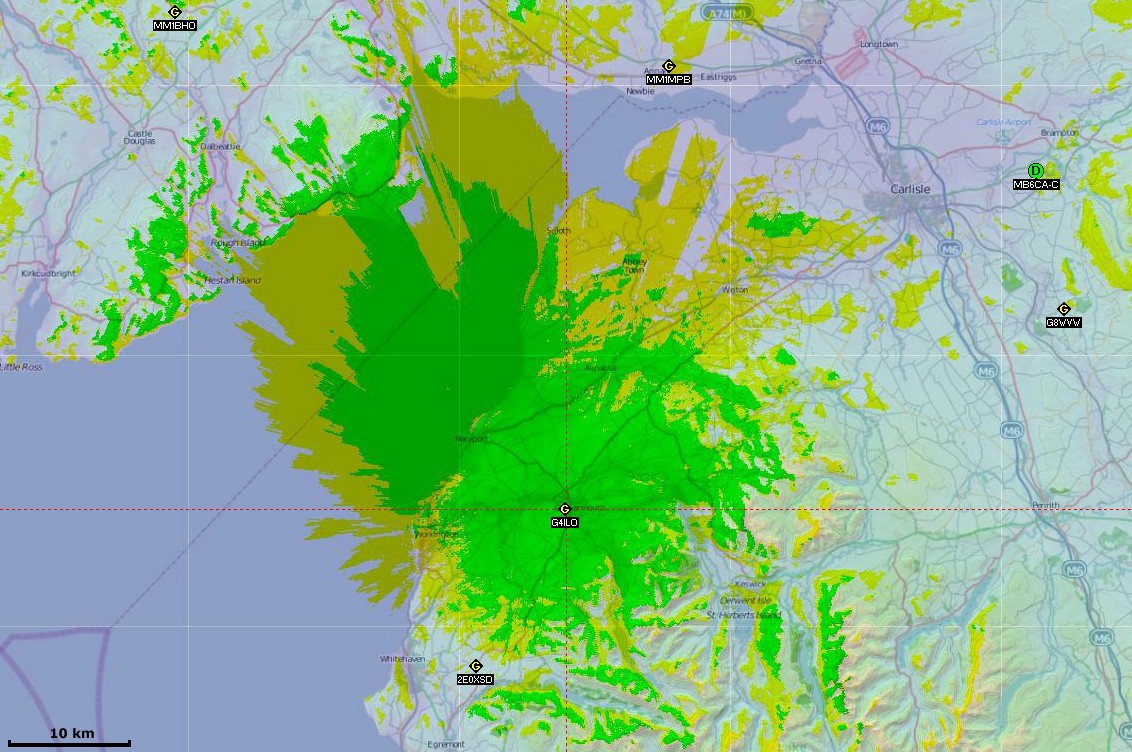
Click to see the map full-sized. I did a second plot at a larger scale to show the local coverage in more detail:

The plot shows really clearly how my VHF range is limited by the surrounding hills.
Connecting Radio Mobile to an APRS server has limited use. The program doesn’t seem to handle objects very well so for example the GB3CA object put out by MM1MPB shows as MM1MPB and moves that station’s position. But it is a useful way to get other local stations into the system instead of manually entering their details.
The objects sent out by WOTA to show the position of a Wainwrights On The Air activation are shown as WOTA not the name of the object. The Radio Link option can be used to plot the path between two stations and estimate the received signal strength, as in this example showing the path between me and Phil G4OBK/P on the summit of Seatallan.
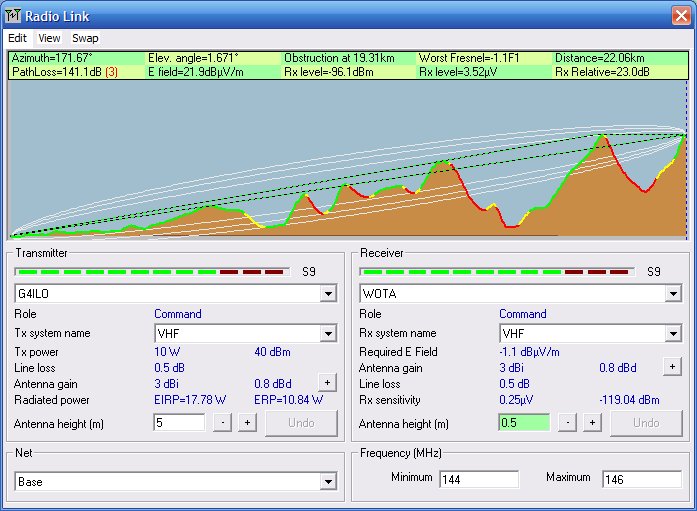
The estimated S9 signal strength is somewhat more than I actually received from Phil and I was running 50W not 10W. As mentioned earlier my antenna gain is also downrated over reality to try to get a more realistic picture.
Radio Mobile is a clever piece of software and it was interesting to play with it. It was quite hard work to get going, but it was useful to see how the nearby hills affect my VHF coverage.














