Posts Tagged ‘Software’
 Back to Firefox
 July 13th, 2013 |
  Author:
 Goodbye Chrome. It was fun while it lasted. But in the last day or so Google Chrome has become so crash-prone that it is unusable. Suggested solutions amounted to disabling plugins and add-ons but my installation was pretty basic apart from AdBlock. Nevertheless I took the step of uninstalling Chrome completely and then reinstalling again. But it still crashes. Just trying to sign in to Yahoo is enough to crash it.
So it’s back to Firefox. I don’t have time for flaky browsers.
Krun – a command line utility
Last week when I posted about using the new dual-mode version of WSJT-X I mentioned a utility I had used to put my Elecraft K3 into split mode before starting WSJT-X and returning it to normal operation after finishing. I’ve been asked to share information about it, so here you are.
The utility is called KRun, from K-Run. K for Elecraft radios (K2, K3 etc.) and Run because you use it to run another program. It was written to use with my Elecraft transceivers but I see no reason why it should not work with other radios that use a similar CAT command syntax such as Kenwoods. Don’t ask me if it can be used with your Yaesu or Icom radios because I know nothing at all about their command format.
If you run the utility it puts up a window listing its command line parameters.
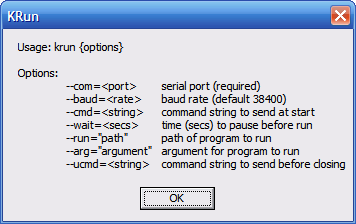
These command line parameters are what tells KRun what you want it to do, so you’ll need to know how to create a shortcut containing command line parameters, or use a batch file. You’ll also need to know what CAT commands to use, which will require a degree of familiarity with the Programmer’s Reference manual for your radio.
The parameters are:
- –com=n where n specifies the serial port used by your radio
- –baud=x where x os the baud rate to use
- –cmd=string specifying the string of CAT commands to send at startup
- –wait=s where s is an optional delay in seconds to give the commands time to execute
- –-run=”path” the path of the program (e.g. WSJTX) that you want to run
- –arg=”args” optional command line parameters for the program specified above
- –ucmd=string optional CAT commands to send on closing
An example invocation is:
C:\Ham\krun\krun.exe –com=3 –cmd=FT1; –run=C:\Ham\WSJT-X2\wsjtx.exe –ucmd=FR0;
where:
- C:\Ham\krun\krun.exe is the location on my computer of the KRun utility
- –com=3 specifies the com port to use
- –cmd=FT1; is the CAT command to set my K3 into split mode (with terminating semicolon)
- –-run=C:\Ham\WSJT-X2\wsjtx.exe is the location on my computer of WSJT-X
- –ucmd=FR0; is the CAT command to cancel split mode (with terminating semicolon)
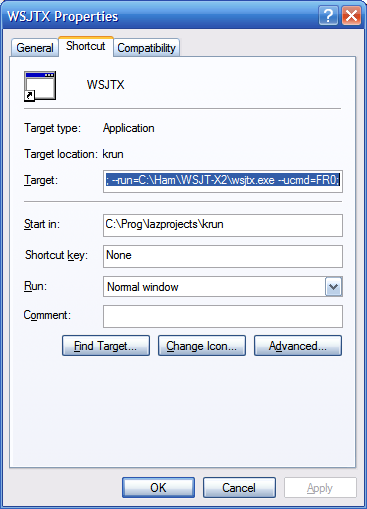 To create a shortcut to do this, first create a shortcut to KRun itself, then edit the Target to add the command line parameters as given above.
You can download KRun as a zip file which contains KRun.exe, the utility itself, and WSJTX, a shortcut configured as described above. If you try to use the provided shortcut instead of creating one from scratch yourself you will need to change the program paths to suit your own system.
So there you are. It works for me so hopefully it will work for you. If it doesn’t then a better solution would be to persuade K1JT to add these CAT commands to WSJT-X!
Yet Another APRS Client
An apt title for this post, but also for the software in question. Yet Another APRS Client (YAAC from now on) is a new program written by Andrew, KA2DDO that has recently entered beta test status. I stumbled across it a few days ago and am now running it on my G4ILO-2 VHF iGate.
 |
| YAAC map display with US Geological Survey topographic data.) |
YAAC is written in Java so it runs equally well on Windows, Mac and Linux platforms as long as you have a recent Java runtime installed.
YAAC is open source software and uses open source mapping (Open Street Map – OSM). APRSISCE does too, but whereas it uses bitmap tiles, YAAC uses vector-based map data. This makes the maps look a bit different (more as if they were drawn by a spider.) You can easily add topographical data from the US Geological Survey (the screenshot above shows this.) YAAC also supports the use of scanned-in maps but I haven’t tried this.
YAAC is very easy to use. There is a wizard to help you set up the program, though there is also an expert mode that allows you to get to all the settings directly. There are far fewer things that can be changed than APRSIS32 has which is one reason it is easier to use, but YAAC’s user interface is more standard. A File menu is on the left of the menu bar, Help on the right, and all the configuration settings are on a multi-tabbed dialog box not nested in three levels of menus. YAAC would be an ideal program for someone new to APRS, which is not to belittle the program in any way as it does all the things that most users would be perfectly happy with.
YAAC supports a wide range of TNCs including TNC2 compatibles and the Kenwood mobiles. In APRS mode the Kenwood D700/D710 can only be used receive-only. In Packet mode the Kenwood can be used as a KISS TNC. Believe it or not I hadn’t realized it had this capability until Andrew pointed it out to me. Just two commands (KISS ON, RESTART) are needed to put the Kenwood into KISS mode. The other thing that confounded me for quite a while is that the Kenwood TNC expects hardware flow control. Once that setting had been made everything started to run perfectly.
 |
| YAAC’s “Radio View” |
One disadvantage of using the Kenwood D700/D710 in Packet mode is that the rig’s display doesn’t show any APRS information.However, Andrew has implemented a rather neat “radio view” which emulates the Kenwood display. The only extra thing that would make the emulation complete would be to limit it to only those packets received over the radio. With an APRS feed covering a wide area the display changes too quickly to be readable.

YAAC doesn’t provide as much information about APRS objects as APRSISCE does.The window on the right is what you get when you click on one of the G4ILO icons. When two or more stations are co-located the calls overwrite one another making them unreadable. APRSISCE manages to position the calls so they don’t overlap at all.
Because YAAC uses vector graphics it does a better job of displaying APRS icons and even orients the icons of moving objects in the direction of motion. Zoom in to street level and you’ll discover that icons are provided for points of interest. I was quite impressed when I saw what was displayed for our small town of Cockermouth. I think these objects come from OSM data.
 |
| Street-level display of Cockermouth including places of interest |
You might get the impression that I really like this new APRS client. It appears to be well designed, well written and is well supported by Andrew, its developer. It’s a very impressive piece of software. I originally intended just to try it out for a couple of days but I think I’ll stick with it for the time being.
Another Android APRS client
Good news for APRS enthusiasts with Android devices. Lynn Deffenbaugh, KJ4ERJ, is embarking on a port of his popular and successful APRSISCE to the Android platform, called APRSISDR.
I use the words “embarking on” advisedly. Although there is a Yahoo group and a collection of testers (including yours truly) the software is in an embryo stage at the moment. You can see the beginnings of an APRS client starting to form but Lynn is really just testing the Android platform at the moment to see how various key things can be accomplished. I would hazard a guess that it will take several months before something usable appears, though those who were in at the start of APRSISCE development will recall that it advanced in leaps and bounds. It’s going to be a fun ride, but for most I think it will be best to wait patiently for more news to emerge. Watch this space!
The case of the disappearing weather objects.
I have just spent what seems like several hours trying to find out why my weather station data sent by Cumulus to the APRS network vanishes without trace. I have tried using the wxnow.txt method of generating APRS weather objects in APRSISCE and that does work, but unfortunately it messes with the MYCALL setting in my Kenwood TM-D710 converse mode TNC. So I thought that I would avoid the problem by getting Cumulus to send the data to APRS-IS directly.
The data packets were being sent but they never showed up on aprs.fi. I produced debug logs for both Cumulus and APRSISCE. These showed the packets being sent. So where did they disappear to?
To cut a long story short, Cumulus was sending the data packet with a path of TCPXX*. This is listed as “deprecated” in the APRS spec but it is actually blocked by the APRS-IS network software. The CWOP (Citizens Weather Observer Program) which I believe runs on an older version of the software, is not so picky so no-one had encountered the problem before. Can you believe that I must be the first person to try sending weather data to the APRS network using the Cumulus software?
JT-Alert for WSJT-X
The eagerly awaited JT-Alert for WSJT-X has finally arrived! You can download it from the Ham Apps website.
This useful accessory will let you know if you have worked a station B4 or whether a station will fill a wanted band or mode slot. It sends spots of JT9 stations to the HamSpots website, providing a useful reverse beacon for the mode. It also logs contacts to a few of the popular logging programs including MixW which happens to be the same log format used by KComm. Due to some nifty programming this new version of JT-Alert works with JT65-HF as well.

This new program couldn’t come soon enough for me as I have worked just about everyone who is on JT9 at the moment and it was getting tiresome doing manual log lookups. Hopefully this new program will attract some new participants to this amazing mode.
Ghostly signals
I have been puzzled and mildly irritated by the ‘ghost’ traces that appear at plus and minus 100Hz when I receive a very strong signal with WSJT-X. Torben OZ1TMK wrote to me after we had a JT9-1 QSO to ask if his signal had been OK. He had received requests from a couple of local stations to reduce power because he was ‘causing harmonics’. I hadn’t noticed anything wrong with Torben’s signal but it hadn’t been strong enough. It looked to me as if it was the same effect I and a few other JT9-1 users had observed when very strong signals were received, so I decided to investigate.
I had a theory that the +/-100Hz spurious outputs ( +/-120Hz observed in the USA) were caused by ripple modulating the transmitted carrier. I used my general purpose signal generator, otherwise known as the FT-817ND, to transmit a low power carrier (CW key down) into an unscreened dummy load (Elecraft DL-1). I repeated this with the transceiver powered from my bench power supply and then on its internal batteries with the power cable removed. The results in the WSJT-X spectrum display window are shown below.
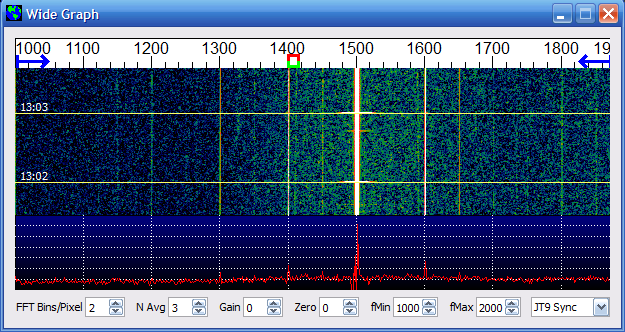 |
| K3 RX, FT-817 TX on mains supply. |
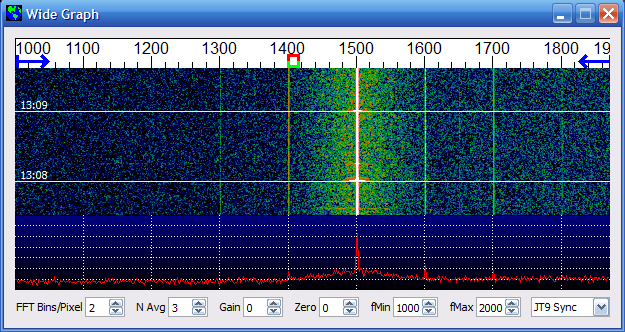 |
| K3 RX, FT-817 on battery power |
As can be seen, there are traces at +/-100Hz and at 100Hz intervals on both signals, but the ghosts seem a bit stronger on the signal when the TX is powered from the main supply.
I recalled an issue a few years ago when someone sending CW using their K3 had reports of spurious signals +/- the sidetone frequency. This turned out to be audio modulation of the synthesizer by the sound of the sidetone from the K3 speaker. Elecraft provided a fix in the form of a stiffener for the synthesizer board. My K3 is an old one and does not have this modification. You can see that the synthesizer is affected by physical vibration looking at the trace produced when I rapped on the K3 case.
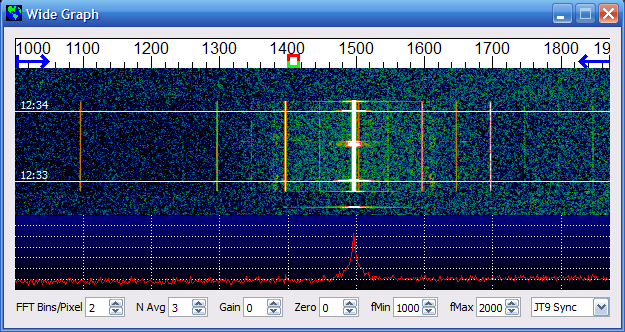 |
| K3 RX showing the effect of vibration (knock on the case) |
My K3 sits on a shelf next door to a heavy linear power supply. Could slight vibration of the mains transformer be modulating the receiver’s local oscillator so as to create weak sidebands at +/- double the mains frequency?
To answer that question I repeated the tests using my Elecraft K2 as a receiver, feeding the headphone output at low level into the cheap USB audio dongle I use for computer sound. You can see the result below.
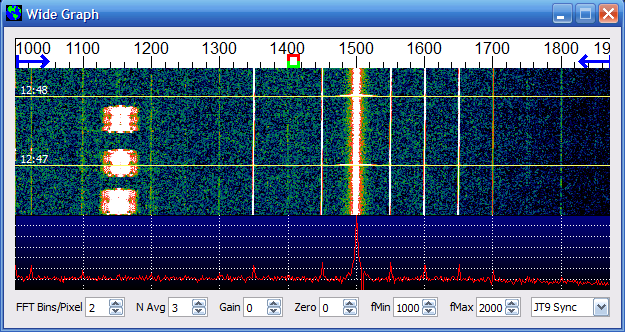 |
| K2 on RX, FT-817 on mains power. |
 |
| K2 RX, FT-817 on battery power |
You can see that the sidebands are much reduced when the signal is produced by a transmitter running on battery power. In fact, some weak +/- 50Hz sidebands are present – possibly the effect of 50Hz AC hum on the un-isolated cable used to connect the K2 headphone output to the sound card.
I’m not sure what to make of all this. It does appear that the ‘harmonics’ – which are really sidebands – that accompany a strong JT9-1 signal are caused mainly by AC ripple modulating the transmitted carrier, but that hum on the receive side can produce a decodable signal as well. The WSJT-X software is extremely sensitive and can detect these components even if they are 30dB or more below the fundamental carrier.
I would appreciate hearing of other theories or tests carried out to explain this phenomenon. It seems to be that this issue is going to be almost unavoidable when mains-powered equipment is used to generate signals that are decoded by very sensitive software.













