Posts Tagged ‘Software’
 Minor update for KComm
 November 29th, 2010 |
  Author:
 I have just uploaded a minor update to the Windows version of KComm, my logging and digital modes program for Elecraft K2 and K3 transceivers. Version 1.91 now supports the ability to specify the receive and transmit sound devices using the device name rather than a number which Windows appeared to change at will.
I had been unable to find a way to get the sound card device names from Windows using Free Pascal and happened to mention this during a discussion in the Yahoo digital modes group about how so many sound card programs seemed to lose the sound card settings under newer versions of Windows. Patrick, F6CTE, who is the author of MultiPSK, very kindly responded with some Delphi Pascal code to list the installed sound devices. This has now been incorporated in KComm and makes sound card selection much easier – especially for me as I am always adding and removing USB audio devices on the shack computer which changes the numbering.
My grateful thanks to Patrick for his help with this little problem.

Xastir update is for geeks
Version 2.0 of Xastir, the open source APRS client, has just been released. The new version now supports OpenStreetMap mapping, the same as is used by APRSISCE. I was interested to see that the project web page claims it runs on Linux/FreeBSD/Solaris/MacOSX/Windows so I thought I would try it out on my shack PC which runs Windows. I was puzzled that there was only one download file instead of different versions for each platform, but thought that perhaps they had recoded it as a Java application. I downloaded the .tar.gz file. opened it in BitZipper and found a load of source code files but no .EXE.
There is a file called readme.W32 which contains a lengthy and complex explanation of how to install the program under Windows which involves compiling it yourself using free software development tools. I seem to recall trying this once with an earlier version and failing. Most other developers of popular free software ham radio apps, such as Fldigi, WSJT and WSPR, now produce ready to run compiled versions for Linux, Windows and any other platform their program runs on. Why can’t Xastir’s developers do this? Most APRS enthusiasts don’t possess a PhD in computing so it’s unrealistic to expect them to do it.

Bête noire
In the digitalradio Yahoo group a few people have been experimenting with APRS on HF using the robust ALE400 mode. I am interested in trying more robust modes for APRS and wish that someone would work out how to interface the new Winmor TNC to an APRS client. But as nobody has, I thought I would try to give this a go. Unfortunately this meant getting to grips with MultiPSK, a program that is something of a personal bête noire as whenever I have been tempted to try I have never been able to figure out how to use it. Today turned out to be no different.
I downloaded the latest version of the program, started it, and was presented with an unexpected screen for a digital modes program. After a few seconds of puzzlement I realized that this was the configuration screen. Normally with software you get the main screen and select configuration from a menu but MultiPSK is not as other software. Oh no. The author threw away the book when he wrote this program, the book in question being “Microsoft User Interface Guidelines.”
I managed among the bewildering array of buttons and options to find one to set the sound card, another to set the KISS TNC port that I would need and one that I presumed would set the serial port for PTT. As I couldn’t find an OK button I tried closing the window and MultiPSK itself closed. Completely. I tried again and realized that you have to click a large button marked RX/TX Window to get to the main operational screen. Bizarre!
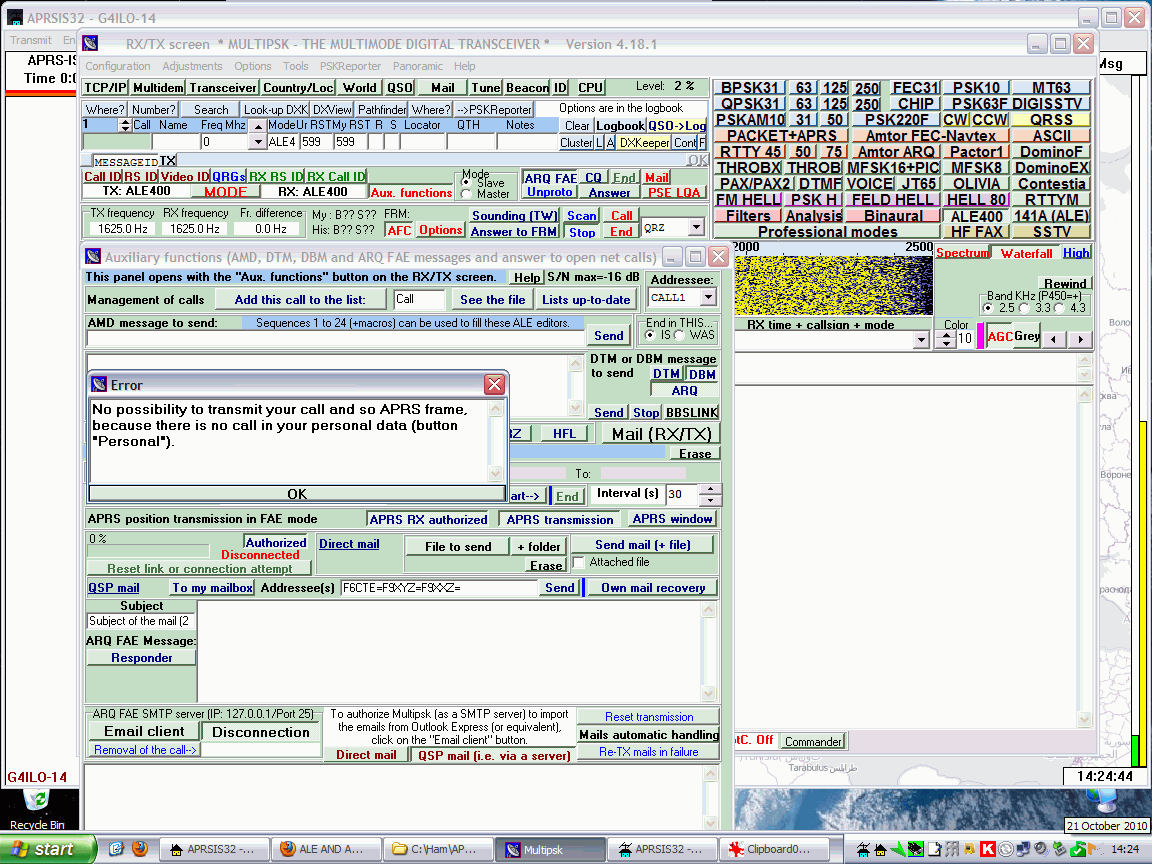
The main screen contains another mind-boggling array of buttons and controls, but I did see a waterfall with noise scrolling down the screen, which looked encouraging. At least I’d managed to select the sound card correctly. After staring open-mouthed at the screen for fully two minutes I managed to spot a button marked ALE400, so I clicked it. I was now in ALE400 mode. At least, I think I was, though I don’t know how I was supposed to tell for sure.
One of the Yahoo group postings had mentioned that you needed to click a button marked “Aux. functions”. After some more searching I found this button it and clicked it and up popped another bewildering dialog box crammed with buttons. Hilariously, at the top is the caption “This panel opens with the Aux. functions button in the TX/RX screen.” Yes, I really laughed out loud when I saw that. If I didn’t know that how would I ever find it?
I spotted that some buttons on this new dialog were to do with APRS. I clicked one and a dialog popped up saying something about there being no map folder. So apart from being a digital modes program MultiPSK is trying to be an APRS client as well? The phrase “jack of all trades, master of none” sprang briefly to mind before I dismissed it as being uncharitable.
I clicked another button marked “APRS Transmit” and a strange notepad-style window appeared with the caption Error which said “No possibility to transmit your call and so APRS frame because there is no call in your personal data (button ‘Personal’).” The English wasn’t great but I could understand what it was trying to tell me. I closed the error dialog but although I could see several places that looked as if they were meant to have a call entered in them I couldn’t see anywhere marked “Personal.”
I did discover a documentation file to do with setting up APRS using ALE400. Unfortunately it is a .doc file and I don’t have Microsoft Word. I did try opening it in Wordpad which is what I normally use but it displayed several errors about graphics filters and opened the file without the all-important images. Google’s HTML view of the document couldn’t display the images either. Hello, anyone heard of PDF files?
Now I do feel a little bit guilty criticizing the work of a fellow amateur programmer. I’m sure the author of MultiPSK, Patrick F6CTE, is far more talented than I ever was in being able to implement all of these sound card digital modes. But when it comes to user interface design I’m sorry but MultiPSK sucks.
This has to be the worst user interface of any program I have ever encountered, by a long way – and at one time in my life I used to review software for a living. Its worst sin is that it uses buttons instead of menus and apparently has no context-sensitivity (or more specifically mode-sensitivity) so that you are presented with all of the available options all at once, which is not only confusing but wastes a lot of screen space. It is testimony to the delight that so many practitioners of our hobby take in doing things the hard way that so many people are willing to use this program to operate digital modes when there are so many better-designed alternatives.
Once again MultiPSK has been deleted from my hard drive without transmitting so much as a digit. If APRS over ALE400 is only achievable by those able to master MultiPSK then I’m afraid it will go nowhere.

Grab me a callsign
While I wait for a correctly programmed chip for my QRSS keyer kit I thought I would investigate the receive side of QRSS beaconing. It’s no good transmitting if nobody receives, and unlike WSPR every transmitter isn’t automatically a receiver during its off periods. This is a mode where you need to give as well as take, to receive in order to be heard, otherwise you can’t complain if no-one tells you that they heard you.
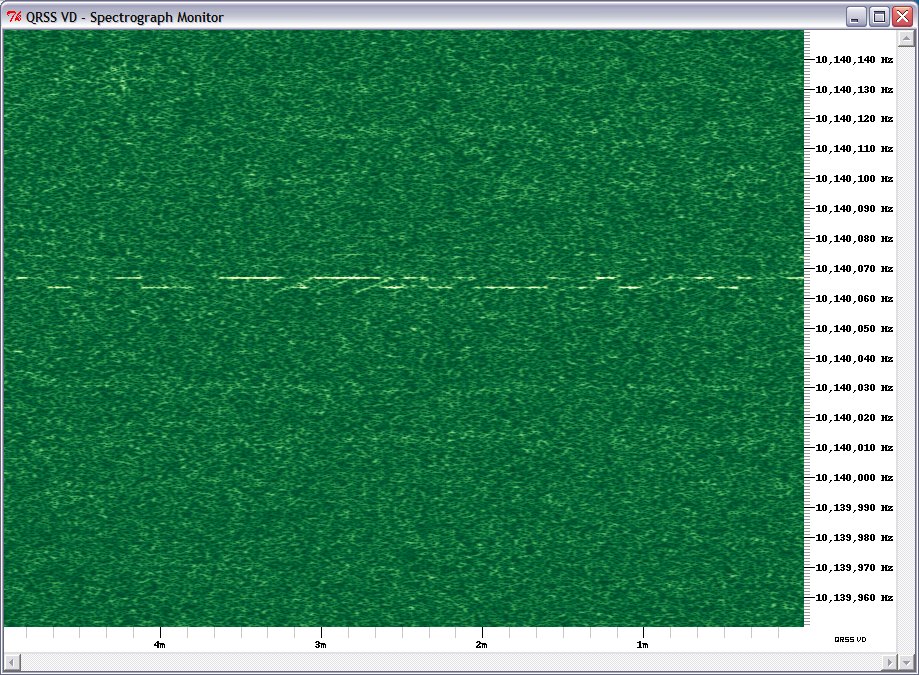
QRSS signals are decoded visually using a spectrograph, a waterfall display similar to that found in digital mode software. However, you can’t use a digimode software waterfall for two reasons: it moves too quickly – to capture a full callsign in QRSS you need to be able to see at least a couple of minutes worth of transmission – and it scrolls down vertically so trying to read calls would give you a crick in your neck!
Fortunately there are programs that have been specially written for just this application – and they are free so there is nothing to stop you trying them. The most popular program for Windows appears to be Argo. However there is alternative called QRSS VD by Scott Harden (the odd choice of name becomes clear when you realized that Scott’s call is AJ4VD.) QRSS VD has one problem: it is a CPU hog. On my fairly modern shack PC it runs at about 50% CPU utilization. For that reason, you might have no alternative but to use Argo. But if you can run QRSS VD it has some nice features that add to the enjoyment of this aspect of the hobby.
QRSS VD includes three programs: a Spectrograph, a Viewer and a Grabber. The QRSS VD Grabber automatically captures the live waterfall and creates images suitable for uploading to a website so others can see whether you are receiving their signals. It doesn’t have any way of automatically uploading the images to the web server, though. It’s really for people who want to run an online grabber, which is only worth doing if you are going to run it regularly. I don’t have enough radios and antennas to do that so I probably won’t investigate this feature further.
QRSS VD Spectrograph is the program that displays in real-time what you are receiving. It has no obvious user interface – you have to right-click the window and then you will get a menu of options. One option lets you select the sound card that is connected to your radio. Another is for setting the frequency. The main settings option determines the size of the window and the maximum and minimum frequencies that are displayed.
There is also an option to save these settings. If you don’t, you will have to set them all over again the next time you start the program. Finally there is the Resume option which you must click to start the spectrum display working.
Most QRSS activity takes place on the 30m band, in the first 100Hz above 10.140 MHz. This is just below the 200Hz used by WSPR, which is itself just below the region where PSK31 operation takes place.
To start receiving QRSS, set your receiver to USB mode and tune it to 10.139.000. If your rig has a DATA mode that is USB you can use that. Don’t be tempted to use the CW mode – most rigs add an offset to the displayed frequency so it shows the frequency in the centre of the CW filter passband, and some rigs use LSB for CW, so finding the right spot gets confusing.
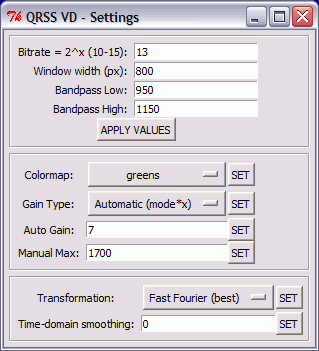
Select the sound card in QRSS VD, then set up the settings dialog. The window width in pixels can be whatever suits your screen size. The bandpass low and high settings define the height of the window, the minimum and maximum audio frequencies displayed on the spectrograph. With the radio on 10.139.000 USB, signals in the QRSS sub-band will be heard at audio frequencies of 1000 to 1100Hz. I set the low and high values to 950 and 1150Hz respectively to give a 50Hz margin on either side. (Note: if you aren’t sure of your receiver’s accurate calibration you might want to choose a wider margin initially because you could miss the QRSS band entirely of it is more than 100Hz out.) The other values on this dialog are all defaults.
[If you are interested in receiving WSPR as well, you could tune the radio to 10.138.700 and enter low and high values of 1250 and 1450Hz. Then you could run WSPR and QRSS VD on 30m simultaneously.]
Right-click the spectrograph window, click Resume and the screen should start scrolling to the left and filling with received signals. Conditions are pretty poor at the moment so there isn’t much to see on the screenshot I made, but when I first tried this program I immediately received a trace of a signal from Steve, G0XAR who coincidentally is the producer, together with Hans G0UPL, of the QRSS beacon kit I just bought. I don’t know if he was using one of these kits but it was producing a heck of a signal. (Ignore the frequency shown, this was received using my K2 whose calibration is considerably out.)

What’s nice about the QRSS VD software is that you don’t have to watch the output in real time to capture signals and it is simple to produce nicely formatted records of signals received like the one above. Every few minutes the spectrograph dumps a bitmap file in the program’s Output folder. When you want to see what you caught you start up the QRSS VD Viewer, select a group of bitmaps to view and it will stitch them into a seamless time continuum. You can then scroll through from start to finish looking for the traces of QRSS signals.
When you find one, you can capture a region of the spectrograph by clicking to specify the top left and bottom right of the desired area. You can even specify a custom caption. The selected area is then copied to the Windows clipboard and pasted into your default bitmap viewer ready for you to save in a format of your choosing (for example, as a JPG file.)
Why would you want to do this? As I mentioned at the beginning, there is no way of finding out how far your signals got (apart from a handful of online grabbers) unless someone sends you a signal report, so if you receive someone’s beacon you should send them a report too. The only way to do this is to look up their email address at qrz.com and send them an email. A picture is worth a thousand words, so it’s nice to be able to send a screen grab of their actual signal as an attachment to the email.

If my initial experience is anything to go by, this personalized way of sending signal reports makes for a very friendly aspect to the hobby. I sent this capture (above) of a beacon from IQ2DP with an emailed report. This morning I received a nice reply from Teo I2RIT thanking me for the report and telling me all about the beacon, which is made from junk box parts and runs well under 100mW into a ground plane made of scrap aluminium tubing. He also sent a link to an article about it. The article is in Italian but here is a translation. If you’ve read this far then you will probably find it interesting. Yet another facet to our amazingly varied radio hobby.

Advice to amateur programmers
If you know a bit about programming and have been thinking of writing a ham radio application, here’s a word of advice. Don’t. If you do, it will take over your hobby, your spare time will never be the same again and you’ll be lucky to receive much thanks for it.
First, you’ll have to spend countless hours answering emails that ask the same basic questions. You’ll have to do this no matter how much time you put into writing documentation or creating an FAQ or a wiki, because no-one will read it. And believe me, starting the day with an inbox full of the same old questions gets tiresome very quickly.
Second, you’ll be expected to know why your program won’t run on a user’s computer, without being given any idea what kind of computer it is or what version of operating system it uses. If the user has done anything that might affect your program’s ability to run, you won’t be told that either. And beware if you should choose not to spend too much time looking into someone’s obscure problem. One user of VOAProp who had a problem several years ago that I was unwilling to solve threatened to write to the RSGB accusing me of lacking in ham spirit. That bruising encounter is one reason I gave up developing programs for the hobby completely and now make it as clear as I possibly can that the programs I wrote continue to be available on the sole condition that I provide absolutely no support for them whatsoever.
Third, you’ll receive a lot of requests from armchair programmers for changes and improvements. Some of these might be good ideas, though you still may not want to implement them. But many will be things that only that person thinks is a good idea, quite possibly because they haven’t read the instructions or understood how the program is supposed to be used. These requests will contain no acknowledgement of the amount of time you will have to spend making these suggestions happen. You’ll have the job of justifying why you shouldn’t spend several hours or days coding some function that you personally have no interest in using. And some people find it hard to take “no” for an answer. If you wanted to write programs to someone else’s spec you’d get a job as a programmer, wouldn’t you? Then at least you’d be paid for it.
Last, but by no means least, you’ll get complaints about bugs. Yes, complaints, even if your program is free. Often, these emails will be the first contact you ever have with that particular user. But don’t expect them to start with any pleasantries. If you are particularly unlucky, as I was with one email I received from someone who couldn’t get KComm to run, you’ll be blamed for wasting their time. Sometimes the “bugs” will be due to user error or failing to read the instructions, but it’s rare that you’ll receive an apology after pointing that out. And believe me, those who complain most bitterly won’t get the joke if you offer to refund what they paid for the software.
Fortunately there are users who will make you feel that your effort is worthwhile. You might even be lucky and build a team of online friends who test your program and give you useful feedback about it. But it doesn’t take many of the other sort of comments to make you wonder why you bother. If you develop your program solely for your own use you will save yourself a lot of trouble.
It’s a good job no-one takes my advice because if ham programmers didn’t release their programs for free and put up with all the brickbats I’ve described the hobby would be a lot poorer for it. But if you’ve ever seen a program mentioned in some old forum posting and been unable to find a copy of it, now you know why.
So next time you use a bit of free ham radio software ask yourself: Did I remember to say thank you for it? Before bothering the developer with a question, take the time to read the documentation and search any relevant forum for the answer. And if you think you found a bug or have a suggestion for an improvement, try not to make it sound like a criticism or a demand. A little tact goes a long way.

Radio recording software Vox Recorder for Windows
 I, on occasion, have the need to have recordings of activities on our local repeaters. Being the local area DEC, recordings do come in handy when running training sessions in the future. Sometimes, it’s nice to have a recording of an on air event as well. When I’m operating in my capacity as a control operator, it comes in handy to have recordings of repeater traffic.
Having a VOX actuated recorder comes in handy. Especially for recording repeater activity. I stumbled on Vox Recorder for Windows by Nino Porcino, IZ8BLY. Wrote a handy little app that will not only record the files, but also name them as well.
Caveat: I have only run this on a 32 bit OS. If you have experience running this in any of the 64 bit versions of windows, please comment below and let us know.
You can find VOX Recorder for Windows at:
APRS Chat
It has been a while since I wrote about the new APRS client for Windows and Windows Mobile being developed by Lynn, KJ4ERJ and known as APRSISCE/32 but it has been coming on apace with new versions being released almost every day. Many of the improvements probably won’t mean much to anyone who doesn’t know anything about APRS. But one of the more recent and quite revolutionary developments has been the chat window, which allows you to carry out a two-way text chat conversation with another APRS user.
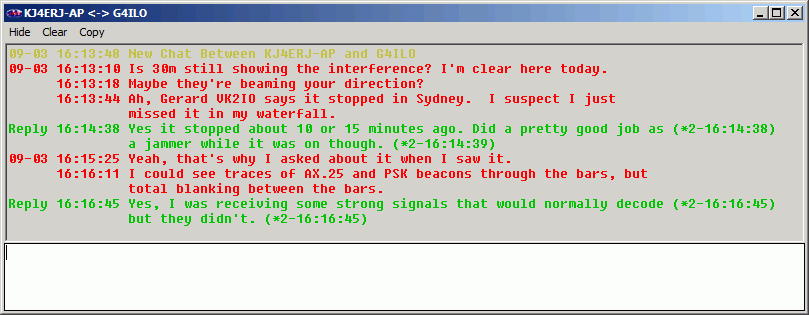
Instead of the primitive edit box found in most APRS clients in which you would have to type your messages in 64-character chunks due to the limitations of APRS messaging you can now type just what you want and APRSISCE/32 will split it up and send it as separate messages transparently. It also takes care of ensuring the parts are displayed in the right order at the other end. You can also view the entire conversation in its own window – useful if you are having conversations with two or more people when you are tired late at night and lose track of what you are saying to whom!
You can chat with anyone, anywhere in the world. True, at the moment most of these conversations are being conveyed over the internet not RF, which will inevitably incur the complaints that “it’s not ham radio.” But they could just as easily use RF. The only problem is that for most of us an adequate APRS RF infrastructure to support worldwide messaging doesn’t exist. But the more people are attracted to the mode – and even the hobby – by cool developments like this, the more likely it is that an effective infrastructure will be built. In many parts of the world you could certainly link up across town on VHF like this.
Regular digital modes are fun. But is there any reason why the only way to have a contact is for two people to have sole occupancy of a frequency and one sends to the other, then the other replies back, repeat until finished, the way contacts have been made ever since Marconi first picked up a morse key?














