Posts Tagged ‘Raspberry Pi’
 MagPi
MagPi
 July 13th, 2012 |
  Author:
 The Raspberry Pi may well be in the public domain and a few of us who have got the boards are busily scratching our heads trying it to get it to do ‘stuff’. There are far brighter people than me who’ve managed to get ‘stuff’ done on this low cost machines and they’re shouting about it in a digital magazine called MagPi, which is available here.
First run with the Raspberry Pi
 Like many others my little Pi turned up on the doorstep in a little cardboard box. As expected there wasn’t much in the box apart from a sort of ‘Welcome Note’ and directions for downloading the OS. Needless to say it took longer to download the OS than it did to write it to the SD card. So all connected up to the keyboard, mouse, screen and ethernet and away we go. Power on.
The first boot took a little while longer than expected but I expect it was creating bits and bobs all over the place. This was confirmed as subsequent boots to the command line, or rather to the login part of the command line took considerably less time. Login details are simple enough with the user name as Pi and the password as Raspberry. Something that you may want to change later on.
Once you’re into the command line it could seem a little confusing as to what to do next. Especially if you are used to a nice looking GUI with a mouse etc. Have no fear as a simple “startx” without the quotes fires up the window manager (LXDE – Lightweight desktop environment).
One thing I like to do is to run “sudo apt-get update” from the LX terminal just to make sure everything is up to date before we get started. The other thing that may be useful is to install synaptic package manager with “sudo apt-get install synaptic”. Again from the terminal window.
Time was running out for me at this point so I thought I’d have a quick look at Xastir (APRS application) to see if it would work. After a bit of a turned up face at the look of the interface I confirmed that it works as easily as it would on any platform. A bit of configuring and you’re away. I didn’t connect up the radio then as it’ll need a sound modem like the AGWPE for windows. That’ll be the next step.
One thing I hadn’t noticed is that there is no on board clock and the Pi get the time either by you setting it in the command line or through the ethernet. This could mean that if applications like WSPR can run on it then an external clock is going to be needed or a permanent connection to the ethernet.
So first impressions are done with and I have to say that it does struggle a bit if you ask it to do too much at once but that’s more to do with managing your own expectations but this is going to be a very interesting little gizmo to keep an eye on for ham radio
Thanks postie
I’d almost forgot that I had an order in for one of these. But my royal weekend was topped off nicely a royal (mail) delivery of 1 Raspberry Pi.
I had a few plans for one of these when I first heard about it but first off I’ll spend a bit of time getting to know the linux distro and I’ll assume there is a way of running something like WSPR without too much trouble as it has a native Debian (.deb) version. First off though will be trying to get a video signal out to my rather old monitor that doesn’t have a HDMI input.
In the mean time I think I’ll have a google about to see what anyone else has done. Always a good start to learn from others.

Raspberry Pi update from RS
I registered with RS Components for a Raspberry Pi board (when they get released) and whilst I’m not expecting one this side of the summer it was nice to get an update from them. If the truth be told I’m having too much fun activating summits in at the moment. Especially now as we seem to have a warm spell. It certainly makes a change from hail and snow I had on Scafell Pike a couple of weeks ago. Anyway see below for the update from RS:
Welcome to the latest Raspberry Pi update from RS Components!
Much has been happening behind the scenes since you received our last update, not least the start of compliance testing on the Raspberry Pi.
Why are we doing this? Compliance testing is an essential part of bringing any electronic product to market. The Raspberry Pi is being tested to make sure it conforms to all the regulations that apply to electronic devices around the world. This means that we can be sure the Raspberry Pi we deliver to you meets the correct standards and is as safe as you would expect any electronic device you purchase to be.
We’re working with the Raspberry Pi Foundation to manage the testing process as quickly as possible, while ensuring all tests are carried out to guarantee safety. More information is being posted on the Raspberry Pi website , as well as on our own FAQ pages rswww.com or DesignSpark. We’re also regularly tweeting updates on progress. Follow @RSElectronics on twitter to catch the latest news.
Alongside this, we’ve also been contacting the first group of people who registered for a Raspberry Pi from RS, to help us plan delivery of the initial batch of boards. In next week’s update, we’ll provide more information on how we’re managing the queue and the order process.
RS Components
Raspberry Pi announcement
For those who are following the progress of the ultra cheap pc proposed by Raspeberry Pi, I received this email this morning.
The Raspberry Pi Foundation will be making a big (and very positive) announcement that just might interest you at 0600h GMT on Wednesday 29 February 2012. Come to www.raspberrypi.org to find out what’s going on.
Eben Upton
Executive Director, Raspberry Pi Foundation
Perhaps they’ll be announcing pricing and delivery of what should be very useful lightweight PC’s (is that even the right way to describe them?)
Anyone for raspberry pi?
There’s a lot of excitement right now in the UK tech community about a new computer called the Raspberry Pi. It’s a bare board computer with an ARM processor that runs Gnu/Linux that is expected to sell for $25. It’s aimed principally at the education market with the intention of getting schools to teach students how to program and build things with computers instead of just learning Word and Excel as they do now.
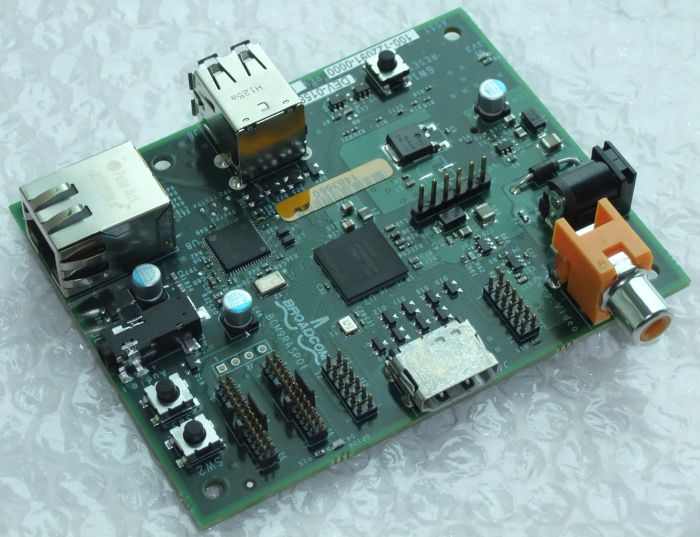
The Raspberry Pi will soon be available for anyone to buy. When they are, I’m tempted to get one. My recently acquired Gadget Gangster has helped me recapture some of the magic and excitement I felt when I first started dabbling in home computers back in the ’80s with things like the Nascom 1, ZX81 and Sinclair Spectrum. I think the Raspberry Pi would do the same.
PCs and Windows are great tools, but they have turned computers into appliances and made computing boring. Microcontrollers are like QRP computers – more of a challenge to use but when you succeed you feel a real thrill at having accomplished something.
I think there has never been a better time than now to have an interest in electronics. I hope the Raspberry Pi is a huge success. Perhaps it will result in more of our young people becoming engineers instead of wanting to be lawyers or salespeople.














