Posts Tagged ‘PSK31’
 LHS Show Notes #055
 January 13th, 2011 |
  Author:
 Announcements:
- Happy New Year!
- The Mid-America GNU/Linux Networkers Conference (MAGNetcon) will be May 6-7, 2011 at the St. Louis Union Station Marriott. If you know anyone that might be a sponsor, exhibitor, or speaker, please let us know. Application forms are available on the web site.
- Donations are now being accepted to send LHS to the Dayton Hamvention 2011, May 20-22. Please click on the Donate button on the website.
- Donation received from Charles (no call sign given). Thank you, Charles!
- The podcast RSS feed lost it’s title after a podPress upgrade. This has been fixed.
- We’ve been informed of a RSS feed problem for some podcatchers that use the XML tag. Joe, K1RBY, emailed us about this problem when using gPodder, but a solution has yet to be found. Anyone else see this problem? Let us know! (Ed. Note: The problem has been fixed and will be detailed in episode 54.)
- Look for new episodes of Resonant Frequency in 2011!
Topic:
- An interview with David Freese, W1HKJ, the primary author of fldigi.
- Dave, now 72 years old, has been licensed continuously since 1957 and is retired from the U.S. Coast Guard. He had been maintaining gMFSK, a Gnome multimode HF terminal program, and decided to create fldigi to prove he could still write code. He started with UNIX, then MINIX, and has been with Linux since the beginning. He’s been writing ham radio programs since the 1970′s. His software will run under Linux, Windows, FreeBSD, OSX, and Puppy.
- flpuppy, aka digipup, is also available from Dave’s site. This is a version of Puppy Linux with fldigi, a logbook, and a geodesic calculator already installed.
- Other developers are Stelios, M0GLD, Leigh, WA5ZNU, and Skip, KH6TY.
- Much of the underlying code in fldigi is from the original gMFSK program, in particular the modem code. Other modes have been added since, along with the GUI.
- Dave says there are about 2500 users of fldigi and he spends 50 hours per week on coding and support.
- Other projects Dave is involved with include:
- NBEMS (Narrow Band Emergency Messaging System), consisting of fldigi, flarq, flwrap, flmessage, and flrig, all using the Fast Light Toolkit.
- flwkey for sending Morse code via the winKeyer chip.
- A computer-aided transceiver (CAT) program that controls the Kachina 505DSP transceiver.
- Dave describes how he came to develop fldigi using C++ and FLTK.
- More features of fldigi:
- Version 3.21 of fldigi, now in alpha test, will have the capability of sending and receiving weatherfax. It will also have an embedded browser that will work with all the PSK modes and RTTY. It has a built-in log book that stores records in ADIF files.
- While not designed specifically for contesters, fldigi is adequate for casual contesters.
- Fldigi will generate Cabrillo reports for many contests.
- The online documentation is quite extensive, at about 140 web pages, with many illustrations. There are sample screenshots of the waterfall display for various modes and audio samples of them.
- Much of the modem code in DM780 is from fldigi.
- Rick Ellis wrote code that allows the N1MM logger to display the waterfall.
- Gary, WB8ROL, “Mr. Olivia”, modified fldigi for his own purposes, calling it fldigirol.
- More cool features of fldigi:
- Many of the controls in fldigi have different reactions to left-, middle- and right-click. For example, rolling the mouse wheel over the macro buttons will scroll them!
- The mouse tab in the waterfall configuration allows you to customize how the waterfall reacts to mouse wheel movement. You can also change the rig frequency by dragging in the waterfall.
- Dave recommends turning on the control hints feature (tooltips). Click Configure, User Interface, General tab, check “Show tooltips”.
- Dave describes the “QSY” and “Store” buttons.
- Dave talks about how to use the Reed-Solomon Identification (RSID) features.
- The “SPOT” control allows you to search for specific strings in a PSK signal, such as “CQ CQ” or “de”, allowing the program to automatically post “spots” on the PSK reporter site.
- Dave then discusses the “Map It” macro feature.
- To keep up with the alpha test group, you can subscribe to mailing lists on the Berlios alpha test web page.
- Dave offers kudos to Ed, W3NR, who answers 95% of the problem reports, and Rick in Michigan who is the principal man for audio interfacing issues.
Contact Info:
- Contact Richard at [email protected], Russ at [email protected], or both at the same time at [email protected].
- Listen to the live stream every other Tuesday at 8:00pm Central time. Check the LHS web site for dates.
- Leave us a voice mail at 417-200-4811, or record an introduction to the podcast.
- Sign up for the LHS mailing list.
- Sign up for the MAGNetcon mailing list.
- LHS merchandise is available at the SHOP! link on Web site. Check out the Badgerwear or buy one of the other LHS-branded items at PrintFection.com/lhs or Cafe Press. Thanks!
- Thanks to Dave from Gamma Leonis for the theme music.
Music:
- “Which Road Takes Me Home” by Fatblueman from the album “Back to Winnipeg,” courtesy of Jamendo.
LHS Episode #055: FLDIGI In Depth
 Welcome to the first Linux in the Ham Shack for the new year! 2011 is upon us and we wanted to present our listeners with a fantabulous new show. That’s what you’re going to get. We were able to entice the lead developer of FLDIGI, W1HKJ, to come on the program and give us his personal insights into this best-of-class Open Source amateur radio software.
Yes, we know we talk about FLDIGI a lot in our program. We try not to beat it to death. But if you use this program, there is so much information packed into this interview, you’re going to learn at least a dozen things you didn’t know about FLDIGI, even if you use it every day. So sit back, strap in, and join us on this thrill-packed ride into the dark and seedy innards of your favorite digital mode app. We were impressed; you will be too.
73 de The LHS Guys
QRP spot
 Now that I have my K2 connected again for computer control I have found that a few things in KComm that worked with the K3 don’t work with the K2 because the control commands, though they may look the same, don’t all work the same way on both radios. So I spent yesterday evening fixing the problems.
One of the things that didn’t work was the auto-repeat option for CQ calling. I was testing it by sending a CQ on 30m with just 1W output into the magnetic loop in the attic. I didn’t expect anyone to come back to me, and no-one did, but I was surprised that my signal was spotted in Northern Spain by EA1GFY. The effectiveness of that magnetic loop antenna never fails to amaze me.
I don’t think many people use as little as 1W on PSK31 but it would be interesting to see what you could work with such low power. It seems to me that 1000 miles per watt should be perfectly achievable. I’ve made a few contacts using the K2 and 4 or 5 watts over similar distances to what I’d expect using the K3 and 40 watts. I think conditions, more than power, determine how far you can work. More power just makes it easier.

Japan on 15m
This morning I worked Kei, JI1BBN, on 15m PSK31 using 50W to the MFJ magnetic loop in the attic.
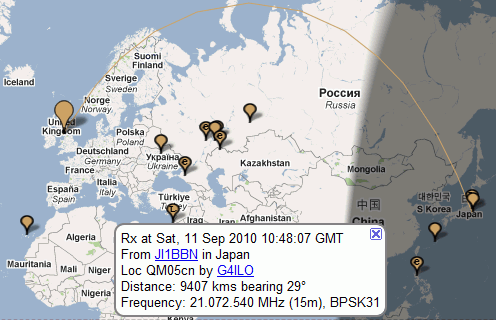
I heard several other DX stations on both the loop and the dipole, including DU3MEL in the Philippines whom I last worked in 2003, also on 15m. That was also the last time I worked Japan. Then I would only have been using QRP with my Elecraft K3, and the antenna would have been a horizontal loop of wire round the perimeter of the attic, with a 4:1 balun at the centre of one side, tuned using the K2 internal ATU.
What’s that about stealth antennas not working?

Inconvenient spurious
During the middle of the day here 30m becomes virtually dead and there is nothing to see on HF APRS. I decided to try some digital modes. After a quick tune around I couldn’t hear any digital apart from PSK. These days, if there’s propagation there is PSK activity.
I had quick listen on 15m and even spotted a couple of stations to PSK Reporter, but signals were really weak so I dropped down to 17m. On 17m I have to use the MFJ magnetic loop, which I needed to re-tune from 30m. As I did so I was startled by a loud buzz from the Kenwood TM-D710 on the VHF APRS channel. I turned the volume down, suspecting a spurious but not knowing if it was the fault of the K3 or the Kenwood.
I made several European contacts using PSK31 before lunch including Veljo, ES0OU on Saaremaa Island, which is IOTA EU-034. None of my contacts wanted chat, though you have to realize that English is not the first language for any of these stations, if they speak it at all. I suppose here in Europe we have to be thankful for macros.
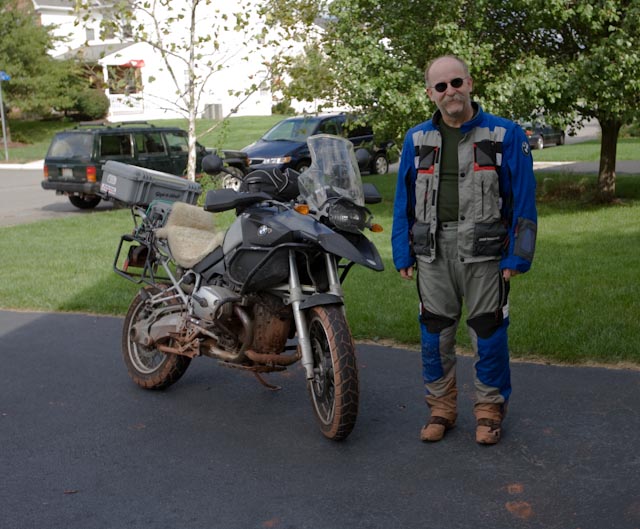
After lunch I walked into town with Olga. On my return the receiver was still on 17m and had spotted a long list of stations to PSK Reporter. KU1T, Zibi from Glengary, WV (pictured above) was one of those spotted. I waited and eventually saw his trace appear on the screen. I gave him a call and he replied. Copy was in and out of QSB so it was one of those contacts where a conversation would not have been possible. KComm told me this was my first USA contact on 17m.
Later, a few seconds with the calculator revealed the reason for the strong interference with the VHF APRS frequency. 18.100MHz, the carrier frequency used when operating in the 17m PSK31 band segment, is exactly one eighth of 144.800MHz!

LHS Episode #006
After putting this off some because of the holidays and other obligations, Episode #006 is now hot off the press. This is the second in our two-part series on PSK31. In the first part, we looked at sound cards, rig control interfaces and the basics of getting a PSK31 software package installed on your Linux operating system.
In part two, we take a much closer look at two popular programs for operating PSK31 mode on Linux: gmFSK and fldigi. On top of that, we respond to listener comments and questions, talk about updates to the web site, and explain how you can be involved in the recording of Linux in the HAM Shack by listening to the live feed and interacting with us in the chat room.
Next up in Episode #007: Install episode! We’ll guide you step by step through the entire process of installing Debian or Ubuntu Linux on a machine to use in your HAM shack. If you join us for the live feed, we’ll even be able to answer your questions in real time.
Stay tuned, and please, keep the feedback coming.
LHS Episode #005
Episode #005 is here. This is the first in a two-part series where we begin to discuss using Linux with your ham radio to participate in digital modes. We outline the software and hardware you might use to enjoy PSK31, a very popular digital mode in amateur radio. We take a look at sound cards, serial ports, rig control interfaces and prepare you for part two, which will get into the specifics of using Linux software to operate your radio in PSK31 mode. Thank you for downloading our latest episode, and please send us your feedback.
Also, we now broadcast the recording of Linux in the HAM Shack using Ustream TV. Follow Richard or Russ on Twitter to find out when the recording goes live, or check on the web site. An event calendar will be available shortly which will let you know when we will be recording. Your comments may even be included in the podcast!
73 de Russ, K5TUX













