Posts Tagged ‘Contesting’
 A Pileup? What It Is And How To Work One
 June 14th, 2026 |
  Author:
 Welcome to the chaotic, thrilling world of the HF pileup. Whether you are the one calling CQ from a park in Nebraska or the one hunting a rare DX station, success relies on rhythm, frequency management, and a deep understanding of human behavior.
Here is a proper look at how a pileup appears on a modern display, followed by a complete guide on how to survive it.

A “pileup” on shortwave amateur radio frequencies. The main station is at the low frequency, and stays put. The hunters spread out, above, and call on a single frequency somewhere in the calling window of frequencies (I.e., up five to ten).
Over my decades of working Morse code (CW on amateur radio), I have learned a few critical things about how to navigate the chaotic, thrilling world of the HF pileup. When a rare station or a Parks On The Air (POTA) activator goes on the air, dozens or even hundreds of operators might try to make contact at the exact same time. Working a pileup is an art that takes time to master. Whether you are the one calling CQ from a park in Nebraska or the one hunting a rare DX station, success relies on rhythm, frequency management, and a deep understanding of human behavior.
One of the most important strategies is to determine the operating style of the DX station, specifically discerning how that operator scans the pileup for the next station to work. With modern waterfall displays, that process is MUCH easier. As an example, I worked the Temotu DXpedition (H40RH) that had just started a few hours prior to my attempt. I broke through with only five calls into the pileup, and it took me a mere 60 seconds to call and get an answer. Of course, I first listened and watched the waterfall for about five minutes to get a hang of the operating style of H40RH. This was on 10 Meters where 28.026 MHz was the DX frequency. We callers spread out five to 15 kHz UP in frequency from the DX station because we never want to cover up the DX station with our own signals. Even with a long carrier of intentional interference visible on the waterfall, the visual aid of the SDR made the catch possible. Temotu was a new country for my DXCC, so I am incredibly pleased to have made the contact!
When You Are the Hunted (The Activator)
A Guide To Survive The Pileup
When you are the station that everyone wants in their logbook, you are the conductor of the orchestra. If the pileup senses hesitation, chaos ensues. You must dictate the pace, for both CW and SSB operations.
Controlling the Pileup on CW
Establish a Predictable Rhythm: Your CQ, your exchange, and your QRZ should follow a strict pattern. Consistency allows hunters to time their calls perfectly. If you change your cadence, the pileup gets messy.
Run Split for Large Piles: If the pileup merges into a single continuous drone, go split immediately. You might send “UP 1” to tell callers to transmit one kilohertz above your listening frequency. This spreads the callers out. Send your “UP” frequently enough that the self-appointed pileup police do not take over your transmit frequency. I suggest sending “UP” after each successful logged contact (QSO).
Own the Partials: If you only pull “NW7” out of the noise, send “NW7?”. Do not send “QRZ?” immediately. Stick to that partial call until that specific station finishes the exchange. If they fade out, clearly send “QRZ?” to reset the pile.
Adjust Speed to Control Volume: A slight speed increase (bumping up 3 to 5 WPM) will naturally thin the pileup down to the more experienced operators. Dropping your speed will invite the newer operators back in.
Receiver Management: Back off your RF gain and use a wider filter than you might expect (around 400 to 500 Hz). A filter that is too narrow will cause you to miss the operators who are smartly calling slightly off-frequency.
Controlling the Pileup on SSB
Command with Your Voice: Speak clearly and maintain a steady, authoritative tone. Avoid shouting. Just like in CW, a predictable rhythm helps callers know exactly when to key their microphones.
Use Standard Phonetics: Stick strictly to the standard NATO phonetic alphabet (Alpha, Bravo, Charlie). Cute or custom phonetics confuse operators who do not speak English as their first language.
Acknowledge and Isolate: When multiple voices blur together, listen for the last phonetic letter you can understand. If you hear “Sierra,” say “The station ending in Sierra, go ahead.” Ignore everyone else until that station completes the contact.

My POTA / Portable HF station (a low-power, or, QRP, station).
When You Are the Hunter (The Chaser)
When you are trying to break through a massive wall of sound, raw output power is secondary to timing and sharp observation.
Breaking the Pileup on CW
Listen First, Key Second: Before touching the paddle, listen to three or four complete exchanges. If the activator is working split, figure out their pattern. Are they tuning from the bottom up? Top down? Find where they listened last, and place your transmit frequency just above it.
Use XIT (The Golden Rule): Never perfectly zero-beat the DX station if others are calling. To the activator, three zero-beat stations merge into a single tone. Use your Transmitter Incremental Tuning (XIT) to shift your transmit frequency by 30 to 50 Hz. This slight difference in pitch makes your signal pop out of the receiver passband.
Time the Tail-End: Wait for the massive wall of sound to begin fading, and send your call exactly as the main group finishes. A perfectly timed tail-end call lets your suffix ring out in the clear.
Send Once: When the DX sends “QRZ?”, send your callsign exactly once and listen. Sending your call multiple times just causes interference and slows down the entire operation.
Follow Instructions: If the DX sends “NW7?”, and that is not you, keep your hand off the key. Transmitting over the station they are trying to work only prolongs the pileup for everyone.
Breaking the Pileup on SSB
Study the Cadence: Just like with Morse code, listen to the activator to find the rhythm. Wait for the exact moment the activator stops speaking before you key up.
Drop Your Call and Wait: Say your full callsign once using standard phonetics, then unkey and listen. If you are tail-ending, you might just drop the last two letters of your callsign precisely as the noise floor drops.
Adjust Your Pitch: If you have equalization controls on your radio, boost the mid-to-high frequencies on your microphone audio. A slightly punchy and higher-pitched voice will cut through the bass-heavy rumble of a dozen other stations calling at once.
Working a pileup tests your patience and your ear. Whether you are tapping out Morse code or speaking into a microphone, the operator who listens more than they transmit almost always makes the contact first.
Propagation and the Pile-Up
As many of you know, I was the space weather and radio propagation columnist in CQ Amateur Radio Magazine from 2001 through its demise. I strongly advocate for all HF radio operators to understand the basics of radio wave propagation on shortwave frequencies. There are a lot of myths and frankly, horrific theories on how radio waves propagate.
Understanding how the ionosphere refracts radio waves is a crucial tactical advantage. The behavior of a pile-up changes dramatically based on the frequency band you choose and the current mood of our sun.
The Sun Dictates the Rules
The ionosphere is charged by solar radiation. When solar activity is high, higher frequencies become usable for long distances.
Solar Flux Index: The SFI is a great indicator of overall ionization. A higher SFI means better conditions for the higher HF bands. When the SFI climbs, bands like 15, 12, and 10 meters open up globally.
Geomagnetic Storms: Measured by the K-index, these storms can disrupt communications entirely. A high K-index often absorbs signals crossing the polar regions. This can suddenly mute a massive European pile-up for North American operators.
Fading: The ionosphere is always shifting. Signals will constantly rise and fall in strength, which is known as QSB. A smart chaser listens for the rhythm of this fade and throws their callsign into the pile-up exactly when the band peaks for their specific location.
How Bands Shape the Pile-Up
Every amateur radio band has its own personality. The pile-ups you encounter will reflect these differences perfectly.
10, 12, and 15 Meters: These high bands are daytime frequencies that thrive on high solar activity. When 10 meters opens up, signals can be astonishingly loud with very low atmospheric noise. Pile-ups here can ignite suddenly and stretch very wide across the frequency spectrum.
20 Meters: This is the traditional workhorse band for global communication. Pile-ups on 20 meters are massive, sustained, and densely packed. You will often compete with high-power stations and massive beam antennas on this frequency day or night.
40 and 80 Meters: These low bands come alive at night. They are heavily affected by atmospheric noise and static crashes. Breaking a pile-up here requires an exceptionally well-tuned ear and the ability to pull faint CW tones or muffled voices out of a very high noise floor.
The Skip Zone Effect

The propagation of radio waves.
One of the most confusing aspects of a pile-up for a new operator is the skip zone. Radio waves bounce off the ionosphere and return to earth far away, which means they skip right over the geographic areas in between. You might hear the DX station perfectly, but you might not hear the hundreds of other operators calling them because those callers are inside your skip zone. This phenomenon is exactly why you must rely on the DX station’s cadence rather than waiting to hear the pile-up clear.
While raw power is often cited as the key to breaking a pile-up, your antenna system plays a far more decisive role in your overall effectiveness. A directional antenna, like a Yagi or a hexbeam, not only focuses your transmitted energy directly toward the DX station but also actively rejects interfering signals from other directions. However, do not be discouraged if you are running a simple wire antenna. A well-placed dipole or end-fed half-wave can still break monumental pile-ups if you leverage good timing, exploit the skip zone, and listen closely to the DX operator. Ultimately, the best antenna in the world cannot compensate for poor operating habits.
Over to You
Working a pile-up is one of the most rewarding challenges in amateur radio. It tests your patience, refines your ear, and forces you to understand both the science of radio wave propagation and the psychology of your fellow operators. Every massive wall of sound is a puzzle waiting to be solved.
Now, I would love to hear from you. What was your most memorable pile-up experience? Do you have a specific tactic that consistently helps you break through the noise, or perhaps a frustrating moment that taught you a valuable lesson? Drop your stories and questions in the comments below, and let us keep the conversation going.
From my shack to yours, 73 de NW7US.
CQ WW WPX CW contest outlook

I have been running my WSPR desktop unit for almost 24 hours to get a better feel for band conditions ahead of this weekend’s CQ WW WPX contest. The bands I focused on were 10m, 15m, 20m, and 40m, using my Hustler 4BTV antenna. The results showed that 40m and 20m have been the strongest bands, while 15m has been relatively weak and 10m has been virtually non-existent. The evening hours appear to be when band activity really picks up and could provide my best opportunity for strong run rates. We’ll see how it all plays out, because before you know it, Sunday evening will be here and another contest will be in the books.

RAC Winter contest was a bust!!

RAC Winter contest was a bust!!
Pile-Up Control System
PUCS: Take control of the pile-up!

Every special event station (SES) operator knows the thrill — and the chaos — of a true pile-up. The excitement of dozens of stations calling you simultaneously can quickly turn into frustration when QRM, doubles, and missed calls clutter the frequency. Wouldn’t it be great if there were a way to bring order to that chaos without losing the fun of real-time operating?
Enter PUCS, the Pile-Up Control System, a fully open-source, web-based platform designed by and for radio amateurs. Born from the ingenuity of the Radio Scouting Fellowship PA3EFR/J, PUCS elegantly blends traditional ham ingenuity with modern AI-assisted software development. The result is a modular, flexible system that any club or individual can tailor to their own operating style — from large-scale SES activities to small club field days.

PUCS can be seen operational at pucs.pa3efr.nl
From Normandy to the Netherlands
The idea for PUCS was sparked during an SES operation on the beaches of Normandy, where operators of TM80DDAY overheard multiple Australian colleagues discussing a private sign-up system for QSOs. Intrigued but unable to obtain the software, Erwin PA3EFR and his team decided to build their own version — and then share it freely with the world. With the help of AI tools and some Python wizard Barry, PC1K, PUCS was born. It was much later when Erwin decided to develop PUCS within his own environment.
Today, PUCS is freely available, fully documented, and open to anyone willing to experiment. It’s more than just software — it’s an invitation to collaborate, learn, and contribute to a smarter way of managing pile-ups.
What Makes PUCS Unique
At its heart, PUCS is a distributed system consisting of two parts:
- Frontend (commercial hosting): This is the public entry point where operators register their callsigns to join the queue. Think of it as a digital “waiting room” — transparent, fair, and visible to everyone.
- Backend (local PC): Here’s where the magic happens. The backend checks QRZ.com logbooks every minute, automatically removes callsigns that have already been worked, and provides an admin dashboard to manage the queue, export logs, and adjust settings on the fly.

Open Source, Open Spirit
PUCS is more than a tool — it’s a philosophy. The creators explicitly invite others to modify, enhance, and restyle the system to their own preferences. Whether you want to change the interface colors, add logging features, integrate digital modes, or redesign the operator dashboard, the code is yours to explore. There’s no hidden agenda, no locked components — just open code and open collaboration.
All scripts, examples, and documentation are available on GitHub:
https://github.com/PA3EFR/PUCS
Why You Should Try It
PUCS is a perfect project for your club’s next technical workshop. It offers practical lessons in networking, APIs, databases, and web hosting — all wrapped around a real amateur radio application.
Beyond that, it promotes fairness in pile-ups, gives weaker stations a chance to make contact, and even allows SWLs to log their participation.
So fire up your soldering iron if you must, but this time, your “kit” is made of code.
Download PUCS, make it your own, and bring calm to your next pile-up.
As Erwin, PA3EFR, says: “Ask AI as your friend for support — and enjoy your own moments of challenge!” On behalf of the Radio Scouting Fellowship PA3EFR/J we look forward to see you on our PUCS screens at a next special event occasion.
~ Sander PD9HIX
Can you see the issue?
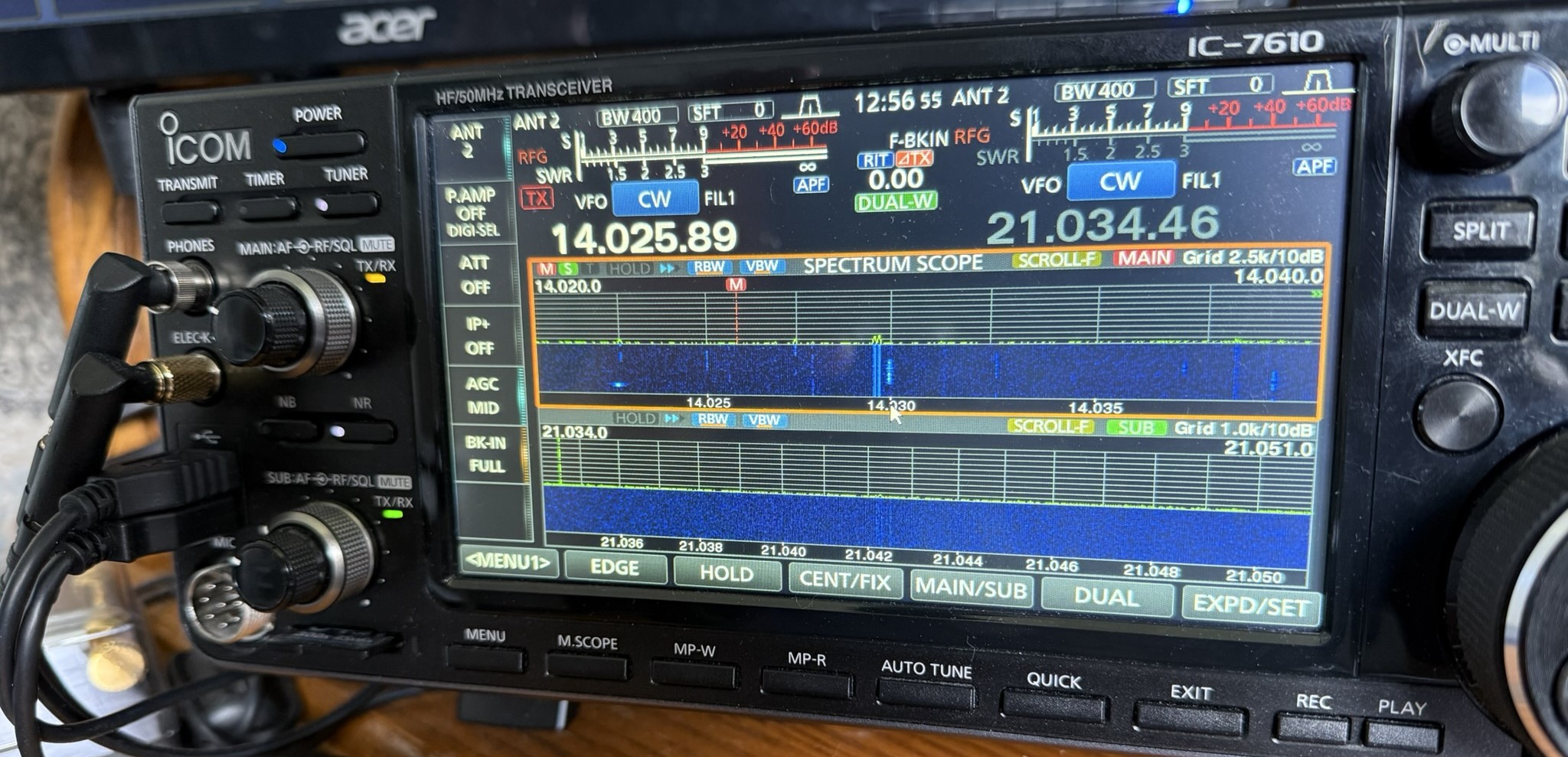
Have a look at the above picture and see if you can see an issue? I operate SO2V in contests now, and this shot was taken during the RAC Canada Day contest on July 1. Operating SO2V is new to me, and I am still getting used to things. If you are familiar with the Icom 7610, you may see the issue in the picture.
Now that you have looked at the picture, let me tell you what I did.....Since I am new to SO2V, I have been trying to get used to VFO A sound in my left ear and VFO B in my right ear. At this time, I had been listening and operating on 15m but just had 20m up on the screen with no audio. Things started to pick up on 20m and drop off on 15m. I then pressed a key on my keyboard (Pause key), and this put me back on 20m and set up N1MM+ to log contacts on 20m.
The odd thing was I was calling CQ contest on 20m for about 5 minutes and no answers. I could hear a noise floor, but I was not getting any replies to my CQ. Then it clicked, I looked at the radio and forgot to take VFO A off mute! The orange light you see in the picture on the main VFO AF/RF control means the audio is muted for the main VFO. I was hearing VFO B in my right ear but I did not click into that. Who knows how many ops called me, but I just could not hear them as the audio was muted. Live and learn, I guess.
Monitor real-estate

what is your shack monitor real estate? For many of us, our hobbies and computers are intertwined, there are many programs out there that can enrich our radio experience. As we indulge in programs I find the monitor real estate becomes a bit crowed. Sure you can put things in the taskbar until needed again and I did this but then the taskbar became a bit crowded.
As I became more involved in contesting I found I needed more programs running as well needed to see them up close and personal on not taskbar jumping. Also many modern transceivers today have a monitor-out option, which is nice and allows a larger view of the waterfall. But that is another monitor that is needed just for this option. Now a basic setup is two monitors. In my case, I have one monitor for the Icom 7610, 2 monitors for my PC and one monitor for Ham Clock running on a Pi 3. Some may think that two monitors for your PC is a bit excessive and there are some very large monitors one can easily fit everything into. I find these monitors to be pricey and I found 2 Samsung 24-inch monitors for 1/2 the price of a very large PC monitor.
The part of the hobby I really enjoy is contesting and 2 monitors allow me to comfortably have Win4icom radio control program running, N1MM+ logger, VFO A and B waterfalls working ( as I operate SO2V) and finally an open window of Firefox as well. My second monitor looks after N1MM+ VFO B logging window and VFO B waterfall along with the open Firefox window. This monitor is on my right, I also have my external VFO B RC-28 knob on my right as well. This way everything to do with VFO B is on my right. Therefore when I look to the right it's all about VFOB. I use Firefox to monitor live contest scoring, reverse beacon network and during slow times look up contesters I worked on QRZ.COM to learn about them. The final monitor looks after Ham Clock and I mainly use that for the solar conditions as well as which bands are open for me as Ham Clock has VOACAP on it.. For example, if I am taking part in a German, North American or Spain contest I setup the a VOACAP in the country or continent I am working and I get informed about the open and closed bands between them and my location. Elwood does a great job at updating this program and it is well worth adding it to your station's software.
Finally, all my monitors are on swivel arms so they can be adjusted to my liking. Because I spend a lot of time in front of the screens I like to have the most commonly used ones at eye level and my left and right monitors set up so that my head does not have to move just my eyes. For me the less neck movement the better over the long-term contesting adventures. The Ham clock monitor is the only one up high and I only check that screen now and then.
So what does your monitor real estate look like?