Posts Tagged ‘Contesting’
 RAC Winter contest was a bust!!
 December 20th, 2025 |
  Author:
RAC Winter contest was a bust!!
Pile-Up Control System
PUCS: Take control of the pile-up!

Every special event station (SES) operator knows the thrill — and the chaos — of a true pile-up. The excitement of dozens of stations calling you simultaneously can quickly turn into frustration when QRM, doubles, and missed calls clutter the frequency. Wouldn’t it be great if there were a way to bring order to that chaos without losing the fun of real-time operating?
Enter PUCS, the Pile-Up Control System, a fully open-source, web-based platform designed by and for radio amateurs. Born from the ingenuity of the Radio Scouting Fellowship PA3EFR/J, PUCS elegantly blends traditional ham ingenuity with modern AI-assisted software development. The result is a modular, flexible system that any club or individual can tailor to their own operating style — from large-scale SES activities to small club field days.

PUCS can be seen operational at pucs.pa3efr.nl
From Normandy to the Netherlands
The idea for PUCS was sparked during an SES operation on the beaches of Normandy, where operators of TM80DDAY overheard multiple Australian colleagues discussing a private sign-up system for QSOs. Intrigued but unable to obtain the software, Erwin PA3EFR and his team decided to build their own version — and then share it freely with the world. With the help of AI tools and some Python wizard Barry, PC1K, PUCS was born. It was much later when Erwin decided to develop PUCS within his own environment.
Today, PUCS is freely available, fully documented, and open to anyone willing to experiment. It’s more than just software — it’s an invitation to collaborate, learn, and contribute to a smarter way of managing pile-ups.
What Makes PUCS Unique
At its heart, PUCS is a distributed system consisting of two parts:
- Frontend (commercial hosting): This is the public entry point where operators register their callsigns to join the queue. Think of it as a digital “waiting room” — transparent, fair, and visible to everyone.
- Backend (local PC): Here’s where the magic happens. The backend checks QRZ.com logbooks every minute, automatically removes callsigns that have already been worked, and provides an admin dashboard to manage the queue, export logs, and adjust settings on the fly.

Open Source, Open Spirit
PUCS is more than a tool — it’s a philosophy. The creators explicitly invite others to modify, enhance, and restyle the system to their own preferences. Whether you want to change the interface colors, add logging features, integrate digital modes, or redesign the operator dashboard, the code is yours to explore. There’s no hidden agenda, no locked components — just open code and open collaboration.
All scripts, examples, and documentation are available on GitHub:
https://github.com/PA3EFR/PUCS
Why You Should Try It
PUCS is a perfect project for your club’s next technical workshop. It offers practical lessons in networking, APIs, databases, and web hosting — all wrapped around a real amateur radio application.
Beyond that, it promotes fairness in pile-ups, gives weaker stations a chance to make contact, and even allows SWLs to log their participation.
So fire up your soldering iron if you must, but this time, your “kit” is made of code.
Download PUCS, make it your own, and bring calm to your next pile-up.
As Erwin, PA3EFR, says: “Ask AI as your friend for support — and enjoy your own moments of challenge!” On behalf of the Radio Scouting Fellowship PA3EFR/J we look forward to see you on our PUCS screens at a next special event occasion.
~ Sander PD9HIX
Can you see the issue?
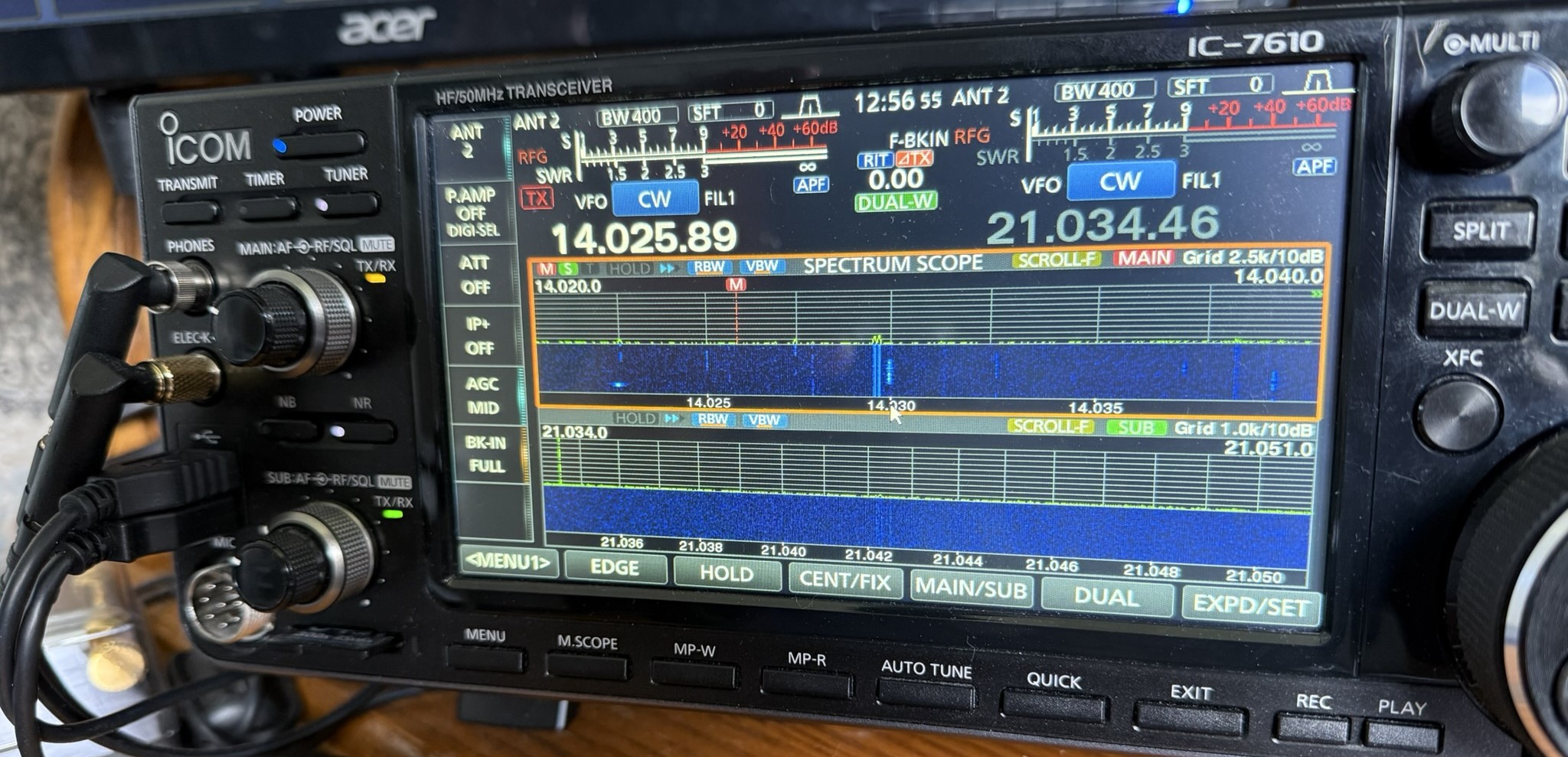
Have a look at the above picture and see if you can see an issue? I operate SO2V in contests now, and this shot was taken during the RAC Canada Day contest on July 1. Operating SO2V is new to me, and I am still getting used to things. If you are familiar with the Icom 7610, you may see the issue in the picture.
Now that you have looked at the picture, let me tell you what I did.....Since I am new to SO2V, I have been trying to get used to VFO A sound in my left ear and VFO B in my right ear. At this time, I had been listening and operating on 15m but just had 20m up on the screen with no audio. Things started to pick up on 20m and drop off on 15m. I then pressed a key on my keyboard (Pause key), and this put me back on 20m and set up N1MM+ to log contacts on 20m.
The odd thing was I was calling CQ contest on 20m for about 5 minutes and no answers. I could hear a noise floor, but I was not getting any replies to my CQ. Then it clicked, I looked at the radio and forgot to take VFO A off mute! The orange light you see in the picture on the main VFO AF/RF control means the audio is muted for the main VFO. I was hearing VFO B in my right ear but I did not click into that. Who knows how many ops called me, but I just could not hear them as the audio was muted. Live and learn, I guess.
Monitor real-estate

what is your shack monitor real estate? For many of us, our hobbies and computers are intertwined, there are many programs out there that can enrich our radio experience. As we indulge in programs I find the monitor real estate becomes a bit crowed. Sure you can put things in the taskbar until needed again and I did this but then the taskbar became a bit crowded.
As I became more involved in contesting I found I needed more programs running as well needed to see them up close and personal on not taskbar jumping. Also many modern transceivers today have a monitor-out option, which is nice and allows a larger view of the waterfall. But that is another monitor that is needed just for this option. Now a basic setup is two monitors. In my case, I have one monitor for the Icom 7610, 2 monitors for my PC and one monitor for Ham Clock running on a Pi 3. Some may think that two monitors for your PC is a bit excessive and there are some very large monitors one can easily fit everything into. I find these monitors to be pricey and I found 2 Samsung 24-inch monitors for 1/2 the price of a very large PC monitor.
The part of the hobby I really enjoy is contesting and 2 monitors allow me to comfortably have Win4icom radio control program running, N1MM+ logger, VFO A and B waterfalls working ( as I operate SO2V) and finally an open window of Firefox as well. My second monitor looks after N1MM+ VFO B logging window and VFO B waterfall along with the open Firefox window. This monitor is on my right, I also have my external VFO B RC-28 knob on my right as well. This way everything to do with VFO B is on my right. Therefore when I look to the right it's all about VFOB. I use Firefox to monitor live contest scoring, reverse beacon network and during slow times look up contesters I worked on QRZ.COM to learn about them. The final monitor looks after Ham Clock and I mainly use that for the solar conditions as well as which bands are open for me as Ham Clock has VOACAP on it.. For example, if I am taking part in a German, North American or Spain contest I setup the a VOACAP in the country or continent I am working and I get informed about the open and closed bands between them and my location. Elwood does a great job at updating this program and it is well worth adding it to your station's software.
Finally, all my monitors are on swivel arms so they can be adjusted to my liking. Because I spend a lot of time in front of the screens I like to have the most commonly used ones at eye level and my left and right monitors set up so that my head does not have to move just my eyes. For me the less neck movement the better over the long-term contesting adventures. The Ham clock monitor is the only one up high and I only check that screen now and then.
So what does your monitor real estate look like?
Special Event Station PA80OV
Radio Club Limburg

announces
Special Event Station
PA80OV
Next week, members of Radio Club Limburg (https://rclb.nl) in the North Limburg region of The Netherlands, will activate:

PA80OV is a special event station to commemorate Operation Veritable, celebrating 80 years of freedom. Operation Veritable, namesake of the station, and the successor of Operation Market Garden, was the northern part of an Allied pincer movement in the Second World War.
We are back in 2025 for the third consecutive time with this special event station; having added another 5 years to our callsign.
Members of Radio Club Limburg will activate the callsign PA80OV from February 13 to 28, 2025, to work as many amateur radio operators across the world as possible. If you're in the area, you can visit our station in the old town hall in the city of Gennep, The Netherlands between February14 and 16.
Whether you are an amateur radio operator, hoping to contact a new country, a new callsign, or you're a casual visitor, you're welcome to our website:
https://rclb.nl/pa80ov
We hope to hear and work you.
On behalf of the PA80OV team.
Jan, PA2P
https://rclb.nl/pa80ov
SARC-SEPAR Winter Field Day
Winter FD was pretty good!
Five of us set up in three sites at Derby reach including Paul VE7VP and 3 newer hams (Carl, Barbara, and Elaine from the last class). John VE7TI and Summer School graduate Grace VA7LZT came out and Grace was able to work 20m for a while which was great. We only made around 60 or 70 contacts, but we were operating more casually. We had a fair number of visitors, both Ham and non-Ham.
A full report will follow in the next Communicator.















