Posts Tagged ‘Computers’
 USB – the shortsighted interface
 May 26th, 2010 |
  Author:
 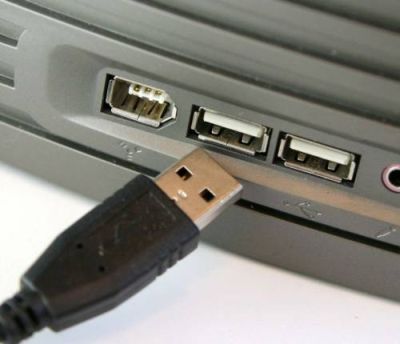 In his review of the Yaesu FTDX5000 in the June 2010 issue of RadCom, Peter Hart G3SJX criticizes Yaesu for not providing a USB interface as Icom does with its IC7600 transceiver. This same criticism is frequently made by new users or prospective users of the Elecraft K3. I think it is an extremely shortsighted view and I’m surprised to hear it from someone of G3SJX’s experience. This seems to be another example of the “it’s newer technology so it must be better” attitude that seems to be taking root in the hobby.
The RS-232 serial port has been around since long before the personal computer. It has not been used for “consumer” equipment since the days when printers and modems came with a serial interface, which is why RS-232 ports are no longer provided with new PCs. But it is nonsense to claim that RS-232 is obsolete because of this. Adding a couple of serial ports to a PC is simply a matter of opening the case and slotting in an RS-232 board. Granted, it isn’t as easy if you are using a laptop, which is why RS-232 to USB adapters exist. But expandable desktop or tower PCs have so many advantages that why anyone would choose to use a laptop for their shack computer beats me.
Icom uses USB not just for computer control but also for audio so the IC7600 doesn’t need the sound card and requires only a single cable to connect it with the PC. This is an innovation that has obvious marketing appeal – which is no doubt why Icom included it. But it’s a benefit that can only be enjoyed by users of specific versions of Windows. If you use Linux, Mac OS, Windows 2000 or earlier or Windows XP 64-bit you’re out of luck. RS-232 on the other hand is supported natively by just about any computer running any OS, by microcontrollers and even by non-computer devices like Ethernet serial port servers. It offers far more choices, even if most of those choices are only of interest to a minority of users.
Buy a device with USB and you are dependent for its continued usability on the willingness of its manufacturer to develop drivers for as yet unreleased operating systems. I’ve had to junk perfectly good printers and scanners in the past because the latest drivers were for Windows 98 or Windows 2000 and the manufacturer did not produce any for Windows XP. Most radios have a life of 20 or 30 years, considerably longer than most computer hardware, so designing into them an interface that itself may have been replaced by something faster and better in the PCs of 10 or 15 years time seems to me very shortsighted.
Icom chose to provide a Windows-only supported USB interface on the IC7600 for purely marketing reasons. Elecraft arguably made the best decision with the K3 by not just providing a true RS-232 interface (not a lame TTL version requiring an extra-cost level converting cable) but also making the DTR and RTS signals optionally usable for PTT control and CW keying. Although separate audio cables and use of a sound card are needed, Elecraft included isolating transformers so no separate interface (RigBlaster etc.) is needed. If Yaesu chose to emulate this aspect of the K3 design as well then it should be commended not criticized.

A couple of setbacks
Computers and radio really don’t mix. I was trying to connect the FT-817 to the shack computer. I plugged the USB cables into the back of the PC, then as I lifted the cables vertical to feed them behind the shelf unit I heard the noise level on 2 metres come up quite clearly. I could probably reduce the noise using clip-on ferrites but any more noise than I already have is unwelcome. I think I might give up the computer altogether and go back to paper logging!
I also proved today that it isn’t possible to work satellites with indoor antennas. Yesterday I tried receiving AO-51 with the 3/4 wave vertical I made, but I got a readable signal for only a few seconds. Today I tried the 6 element Yagi I made a few weeks ago which received signals off the Moon when used outdoors. Pointing it at the satellite from inside the shack I again heard only a few seconds of signal from the satellite. I think there is just too much attenuation at 70cm to use indoor antennas, so satellite operation is out of the question.
I could probably combine the 6-element 70cm and the Moxon 2m antenna to make a portable hand held antenna for satellite use. But whilst it would be an interesting challenge to make a satellite contact using the FT-817 and a hand held antenna out of doors I had really hoped to be able to do it from inside the shack.

Motorola programming frustration
The renovation of the G4ILO shack is about half completed. The wood for the new shelf module needs another coat of paint, then it can be built and everything put back in again. Unfortunately old age is catching up with me and I am just sooooo tired and have so many aches and pains from all the work so far that progress is (literally) painfully slow. I missed the talk on SOTA at the radio club on Monday evening because I would probably have just fallen asleep!
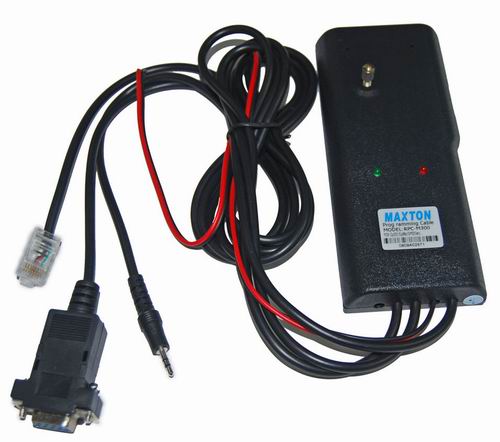 After the flying hiatus some items I ordered from China and Hong Kong are starting to filter through including the programming interface for the Motorola GP300 radio. It is a Maxton RPC-M300, pictured on the right, and it came with a CD containing the necessary programming software. (The software can also be found on the hampedia website, so please don’t ask me for a copy.)
The software runs under real MS-DOS, not a DOS window. My researches had already established that it doesn’t run properly on newer, faster computers, so I installed it on the oldest PC I had available, a 2002 vintage Toshiba Satellite 1800, which happens to have both a floppy drive and a serial port. It doesn’t have network access, so getting anything on and off it is a bit of a headache, but I still have a copy of a Windows 98SE install CD and the required boot disk, so I was able to use that to provide the MS-DOS access.
No instructions came with the interface. It’s obvious that it clips on the back of the radio, and the red and black wires are used to provide power, but there is no indication of what voltage to use. Some DIY interfaces that have been published use a 9V battery so I set the variable power supply to 9V. The other two plugs – one like a telephone plug and the other a 3.5mm stereo jack – are presumably for other radios that the interface can be used with, so I left them dangling free.
I applied power and the red light on the interface came on. I then tested communication between the software and the radio, and the green light flashed for a few seconds, then I got an error #2 “No acknowledgement.” I tried again, this time after switching the radio on with the volume control, but then I got an error #7 “Invalid opcode.”
I had read that the programming software may not run properly on any Pentium computer at all, due to its use of timing loops. One of the suggestions to slow a faster computer down is to disable the CPU cache, so I went into the Bios and did this. This didn’t make any difference to my inability to program the radio, but it did make Windows 98 take 20 minutes to load and be unusable once it has done so. Unfortunately I discovered this morning that I had somehow managed to set a password on the Bios which of course I don’t know, so now I can’t get back in to the Bios to re-enable the cache. 🙁
It seems as if I will have to give up on the idea of programming this radio myself. My only hope now is that someone at my radio club is able to help with this. Unless anyone has any other suggestions?

Showing M$ who’s boss
One of the things that annoys me about Microsoft is that it has created an operating system that behaves as if it is your job to service its needs rather than a tool that is supposed to serve yours.
I’m thinking specifically about updates. Windows constantly nags you to install updates (which wouldn’t be necessary if they’d designed the thing properly in the first place) and then it expects you to interrupt what you’re doing while it does. After you have downloaded updates it nags you to restart the computer in order to install them. Perhaps they could have designed it so you didn’t have to restart the entire OS after every change? When you do shut down it won’t let you switch off while it is installing updates, so you have to wait around twiddling your thumbs until it is finished.
Hey, Microsoft, it’s MY computer, okay?
I just received an update to Internet Explorer 8 (which I don’t even use) today. After it was downloaded, Windows nagged me twice to restart the system by popping up a window in front of what I was doing, even though I was in the middle of writing something and did not want these interruptions to my train of thought.
Fortunately there is a magic incantation you can remember to show Microsoft who’s boss. It’s:
net stop wuauserv
Just click Start, Run, type the magic words into the box and hit the Enter key. What it does is kill the Windows update service for the remainder of that session. Windows will nag you no longer, and your updates will be installed the next time YOU decide to restart.

Wobbly memory
Kevin, GW0KIG, has just written in his blog about struggling to brush up his Morse. He first learnt the code at the age of 19 and has “memories of a Morse code tutor program on a borrowed ZX81 computer (remember those?)”
 I remember the ZX81 and its wobbly 16KB RAM pack very well. In fact, a Morse tutor was one of the first programs I wrote for it. I wrote an article for Short Wave Magazine which described the program, together with a Morse keyboard with programmable memory and a high-speed Morse sender for meteor-scatter work. It is amusing today to read my conclusion that “it is possible to program the ZX81 to create sophisticated memory keyers.” These primitive programs would hardly seem sophisticated today.
The article was published in the August 1982 issue of Short Wave Magazine. I kept a copy and you can see it here. I wonder if my program was the one Kevin used to learn Morse when he was 19? One of these days I might try downloading a ZX81 emulator and see if these old programs will run on it.














